

8 Muses Video Downloader | How to Download 8 Muses Videos
Pricing
Pay per usage
8 Muses Video Downloader | How to Download 8 Muses Videos
Download the playable videos on 8muses.xxx without leaving their page, pasting a link anywhere, or opening another program.
Pricing
Pay per usage
Rating
0.0
(0)
Developer
how-to-download-videos
Maintained by CommunityActor stats
0
Bookmarked
2
Total users
1
Monthly active users
21 days ago
Last modified
Categories
Share
Download the playable videos on 8muses.xxx without leaving their page, pasting a link anywhere, or opening another program.
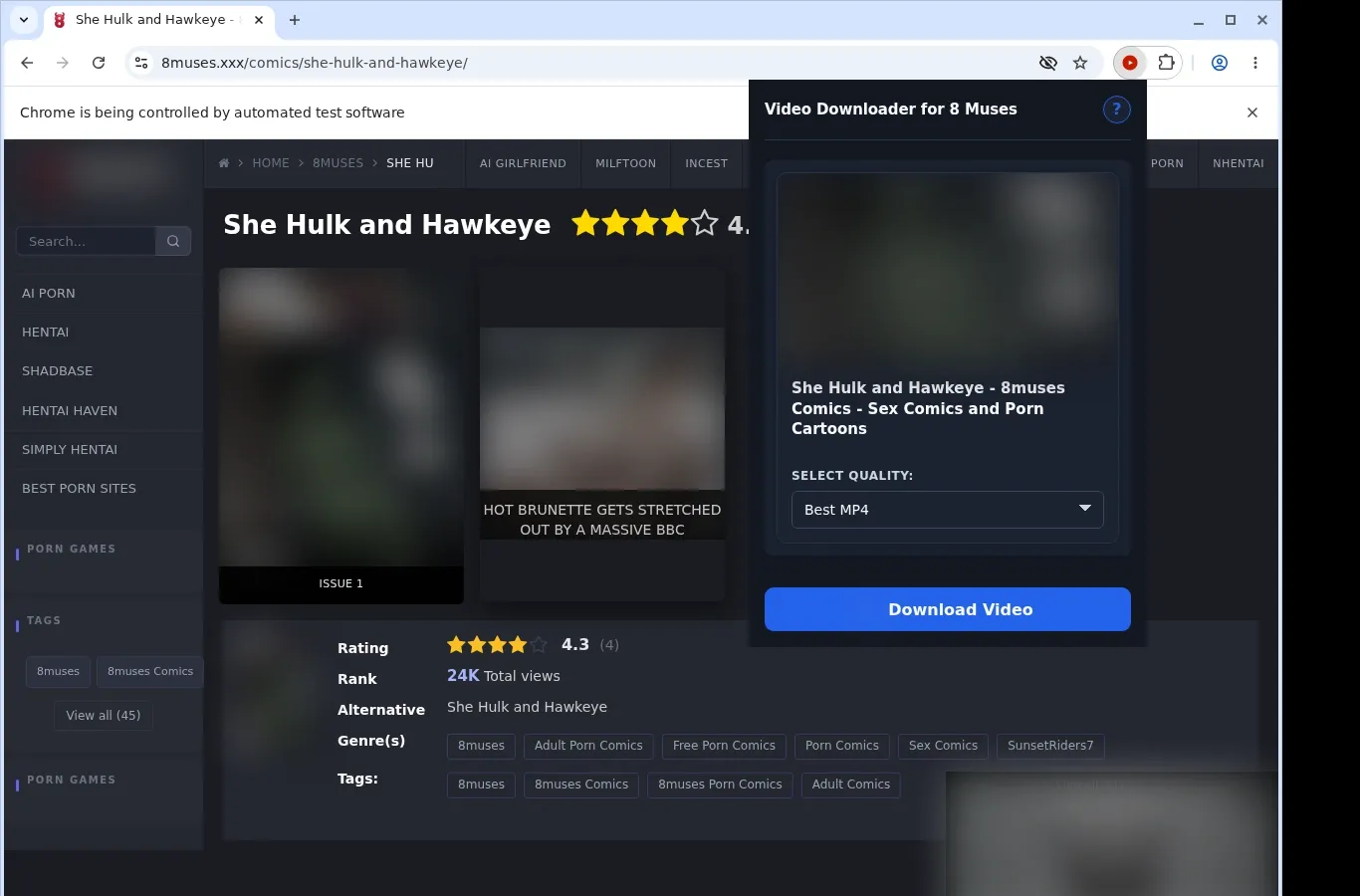
Visit a page on 8muses.xxx and press play. The extension only looks for playable video, so anything that isn't video, such as comic panels or galleries of images, is left alone. If it finds a direct MP4 file it can use, a download option shows up in the same spot. Once you choose among the listed formats, the video goes to your device through the browser's local download process, all within the one tab you opened.
Get it Here
👉 Get it here: 8 Muses Video Downloader
- ✅ Nothing you download is relayed through our servers
- ✅ The extension is ad-free and carries no tracking or analytics
- ✅ Desktop-ready on Linux, Windows and macOS
Preview
How It Works
- Go to 8 Muses: Open the 8 Muses page you want to save from and let it load as usual.
- Spot the source: Open the extension. It looks on the current page for a video source and, if it finds one, displays a download option.
- Choose a format and save: Use the format menu to select one of the available files, then store the finished video on your device.
What It Does
- Lets you download videos from 8 Muses as you browse.
- The video page itself carries a button that launches the download with one click.
- The toolbar popup of the extension opens a second path to the same action.
- Videos are processed one at a time, so the flow stays easy to follow.
- The browser's regular download system does the fetching.
- You can see progress in the usual downloads list of the browser.
8 Muses Video Downloader vs. Online Downloader Website
Everything begins on the 8 Muses page you have open; nothing sends you elsewhere.
| 8 Muses Video Downloader | Online Downloader Website |
|---|---|
| The video page has its own download button to click. | You have to copy the page's address before moving away from the video. |
| The toolbar popup offers a second way in. | A separate input page has to be opened first, away from the video. |
| Your focus stays with the 8 Muses video that's playing. | Player context gets lost when the page link is copied elsewhere. |
| The video is found right on the page that's open. | The outside site has to figure out where the video is, working only from a URL. |
| Pasting the page address isn't part of the process. | Copying the address manually adds a step. |
Compatibility
Browsers: Chrome, Firefox, Edge, Brave, Opera, Whale, Yandex
It Can Work With:
- Pages on 8muses.xxx where a video can actually be played
- A direct MP4 file that surfaces once playing has started
- Browsers on the desktop that let you add extensions
It Won't Save:
- Comic pages, artwork and still-image galleries
- Pages where no suitable video is available to play
- Anything unavailable, paid, private, or protected
- Mobile browsers, including Safari
FAQ
How do I download a video here? Play a video on an 8muses.xxx page, and a download button becomes available there for you to click. Starting from the extension's toolbar popup is also possible.
Which format will the video be saved in? You receive MP4, the same file the site serves. Neither the format nor the quality is altered at any stage.
Can I save several videos together? Videos are taken one by one. Working through them singly keeps each download simple and gives it room to complete.
Where do the files go? Your browser stores them in an 8 Muses folder, created under whatever location it normally uses for downloads. Progress appears in the usual downloads list.
Know Before You Use It
- Your browser session needs access to a video that is both playable and supported.
- Nothing is detected until you've pressed play.
- Artwork galleries and comic images aren't something it can download.
- Protected playback and restricted access are left as they are; the extension doesn't work around either.
Only download videos you own or have permission to save.


