

X (Twitter) Scraper & Account Analytics
Pricing
from $5.00 / 1,000 tweets
X (Twitter) Scraper & Account Analytics
Scrape X (Twitter) posts from multiple accounts with parallel processing. Extract tweet text, dates, engagement metrics, and account data. Generate CSV, JSON, and analytics reports to monitor competitors, analyze audiences, and track content performance. Requires X session credentials.
Pricing
from $5.00 / 1,000 tweets
Rating
0.0
(0)
Developer

AL-Hussein EL-Abeedy
Maintained by CommunityActor stats
0
Bookmarked
2
Total users
1
Monthly active users
3 days ago
Last modified
Categories
Features
Share
ScrapeNess — X (Twitter) Scraper & Account Analytics
2500 tweets with full dashboard under 2 minutes
ScrapeNess turns X (Twitter) account posts into a visual performance and competitive-intelligence report. Track multiple accounts in one run, compare engagement, discover top-performing posts, and export the collected data for further analysis.
Why use ScrapeNess?
ScrapeNess is designed for social media managers, marketing agencies, researchers, and analysts who need more than a raw tweet export. It combines multi-account post collection with a visual dashboard that makes the results easier to understand and compare.
- Compare X accounts: review collected posts, views, interactions, engagement rates, and posting activity side by side.
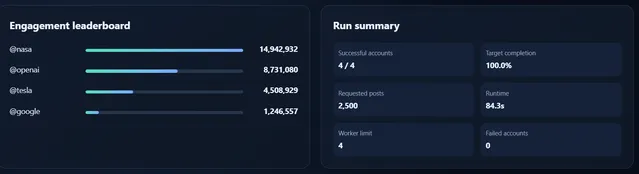
- Engagement leaderboard: identify which tracked accounts generated the most interactions in the collected sample.
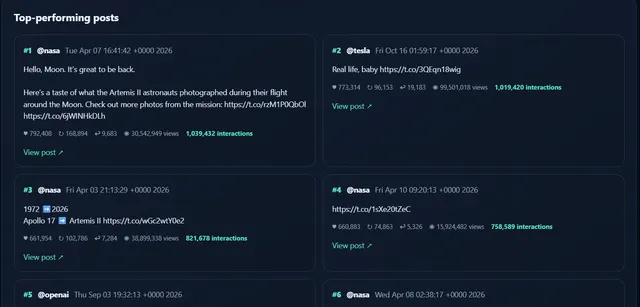
- Analyze top posts: find high-performing posts and open the original post on X.
- Discover content signals: review frequent hashtags, keywords, active days, and peak posting hours.
- Export your data: use the posts dataset, JSON report, CSV summaries, and ZIP archive in your own workflows.
ScrapeNess dashboard preview
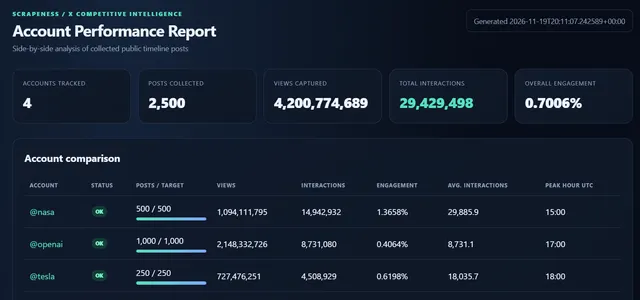
Account performance overview
The overview brings the most important run-level KPIs and account comparisons together in one report.
Account comparison and engagement leaderboard
Compare accounts by collected posts, views, total interactions, engagement rate, average interactions, and peak posting hour.
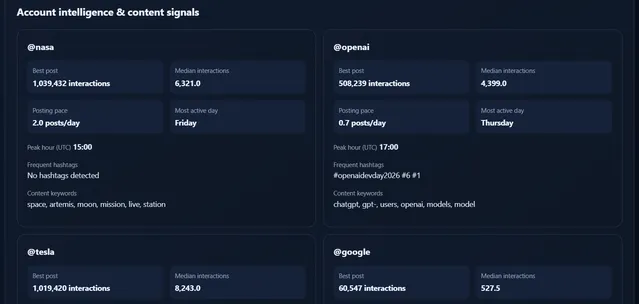
Account intelligence and content signals
Review account-level performance indicators, best-post interactions, median interactions, posting pace, active days, hashtags, and content keywords.
Engagement leaderboard and run summary
See the relative interaction performance of tracked accounts alongside run completion, requested post count, runtime, worker limit, and failed-account count.
How to use the X (Twitter) scraper
- Enter the X usernames as a comma-separated list.
- Enter the post targets as comma-separated numbers in the same order.
- Start the Actor.
- Open the run's Output tab to view the dashboard and access the collected posts and reports.
Input
ScrapeNess uses two input fields:
| Input | Description | Example |
|---|---|---|
| Usernames | Comma-separated X usernames, with or without @. | nasa,openai,tesla |
| Counts | Requested number of posts for each username, in the same order. | 500,1000,250 |
Example input:
Each count maps to the username in the same position. The number of counts must match the number of usernames. Set each account's target between 1 and 5,000 posts.
Output
Every successful run generates a visual dashboard and structured data outputs.
| Output | What it contains |
|---|---|
| HTML dashboard | Run KPIs, account comparison, engagement leaderboard, account intelligence, content signals, and top-performing posts. |
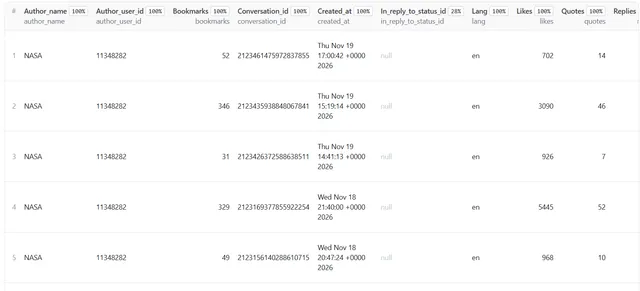
| Posts dataset | Individual collected post records, available in Apify Dataset. |
| JSON report | Run summary, account-level metrics, top posts, and analytics methodology. |
| Account insights CSV | One row per tracked account with its collected performance metrics. |
| Top posts CSV | The highest-interaction posts across the tracked accounts. |
| ZIP report | A downloadable archive containing the dashboard, JSON report, CSV reports, and account-level collected data. |
Main post fields
| Field | Description |
|---|---|
tweet_id | Unique X post ID |
username | Tracked account username |
author_name | Post author's display name |
author_user_id | Post author's X user ID |
text | Post text |
created_at | Post timestamp |
likes | Like count |
retweets | Repost count |
replies | Reply count |
quotes | Quote-post count |
bookmarks | Bookmark count, when available |
views | View count, when available |
url | Direct link to the X post |
lang | Post language, when available |
You can export the Apify dataset in formats supported by the platform, including JSON, CSV, Excel, and other available formats.
Pricing — how much does ScrapeNess cost?
The target pay-per-result price is $0.005 per collected post, equivalent to $5 per 1,000 posts. The Actor-start event and any applicable Apify platform or compute charges are additional. The final amount is determined by the current pricing configured on the ScrapeNess Store page.
Analytics notes
- Account comparisons and rankings describe only the posts collected in the current run, not an account's complete lifetime performance.
- Views and some engagement fields may be unavailable for individual posts depending on the data returned by X.
- Engagement rate is calculated as total interactions divided by total views, multiplied by 100.
- Total interactions are calculated from likes, reposts, replies, quotes, and bookmarks.
- Posting-hour analysis is reported in UTC.
Use ScrapeNess only for accounts and data you are authorized to access.


