

ALDI Australia Scraper: Grocery Prices & ALDI Special Buys
Pricing
from $1.50 / 1,000 products
ALDI Australia Scraper: Grocery Prices & ALDI Special Buys
Scrape ALDI Australia products by search words, category, Special Buys date, product id or the whole catalogue: name, brand, size, price, unit price, Special Buys date and theme, availability, images, category, ingredients and allergens. At your store. No login. Misses free.
Pricing
from $1.50 / 1,000 products
Rating
0.0
(0)
Developer

Hyperbach
Maintained by CommunityActor stats
0
Bookmarked
2
Total users
1
Monthly active users
4 days ago
Last modified
Categories
Features
Share
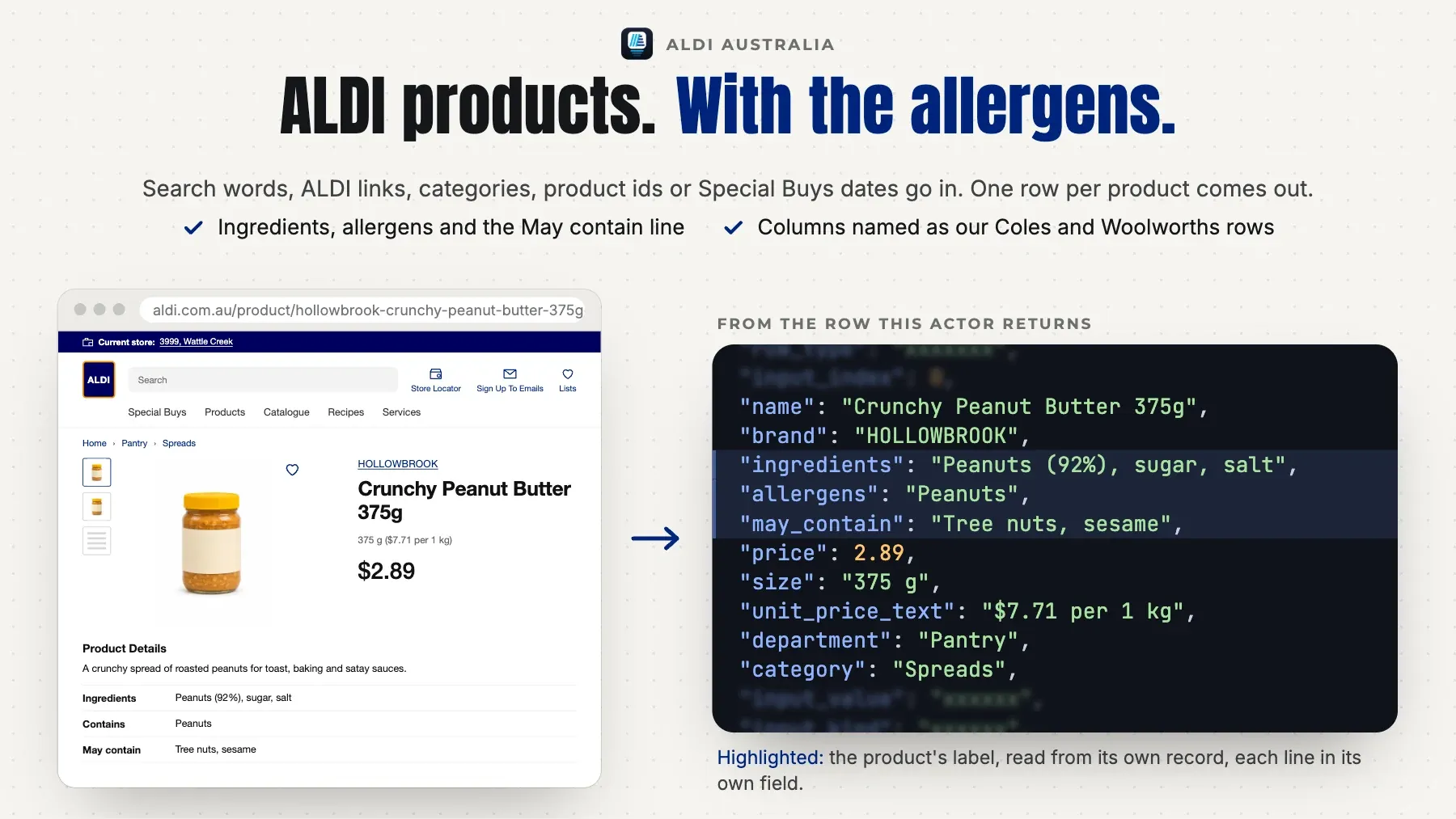
ALDI Australia products, logged out: search words, ALDI search, category, Special Buys or product links, categories by name, product ids, Special Buys dates or the whole catalogue in, one row per product out — the product id and URL, name, brand and size, the shelf price, the Special Buy with its date, text and theme, the unit price with the price per kg or litre, availability, images and the category path, and with the details on the description, ingredients, allergens and the may-contain line — at the ALDI store you choose. One free query row per input carries a completeness verdict: COMPLETE (every product of ALDI's count), CAPPED (your limit), TRUNCATED (ALDI's list ended under its own count) or PARTIAL. No login, no API key, no browser, proxies handled for you.
$3.00 per 1,000 product rows on the Free plan, $2.55 on Starter. A run start is $0.005. The default input returns about 21 rows for about $0.065. A value that names nothing is a free row that says why.
How it compares
- 4 times faster than dromb's ALDI AU Product Scraper, with more data: 20 products in 8.8 s, against 32 s; 44 fields per product, against 23. It is 4 times cheaper: $0.65 per 1,000 products, against our $2.35.
- Cheaper than solidcode's ALDI Australia Scraper, with more data: $2.35 per 1,000 products, against $2.86; 44 fields per product, against 16.
Measured on 2026-11-06. Each line compares one job, run by both scrapers at the same time. Prices are per 1,000 products: Apify Actors at the Scale plan's prices.
Tested head-to-head on 2026-11-06
The job: the products of one ALDI Australia search (milk, the schema's example query), 20 products with their own records. Every Actor ran on it the same day from the same harness; every run's cost is at the Scale plan's prices: a rival's charged events at its price for that plan, this Actor's at its list price. Fields counts the filled fields of a typical row. dromb's cost is its charged events; its buyers also pay the run's platform usage on top. Re-measured monthly.
| Actor | Rows | First row | Run time | Cost | Fields | Failures |
|---|---|---|---|---|---|---|
| this Actor | 20 | 4.0 s | 8.8 s | $0.047 | 44 | none |
dromb/aldi-au-product-search-catalog-unofficial | 20 | 30 s | 32 s | $0.013 | 23 | none |
solidcode/aldi-com-au-scraper | 24 | 6.0 s | 6.1 s | $0.069 | 16 | none |
Why this ALDI scraper
- Every way into ALDI's catalogue in one run. Search words (
milk), ALDI links from your browser (a search with its sort and brand filter, a category, a Special Buys date with its theme, a product), categories by id or name (Milk), product ids, Special Buys by date orcurrent/upcoming/all, or the whole catalogue (about 3,300 products). Each list gets its own cap (maxItemsPerQuery), and the run's cap sits on top (maxItems). - The label data on the same row. With the details on (the default) each product's own record is read: the description, the ingredients, the allergens ALDI states (
Contains) and theMay containline, the storage and usage texts and the variant ids. Measured on 1,909 ALDI product records: ingredients on 740. - Built to join Coles and Woolworths. The columns carry coles-scraper's and woolworths-scraper's names wherever ALDI has the same fact (
product_id,price,unit_price,unit_measure,size,on_special,category_path,ingredients,allergens), plus the size in grams or millilitres and the unit price per kg or litre, so three chains line up by column. - Special Buys as ALDI runs them. Each Special Buys event is read theme by theme, so every row names its theme (
Christmas Lighting) and its date and ALDI's own text (While Stocks Last,On Sale Sat 07 Nov); withincludeStoreStockthe stock light at your store and at the stores within 50 km. - Your store, and every list checked to its count. ALDI's price is the same in every store and the range differs by state: give a store id or a postcode and every row says the store it was read at. A list is read to ALDI's own count (COMPLETE), and an end under the count is read twice and says TRUNCATED with both figures (the whole catalogue: 3,274 of its count 3,278 on 2026-11-06).
Who it's for
- Grocery price analysts — ALDI's shelf and unit prices of a category or a search's products beside the Coles and Woolworths rows, joined by column, read again each week.
- Deal and catalogue sites — the week's Special Buys by date and theme, with ALDI's text, images, product links and the stock light at a store.
- Nutrition and allergen apps — the ingredients, the allergens ALDI states and the may-contain line of ALDI's food range, with the size and the unit price.
Quick start
The first 100 products of a search, with the label data
This week's Special Buys, theme by theme, with the stock at a postcode
A category by name and two products by link and by id
The whole catalogue, list fields only
Switching from dromb/aldi-au-product-search-catalog-unofficial or solidcode/aldi-com-au-scraper?
Your input works as it is. Each name in the left column is read as this Actor's own field and the run log says so (read <theirs> as <ours>); a name marked not read is ignored with a note. A value in the other Actor's shape, an object list or its own date form, is read too.
| dromb/aldi-au-product-search-catalog-unofficial / solidcode/aldi-com-au-scraper | this Actor | what to know |
|---|---|---|
query | searchTerms | dromb's search phrase: read as one search line. |
searchTerms | searchTerms | solidcode's search words, one search a line, the same name. |
startUrls | startUrls | solidcode's ALDI links: search, category and product links, the same name; Special Buys links are read too. |
itemId | productIds | dromb's product id (18 digits, leading zeros kept; the short form is padded). |
itemSlug | productIds | dromb's product slug: read when it ends in the product id (farmdale-light-milk-2l-000000000000398691). |
categoryId | categories | dromb's numeric category id. |
categoryUrl | startUrls | dromb's category link (/products/<path>/k/<id>, or the path alone). |
limit | maxItemsPerQuery | dromb's rows per search: the cap per input here. |
maxResults | maxItemsPerQuery | solidcode's cap per search term or link, 0 = no limit: the same here. |
sort | sortBy | dromb's sort: the same five values (relevance, name_asc, name_desc, price_asc, price_desc). |
sortBy | sortBy | solidcode's sort, the same name. |
brand | brands | dromb's brand filter, matched to ALDI's brand names whatever the case. |
theme | themes | dromb's theme filter (a Special Buys theme), matched whatever the case. |
eventDate | specials | dromb's Special Buys date (YYYY-MM-DD). |
details | includeDetails | dromb's product-page switch, on by default here too. |
operation | not read | Not an input of this Actor (the job follows from the inputs given), but a run that carries it reads only that job's fields of dromb's form (item: itemId / itemSlug; search: query, limit, sort, brand, theme, details; category: categoryId / categoryUrl; specials: eventDate). special_events, categories and search_filters list no product and are refused (specials: all reads every Special Buys event's products). |
page | not read | Not read: every page is read up to maxItemsPerQuery. |
categoryTree | not read | Not an input: a search link with categoryTree keeps it; or give the category itself in categories. |
includeRaw | not read | Not offered: every row has one typed shape (the dataset schema); ALDI's raw answer is not copied. |
What differs:
- dromb's
operationis read when you give it: anitemjob reads itsitemIdoritemSlugalone, asearchjob its search fields, and the other fields of dromb's form are left out with a note. Without it the job follows from the inputs you give (search words, links, categories, product ids, Special Buys dates or the whole catalogue), and several jobs run in one run. - dromb's
limitand solidcode'smaxResultsare the cap per input here (maxItemsPerQuery, default 100; 0 = the whole list); there is nopage: every page is read up to the cap. - solidcode's
maxResults0 reads a whole list; heremaxItemsPerQuery0 does the same. - The rows use the Coles and Woolworths scrapers' column names (
product_id,price,unit_price,category_path), not dromb's or solidcode's keys. - With
includeDetails(dromb'sdetails, on by default in both) the row adds the ingredients, allergens and may-contain line, which neither leader delivers.
Output
One row per product (and one free query row per input):
| field | meaning |
|---|---|
row_type | product (one product, charged) or query (the input's row with the walk's verdict; free). |
input_index | The 1-based position of the input this row answers: searchTerms first, then startUrls, categories, productIds, specials, and the whole catalogue last. |
input_value | The input as you gave it (the search words, the link, the category, the product id or the Special Buys date). |
input_kind | Which input it came from: query, url, category, product, specials or catalogue. |
search_url | The list (or the product) on aldi.com.au, as a link you can open. |
status | A query row: ok, no_results, not_found, not_in_store, invalid, duplicate, failed or not_read (see the FAQ). A product row: ok. |
status_detail | Why a query row is not ok, in a sentence; on an ok row, a note (a brand or theme the list does not have). |
scraped_at | When the row was read (UTC). |
position | The product's place among this input's delivered products (1 = first); 1 for a product id. |
page | The list page the product was on (empty for a product id). |
product_id | ALDI's 18-digit product id (the digits at the end of the product URL), leading zeros kept. |
url | The product's page on aldi.com.au. |
name | The product's name as ALDI writes it. |
brand | The brand as ALDI writes it (FARMDALE); empty for loose fruit and vegetables. |
description | The product's description, as text (with the details on). |
size | The pack size as ALDI writes it (2 l, 168 g, 4 x 250 ml, approx. 0.6 kg per package). |
size_grams | The pack size in grams, from size (a weight; 4 x 250 g = 1000). |
size_ml | The pack size in millilitres, from size (a volume; 2 l = 2000). |
size_approx | True when ALDI gives the size as approximate (a weighed pack: approx. 0.6 kg per package). |
price | The shelf price in currency (ALDI's amountRelevant: for a weighed pack the pack's price, not the per-kg figure). |
currency | The price's currency (AUD). |
was_price | Always empty: ALDI publishes no was-price (kept so the row joins coles-scraper's and woolworths-scraper's). |
save_amount | Always empty: ALDI publishes no saving (kept for the join with the other chains). |
on_special | True for a Special Buy (the product carries a Special Buys date). |
special_type | special_buy for a Special Buy, else empty. |
special_text | ALDI's own text for the Special Buy: While Stocks Last or On Sale Sat 07 Nov. |
on_sale_date | The Special Buys date (YYYY-MM-DD). |
special_theme | The Special Buys theme the product was listed under (Christmas Lighting), on rows read from a Special Buys event. |
price_labels | Which of ALDI's price lists list the product (New Low Price, Super Savers, Limited Time Only), with includePriceLabels on; empty otherwise. |
unit_price | The unit price in dollars for unit_measure (ALDI's comparison price). |
unit_measure | The unit of the unit price (100 g, 1 kg, 1 L, 1 each). |
unit_price_text | ALDI's text of the unit price ($1.70 per 1 L). |
unit_price_per_kg | The unit price per kilogram, from a weight measure. |
unit_price_per_l | The unit price per litre, from a volume measure. |
available | True: ALDI lists the product at the row's store (ALDI sells in store; it publishes no online stock for its everyday range). |
availability_type | in_range (ALDI's everyday range), special_buy_while_stocks_last (a Special Buy on sale now) or special_buy_coming (on sale from on_sale_date). |
stock_level | ALDI's stock light for a Special Buy at the row's store (green, orange, red, yellow; empty before the sale date), with includeStoreStock on. |
stock_text | ALDI's stock text at the row's store (Stock available, Medium stock, Low/no stock). |
nearby_stock | The stock of the stores within 50 km of the row's store (store id, name, suburb, state, distance, level, text), with includeStoreStock on. |
image_url | The product's first image at ALDI's own width for it (1,500 px on most; a few images are narrower). |
image_urls | Every image of the product at ALDI's own width for it (1,500 px on most): front, back, the nutrition panel and the ingredients when ALDI shows them. |
nutrition_image_url | The image of the nutrition panel (one of image_urls), when ALDI shows one. |
ingredients_image_url | The image of the ingredients list (one of image_urls), when ALDI shows one. |
department | The top category (Dairy, Eggs & Fridge). |
category | The category under it (Milk). |
category_id | ALDI's id of the product's deepest category (1111111160). |
category_path | The category path (Dairy, Eggs & Fridge > Milk); empty for a Special Buy outside the aisles. |
ingredients | The ingredients as ALDI lists them (with the details on). |
allergens | The allergens ALDI states the product contains (its Contains line), with the details on. |
may_contain | ALDI's May contain line, with the details on. |
storage_instructions | How to store the product, as ALDI writes it (with the details on). |
usage_instructions | How to use the product, as ALDI writes it (with the details on). |
age_restricted | True when ALDI sells the product to adults only. |
min_age | The minimum age (18) of an age-restricted product. |
alcohol_percent | The alcohol by volume in percent, when ALDI states it. |
sold_by_weight | True when the product is weighed (sold per kg or as a weighed pack). |
quantity_step | The quantity step ALDI sells in (1, or a kg step such as 0.15 for a weighed product). |
quantity_unit | ALDI's selling unit (ea, kg, pac, bt). |
variant_skus | The product ids of the product's other variants (another flavour or size), with the details on. |
variant_option | This variant's own option, with the details on (Type: Santa). |
variant_values | Every option of the product's variants, with the details on (Type: Elf, Reindeer, Santa). |
legal_disclaimer | ALDI's legal note on the product page, with the details on. |
discontinued | ALDI's discontinued flag. |
sponsored | True when the product is a pinned placement of ALDI's list; ALDI's search carries none (false on every row read in 2026-11). |
details_read | True when the product's own record was read (the description and the label data); false when the row has the list's fields only. |
store_id | The ALDI store the row was read at (G452, Glenmore Park NSW, by default). |
products_count | A query row: ALDI's own count of the list (the sum over a Special Buys event's themes). |
products_delivered | A query row: the product rows this input delivered. |
pages_read | A query row: the list pages read. |
repeats_skipped | A query row: products skipped because an earlier page or another input of the run delivered them. |
verdict | A query row: COMPLETE (every product of ALDI's count), CAPPED (your limit), TRUNCATED (ALDI's list ended under its own count, read on two connections) or PARTIAL (stopped: verdict_detail says why). |
verdict_detail | A query row: the verdict in a sentence, with the counts. |
Example record:
Pricing
Pay for the products a run delivers, plus one run start; no platform usage is billed to you. The product price falls with your Apify plan.
| event | unit | Free | Starter | Scale | Business |
|---|---|---|---|---|---|
Product (product) | per 1,000 | $3.00 | $2.55 | $2.10 | $1.50 |
Run start (start) | per run | $0.005 | $0.005 | $0.005 | $0.005 |
A product is $3.00 per 1,000 on the Free plan ($0.003 a product) and $2.55 on Starter, with the description and the label data included: there is no add-on. Each run that delivers a charged product also pays the run start, $0.005 once; a run that delivers no charged product pays nothing at all. So 20 products cost $0.065 on the Free plan and $0.056 on Starter; 100 products $0.305 and $0.26; the whole catalogue (about 3,300 products) $9.905 and $8.42; every input of a run shares one start. The free query row of every input, a value that is not an ALDI link (invalid), a product ALDI does not know (not_found), a product your store does not range (not_in_store), a search with no match (no_results), a repeated input (duplicate), an input left at the cap or the time limit (not_read) and a refusal the run could not pass (failed) are never charged. A product is charged once a run, also when several inputs list it. A run that stops early (a timeout, an abort) is charged for the products it delivered.
Before the first request the log names the price of a product at your plan, the run start and the most the run can cost: maxItemsPerQuery for each list, maxItems over the whole run, and never more than your charge limit. A list with no cap (maxItemsPerQuery 0) reads to ALDI's own count: 246 products for chocolate and 3,274 for the whole catalogue in our tests. Enterprise plans have their own rates — the Actor's Pricing tab shows the price for your plan.
Usage patterns
- Searches, links, categories, ids, Special Buys and the catalogue —
searchTermstakes words, one search a line (ALDI matches each word on its own: one word a line gives the cleanest list).startUrlstakes links as your browser shows them: a search (/results?q=milk&sort=price_asc&brandName=FARMDALE), a category (/products/dairy-eggs-fridge/milk/k/1111111160, or the path alone), a Special Buys date (/special-buys/2026-11-07?theme=Christmas%20Lighting) and a product (/product/<name>-<id>).categoriestakes an id or a name,productIdsthe 18-digit id or its short form,specialsa date orcurrent,upcoming,all.wholeCataloguereads every product ALDI lists online. aldi.com.au only. - What a row is —
row_type=product: one product, in ALDI's order (position, and thepageit was on).row_type=query: the free row of one input value —products_count(ALDI's own count),products_delivered,pages_read,repeats_skipped, theverdictwith itsverdict_detail, and thestatuswith its reason. - The store —
storetakes an ALDI store id (G452) or a 4-digit postcode (its nearest store). ALDI's price is the same in every store (93 of 93 pairs compared in 2026-11); the range differs by state, so a product a store does not range is a freenot_in_storerow. Empty: G452 (Glenmore Park NSW), the site's own default. - How far a list goes —
maxItemsPerQuery(default 100; 0 = every product the list serves) stops each list after that many new products. A list is read 60 products a call to ALDI's own count. The whole catalogue's list serves 4 fewer products than its count says (3,274 of 3,278 on 2026-11-06): its row says TRUNCATED with both figures, after the empty last page was read on two connections.maxItemscaps the charged rows of the whole run.
Input configuration
| field | type | default | what it does |
|---|---|---|---|
searchTerms | array | [] | Words to search ALDI Australia for, one search a line (milk, coffee, nappies). ALDI matches each word on its own: 'frozen pizza' lists every product with 'frozen' OR 'pizza' (184), while 'pizza' lists 27 pizzas, so one word a line gives the cleanest list. |
startUrls | array | [] | Links from aldi.com.au: a search (https://www.aldi.com.au/results?q=milk&sort=price_asc, its brand, theme and category filters kept), a category (https://www.aldi.com.au/products/dairy-eggs-fridge/milk/k/1111111160), a Special Buys date (https://www.aldi.com.au/special-buys/2026-11-07?theme=Christmas%20Lighting) or a product (https://www.aldi.com.au/product/farmdale-light-milk-2l-000000000000398691). |
categories | array | [] | ALDI categories by id (1111111160) or by name or path (Milk, Pantry, dairy-eggs-fridge/milk); a name is read from ALDI's category tree. |
productIds | array | [] | ALDI product ids: the 18-digit id (000000000000398691), its short form (398691) or the product's slug ending in the id. One row each; an id ALDI does not know, or a product the store does not range, is a free row that says so. |
specials | array | [] | Special Buys events by date (2026-11-07), or current (every event on sale today), upcoming (every event announced for later) or all (every event in ALDI's calendar). Each event is read theme by theme, so every row names its theme. |
wholeCatalogue | boolean | false | Read every product ALDI lists online (about 3,300; ALDI's list serves 4 fewer than its own count, and the input's row says both figures). Set maxItemsPerQuery to 0 to read it all. |
store | string | "" | The ALDI store to read the range at: a store id (G452) or a 4-digit postcode (2000: its nearest store). ALDI's price is the same in every store; the range differs by state. Empty: G452 (Glenmore Park NSW), the site's own default. Every row says the store it was read at. |
sortBy | relevance / name_asc / name_desc / price_asc / price_desc | "relevance" | The order of each list, as ALDI sorts it. |
brands | array | [] | Only these brands (FARMDALE, Choceur), matched to the brands ALDI lists for each search or category whatever the case. A brand the list does not have is named on the input's row. |
themes | array | [] | Only these Special Buys themes (Christmas Lighting), matched to the themes ALDI lists for each list whatever the case. |
minPrice | number | Only products at this shelf price or more. A product left out is not charged. | |
maxPrice | number | Only products at this shelf price or less. A product left out is not charged. | |
onlySpecials | boolean | false | Only products that carry a Special Buys date (on sale now while stocks last, or on sale from a later date). |
includeDetails | boolean | true | Read each product's own record for the description, ingredients, allergens, the 'may contain' text, the storage and usage texts and the variant ids (one more call a product; about 0.8 s, read in parallel). Off: the list's fields only, faster. |
includeStoreStock | boolean | false | For Special Buys, ALDI's stock level at the store (Stock available, Medium stock, Low/no stock) and at the stores within 50 km. ALDI publishes no stock for its everyday range. |
includePriceLabels | boolean | false | Say which of ALDI's price lists (New Low Price, Super Savers, Limited Time Only) list each product. Reads those three lists once a run (about 13 calls). |
maxItemsPerQuery | integer | 100 | The most product rows for each search, link, category or Special Buys entry; 0 = every product the list serves. A product id is one row whatever this says. |
maxItems | integer | 0 | The most product rows of the whole run; 0 = no cap beyond your charge limit. The free rows per input do not count. |
feedback | string | A note to the people who maintain this Actor: what you needed and did not get. For example a missing field, a wrong or empty result, or the Actor you switch from or to, and why. The run does not read it: the rows and the charges stay the same. A person reads every note. |
Errors
A run does not fail because of your input. When an input cannot be used — a date that is not a date, an id in the wrong form, two settings that contradict each other — the run ends Succeeded, charges nothing, and says what to change:
- the status message starts with
INPUT REJECTED; - the dataset holds one row,
{"error": true, "code": "…", "message": "…"}, and no results; - the key-value store record
ERRORholds the same object.
From code, check error on the first row before reading results.
A link that is not an ALDI search, category, Special Buys or product link is not an error: it gets one free query row with status invalid that says why, and the run goes on with the others. A run that ends Failed is a fault on our side, never your input; it charges nothing, and we are alerted.
FAQ
Which status is which?
A query row's status is ok (products served), no_results (ALDI lists no product for it; read on two connections), not_found (ALDI has no such product or category; checked on two connections), not_in_store (the store you chose does not range the product), invalid (a value that is not an ALDI link, id or date, or search words over 73 characters, which ALDI refuses), duplicate (the same list or product again in the input: read once; or a product another input already delivered), failed (ALDI refused every try; free) or not_read (left at maxItems, the charge limit or the run's time limit). A product row's status is ok.
Is there a was-price, a barcode or the online stock?
No: ALDI Australia publishes none of them (0 of 3,274 records carry a was-price or a saving, no record carries a barcode, and every product is sold in store only). The was_price and save_amount columns stay empty so the rows join the Coles and Woolworths rows. For Special Buys, includeStoreStock reads ALDI's stock light per store. There is no container-deposit column: ALDI shows a deposit of $0.00 on every record read (111 of 111 in 2026-11).
Are the prices for my store?
Yes: every row is read at one ALDI store (store_id). ALDI's price is the same in every store; what moves by store is the range (a WA store listed 19 of a Sydney store's 21 milks).
Why is the whole catalogue TRUNCATED?
ALDI's own list counts 3,278 products and serves 3,274 of them (two walks on two connections under two orders agreed, 2026-11-06): the last page under the count is empty. The row says both figures rather than COMPLETE.
Does it need an ALDI account or API key?
No. Everything is read from ALDI's public product data, logged out.
Do I need Apify Proxy or my own proxy?
No. The Actor uses its own connections, at no extra cost to you.
Integration
JavaScript
Python
CLI
REST
AI agents and MCP
Apify's MCP server offers this Actor as a tool to Claude, Cursor, VS Code and any other MCP client. Connect https://mcp.apify.com?tools=hyperbach/aldi-australia-scraper and ask, for example: "Get the first 100 ALDI Australia products for milk with prices, unit prices and ingredients". The agent fills the input from the table above and reads the rows from the run's dataset. A field under the name another Actor gives it is read as this Actor's own: query, queries, keywords, keyword as searchTerms; categoryUrl, urls, url, categoryUrls as startUrls; categoryId, categoryIds, category as categories; itemId, itemSlug, itemIds, skus as productIds (and more). An agent or a person can add feedback to any run and say what was needed and not delivered: a missing field, a wrong or empty result, the Actor switched from or to, and why. The run returns the same rows at the same price, and a person reads every note.
n8n, Make and Zapier
The Apify node in n8n, the Apify app in Make and the Apify integration in Zapier run this Actor on a schedule or from a trigger and read its dataset. A webhook on the run's end (Integrations on the Actor page) sends the rows on to your own endpoint. Nothing to install on our side.
Support
Disagree with a charge? Write to apify@hyperbach.com with the run ID. We will ask Apify to compensate you, and the charge comes back to your Apify account as platform credit.
Did it do the job? A short review on the Store, at any rating, helps the next buyer choose.
See also
- Amazon Product Details Scraper — Amazon products by ASIN, URL or UPC / EAN / ISBN on 21 Amazon stores: the buy-box price, every best-seller rank, the rating and the review summary.
- AliExpress Product Details Scraper — AliExpress products by URL or item id: every SKU with its own price and stock, in the country and currency you choose.
- Shopify Store Scraper — every product of a Shopify store, with its variants, prices and images.
- Alibaba Products Scraper — the products of an Alibaba.com search: price range, minimum order and the supplier with its country and verification.
- Walmart Products Scraper — Walmart products by search, category or URL: the price with the was-price, the seller and the rating.
- Coles Scraper — Coles Australia products and specials, with the price, the was-price and the unit price.
This page is generated from the Actor's schemas and a live sample — it cannot describe a field the Actor does not have.


