

AliExpress Search Scraper & AliExpress Image Search API
Pricing
from $4.50 / 1,000 products
AliExpress Search Scraper & AliExpress Image Search API
Scrape AliExpress search results by keyword, search or category URL, or image: price, original and first-order price, exact orders, rating, store, shipping, delivery date and product id, in the country, currency and language you choose. No login. Export to CSV, JSON or Excel. Misses free.
Pricing
from $4.50 / 1,000 products
Rating
0.0
(0)
Developer
Hyperbach
Maintained by CommunityActor stats
0
Bookmarked
1
Total users
0
Monthly active users
15 hours ago
Last modified
Categories
Features
Share
AliExpress search results as data, logged out. Give keywords, AliExpress search or category links, a category id or images, and get one row per product: the shown price beside the original price and the seller's own price, a flag on the new-shopper (first-order) price, the currency, the exact orders, the rating, the store, free shipping, ships-from, the delivery estimate, the badges, the images and the global product id and link, in the country, currency and language you choose. Sort by orders or price, filter by price, rating, orders, discount, free shipping, Choice or ship-from, and read each list to AliExpress's own end (up to 3,600 positions a search). Every search ends with a free row that says what AliExpress served. No login, no cookies, no browser, proxies handled for you.
From $9.00 per 1,000 rows (product) on the Free plan, $7.65 on Starter; every row and add-on is priced under Pricing below. A run start is $0.0031. The default input returns about 51 rows for about $0.4531. A search with no match, an empty list, a view AliExpress did not serve or a link that is no search is a free row that says why: you never pay for a search that gave no product.
Tested head-to-head on 2026-11-05
The job: the first 50 best-match products of one AliExpress keyword shipped to the US (wireless earbuds, the input schema's example). Every Actor ran on it the same day from the same harness; a rival's cost is what a buyer account paid, this Actor's is its list price on the Free plan. Fields counts the filled fields of a typical row. Re-measured monthly.
| Actor | Rows | First row | Run time | Cost | Fields | Failures |
|---|---|---|---|---|---|---|
| this Actor | 50 | 4.1 s | 4.7 s | $0.45 | 41 | none |
kawsar/aliexpress-search-scraper | 50 | 10 s | 10 s | $0.40 | 16 | none |
apt_marble/aliexpress-search-scraper | 50 | 4.0 s | 7.1 s | $0.035 | 35 | none |
Why this AliExpress search scraper
- Three prices, never one mixed up. The price the card shows (
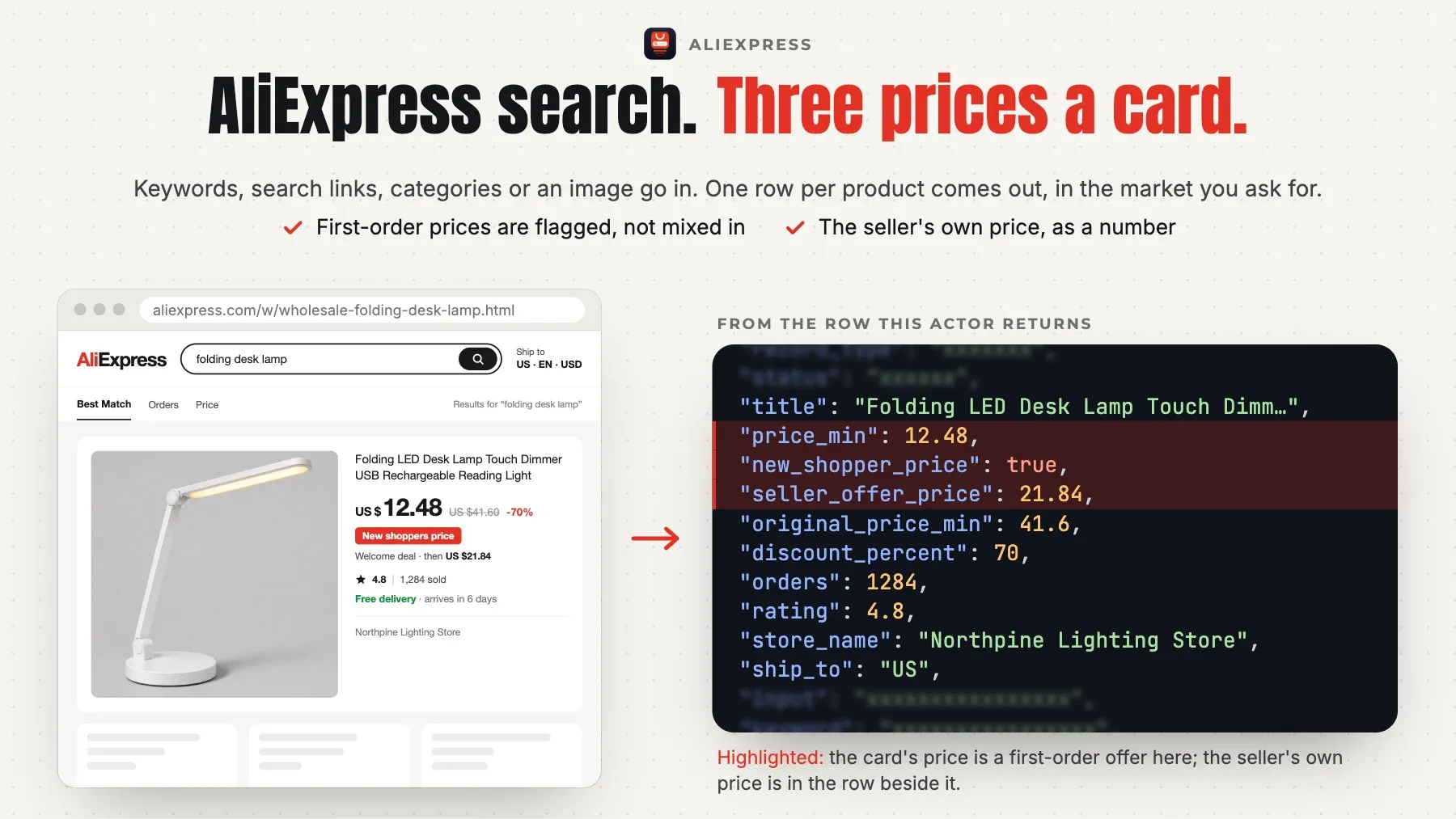
price_min), the original price (original_price_min, from the one field every market carries: 66 of 66 tested ship-to views) and the seller's own price before AliExpress's new-shopper allowance (seller_offer_price), withnew_shopper_pricetrue on every card whose price is the first-order offer. The lane leader's price is the first-order price on 29 of 48 GB rows with nothing that says so, and its original price was empty on 50 of 50 US rows. - The market you ask for, checked on every page.
shipTo,currencyandlanguageset the view (66 countries tested, each answering its own view); the page's own country and currency are read on every page, and a view AliExpress did not give is a freewrong_viewrow, never charged rows in the wrong market. The leader has no market input: its runs landed in GBP, EUR and IDR. - To the end of the list, not page 1. Each search is read 60 products a page to AliExpress's own 0-product page or its last page (60 pages, 3,600 positions); the search row says COMPLETE, LIMIT or TRUNCATED against AliExpress's own count.
moreOrderingsreads the same search again in other orders and adds only new products (64 % more distinct products with the orders list in our tests). - No charge for AliExpress's filler. For words it cannot match, AliExpress shows unrelated products and labels the answer
few_result; here that is a freeno_matchrow, never charged results (includeRelateddelivers them, markedrelated). One row per product across searches, pages and orders: a repeat is counted on the search row, never charged twice. - Exact orders and the global id.
ordersis the exact count the card carries (21,793 where the card says 10,000+ sold), andproduct_idis the global 1005… id on every market, the US view's local id beside it, so the rows join our AliExpress Product Details Scraper and the other markets. - Search by image. Give an image link and AliExpress's own image search is read: up to 150 positions, about 105 distinct products, with the same columns.
- Speed, measured. On the 21 runs of versions 0.1.5 and 0.1.6 on Apify that delivered products (2026-11-05, 512 MB: the deploy tests, the cost runs, the head-to-head run below and a run with no memory option) the first products came 3.6 to 7.4 seconds after the start, and once 11.7 seconds, on a German search with a minimum of 1,000 orders that read 8 pages for its 30 products. The 50 best-match products of a keyword took 4.3 to 5.4 seconds start to finish (5 runs), ten keywords of one product each 9.2 to 17.2 seconds (3 runs), ten image searches 21.0 seconds, and one keyword's whole list (60 pages, 2,233 products) 136 seconds; a page of 60 products came in 1.4 to 2.3 seconds (the median of each cost run), and a slow connection is replaced after one slow answer.
Who it's for
- Dropshippers and e-commerce sellers — the best-selling products for a niche keyword in the market they sell to, with the first-order price told apart from the regular price, the exact orders and the delivery estimate.
- Market and price researchers — a category's or a keyword's full list in several countries and currencies, with original and sale prices, discounts and ratings, for a price index or an assortment study.
- Brand and marketplace teams — the listings that match a product photo (search by image) or a brand's words, with the stores that sell them.
Quick start
The 100 best-selling wireless earbuds shipped to the US
Two keywords in Germany, in euros and German, free shipping, rated 4.5 or more
A category page and a search URL with its own filters
Search by image
Switching from kawsar/aliexpress-search-scraper?
Your input works as it is. Each name in the left column is read as this Actor's own field and the run log says so (read <theirs> as <ours>); a name marked not read is ignored with a note. A value in the other Actor's shape, an object list or its own date form, is read too.
| kawsar/aliexpress-search-scraper | this Actor | what to know |
|---|---|---|
keywords | keywords | The same name and shape: a list of search words. |
sort | sortBy | Read as sortBy: default, orders, price_asc and price_desc the same; rating has no AliExpress order and reads best match. |
minPrice | minPrice | The same name: in the view's currency. |
maxPrice | maxPrice | The same name: in the view's currency. |
minRating | minRating | The same name: checked on each product (unrated products left out). |
minOrders | minOrders | The same name: checked on the exact orders count. |
maxItems | maxItems | The same name, read as the whole run's cap (the leader's is per keyword): give maxItemsPerSearch for a cap per keyword. |
maxPages | maxItemsPerSearch | Read as maxItemsPerSearch = pages × 60. |
requestTimeoutSecs | not read | Not read: each call has its own deadline, and a slow or refused connection is replaced at once. |
What differs:
maxItemscaps the whole run here; the leader'smaxItemsis per keyword (48 unless set). With several keywords givemaxItemsPerSearchfor the leader's meaning: its input as it is gives at mostmaxItemsrows in all, never more.- There is no rating order on AliExpress: the leader's
sort=ratingreads the best-match order here, and the run says so; useminRatingto keep well-rated products. - The output columns are snake_case (
product_id,title,price_min,original_price_min,main_image,orders) where the leader's are camelCase (productId,productTitle,price,originalPrice,imageUrl,orders); each field's description names the leader's key. - Each search gets a free summary row (
record_type=search) beside its product rows; filter onrecord_type=productfor the products alone. - The market is yours to set (
shipTo,currency,language); the leader's follows its connection's country.
Output
One row per product (and one free summary row for every search):
| field | meaning |
|---|---|
record_type | product on a product row (charged); search on a search's free summary row (a keyword, URL, category or image you gave). |
status | ok, or why a search gave no product: no_match (AliExpress found no product for the words and showed others, few_result), no_results (an empty list), not_found (AliExpress answered its error page for the URL), not_offered (a ship-to the global site does not serve: RU, KZ, CN, or an aliexpress.ru link), wrong_view (AliExpress answered another country or currency than asked, on two connections), invalid_input (a product, store or campaign link, another site, an empty value), failed (AliExpress refused every connection tried, or showed the search only as bare "lite" cards), not_read (maxItems, your charge limit or the time limit came first). |
input | The value you gave that this row answers (a keyword, a URL, a category id or an image link). |
keyword | The search words AliExpress answered for (from the page itself; the leader's keyword); null on a category list and an image search. |
product_id | AliExpress's global product id (1005…), the same on every market (the leader's productId; our AliExpress Product Details Scraper takes it). |
product_id_us | On the US view, the local US id (3256…) the page lists beside the global id; null on other views. |
url | The product's page, https://www.aliexpress.com/item/<product_id>.html (the leader's productUrl). |
title | The product title in the view's language (the leader's productTitle). |
main_image | The main image (the leader's imageUrl). |
images | The card's other images, in order (the leader's additionalImages); an empty list when the card has none. |
price_min | The price the card shows, in currency (the lowest SKU's; the leader's price). On most non-EU markets this is the new-shopper (first-order) price where new_shopper_price is true. |
price_text | The price as AliExpress writes it in the view (US $17.55, € 13,74; the leader's formattedPrice). |
original_price_min | The original price before the discount, in currency (the leader's originalPrice). |
discount_percent | The discount the card shows, in percent (the leader's discount). |
seller_offer_price | The seller's own price before AliExpress's new-shopper allowance, in currency: the regular price a returning buyer pays. |
new_shopper_price | True when the card's price is the new-shopper (first-order) offer, so price_min is that offer and seller_offer_price the regular price: by the card's "New shoppers" badge, or by the new-shopper allowance the card names where it shows "Save $X" or no badge instead. |
new_shopper_saving | What the new-shopper offer saves, as the card's badge says ("New shoppers save $40" → 40), else the original price less price_min, in currency. |
currency | The prices' currency (ISO; the leader's currency). |
tax_rate | The tax rate the card states, as a fraction (0.19 on the DE view, 0 on the US view). |
orders | Orders sold, the exact count the card carries (21,793 where the card says 10,000+ sold; the leader's orders); null when the card shows no sold count. |
sold_text | Orders sold as the card shows them (4,000+ sold). |
rating | The star rating (0-5; the leader's rating); null for a product with no rating yet. |
store_name | The store's name where the card carries it (on part of the cards; null elsewhere, never a placeholder). The store's id and rating are our AliExpress Product Details Scraper's. |
free_shipping | True when the card says Free shipping (read from the badge's own code, in every language). |
ships_from | The country the product ships from, two letters (the leader's shippingFrom). |
delivery_days_min | The fastest delivery the card estimates, in days; null where the view carries no estimate. |
delivery_days_max | The slowest delivery the card estimates, in days. |
delivery_date_min | The earliest estimated delivery date (YYYY-MM-DD). |
delivery_date_max | The latest estimated delivery date (YYYY-MM-DD). |
choice | True for an AliExpress Choice product. |
is_ad | True for a sponsored product (an ad among the results). |
badges | The card's badge texts in order (Free shipping, Lowest price in 90 days, Save $5, Delivery: Nov 13 - 17 …; the leader's tags). |
sku_id | The id of the SKU whose price the card shows. |
category_id | AliExpress's category id of the product. |
category_ids | The product's category path as ids, from the top category down. |
listed_at | The date the product was listed (YYYY-MM-DD). |
page | The page of the search the product was on (the leader's page). |
position | The product's place in the search, from 1, in AliExpress's order (60 a page; the leader's position). |
match | exact for a result of the search; related for a product AliExpress showed because nothing matched the words (only with includeRelated). |
ship_to | The ship-to country of the view AliExpress served. |
language | The language of the view AliExpress served (en, de …). |
search_type | The kind of search: keyword, url, category, image (an image you gave), image_file (a pasted image-results link); on a search row also invalid or not_offered. A product row from an image search (image, image_file) is charged as image_product, every other product row as product. |
sort_by | On a search row: the order AliExpress answered with (default_default, total_tranpro_desc, price_asc …). |
filter_by | On a search row: the filters AliExpress says it applied (categoryId, priceRange, filterCodes, shipFromCountry). |
total_results | On a search row: AliExpress's own count for the search (a catalogue figure that moves a little per page; under the 4-star switch a running count). |
pages_read | On a search row: the pages read. |
rows_delivered | On a search row: the product rows it delivered. |
duplicates | On a search row: products listed again (on another page, another order or another search of the run): never delivered or charged twice. |
dropped | On a search row: products your filters left out, by reason (price, rating, orders, discount, ad, excluded_word, ships_from, free_shipping, choice), and lite_card (AliExpress showed the card bare, without its search-page price, on fresh connections too), free; each product counted once. |
gift_cards_skipped | On a search row: AliExpress's "FREE with any purchase" welcome-gift cards among the results (no price: not delivered). |
price_min_seen | On a search row: the lowest price among the products it delivered. |
price_max_seen | On a search row: the highest price among the products it delivered. |
verdict | On a search row: COMPLETE (read to AliExpress's own end), LIMIT (maxItemsPerSearch or maxItems), TRUNCATED (page 60, AliExpress's last page, or an end two connections agreed on far under AliExpress's count), PARTIAL (stopped early: note says why). |
note | Why a search row has the status or the verdict it has, and what AliExpress did with the filters asked. |
scraped_at | When this row was read (UTC). |
Example record:
Pricing
Pay for the products a run delivers, plus one run start; no platform usage is billed to you. The price falls with your Apify plan.
| event | unit | Free | Starter | Scale | Business |
|---|---|---|---|---|---|
Product (product) | per 1,000 | $9.00 | $7.65 | $6.30 | $4.50 |
Product from an image search (image_product) | per 1,000 | $5.00 | $4.25 | $3.50 | $2.50 |
Run start (start) | per run | $0.0031 | $0.0031 | $0.0031 | $0.0031 |
A product from a keyword, an AliExpress search or category link or a category id is $9.00 per 1,000 on the Free plan ($0.009 a row) and $7.65 on Starter. A product from an image search is $5.00 per 1,000 on the Free plan and $4.25 on Starter. Every column is inside the row's price, with no add-on. A product is charged once a run however many searches, pages or orders list it, under the search that delivered it first. Each run that delivers a product also pays the run start, $0.0031 once; a run that delivers none pays nothing at all. So 10 products cost $0.0931 on the Free plan and $0.0796 on Starter; the 100 best-selling products of a keyword $0.9031 and $0.7681; 1,000 products $9.0031 and $7.6531; 100 products of an image search $0.5031 and $0.4281; every search of a run shares one start. Free: every search's summary row, a search AliExpress has no match for (its own fill of other products is not delivered unless you set includeRelated), an empty list, a ship-to country the global site does not serve, a view AliExpress did not give, a link that is no search, a card your filters leave out, a product already delivered in the run, a welcome-gift card with no price, and a search left unread at maxItems, your charge limit or the time limit. A run that stops early (a timeout, an abort) is charged for the products it delivered.
Before the first request the log names the price of a product at your plan, the run start and the most the run can cost: maxItemsPerSearch for each search, maxItems over the whole run (the dearer rows counted first), else 60 pages of 60 positions a list order, and never more than your charge limit. A keyword's list ends at its last page or at page 60, AliExpress's last page, and AliExpress repeats products across pages, so a whole list gives fewer rows than positions: 2,233 distinct products of 3,600 positions for "phone holder" in our test (136 seconds), 68 to 74 % of the positions in the study's walks; each search row gives AliExpress's own count. An image's list ends at AliExpress's own count (137 to 363 positions on 10 photos in our tests). Set maxItemsPerSearch, maxItems or a charge limit for a lower maximum. Enterprise plans have their own rates — the Actor's Pricing tab shows the price for your plan.
Usage patterns
- What a search reads — Each keyword, URL or category id is one search, read 60 products a page in the order you choose (
sortBy: best match, orders, price up, price down; AliExpress has no rating or newest order), to AliExpress's own end of the list: the page with no product, or page 60 (3,600 positions), whichever comes first.maxItemsPerSearchstops each search at that many products;maxItemscaps the whole run. A long list is read in about 2 seconds a page; several searches run at the same time. - The market —
shipTo(two letters, default US) sets the country whose prices, offers, delivery dates and catalogue you see;currency(empty = the country's own) andlanguage(en_US, de_DE, es_ES, fr_FR …) are set apart from it. Every row says the country and language AliExpress served. The new-shopper (first-order) price is shown on most non-EU markets and on none in the EU;seller_offer_pricegives the seller's own price everywhere. The delivery estimate is on the card in some markets (most US cards) and not in others (Brazil, Turkey, Japan in our tests): null there, never a guess. - Filters —
minPrice/maxPrice(in the view's currency),freeShippingOnly,choiceOnly,shipFromandcategoryIdare AliExpress's own filters; the price and ships-from are checked again on each product.minRating,minOrders,minDiscount,excludeAdsandexcludeWordsare checked on each product. A product a filter leaves out is free and counted on the search row by reason. A pasted search URL keeps its own filters; the inputs fill in what the URL does not set. - What a row is —
record_type=product: one product, charged once a run however many searches list it.record_type=search: one free row per keyword, URL, category or image, with itsstatus,verdict, the view AliExpress served (ship_to,currency,language), the filters it applied (filter_by), its count (total_results), the pages read, the rows delivered, the repeats, the products dropped by your filters (dropped) and anote. Filter onrecord_type=productfor the products alone.
Input configuration
| field | type | default | what it does |
|---|---|---|---|
keywords | array | [] | Search words, one search per line, in any language (wireless earbuds, usb-c cable, 手机壳). Each search is read page by page, 60 products a page, to the end of AliExpress's list (at most 60 pages). A search URL pasted here is read as a URL. |
searchUrls | array | [] | AliExpress search or category pages as you see them in a browser, with their filters: https://www.aliexpress.com/w/wholesale-yoga-mat.html?SortType=total_tranpro_desc, https://www.aliexpress.com/category/5090301/mobile-phones.html. Any AliExpress host works (.us, es., fr., m.). The URL's own sort, price range, switches, ship-from and page are kept; a filter name AliExpress ignores (pr, isFreeShip, choice, categoryId) is named on the search row. A product, store or campaign page gets a free row that says why. |
imageUrls | array | [] | Public image links (an AliExpress product image or any other https link to a JPG, PNG or WebP up to 5 MB). Each image is searched with AliExpress's own image search: up to 150 positions, about 105 distinct products. |
categoryId | string | "" | AliExpress's numeric category id (the number in /category/ |
sortBy | default / orders / price_asc / price_desc | "default" | The order AliExpress lists the products in. AliExpress has no rating and no newest order: use minRating to keep well-rated products. |
moreOrderings | array | [] | More orders to read each search in, to reach more of AliExpress's catalogue: orders, price_asc, price_desc, default. Only products not already delivered are added (one default list plus the orders list gave 64 % more distinct products in our tests). Empty = one order. |
minPrice | number | In the currency of the view (the currency field, or the ship-to country's own). AliExpress filters by it and each product is checked again; empty = no minimum. | |
maxPrice | number | In the currency of the view; empty = no maximum. | |
minRating | number | Keep products rated at least this (0-5). Products with no rating yet are left out when set. Checked on each product: AliExpress's own 4-star switch lets lower-rated products through. | |
minOrders | integer | 0 | Keep products with at least this many orders (the exact count, not the rounded 10,000+). 0 = no minimum. |
minDiscount | integer | 0 | Keep products whose shown price is at least this many percent below the original. 0 = no minimum. |
freeShippingOnly | boolean | false | AliExpress's own Free shipping filter. |
choiceOnly | boolean | false | AliExpress's own Choice filter. |
shipFrom | string | "" | Two letters, e.g. US, ES, CN: AliExpress's ship-from filter, and each product's ships-from is checked again. Empty = any. |
excludeAds | boolean | false | Leave out the products AliExpress marks as ads (about 1 in 11 on the best-match order). |
excludeWords | array | [] | A product whose title holds any of these words (case does not matter) is left out. |
includeRelated | boolean | false | When no product matches the words, AliExpress shows other products instead. Off: nothing is delivered or charged and the search row says so. On: those products are delivered, marked match = related. |
shipTo | string | "US" | Two letters (US, GB, DE, FR, BR, JP, AU …): the market whose prices, offers, delivery and catalogue you see. 66 countries were tested, each answering its own view. RU and KZ are served by aliexpress.ru, another site, and CN is not a ship-to country of the global site: a search asked for them gets a free row. |
currency | string | "" | Three letters (USD, EUR, GBP …). Empty = the ship-to country's own currency. |
language | string | "en_US" | The language of titles and badges, as a locale: en_US, es_ES, fr_FR, de_DE, pt_BR, it_IT, ja_JP, ko_KR, ar_MA, ru_RU, nl_NL, pl_PL, tr_TR. The list of products follows the language too. |
maxItemsPerSearch | integer | 0 | The most product rows of each keyword, URL or image; 0 = to the end of the list (up to 3,600 positions a list, 150 an image). |
maxItems | integer | 0 | The most charged rows of the whole run; 0 = no cap beyond your charge limit. |
proxyUrl | string | Your own proxy (scheme://user:pass@host:port) for every call instead of ours. Leave empty: the Actor brings its own connections at no cost to you. | |
feedback | string | A note to the people who maintain this Actor: what you needed and did not get. For example a missing field, a wrong or empty result, or the Actor you switch from or to, and why. The run does not read it: the rows and the charges stay the same. A person reads every note. |
Errors
A run does not fail because of your input. When an input cannot be used — a date that is not a date, an id in the wrong form, two settings that contradict each other — the run ends Succeeded, charges nothing, and says what to change:
- the status message starts with
INPUT REJECTED; - the dataset holds one row,
{"error": true, "code": "…", "message": "…"}, and no results; - the key-value store record
ERRORholds the same object.
From code, check error on the first row before reading results.
A search AliExpress has no match for (it shows other products instead), an empty list, a ship-to country the global site does not serve, a view AliExpress did not give, or a value that is not a search is not an error: it gets one free row with its status and the reason, and the run goes on with the others. A run that ends Failed is a fault on our side, never your input; it charges nothing, and we are alerted.
FAQ
Which status and verdict is which?
A product row is ok. A search row: ok with a verdict (COMPLETE: read to AliExpress's own end; LIMIT: maxItemsPerSearch or maxItems reached; TRUNCATED: page 60, AliExpress's last page, with more in its count, or a list that ended on two connections far under its own count; PARTIAL: stopped early, the note says why), or free: no_match (AliExpress found no product for the words and showed others), no_results (an empty list), not_found (AliExpress answered its error page for the URL), wrong_view (AliExpress did not give the country or currency asked, on two connections), not_offered (RU and KZ are served by aliexpress.ru, another site; CN is not a ship-to country), invalid_input (a product, store or campaign link, or a value that is no search), failed (AliExpress refused every connection tried, or showed the search only as its bare "lite" cards; run it again later), not_read (maxItems, your charge limit or the time limit came first).
Why do I get fewer products than AliExpress's count?
AliExpress's count (total_results) is a figure for the whole catalogue, but its list ends at page 60 (3,600 positions) and repeats some products across pages (about 70 % of the positions of a long list are distinct products). Every row is one distinct product. For more of a large catalogue, add moreOrderings (another order reaches other products) or narrow the search with a category or filters.
Can it read a store's products or a product's full details?
A store's own product list is not read: a store link gets a free row that says so (its list call met AliExpress's slider on 3 of 3 of our tests). A product's SKUs, stock, specifications and description are our AliExpress Product Details Scraper's job: give it this Actor's product_id or url.
Does it need an AliExpress account, cookies or an API key?
No. Everything is read from AliExpress's public, logged-out search pages: no login, no cookie of yours, no token. The connections are included in the price.
Integration
JavaScript
Python
CLI
REST
AI agents and MCP
Apify's MCP server offers this Actor as a tool to Claude, Cursor, VS Code and any other MCP client. Connect https://mcp.apify.com?tools=hyperbach/aliexpress-search-scraper and ask, for example: "Find the best-selling wireless earbuds on AliExpress shipped to the United States with their prices, orders sold and ratings". The agent fills the input from the table above and reads the rows from the run's dataset. A field under the name another Actor gives it is read as this Actor's own: keyword, searchTerms, searchQueries, queries as keywords; startUrls, urls, url, searchUrl as searchUrls; imageUrl, images, image, imageSearchUrls as imageUrls; category, catId, categoryID as categoryId (and more). An agent or a person can add feedback to any run and say what was needed and not delivered: a missing field, a wrong or empty result, the Actor switched from or to, and why. The run returns the same rows at the same price, and a person reads every note.
n8n, Make and Zapier
The Apify node in n8n, the Apify app in Make and the Apify integration in Zapier run this Actor on a schedule or from a trigger and read its dataset. A webhook on the run's end (Integrations on the Actor page) sends the rows on to your own endpoint. Nothing to install on our side.
Support
Disagree with a charge? Write to apify@hyperbach.com with the run ID. We will ask Apify to compensate you, and the charge comes back to your Apify account as platform credit.
Did it do the job? A short review on the Store, at any rating, helps the next buyer choose.
See also
- Amazon Product Details Scraper — Amazon products by ASIN, URL or UPC / EAN / ISBN on 21 Amazon stores: the buy-box price, every best-seller rank, the rating and the review summary.
- AliExpress Product Details Scraper — AliExpress products by URL or item id: every SKU with its own price and stock, in the country and currency you choose.
- Shopify Store Scraper — every product of a Shopify store, with its variants, prices and images.
- Alibaba Products Scraper — the products of an Alibaba.com search: price range, minimum order and the supplier with its country and verification.
- Walmart Products Scraper — Walmart products by search, category or URL: the price with the was-price, the seller and the rating.
- Coles Scraper — Coles Australia products and specials, with the price, the was-price and the unit price.
This page is generated from the Actor's schemas and a live sample — it cannot describe a field the Actor does not have.


