

Facebook Followers & Following Scraper, No Login
Pricing
from $4.10 / 1,000 follower or following profiles
Facebook Followers & Following Scraper, No Login
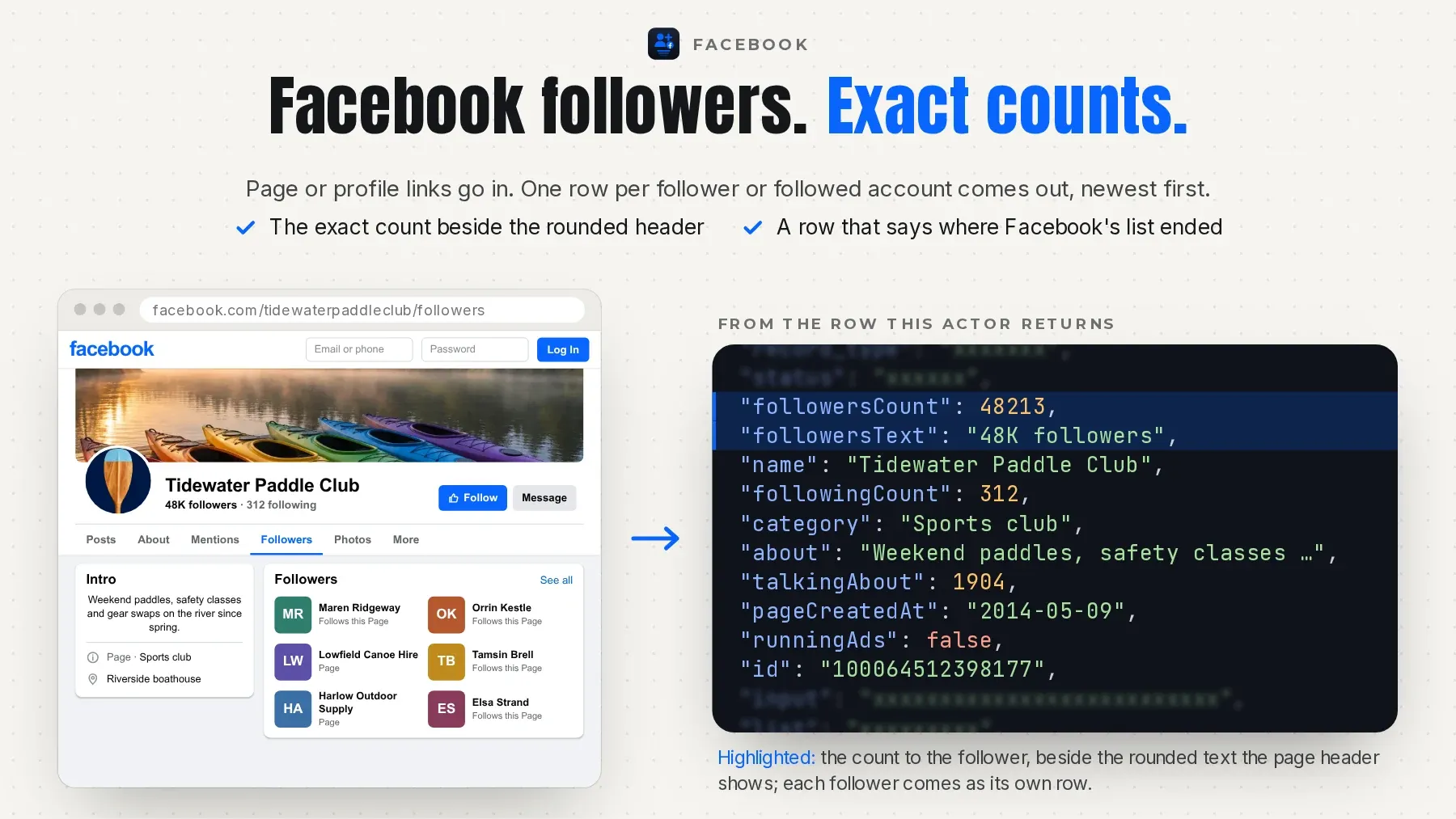
Facebook followers and following lists of any page or profile, newest first: id, name, link, picture, verified flag. Each target's exact follower count (not 18M), following count and page facts. Caps per list, Facebook's own name filter, profile details on request. No login. Misses free.
Pricing
from $4.10 / 1,000 follower or following profiles
Rating
0.0
(0)
Developer

Hyperbach
Maintained by CommunityActor stats
0
Bookmarked
2
Total users
1
Monthly active users
6 days ago
Last modified
Categories
Features
Share
The followers and following lists of any Facebook page or profile, in Facebook's own order (newest followers first), one row per follower with its id, name, profile link, picture and verified flag — and each target's exact follower count, 18,393,739, not 18M. Give page or profile links, handles or ids; ask for followers, following or both, with a cap per list, or for the counts alone. Each list ends with a row that says where Facebook's logged-out list ended and how that compares with its count. Pages that do not exist and lists a profile hides come back as a typed row, free. No login, no cookies, proxies handled for you.
From $8.20 per 1,000 rows (profile) on the Free plan, $6.97 on Starter; every row and add-on is priced under Pricing below. A run start is $0.0017. The default input returns about 52 rows for about $0.4167. A page that does not exist, a link that names no profile, a list the profile hides and a target named twice cost nothing: each gets one free row that says why.
How it compares
- Apify's own Facebook Followers & Following Scraper is faster: 50 profiles in 9.6 s, against our 11 s. We give more data: 16 fields per profile, against 14. The price is about the same: $5.84 per 1,000 profiles, against $6.00.
- 3 times faster and cheaper than easyapi's Facebook Followers Scraper, with more data: 50 profiles in 11 s, against 31 s; $5.84 per 1,000 profiles, against $6.59; 16 fields per profile, against 3.
Measured on 2026-11-13. Each line compares one job, run by both scrapers at the same time. Prices are per 1,000 profiles: Apify Actors at the Scale plan's prices.
Tested head-to-head on 2026-11-13
The job: The followers and following lists of the Facebook page LeonardoDiCaprio, the newest 25 of each, with the page's own counts (the input schema's example: startUrls LeonardoDiCaprio, maxFollowers 25, maxFollowing 25). Every Actor ran on it the same day from the same harness; every run's cost is at the Scale plan's prices: a rival's charged events at its price for that plan, this Actor's at its list price. Fields counts the filled fields of a typical row. Every actor read the same page's lists in the same minute; ours also returns the page's exact follower count (not 18M) on its own row and says where Facebook's list ended. Re-measured monthly.
| Actor | Rows | First row | Run time | Cost | Fields | Failures |
|---|---|---|---|---|---|---|
| this Actor | 50 | 10 s | 11 s | $0.29 | 16 | none |
apify/facebook-followers-following-scraper | 50 | 4.8 s | 9.6 s | $0.30 | 14 | none |
easyapi/facebook-followers-scraper | 50 | 19 s | 31 s | $0.33 | 3 | none |
Why this scraper, not the other Facebook followers actors
- Exact counts, not rounded ones. The account row carries the exact follower count from the page itself (18,393,739 for LeonardoDiCaprio) with the rounded header text beside it (
followersText: 18M followers). Four of the rivals we ran ship the rounded figure as 18,000,000. - Deeper lists. Facebook's logged-out followers list of a famous page goes on past the count it shows: we read 3,160 of LeonardoDiCaprio's followers where the rivals stop at its count of about 2,390. Each list ends with a row that says where it ended:
LIST_END(Facebook's list ended, read a second time on a fresh connection when it ends under its count),LIMIT(your cap) orPARTIAL(with the reason). - Honest about short lists. An ordinary page's logged-out list can end before the count it shows: The Copper Kettle Restaurant's followers list ended at 171 of 208 and its following list at 410 of 441 on two separate reads. The target row says so in words, so a short list never looks like a failure or a whole list.
- Exact caps, nothing charged past them. 25 asked = at most 25 delivered and charged, cut inside Facebook's page of 8. The lane leader charged 42 rows for a limit of 40 in our run.
- Profiles as well as pages. A person's public followers list is read the same way as a page's (Mark Zuckerberg's 10,000-follower list); a following list the profile hides comes back as
HIDDENon its free row. - Facebook's own name filter.
searchNameasks Facebook to filter each list by name (any case, any part of the name) over the whole list, not only its first pages. - Details on request, priced apart.
includeProfileDetailsadds each listed profile's own exact follower count, "talking about", intro, a 597-px picture and whether it is a page or a profile (a page with its page id and category); a profile Facebook shows no count for is said on the row (detailsStatus) and not charged as details.
Who it's for
- Marketing teams and agencies — see who follows a brand, a creator or a competitor's page and which pages they follow, with each target's exact follower count, to vet audiences and find partners.
- Social media analysts — track the exact follower counts of many pages and profiles in one run (the counts alone, one row a target) with a page's creation date, ads and verification.
- Researchers and data teams — follower and following lists in Facebook's order with positions, stable ids and an honest end-of-list row, ready to join across runs.
Quick start
The newest 100 followers and the following list of a page
The exact follower counts of several pages (no list)
Followers with each profile's own follower count and picture
Only followed pages whose name contains a word
Switching from apify/facebook-followers-following-scraper?
Your input works as it is. Each name in the left column is read as this Actor's own field and the run log says so (read <theirs> as <ours>); a name marked not read is ignored with a note. A value in the other Actor's shape, an object list or its own date form, is read too.
| apify/facebook-followers-following-scraper | this Actor | what to know |
|---|---|---|
startUrls | startUrls | Read as it is: request-list objects ({url}) or plain strings, page or profile links in any form, handles and numeric ids. |
resultsLimit | maxFollowers | The leader's cap per list: read as maxFollowers and maxFollowing, the most rows of each list a target delivers. maxItems caps the whole run. |
followType | followType | The same name and values: an empty value reads both lists, follower the followers, following the following; none here reads the account rows alone. |
What differs:
- Every target also gets an account row (record_type account) with its exact follower count, its following count and a page's creation date, ads and verification; the leader puts the target's URL and id on each follower row only.
- resultsLimit is read as the cap of each list (maxFollowers and maxFollowing), as the leader reads it; with no cap the leader reads as many as it can, while here each list stops at 100 unless you raise maxFollowers and maxFollowing (up to 100,000).
- followType takes the leader's values ("" both, follower, following) and one more, none, for the counts alone.
- Rows carry the leader's fields under plainer names: title is name, image is profilePicture, subtitle_text is subtitle, facebookUrl and facebookId are targetUrl and targetId; the source's internal collection ids are not carried.
Output
One row per follower or followed profile (record_type profile), one row per target with its counts and page facts (record_type account), and one free summary row per input (record_type target):
| field | meaning |
|---|---|
record_type | profile on a follower or followed profile (charged), account on a target's own row with its counts (charged), target on a target's free summary row. |
status | ok, or why a target gave no row: not_found (Facebook shows no profile or page there to a logged-out visitor; two connections agreed), invalid_input (the value names no profile or page), duplicate (the same target as another input), failed (Facebook did not serve it), not_read (the run stopped first). |
input | The value you gave that this row answers. |
list | On a profile row: followers (it follows the target) or following (the target follows it). |
position | On a profile row: its place in the list as Facebook served it, 1 = the first (the newest follower). |
id | The profile's or page's Facebook id (on an account row: the target's own profile id). |
name | The profile's or page's name. |
username | The vanity name of its link (facebook.com/ |
url | The profile's or page's Facebook link; null where Facebook gives no link. |
profilePicture | The small picture Facebook shows in the list (a signed link that expires). |
subtitle | The second line Facebook shows under the name in the list, when there is one. |
isVerified | Facebook's verified badge (on an account row: the page's verification, from its transparency dialog). |
profileType | With includeProfileDetails: page (Facebook's page plugin shows it as a page), profile (a person, or a page without a username), unknown (no link). |
followersCount | The exact follower count: the target's on an account row, the listed profile's with includeProfileDetails. |
followingCount | On an account row: the following count Facebook shows on the profile. |
talkingAbout | "Talking about this": the target's on an account row, the listed profile's with includeProfileDetails. |
about | The intro text Facebook shows with the counts. |
category | On a page's account row: its category (Artist, Pizza place, …); with includeProfileDetails, the listed page's own. |
profilePictureLarge | The large picture (597 px): the target's on an account row, the listed profile's with includeProfileDetails. |
detailsStatus | With includeProfileDetails: ok (served, with the count; charged as details), no_count (served, Facebook shows no follower count for this profile), failed (not served), no_url (no link to read). |
followersText | On an account row: the follower count as Facebook's header shows it, rounded (18M followers). |
pageId | On an account row: the page id behind the profile (its Ad Library id); with includeProfileDetails, the listed page's own id. |
pageCreatedAt | On a page's account row: the date the page was created, from its transparency dialog. |
runningAds | On a page's account row: whether the page runs ads now. |
adLibraryUrl | On a page's account row: the page's Facebook Ad Library link. |
listCount | On a profile row: the count Facebook gives for the list it came from (the list itself can end before it, or go on past it). |
followersListCount | On account and target rows: the count Facebook gives for the followers list. |
followingListCount | On account and target rows: the count Facebook gives for the following list. |
searchName | On a profile row: the name filter it was found with, when searchName was given. |
targetUrl | The target's Facebook link. |
targetId | The target's Facebook profile id. |
targetName | The target's name. |
verdict | On a target row: LIST_END (every list asked ended at Facebook's end), LIMIT (a list stopped at your cap), PARTIAL (stopped early: note says why), HIDDEN (every list asked is hidden), COUNTS_ONLY (no list asked). |
followersEnd | On a target row: how the followers list ended: LIST_END, LIMIT, PARTIAL, HIDDEN or NOT_ASKED. |
followingEnd | On a target row: how the following list ended: LIST_END, LIMIT, PARTIAL, HIDDEN or NOT_ASKED. |
followersDelivered | On a target row: the follower rows it delivered. |
followingDelivered | On a target row: the following rows it delivered. |
rows_delivered | On a target row: every charged row it delivered (its account row included). |
note | Why a target row has the status or the verdict it has, in words, with the counts. |
scraped_at | When this row was read (UTC). |
Example record:
Pricing
Pay for the rows a run delivers, plus one run start; the details only on the rows that carry them. No platform usage is billed to you, and the prices fall with your Apify plan.
| event | unit | Free | Starter | Scale | Business |
|---|---|---|---|---|---|
Follower or following profile (profile) | per 1,000 | $8.20 | $6.97 | $5.74 | $4.10 |
Account row (counts) (account) | per 1,000 | $5.00 | $4.25 | $3.50 | $2.50 |
Profile details on that row (profile_detail) | per 1,000 | $5.00 | $3.50 | $2.50 | $2.00 |
Run start (start) | per run | $0.0017 | $0.0017 | $0.0017 | $0.0017 |
A follower or followed profile is $8.20 per 1,000 on the Free plan ($0.0082 a row) and $6.97 on Starter, with everything its row carries: id, name, link, picture, verified flag, position and the list's count. Each target's own account row (its exact follower count, following count, talking about, intro and page facts) is $0.005 on the Free plan. With includeProfileDetails, each profile row that carries the profile's own details is $0.005 more; a profile Facebook served no details for is not charged for them. Each run that delivers a charged row also pays the run start, $0.0017 once; a run that delivers none pays nothing at all.
So one page's newest 25 followers and 25 followed accounts with its account row cost $0.4167 on the Free plan and $0.35445 on Starter; 100 of each (the default caps) $1.6467 and $1.39995; the counts alone of 10 pages (followType: none) $0.0517 and $0.0442. Free: every target's summary row, a page that does not exist, a link that names no profile or page, a list the profile hides, a target named twice, and a run that delivered no charged row (no run start either). A run that stops early (a timeout, an abort) is charged for the rows it delivered.
Before the first request the log names the prices at your plan and the most the run can cost: each list to its cap (maxFollowers, maxFollowing), maxItems over the whole run, and never more than your charge limit. A famous page's followers list goes on past the count Facebook shows, so the caps are what bound such a run; a list that ends under its cap costs less. Enterprise plans have their own rates — the Actor's Pricing tab shows the price for your plan.
Usage patterns
- Audience lists — Give the pages or profiles in
startUrlsand a cap per list (maxFollowers,maxFollowing). Rows come in Facebook's order withposition(1 = the newest follower), the list's own count inlistCount, and the target on every row. The free target row says where each list ended (followersEnd,followingEnd) and why (note). - Follower counts of many pages —
followType: nonereads one account row a target: the exact follower count (followersCount) with the rounded header text (followersText), the following count, "talking about", the intro, and for a page its creation date, category, verification and whether it runs ads, with its Ad Library link. - Who a page follows —
followType: followingreads the pages and profiles a target follows, to the list's end or your cap. A profile that hides the list getsHIDDENon its target row, free.
Input configuration
| field | type | default | what it does |
|---|---|---|---|
startUrls | array | [] | Facebook pages or profiles, one per line, in any form: a link (facebook.com/LeonardoDiCaprio, m.facebook.com/…, a /followers/ tab link, a profile.php?id= or /people/…/ |
followType | `` / follower / following / none | "" | Which lists of each target to read. Every target also gets its account row: the exact follower count, the following count, "talking about", and for a page its creation date, ads and verification. "No list" reads that row alone (the count job). |
maxFollowers | integer | 100 | How many of each target's followers to deliver, newest first; 0 = the followers list is not read. Exact: 25 asked = at most 25 delivered and charged. Facebook's logged-out list can end before the count it shows (an ordinary page's list ended at 171 of 208); the target row says where it ended. |
maxFollowing | integer | 100 | How many of the profiles each target follows to deliver, in Facebook's order; 0 = the following list is not read. A profile that hides its following list gets HIDDEN on its target row. |
searchName | string | Facebook's own name filter inside each list: only the followers and following whose name contains these letters (any case, any part of the name: "pizza" finds "New York Pizza"). Read over the whole list, not only its head. Leave empty for every name. | |
includeProfileDetails | boolean | false | Read each follower's and followed profile's own public page as well: its exact follower count, "talking about", intro, a large picture (597 px) and whether it is a page or a profile (a page with its page id and category). One more light read a row, charged as its own event only when the details were served. |
maxItems | integer | 0 | The most charged rows of the whole run (follower, following and account rows together); 0 = no cap beyond your charge limit. |
feedback | string | A note to the people who maintain this Actor: what you needed and did not get. For example a missing field, a wrong or empty result, or the Actor you switch from or to, and why. The run does not read it: the rows and the charges stay the same. A person reads every note. |
Errors
A run does not fail because of your input. When an input cannot be used — a date that is not a date, an id in the wrong form, two settings that contradict each other — the run ends Succeeded, charges nothing, and says what to change:
- the status message starts with
INPUT REJECTED; - the dataset holds one row,
{"error": true, "code": "…", "message": "…"}, and no results; - the key-value store record
ERRORholds the same object.
From code, check error on the first row before reading results.
A page that does not exist or a link that names no profile or page is not an error: it gets one free target row with the reason, and the run goes on with the others. A run that ends Failed is a fault on our side, never your input; it charges nothing, and we are alerted.
FAQ
Why did a list end before the count Facebook shows?
Facebook's logged-out list of an ordinary page can end before its count (171 of 208 on one page we read; 410 of 441 on its following list). When a list ends under its count the Actor reads its last page again on a fresh connection; the target row says LIST_END and "Facebook's logged-out list ended at 171 of 208 (the second read on a fresh exit agreed)". A famous page's followers list can go on past its count.
Can it read a person's profile, not only pages?
Yes: a public profile's followers list is read the same way (Mark Zuckerberg's, for one). A profile that hides its following list gets HIDDEN on its target row. Friends lists are not public to a logged-out visitor and are not offered.
Is a follower a page or a person?
With includeProfileDetails each row says profileType: page when Facebook's page plugin shows it as a page, profile otherwise (a person, or a page without a username), unknown for a row Facebook gives no link for.
Does it need my Facebook login?
No. Everything is read logged out, with no cookies, through the Actor's own connections.
Do I need Apify Proxy or my own proxy?
No. The Actor uses its own connections, at no extra cost to you.
Integration
JavaScript
Python
CLI
REST
AI agents and MCP
Apify's MCP server offers this Actor as a tool to Claude, Cursor, VS Code and any other MCP client. Connect https://mcp.apify.com?tools=hyperbach/facebook-followers-following-scraper and ask, for example: "Get the newest 100 followers and the following list of the Facebook page LeonardoDiCaprio, with its exact follower count". The agent fills the input from the table above and reads the rows from the run's dataset. A field under the name another Actor gives it is read as this Actor's own: urls, url, links, profileUrls as startUrls; limit, maxResults as maxItems; relationType, relation, lists, scrape_mode as followType; resultsLimit, max_followers, followersLimit, maxFollowersPerProfile as maxFollowers (and more). An agent or a person can add feedback to any run and say what was needed and not delivered: a missing field, a wrong or empty result, the Actor switched from or to, and why. The run returns the same rows at the same price, and a person reads every note.
n8n, Make and Zapier
The Apify node in n8n, the Apify app in Make and the Apify integration in Zapier run this Actor on a schedule or from a trigger and read its dataset. A webhook on the run's end (Integrations on the Actor page) sends the rows on to your own endpoint. Nothing to install on our side.
Support
Disagree with a charge? Write to apify@hyperbach.com with the run ID. We will ask Apify to compensate you, and the charge comes back to your Apify account as platform credit.
Did it do the job? A short review on the Store, at any rating, helps the next buyer choose.
See also
- Meta Ad Library Scraper — every ad a page runs on Facebook, Instagram, Messenger, WhatsApp and Threads, with the landing URL, media, run dates and EU reach.
- Threads Scraper — Threads profiles with the exact follower count, their posts and replies with view counts, and keyword and tag search, without a login.
- Instagram Reels Transcript Scraper — the spoken words of Instagram reels, by reel link or creator, with the exact posting time.
- Instagram Posts Scraper — the posts and reels of Instagram profiles, with the whole caption, the exact publish time, likes, comments and plays.
- Instagram Hashtag Scraper — Instagram's own ranked list of top reels for a hashtag or a search keyword.
- Facebook Pages Scraper — Facebook pages by URL, id, name or search words: the exact follower count, categories, address, phone, e-mail and websites, and the page transparency facts.
This page is generated from the Actor's schemas and a live sample — it cannot describe a field the Actor does not have.


