

GitHub Trending Scraper: Repositories, Developers & Stars
Pricing
from $0.58 / 1,000 trending repositories
GitHub Trending Scraper: Repositories, Developers & Stars
Scrape GitHub Trending by language, date range (today, this week, this month) and spoken language: trending repositories with stars, forks, stars gained, description, topics and license, and trending developers. Several lists a run. No login.
Pricing
from $0.58 / 1,000 trending repositories
Rating
0.0
(0)
Developer

Hyperbach
Maintained by CommunityActor stats
0
Bookmarked
2
Total users
1
Monthly active users
6 days ago
Last modified
Categories
Features
Share
GitHub Trending, logged out: the trending repositories and developers of any programming language, today, this week or this month, with a spoken-language list too — several lists in one run, one row per repository with its rank, owner, name and URL, description, language, stars, forks, the stars gained in the period and the contributors the list shows, plus each repository's topics, license, homepage, created and last-push dates, open issues and watchers. Developers come with their handle, name, avatar and the popular repository the list shows. One free list row per list carries a completeness verdict: COMPLETE, CAPPED (your limit) or PARTIAL. No login, no GitHub token, no browser, proxies handled for you.
From $1.15 per 1,000 rows (repository) on the Free plan, $0.9775 on Starter; every row and add-on is priced under Pricing below. A run start is $0.0019. The default input returns about 14 rows for about $0.018. A value that names nothing is a free row that says why.
Why this GitHub Trending scraper
- Several lists in one run. Give programming languages (
Python,C#,Jupyter Notebook) with a date range and a spoken language, the list type (repositories, developers or both), or GitHub Trending URLs from your browser: each list is read apart and gets its own free row. With nothing given, the run reads today's trending repositories of every language. - Every field the list shows. The rank, owner, name and URL, the numeric repository id, the description, the language, the total stars and forks, the stars gained today / this week / this month and the growth in percent, and the contributors under "Built by" with their avatars.
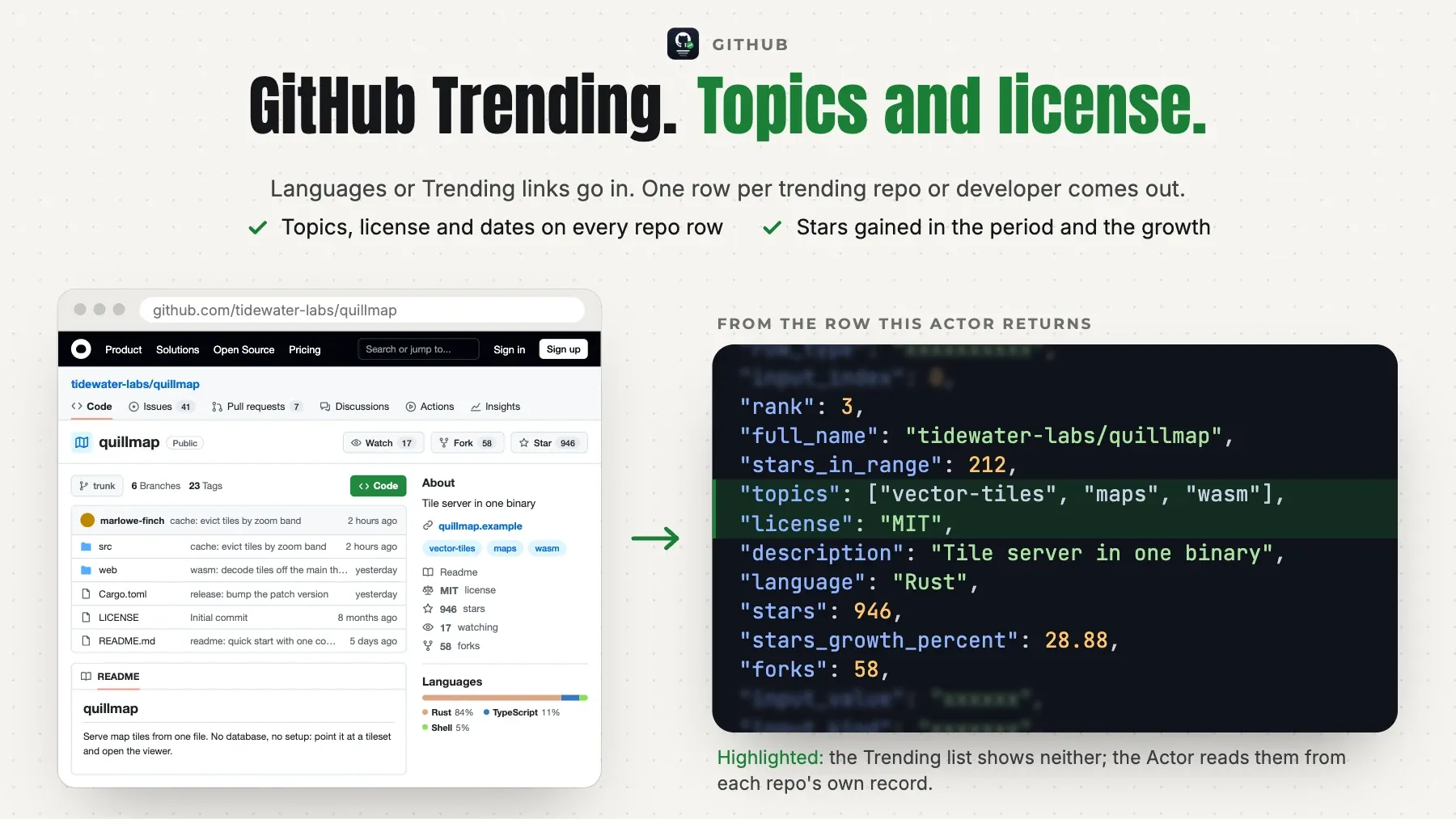
- Topics, license and dates included. Each trending repository is read once more from GitHub's public REST API, at no extra charge: its topics, license, homepage, created and last-push dates, open issues, watchers and the archived and fork flags. A record GitHub does not serve keeps the list's values and says so (
details_status). - Trending developers too. The developers list of any language and date range: rank, handle, display name, avatar and the popular repository the list shows with its description.
- Honest runs. A language GitHub Trending does not list is a free
invalidrow (GitHub answers it with the same empty page as an empty list; the page title tells them apart); an empty list is COMPLETE with 0 rows; a repeated list a freeduplicaterow. Every list gets a row; a repository is charged once per date range a run. - Fast. Plain HTTP, the pages GitHub serves a browser: six lists (three languages, repositories and developers, this week) gave 122 rows with 47 REST records in 8 s on our test; today's list of every language took 4 s.
Who it's for
- Developer advocates and newsletter writers — a daily or weekly digest of the trending repositories of the languages they cover, with descriptions, topics and the stars gained, on a schedule.
- Investors, analysts and CTOs — the open-source projects gaining traction in a stack, with star growth, license and age, read every day to see what rises.
- Data teams and researchers — typed rows keyed by
full_nameandrepository_id, the list each row came from, a free row per list with the verdict, and a run summary to check a pipeline against.
Quick start
Today's trending repositories of every language
This week's Python, Rust and TypeScript repositories and developers
Trending pages from your browser
Output
One row per trending repository or developer (and one free list row per list):
| field | meaning |
|---|---|
row_type | repository (a trending repository, charged), developer (a trending developer, charged) or list (the list's own row with its verdict; free). |
input_index | The 1-based position of the input this row answers: languages first, then startUrls; 0 for the default list (no language and no URL given). |
input_value | The input as you gave it (the language or the URL); empty for the default list. |
input_kind | Which input it came from: language (languages), url (startUrls) or default. |
list_type | The list: repositories or developers. |
list_url | The trending page this row comes from, as a URL you can open. |
language_filter | The list's programming language as GitHub's URL writes it (python, c%23); null for the list of every language. |
language_name | The list's programming language as the page names it (Python, C#); null for every language or a name GitHub does not list. |
date_range | The list's period: daily (today), weekly (this week) or monthly (this month). |
spoken_language_code | The list's spoken language (en, zh), repositories lists only; null for none. |
status | A list row: ok, invalid, duplicate, failed or not_read (see the FAQ). A repository or developer row: ok. |
status_detail | Why a list row is not ok, in a sentence. |
scraped_at | When the row was read (ISO 8601, UTC). |
rank | The row's place on the trending list (1 = first), as GitHub orders it. |
repository_id | GitHub's numeric id of the repository (it stays when the repository is renamed). |
owner | The repository's owner: a user or an organization. |
name | The repository's name. |
full_name | owner/name, the repository's key. |
url | The repository's page on GitHub. |
description | The repository's description; null when it has none. |
language | The repository's main programming language as GitHub shows it; null when GitHub shows none. |
stars | The repository's total stars, as the list shows them. |
forks | The repository's total forks, as the list shows them. |
stars_in_range | The stars the repository gained in the list's period (today, this week or this month), as the list says. |
stars_growth_percent | The stars gained in the period against the stars before it, in percent; null when the repository had none before. |
built_by | The contributors the list shows under "Built by" (up to 5): a list of {username, avatar_url}. |
topics | The repository's topics (its REST record); an empty list when it has none. |
license | The repository's license as an SPDX id (MIT, Apache-2.0) or GitHub's name for it (Other); null for none. |
homepage | The website the repository names; null for none. |
created_at | When the repository was created (ISO 8601, UTC). |
pushed_at | The repository's last push (ISO 8601, UTC). |
open_issues | Open issues and pull requests, as GitHub counts them. |
watchers | The accounts watching the repository. |
is_archived | True when the repository is archived (read-only). |
is_fork | True when the repository is a fork. |
default_branch | The repository's default branch. |
details_status | A repository row: read (its REST record served the topics, license and dates), failed (not served: the row keeps the list's values) or not_found (GitHub knows no such repository any more; checked twice). |
username | A developer row: the developer's GitHub handle. |
display_name | A developer row: the name the developer shows; null when they set none. |
profile_url | A developer row: the developer's GitHub page. |
avatar_url | A developer row: the developer's avatar image. |
popular_repo | A developer row: the popular repository the list shows; null when it shows none. |
popular_repo_url | A developer row: that repository's page. |
popular_repo_description | A developer row: that repository's description, as the list shows it (GitHub shortens a long one with …). |
rows_delivered | A list row: the repositories or developers this list delivered. |
rows_on_page | A list row: the rows GitHub's page showed (25 at most). |
repeats_skipped | A list row: rows skipped because another list of this run delivered them for the same date range. |
verdict | A list row: COMPLETE (the page's whole list, or GitHub's empty list), CAPPED (your limit) or PARTIAL (a refusal or the time limit). |
verdict_detail | A list row: the verdict in a sentence: how many rows of how many, the repeats skipped and the REST records not served. |
Example record:
Pricing
Pay for the rows a run delivers, plus one run start; no platform usage is billed to you. The price falls with your Apify plan.
| event | unit | Free | Starter | Scale | Business |
|---|---|---|---|---|---|
Repository (repository) | per 1,000 | $1.15 | $0.9775 | $0.78 | $0.575 |
Developer (developer) | per 1,000 | $1.15 | $0.9775 | $0.78 | $0.575 |
Run start (start) | per run | $0.0019 | $0.0019 | $0.0019 | $0.0019 |
A trending repository is $1.15 per 1,000 on the Free plan ($0.00115 a row), with its topics, license and dates included; a trending developer the same. Each run that delivers a charged row also pays the run start, $0.0019 once; a run that delivers no charged row pays nothing at all. So today's list of every language (up to 25 repositories) costs at most $0.03065 on the Free plan, and ten languages' weekly lists at most $0.2894. The free list row of every list, a language GitHub Trending does not list or a URL of another page (invalid), a repeated list (duplicate), a list left at the cap or the time limit (not_read) and a refusal the run could not pass (failed) are never charged. A repository or developer is charged once per date range a run, also when several lists show it. A run that stops early (a timeout, an abort) is charged for the rows it delivered. maxItems counts the charged rows; before the first request the log names the price of each row at your plan and the most the run can cost. Enterprise plans have their own rates: the Actor's Pricing tab shows the price for your plan.
Usage patterns
- Languages, date range, spoken language and URLs —
languagestakes the programming languages as GitHub's language menu names them (Python,C#,C++,Jupyter Notebook) or as its URL writes them (python,c%23); each is its own list, with thesincedate range (daily,weekly,monthly) and the optionalspokenLanguageCode(en,zh,es).listTypepicks the repositories list, the developers list or both for each language.startUrlstakes trending pages as your browser shows them (https://github.com/trending/rust?since=monthly,https://github.com/trending/developers/python): each URL keeps its own settings. With no language and no URL the run reads today's list of every language. - What a row is —
row_type=repository: one trending repository, in GitHub's order (rank).row_type=developer: one trending developer (rank).row_type=list: the free row of one list —rows_delivered,rows_on_page,repeats_skipped, theverdictwith itsverdict_detail, and thestatuswith its reason. Every row carries the list it came from (list_type,list_url,language_filter,date_range,spoken_language_code). - How many rows a list has — A trending list is one page of at most 25 rows; GitHub shows fewer for small languages and periods (2-25 repositories on our test, 0 developers for some smaller languages). The spoken-language list is GitHub's own other list, not a filter of the plain one: Python this week had 12 repositories without a spoken language and 24 with
en, none in both.maxItemscaps the charged rows of the whole run.
Input configuration
| field | type | default | what it does |
|---|---|---|---|
languages | array | The programming languages whose trending lists to read, one a line, as GitHub's language menu names them (Python, C#, Jupyter Notebook) or as its URL writes them (python, c%23). Each language is its own list. Leave it empty (and startUrls empty) for the list of every language. A name GitHub Trending does not list gets a free invalid row. | |
since | daily / weekly / monthly | "daily" | The trending period of every list asked by language: today, this week or this month. The stars_in_range field counts the stars gained in it. |
spokenLanguageCode | string | "" | Optional: the two-letter code of the language the repositories are written in, as GitHub's spoken-language menu uses it (en, zh, es, ja). GitHub serves it as a list of its own, not a filter of the plain list. It applies to the repositories lists only: the developers list has none. A code GitHub's menu lacks gets a free invalid row. |
listType | repositories / developers / both | "repositories" | Which trending lists to read for each language: the trending repositories, the trending developers, or both. |
startUrls | array | Optional: GitHub Trending pages as your browser shows them, each read as its own list with its own settings: https://github.com/trending/python?since=weekly, https://github.com/trending?since=monthly&spoken_language_code=zh, https://github.com/trending/developers/rust. The date range, language and spoken language of the URL are used, not the fields above. A URL of another page gets a free invalid row. | |
maxItems | integer | 0 | Stop the run after this many repository and developer rows across every list (0 = no limit; a list shows 25 rows at most). List rows are free and not counted; a list left unread at the cap gets a free not_read row. |
feedback | string | A note to the people who maintain this Actor: what you needed and did not get. For example a missing field, a wrong or empty result, or the Actor you switch from or to, and why. The run does not read it: the rows and the charges stay the same. A person reads every note. |
Errors
A run does not fail because of your input. When an input cannot be used — a date that is not a date, an id in the wrong form, two settings that contradict each other — the run ends Succeeded, charges nothing, and says what to change:
- the status message starts with
INPUT REJECTED; - the dataset holds one row,
{"error": true, "code": "…", "message": "…"}, and no results; - the key-value store record
ERRORholds the same object.
From code, check error on the first row before reading results.
A language GitHub Trending does not list, or a URL that is not a GitHub Trending page, is not an error: it gets one free list row with status invalid that says why, and the run goes on with the others. A run that ends Failed is a fault on our side, never your input; it charges nothing, and we are alerted.
FAQ
Which status is which?
A list row's status is ok (served), invalid (a language GitHub Trending does not list, a spoken-language code its menu lacks, or a URL that is not a trending page), duplicate (the same list again: read once), failed (GitHub refused every try; free) or not_read (left at maxItems, the charge limit or the run's time limit). A repository or developer row's status is ok; a repository's details_status says whether its REST record was read (read), not served (failed, the row keeps the list's values) or gone (not_found).
Why is a repository I saw in two lists delivered once?
A repository or developer is delivered and charged once per date range a run: when two lists of the run show it for the same period (Python today and every language today), the first list read delivers it and the other list's row counts it in repeats_skipped. Lists of different periods each deliver it, with that period's stars_in_range.
Does it give the README text, the full contributor list or the star history?
No. The row carries what the trending list shows (up to 5 contributors under "Built by", the stars gained in the period) and the repository's REST record (topics, license, dates, counts), not its README, its whole contributor list, releases or a star history.
Does it need a GitHub account or token?
No. The trending pages and the REST records are read logged out. GitHub's REST API answers 60 calls an hour per IP without a token; the scraper moves to a fresh IP at that limit, so you never set a token. Developers' names are the ones their GitHub profile shows; nothing is added from other sources.
Do I need Apify Proxy or my own proxy?
No. The Actor uses its own connections, at no extra cost to you.
Integration
JavaScript
Python
CLI
REST
AI agents and MCP
Apify's MCP server offers this Actor as a tool to Claude, Cursor, VS Code and any other MCP client. Connect https://mcp.apify.com?tools=hyperbach/github-trending-scraper and ask, for example: "Get today's trending Python repositories on GitHub with their stars, forks and stars gained today". The agent fills the input from the table above and reads the rows from the run's dataset. The input names are the ones in the table above. An agent or a person can add feedback to any run and say what was needed and not delivered: a missing field, a wrong or empty result, the Actor switched from or to, and why. The run returns the same rows at the same price, and a person reads every note.
n8n, Make and Zapier
The Apify node in n8n, the Apify app in Make and the Apify integration in Zapier run this Actor on a schedule or from a trigger and read its dataset. A webhook on the run's end (Integrations on the Actor page) sends the rows on to your own endpoint. Nothing to install on our side.
Support
Disagree with a charge? Write to apify@hyperbach.com with the run ID. We will ask Apify to compensate you, and the charge comes back to your Apify account as platform credit.
Did it do the job? A short review on the Store, at any rating, helps the next buyer choose.
This page is generated from the Actor's schemas and a live sample — it cannot describe a field the Actor does not have.


