

Google Ads Transparency Center Scraper — Ads Scraper, Ad Copy
Pricing
from $0.80 / 1,000 ad results
Google Ads Transparency Center Scraper — Ads Scraper, Ad Copy
Every ad an advertiser runs on Google, with the real copy: headline, body, CTA, display and landing URLs, plus {KeyWord:...} templates and run dates. Image ads are read by a vision model, not Tesseract. Political mode adds spend and impressions. Search by domain, brand or ID. No login. Misses free.
Pricing
from $0.80 / 1,000 ad results
Rating
0.0
(0)
Developer
Hyperbach
Maintained by CommunityActor stats
0
Bookmarked
83
Total users
38
Monthly active users
20 hours ago
Last modified
Categories
Share
Google Ads Transparency Scraper — Ad Copy + Image OCR
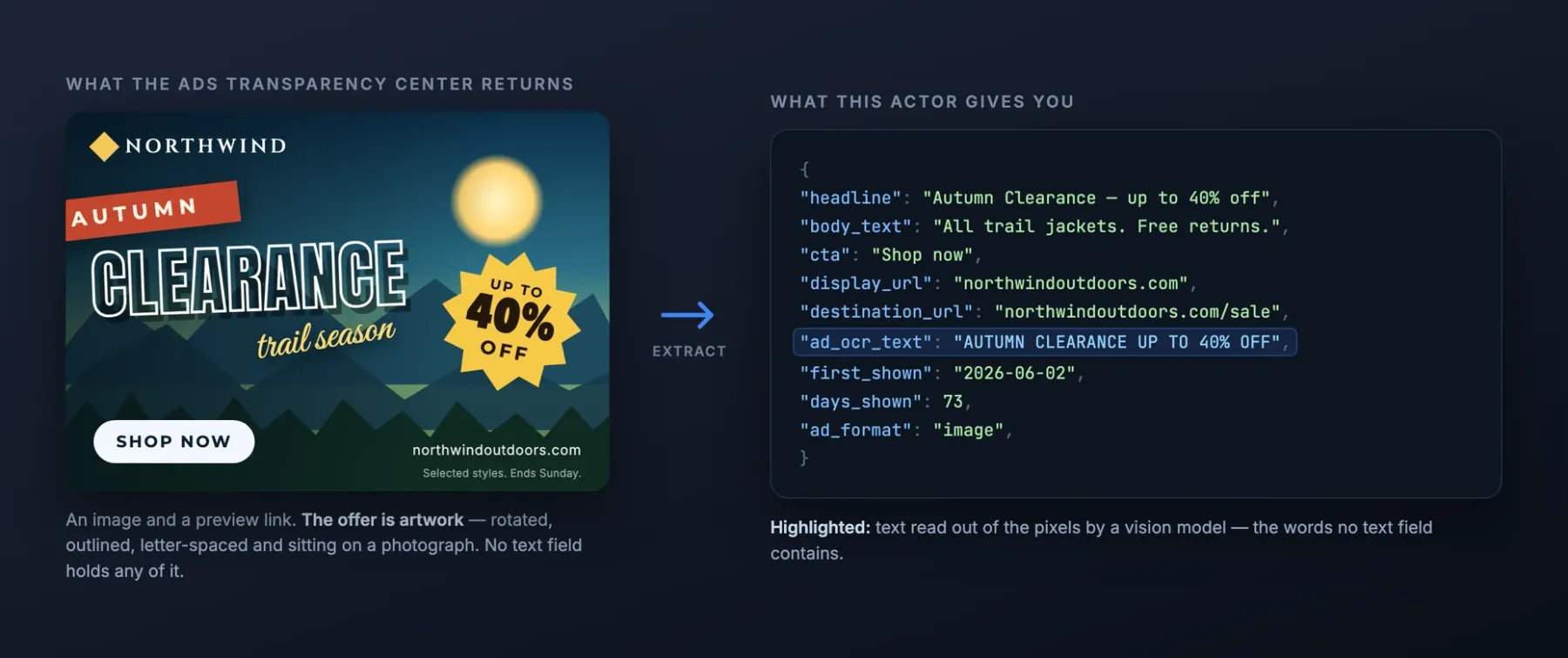
Every ad a company is running on Google — with the actual ad copy, including the words baked into image creatives, and for political ads, what it cost. Headline, body text, display URL, call to action, run dates and the advertiser's own {KeyWord:...} insertion templates, for any advertiser in any country. Watch a competitor on a schedule and get only their new ads — into Slack or your inbox through Apify's own integrations, with ads you already have never fetched or charged. Most Ads Transparency scrapers hand you an image thumbnail and a preview link; this one returns the words — and where the words are pixels, a vision model reads them out. Proxies are handled for you: no proxy to buy, configure or pay for, even on an advertiser with tens of thousands of ads.
Pay only for what a run actually returns, with no start fee.
Tested head-to-head on 2026-11-01
The job: the ads of one advertiser domain (monday.com), 50 ads. Every Actor ran on it the same day from the same harness; a rival's cost is what a buyer account paid, this Actor's is its list price on the Free plan. Fields counts the filled fields of a typical row. Re-measured monthly.
| Actor | Rows | First row | Run time | Cost | Fields | Failures |
|---|---|---|---|---|---|---|
| this Actor | 50 | 7.1 s | 7.9 s | $0.10 | 14 | none |
scrapesage/google-ads-transparency-scraper | 50 | 14 s | 29 s | $0.10 | 17 | none |
solidcode/ads-transparency-scraper | 50 | 3.8 s | 27 s | $0.051 | 9 | none |
Why this scraper, not the other Ads Transparency actors
- The ad copy, and more of it. Google returns text and responsive ads as a preview URL rather than as text. Most actors ship that URL and stop: measured 2026-08-13, the category leader returns no text field at all, and one free actor returned ad text on 0 of 14 text ads while declaring the field. One competitor does extract copy — head-to-head on the same 20 monday.com creatives, it returned copy on 3 and this actor on 7.
- We manage the proxies. You do not. Google throttles this source per IP after roughly 2,400 records, and only a fresh exit recovers — which is why most scrapers in this category either hand you a short dataset or tell you to go and buy a rotating proxy first. This Actor carries its own and switches to it the moment a request is blocked, so a 17,838-ad advertiser comes back complete. There is no proxy input to configure, no proxy bill of your own, and nothing to get wrong.
- Image ads read by a vision model, not a 1990s OCR engine. On a typical consumer advertiser most creatives are pure images with no text field anywhere — the headline and the offer exist only as pixels. Switch on
ocrImageAdsand they come back as text. It uses an OpenAI vision model rather than classical OCR, and on stylised display creatives that is worth 16% more words recovered (646 vs 557 over 27 real ads, measured 2026-08-14): Tesseract returnedTEMY BNG SALEwhere the ad saysTEMU BIG SALE,SU giftfor$0 gift, andEstagao de Energia PortatilforEstação de Energia Portátil, while missing90% OFF CLEARANCEandSHOP NOWcompletely. Ad artwork — text over photography, letter-spaced, accented — is the case classical OCR is worst at. No key to paste and no separate OpenAI bill: model usage is included in the per-image fee. Google publishes many plain text ads the same way — a rendered screenshot with no text behind it — and those are read whenever ad copy is on, no switch needed; the words arrive inad_ocr_text.ocrImageAdsextends the same reading to image ads. - The
{KeyWord:...}insertion templates. A search ad headline is often a template like{KeyWord:Nike Air Max 95}, which is the advertiser's own targeting logic written down: the keywords they bid on and the phrasing they swap in. You get the raw template, not the rendered guess — no other actor in this category exposes the field at all. - Run dates, so you can tell what works. Every ad carries when it first ran, when it last ran, and how many days it has been live. An ad running unchanged for 300 days is an ad that converts — nobody funds a loser that long. This is the fastest read on which of a competitor's messages actually earn their budget.
- Political ads with spend and reach. Switch on
politicalAdsand election ads come back carrying what commercial ads never do: how much the advertiser spent on each creative and how many times it was shown, as the ranges Google publishes — plus the advertiser's verified identity. Campaign spending, per creative, without a FOIA request. - Location and sitelink extensions, when the ad carries them — store names, addresses, cities, and categories attached to the creative.
- By domain, by brand, or by exact advertiser. One brand often advertises through several verified entities (Nike runs as both
Nike Retail BVandNike, Inc.); a domain search sweeps all of them, andresultType: advertiserslists them so you can see who you are actually looking at. - Filters that do not cost you rows you did not want. Date range, ad format, and an
onlyAdsWithCopyswitch that skips creatives carrying no text — skipped records are never stored and never charged for, so you are not paying per row for image ads when you came for copy. - Monitor a competitor and pay only for what changed. Set
onlyNewAdsand each run skips every creative earlier runs already delivered — not fetched, not returned, not charged; the memory is named after the targets, or after your ownstateStoreName. Measured: a first run returned 313 ads, the repeat returned 0. - It pulls the whole advertiser, and you do not need to bring a proxy. There is no depth cap: a 17,838-ad advertiser comes back complete. This source throttles per IP after roughly 2,400 records, and a rotating exit is the only thing that recovers from it — so this Actor carries one. Most scrapers in this category hand you a short dataset at that point, or tell you to go buy a proxy first. You can still set
proxyUrlto use your own. And if the source cuts a search off anyway, the run reports PARTIAL rather than passing a truncated dataset off as a full one: a short result from a quiet advertiser and a short result from a cut-off crawl are different things, and you can tell them apart.
Same competitor, other ad platforms
Our ad library scrapers share their column names — advertiser_name, body_text, cta, destination_url, first_shown, last_shown, days_shown, regions and more — so one competitor's ads from every platform land in one table with no mapping.
- Meta Ad Library Scraper — every ad a page runs on Facebook, Instagram, Messenger, WhatsApp and Threads, with the landing URL, media, run dates and EU reach.
- LinkedIn Ad Library Scraper — every ad a company runs on LinkedIn, with the full detail page: payer, impressions by country and the targeting the advertiser chose.
- TikTok Ads Library Scraper — every ad an advertiser runs in TikTok's Ad Library, with targeting, reach per country, payer and landing page.
- TikTok Creative Center Scraper — TikTok's top ads by country and period with CTR and retention curves, plus trending hashtags and videos.
Who it's for
- Performance marketers & agencies — read a competitor's live ad copy and the keywords behind it, then pitch or counter it — with the run dates showing which messages have survived.
- Founders sizing up a market — see who is paying to acquire customers in a niche, how long their ads have run, and exactly how they position — evidence of a market with money in it, before you spend any.
- Copywriters & creative strategists — a corpus of ad copy that is proven in market, sorted by how long it stayed up, instead of swipe files of ads nobody knows performed.
- Journalists, researchers & campaign teams — election ads with the money attached — what each creative cost, how far it reached, and which committee paid for it.
- Brand & competitive-intel teams — monitor a competitor's whole ad footprint per country, including which creatives just started and which just stopped.
Quick start
One competitor's ads
Read the words inside image ads
A brand's ads, across every name it advertises under
Metadata only, faster
Their YouTube ads only
Weekly monitor — only new ads
Political ads with spend and reach
Which advertisers does a brand run under
Switching from scrapesage/google-ads-transparency-scraper?
Your input works as it is. Each name in the left column is read as this Actor's own field and the run log says so (read <theirs> as <ours>); a name marked not read is ignored with a note. A value in the other Actor's shape, an object list or its own date form, is read too.
| scrapesage/google-ads-transparency-scraper | this Actor | what to know |
|---|---|---|
queries | searchTerms | Brand names or domains. |
domains | domains | The same name. |
advertiserIds | advertiserIds | The same name; the advertiser's URL works too. |
startUrls | startUrls | The same name and shape. |
resultType | resultType | The same name and values. |
region | region | The same name; a code or ANYWHERE. |
platforms | platforms | The same name. |
adFormat | adFormats | One word (VIDEO) read into the list; ALL = every format. |
startDate | startDate | The same name. |
endDate | endDate | The same name. |
maxAdsPerSearch | maxAdsPerTarget | Ads per domain, advertiser or search term. |
maxAdvertisersPerQuery | maxAdvertisersPerSearchTerm | Advertisers followed per brand name. |
includeDetails | includeAdCopy | Each creative's real copy, display URL and templates. |
detailConcurrency | adCopyConcurrency | Creative previews fetched in parallel. |
onlyNewAds | onlyNewAds | The same name. |
monitorStoreName | stateStoreName | The memory's name. |
includeRawData | includeRawData | The same name. |
proxyConfiguration | not read | Not read: the Actor's own exits. |
urlsFromFile | not read | Not read: paste the URLs into startUrls. |
What differs:
domains,advertiserIds,startUrls,resultType,region,platforms,startDate,endDate,onlyNewAdsandincludeRawDatacarry the same names. The leader'squeries(brand names or domains) aresearchTerms;adFormat(one word) fills theadFormatslist;includeDetailsisincludeAdCopy;monitorStoreNameisstateStoreName.urlsFromFileis not read (paste the URLs intostartUrls);proxyConfigurationis not read: the Actor brings its own exits. Image ads are read by a vision model (ocrImageAds), which the leader has no switch for.
Output
One record per ad creative:
| field | meaning |
|---|---|
advertiser_name | The verified advertiser's name as Google publishes it. |
advertiser_id | Google's stable identifier for the advertiser (AR...). Join on this across runs and regions. |
creative_id | Google's stable identifier for this ad creative (CR...). Deduplicate on this. |
ad_format | text for search and responsive ads, image for display creatives, video for video ads. Google returns text and video ads identically, so video is only distinguished when includeAdCopy is on — with it off, video ads are labelled text. |
ad_surface | Which Google surface the ad ran on — search, shopping, youtube, or display for an HTML5 animated creative — read from the creative's own shape. Needs the ad-copy fetch on; null when the creative was not opened. |
headline | The ad's headline, as written by the advertiser — including any {KeyWord:...} insertion template. Null on pure image and video creatives, which carry no text component. |
body_text | The ad's body copy, as written by the advertiser. |
ad_ocr_text | Text read out of the creative's pixels, in reading order. Filled for text ads that Google publishes only as a screenshot whenever ad copy is on, and for image ads when ocrImageAds is on — and only when the image actually carried words. |
headlines | Every headline variant on the creative. Responsive ads carry several and Google rotates them; the primary headline is the first of these. |
descriptions | Every body-copy variant on the creative, for the same reason as headlines. |
display_url | The display URL shown in the ad (the domain the ad presents itself as). |
destination_url | The landing page the ad actually clicks through to, including its campaign path — the page they are spending money to send traffic to, not just the domain they display. |
cta | The ad's call-to-action button text, as written — INSTALL, Sign up, Jetzt buchen. Present on the display, app and video creatives that carry one; measured at 14 of 48 creatives with copy across seven advertisers. Search ads have none — their button is the headline. |
keyword_templates | The advertiser's raw keyword-insertion values, pulled out of {KeyWord:...} in the headline and body — the terms they bid on and swap into the ad. No other actor in this category exposes this field. |
extensions | Location and sitelink extensions attached to the creative, when present — store name, address, city, postcode, country, and category. |
first_shown | The date this creative was first shown, as Google reports it. |
last_shown | The date this creative was last shown. A last-shown date in the past means the ad has stopped running. |
days_shown | How many days the creative has been running. The single best public proxy for whether an ad converts — long-lived ads are ads someone keeps paying for. |
impressions_max | Upper bound of how many times the creative was shown. Political ads only. |
impressions_min | Lower bound of how many times the creative was shown. Political ads only. |
spend_currency | Currency of the spend range, e.g. USD. Political ads only. |
spend_max | Upper bound of what the advertiser spent on this creative. Political ads only. |
spend_min | Lower bound of what the advertiser spent on this creative. Political ads only — Google publishes spend as a range, never an exact figure. |
image_url | The creative's image, for display ads. |
image_width | Image width in pixels. |
image_height | Image height in pixels. |
preview_url | Google's own rendered preview of the creative. This is the field competing actors return instead of the ad copy. |
target_domain | The domain the search matched this creative on. Present when you search by domain, so you can tell which of several domains in one run produced a row. |
regions | Countries the creative declares it ran in. Google publishes this for political advertisers, where disclosure is mandatory; commercial ads usually leave it empty. |
region | The country the ads were searched in, as a two-letter code. |
ad_url | The creative's page in Google's Ads Transparency Center, for verification by hand. |
advertiser_country | The advertiser's country of registration, as Google verified it. Only on advertisers records. |
advertiser_ad_count | How many ads this advertiser has published in total, as the source counts them. Advertiser results put those registered in your region first, then sort by this count, because the source ranks matches by name similarity, in every country — a search for a big brand otherwise leads with tiny lookalike accounts. |
advertiser_verified | Whether Google has verified this advertiser's identity. Only on advertisers records. |
matched_query | The domain or search term that matched this advertiser. Only on advertisers records. |
advertiser_url | The advertiser's page in Google's Ads Transparency Center. Only on advertisers records. |
raw | The source's untouched record for this creative, present only when includeRawData is on. |
advertiser_legal_name | The advertiser's registered legal name, as verified by Google. Political advertiser records only. |
advertiser_fec_id | The committee's FEC identifier, e.g. C00786657 — the key that joins this advertiser to US campaign-finance filings. Political advertiser records only. |
advertiser_office | Office sought, as filed: H House, S Senate, P President. Political advertiser records only. |
advertiser_district | District contested, e.g. SC-07. Political advertiser records only. |
advertiser_ads_min | Lower bound of how many ads this advertiser has run in total. Political advertiser records only. |
advertiser_ads_max | Upper bound of how many ads this advertiser has run in total. |
advertiser_impressions_min | Lower bound of how many times this advertiser's ads were shown in total. Political advertiser records only. |
advertiser_impressions_max | Upper bound of how many times this advertiser's ads were shown in total. |
advertiser_spend_total | Total spent by this advertiser on Google ads, to the dollar — not a range. Read from the same statistics the Ads Transparency Centre shows on its Insights tab. Political advertiser records only. |
advertiser_spend_currency | Currency of advertiser_spend_total, e.g. USD. |
advertiser_ads_total | Exact number of ads this advertiser has run, as the statistics endpoint reports it — the advertiser card only carries a range. |
spend_by_day | Daily spend history for the advertiser — one row per day with date, spend_share and spend in the advertiser's currency. Hundreds of days for an established campaign. Political advertiser records only. |
spend_by_region | Where the money went — one row per region with the place region named (South Carolina), its region_canonical and region_country, alongside spend_share, spend, and ads_share, the share of the advertiser's ads that ran there. Note ads_share does not sum to 1: one ad runs in many regions. Political advertiser records only. |
spend_by_format | Spend split by creative format, with the share of ads in each. Political advertiser records only. |
record_type | removed_ad on rows from the Europe removal feed. Absent on ordinary ad records. |
policy_decided_at | When Google decided to remove the ad. Removal-feed rows only. |
removal_reason | The headline reason the ad was removed, e.g. Misrepresentation or Account suspension — the first named violation on the record. Removal-feed rows only. |
violations | What the ad was removed for: one entry per violation with the named policy and policy_category — Misrepresentation / PROHIBITED PRACTICES — alongside Google's raw codes. Google publishes the taxonomy as numbers only; the names here were derived by pairing 280 feed rows against the labels the Ads Transparency Centre renders for those same rows. A code outside the derived set keeps its number and a null name rather than a guess. Removal-feed rows only. |
Example record:
Pricing
Pay only for what a run actually returns, with no start fee. Prices are per 1,000 and fall with your Apify plan:
| per 1,000 | Free | Starter | Scale | Business |
|---|---|---|---|---|
| Ad result | $1.20 | $1.00 | $0.90 | $0.80 |
| Ad copy, when the creative carried any | +$1.30 | +$1.15 | +$1.05 | +$0.95 |
| Political spend & reach, when published | +$1.50 | +$1.30 | +$1.15 | +$1.00 |
| Image text read (OCR), model usage included | +$1.00 | +$1.00 | +$1.00 | +$1.00 |
| Advertiser record | $2.00 | $1.70 | $1.50 | $1.30 |
So ordinary ads with copy run $2.50 per 1,000 on the Free plan and $1.75 on Business; metadata alone is $1.20 falling to $0.80. Enterprise plans have their own rates — the Actor's Pricing tab shows the price for your plan. OCR is flat on every plan because it is the one line with a real per-image cost behind it — you are not billed separately by OpenAI, and you paste no key.
Each fee is charged per record that actually carries the thing. Image creatives contain
no text and are never billed the copy fee. Ads where Google published no spend are never
billed the political fee. Set onlyAdsWithCopy and text-free ads are not returned or billed
at all.
Usage patterns
- Pull a competitor's ad copy — Pass their domain and a region. You get every ad they run there, each with its headline, body text, display URL, and how long it has been running.
- Read the offer out of an image ad — Set
ocrImageAdson a consumer advertiser and the words baked into the artwork come back inad_ocr_text. On brands that advertise mostly in images this is the difference between a thumbnail URL and the offer itself — narrow withadFormatstoimageto see it clearly. Text ads that Google publishes only as a screenshot are read whenever ad copy is on, no switch needed. - Find the messages that survive — Sort the results by
days_shown. The ads at the top have been paid for the longest, which is the strongest public signal that they convert. - Extract the keyword strategy — Read
keyword_templatesacross an advertiser's ads to see the terms they bid on and how they phrase their offer around each one. - Track political spending — Set
politicalAdsand pass a committee or candidate advertiser. Every ad comes back with its spend range and how many times it was shown, so you can rank a campaign's creatives by budget. - Compare a market — Run several competitor domains in one go with
maxAdsPerTargetset, so one prolific advertiser cannot eat the whole budget and leave the others empty. - Find who a brand advertises as — Set
resultTypetoadvertisersand pass a brand name. You get every verified advertiser entity matching it, with country and verification status, before you spend anything pulling ads. - Watch a competitor weekly — Schedule the same input with
onlyNewAds. Every run returns only creatives you have not been given before, so a weekly watch costs a handful of ads instead of the whole advertiser. AstateStoreNameis optional: left empty, the memory is named after the targets. - Only what changed recently — Set
startDateto keep ads whose run overlaps that date or later — new creatives, plus the long-running ones still live. - See the same competitor's Meta ads next to these — Run the same brand through our Meta Ad Library Scraper: every ad a page runs on Facebook, Instagram, Messenger and Threads, with the copy, the landing URL, the media and the run dates. The two outputs share
advertiser_name,headline,body_text,destination_url,cta,first_shown,last_shownanddays_shown, so one sheet shows both platforms — and itsonlyNewAdswatch works the same way as this one. - See what Google took down, and why — Set
removedAdsfor Google's Europe-wide feed of ads it has removed: one row per creative with the policy broken (removal_reason, plus the fullviolationslist), the date the decision landed, and how long the ad ran before it. This is a single global feed — the request takes a page size and nothing else, sodomains,searchTermsandregiondo not narrow it;regiononly labels the rows. Rows carry no advertiser and no ad copy.
Input configuration
| field | type | default | what it does |
|---|---|---|---|
domains | array | [] | Domains to pull ads for, e.g. nike.com. Returns every verified advertiser matching that domain — a brand often runs under several (Nike advertises as both Nike Retail BV and Nike, Inc.). |
searchTerms | array | [] | Brand or company name, e.g. Nike. Resolved to the matching verified advertisers first, then their ads are pulled — the ad search itself matches domains, not names, so a bare name would otherwise return nothing. Use maxAdvertisersPerSearchTerm to control how many matches are followed. |
advertiserIds | array | [] | Exact advertiser IDs, e.g. AR18378488041124659201 — the AR... value in an advertiser's Ads Transparency Center URL. The whole advertiser URL is accepted too. Use this when you want one specific advertiser and nothing else. |
region | string | "US" | Two-letter country code for the country the ads were shown in, e.g. US, GB (UK also works), DE, ES, IN. Ads are published per country: the same advertiser returns different creatives in different regions. Use anywhere to search every country at once — the same thing region=anywhere does in a Transparency Center URL. anywhere covers scraping ads by domain, advertiser id or URL; searchTerms, resultType: advertisers and politicalAds need a real country, because Google's lookup and stats endpoints return nothing without one. |
resultType | ads / advertisers | "ads" | ads returns one record per ad creative. advertisers returns one record per verified advertiser matching your domains or search terms — use it to discover which advertiser entities a brand runs under before pulling their ads. |
startDate | string | YYYY-MM-DD. Keeps ads whose run overlaps this date or later — an ad that started years ago and is still running counts, because it is still running. | |
endDate | string | YYYY-MM-DD. Keeps ads whose run overlaps this date or earlier. | |
adFormats | array | [] | Keep only these formats. Empty means all. Google returns text and video ads identically, so selecting either turns on the ad-copy fetch — that is the only thing that tells them apart. |
onlyAdsWithCopy | boolean | false | Skip ads that carry no text at all — image creatives not read by OCR, and the occasional preview the source refuses to serve. A text ad read from its screenshot counts as carrying text. Records that are skipped are never stored and never charged for, so you only pay for rows that carry the copy. |
includeAdCopy | boolean | true | Follow each ad's creative preview and extract the real headline, body text, display URL and the advertiser's {KeyWord:...} insertion templates. Text ads that Google publishes only as a screenshot are read by a vision model instead and arrive in ad_ocr_text. Turn off for a faster, metadata-only run. |
maxAds | integer | 0 | Stop after this many ads in total, across every search. 0 means no limit. |
maxAdsPerTarget | integer | 0 | Cap each domain, search term, or advertiser ID separately. Without this, one prolific advertiser can consume the whole maxAds budget and the searches after it return nothing. 0 means no per-search cap. |
adCopyConcurrency | integer | 4 | How many creative previews to fetch in parallel. Raise for speed, lower if you see throttling. |
requestDelaySecs | number | 0.3 | Seconds to wait between result pages. The source tolerates a steady pace far better than a burst. |
maxAdvertisersPerSearchTerm | integer | 5 | How many matching advertisers to follow for each brand search term. A common name like Nike matches 150+ advertisers, most of them unrelated small businesses; the default takes the closest few. |
startUrls | array | [] | Paste Ads Transparency Center URLs — an advertiser page (.../advertiser/AR...), a single creative (.../advertiser/AR.../creative/CR...) or a search by domain (...?domain=nike.com). The advertiser's own website (https://www.nike.com) is read as that domain. A creative URL narrows the run to that creative, and a region in the URL is used unless you set one explicitly. |
platforms | array | [] | Keep only ads shown on these Google surfaces. Empty means all. search and shopping share one filter at the source, so separating those two also needs the ad-copy fetch on. |
creativeIds | array | [] | Return only these creatives (CR..., or a creative's Transparency Center URL). On their own they are a complete request: the Actor looks up each creative's advertiser and returns that creative. With advertiserIds, domains or startUrls they narrow those searches to the listed creatives. |
onlyNewAds | boolean | false | Skip creatives delivered by previous runs of the same targets (or of the same stateStoreName). Skipped ads are never fetched, never returned and never charged — a weekly monitoring run pays only for what actually changed. Works the same from the API or your own cron: the memory is named after the targets, so repeating the same input finds it. Without this, a repeat run says in its status how many ads it had already delivered. |
stateStoreName | string | Name of the memory that holds the creative IDs already delivered, so onlyNewAds can tell new from old across runs. The memory is kept by the Actor on its side, one per Apify account — nothing is stored in your account. Optional: left empty, the name is derived from the targets, so a scheduled task remembers on its own. Set one to share memory between different inputs, e.g. ads-monday-us, or change it to start over. | |
resumeCursor | string | Continue paging from where an earlier run stopped. Paste the RESUME_CURSOR value from that run's key-value store. It is Google's own paging position — not a credential, and it grants no access to anything. | |
includeRawData | boolean | false | Add the source's own untouched record to each row as raw, for callers who would rather map the fields themselves. |
politicalAds | boolean | false | Return political and election ads instead of ordinary ones. These carry what commercial ads never do: how much was spent on each creative and how many times it was shown, both as the ranges Google publishes. Note this is a filter — with it on, only political ads come back. |
useCache | boolean | true | Serve ad copy, image text and campaign statistics that an earlier run already extracted, instead of fetching them from Google again. A creative's content never changes once it is published, so cached copy stays valid for ever; campaign statistics expire on the TTL below. The cache is on our side: nothing is written to your Apify account. Turn it off to force a fresh read of every creative. |
cacheTtlHours | integer | 24 | How long campaign statistics from the shared cache stay valid. Ad copy and image text ignore this and are kept for ever, because a creative's content cannot change. |
removedAds | boolean | false | Return Google's Europe-wide feed of ads it has taken down, newest first, with the policy decision date and what each ad ran for before removal. This is a single global feed: advertiser, domain and region filters do not apply to it. |
ocrImageAds | boolean | false | Image creatives carry their words in the pixels and have no text field at all — on a typical advertiser they are most of the result set. Turn this on to read them with a vision model. Text ads that Google publishes only as a screenshot are read whenever ad copy is on, with or without this switch. Adds roughly two seconds per image, and is charged only for images that actually yielded text. |
openaiApiKey | string | Optional. The Actor uses its own model access by default and bills you a flat fee per image read. Supply your own OpenAI key only if you would rather the model usage went to your account. | |
ocrConcurrency | integer | 12 | How many image creatives to read at once when ocrImageAds is on. Separate from adCopyConcurrency, which paces requests to Google: OCR calls a different service, and it is network-bound, so it scales with concurrency (measured 0.6 to 3.9 images/second going from 1 to 16). Lower it only if you hit your own provider's rate limit. |
Errors
A run does not fail because of your input. When an input cannot be used — a date that is not a date, an id in the wrong form, two settings that contradict each other — the run ends Succeeded, charges nothing, and says what to change:
- the status message starts with
INPUT REJECTED; - the dataset holds one row,
{"error": true, "code": "…", "message": "…"}, and no results; - the key-value store record
ERRORholds the same object.
From code, check error on the first row before reading results.
A search that matches nothing is not an error: the dataset is empty and nothing is charged. A run that ends Failed is a fault on our side, never your input; it charges nothing, and we are alerted.
FAQ
How is this different from the other Google Ads Transparency scrapers?
They return metadata — creative IDs, dates, an image thumbnail, and a preview URL. This one opens the preview and returns the actual text of the ad: headline, body, display URL, and the raw {KeyWord:...} templates. If you only need IDs and dates, the cheaper actors are fine.
Which countries can I search?
Any country the Ads Transparency Center covers — pass a two-letter code such as US, GB, DE, ES, IN — or anywhere to search every country at once, the same thing region=anywhere does in a Transparency Center URL. Ads are published per country, so the same advertiser returns different creatives in different regions: a GB locksmith returns 11 ads under GB, none under US, and the same 11 under anywhere. anywhere covers scraping ads by domain, advertiser id or URL; searchTerms, resultType: advertisers and politicalAds need a real country, because Google's advertiser-lookup and stats endpoints return nothing without one.
Some ads show in the Transparency Center but not in my results — why?
Four reasons, in the order they actually occur:
- You are signed in and the Actor is not. Google serves some ads only to a signed-in account. This Actor runs anonymously — no Google account, nothing to get your account flagged — so those ads are not in the output. Open the same page in an incognito window: what you see there is what you get here.
- Google's count is a range, not a number. "~4K ads" means somewhere between 3,000 and 4,000. Getting 3,015 back is the count being right, not the scrape being short.
- Region. Ads are published per country. An advertiser with 200 ads in Germany may have none in the US. Use
anywhereif you do not care which country. - The source cut the run off. Sustained paging gets throttled at roughly 2,400 ads on a single IP. When that happens the run reports PARTIAL and names the searches it could not finish — it never hands you a short dataset labelled as complete. Set
proxyUrlto a rotating proxy to page past it.
Do I get image and video ads too?
Yes. Image ads come with the image URL and its dimensions; video ads are identified as such and carry their copy plus the companion banner. Note that pure image creatives contain no text anywhere — on a typical consumer advertiser they are the majority of ads, so if you only want rows with copy, set onlyAdsWithCopy and you will not be charged for the rest. One kind stays wordless on purpose: HTML5 animated creatives (ad_surface: display, a preview_url and no image_url) draw their words as shapes on a canvas, so there is no text and no image to read — they are billed as an ad only.
How good is the image-ad OCR, really?
It is an OpenAI vision model (gpt-4.1-mini), not Tesseract or PaddleOCR, and the difference shows on exactly the creatives you would buy OCR for.
Measured 2026-08-14 on 27 real display creatives, both engines over identical bytes: 646 words recovered against Tesseract's 557. On plain search ads rendered as images the two tie — that is clean black text on white, which classical OCR handles fine. The gap opens on ad artwork: text over photography, letter-spaced, accented, or part of the design. Tesseract read TEMY BNG SALE where the ad says TEMU BIG SALE, SU gift for $0 gift, Estagao de Energia Portatil for Estação de Energia Portátil, and missed 90% OFF CLEARANCE and SHOP NOW outright.
Honest trade-off: it is slower per image than a local binary (about 1.5s against 0.26s), because the request leaves the machine. You are paying for the read being right, and the fee includes the model usage — no key to paste, no second bill.
What do I get for political ads that I do not get otherwise?
Spend and reach. Each political creative carries the range Google published — for example USD 200-300 spent and shown 0-1,000 times — alongside the usual dates and copy. Note politicalAds is a filter: with it on, only political ads are returned, so run it separately from a commercial pull. Many political creatives are images and carry no text, and the copy fee is not charged on those.
Is this the whole history of an advertiser's ads?
It is everything the Ads Transparency Center currently publishes for that advertiser in that region, including ads that have stopped running — first_shown and last_shown tell you when each ran. Google decides what stays published; this actor does not add history of its own.
Do I need a login or an API key for Google?
No login and no API key — the Ads Transparency Center is public. You also do not need a proxy: Google throttles this source per IP after roughly 2,400 ads, and this Actor carries its own rotating exit and escalates to it automatically the moment a request is blocked, so a 17,838-ad advertiser comes back complete and you configure nothing. Runs that never reach the limit never touch a proxy at all. If the source cuts a search off anyway, the run reports PARTIAL and names what it could not finish, rather than handing you a short dataset that looks complete.
Can I get an alert when a competitor starts a new ad?
Yes, with a schedule and one of Apify's own integrations. Nothing to host.
- Create a Task from this Actor with the advertiser's domain and
onlyNewAds: true. AstateStoreNameis optional: leave it empty and the task remembers under a name derived from its targets, or set one per thing you watch, e.g.ads-monday-us. LeavemaxAdsat 0 for the first run so the whole advertiser is remembered — with a cap, each run returns the next batch of unseen creatives until the advertiser is exhausted. After that, every run returns only creatives you have not been given before, and skipped ads are never charged. - Schedule it — Task → Schedule. Weekly is the natural cadence for ad creatives; daily if the advertiser is active. A run that finds nothing costs nothing.
- Add an integration — Task → Integrations: Slack posts one message per run with a link to the new rows; Gmail sends one email per run with the rows attached; a webhook calls your URL. Slack and Gmail fire on every successful run, including an empty one, so keep the schedule weekly or daily, or route a webhook through Make, n8n or Zapier and filter on the run's item count.
Ready-made: the published task Follow a competitor weekly carries the right input — copy it, change the domain, schedule it, connect Slack.
Integration
Calling this from your own code or cron? Keep onlyNewAds: true: each call then returns only ads the earlier calls did not, and the ads you already have are never fetched or charged. The memory is named after the targets, so the same input finds it on the next call with nothing to store on your side.
JavaScript
Python
CLI
REST
AI agents and MCP
Apify's MCP server offers this Actor as a tool to Claude, Cursor, VS Code and any other MCP client. Connect https://mcp.apify.com?tools=hyperbach/google-ads-transparency-scraper and ask, for example: "Pull the Google ads monday.com is running in the US, with the ad copy". The agent fills the input from the table above and reads the rows from the run's dataset. A field under the name another Actor gives it is read as this Actor's own: queries, query, keywords, keyword as searchTerms; domain, websites, sites, advertiserDomains as domains; advertiserId, advertisers, ids as advertiserIds; urls, url, links as startUrls (and more).
n8n, Make and Zapier
The Apify node in n8n, the Apify app in Make and the Apify integration in Zapier run this Actor on a schedule or from a trigger and read its dataset. A webhook on the run's end (Integrations on the Actor page) sends the rows on to your own endpoint. Nothing to install on our side.
Support
Disagree with a charge? Write to apify@hyperbach.com with the run ID. We will ask Apify to compensate you, and the charge comes back to your Apify account as platform credit.
Did it do the job? A short review on the Store, at any rating, helps the next buyer choose.
This page is generated from the Actor's schemas and a live sample — it cannot describe a field the Actor does not have.


