
Google Play Store Reviews Scraper: Android App Reviews
Pricing
from $0.04 / 1,000 reviews
Google Play Store Reviews Scraper: Android App Reviews
Scrape Google Play reviews by app URL or package name, language and country: rating, text, reviewer nickname, date, app version, thumbs-up, developer reply and review id, newest first, most relevant or highest rating. Several apps per run, a cap per app, a free app row with a completeness verdict.
Pricing
from $0.04 / 1,000 reviews
Rating
0.0
(0)
Developer
Hyperbach
Maintained by CommunityActor stats
0
Bookmarked
2
Total users
1
Monthly active users
6 hours ago
Last modified
Categories
Features
Share
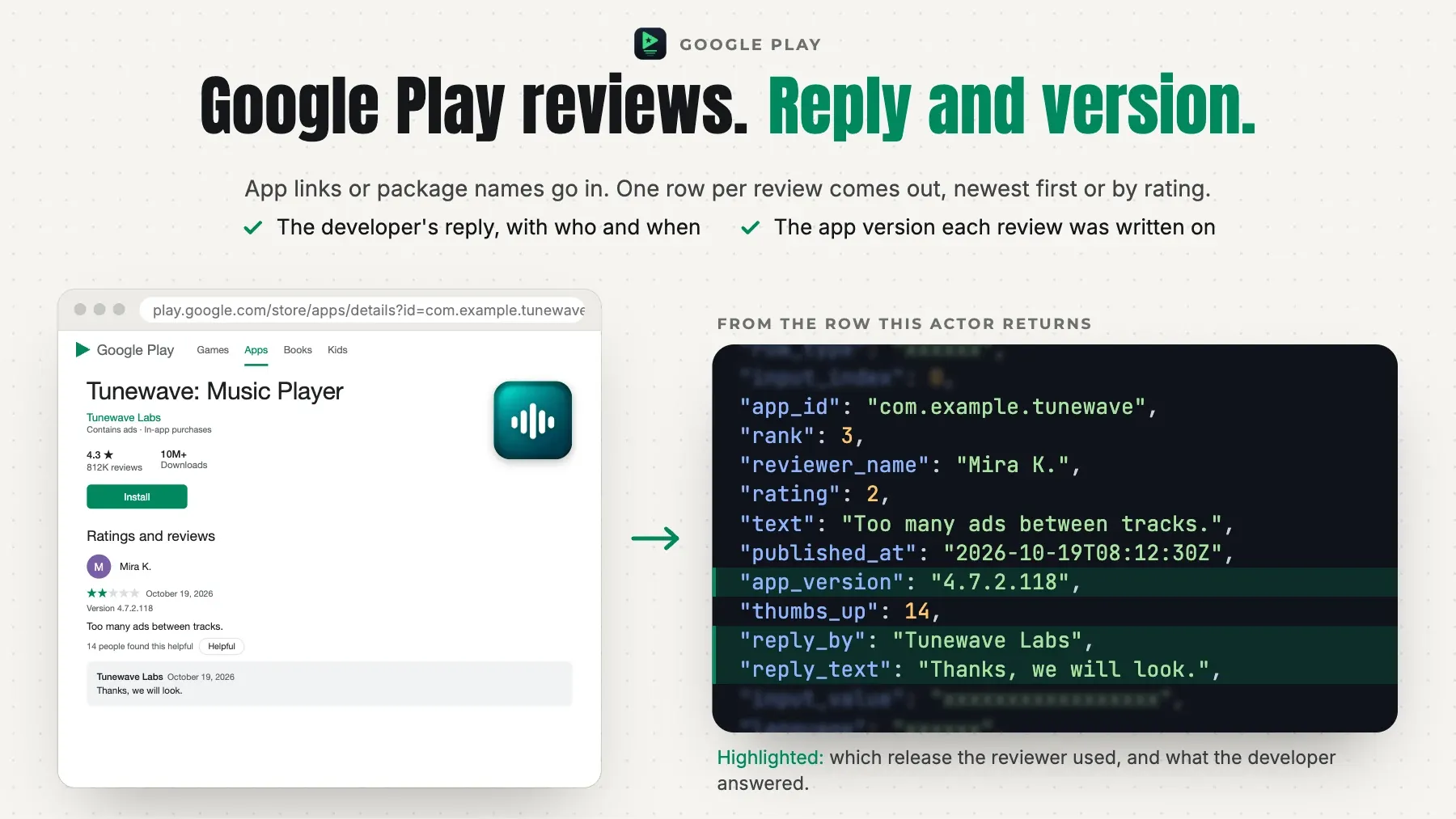
Google Play reviews by app, language and country, logged out: Play URLs or package names in, one row per review out — the star rating, the text, the reviewer's nickname and avatar, the date, the app version the reviewer used, the thumbs-up count, the developer's reply with its date, the criteria ratings and the review id — newest first, most relevant or highest rating first, several apps in one run, a cap per app. One free app row per app carries a completeness verdict: COMPLETE (the list's own end), CAPPED (your limit) or PARTIAL. An unknown package, an app with no review in the language: free typed rows. No login, no Google account, no API key, proxies handled for you.
$0.085 per 1,000 review rows on the Free plan, $0.07225 on Starter. A run start is $0.000546. The default input returns about 100 rows for about $0.009046. A value that names nothing is a free row that says why.
Why this Google Play reviews scraper
- Several apps in one run. Give Play URLs or package names: each app gets its own cap (
maxReviewsPerApp), and the run's cap sits on top (maxItems). A URL's ownhlandglare used whenlanguageandcountryare empty. - Three orders.
newest,mostRelevant(Google Play's own order) andrating(5 stars first, then 4, 3, 2, 1). The first pages of newest and most relevant shared no review on our test. Each row carries itsrankin the order read. - Every field Google Play shows. The star rating and the text, the reviewer's nickname and avatar, the date (UTC), the app version the review was written on, the thumbs-up count, the developer's reply with who wrote it and when, the criteria ratings some apps ask for (
criteria), and Google Play's review id with a link to the review; every row carries the app, the language, the country and the input it answers. - Deep walks. The reviews come 200 a call in the order asked, page after page, to the end of Google Play's list: our test read 12,000 of WhatsApp's newest English reviews with no end in sight (2026-10-22). The free
approw says how many reviews were delivered from how many pages and why the walk stopped: the list's own end (COMPLETE), your cap (CAPPED), or a refusal or the time limit (PARTIAL). - Language is the set. Google Play lists the reviews written in the language asked (
language, the store'shl): French reviews are another set from English ones. Thecountry(the store'sgl) is on every row; on our test it did not change the reviews listed. - Honest runs. A package Google Play does not know is a free
not_foundrow (its app page answered 404 on two exits), an app with no review in the language a freeemptyrow, a value that is no Play app a freeinvalidrow, a repeated app a freeduplicaterow. Every input gets a row; a review is charged once a run. - Fast and light. Plain HTTP on the call Google Play's own web page makes: 200 reviews a call, about 30 KB on the wire for the newest 200. A run of 3 apps × 260 reviews took 4 seconds of reading on our test.
Who it's for
- App developers and product teams — the newest reviews of your Android app in every language you ship, with the app version per review to see what a release changed, and your team's replies beside them.
- ASO and market researchers — the reviews of a list of competitor apps in one run, newest, most relevant or highest rated first, with the criteria ratings some categories carry.
- Data and analytics teams — typed rows keyed by
app_id,languageandreview_id, a free row per app with the status and verdict, a run summary to check a pipeline against.
Quick start
The newest reviews of two apps (a Play URL and a package name)
One app's reviews in German, up to 1,000
The most relevant reviews of an app
Output
One row per review (and one free app row per app):
| field | meaning |
|---|---|
row_type | review (one review, charged) or app (the app's row with the walk's verdict; free). |
input_index | The 1-based position in appIds of the input this row answers. |
input_value | The input as you gave it (the URL or package name). |
app_id | The app's package name (com.whatsapp). |
language | The language read (Google Play's hl: en, pt-BR …). |
country | The store country sent (Google Play's gl: US, GB …). |
sort | The order read: newest, mostRelevant or rating. |
status | An app row: ok, empty, not_found, invalid, duplicate, failed or not_read (see the FAQ). A review row: ok. |
status_detail | Why, in words, when the status is not ok. |
scraped_at | When the row was read (ISO 8601, UTC). |
review_id | Google Play's review id. |
rank | The review's position in the order read (from 1). |
rating | The star rating, 1 to 5. |
text | The review's text. |
reviewer_name | The reviewer's nickname, as Google Play shows it. |
reviewer_image | The reviewer's public avatar image. |
published_at | When the review was written or last edited (ISO 8601, UTC). |
app_version | The app version the review was written on (null when Google Play does not show one). |
thumbs_up | How many users marked the review helpful (thumbs up). |
reply_by | Who wrote the developer's reply (the developer's name), null when there is no reply. |
reply_text | The developer's reply to the review, null when there is none. |
replied_at | When the developer replied (ISO 8601, UTC). |
criteria | The criteria ratings Google Play asks for in some categories, as {criterion, rating} pairs (vaf_app_quality_visual_appeal …); null when the review has none. |
url | A link to the review on Google Play. |
app_url | The app's Google Play link in the language and country read (app row). |
reviews_delivered | Review rows delivered for this app (app row). |
pages_read | Pages of Google Play's review list read for this app (app row). |
verdict | COMPLETE (the list's own end), CAPPED (your limit) or PARTIAL (a refusal or the time limit) (app row). |
verdict_detail | The verdict in words, with the numbers (app row). |
Example record:
Pricing
Pay for the reviews a run delivers, plus one run start; no platform usage is billed to you. The review price falls with your Apify plan.
| event | unit | Free | Starter | Scale | Business |
|---|---|---|---|---|---|
Review (review) | per 1,000 | $0.085 | $0.07225 | $0.0595 | $0.0425 |
Run start (start) | per run | $0.000546 | $0.000546 | $0.000546 | $0.000546 |
A review is $0.085 per 1,000 on the Free plan ($0.000085 a review). Each run that delivers a charged review also pays the run start, $0.000546 once; a run that delivers no charged review pays nothing at all. So the 500 newest reviews of one app cost $0.0430 on the Free plan and $0.0367 on Starter, and 1,000 reviews $0.0855 / $0.0728; several apps in one run share one start. The free app row of every app, an unknown package (not_found), an app with no review in the language (empty), a value that is no Google Play app (invalid), a repeated app (duplicate), an app left at the cap or the time limit (not_read) and a refusal the run could not pass (failed) are never charged. A review is charged once a run. A run that stops early (a timeout, an abort) is charged for the reviews it delivered. maxItems counts the charged rows; before the first request the log names the price of each row at your plan and the most the run can cost. Enterprise plans have their own rates: the Actor's Pricing tab shows the price for your plan.
Usage patterns
- Apps, language and country —
appIdstakes Google Play URLs (https://play.google.com/store/apps/details?id=com.whatsapp&hl=en&gl=US;market://details?id=links too) or package names (com.whatsapp).languagetakes Google Play language codes (en,de,pt-BR,es-419…) andcountrytwo-letter codes (US,GB,DE…). Each app is read in thelanguageandcountrygiven; when they are empty, in its URL's ownhlandgl, else inenandUS. - What a row is —
row_type=review: one review with Google Play's record;rankis its position in the order read;sortthe order.row_type=app: the free row of one app in one language and country —reviews_delivered,pages_read, theverdictwith itsverdict_detail, and thestatuswith its reason. - How far an app goes —
maxReviewsPerApp= 0 (the default) reads every review Google Play lists for the app, language and order — a big app lists millions, so set a cap,maxItemsor a run timeout.maxReviewsPerApp= 100 is the first 100 in the order asked.maxItemscaps the charged rows of the whole run. The app row'sverdictsays where the walk stopped and why.
Input configuration
| field | type | default | what it does |
|---|---|---|---|
appIds | array | The apps to read: Google Play URLs (https://play.google.com/store/apps/details?id=com.whatsapp&hl=en&gl=US) or package names (com.whatsapp). A URL's own hl and gl are used when language and country are empty. Up to 1,000 apps a run; a value that is no Google Play app gets a free invalid row, an app given twice for the same language and country a free duplicate row. | |
language | string | The reviews' language as Google Play codes it (en, de, fr, pt-BR, es-419 …). Google Play lists the reviews written in this language, so each language is a different set of reviews. Empty: the app URL's hl, else en. | |
country | string | The two-letter Google Play country (US, GB, DE, IN …; UK is read as GB), sent as the store's gl and written on every row. Empty: the app URL's gl, else US. On our test the country did not change which reviews Google Play lists; the language does. | |
sort | newest / mostRelevant / rating | "newest" | newest: the newest reviews first. mostRelevant: Google Play's own most-relevant order. rating: the highest star rating first. |
maxReviewsPerApp | integer | 0 | Stop each app after this many review rows (0 = every review Google Play lists for the app, language and order; a big app lists millions, so set a cap or maxItems). |
maxItems | integer | 0 | Stop the run after this many review rows across every app (0 = no limit). App rows are free and not counted; an app left unread at the cap gets a free not_read row. |
feedback | string | A note to the people who maintain this Actor: what you needed and did not get. For example a missing field, a wrong or empty result, or the Actor you switch from or to, and why. The run does not read it: the rows and the charges stay the same. A person reads every note. |
Errors
A run does not fail because of your input. When an input cannot be used — a date that is not a date, an id in the wrong form, two settings that contradict each other — the run ends Succeeded, charges nothing, and says what to change:
- the status message starts with
INPUT REJECTED; - the dataset holds one row,
{"error": true, "code": "…", "message": "…"}, and no results; - the key-value store record
ERRORholds the same object.
From code, check error on the first row before reading results.
An app with no review in the language asked is not an error: it gets one free app row with status empty, and the run goes on with the others. A run that ends Failed is a fault on our side, never your input; it charges nothing, and we are alerted.
FAQ
Which status is which?
An app row's status is ok (reviews served), empty (the app exists and has no review in that language), not_found (Google Play does not know the package; its app page answered 404 on two exits), invalid (a value that is no Google Play app), duplicate (the same app, language and country twice: read once), failed (a refusal or an error; free) or not_read (left at maxItems, the charge limit or the run's time limit). A review row's status is ok.
Is there a review title?
No. A Google Play review has a star rating and a text, no title; the row carries what Google Play shows.
Does it read ratings without a text?
No. Google Play lists the reviews with a written text; a star rating given without one is not in the list, so the review count of an app on its page (the ratings) is larger than what any review scraper returns.
Is the reviewer's nickname on the row?
The nickname and the avatar are on every review row as Google Play shows them publicly. They are personal data: process them under your own lawful basis.
Does it need a Google account or API key?
No. Everything is read from Google Play's public web pages, logged out.
Do I need Apify Proxy or my own proxy?
No. The Actor uses its own connections, at no extra cost to you.
Integration
JavaScript
Python
CLI
REST
AI agents and MCP
Apify's MCP server offers this Actor as a tool to Claude, Cursor, VS Code and any other MCP client. Connect https://mcp.apify.com?tools=hyperbach/google-play-reviews-scraper and ask, for example: "Get the 50 newest Google Play reviews of WhatsApp and of com.instagram.android". The agent fills the input from the table above and reads the rows from the run's dataset. The input names are the ones in the table above. An agent or a person can add feedback to any run and say what was needed and not delivered: a missing field, a wrong or empty result, the Actor switched from or to, and why. The run returns the same rows at the same price, and a person reads every note.
n8n, Make and Zapier
The Apify node in n8n, the Apify app in Make and the Apify integration in Zapier run this Actor on a schedule or from a trigger and read its dataset. A webhook on the run's end (Integrations on the Actor page) sends the rows on to your own endpoint. Nothing to install on our side.
Support
Disagree with a charge? Write to apify@hyperbach.com with the run ID. We will ask Apify to compensate you, and the charge comes back to your Apify account as platform credit.
Did it do the job? A short review on the Store, at any rating, helps the next buyer choose.
See also
- ChatGPT Scraper — what ChatGPT, Gemini, Perplexity and Google's AI Mode and AI Overviews answer for your queries, with every source they cite.
- Keyword Search Volume & CPC Checker — Google search volume, CPC and competition for each keyword, with up to 104 months of history.
- Google Flights Scraper — every itinerary Google Flights lists for a one-way, round-trip or multi-city search, with the exact fare.
- Google Hotels Scraper — the hotels Google lists for a place and a stay, with the stay price and, on request, the price on each booking site.
- Google Maps Scraper — the places Google Maps lists for a search and an area: address, phone, website, rating and review histogram, hours, and new places only on request.
- Google Trends Scraper — Google Trends interest over time for up to five terms by country, time range and category, with interest by region, related queries and Trending Now.
This page is generated from the Actor's schemas and a live sample — it cannot describe a field the Actor does not have.


