
Instagram Search Scraper: Hashtag Search, Users, No Login
Pricing
from $1.15 / 1,000 hashtags
Instagram Search Scraper: Hashtag Search, Users, No Login
Instagram search results for any keyword, no login: hashtag search with exact post counts, user search with followers, bio and latest posts, places with address and coordinates, popular reels with plays and likes. Hashtags and reels in Instagram's own order. Misses free.
Pricing
from $1.15 / 1,000 hashtags
Rating
0.0
(0)
Developer

Hyperbach
Maintained by CommunityActor stats
0
Bookmarked
2
Total users
1
Monthly active users
a day ago
Last modified
Categories
Features
Share
Instagram's own search results for any keyword, as data, logged out. Give keywords (restaurant, restaurant prague) and pick what they find: hashtags (Instagram's own hashtag search, in its order, each with its exact post count), accounts (the accounts the Threads account search and the Facebook Ad Library list for the keyword, each with its profile: followers, following, posts, bio, category, 12 latest posts), places (Instagram places with their address, coordinates, phone, category and post count, kept only when the place's own record carries every word of your keyword) or popular reels (Instagram's ranked reels for the keyword, to the list's end, with plays, likes, comments, the time, the owner and the music). Every keyword also gets a free search row that says how deep Instagram's list went and why it ended. No login, no Instagram account, no cookie, proxies handled for you.
From $2.295 per 1,000 rows (hashtag) on the Free plan, $1.95 on Starter; every row and add-on is priced under Pricing below. A run start is $0.0058. The default input returns about 51 rows for about $0.12055. Every keyword gets one free search row with its verdict and the list's depth; a keyword the source lists nothing for (no_results, no_ranked_list, unknown_term), a value that names nothing (invalid_input) and a search every connection was refused on (blocked) are named there and never charged.
How it compares
- 171 times faster than Apify's own Instagram Scraper, with more data: 50 hashtags in 3.7 s, against 632 s; 17 fields per hashtag, against 6. The price is about the same: $1.72 per 1,000 hashtags, against $1.90.
- 94 times faster than Apify's own Instagram Search Scraper, with more data: 50 hashtags in 3.7 s, against 349 s; 17 fields per hashtag, against 6. The price is about the same: $1.72 per 1,000 hashtags, against $1.90.
- 156 times faster and 3 times cheaper than Apify's own Instagram API Scraper, with more data: 50 hashtags in 3.7 s, against 577 s; $1.72 per 1,000 hashtags, against $4.32; 17 fields per hashtag, against 6.
- 3 times faster than topapi's Instagram Search Scraper, with more data: 50 hashtags in 3.7 s, against 12 s; 17 fields per hashtag, against 15. It is 6 times cheaper: $0.27 per 1,000 hashtags, against our $1.72.
- Faster than memo23's Instagram Search Scraper, with more data: 50 hashtags in 3.7 s, against 7.2 s; 17 fields per hashtag, against 7. The price is about the same: $1.72 per 1,000 hashtags, against $1.60.
Measured on 2026-11-19. Each line compares one job, run by both scrapers at the same time. Prices are per 1,000 hashtags: Apify Actors at the Scale plan's prices.
Tested head-to-head on 2026-11-19
The job: Instagram's hashtags for one keyword, 50 of them (the input schema's example: restaurant, the hashtag type). Every Actor ran on it the same day from the same harness; every run's cost is at the Scale plan's prices: a rival's charged events at its price for that plan, this Actor's at its list price. Fields counts the filled fields of a typical row. Each rival searches Instagram's hashtags for the same keyword (restaurant, 50 results): Apify's three Instagram scrapers that do it (the most used, the dedicated search scraper and the API scraper) read the hashtags from a web search, memo23 and topapi from Instagram's own search. Re-measured monthly.
| Actor | Rows | First row | Run time | Cost | Fields | Failures |
|---|---|---|---|---|---|---|
| this Actor | 50 | — | 3.7 s | $0.086 | 17 | none |
apify/instagram-scraper | 50 | — | 632 s | $0.095 | 6 | none |
apify/instagram-search-scraper | 50 | — | 349 s | $0.095 | 6 | none |
apify/instagram-api-scraper | 50 | — | 577 s | $0.22 | 6 | none |
memo23/instagram-search-scraper | 50 | — | 7.2 s | $0.080 | 7 | none |
topapi/instagram-search-scraper | 50 | — | 12 s | $0.013 | 15 | none |
Why this Instagram search scraper
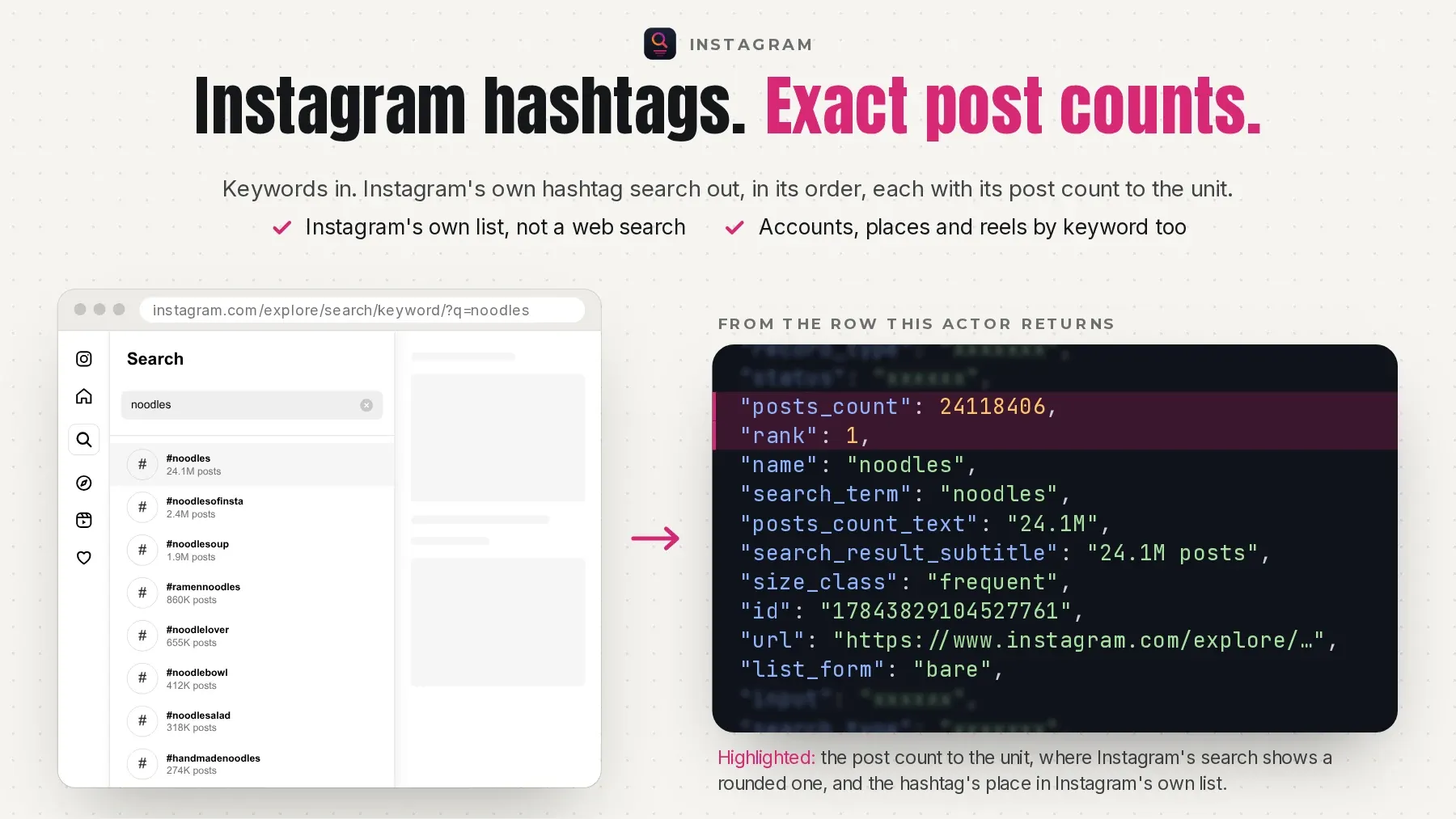
- Instagram's own hashtag list, in its order, with exact counts. The hashtag type reads Instagram's hashtag search itself: 55 hashtags for a keyword in Instagram's order, each with the post count to the unit (
restaurant76,641,776), and the deeper list past them when you ask for more (64 forrestaurant, 63 forcoffeeon our runs). Hashtag lists built from a web search instead come back with other names and null or rounded counts: on our tests 0 of 60 of another scraper's hashtag rows were in Instagram's own 55. - Accounts with their profiles, from the same two sources the leading search scraper uses. The user type reads the Threads account search and the Facebook Ad Library's page search (13 to 25 accounts a keyword; 23 for
restaurant) and reads each account's profile: the exact follower, following and posts counts, the bio with its links, e-mails and phones, the category and account type, the 12 latest posts, Instagram's related accounts and the engagement. A private or age-restricted account is a free row that says so. - Places that match your keyword. The place type takes the Instagram places a web index lists for the keyword and reads each one's own location page: name, address, city, ZIP, coordinates, phone, category, price range, hours, post count and latest posts. A place is kept only when its own record carries every word of your keyword (
matched_words); the rest are left out, free, and the search row counts them. - Popular reels to the end of Instagram's list. The popular type reads
instagram.com/popular/<keyword>'s ranked reels to Instagram's own end flag (56 and 58 forrestauranton two reads, 96 forstreet foodon our runs): plays, likes (null when the owner hides them, never a placeholder), comments, the exact time, the owner and their full name, the music, the location and the latest comments, with a date window applied before the charge. - The search row says how deep the list went. Every keyword gets a free row with Instagram's list length and why the search ended:
LIST_END(Instagram's own end),CAPPED(your limit came first),RUN_CAP,PARTIALwith the reason. A shorter dataset is never silent, and an empty answer is checked on a second connection before it is called empty. - One row per result across keywords. A hashtag, account, place or reel two of your keywords share is one row and one charge; the second keyword's search row says it was delivered under the first.
- Plain HTTP, no browser. Instagram's own logged-out answers: no login, no cookie, no account of yours. On build 0.1.5 on Apify (3 priced runs of 2026-11-19, 18:14-18:24 UTC, 512 MB): 50 hashtags of one keyword in 3.7 and 4.5 seconds of run time, the first row after 3.1 and 3.8 seconds; the 99 popular reels of
street food, to the list's end, in 29.9 seconds.
Who it's for
- Marketers and social media managers — the hashtags Instagram itself lists for a topic, in its order, with their exact sizes, to pick the tags of a campaign.
- Influencer and partnership scouts — the accounts a keyword finds, with their follower counts, categories, bios, contacts written in the bio and latest posts, filtered by size, the verified badge or the business type.
- Local and location marketers — the Instagram places for a business type and a city, with their address, coordinates, phone, category and post count.
- Trend researchers and data teams — Instagram's ranked reels for a keyword with plays, likes, comments, times and music, and typed rows with a free search row per keyword to check a pipeline against.
Quick start
Instagram's hashtags for a keyword
Accounts for two keywords, 10 000 followers or more
Places for a business type in a city
A keyword's popular reels of the last 30 days
Switching from apify/instagram-search-scraper?
Your input works as it is. Each name in the left column is read as this Actor's own field and the run log says so (read <theirs> as <ours>); a name marked not read is ignored with a note. A value in the other Actor's shape, an object list or its own date form, is read too.
| apify/instagram-search-scraper | this Actor | what to know |
|---|---|---|
search | search | The same name: keywords separated by commas. |
searchType | searchType | The same name and values: hashtag, user, place, popular. |
searchLimit | searchLimit | The same name: results per keyword, 1 to 250. |
enhanceUserSearchWithFacebookPage | not read | Not read: every account row the Ad Library finds carries its Facebook page (name, id, category, likes), and every account's profile is read with accountDetails on. |
liveSearch | not read | Not read: Instagram's live search needs a login; this Actor reads the logged-out searches. |
What differs:
- The leader's four
searchTypevalues (hashtag,user,place,popular) are this Actor's; the default ishashtaghere (the leader's form prefills it). - A hashtag row's
idis Instagram's numeric hashtag id andposts_countthe exact count; the leader'sidis the name and its count is often null. searchTypetakes the leader's four values; the wordsusers,profiles,places,reelsandtagsare read under the nametype(an AI agent's), not undersearchType, whose list is the leader's.searchLimitis the same 1–250 cap per keyword; each list is as deep as Instagram's own (55–65 hashtags, 13–25 accounts, up to about 10 places, 56–96 reels).
Output
One row per result (and one free search row per keyword):
| field | meaning |
|---|---|
record_type | hashtag, profile, place or reel: a result of the run's search type (charged when status is ok); search: the free row each keyword gets (how deep the source's list went, why it ended, what was left out; or why the keyword gave no result). |
status | A result: ok (charged); on a profile row also private or restricted (a free row with the account's public fields). A search row: ok (see verdict), no_results (the source lists nothing for the keyword; a second exit or exit class agreed), no_ranked_list (popular: Instagram knows the keyword and shows no ranked reels list for it), unknown_term (popular: Instagram does not know the keyword as typed), invalid_input (the value names no keyword), blocked (every exit asked was refused), failed, not_read (maxItems, the charge limit or the time limit came first). |
input | The value you gave that led to this row. |
search_term | The keyword the source was asked for: your value lower-cased, without # or the link's path; accents and scripts kept. |
search_type | The run's search type: hashtag, user, place or popular (the leader's searchType values). |
search_source | Where the result came from: instagram-hashtag-search (Instagram's own hashtag search), threads (the Threads account search: a Threads account is its Instagram account), facebook-ads (the Facebook Ad Library's page search, a page that names its Instagram account), threads+facebook-ads (both), web-index (a web index's Instagram place links, each read from its own location page), instagram-popular (Instagram's ranked reels for the keyword). |
rank | The result's place in the source's own list for the keyword, 1 = the first (a hashtag's place in Instagram's hashtag search, an account's in the account searches joined Threads first, a place's in the web index, a reel's in Instagram's ranked list). |
id | The source's own id: the hashtag's id, the account's pk, the location id, the reel's media id (pk). One row per id in a run. |
url | The result's Instagram page: the hashtag's, the profile's, the location's or the reel's. |
name | A hashtag's name (without #) or a place's name. |
posts_count | The posts count Instagram shows for the hashtag (exact, to the unit), the account (from its embed or profile) or the place. |
posts_count_text | The hashtag's post count as Instagram writes it (76.6M). |
search_result_subtitle | The line Instagram's hashtag search shows under the hashtag (76.6M posts). |
size_class | The hashtag's size by its post count: frequent (1,000,000 posts or more), average (10,000 to 999,999), rare (under 10,000). The buckets are this Actor's. |
list_form | Which list of Instagram's hashtag search gave the hashtag: bare (its first 55, in Instagram's order) or paged (the deeper, paged list Instagram serves past them; read only when searchLimit asks for more than the first list holds). |
username | The username, lower case. |
full_name | The name on the profile. |
biography | The whole bio text, line breaks and emoji kept. |
bio_hashtags | Every #hashtag of the bio, without the #, once each. |
bio_mentions | Every @username the bio mentions, without the @, once each. |
bio_emails | E-mail addresses written in the bio text, lower case. |
bio_phones | Phone numbers written in the bio, as written: a number starting with +, or one next to a phone word or sign (📞, tel, call, WhatsApp). A number with no country code is left as written. The contact button's own e-mail and phone are not shown to logged-out visitors. |
bio_links | Every link of the bio: {title, url, link_type} (the URL is the target, not Instagram's tracking redirect). |
external_url | The profile's website link (the first external bio link). |
followers | The exact follower count at the read (never a rounded '12.6M'); on an account row with no profile read (accountDetails off, or a restricted row), the count the Facebook Ad Library gives for an account it names. |
following | The exact number of accounts the profile follows. |
posts_count_source | Where an account's posts_count came from: embed (Instagram's profile embed: the exact count), root or page (the profile's own queries); null when none served it. |
is_verified | True when the profile carries the verified badge. |
is_private | True for a private account (its row is free and carries no posts). |
is_business | True for a business account. |
is_professional | True for a business or creator (professional) account. |
account_type | personal, creator or business. |
category | An account's category as the owner set it (null when none), or a place's category. |
profile_pic_url | The profile picture, Instagram's own CDN URL (signed: it expires after a few days). |
profile_pic_url_hd | The largest profile picture Instagram serves, its own CDN URL. |
has_threads_badge | True when the profile shows its Threads badge. |
has_reels | True when the profile has reels. |
highlights_count | The account's number of story highlights: the exact count up to 10, null past 10 (highlights_count_min then says 10). |
highlights_count_min | 10 when the profile has more than 10 highlights and only the first 10 are listed; else null. |
latest_story_at | When the account's newest active story was posted (stories live 24 hours); null when it has none. |
fbid | The profile's Facebook-side id (fbid). |
linked_facebook_page | The Facebook page the account links, {name, id}; on an account the Ad Library found, the page that names it. |
facebook_page_category | On an account the Facebook Ad Library found: the Facebook page's category. |
facebook_page_likes | On an account found by the Ad Library: the Facebook page's likes. |
threads_url | On an account found by the Threads account search: its Threads profile. |
latest_posts | An account's 12 latest posts (shortcode, URL, type, caption, time, likes, comments, media URLs, the pinned flag); a place's latest posts, every post its location page shows (15 to 24: shortcode, URL, type, time, caption, hashtags, image URL, likes, comments, the owner's id only). |
posts_note | What an account row lacks and why (a private or restricted account, a list not served on this run). |
latest_reels | With includeReelPlays: the 12 latest reels, {shortcode, id, url, taken_at, plays, likes, comments, duration}. |
avg_reel_plays | The average plays of latest_reels. |
reels_status | served, no_reels, refused (the reels page was not served: try again) or not_asked (includeReelPlays off). |
related_profiles | Instagram's related accounts for the account (its suggestions to a visitor, 0 to 50): {username, id, full_name, is_verified, profile_pic_url}. |
related_count | How many related accounts the row carries. |
related_status | served_by_suggestions (Instagram's suggestions for the account), none_at_source (Instagram lists none) or refused (not served on this run). |
engagement | Over the account's latest posts, pinned posts left out (a hidden-likes post is left out of the likes): {posts_read, avg_likes, avg_comments, median_likes, engagement_rate ((avg likes + avg comments) ÷ followers), posts_per_week, last_post_at, followers_to_following}. |
record_source | Where an account row's fields came from: bundle (its profile read: the root query, the page query, the owner list, the related accounts and the embed) or search (the account searches' own fields only: accountDetails off, or a restricted row). |
slug | The place's slug in its Instagram URL. |
lat | The place's latitude. |
lng | The place's longitude. |
address | The place's street address as its Instagram record has it. |
city | The place's city as its Instagram record has it (null when the record has none). |
zip | The place's postal code. |
phone | The place's phone as its Instagram record has it. |
price_range | The place's price range as its record has it (1 to 4). |
hours | The place's opening status as its page shows it (Open until 12:00 AM). |
business_username | The Instagram account of the place's business, when its record names one. |
matched_words | The words of your keyword the place's own record carries (name, city, address, category or slug; accents folded). A place is kept only when it carries every word. |
shortcode | The reel's shortcode (instagram.com/reel/<shortcode>/). |
type | A reel row: reel, video (a feed video Instagram puts on a ranked list) or carousel. |
product_type | Instagram's own type of the media (clips for a reel), from the reel's record (includeDetails). |
timestamp | The exact publish time (UTC, ISO 8601). |
taken_at | The exact publish time as a Unix timestamp (seconds). |
caption | The caption in full. |
hashtags | The hashtags of the caption, in order, without #. |
mentions | The accounts the caption mentions, without @. |
alt | Instagram's alt text of the reel (includeDetails). |
likes | The like count; null when the owner hides the likes (likes_hidden true) — never Instagram's placeholder value. |
likes_hidden | True when the owner hid the like and view counts. |
comments_count | The comment count. |
plays | The play count Instagram's ranked list shows; null on the list's last 1–11 reels, which Instagram serves without plays (plays_status). |
plays_status | served, not_in_ranked_head (one of the list's last reels, which Instagram serves without a play count) or not_served. |
video_duration | The video's length in seconds. |
has_audio | False for a reel with no sound track. |
engagement_per_play | (likes + comments) ÷ plays, four significant digits; null when the likes are hidden or there are no plays. |
owner_username | The reel's owner's username. |
owner_id | The owner's account id (pk). |
owner_full_name | The owner's full name as their profile shows it (includeDetails; null when the profile has none). |
owner_is_verified | True when the owner's account is verified. |
owner_profile_pic_url | The owner's profile picture (a signed URL). |
coauthors | The coauthors of a collab reel: {username, id, is_verified, full_name} (includeDetails). |
tagged_users | The accounts tagged in the reel: {username, full_name, id, is_verified} (includeDetails). |
location_name | The reel's location name (includeDetails; null when it has none). |
location_id | Instagram's id of the location. |
display_url | The reel's cover image (a signed URL, see media_urls_expire_at). |
video_url | The reel's video file (a signed URL). |
audio_url | The reel's audio-only track (HE-AAC; a signed URL); null when the reel has no sound. |
media_urls_expire_at | When the row's signed media URLs stop working (UTC; 1 to 4 days after the read). |
width | The video's width in pixels. |
height | The video's height in pixels. |
sound_type | original (the creator's own audio), licensed (a track from Instagram's music library) or none. |
audio_muted | Instagram's own mute flag of the reel's sound: true when it serves the reel without its music track, with the reason in audio_muted_reason ("This song is currently unavailable."; the reason comes with includeDetails, the list gives the flag only); false when the sound is not muted or the reel has no sound asset. Every reel is read from an exit whose sound is checked first: a few exits serve every licensed track muted or as the creator's original audio, and the actor moves off them before it reads a reel there. |
audio_muted_reason | Instagram's reason for a muted sound, as it gives it; null when the sound is not muted. |
music | The sound: {title, artist, audio_id, uses_original_audio} (includeDetails); a licensed track Instagram marks unavailable has its title and artist null. |
latest_comments | The reel's latest comments as Instagram shows them logged out, up to 15: {id, text, timestamp, likes, owner_username, owner_id, owner_is_verified} (includeDetails). |
first_comment | The text of the first comment Instagram serves with the reel (includeDetails). |
details_status | A reel row: served (the reel's own record was read), not_asked (includeDetails off), failed (the record did not answer: the list's fields are there) or not_found. An account row: served (its profile was read), not_asked (accountDetails off) or withheld (a restricted account). |
verdict | On a search row: LIST_END (the list ended: the source's own end flag; for accounts, the two account searches' whole answers, which do not page), CAPPED (searchLimit came first), RUN_CAP (maxItems or your charge limit came first), PARTIAL (the list was not read to its end: note says why). |
results_listed | On a search row: how many results the source listed for the keyword (the hashtags of both lists, the accounts of both searches, the index's places, the ranked reels read). |
rows_delivered | On a search row: the result rows the keyword delivered (charged). |
related_keywords | On a popular search row: Instagram's related keywords for the keyword. |
description | On a popular search row: Instagram's own description of the keyword, when it shows one. |
input_url | The Instagram page of the search the row came from (the keyword's search-results page, or its popular page). |
note | On a search row: how deep the list went and why it ended, what was left out (a repeat, a filter, a place lacking a word, a missing or unread result) and why; on a free row, the reason. |
scraped_at | When this row was read (UTC). |
Example record:
Pricing
Pay for the results a run delivers, plus one run start. No platform usage is billed to you, and the price falls with your Apify plan.
| event | unit | Free | Starter | Scale | Business |
|---|---|---|---|---|---|
Hashtag (hashtag) | per 1,000 | $2.295 | $1.95 | $1.60 | $1.15 |
Account (profile) | per 1,000 | $2.295 | $1.95 | $1.60 | $1.15 |
Place (place) | per 1,000 | $2.295 | $1.95 | $1.60 | $1.58 |
Reel (reel) | per 1,000 | $2.70 | $2.295 | $1.89 | $1.35 |
Run start (start) | per run | $0.0058 | $0.0058 | $0.0058 | $0.0058 |
A run reads one search type and charges that type's row: a hashtag with its exact post count, an account with its profile, a place with its own record, each $2.295 per 1,000 on the Free plan ($0.002295 a row), or a popular reel with its details, $2.70 per 1,000 ($0.0027 a reel). Each run that delivers a charged row pays the run start, $0.0058 once.
So the example (50 hashtags of restaurant) costs $0.12055 on the Free plan and $0.1033 on Starter; 10 keywords with 50 hashtags each $1.1533 and $0.9808; 20 accounts of a keyword with their profiles $0.0517 and $0.0448; the 99 popular reels of street food (one of our runs, the list's end) $0.2731 and $0.233005. Free: every keyword's search row (how deep the list went and why it ended), a keyword the source lists nothing for, a value that names nothing, a private or age-restricted account, an account or reel your filters leave out, a place whose own record lacks a word of your keyword, a second keyword's repeat of a result (charged once), and a run that delivered no charged row (no run start either). A run that stops early (a timeout, an abort, the charge limit) is charged for the rows it delivered.
Before the first request the log names the prices at your plan and what the run can cost: "at most" under searchLimit a keyword and maxItems, plus the run start, and never more than your charge limit. With countries each country view is one more call a keyword, at no fee. Enterprise plans have their own rates: the Actor's Pricing tab shows the price for your plan.
Usage patterns
- What to give —
search: one or more keywords, comma-separated (restaurant, restaurant prague), orsearchTerms, one keyword per line. A hashtag with or without#and an Instagram hashtag, popular or search-results link are read too. A keyword is lower-cased; accents and scripts are kept (caféandcafeare two searches). A keyword given twice is read once; a value that names nothing (a profile or post link, another site) is a freeinvalid_inputrow. - What each search type finds —
hashtag(the default): Instagram's own hashtag search, up to 55 hashtags in its order, about 63 to 65 with the deeper list.user: the accounts the Threads account search and the Facebook Ad Library list for the keyword (13 to 25), each with its profile unlessaccountDetailsis off.place: the Instagram places a web index lists for the keyword (up to about 10), each read from its own location page and kept only when its record carries every word of the keyword.popular: Instagram's ranked reels for the keyword, 56 to 96 to the list's end. One type a run: start a second run for a second type. - How many results —
searchLimit(50 by default, up to 250) caps each keyword's results in the source's order; a result left out by a filter, or already delivered under another keyword, does not count.maxItemscaps the charged rows of the whole run; the keywords are read side by side, so a cap under what they need is shared as their results arrive. Each list is as deep as Instagram's own: the search row says how deep it went. - Filters — Accounts:
minFollowers,maxFollowers,verifiedOnly,businessOnly,skipPrivate(private and age-restricted accounts),countries(the Facebook Ad Library's country views); an account left out is free and frees its place. Reels:newerThanandolderThan(a date, a date and time, or7 days); Instagram's ranked list is not in date order, so the window reads the whole list first, and a reel outside it is free.
Input configuration
| field | type | default | what it does |
|---|---|---|---|
search | string | "" | One or more keywords, separated by commas (restaurant, restaurant prague): each is one search. A hashtag with or without # and an Instagram hashtag, popular or search-results link are read too (instagram.com/explore/tags/restaurant/, instagram.com/popular/restaurant/). Case does not matter; accents do (café and cafe are two searches). |
searchTerms | array | [] | The same as search, one keyword or phrase per line, for a long list. A comma inside a line stays part of the keyword. A keyword given in both fields is read once. |
searchType | hashtag / user / place / popular | "hashtag" | What each keyword finds: hashtag (Instagram's hashtag search: up to 55 hashtags in Instagram's order with the exact post count, about 63–65 with the deeper list), user (the accounts the Threads account search and the Facebook Ad Library list for the keyword, 13–25 a keyword, each with its profile), place (the Instagram places a web index lists for the keyword, up to about 10, each read from its own location page) or popular (Instagram's ranked reels for the keyword, 56–96 to the list's end). One type a run. |
searchLimit | integer | 50 | The most results each keyword delivers, in the source's order. A keyword's list is as deep as Instagram's own: about 55–65 hashtags, 13–25 accounts, up to about 10 places, 56–96 reels; the search row says how deep it went and why it ended. A result left out by a filter, or already delivered under another keyword, does not count. |
accountDetails | boolean | true | Read each account's profile: followers, following and posts counts, the bio with its links, e-mails and phones, the category and account type, the 12 latest posts, the related accounts, the engagement. On by default. Off = the account searches' own fields only (username, full name, verified, picture, the Facebook page's follower count): fewer calls, faster. |
minFollowers | integer | 0 | Keep an account only with at least this many followers. Free when it leaves an account out. 0 = every account. |
maxFollowers | integer | 0 | Keep an account only with at most this many followers. 0 = no upper bound. |
verifiedOnly | boolean | false | Keep only accounts with Instagram's verified badge. |
businessOnly | boolean | false | Keep only business accounts (Instagram's account type). |
skipPrivate | boolean | false | Leave private and age-restricted accounts out (never charged either way). When off, such an account gets a free row with its public fields (name, bio, counts). |
includeReelPlays | boolean | false | Add each account's 12 latest reels with their plays and the average (latest_reels, avg_reel_plays). One more call an account. |
countries | array | [] | Two-letter country codes (GB, US, DE) for the user type: the Facebook Ad Library's page search is read in each country's view as well as its worldwide one, and the accounts it adds are joined by username. Each country is one more search call a keyword (13 to 25 accounts a keyword come from the worldwide view alone; the GB view of restaurant added 4). Empty: the worldwide view only. |
includeDetails | boolean | true | Read each reel's own record: the owner's full name, the music title and artist, the location, the tagged accounts, the coauthors, the latest comments (up to 15), Instagram's alt text. On by default. Off = the ranked list's own fields (plays, likes, comments, the time, the owner, the media): faster. |
newerThan | string | "" | Only reels published on or after this date: 2026-09-01, a date and time (2026-09-01T12:00:00Z), or a span back from now in lower case (7 days, 12 hours, 2 weeks, 3 months). The whole ranked list is read and the reels outside the window are left out, free. |
olderThan | string | "" | Only reels published on or before this date (a date includes its whole day), in the same forms as newerThan. |
maxItems | integer | 0 | The most charged rows of the whole run, over every keyword; 0 = no cap beyond searchLimit and your charge limit. The keywords are read side by side, so a cap under what they need is shared as their results arrive. |
feedback | string | A note to the people who maintain this Actor: what you needed and did not get. For example a missing field, a wrong or empty result, or the Actor you switch from or to, and why. The run does not read it: the rows and the charges stay the same. A person reads every note. |
Errors
A run does not fail because of your input. When an input cannot be used — a date that is not a date, an id in the wrong form, two settings that contradict each other — the run ends Succeeded, charges nothing, and says what to change:
- the status message starts with
INPUT REJECTED; - the dataset holds one row,
{"error": true, "code": "…", "message": "…"}, and no results; - the key-value store record
ERRORholds the same object.
From code, check error on the first row before reading results.
A keyword Instagram's search lists nothing for, a keyword with no ranked reels list, or a value that names nothing is not an error: it gets one free search row with its status and the source's own answer (after a second connection agrees), and the run goes on with the other keywords. A run that ends Failed is a fault on our side, never your input; it charges nothing, and we are alerted.
FAQ
Why do I get 55 hashtags, not 250?
Instagram's hashtag search lists 55 hashtags for a keyword, and about 8 to 10 more on its deeper list (63 to 65 in all on our runs): that is Instagram's list, read to its own end. The search row's verdict says LIST_END with the length. For more hashtags, add more keywords.
Where do the accounts come from?
From the Threads account search (a Threads account is its Instagram account) and the Facebook Ad Library's page search (a Facebook page that names its Instagram account): the two logged-out searches the leading search scraper also reads (search_source says which). Instagram's own account search needs a login. Each account's profile is then read from Instagram's logged-out profile data.
Why are some places left out?
The place type keeps a place only when its own Instagram record carries every word of your keyword (its name, city, address, category or slug). The web index answers some connections with a list of unrelated places (on one of our runs, places in Japan and Argentina for restaurant prague while another connection in the same second listed four Prague restaurants): a list that keeps no place is read again on fresh connections, up to three reads, and a keyword whose every read kept none ends PARTIAL with "try again", never as the list's end. The places left out are free, and the search row counts them. Instagram's own place search needs a login.
What are the free rows?
One search row per keyword (record_type search): ok with the list's depth and the verdict, or why it gave no result — no_results, no_ranked_list (popular: Instagram knows the keyword and shows no ranked list), unknown_term (popular: Instagram does not know the keyword as typed), invalid_input, blocked, failed, not_read. A private or age-restricted account found by the user type is a free row too. Only results are charged. For results alone keep the rows whose status is ok and record_type is not search.
Does it need an Instagram account, cookies or a login?
No. Everything is read from Instagram's, Threads' and the Facebook Ad Library's public logged-out data with a plain HTTP client; nothing of yours is sent.
Can I search by country or language?
For accounts, yes: countries (two-letter codes such as GB or US) reads the Facebook Ad Library's page search in each country's view beside its worldwide one, and the accounts a country adds are joined by username (the GB view of restaurant added 4 pages on our tests); each country is one more search call a keyword. The hashtag and reel lists have no country view: Instagram serves one global list (the same 55 hashtags in the same order from the US, Germany and Brazil on our tests). A place row carries the place's own address and city. There is no language filter.
Why no posts per day or difficulty score for a hashtag?
Instagram's hashtag search serves a hashtag's name, id and exact post count, not a posting rate or a difficulty score. A posts-per-day figure on another scraper's hashtag row comes from a third-party statistics page, not from Instagram; this Actor gives the exact count and its size class (size_class) instead.
Why is the account export so wide in CSV or Excel?
An account row carries its latest posts and related accounts as lists of objects, and Apify's CSV and Excel exports give each value of a list its own column (about 800 columns for the user type). Pick the columns you need in the export (fields=username,followers,…), or export JSON, which keeps the lists whole.
How do I report a problem?
Open an issue on the Actor's Issues tab (https://apify.com/hyperbach/instagram-search-scraper/issues) with the run ID, or write to apify@hyperbach.com.
Why are some likes null?
The owner hid the like count on that reel. Instagram then serves a placeholder number, not the count, so the row gives likes null and likes_hidden true.
How long do the image and video URLs work?
Instagram signs every media URL with an expiry, 1 to 4 days after the read; a reel row gives that time in media_urls_expire_at. Download what you need before it.
Do I need Apify Proxy or my own proxy?
No. The Actor uses its own connections, at no extra cost to you.
Integration
JavaScript
Python
CLI
REST
AI agents and MCP
Apify's MCP server offers this Actor as a tool to Claude, Cursor, VS Code and any other MCP client. Connect https://mcp.apify.com?tools=hyperbach/instagram-search-scraper and ask, for example: "Get the Instagram hashtags for the keyword restaurant with their post counts". The agent fills the input from the table above and reads the rows from the run's dataset. A field under the name another Actor gives it is read as this Actor's own: keywords, keyword, queries, query as searchTerms; type, searchKind, resultType as searchType; resultsLimit, limit, maxResults, maxResultsPerQuery as searchLimit; onlyPostsNewerThan, dateFrom as newerThan (and more). An agent or a person can add feedback to any run and say what was needed and not delivered: a missing field, a wrong or empty result, the Actor switched from or to, and why. The run returns the same rows at the same price, and a person reads every note.
n8n, Make and Zapier
The Apify node in n8n, the Apify app in Make and the Apify integration in Zapier run this Actor on a schedule or from a trigger and read its dataset. A webhook on the run's end (Integrations on the Actor page) sends the rows on to your own endpoint. Nothing to install on our side.
Support
Disagree with a charge? Write to apify@hyperbach.com with the run ID. We will ask Apify to compensate you, and the charge comes back to your Apify account as platform credit.
Did it do the job? A short review on the Store, at any rating, helps the next buyer choose.
This page is generated from the Actor's schemas and a live sample — it cannot describe a field the Actor does not have.


