
JD Products Scraper: JD.com Prices, Brands, Stock & Barcodes
Pricing
from $0.80 / 1,000 products
JD Products Scraper: JD.com Prices, Brands, Stock & Barcodes
Scrape JD.com (京东) products by keyword, product link or SKU id: the price in CNY, brand, model, barcode, shop, category, photos, review count and good rate, stock and delivery as JD shows them. No login. Export to CSV, JSON or Excel. Misses free.
Pricing
from $0.80 / 1,000 products
Rating
0.0
(0)
Developer

Hyperbach
Maintained by CommunityActor stats
0
Bookmarked
1
Total users
1
Monthly active users
a day ago
Last modified
Categories
Features
Share
JD.com (京东) products, logged out: keywords, product links or SKU ids in, one row per product out — the title, the price in yuan where JD's logged-out pages show it, the brand, model and barcode, colour, size and every variant, the shop, the category, the photos, the review count and good rate, on sale or not, the stock state and the delivery promise as JD shows them, the weight and the size. One free target row per input carries a verdict: COMPLETE, CAPPED (your limit) or TRUNCATED. No login, no JD account, no browser, proxies handled for you.
$1.60 per 1,000 product rows on the Free plan, $1.30 on Starter. A run start is $0.005. The default input returns about 50 rows for about $0.085. A value that names nothing is a free row that says why.
Why this JD.com scraper
- The real price, not
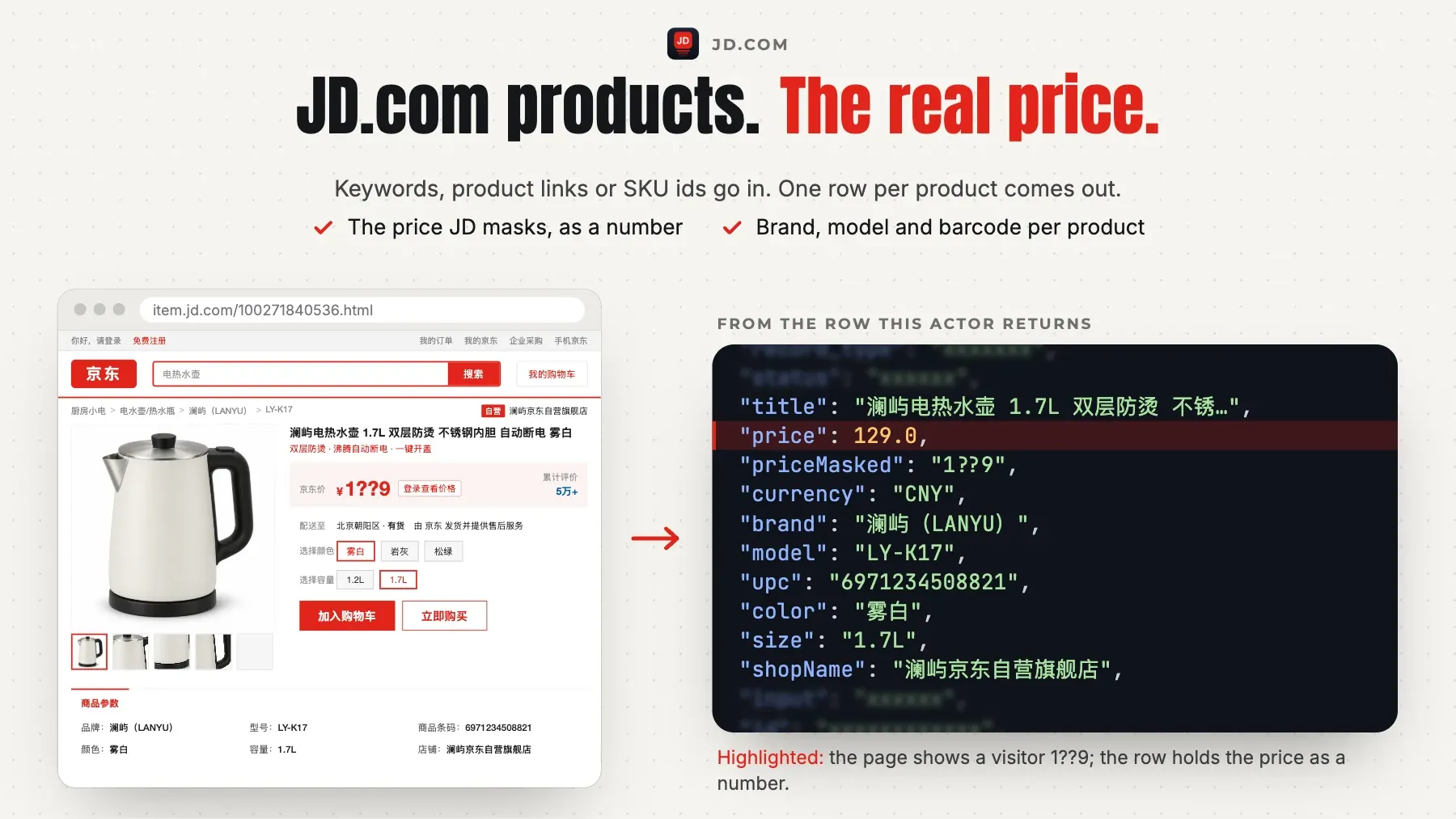
6??8. JD's product page masks the price for visitors who are not logged in (6??8, "登录查看价格"). This Actor reads the price from JD's own logged-out pages that show it: the search card for a keyword, JD's hot-sale item page for a SKU. On the live run of 2026-11-07, 53 of 53 rows had a price; the masked text is kept beside it inpriceMasked. - Search and product page in one row. Each product a keyword finds is completed from its own JD page: brand, model, UPC barcode, colour, size, every variant SKU, all photos, the stock state and quantity, the delivery promise, the shipping note, seven-day return, weight and size. 50 Huawei phones for
华为手机and three SKUs came back in 12 seconds on the live run of 2026-11-07, 37 of 53 rows with a barcode and 43 with a model. - Keywords, links and SKU ids in the same run. Words in Chinese or English, product links from the desktop or mobile site (item.jd.com, item.m.jd.com, re.jd.com, jd.hk), search links (their keyword is read) and bare SKU ids. A product that two keywords list is delivered and charged once.
- Honest runs. A SKU JD does not know is a free
not_foundrow, checked on a second connection; words with no product a freeno_resultsrow; a shop page a freeinvalid_inputrow that says why. Every input gets a row with its verdict.
Who it's for
- Cross-border sellers and sourcing teams — JD's live yuan price, brand, model and barcode of the products they buy or sell, to compare with Tmall, Amazon or a distributor's price file.
- Brand and price monitors — a list of SKU ids read every day: price, stock state, delivery promise and review count, to see a change the day it happens.
- Market researchers — what JD lists for a product word: prices, shops, self-operated or not, review counts and good rates across the first pages.
Quick start
The first 50 products for a keyword
Prices of a list of SKU ids
Search cards only, for several keywords
Switching from silentflow/jd-products-scraper or bakos_bence/jd-com-products?
Your input works as it is. Each name in the left column is read as this Actor's own field and the run log says so (read <theirs> as <ours>); a name marked not read is ignored with a note. A value in the other Actor's shape, an object list or its own date form, is read too.
| silentflow/jd-products-scraper / bakos_bence/jd-com-products | this Actor | what to know |
|---|---|---|
keywords | keywords | Words, one search each, Chinese or English; a number of 6 to 15 digits is read as a SKU id. |
startUrls | startUrls | Product links (item.jd.com, item.m.jd.com, re.jd.com/item, jd.hk) and search links (search.jd.com, re.jd.com: their keyword); {url} objects or plain strings. |
productIds | productIds | SKU ids, one per line. |
maxItems | maxItems | Here the cap of the whole run; the per-keyword cap is maxItemsPerKeyword (default 50). |
includeDetails | includeDetails | On by default: each product's own page. Product links and SKU ids always read it. |
shopIds | not read | Not read: shop catalogues are not served in this version; give the product links or SKU ids. |
minPrice | not read | Not read: filter the price column of the rows. |
maxPrice | not read | Not read: filter the price column of the rows. |
skuIds | productIds | bakos_bence/jd-com-products' name for SKU ids. |
What differs:
- Keywords are searched on JD's hot-sale search (re.jd.com), the search JD serves to a visitor who is not logged in: its products and its order, 48 cards a page; search.jd.com itself asks for a login.
maxItemscaps the charged rows of the whole run here; the cap per keyword ismaxItemsPerKeyword(default 50). For one keyword the two are the same.- Shop catalogues (
shopIds, mall.jd.com pages) and the price range (minPrice,maxPrice) are not read; a shop page gets a freeinvalid_inputrow. - A SKU whose price no logged-out JD page shows has
pricenull and anotethat says so; the masked text the product page shows is inpriceMasked.
Output
One row per product (and one free summary row per input):
| field | meaning |
|---|---|
record_type | product on a product row (charged); target on an input's free summary row. |
status | ok, or why an input gave no row: no_results, not_found, invalid_input, failed, not_read (see the FAQ). |
input | The value you gave that this row answers. |
id | JD's SKU id. |
url | The product on item.jd.com. |
title | The product's title, in Chinese as JD shows it. |
shortTitle | JD's short title of the product. |
price | The price in yuan (CNY), as a number; null when no logged-out JD page shows it (note says why). |
currency | CNY when a price is set. |
priceSource | Where the price was read: search (the keyword's search card) or hot_sale_page (JD's hot-sale item page). |
priceMasked | The masked price JD's product page shows a visitor who is not logged in (6??8). |
originalPrice | The struck-through original price, only where the product page's discount line proves it. |
brand | The brand as JD names it (华为(HUAWEI)). |
brandId | JD's brand id. |
model | The model the product page names. |
upc | The UPC / EAN barcode the product page names (some products carry the SKU id first, ;-separated). |
color | This SKU's colour. |
size | This SKU's size or edition. |
variantCount | How many variant SKUs the product page lists. |
variants | Every variant SKU: id, color, size, spec. |
shopId | JD's shop id. |
shopName | The shop's name (华为京东自营旗舰店). |
venderId | JD's seller (vender) id. |
isSelfOperated | True for a JD self-operated product (自营), false for a third-party shop. |
categoryIds | JD's category ids, top level first. |
categoryName | The leaf category's name, where JD's hot-sale item page names it (SKU and link inputs). |
imageUrl | The main photo, full size. |
images | Every photo the product page lists, full size. |
reviewsCount | The review count JD shows, as the number it shows at least (20万+ = 200000). |
reviewsCountText | The review count as JD writes it (20万+). |
goodRate | The share of good reviews, in percent. |
isOnSale | True when the product is on sale, false when it is off the shelf (下柜). |
inStock | True when JD shows it in stock, in transit or available to order. |
stockState | in_stock, out_of_stock, pre_order, in_transit, available_to_order (or JD's code). |
stockQuantity | The stock count JD shows, where it shows one. |
deliveryPromise | The delivery promise JD shows for its default address (23:10前付款,预计明天(11月08日)送达). |
shippingNote | The shipping-fee note JD shows. |
isSevenDayReturn | True when the product takes JD's seven-day no-reason return. |
weightKg | The weight in kg the product page names. |
lengthMm | The length in mm the product page names. |
widthMm | The width in mm the product page names. |
heightMm | The height in mm the product page names. |
listedAt | When the product went on sale on JD (UTC). |
installmentOffer | The installment offer on the search card (12期免息). |
searchKeyword | The keyword that found the product. |
position | The product's place among the keyword's new products, from 1. |
details | The product page: read, not_asked (includeDetails off), not_found or failed (the row keeps the search card's fields). |
verdict | On a target row: COMPLETE (read to the end), CAPPED (your maxItemsPerKeyword), TRUNCATED (the list ended under half its count), PARTIAL (stopped: note says why). |
rows_delivered | On a target row: the product rows it delivered. |
found | On a keyword's target row: the hot-sale list's own count. |
note | Why a row has the status, the verdict or the empty price it has. |
scraped_at | When this row was read (UTC). |
Example record:
Pricing
Pay for the products a run delivers, plus one run start; no platform usage is billed to you. The product price falls with your Apify plan.
| event | unit | Free | Starter | Scale | Business |
|---|---|---|---|---|---|
Product (product) | per 1,000 | $1.60 | $1.30 | $1.10 | $0.80 |
Run start (start) | per run | $0.005 | $0.005 | $0.005 | $0.005 |
A product is $1.60 per 1,000 on the Free plan ($0.0016 a product), with its product page (brand, model, barcode, variants, photos, stock and delivery) included. Each run that delivers a charged product also pays the run start, $0.005 once; a run that delivers no charged product pays nothing at all. So one search of 50 products costs $0.085 on the Free plan, and several keywords in one run share one start. The free target row of every input, a value that names no JD product (invalid_input), a SKU JD does not know (not_found), words with no product (no_results), an input left at the cap or the time limit (not_read) and a refusal the run could not pass (failed) are never charged. A product is charged once a run, also when several keywords list it. A run that stops early (a timeout, an abort) is charged for the products it delivered. maxItems counts the charged rows; before the first request the log names the price of each row at your plan. Enterprise plans have their own rates: the Actor's Pricing tab shows the price for your plan.
Usage patterns
- Keywords, links and SKU ids —
keywordstakes words, one search a line, in Chinese or English.startUrlstakes JD product links as your browser shows them (item.jd.com/<sku>.html,item.m.jd.com/product/<sku>.html,re.jd.com/item/<sku>.html, jd.hk) and search links (search.jd.com/Search?keyword=…,re.jd.com/search?keyword=…: their keyword is read).productIdstakes SKU ids, the number in a product link. - What a row is —
record_type=product: one product (one SKU), with the search card and its own product page (detailssays whether the page was read).record_type=target: the free row of one input —found(the hot-sale list's count for a keyword),rows_delivered, theverdictand thestatuswith itsnote. - Where the price comes from —
priceSourcesays it:search(the keyword's search card) orhot_sale_page(JD's hot-sale item page, re.jd.com, for a SKU or a link). JD's product page masks the price for visitors who are not logged in;priceMaskedkeeps that masked text (6??8). When no logged-out JD page shows a SKU's price,priceis null andnotesays why.originalPriceis set only where the product page's discount line proves it. - How far a keyword goes —
maxItemsPerKeyword(default 50; 0 = every product the list shows) stops each keyword after that many new products. JD's hot-sale list shows 48 cards a page with repeats across pages (about 24 to 35 new products a page on 2026-11-07); the walk ends when a page, read again on a second connection, adds no new product. A list that ends under half its own count says TRUNCATED with the count.maxItemscaps the charged rows of the whole run.
Input configuration
| field | type | default | what it does |
|---|---|---|---|
keywords | array | [] | Product words, one search each, in Chinese or English: 华为手机, lego, iphone 17. They are searched on JD's hot-sale search (re.jd.com), the logged-out search JD serves, and each product found is one row. A number of 6 to 15 digits typed here is read as a SKU id. |
startUrls | array | [] | Product pages (https://item.jd.com/100320690657.html, https://item.m.jd.com/product/100320690657.html, https://re.jd.com/item/100320690657.html, jd.hk) give one row each; search pages (search.jd.com/Search?keyword=…, re.jd.com/search?keyword=…) are read as their keyword. Shop pages are not read. |
productIds | array | [] | JD SKU ids, one per line: the number in a product address (100320690657 in item.jd.com/100320690657.html). Each gives one row. |
maxItemsPerKeyword | integer | 50 | How many products each keyword or search link delivers. 0 = every product JD's hot-sale list shows for it (48 cards a page, with repeats across pages). A product link or SKU id gives one row whatever this cap. |
includeDetails | boolean | true | On: each product a keyword finds is completed from its own JD page (brand, model, barcode, colour and size, variants, all photos, stock state, delivery promise, shipping note, weight and size). Off: the search card only (title, price, shop, review count, good rate, category ids, one photo), faster. Product links and SKU ids always read the product page. |
maxItems | integer | 0 | The most charged rows of the whole run; 0 = no cap beyond your charge limit. |
feedback | string | A note to the people who maintain this Actor: what you needed and did not get. For example a missing field, a wrong or empty result, or the Actor you switch from or to, and why. The run does not read it: the rows and the charges stay the same. A person reads every note. |
Errors
A run does not fail because of your input. When an input cannot be used — a date that is not a date, an id in the wrong form, two settings that contradict each other — the run ends Succeeded, charges nothing, and says what to change:
- the status message starts with
INPUT REJECTED; - the dataset holds one row,
{"error": true, "code": "…", "message": "…"}, and no results; - the key-value store record
ERRORholds the same object.
From code, check error on the first row before reading results.
A value that is not a JD product link, a JD search link, a SKU id or words (a shop page, another site) is not an error: it gets one free target row with status invalid_input that says why, and the run goes on with the others. A run that ends Failed is a fault on our side, never your input; it charges nothing, and we are alerted.
FAQ
Which status is which?
A target row's status is ok (products served), no_results (JD's hot-sale search lists nothing for the words; read on two connections), not_found (JD answers that the SKU does not exist; checked on two connections), invalid_input (not a JD product or search link, a SKU id or words), failed (JD refused every try; free) or not_read (left at maxItems, the charge limit or the run's time limit). A product row's status is ok.
Is this JD's main search?
No. search.jd.com and the mobile search ask for a login or a verification page. Keywords are searched on JD's hot-sale search (re.jd.com), which JD serves logged out: the products and the order are JD's own for that page, and its cards carry the live price.
Does it need a JD account, cookies or an API key?
No. Everything is read from what JD shows a visitor who is not logged in.
Does it read reviews or shop catalogues?
No. It reads products: the review count and good rate are on each row, the review texts are not. A shop page gets a free invalid_input row.
Do I need Apify Proxy or my own proxy?
No. The Actor uses its own connections, at no extra cost to you.
Integration
JavaScript
Python
CLI
REST
AI agents and MCP
Apify's MCP server offers this Actor as a tool to Claude, Cursor, VS Code and any other MCP client. Connect https://mcp.apify.com?tools=hyperbach/jd-products-scraper and ask, for example: "Get the first 50 JD.com products for 华为手机 with price in yuan, brand, model, barcode, shop and stock". The agent fills the input from the table above and reads the rows from the run's dataset. A field under the name another Actor gives it is read as this Actor's own: keyword, searchTerms, queries, query as keywords; urls, url, links, productUrls as startUrls; skuIds, skus, itemId, itemIds as productIds; maxItemsPerSearch, maxItemsPerQuery, resultsPerKeyword, maxResultsPerKeyword as maxItemsPerKeyword (and more). An agent or a person can add feedback to any run and say what was needed and not delivered: a missing field, a wrong or empty result, the Actor switched from or to, and why. The run returns the same rows at the same price, and a person reads every note.
n8n, Make and Zapier
The Apify node in n8n, the Apify app in Make and the Apify integration in Zapier run this Actor on a schedule or from a trigger and read its dataset. A webhook on the run's end (Integrations on the Actor page) sends the rows on to your own endpoint. Nothing to install on our side.
Support
Disagree with a charge? Write to apify@hyperbach.com with the run ID. We will ask Apify to compensate you, and the charge comes back to your Apify account as platform credit.
Did it do the job? A short review on the Store, at any rating, helps the next buyer choose.
See also
- Amazon Product Details Scraper — Amazon products by ASIN, URL or UPC / EAN / ISBN on 21 Amazon stores: the buy-box price, every best-seller rank, the rating and the review summary.
- AliExpress Product Details Scraper — AliExpress products by URL or item id: every SKU with its own price and stock, in the country and currency you choose.
- Shopify Store Scraper — every product of a Shopify store, with its variants, prices and images.
- Alibaba Products Scraper — the products of an Alibaba.com search: price range, minimum order and the supplier with its country and verification.
- Walmart Products Scraper — Walmart products by search, category or URL: the price with the was-price, the seller and the rating.
- Coles Scraper — Coles Australia products and specials, with the price, the was-price and the unit price.
This page is generated from the Actor's schemas and a live sample — it cannot describe a field the Actor does not have.


