

Telegram Comments Scraper | Telegram Channel Comments & Replies
Pricing
from $0.43 / 1,000 comments
Telegram Comments Scraper | Telegram Channel Comments & Replies
Telegram comments scraper, no login: every comment under public channel posts, from post links or channels. Commenter name, username and photo, exact text, date, the comment it answers, reactions, media. Whole threads to their end, a free row per post with Telegram's count. Misses free.
Pricing
from $0.43 / 1,000 comments
Rating
0.0
(0)
Developer

Hyperbach
Maintained by CommunityActor stats
0
Bookmarked
2
Total users
1
Monthly active users
6 days ago
Last modified
Categories
Features
Share
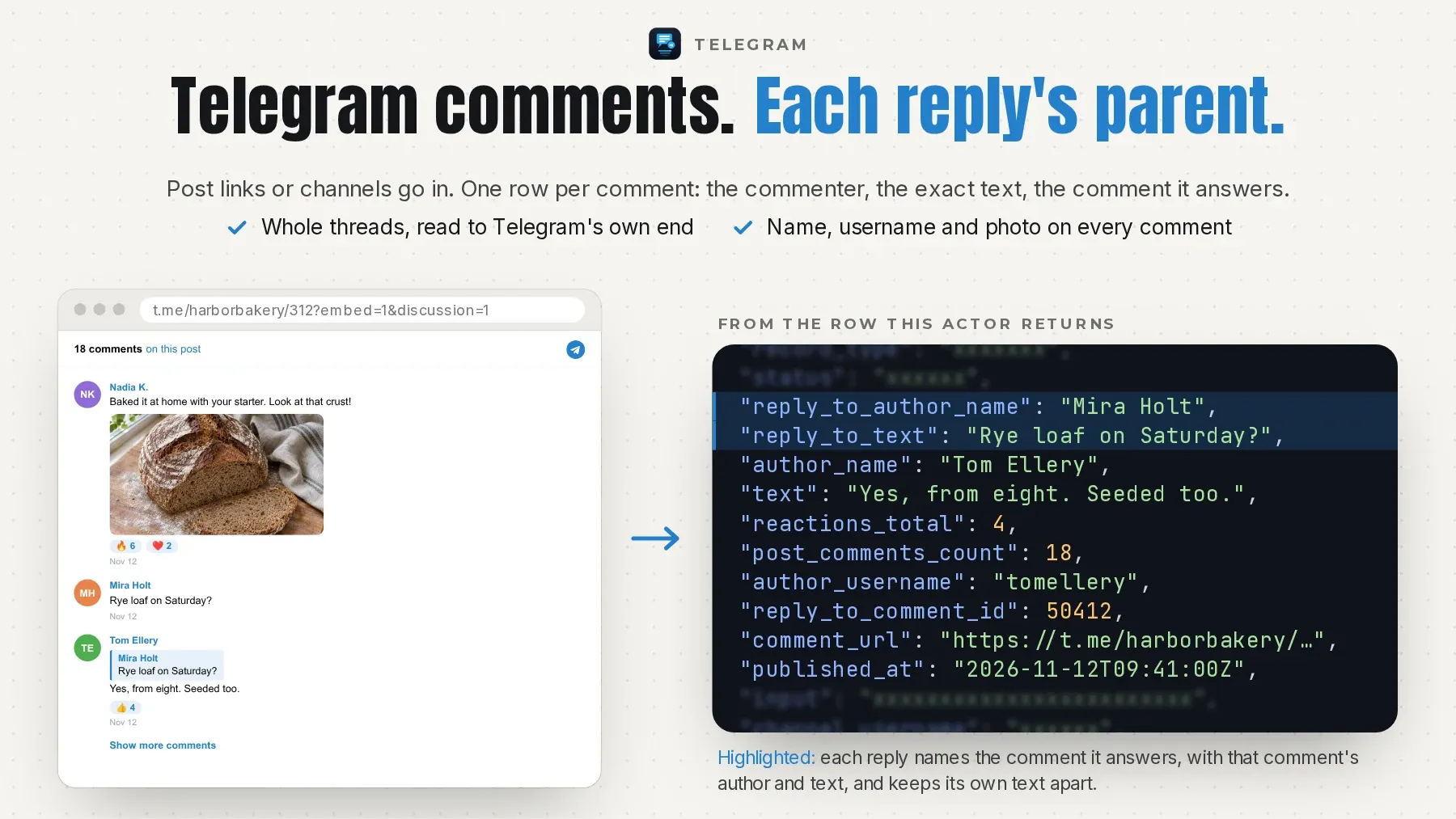
Every comment under public Telegram channel posts: give post links or channels, get one row per comment with the commenter's name, username and photo, the exact text, the time, the comment it answers with that comment's author and text, reactions and media — the whole thread, read to its end, with a free row per post that says how far the read got against Telegram's own count. No login, no Telegram account, no phone, no API key.
$0.85 per 1,000 comment rows on the Free plan, $0.7225 on Starter. A run start is $0.000776. The default input returns about 55 rows for about $0.043276. Post rows, channel rows, a post whose discussion Telegram does not show, a comment a filter leaves out and a run that delivered no comment cost nothing.
How it compares
- Cheaper than automation-lab's Telegram Scraper, with more data: $0.59 per 1,000 comments, against $0.76; 28 fields per comment, against 16. It is 4 times faster: 63 comments in 5.3 s, against our 60 comments in 19 s.
- 3 times cheaper than fetch_cat's Telegram Channel Posts Scraper: $0.59 per 1,000 comments, against $1.97.
Measured on 2026-11-17. Each line compares one job, run by both scrapers at the same time. Prices are per 1,000 comments: Apify Actors at the Scale plan's prices.
Tested head-to-head on 2026-11-17
The job: the comments of one public Telegram channel's 3 newest posts (tginfo), up to 20 comments a post. Every Actor ran on it the same day from the same harness; every run's cost is at the Scale plan's prices: a rival's charged events at its price for that plan, this Actor's at its list price. Fields counts the filled fields of a typical row. The comments of one channel's 3 newest posts, up to 20 a post. automation-lab writes each comment as a message row; fetch_cat nests the comments inside its post rows; ours writes one row a comment with the commenter's username, photo and the comment it answers. Re-measured monthly.
| Actor | Rows | First row | Run time | Cost | Fields | Failures |
|---|---|---|---|---|---|---|
| this Actor | 60 | 9.2 s | 19 s | $0.035 | 28 | none |
automation-lab/telegram-scraper | 63 | 5.4 s | 5.3 s | $0.048 | 16 | none |
fetch_cat/telegram-channel-posts-scraper | 3 | 6.0 s | 6.5 s | $0.006 | 30 | none |
Why this Telegram comments scraper
- The whole thread, to its end. The widget Telegram shows on the web gives the newest 100 comments; this Actor then asks the widget's own next page, 50 at a time, from the oldest comment it holds until Telegram says there is none older. In our tests a 155-comment thread came back whole, a 488-comment thread to the 475 the widget shows, and two runs of the lane's identical test post gave 59 of 59. Each post's row says COMPLETE (every comment Telegram counts), LIST_END (Telegram's list ended under its own count: it counts comments the web never shows; the end is read twice), or CAPPED at your limit.
- Never a page without names. Telegram keeps each widget page for about a minute and serves that copy with every commenter's name, link and photo empty (two popular actors delivered such rows: null names on 5 of 5). A page with a nameless comment is read again at once under a fresh request; 0 of 1,104 fresh comments in our study came without a name.
- The comment's own text and its parent. Each reply carries the id of the comment it answers (
reply_to_comment_id), that comment's author and text, and its own text, never the parent's: the lane's leader had the reply-to on 0 of 10 replies of our test post, another actor put the parent's text in the reply's row. - A row for every post, with Telegram's own words. Many channels do not show their discussion on the web (21 of 30 large channels in our study). Such a post gets a free row that quotes Telegram (
Discussion is not available at the moment.) and says whether the post itself exists, so a run never ends green and empty without saying why. - Filters before the charge. Comments posted after a date, comments that hold your words, a minimum of reactions, top-level comments only: a comment left out is not delivered and not charged, and each post's row counts it.
- No account to lose. Telegram's public web pages only: no phone, no session that logs out or gets banned.
Who it's for
- Marketers and community managers — what an audience says under a channel's posts: every comment with its author, reactions and the thread it answers, newest first.
- Researchers and analysts — whole discussions under posts in a date window, with replies linked to their parents, for sentiment, topic or network analysis.
- Crypto and finance watchers — the comments under a project's or a ticker's posts, filtered by words or reactions, with wallet addresses and cashtags pulled out.
- Developers and agents — typed rows, a free row per post with its verdict against Telegram's own count, and a run summary to check a pipeline against.
Quick start
All comments of one post (at most 1,000)
The newest 3 posts of a channel, 20 comments each
A channel's posts of the last 7 days, comments with a word
Only comments of the last 24 hours, top level only
Switching from automation-lab/telegram-scraper?
Your input works as it is. Each name in the left column is read as this Actor's own field and the run log says so (read <theirs> as <ours>); a name marked not read is ignored with a note. A value in the other Actor's shape, an object list or its own date form, is read too.
| automation-lab/telegram-scraper | this Actor | what to know |
|---|---|---|
channels | channels | Usernames, @usernames or t.me links; a post link is read as that post. |
maxMessages | maxPostsPerChannel | The newest posts read from each channel; their comments are the rows. |
oldestMessageDate | oldestPostDate | A date (2026-11-01) or a relative time (7 days). |
newestMessageDate | newestPostDate | A date: posts up to the end of that day. |
lastNDays | oldestPostDate | A number of days is read as that many days ago. |
afterMessageId | not read | Read as fromPostId = the id + 1 (the leader's cursor is exclusive, fromPostId includes its id). |
afterMessageIds | not read | Read per channel: each named channel's own fromPostId = its id + 1. |
keywords | not read | Not read: it filters the leader's message rows. To keep only comments that hold words, use commentKeywords. |
excludeKeywords | not read | Not read: a message filter of the leader's. |
mediaTypes | not read | Not read: a message filter of the leader's; each comment row lists its own media types. |
includeComments | not read | Not needed: this Actor's rows are the comments. |
maxCommentsPerMessage | maxCommentsPerPost | The most comments of one post, newest first; 0 = the whole thread. |
includeChannelInfo | not read | Not read: the channel's profile row is our Telegram Profile Scraper's; the channel row here carries the title and the rounded subscriber count. |
profileOnly | not read | Not read: use our Telegram Profile Scraper for profile rows alone. |
What differs:
- The leader reads a channel's messages and adds comments when
includeCommentsis on; this Actor reads comments always, from post links or from a channel's posts, and writes a free row per post (the leader charges the messages themselves). maxCommentsPerPosttakes any number, 0 for the whole thread (the leader'smaxCommentsPerMessageis 1 to 200, default 20).- The leader's message filters (
keywords,excludeKeywords,mediaTypes) filter posts; herecommentKeywordsfilters comments, and the posts of a channel are chosen by count, date and id. - The channel's profile row (
includeChannelInfo,profileOnly) is our Telegram Profile Scraper's; here each row carries the channel's title and the channel row its rounded subscriber count.
Output
One comment row per comment (charged), one free post row per post read (its own fields, its comment count, the comments delivered and the read's verdict), one free channel row per channel you gave, and one free input row for a value that names nothing readable (record_type says which):
| field | meaning |
|---|---|
record_type | comment (a comment, charged), post (a post read, free), channel (a channel you gave, free) or input (a value that names nothing readable, free). |
status | ok, or why a row carries no comment: on a comment names_hidden (Telegram served no name three times: free); on a post no_comments, not_available (Telegram's words in note), post_not_found, not_found, below_min_comments, duplicate, failed, not_read; on a channel not_a_channel, no_posts, duplicate, failed, not_read; on an input invalid_input. |
input | The post link or channel you gave that this row answers. |
channel_username | The channel's username as its posts name it. |
channel_title | The channel's title. |
channel_id | The channel's own numeric id (Telegram's id without the -100 prefix), on every row of the channel. |
post_id | The post's number in its channel. |
post_url | The post's link (t.me/ |
comment_id | The comment's id in the channel's discussion group. |
comment_url | The comment's own link (the post's link with ?comment= |
published_at | When the comment (on a post row: the post) was published (UTC). |
author_name | The commenter's name as Telegram shows it (emoji included); Telegram's own label for a deleted account. |
author_username | The commenter's username, when the account has a public one. When Telegram's render of one comment leaves the link off, the username the same run read for the same name and photo (RUN_SUMMARY walk.links_filled counts them). |
author_url | The commenter's t.me link, when the account has a public username. |
author_photo_url | The commenter's photo (null for a letter avatar). |
author_has_photo | The commenter has a profile photo. |
author_is_channel | True when the comment is written as the post's own channel; false for every other named commenter, the discussion group's own comments included (the widget names the group by its handle alone); null on a comment Telegram served without its commenter. |
text | The comment's own text (on a post row: the post's text), emoji as characters; never the quoted parent's. |
text_length | The text's length in characters. |
language | The comment's language as an ISO 639-1 code, with detectLanguage only: a statistical guess, null for a text under 20 letters (links, handles, tags and wallet addresses left out) or an unclear one; a Cyrillic text the detector calls Bulgarian is read as Russian unless it writes Bulgarian's vowel ъ. |
is_edited | The comment was edited. |
is_reply | The comment answers another comment. |
reply_to_comment_id | The id of the comment it answers. |
reply_to_author_name | The answered comment's author. |
reply_to_text | The answered comment's text as the reply shows it (its start, or the part the commenter quoted). |
reply_is_quote | reply_to_text is a part the commenter quoted, not the start of the answered comment. |
reactions | Each reaction: the emoji (⭐ for paid Stars), its custom emoji id, the count as a number and as shown. |
reactions_total | All reactions added up. |
media | Each photo, video, audio, document or sticker: its type and its file or page link, with a video's duration and thumbnail. |
media_types | The media types, once each. |
media_not_supported | Telegram's own words when the web page does not show a part ("Please open Telegram to view this comment", "This media is not supported in your browser", "Media is too big"). |
link_preview | A link preview: its link, site, title, description and image. |
hashtags | The hashtags in the text. |
cashtags | The cashtags ($TON) in the text. |
mentions | The @usernames in the text. |
links | The outgoing links in the text. |
crypto_addresses | Wallet addresses written in the text (BTC, ETH, TRON, TON shapes): their type and the address. |
text_html | The comment's text as HTML (bold, links, code, quotes, spoilers, custom emoji). |
post_comments_count | On a comment: its post's comment count, as Telegram counts it. |
views | On a post: views as a number (rounded by Telegram above 999). |
views_shown | On a post: views as the page shows them ("16.3K"). |
author_signature | On a post: the author's signature, when the channel signs its posts. |
forwarded_from | On a post: the chat it was forwarded from. |
comments_count | On a post: its comment count, as Telegram counts it (null when Telegram shows no discussion). |
comments_delivered | On a post or a channel: the comment rows delivered for it. |
comments_filtered | On a post: the comments read and left out by your filters (not charged). |
verdict | On a post: COMPLETE (every comment Telegram counts), LIST_END (the list ended under the count; read twice), CAPPED (maxCommentsPerPost), DATE_LIMIT (commentsPostedAfter), PARTIAL (the run stopped: note says why). On a channel: CAPPED, DATE_LIMIT, ID_LIMIT, COMPLETE (its first post reached), PARTIAL. |
channel_subscribers | On a channel row: its subscribers as a number (rounded by Telegram's page). |
channel_subscribers_shown | On a channel row: its subscribers as the page shows them ("84K"). |
posts_read | On a channel row: the posts read. |
linked_chat_id | The id of the channel's discussion group (the comments' home). |
note | Why a post, channel or input row has the status or the verdict it has, in Telegram's words where it gave some. |
scraped_at | When this row was read (UTC). |
Example record:
Pricing
Pay only for the comments a run delivers, plus one run start. Post rows, channel rows and status rows are free, no platform usage is billed to you, and the prices fall with your Apify plan.
| event | unit | Free | Starter | Scale | Business |
|---|---|---|---|---|---|
Comment (comment) | per 1,000 | $0.85 | $0.7225 | $0.5763 | $0.425 |
Run start (start) | per run | $0.000776 | $0.000776 | $0.000776 | $0.000776 |
A comment is $0.85 per 1,000 on the Free plan ($0.00085 a comment) and $0.7225 on Starter, with everything its row carries: the commenter's name, username and photo, the exact text, the time, the comment it answers with that comment's author and text, reactions and media. Each run that delivers a comment pays the run start, $0.000776 once.
So the example input (one post link and a channel's 3 newest posts, up to 20 comments a post, 50 at most) costs $0.043276 on the Free plan and $0.036901 on Starter; 10 post links with 1 comment each $0.009276 and $0.008001; two whole threads of 25 and 59 comments $0.072176 and $0.061466; a 488-comment thread read to the 475 comments Telegram's web shows $0.404526 and $0.3439635. Free: every post row and channel row, a post whose discussion Telegram does not show (not_available), a post that does not exist, a channel name nobody holds, a value that is not a Telegram post or channel, a second spelling of a target already read, the comments a filter leaves out (counted on the post's row), a comment Telegram served without its commenter three times (names_hidden), and a run that delivered no comment (no run start either). A run that stops early (a timeout, an abort, the charge limit) is charged for the comments it delivered.
Before the first request the log names the prices at your plan and the most the run can cost: maxCommentsPerPost for each post, maxPostsPerChannel for each channel, maxItems and your charge limit bound it; with maxCommentsPerPost 0 each thread is read to its end, so Telegram's own count of each post's comments decides the rows and the run stops at your charge limit. Enterprise plans have their own rates: the Actor's Pricing tab shows the price for your plan.
Usage patterns
- Whole threads — With
maxCommentsPerPost0 the Actor reads each thread to Telegram's end. A post's row then says COMPLETE when every comment Telegram counts came back, or LIST_END with both numbers when the list ended under Telegram's count (the header counts comments the web widget never shows, for example 475 shown of 488 counted), read a second time on a fresh connection before it says so. - A channel's recent discussions —
channelswithmaxPostsPerChannel, a date window (oldestPostDate,newestPostDate) or an id range (fromPostId,toPostId): the posts are taken newest first and read four at a time, so their rows come as each thread ends (sort bypost_idfor the channel's own order).minCommentsskips posts with fewer comments for about 3.5 KB a post, before any comment is read. - Filters —
commentsPostedAfter,commentKeywords,minCommentReactionsandonlyTopLevelCommentsdecide which comments are delivered and charged; the per-post cap counts the comments kept. A date cut stops a thread's walk at its first older page. - Languages —
detectLanguagenames each comment's language (an ISO 639-1 code) from texts of 20 letters or more. It is off by default because it takes the run's processor about as long as the reading itself.
Input configuration
| field | type | default | what it does |
|---|---|---|---|
postUrls | array | [] | Links to public channel posts, one a line: https://t.me/ |
channels | array | [] | Public channels, one a line: a username, @username or a t.me link. The channel's newest posts are read (Max posts per channel, the date window or the post-id range below), and the comments of each. A post link pasted here is read as that post. Only channels whose discussion Telegram shows on the web have comments to read: every other post gets a free row with Telegram's own words. |
maxPostsPerChannel | integer | 10 | The newest posts read from each channel (service messages not counted); 0 = every post the date window or the id range holds. |
oldestPostDate | string | Channels: only posts published on or after this date (2026-11-01), or a relative time (7 days). The walk stops at the first older post. | |
newestPostDate | string | Channels: only posts published on or before this date (the whole day counts). | |
fromPostId | integer | Channels: only posts with this id or a higher one (the number at the end of a post link). With the id of the newest post you already have + 1, a run reads only the newer posts. | |
toPostId | integer | Channels: only posts with this id or a lower one; the walk starts there. | |
maxCommentsPerPost | integer | 0 | The most comments delivered for one post, newest first; 0 = the whole thread, read to its end. The post's row says whether its comments were all read (COMPLETE), the list ended under Telegram's count (LIST_END), or this cap stopped it (CAPPED). |
commentsPostedAfter | string | Only comments posted on or after this date (2026-11-01), or a relative time (24 hours, 7 days). Older comments are not delivered and not charged; the walk of a thread stops at the first older page. | |
commentKeywords | array | [] | Only comments whose own text holds one of these words or phrases (any case, any language). Others are not delivered and not charged; each post's row counts them. |
minCommentReactions | integer | 0 | Only comments with at least this many reactions (all emoji together); 0 = every comment. |
onlyTopLevelComments | boolean | false | Leave out replies to other comments (not delivered, not charged). |
minComments | integer | 0 | Read only posts with at least this many comments (Telegram's own count, read first for about 3.5 KB a post); a post under it gets a free row and no comment is read. 0 = every post. |
detectLanguage | boolean | false | Name each comment's language (an ISO 639-1 code such as ru, en, uk) from its text of 20 letters or more; null when the text is shorter or the language is not clear. Off by default: the detection takes the run's processor about as long as reading the comments. |
maxItems | integer | 0 | The most charged comments of the whole run; 0 = no cap beyond your charge limit. Post, channel and status rows are free and do not count. |
feedback | string | A note to the people who maintain this Actor: what you needed and did not get. For example a missing field, a wrong or empty result, or the Actor you switch from or to, and why. The run does not read it: the rows and the charges stay the same. A person reads every note. |
Errors
A run does not fail because of your input. When an input cannot be used — a date that is not a date, an id in the wrong form, two settings that contradict each other — the run ends Succeeded, charges nothing, and says what to change:
- the status message starts with
INPUT REJECTED; - the dataset holds one row,
{"error": true, "code": "…", "message": "…"}, and no results; - the key-value store record
ERRORholds the same object.
From code, check error on the first row before reading results.
A search that matches nothing is not an error: the dataset is empty and nothing is charged. A run that ends Failed is a fault on our side, never your input; it charges nothing, and we are alerted.
FAQ
Why does a post say not_available?
Telegram shows the discussion on the web only for channels whose comment group is public, and a channel can turn comments off for one post. The row quotes Telegram (Discussion is not available at the moment.) and says whether the post itself exists. Every rival reads the same web widget, so no tool reads those comments without a Telegram account.
Why fewer comments than the post's count?
Telegram's count includes comments its web widget never shows (deleted ones, or those of accounts it hides): in our tests 475 shown of 488 counted, 25 of 31. The post's row says LIST_END with both numbers, after reading the end a second time.
Is the commenter's name always there?
Yes on every row charged: a page Telegram serves from its short-lived copy without names is read again at once. If that copy came back three times in a row, its comments go out free with status names_hidden and no name.
Does a private channel or a group work?
No: only public channels' posts have a public discussion. A private link (t.me/c/…) or an invite link gets a free row that says so; a group's name gets a free channel row.
Do I need Apify Proxy or my own proxy?
No. The Actor uses its own connections, at no extra cost to you.
Integration
JavaScript
Python
CLI
REST
AI agents and MCP
Apify's MCP server offers this Actor as a tool to Claude, Cursor, VS Code and any other MCP client. Connect https://mcp.apify.com?tools=hyperbach/telegram-scraper and ask, for example: "Get all comments under this Telegram post with each commenter's name, the text and the date". The agent fills the input from the table above and reads the rows from the run's dataset. A field under the name another Actor gives it is read as this Actor's own: startUrls, urls, url, links as postUrls; channel, channelUsernames, channelNames, usernames as channels; maxMessages, maxPosts, maxMessagesPerChannel, postsPerChannel as maxPostsPerChannel; oldestMessageDate, lastNDays, dateFrom, fromDate as oldestPostDate (and more). An agent or a person can add feedback to any run and say what was needed and not delivered: a missing field, a wrong or empty result, the Actor switched from or to, and why. The run returns the same rows at the same price, and a person reads every note.
n8n, Make and Zapier
The Apify node in n8n, the Apify app in Make and the Apify integration in Zapier run this Actor on a schedule or from a trigger and read its dataset. A webhook on the run's end (Integrations on the Actor page) sends the rows on to your own endpoint. Nothing to install on our side.
Support
Disagree with a charge? Write to apify@hyperbach.com with the run ID. We will ask Apify to compensate you, and the charge comes back to your Apify account as platform credit.
Did it do the job? A short review on the Store, at any rating, helps the next buyer choose.
See also
- Telegram Profile Scraper — Telegram channels, groups, bots and users by username or link, with the exact subscriber or member count.
- YouTube Channel Search Scraper — the YouTube channels a keyword finds, with subscribers, the exact video and view counts and the country.
- Threads Scraper — Threads profiles with the exact follower count, their posts and replies with view counts, and keyword and tag search, without a login.
- Substack Scraper — the posts of a Substack newsletter with the full text of free posts, the date, the paywall flag and the likes.
- Weibo Scraper — Weibo posts, profiles, search, comments and the hot-search boards, without a login.
- Pinterest Search Scraper — the pins of a Pinterest search, with the link each pin points to, the image and the pinner.
Run them together: Put the author_username of the commenters this run returns into Telegram Profile Scraper's Usernames or t.me links to get each commenter's public profile.
This page is generated from the Actor's schemas and a live sample — it cannot describe a field the Actor does not have.


