
TikTok Email Scraper & TikTok Email Finder, No Login
Pricing
from $2.00 / 1,000 creator with an e-mails
TikTok Email Scraper & TikTok Email Finder, No Login
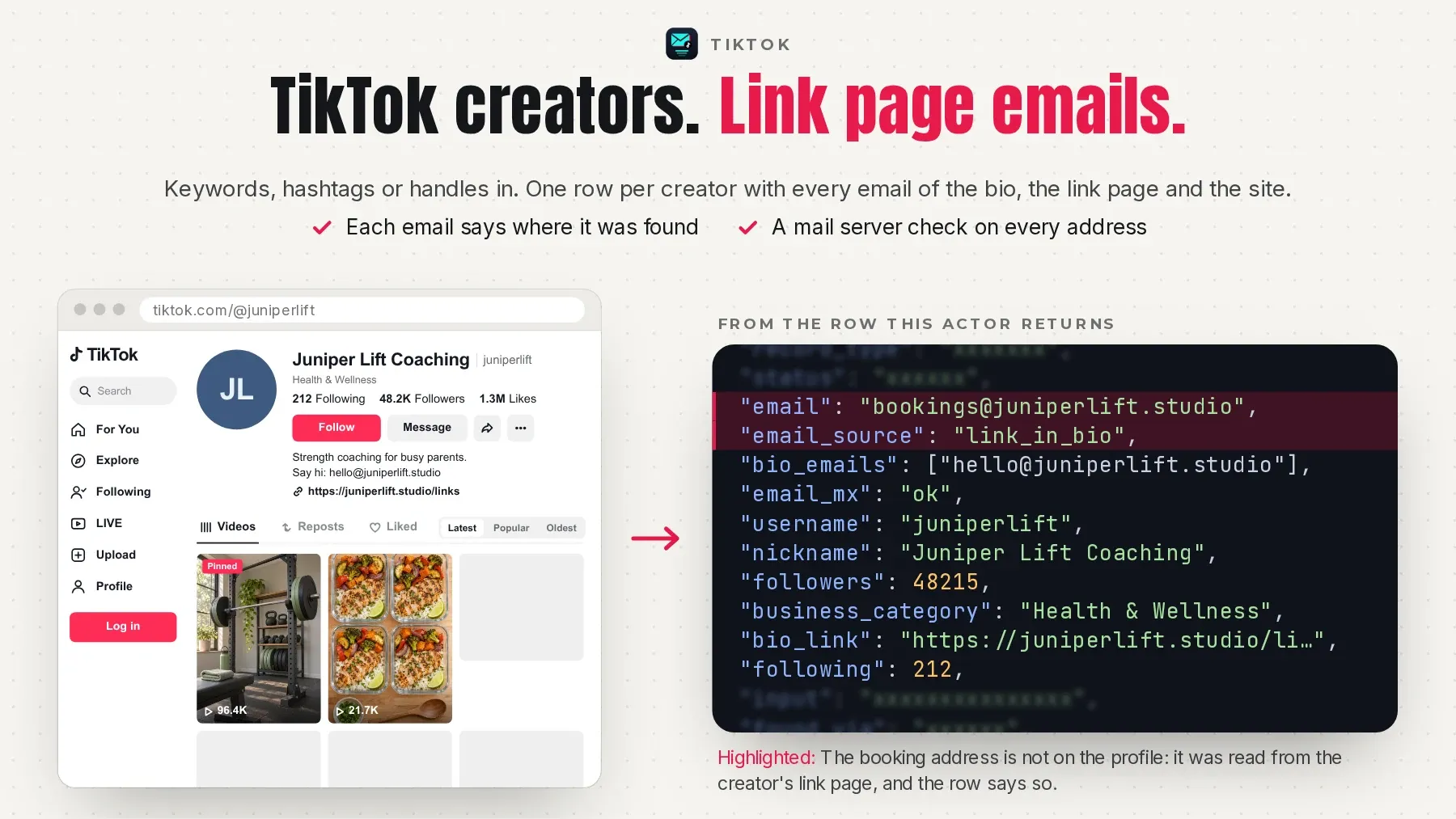
Find the emails TikTok creators publish: keywords, #hashtags, handles or followers in; one row per creator with every email of the bio, the Linktree-style link page and the website (source, mail check), phones, socials, exact counts and a country guess. Creators without an email are free.
Pricing
from $2.00 / 1,000 creator with an e-mails
Rating
0.0
(0)
Developer

Hyperbach
Maintained by CommunityActor stats
0
Bookmarked
1
Total users
1
Monthly active users
5 days ago
Last modified
Categories
Features
Share
TikTok creators with the e-mails they publish, logged out: keywords or #hashtags (the creators who post under them), TikTok handles, or each creator's followers in — one contact row per creator out. Each row has every e-mail of the bio, of the creator's link page (Linktree, Stan, Komi and the like) and of the website it links, each with its source and a mail-server check, the best one to write to, phones and WhatsApp numbers, Instagram, YouTube, X, Facebook and the other social links, and the profile with exact counts (followers, likes past 2.1 billion), verified and business flags, the business category, language and a country guess with its signals. On keyword runs creators without an e-mail are checked for free. No login, no cookies, no API key, proxies handled for you.
From $4.00 per 1,000 rows (lead) on the Free plan, $3.40 on Starter; every row and add-on is priced under Pricing below. A run start is $0.00835. The default input returns about 21 rows for about $0.08835. A creator without an e-mail on a keyword or follower run, a creator your filters leave out, a private or missing account and every input's own summary row are free.
How it compares
- Cheaper than scrape-lads's TikTok Email Finder, with more data: $3.22 per 1,000 leads, against $3.65; 47 fields per lead, against 35. It is faster: 20 leads in 62 s, against our 71 s.
- 3 times cheaper than lurkapi's TikTok Email Scraper & Influencer Profile Scraper, with more data: $3.22 per 1,000 leads, against $8.81; 47 fields per lead, against 17. It is 2 times faster: 20 leads in 32 s, against our 71 s.
Measured on 2026-11-17. Each line compares one job, run by both scrapers at the same time. Prices are per 1,000 leads: Apify Actors at the Scale plan's prices.
Tested head-to-head on 2026-11-17
The job: 20 TikTok creators with an e-mail for the keyword fitness coach (the input schema's example, leads only). Every Actor ran on it the same day from the same harness; every run's cost is at the Scale plan's prices: a rival's charged events at its price for that plan, this Actor's at its list price. Fields counts the filled fields of a typical row. flash_scraper/creator-leads-scraper and creatorlens/social-media-email-scraper-2026 have more users but do not search TikTok by keyword, so lurkapi/tiktok-profile-email-scraper, the next one that does, runs the same keyword; its rows are every profile it found, with or without an e-mail. Re-measured monthly.
| Actor | Rows | First row | Run time | Cost | Fields | Failures |
|---|---|---|---|---|---|---|
| this Actor | 20 | 9.5 s | 71 s | $0.064 | 47 | none |
scrape-lads/tiktok-profile-scraper | 20 | 9.9 s | 62 s | $0.073 | 35 | none |
lurkapi/tiktok-profile-email-scraper | 20 | 20 s | 32 s | $0.18 | 17 | none |
Why this TikTok email scraper
- The e-mails of the link page, not only the bio. Many creators put their address on their Linktree, Stan or Komi page and not in the bio (the lane leader's own rows: 11 of 20 on the link page). The link under every bio is opened and its
mailto:links, text and data are read; a Linktree page that refuses a desktop browser is read again as a phone. The website the creator owns is read too, with its contact and about pages. - Clean addresses, each with its source. Every address says where it was found (
bio,link_in_bio,website), gets a mail-server check and three flags (a role address such asbooking@, a free-mail provider, a disposable domain). A word glued to an address in a bio (the lane leader returnedcontact-<name>@gmail.comfor a bio that wrote the word before the address) is cut off, a platform's own address on a link page is never the creator's, and a bio link whose domain does not carry the creator's name (a shop, a brand, a platform) is read as that one page, never crawled, with the domain's own support and help addresses left out. - Keyword depth you can see. A keyword is read as TikTok's hashtag of the same words, then the hashtags its creators' videos carry most, each to its end. TikTok's logged-out list of one hashtag ends after about 100 creators on a niche tag and after a few on a broad one, so the free summary row of every keyword names each hashtag walked, its video count, the creators found and how the list ended.
- Free when there is nothing to sell. On keyword and follower runs a creator without an e-mail is checked and counted, never charged; a creator your filters leave out, a private account, a handle that does not exist and a duplicate are free too. A creator found by two keywords or a keyword and a handle is one row and one charge.
- Exact counts. Followers, following, likes and videos are TikTok's exact figures, not the rounded ones; a like count past 2,147,483,647 is right (the app's own count turns negative there).
Who it's for
- Influencer marketing and agencies — the creators of a niche (#fitnesscoach, #booktok, a product category) with the address their management or brand-deal inbox publishes, their follower count, language and country guess, only those with an e-mail.
- Brands and sales teams — a list of handles you already have, each with every e-mail, phone, WhatsApp number and social profile it publishes, exact counts and the business category, in one row per creator.
- Data teams and CRMs — typed rows keyed by the TikTok user id, each address with its source and a mail-server check, the leader's input names read as they are.
Quick start
Creators of a niche with their e-mails (the common job)
Your list of handles, every profile
Micro-influencers in English with a business address
Creators with their recent engagement
The followers of an account who publish an e-mail
Switching from scrape-lads/tiktok-profile-scraper?
Your input works as it is. Each name in the left column is read as this Actor's own field and the run log says so (read <theirs> as <ours>); a name marked not read is ignored with a note. A value in the other Actor's shape, an object list or its own date form, is read too.
| scrape-lads/tiktok-profile-scraper | this Actor | what to know |
|---|---|---|
searchKeywords | searchKeywords | Topics, #hashtags or tag links; a keyword is read as its hashtag and the related hashtags. |
handles | handles | @username, username, profile, video or share links, user ids. |
maxResults | maxItems | Creator rows of the whole run; follower rows count too. |
onlyWithEmail | onlyWithEmail | Unset: on for keywords and followers, off for handles, as the leader. |
scrapeFollowers | scrapeFollowers | The followers of every creator saved; followersList picks followers or following. |
minFollowers | minFollowers | Read as given. |
maxFollowers | maxFollowers | Read as given; 0 is no maximum. |
languages | languages | 2-letter codes. |
countries | countries | 2-letter codes or country names; the guess and its signals are on every row. |
keepUnknownCountry | keepUnknownCountry | Read as given. |
followerEmailsPerAccount | followerEmailsPerAccount | Read as given. |
followersToScan | followersToScan | Read as given. |
nestedFollowers | not read | Not read: one level of followers in this version; run the followers you got as handles with scrapeFollowers for a second level. |
nestedFollowersPerFollower | not read | Not read, with nestedFollowers. |
enrichBioLinks | enrichBioLinks | Read as given; on by default. |
includeUnavailable | not read | Not needed: every handle that gives no creator row gets a free row with its reason. |
recentVideoStats | recentVideoStats | Read as given; pinned videos skipped. |
recentVideosCount | recentVideosCount | 3 to 30; a creator gives at most the 10 to 13 newest videos TikTok's logged-out page lists. |
maxConcurrency | not read | Not read: the Actor paces its own connections. |
What differs:
- A keyword is read through TikTok's hashtags (the keyword's own and the related ones), not the app's user search, which a logged-out reader cannot open; the keyword's free row names every hashtag walked.
maxResultsis read asmaxItems, and follower rows count toward it (the leader adds them on top).- One level of followers:
nestedFollowersandnestedFollowersPerFollowerare not read. - Every input that gives no row gets a free row without asking (
includeUnavailableis always on here). - The columns are snake_case (
email,email_source,followers,bio_link,country_signals); each address sits inemails_detailwith its source and checks.
Output
One row per creator (charged), and one free row for each input that gave no creator row of its own (a keyword's summary, a handle that is private, gone or left out):
| field | meaning |
|---|---|
record_type | creator on a creator's row (charged); target on an input's free row. |
status | ok, or why an input gave no creator row: not_found, private, region_restricted, unavailable (TikTok's own answers), no_tag (a keyword with no hashtag), no_email (leads only), filtered, duplicate, invalid_input, failed, not_read (the run stopped first). |
input | The value you gave that this row answers (the keyword, the handle, or the seed of a follower). |
found_via | How the creator was found: handle, hashtag, follower or following. |
found_in | The hashtag the creator was found under, or the handle whose followers listed it. |
rank | The creator's position in the list it was found in (a hashtag's videos, a followers list). |
username | The TikTok handle, without the @. |
nickname | The display name. |
profile_url | The profile's link. |
email | The best address to write to: the bio's first, then the link page's, then the website's (a working mail server and an own domain first). |
email_source | Where email was found: bio, link_in_bio or website. |
emails | Every address found, best first. |
emails_count | How many addresses were found. |
phone | The first phone found, in E.164 (+12025550123) where the page gives its country, else as written. |
whatsapp | The first WhatsApp number (from a wa.me link), in E.164. |
bio | The profile's bio text. |
bio_link | The link under the bio. |
bio_link_kind | What the bio link is: link_page (Linktree, Stan, Komi …), website, social, document or affiliate. |
link_status | How the bio link was read: served, walled (a Cloudflare challenge on both connections), refused, social (a social profile, not crawled), no_link, not_read, not_asked (enrichBioLinks off). |
followers | Followers, exact. |
following | Accounts followed, exact. |
likes | Total likes received, exact (right past 2,147,483,647). |
videos | Videos posted. |
friends | Mutual follows (TikTok's friends count). |
counts_precision | exact when the counts are TikTok's exact figures (statsV2), as_shown when only the app's rounded ones were served. |
verified | TikTok's verified badge. |
private_account | The account is private. |
is_business | A TikTok business (commerce) account. |
business_category | The business account's category as TikTok shows it (Health & Wellness, Media & Entertainment …). |
is_organization | TikTok marks the account as an organization. |
tt_seller | A TikTok Shop seller. |
language | The account's TikTok language (2-letter code). |
created_at | When the account was created (UTC). |
is_live | The creator was live on TikTok when the profile was read. |
country | The guessed country (2-letter code) from the signals in country_signals; empty on a tie or with none. TikTok publishes no account country. |
country_signals | The signals of the country guess, each as <kind>:<what>=<country>: flag, place (after 📍), bio (a country's name), state, phone, tld, language. |
email_mx | The mail-server check of email's domain: ok, none (the domain does not exist or takes no mail), unknown. |
email_role | email is a role address (info@, booking@, management@ …). |
email_free_provider | email is on a free-mail provider (gmail.com, outlook.com …). |
email_disposable | email is on a disposable-mail domain. |
emails_detail | Every address with value, source, source_url, mx, role, free_provider, disposable. |
bio_emails | The addresses written in the bio. |
link_page_emails | The addresses on the link page. |
website_emails | The addresses on the creator's own website. |
phones | Every phone found. |
whatsapp_numbers | Every WhatsApp number found. |
other_links | Other profiles the creator links, by network (Patreon, OnlyFans, Kick, Ko-fi, Apple Music …). |
website_url | The creator's own website, as read. |
website_domain | The website's domain. |
website_pages_read | The website's pages read, each with url, type (home, contact, about), status and the contacts it gave. |
link_page_reads | The link pages read, each with url, host, status, the links on it and the contacts it gave. |
finder_note | Why a link was not crawled as the creator's website (a brand's or a shop's link, a document host). |
charge_event | On a creator's row: the event it was charged as, lead, profile or follower-lead (and the add-on recent-videos when recent_videos_status is served). Free rows have none. |
user_id | TikTok's numeric user id (the row's key). |
sec_uid | TikTok's secUid of the account. |
avatar_url | The profile picture (a signed TikTok link that expires). |
page_region | The country view TikTok served the profile page in (the connection's, not the creator's). |
record_source | Where the profile fields came from: profile_page, or the list row (tag_list, user_list) when the profile page did not answer. |
verdict | On a keyword's row: CAPPED (maxItems reached), TRUNCATED (TikTok's logged-out hashtag lists ended, far under their counts, or the keyword's read budget of 20 profiles a row, 100 at least, was spent because the filters keep few creators), PARTIAL (a list was refused or the run stopped: note says why). On a handle with scrapeFollowers: COMPLETE (the whole list served), CAPPED (followerEmailsPerAccount or followersToScan reached), LIST_END (TikTok ended the list under its own count: RUN_SUMMARY's note names both), PARTIAL (the list was refused, hidden or stopped); COMPLETE on a handle otherwise. |
rows_delivered | On an input's free row: the creator rows it delivered. |
note | Why an input's row has its status or verdict: TikTok's own answer for a handle, every hashtag walked for a keyword. |
tags_walked | On a keyword's row: each hashtag walked with tag, videos_count, videos_read, creators, pages, end and second_read_agreed (the end read twice). |
creators_read | On a keyword's row: the creators found under its hashtags. |
scraped_at | When this row was read (UTC). |
instagram | The Instagram profile the creator links. |
youtube | The YouTube channel the creator links. |
twitter | The X (Twitter) profile the creator links. |
facebook | The Facebook page the creator links. |
linkedin | The LinkedIn profile or page the creator links. |
twitch | The Twitch channel the creator links. |
snapchat | The Snapchat profile the creator links. |
telegram | The Telegram channel or account the creator links. |
discord | The Discord server the creator links. |
threads | The Threads profile the creator links. |
pinterest | The Pinterest profile the creator links. |
spotify | The Spotify artist or show the creator links. |
recent_videos_sampled | With recentVideoStats: the recent videos read (pinned videos skipped). |
recent_median_views | The median views of those videos (exact counts). |
recent_engagement_rate_pct | The mean of (likes + comments + shares) ÷ views over those videos, in percent. |
recent_views_to_followers | The median views ÷ followers. |
last_post_at | The newest of those videos' dates (UTC). |
posts_last_30_days | Those videos posted in the 30 days before the read. |
posts_last_30_days_capped | Every video read was that recent, so posts_last_30_days is a floor. |
recent_brand_deals | Those videos with TikTok's ad or branded-content mark or a caption tag such as #ad or "use my code". |
recent_videos_status | served, cut (the run's time limit stopped the read; not charged), not_read, or why no stats (fewer than 3 videos, no video listed). |
Example record:
Pricing
Pay for the creator rows a run delivers, plus one run start. No platform usage is billed to you, and the row prices fall with your Apify plan.
| event | unit | Free | Starter | Scale | Business |
|---|---|---|---|---|---|
Creator with an e-mail (lead) | per 1,000 | $4.00 | $3.40 | $2.80 | $2.00 |
Creator profile without an e-mail (profile) | per 1,000 | $1.00 | $0.85 | $0.70 | $0.50 |
Follower with an e-mail (follower-lead) | per 1,000 | $12.00 | $10.20 | $8.40 | $6.00 |
Recent video stats (recent-videos) | per 1,000 | $3.00 | $2.55 | $2.10 | $1.50 |
Run start (start) | per run | $0.00835 | $0.00835 | $0.00835 | $0.00835 |
A creator with an e-mail (a lead) is $4.00 per 1,000 on the Free plan ($0.004 a lead) and $3.40 on Starter, with everything its row carries: every e-mail of the bio, the link page and the website with its source and mail check, phones, WhatsApp, the social links, the exact counts and the profile. A creator without an e-mail is charged only when you ask for every profile (a list of handles does by default; onlyWithEmail true makes it leads only): $1.00 per 1,000. A follower (or a followed account) of your creators with an e-mail (scrapeFollowers) is $12.00 per 1,000: each one costs the reads of the followers without one, which are free to you. recentVideoStats adds $3.00 per 1,000 on a row whose recent videos were read. Each run that delivers a charged row pays the run start, $0.00835 once.
So the example (20 leads of the keyword "fitness coach") costs $0.08835 on the Free plan and $0.07635 on Starter; 100 leads $0.40835 and $0.34835; 10 handles, 4 with an e-mail, $0.03035 and $0.02705; the same 10 with their recent video stats $0.06035 and $0.05255. Free: a creator without an e-mail on a keyword or follower run, a creator your filters leave out, a private account, a handle that does not exist, a value that names nothing, a creator the run already delivered (one row, one charge), every input's own summary row, recent video stats that were not read, and a run that delivered no charged row (no run start either). A run that stops early (a timeout, an abort, the charge limit) is charged for the rows it delivered.
Before the first request the log names the prices at your plan and what the run can cost: "at most" under maxItems (follower leads counted first, the recent-videos add-on on every row) or your charge limit, and for a list of handles without maxItems one row a handle; with maxItems 0 on a keyword or a followers list it names the rates and the cost follows the creators TikTok lists there. Enterprise plans have their own rates: the Actor's Pricing tab shows the price for your plan.
Usage patterns
- Keywords and hashtags —
searchKeywordstakes topics (fitness coach), hashtags (#booktok) or tag links (tiktok.com/tag/gymtok). A keyword is read as TikTok's hashtag of its words joined (#fitnesscoach; its words one by one when no such tag exists), thenrelatedTagsmore: the hashtags its videos carry most, each to its end. Every creator who posted there is checked for contacts. The keyword's free row names every hashtag walked, its video count, the creators found and how the list ended. - Handles —
handlestakes@username,username, profile links, video links (their author), share links (vm.tiktok.com),tiktok.com/share/user/<id>links and numeric user ids. Each gives one row; a private account, a handle that does not exist and a value that names nothing get a free row that says which. Handles are read with every profile kept unless you setonlyWithEmail. - Contacts — The bio is read for e-mails (also written as
name [at] domain [dot] comorname at domain dot com), phones and WhatsApp links; then, withenrichBioLinks(on by default), the link under the bio and the links written in it: a link page (Linktree, Stan, Komi, Beacons and the like) is read once for itsmailto:, text and data, and the creator's own website (a link whose domain carries the creator's name, or a business account's link) with up to two of its contact and about pages; a bio link on a domain under another name is read as that one page. A social profile in the bio becomes that network's column, never a page to crawl. Each e-mail gets a mail-server check (ok,none,unknown). - Followers — With
scrapeFollowersevery creator saved also has its followers (or, withfollowersList, the accounts it follows) scanned: up tofollowersToScanof them are checked and up tofollowerEmailsPerAccountwith an e-mail are saved, each as its own row with the seed's handle infound_in. A follower without an e-mail and a private follower are free. - Filters and limits —
minFollowers,maxFollowers,verifiedOnly,businessOnly,languages,countries(withkeepUnknownCountry),excludeHandles,emailDomainsandbusinessEmailsOnlyleave creators out before they are charged; a creator the list's own counts already rule out costs no profile read.maxItemsstops the run after that many creator rows (follower rows count too).
Input configuration
| field | type | default | what it does |
|---|---|---|---|
searchKeywords | array | [] | Find creators by topic, for example "fitness coach", "skincare" or "#booktok". A keyword is read as TikTok's hashtag of the same words (#fitnesscoach) and then the hashtags its videos carry most (see Related hashtags), and each creator who posted there is checked for contacts. A tiktok.com/tag/ link works too. Leave empty to look up only the handles below. |
handles | array | [] | Already have a list? Paste @username, username, profile URLs, video URLs (their author), share links (vm.tiktok.com) or numeric user ids. They are looked up as well as any keyword. A value that names no account gives a free row that says why. |
onlyWithEmail | boolean | Save and charge only creators who publish an e-mail (in the bio, on the link page or on the website); creators without one are checked for free and counted. When left unset it is on for keywords and followers and off for handles. Switch it off to get every profile. | |
enrichBioLinks | boolean | true | Open the link under each bio (Linktree, Stan, Komi, Beacons and the like, or the creator's own website with its contact and about pages) and add the e-mails, phones and social profiles published there. More e-mails sit on the link page than in the bio. Turn off for the fastest run on the bio alone (fewer leads). |
emailDomains | array | [] | Keep only e-mails on these domains, for example gmail.com or a brand's own domain. A creator with no e-mail left is not saved or charged. Leave empty for every domain. |
businessEmailsOnly | boolean | false | Drop free-mail addresses (gmail.com, outlook.com, yahoo.com and the like) and keep only addresses on an own domain. A creator with no e-mail left is not saved or charged. |
relatedTags | integer | 8 | After the keyword's own hashtag, how many of the hashtags its videos carry most are walked too, until Max results is reached. TikTok's logged-out list of one hashtag ends after about 100 creators on a niche tag and after a few on a broad one, so related hashtags give a keyword its depth. 0 = the keyword's own hashtag only. |
scrapeFollowers | boolean | false | For every creator saved (keyword results and the handles above), also scan their followers (or the accounts they follow) and save those who publish an e-mail, with their profile and socials. Followers without an e-mail are checked for free. These rows count toward Max results. |
followersList | followers / following | "followers" | Followers: the accounts that follow each creator. Following: the accounts each creator follows. Only used with Also get their followers' e-mails. |
followersToScan | integer | 1000 | How many followers of each creator to look through. Only a small share of followers publish an e-mail, so scan many more followers than the e-mails you want. |
followerEmailsPerAccount | integer | 10 | Most followers with an e-mail to save for each creator. |
minFollowers | integer | 0 | Skip creators with fewer followers than this. 0 = no minimum. |
maxFollowers | integer | 0 | Skip creators with more followers than this, for example 100000 for micro-influencers. 0 = no maximum. |
languages | array | [] | Keep only accounts whose TikTok language is one of these 2-letter codes, for example en, es or de. Leave empty for any language. |
countries | array | [] | Keep only creators from these countries, as 2-letter codes such as US, GB, DE or BR. TikTok does not publish an account's country, so the Actor guesses it from what the creator wrote: a flag emoji, a 📍 place, country and city names in the bio, the phone numbers' country codes, the e-mail and website country domains (.de, .co.uk) and, when nothing else speaks, the account language. Every row gets country and country_signals. |
keepUnknownCountry | boolean | false | Only used with Creator countries. Off: only creators that clearly match are kept. On: creators with no clear country are kept too. |
verifiedOnly | boolean | false | Keep only accounts with TikTok's verified badge. |
businessOnly | boolean | false | Keep only TikTok business (commerce) accounts; their category is on the row. |
excludeHandles | array | [] | Creators never to read or save: @username, username or profile URLs, for example the creators you already contacted. |
recentVideoStats | boolean | false | Read each saved creator's latest public videos (pinned videos skipped) and add median views, engagement rate, views-to-followers ratio, last post date, posts in the last 30 days and how many videos show brand deals (TikTok's ad and branded-content flags, caption tags such as #ad or "use my code"). Only creators that pass your filters are read. Makes runs slower. |
recentVideosCount | integer | 10 | How many of the latest videos to read for the recent stats, from 3 to 30. TikTok's logged-out page lists about 10 to 13 of a creator's newest videos, so a creator gives at most those. |
maxItems | integer | 100 | Stop after this many saved creator rows: leads in leads-only mode, profiles otherwise; follower rows count too. 0 = no cap beyond your charge limit (a keyword then reads its hashtag and its related hashtags to their ends). Start small on your first run. |
feedback | string | A note to the people who maintain this Actor: what you needed and did not get. For example a missing field, a wrong or empty result, or the Actor you switch from or to, and why. The run does not read it: the rows and the charges stay the same. A person reads every note. |
Errors
A run does not fail because of your input. When an input cannot be used — a date that is not a date, an id in the wrong form, two settings that contradict each other — the run ends Succeeded, charges nothing, and says what to change:
- the status message starts with
INPUT REJECTED; - the dataset holds one row,
{"error": true, "code": "…", "message": "…"}, and no results; - the key-value store record
ERRORholds the same object.
From code, check error on the first row before reading results.
A handle that does not exist, a private account, a keyword with no TikTok hashtag or a value that names nothing is not an error: it gets one free row with its status and a note, and the run goes on with the others. A link page that cannot be read is not an error either: the creator's row says why in link_status. A run that ends Failed is a fault on our side, never your input; it charges nothing, and we are alerted.
FAQ
Why do some creators have no e-mail?
They publish none on the bio, the link page or the website read, or their link page cannot be read: the row's link_status says served, walled (a Cloudflare challenge, as Beacons answers), refused, social (the bio links a social profile), no_link or not_read. On keyword and follower runs such creators are not delivered and cost nothing unless you switch onlyWithEmail off.
Do you read the business e-mail behind TikTok's email button?
No. That button shows its address only to a logged-in app user; this Actor reads TikTok logged out and delivers what the creator publishes: the bio, the link page and the website.
How is a keyword different from TikTok's search?
TikTok's user search is not open to a logged-out reader, so a keyword is read through its hashtags: the creators who post under the keyword's hashtag and the hashtags its videos carry. A niche keyword reads deep (about 100 creators a niche hashtag); a broad one gets its depth from relatedTags.
How is the country guessed?
TikTok publishes no account country. The guess counts what the creator wrote: a flag emoji, a 📍 place or a city or country name in the bio, the phone numbers' country codes, the e-mail and website country domains (.de, .co.uk), and the account language only when nothing else speaks. Every row lists its signals in country_signals; a tie or no signal leaves country empty.
Do I need Apify Proxy or my own proxy?
No. The Actor uses its own connections, at no extra cost to you.
Integration
JavaScript
Python
CLI
REST
AI agents and MCP
Apify's MCP server offers this Actor as a tool to Claude, Cursor, VS Code and any other MCP client. Connect https://mcp.apify.com?tools=hyperbach/tiktok-email-scraper and ask, for example: "Find 50 fitness coaches on TikTok with their email addresses, follower counts and Instagram links". The agent fills the input from the table above and reads the rows from the run's dataset. A field under the name another Actor gives it is read as this Actor's own: usernames, profiles, profileUrls, startUrls as handles; keywords, keyword, hashtags, hashtag as searchKeywords; maxResults, maxProfiles, resultsLimit, limit as maxItems; leadsOnly, emailOnly, onlyEmails, onlyWithEmails as onlyWithEmail (and more). An agent or a person can add feedback to any run and say what was needed and not delivered: a missing field, a wrong or empty result, the Actor switched from or to, and why. The run returns the same rows at the same price, and a person reads every note.
n8n, Make and Zapier
The Apify node in n8n, the Apify app in Make and the Apify integration in Zapier run this Actor on a schedule or from a trigger and read its dataset. A webhook on the run's end (Integrations on the Actor page) sends the rows on to your own endpoint. Nothing to install on our side.
Support
Disagree with a charge? Write to apify@hyperbach.com with the run ID. We will ask Apify to compensate you, and the charge comes back to your Apify account as platform credit.
Did it do the job? A short review on the Store, at any rating, helps the next buyer choose.
See also
- TikTok Followers Scraper — the followers and following lists of any TikTok account, with the exact follower count of every account listed.
- TikTok Creative Center Scraper — TikTok's top ads by country and period with CTR and retention curves, plus trending hashtags and videos.
- TikTok User Search Scraper — the TikTok creators a keyword finds, in TikTok's own order, with exact counts and the e-mails and links in their bios.
- TikTok Profile Scraper — TikTok profiles with the exact follower, like and video counts, the created date and the business category.
- TikTok Ads Library Scraper — every ad an advertiser runs in TikTok's Ad Library, with targeting, reach per country, payer and landing page.
- TikTok Transcript Scraper — the spoken words of TikTok videos, by video link or creator: TikTok's own captions first, speech-to-text where there are none.
This page is generated from the Actor's schemas and a live sample — it cannot describe a field the Actor does not have.


