

Xiaohongshu & RedNote Comments Scraper (小红书评论)
Pricing
from $2.55 / 1,000 comments
Xiaohongshu & RedNote Comments Scraper (小红书评论)
Scrape Xiaohongshu (RedNote, 小红书) comments logged out: every top comment of a note by link, share link or bare id, replies as flat rows, RedNote's English translation, likes, time, the commenter's red id and IP region. Keywords, creators and feed channels too. No login. Misses free.
Pricing
from $2.55 / 1,000 comments
Rating
0.0
(0)
Developer

Hyperbach
Maintained by CommunityActor stats
0
Bookmarked
1
Total users
1
Monthly active users
3 days ago
Last modified
Categories
Features
Share
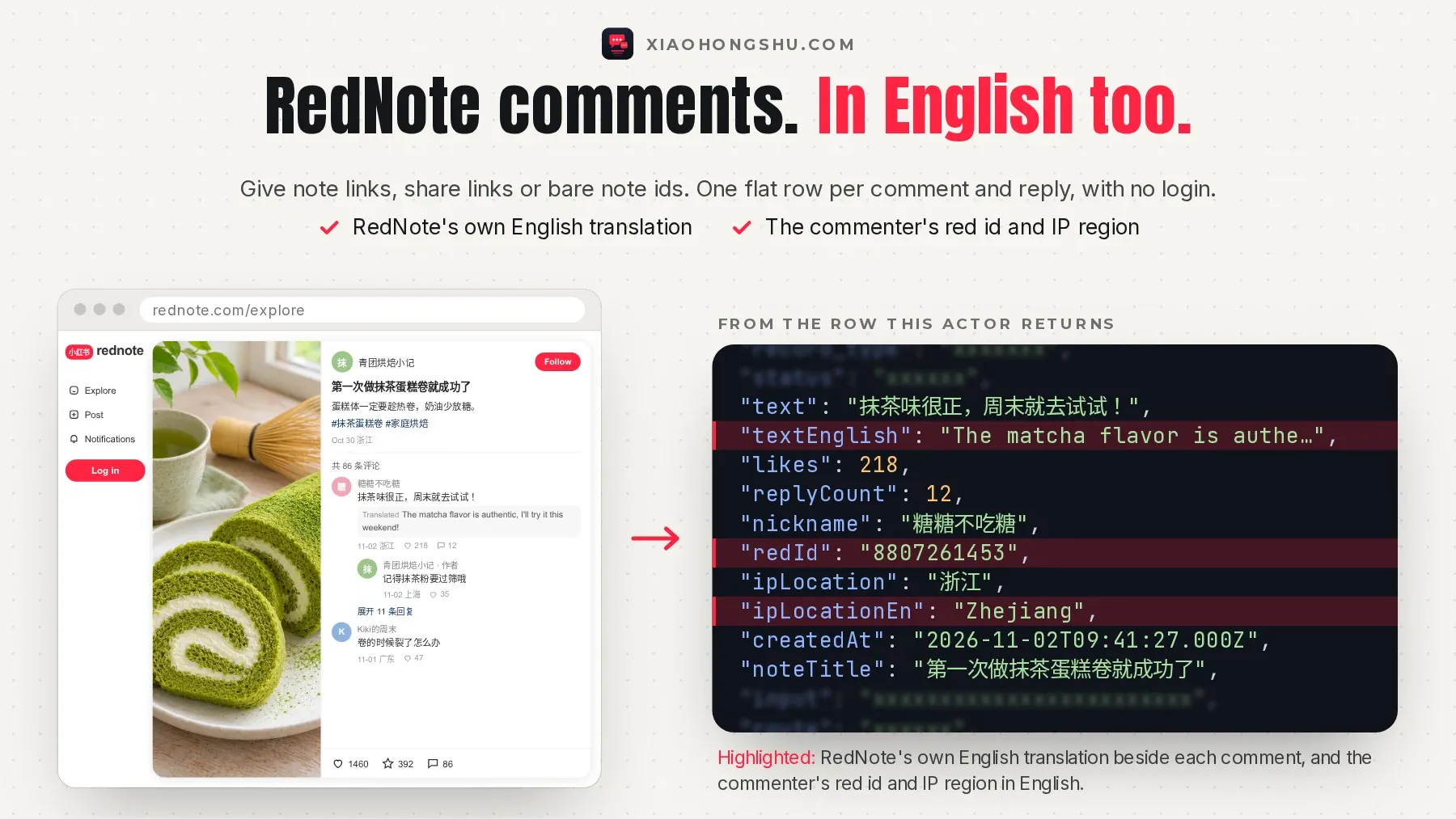
RedNote (Xiaohongshu, 小红书) comments as data, logged out. Give note links, share links or note ids (or keywords, creators or a trending feed channel) and get one flat row per comment and per reply: the text and RedNote's own English translation, the language, the exact time, likes, the reply count, the pinned and author tags, pictures and voice comments with RedNote's transcript, and the commenter with user id, red id and IP region (in Chinese and English). Every note also gets a free row with its verdict (COMPLETE, LIST_END or CAP) and its counts. No login, no cookie, no token.
From $5.09 per 1,000 rows (comment) on the Free plan, $4.3265 on Starter; every row and add-on is priced under Pricing below. A run start is $0.05. The default input returns about 51 rows for about $0.3045. A value that names nothing is a free row that says why.
How it compares
- 3 times cheaper than zen-studio's Xiaohongshu Comments Scraper, with more data: $4.56 per 1,000 comments, against $12.35; 46 fields per comment, against 25.
- More data than socialdatax's 小红书数据 API:笔记搜索与评论: 46 fields per comment, against 27. The price is about the same: $4.56 per 1,000 comments, against $4.99.
Measured on 2026-11-16. Each line compares one job, run by both scrapers at the same time. Prices are per 1,000 comments: Apify Actors at the Scale plan's prices.
Tested head-to-head on 2026-11-16
The job: 50 comments of one RedNote note (the input form's own example: its first 20 top comments with their replies, maxItems 50). Every Actor ran on it the same day from the same harness; every run's cost is at the Scale plan's prices: a rival's charged events at its price for that plan, this Actor's at its list price. Fields counts the filled fields of a typical row. Each rival read the same note: the leader nests the replies in each top comment (2 a comment here, to fit the card's cap) and bills each reply as a comment; our rows are flat, one per comment or reply. Re-measured monthly.
| Actor | Rows | First row | Run time | Cost | Fields | Failures |
|---|---|---|---|---|---|---|
| this Actor | 50 | 4.0 s | 4.9 s | $0.23 | 46 | none |
zen-studio/rednote-comments-scraper | 20 | 7.9 s | 21 s | $0.25 | 25 | none |
socialdatax/socialdatax-xhs-data-api | 40 | 6.9 s | 6.9 s | $0.20 | 27 | none |
Why this RedNote (Xiaohongshu) comments scraper
- A bare note id is enough. RedNote's own web pages ask for the link's
xsec_token; this Actor reads the comments by the 24-character note id alone, so a link without its token, an old link or an id from your own records still works. App share links (xhslink.com) and the pasted share text work too. - Every top comment, with a stated end. The walk follows RedNote's list to its end: on our 318-comment test note all 318 top comments came back (COMPLETE, the count RedNote states). When the list ends under RedNote's own count, the end is read again on a fresh connection and the note's row says LIST_END with both numbers. Nothing ends silently.
- Flat rows, replies included. Each reply is its own row with
rootCommentIdandreplyToCommentId, so the dataset exports to CSV as it is. Logged out RedNote shows up to 3 replies under each comment; every comment row has the exactreplyCountandrepliesComplete, so you know what is left. - English beside the Chinese. A comment carries RedNote's own English translation (
textEnglish) and the language code: 886 of 920 comments of our 12-note gate run had one (build 0.1.6, 2026-11-16). The commenter's IP region comes in Chinese and in English (ipLocation,ipLocationEn). - The commenter's red id. The red id (the public account number on the profile) is looked up once per commenter per run: 914 of 920 rows of the same 12-note run got one (an account that answers none says so on its row).
- Fast on hot notes. In the default order rows stream page by page, and a capped run reads only the pages it needs. On our 22 runs of build 0.1.5 on Apify (2026-11-16) the first row came after 3.3 to 18.1 seconds (18.1 s once, when RedNote's note page did not answer on one connection); the form's example, 50 comments of a note, took 4.9 seconds in all, and every one of the 413 comments and replies of our 318-comment test note was out after 24.4 seconds (without the red-id lookups).
Who it's for
- Brand and marketing teams — what RedNote users say under a product's, a competitor's or a campaign's notes: the comments with their likes, the replies, the IP regions and RedNote's English translation.
- Market and consumer researchers — Chinese consumer opinion as data: every comment of a note with its exact time and likes, in Chinese and English, with an optional sentiment score.
- Creators and agencies — the audience under a creator's notes: who comments, from which region, what gets liked and pinned, and which comments are the author's own.
- Developers and data teams — typed flat rows with one schema for every input, a free row per note with its verdict and counts, and a run summary to check a pipeline against.
Quick start
Every comment of one note
The 100 newest comments of a note, with sentiment
Comments under a keyword's notes
Comments of today's trending food notes
Switching from zen-studio/rednote-comments-scraper?
Your input works as it is. Each name in the left column is read as this Actor's own field and the run log says so (read <theirs> as <ours>); a name marked not read is ignored with a note. A value in the other Actor's shape, an object list or its own date form, is read too.
| zen-studio/rednote-comments-scraper | this Actor | what to know |
|---|---|---|
noteUrls | noteUrls | The same note links, share links and bare 24-character note ids; the xsec_token is not needed. |
sortBy | sortBy | The same values (latest, recommended, most_liked); the default here is recommended. |
includeReplies | includeReplies | The same switch, on by default; each reply is its own row. |
maxCommentsPerNote | maxCommentsPerNote | The same: top comments per note, 0 = all. |
maxRepliesPerComment | maxRepliesPerComment | The same name; logged out RedNote shows at most 3 replies a comment (6 on keyword and creator rows), so a larger value or 0 gives all it shows. |
What differs:
- The default order is
recommended(RedNote's own ranking, the pinned comment first), notlatest: rows stream page by page and a capped run reads only the pages it needs.latestandmost_likedwork as in the leader, but the run reads every top comment of the note before it sorts them. - Replies are their own rows (the leader nests them in
replies[]and bills each as a comment too). Each comment row says how many replies it has (replyCount) and how many came (repliesDelivered). - Logged out RedNote shows at most 3 replies under a comment (6 on keyword and creator rows), so
maxRepliesPerCommentabove 3 gives 3 on note links (up to 6 on keyword and creator rows); the leader's deeper threads and its "author liked" tag come from the app's own record, which this Actor does not read. - Column names:
commentId(the leader'sid),text(content),likes(like_count),createTime(time, in ms;createdAtISO),replyCount(sub_comment_count),ipLocation(ip_location), the commenter flat (userId,nickname,avatar,redId) instead of auserobject. - Added: RedNote's English translation and the language code on every row, the IP region in English, the note's title, author and counts, pictures and voice comments, and keyword, creator and feed-channel inputs.
Output
One row per comment or reply (and one free row per note and per keyword, creator or channel):
| field | meaning |
|---|---|
record_type | comment on a comment or reply row (charged); note on a note's free row; source on a keyword's, a creator's or a channel's free row. |
status | ok, or why an input or a note gave no comment: no_comments, not_found (RedNote has no such note, read on two connections), not_joined (a creator's listed note the search did not find), invalid_input, refused, failed, not_read. |
input | The value you gave that this row answers (the note link, the keyword, the creator or the channel). |
route | h5: read by the note id, with the commenter's id and red id. partner: read through RedNote's search (keywords and creators), with no commenter id. |
noteId | The note's 24-character id; on partner rows the search's encrypted id. |
noteUrl | The note's link (no token needed); null on partner rows. |
noteTitle | The note's title. |
noteAuthorId | The note author's user id, from the note's page (on a creator's notes, from the creator's list); null when RedNote refuses the page for that note (noteAuthorStatus). |
noteAuthorNickname | The note author's name. |
commentId | The comment's own id (the same on every route). |
type | comment (a top-level comment) or reply. |
position | The row's place in the note's list as delivered (1 = first), in the order sortBy gives. |
rootCommentId | On a reply: the top-level comment it sits under. |
replyToCommentId | On a reply: the comment it answers. |
replyToUserId | On a reply: the user id of the person it answers (from the comment it answers when that comment is in the same thread; null otherwise). |
replyToNickname | On a reply: the name of the person it answers (as replyToUserId). |
text | The comment's text as written (empty for a picture-only comment). |
textEnglish | RedNote's own English translation of the comment (h5 rows; none for a comment of numbers or already in English). |
language | RedNote's language code for the comment (zh_cn, en_us; num_sp_ch for a comment with no words, such as numbers, emotes, symbols or a lone @name). |
commentType | text, picture or voice. |
pictures | The comment's picture links. |
pictureCount | How many pictures the comment carries. |
voiceUrl | A voice comment's audio link (signed, it expires). |
voiceDurationMs | A voice comment's length in milliseconds. |
voiceTranscript | RedNote's own transcript of a voice comment. |
mentions | The users the comment @-mentions: userId and nickname each. |
createdAt | When the comment was posted (UTC, ISO 8601). |
createTime | When the comment was posted, in milliseconds since 1970 (UTC). |
likes | The comment's likes, exact; null where RedNote shows only a band ("10+" on keyword and creator rows). |
replyCount | On a top-level comment: its replies, exact (RedNote's own count); null where RedNote shows only a band ("10+" on keyword and creator rows). |
repliesDelivered | On a top-level comment: the replies delivered as rows under it. |
repliesComplete | On a top-level comment: true when the delivered replies cover replyCount. |
isPinned | True for the comment pinned on top of the note. |
isAuthor | True for a comment by the note's own author; null when the author is not known (noteAuthorStatus). |
isAiAgent | True when RedNote marks the commenter as an AI agent. |
sourceStatus | RedNote's own status number of the comment (4 = pinned; others passed through as RedNote sends them). |
userId | The commenter's user id (h5 rows). |
nickname | The commenter's name. |
avatar | The commenter's avatar picture. |
redId | The commenter's red id, the public account number on the profile (includeRedIds). |
redIdReadAt | When the red id was read (UTC); it may come from the last 24 hours' cache. |
redIdStatus | served, cached, not_found (the account answered none), refused, not_asked (includeRedIds off), not_served (partner rows), cut (the run stopped while it was read). |
userUrl | The commenter's profile link. |
ipLocation | The commenter's IP region as RedNote shows it (Chinese: a province or a country). |
ipLocationEn | The same region in English; null for a value outside the Actor's table. |
analysis_sentiment | With sentimentAnalysis: the comment's sentiment from -1 (negative) to 1 (positive); null when the model gave no answer or the run stopped before the score (sentimentStatus says which). |
analysis_confidence | With sentimentAnalysis: how sure the model is, 0 to 1. |
sentimentLabel | With sentimentAnalysis: positive, neutral or negative. |
sentimentStatus | served (scored: the comment owes the sentiment fee), no_text (nothing to score), failed (the model gave no answer), cut (the run stopped before the score), not_asked (sentimentAnalysis off). Only served is charged. |
noteCommentCount | The note's comments, top-level and replies, as RedNote counts them. |
noteTopLevelCommentCount | The note's top-level comments, as RedNote counts them (the yardstick of COMPLETE). |
noteLikes | The note's likes (exact under 10,000, RedNote's rounded figure above). |
noteCollects | The note's collects (as noteLikes). |
noteShares | The note's shares (as noteLikes). |
noteType | normal (pictures) or video. |
notePostedAt | When the note was posted (UTC). |
noteAuthorStatus | served: the note's page named its author. page_refused: RedNote refused the page for this note (its comments still come), so isAuthor is null. slow: the page did not answer in time. cut: the run stopped while the page was read. The other note fields (noteLikes, noteCollects, noteShares, noteType, notePostedAt) come from the same page and are null with it. |
sortBy | On a note row: the order its comments were delivered in. |
verdict | On a note row: COMPLETE, LIST_END, CAP, PARTIAL, TRUNCATED or DUPLICATE (read for another input of the run); on a source row: COMPLETE or PARTIAL. |
rowsDelivered | On a note or source row: the comment rows it delivered. |
topCommentsRead | On a note row: the distinct top-level comments read. |
notesFound | On a source row: the notes the keyword, creator or channel gave. |
notesRead | On a source row: the notes whose comments were read (wholly or in part); a note left unread by maxItems or the charge limit has a free not_read row. |
reason | Why a note or source row has its status or verdict. |
scrapedAt | When this row was read (UTC). |
Example record:
Pricing
Pay for the comments a run delivers, plus one run start; no platform usage is billed to you. The comment price falls with your Apify plan.
| event | unit | Free | Starter | Scale | Business |
|---|---|---|---|---|---|
Comment (comment) | per 1,000 | $5.09 | $4.3265 | $3.563 | $2.545 |
Sentiment score (sentiment) | per 1,000 | $0.50 | $0.425 | $0.35 | $0.25 |
Run start (start) | per run | $0.05 | $0.05 | $0.05 | $0.05 |
A comment or a reply is $5.09 per 1,000 on the Free plan ($0.00509 a comment) and $4.3265 on Starter, with everything it carries: RedNote's English translation, the commenter's red id and IP region, the note's title, author and counts. The optional sentiment score (sentimentAnalysis) adds $0.50 per 1,000 scored comments ($0.425 on Starter); a comment with no text or no answer from the model is not charged for it. Each run that delivers a comment also pays the run start, $0.05 once; a run that delivers none pays nothing at all. So 50 comments cost $0.3045 on the Free plan and $0.266325 on Starter; 200 comments $1.068 and $0.9153; 1,000 comments $5.14 and $4.3765; every input of a run shares one start. Free: every note's own row (its verdict and counts), every keyword, creator and channel row, a note id that names no note, a note with no comment, a value that names nothing, a comment listed twice (one row, one charge), a comment your filters leave out, and a note left unread at maxItems, your charge limit or the time limit. A run that stops early (a timeout, an abort) is charged for the comments it delivered.
Before the first request the log names the prices at your plan and the most the run can cost: maxItems over the whole run, or maxCommentsPerNote times the notes (each top comment with at most 3 replies, 6 on keyword and creator notes), and never more than your charge limit. With no cap the run reads each note to its end, so it costs about the comment price times the comments RedNote counts on the note (each note row says how many). Enterprise plans have their own rates — the Actor's Pricing tab shows the price for your plan.
Usage patterns
- What to give —
noteUrls: note links (copy the link from the browser's address bar or the app's share menu; thexsec_tokenis not needed),xhslink.comshare links or the whole share text, or bare 24-character note ids.keywords: search words in any language.creatorUrls: profile links or user ids.channels: the trending feed by category. Fill one list or several; a value given twice is read once, and each repeat gets a free note or source row with the verdict DUPLICATE that names the value it repeats; a value that names nothing is a freeinvalid_inputrow that says why. - How much and in which order —
maxCommentsPerNotecaps the top comments of each note (0 = all; their replies come with them),maxItemsthe comments of the whole run.sortByrecommendedstreams RedNote's own ranking;latestandmost_likedsort the note's complete list first.maxNotesPerSourcesets how many notes each keyword, creator or channel gives (10 by default). - Filters —
postedAfterandpostedBefore(a date, a UTC time or an age such as7 days),commentKeywords(any of the words, in the text or its English translation; a word in Latin letters matches as a whole word, soteadoes not matchteam, and a Chinese word matches anywhere in the text),minLikesandonlyWithPictureskeep the comments you want; a comment left out is free. RedNote filters none of these itself, so a filtered run still reads every comment of the note. Each comment is judged on its own: a reply that passes a filter is delivered even when the comment it sits under does not, andrepliesDeliveredcounts only the replies delivered. - Keyword and creator rows — A keyword's or a creator's notes are read through RedNote's search, whose comment list differs: up to about 100 top comments a note and up to 6 replies a thread, but no commenter id and no red id, and the note id is the search's encrypted id (
route=partner). The search writes a like or reply count of 10 or more as "10+", so such a count is null on these rows, never 10. A creator's notes are found in the search by their title and the creator's name (20 of 27 listed notes on our tests); a listed note the search does not find is a freenot_joinedrow.
Input configuration
| field | type | default | what it does |
|---|---|---|---|
noteUrls | array | [] | One note a line: a note link (xiaohongshu.com/explore/<id>, /discovery/item/<id>, rednote.com/..., with or without its xsec_token), an app share link (xhslink.com/...) or the copied share text around it, or a bare 24-character note id. No token or login is needed. A value that names no note is a free invalid_input row. |
keywords | array | [] | Search words, one a line (Chinese or English). The run reads the comments of the first maxNotesPerSource notes the search lists. These rows come from the search's own comment list: up to about 100 top comments a note, up to 6 replies a thread, and no commenter id or red id (route = partner). |
creatorUrls | array | [] | A creator's profile link (xiaohongshu.com/user/profile/<id>) or 24-character user id, one a line. The run reads the creator's newest notes (logged out the profile lists up to 12) and finds each one in the search by its title and the creator's name; a listed note the search does not find is a free not_joined row. These rows have no commenter id or red id (route = partner). |
channels | array | [] | The explore feed by category, one a line: recommend (the home feed), fashion, food, beauty, movies, kpop, career, relationships, home, gaming, travel, fitness, video. The run reads the comments of the first maxNotesPerSource notes the feed shows now. |
sortBy | recommended / latest / most_liked | "recommended" | recommended (default): the platform's own ranking, the pinned comment first; rows stream page by page, and a capped run reads only the pages it needs. latest (newest first) and most_liked: the run reads every top comment of the note first, then sorts them, so the first row of a note with thousands of comments waits for its whole list. |
maxCommentsPerNote | integer | 0 | The most top-level comments a note gives (its replies come with them); 0 = every top comment the note lists. The note's row says COMPLETE, LIST_END or CAP. |
includeReplies | boolean | true | Deliver the replies the source shows under each comment, each as its own row with rootCommentId and replyToCommentId. |
maxRepliesPerComment | integer | 3 | The most replies a comment gives. Logged out the source shows up to 3 replies under a comment (6 on keyword and creator rows); a larger value or 0 gives all it shows. Every comment row has its exact replyCount, repliesDelivered and repliesComplete. |
maxNotesPerSource | integer | 10 | How many notes each keyword, creator or channel gives. |
postedAfter | string | Only comments from this time on: a date (2026-11-01), a UTC time (2026-11-01T08:00:00Z) or an age (7 days, 24 hours). The run reads every comment of the note and keeps these; a comment left out is free. | |
postedBefore | string | Only comments from before this time: a date, a UTC time or an age, as above. | |
commentKeywords | array | [] | Only comments whose text (or its English translation) contains any of these words, case-insensitive: a word in Latin letters as a whole word (tea does not match team), a Chinese word anywhere in the text. A comment left out is free. |
minLikes | integer | 0 | Only comments with at least this many likes. A comment left out is free. |
onlyWithPictures | boolean | false | Only comments that carry pictures. |
includeRedIds | boolean | true | Add each commenter's red id (the public account number shown on the profile). One extra lookup per distinct commenter, so a run is about 3 times faster without it; the comment rows stay the same. |
sentimentAnalysis | boolean | false | Score each delivered comment from -1 (negative) to 1 (positive) with a confidence and a label. A model reads the Chinese text and its emote codes; on 20 real comments it read 19 right by eye, weakest on teasing, so use the confidence to drop unsure answers. |
pseudonymizeCommenters | boolean | false | Replace each commenter's id, name and red id (and the people a reply answers or mentions, with their @name in the text) with a stable hash for this run; the avatar and profile link are left out. The note's author stays named where the note's page names the author. |
maxItems | integer | 0 | The most comment rows of the whole run (the charged rows); 0 = no cap beyond your charge limit. |
feedback | string | A note to the people who maintain this Actor: what you needed and did not get. For example a missing field, a wrong or empty result, or the Actor you switch from or to, and why. The run does not read it: the rows and the charges stay the same. A person reads every note. |
Errors
A run does not fail because of your input. When an input cannot be used — a date that is not a date, an id in the wrong form, two settings that contradict each other — the run ends Succeeded, charges nothing, and says what to change:
- the status message starts with
INPUT REJECTED; - the dataset holds one row,
{"error": true, "code": "…", "message": "…"}, and no results; - the key-value store record
ERRORholds the same object.
From code, check error on the first row before reading results.
A note id that names no note, a note with no comment, a share link that leads nowhere, a creator note the search does not find, or a value that names nothing is not an error: it gets one free row with its status and the reason, and the run goes on with the others. A run that ends Failed is a fault on our side, never your input; it charges nothing, and we are alerted.
FAQ
Do I need a RedNote account, a cookie or the link's xsec_token?
No. The Actor reads RedNote logged out, with no cookie and no token. A bare note id works as well as a full link.
Why do I get at most 3 replies under a comment?
Logged out, RedNote shows up to 3 replies under each comment (up to 6 on keyword and creator rows); the rest of a thread opens only in the app or with a login. Each comment row has the exact replyCount, repliesDelivered and repliesComplete, so you can see which threads have more.
What does the note row's verdict mean?
COMPLETE: every top comment RedNote counts came back. LIST_END: RedNote's list ended under its own count; the end was read again on a fresh connection, and reason says whether that read agreed. CAP: your maxCommentsPerNote stopped the note. PARTIAL: the run's time limit, your maxItems, your charge limit or an abort stopped it (a note whose list had ended and whose comments all went out still says COMPLETE). TRUNCATED: the walk stopped after 1,000 pages (20,000 top comments).
Is the English translation machine-made?
It is RedNote's own translation, served with each comment; this Actor adds no model for it. A comment that is only numbers or already in English has none.
What is the red id, and why is it sometimes empty?
The red id is the public account number on a RedNote profile. It is read once per commenter per run (includeRedIds, on by default; off makes a run about 3 times faster). A deleted or restricted account answers none, and redIdStatus says why. Keyword and creator rows carry no commenter id, so they have no red id either.
Is commenter data personal data?
Commenters are private persons. Use the data under the laws that apply to you; pseudonymizeCommenters replaces each commenter's id, name and red id with a stable hash for the run (the people a reply answers or mentions too, and their @name in the text and its English), and drops the avatar. The note's author stays named where the note's page names the author (noteAuthorStatus served).
Can I use this Actor with AI agents and MCP?
Yes. Any agent that can call Apify Actors (the Apify MCP server, LangChain, n8n, Make, Zapier) can run it with note links or ids and read the rows.
Do I need Apify Proxy or my own proxy?
No. The Actor uses its own connections, at no extra cost to you.
Integration
JavaScript
Python
CLI
REST
AI agents and MCP
Apify's MCP server offers this Actor as a tool to Claude, Cursor, VS Code and any other MCP client. Connect https://mcp.apify.com?tools=hyperbach/xiaohongshu-comments-scraper and ask, for example: "Get every comment and reply of this RedNote (Xiaohongshu) note with likes, time and commenter, in English too". The agent fills the input from the table above and reads the rows from the run's dataset. A field under the name another Actor gives it is read as this Actor's own: startUrls, urls, url, postUrls as noteUrls; keyword, searchKeywords, searchTerms, queries as keywords; profileUrls, userUrls, creators, users as creatorUrls; channel, categories, category, feeds as channels (and more). An agent or a person can add feedback to any run and say what was needed and not delivered: a missing field, a wrong or empty result, the Actor switched from or to, and why. The run returns the same rows at the same price, and a person reads every note.
n8n, Make and Zapier
The Apify node in n8n, the Apify app in Make and the Apify integration in Zapier run this Actor on a schedule or from a trigger and read its dataset. A webhook on the run's end (Integrations on the Actor page) sends the rows on to your own endpoint. Nothing to install on our side.
Support
Disagree with a charge? Write to apify@hyperbach.com with the run ID. We will ask Apify to compensate you, and the charge comes back to your Apify account as platform credit.
Did it do the job? A short review on the Store, at any rating, helps the next buyer choose.
See also
- Telegram Profile Scraper — Telegram channels, groups, bots and users by username or link, with the exact subscriber or member count.
- YouTube Channel Search Scraper — the YouTube channels a keyword finds, with subscribers, the exact video and view counts and the country.
- Threads Scraper — Threads profiles with the exact follower count, their posts and replies with view counts, and keyword and tag search, without a login.
- Substack Scraper — the posts of a Substack newsletter with the full text of free posts, the date, the paywall flag and the likes.
- Weibo Scraper — Weibo posts, profiles, search, comments and the hot-search boards, without a login.
- Pinterest Search Scraper — the pins of a Pinterest search, with the link each pin points to, the image and the pinner.
This page is generated from the Actor's schemas and a live sample — it cannot describe a field the Actor does not have.


