
RedNote Xiaohongshu Scraper: Notes, Search & Trending | 小红书
Pricing
from $2.00 / 1,000 notes
RedNote Xiaohongshu Scraper: Notes, Search & Trending | 小红书
Scrape Xiaohongshu (RedNote, 小红书) notes logged out: the trending feed by channel, keyword search, note links and creator profiles. Full text, likes, collects, comments, shares, topics, images, video, author red id, IP location and followers. No login or cookies. Misses free.
Pricing
from $2.00 / 1,000 notes
Rating
0.0
(0)
Developer

Hyperbach
Maintained by CommunityActor stats
0
Bookmarked
6
Total users
2
Monthly active users
6 days ago
Last modified
Categories
Features
Share
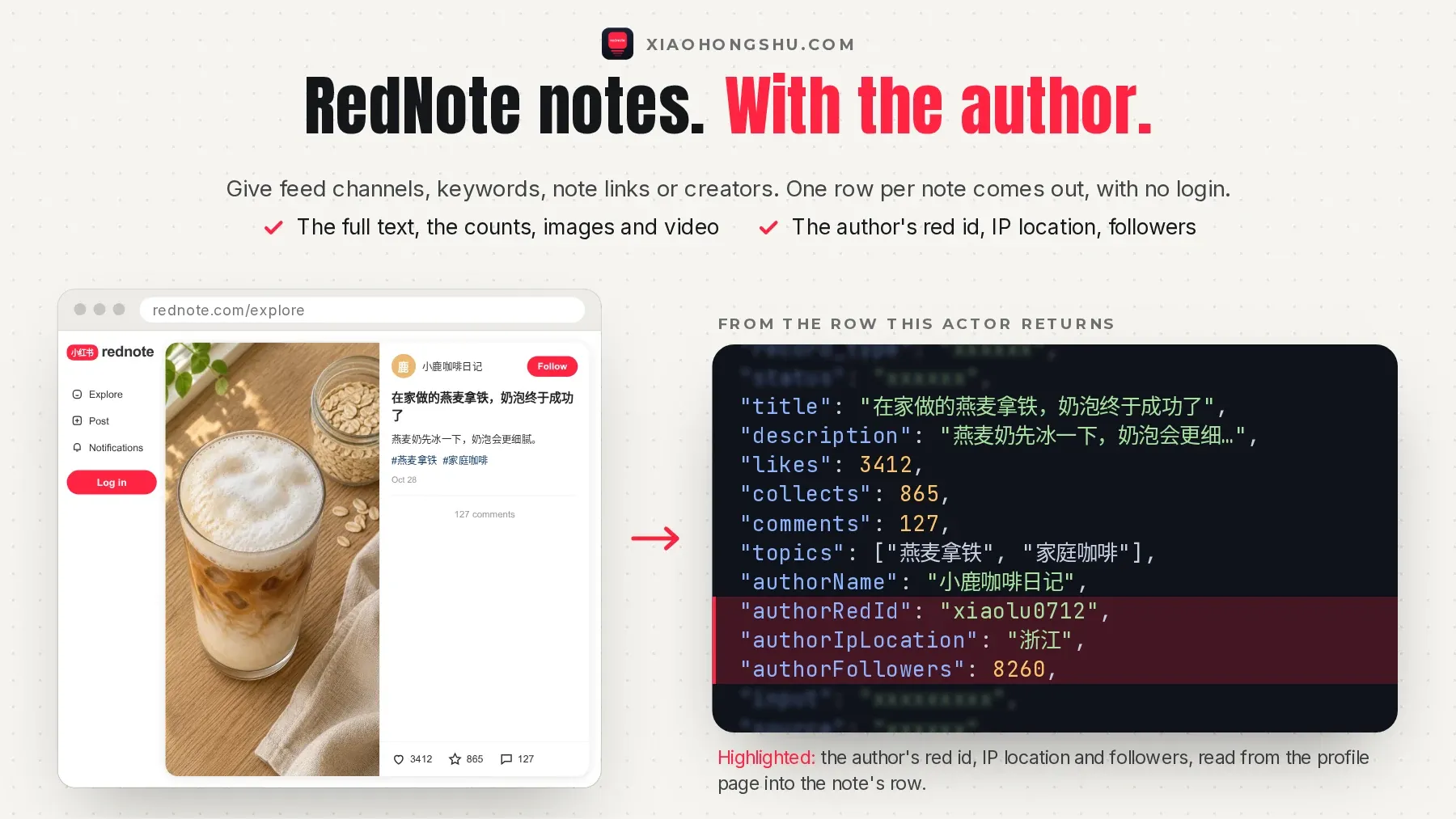
RedNote (Xiaohongshu, 小红书) notes as data, logged out. Give feed channels, search keywords, note links or creator profile links, and get one row per note: the full text, likes, collects, comments and shares (exact under 10,000, RedNote's own band above, with the text beside the number), the topics with their ids, every image with its size and live photo, the video stream URLs, the publish and edit times, the English translation RedNote gives, and the author with the red id, IP location and follower count. Search notes add the full text, the video's subtitles and, on request, the first page of comments. Creator links give one row per profile: followers, notes, likes and collects received, bio, IP location. Every input also gets a free row with its verdict. No login, no cookie, no RedNote account.
From $4.00 per 1,000 rows (note) on the Free plan, $3.40 on Starter; every row and add-on is priced under Pricing below. A run start is $0.00283. The default input returns about 22 rows for about $0.0828. A value that names nothing is a free row that says why.
How it compares
- Cheaper than socialdatax's 小红书数据 API:笔记搜索与评论, with more data: $2.94 per 1,000 notes, against $4.99; 44 fields per note, against 30. It is 3 times faster: 20 notes in 10 s, against our 33 s.
- 3 times cheaper than zen-studio's RedNote Search Scraper, with more data: $2.94 per 1,000 notes, against $7.50; 44 fields per note, against 20. It is 5 times faster: 20 notes in 6.4 s, against our 33 s.
Measured on 2026-11-12. Each line compares one job, run by both scrapers at the same time. Prices are per 1,000 notes: Apify Actors at the Scale plan's prices.
Tested head-to-head on 2026-11-12
The job: the first 20 notes of one RedNote keyword search (咖啡, the input schema's example keyword). Every Actor ran on it the same day from the same harness; every run's cost is at the Scale plan's prices: a rival's charged events at its price for that plan, this Actor's at its list price. Fields counts the filled fields of a typical row. Every row here is a note of the same keyword search; our rows carry the full note text (the rivals' cards a preview), and the rivals' counts are exact where RedNote's logged-out view rounds above 10,000. Re-measured monthly.
| Actor | Rows | First row | Run time | Cost | Fields | Failures |
|---|---|---|---|---|---|---|
| this Actor | 20 | 14 s | 33 s | $0.059 | 44 | none |
socialdatax/socialdatax-xhs-data-api | 20 | 10 s | 10 s | $0.100 | 30 | none |
zen-studio/rednote-search-scraper | 20 | 5.5 s | 6.4 s | $0.15 | 20 | none |
Why this RedNote (Xiaohongshu) scraper
- Four ways in, one row shape. The trending feed by channel (recommended, food, fashion, travel and 9 more), RedNote's keyword search, note links (with their token,
xhslink.comshare links and pasted share text too) and creator profiles, in one run. Every note row has the same columns whichever way it came, andsourcesays which. - Counts you can trust. RedNote shows a count above 10,000 rounded (
39.8K,1.7万). This Actor keeps RedNote's own text (likesText) beside the number it stands for (likes, RedNote's rounded figure) and says whether all four counts were exact (countsExact); it never invents digits the page does not show. - The author in the same row. With
includeAuthorProfileandenrichNoteDetails(both on by default) each feed note and note link carries the author's red id, IP location and follower count, read once per author per run. WithenrichNoteDetailsoff a row is the list's card and no profile is read. - Keyword search, logged out. RedNote's own web search asks a visitor to log in. This Actor reads the search a partner phone browser uses: 20 notes a page in RedNote's order, each with its full text, counts, images and video when
enrichNoteDetailsis on, and the first page of comments on request. The limit, said plainly: a search note carries RedNote's encrypted id and no link that opens. - Every input answered. A wrong token, a removed note, a keyword with no result: one free row each with the reason, after a second connection agrees. A run that delivers nothing says why; you pay only for delivered rows.
- Plain HTTP, no browser. No login, no cookie, no account of yours. On our 13 runs of build 0.1.5 on Apify (512 MB, 2026-11-12) the first row came after 2.7 to 14.1 seconds; 20 trending notes with their authors took 14 seconds (the first after 8), and 160 notes of two feed channels and two keywords with the full text took 36 seconds.
Who it's for
- Brand and marketing teams — what RedNote's trending feed and search show for a product, a category or a competitor right now, with the counts, the topics and the creators behind each note.
- Creator and KOL scouts — the creators behind trending and searched notes, with their red ids, IP locations and follower bands, and each profile's notes, likes and collects received.
- Market and trend researchers — Chinese consumer topics as data: the full texts with RedNote's own English translation, the topics with their ids, the publish times, the engagement.
- Developers and data teams — typed rows with one schema for every source, the counts as numbers and as RedNote's text, one free row per input and a run summary to check a pipeline against.
Quick start
The trending feed: 50 recommended notes
A keyword search with comments
Note links and a creator
Video notes about camping from the last week
Switching from scrapesage/rednote-xiaohongshu-scraper or zen-studio/rednote-search-scraper?
Your input works as it is. Each name in the left column is read as this Actor's own field and the run log says so (read <theirs> as <ours>); a name marked not read is ignored with a note. A value in the other Actor's shape, an object list or its own date form, is read too.
| scrapesage/rednote-xiaohongshu-scraper / zen-studio/rednote-search-scraper | this Actor | what to know |
|---|---|---|
mode | not read | Read: trending keeps channels, notes keeps noteUrls, creators keeps creatorUrls, creatorLeads reads the feed (its authors are on each row). Without mode every list you fill is read. |
channels | channels | The same channel ids (recommend, homefeed.food_v3, …), and words such as food or travel. |
noteUrls | noteUrls | The same links with their xsec_token; share links and pasted share text too. |
creatorUrls | creatorUrls | The same profile links, or 24-character user ids. |
urlsFromFile | noteUrls | Read as note links, one per line (a profile link among them is read as a creator); a link to a file or a sheet is not opened. |
maxItems | maxItems | The whole run's charged rows; maxResults caps each channel or keyword (100 by default). |
enrichNoteDetails | enrichNoteDetails | The same switch, on by default. |
includeAuthorProfile | includeAuthorProfile | The same switch, on by default: red id, IP location, followers. |
maxNotesPerCreator | not read | Not read: a creator row lists every note its profile shows (about 30); their ids are hidden from a logged-out reader. |
concurrency | not read | Not read: the Actor sets its own pace per connection and rotates a refused one. |
monitorMode | not read | Not read: no monitor mode; each run reads the feed as it is now. |
monitorStoreName | not read | Not read: no monitor mode. |
proxyConfiguration | not read | Not read: the Actor brings its own connections. |
keywords | keywords | zen-studio's name: one keyword per line. |
maxResults | maxResults | zen-studio's name: the most notes per keyword (here per channel too); 0 = up to 50 pages. |
sortType | not read | Not read: RedNote's logged-out search ignores the sort it is sent (the same list for every sort), so the rows come in RedNote's own order; filter with timeFilter or minLikes. |
noteType | noteType | The same values for video and image notes (all, video, image); live notes are not a type here. |
timeFilter | timeFilter | The same windows (all, 1d, 1w, 6mo), and 1m. |
What differs:
- No
mode: fill any of the four lists (channels,keywords,noteUrls,creatorUrls) and the run reads every list you filled. The leader'smodeis still read: it keeps the list it names. - Keyword search is here (the leader has none):
keywords, withmaxResultsper keyword, as zen-studio names them. - A note's id is
id(the leader'snoteId); the counts keep the leader's names (likes,likesText,collects, …), the author fields too (authorRedId,authorIpLocation,authorFollowers). - A creator row lists the notes the profile shows with their titles, likes and covers; RedNote hides their ids from a logged-out reader, so they are not note rows.
- No monitor mode: a run reads the feed as it is now (about 35 fresh notes a load).
Output
One row per note or creator profile (and one free row per input):
| field | meaning |
|---|---|
record_type | note on a note row (charged as note), creator on a creator profile row (charged as creator), target on an input's free row. |
status | ok, or why an input gave no row: not_found (RedNote's 404 page on two connections: a wrong or old token, a removed note or profile), no_results (the search answered no note), invalid_input (the value names nothing), failed (RedNote refused every connection the run tried), not_read (the run stopped first). |
input | The value you gave that this row answers. |
source | Where the row came from: feed (the trending feed), search (the keyword search), note_url (a note link), creator (a profile link). |
keyword | On a search note: the keyword that found it. |
channel | On a feed note: the feed channel it came from (recommend, homefeed.food_v3, …). |
rank | On a feed or search note: its place in the list as RedNote served it, 1 = the first. |
id | The note's id (24 characters; on a search note RedNote's encrypted id), or the creator's user id. |
url | The note's link with its xsec_token, or the creator's profile link; null on a search note (RedNote gives no link that opens). |
xsecToken | The note's xsec_token, the key RedNote's link needs. |
noteType | video or image. |
title | The note's title. |
description | The note's full text, its topics as #name (a search card without enrichNoteDetails has RedNote's snippet). |
publishedAt | When the note was published (UTC). |
updatedAt | When the note was last edited (UTC), or its publish time. |
publishedTimestamp | The publish time in epoch milliseconds. |
likes | Likes: the exact number, or RedNote's rounded figure above 10,000 (39.8K → 39800; likesText keeps the text). |
collects | Collects (saves), as likes. |
comments | The comment count, as likes. |
shares | Shares, as likes. |
likesText | Likes as RedNote shows them (6,468, 39.8K; a search card's text can read 1.7万). |
collectsText | Collects as RedNote shows them. |
commentsText | The comment count as RedNote shows it. |
sharesText | Shares as RedNote shows them. |
countsExact | True when every count on the row was exact (none banded). |
engagementTotal | likes + collects + comments + shares (a rounded count counts as its figure). |
authorId | The author's user id (on a search note RedNote's encrypted id). |
authorName | The author's nickname. |
authorAvatar | The author's avatar image. |
authorUrl | The author's profile link (null on a search note). |
authorXsecToken | The xsec_token of the author's profile link. |
authorRedId | The author's red id (小红书号), with includeAuthorProfile. |
authorIpLocation | The author's IP location as their profile shows it, with includeAuthorProfile. |
authorFollowers | The author's followers: the floor of RedNote's band (1万+ → 10000), with includeAuthorProfile. |
authorFollowersText | The author's followers as RedNote shows them (10+, 1千+, 1万+). |
authorProfileStatus | read, refused (the profile page did not answer), or not_served (a search note's author has an encrypted id; no profile to read). |
ipLocation | The note's IP region where RedNote shows it (most notes carry none on the international view), or a creator's IP location. |
topics | The note's topics (hashtags), by name. |
topicIds | RedNote's ids of the topics, in the same order. |
topicCount | How many topics the note carries. |
mentions | The accounts the note mentions: {id, name}. |
coverUrl | The cover image (the first image). |
imageCount | How many images the note has (a video note: its cover). |
images | Every image: {url, width, height, livePhoto, livePhotoUrl} (a live photo's motion clip in livePhotoUrl). Image links carry RedNote's time stamp and expire. |
hasLivePhoto | True when an image is a live photo. |
videoUrl | The video's stream (MP4). |
videoBackupUrls | The same stream on RedNote's other servers. |
videoDurationSec | The video's length in seconds. |
videoWidth | The stream's width in pixels. |
videoHeight | The stream's height in pixels. |
videoSizeBytes | The stream's file size in bytes. |
videoCodec | The stream's codec (h264, h265). |
videoAvailableCodecs | Every codec RedNote serves the video in. |
subtitles | On a video note: RedNote's subtitle files {language, url, original} (SRT), where it has them; original true is the track in the video's own language, the others are RedNote's translations. |
titleTranslation | RedNote's own English translation of the title, where it gives one. |
descriptionTranslation | RedNote's own English translation of the text, where it gives one. |
language | The note's language as RedNote labels it (zh_cn). |
topComments | With includeComments, on a search note: the first page of comments, each {id, text, likes, likesText, publishedAt, ipLocation, authorName, authorAvatar, replyCount, replyCountText, replies} (likes is a floor where likesText is a band such as 1千+). |
commentsStatus | With includeComments: all (every comment is in topComments), first_page (the first page; RedNote serves no more to a logged-out reader), refused, or not_served (a feed note or a note link: RedNote serves their comments only to a logged-in reader). |
detailsStatus | full (the note's own page or full record was read), card_only (the list's card: enrichNoteDetails off), refused (the full read was refused; the card's fields stay), not_found. |
name | On a creator row: the nickname. |
redId | On a creator row: the red id (小红书号). |
gender | On a creator row: male or female where the profile shows it. |
avatarUrl | On a creator row: the avatar image. |
verified | On a creator row: true when RedNote shows an official verification. |
profileTags | On a creator row: the profile's tags (a city, an age band, a field). |
followers | On a creator row: followers, the floor of RedNote's band (1万+ → 10000). |
followersText | On a creator row: followers as RedNote shows them. |
following | On a creator row: accounts followed, the floor of RedNote's band. |
followingText | On a creator row: accounts followed as RedNote shows them. |
likesAndCollects | On a creator row: likes and collects received, the floor of RedNote's band. |
likesAndCollectsText | On a creator row: likes and collects received as RedNote shows them. |
notesCount | On a creator row: the notes the creator has published (exact). |
likesReceived | On a creator row: likes received over every note (exact). |
collectsReceived | On a creator row: collects received over every note (exact). |
recentNotes | On a creator row: the notes the profile lists (about 30), each {title, noteType, likes, likesText, pinned, publishedAt, coverUrl}; RedNote hides their ids from a logged-out reader. |
verdict | On an input's free row: COMPLETE (the list's own end, or the one note or profile read), CAPPED (maxResults or maxItems came first), TRUNCATED (the walk's own page cap), PARTIAL (the run stopped: note says why). |
rows_delivered | On an input's free row: the rows it delivered. |
note | Why an input's row has the status or the verdict it has. |
scraped_at | When this row was read (UTC). |
Example record:
Pricing
Pay for the notes and creator profiles a run delivers, plus one run start; no platform usage is billed to you. The prices fall with your Apify plan.
| event | unit | Free | Starter | Scale | Business |
|---|---|---|---|---|---|
Note (note) | per 1,000 | $4.00 | $3.40 | $2.80 | $2.00 |
Creator profile (creator) | per 1,000 | $10.00 | $8.50 | $7.00 | $5.00 |
Run start (start) | per run | $0.00283 | $0.00283 | $0.00283 | $0.00283 |
A note is $4.00 per 1,000 on the Free plan ($0.004 a note) and $3.40 on Starter, with everything it carries: the full text, the counts, the images and video, and the author's red id, IP location and followers or a search note's first comments when you ask for them are inside the note's price. A creator profile is $10.00 per 1,000 ($0.01 a profile) and $8.50 on Starter. Each run that delivers a charged row also pays the run start, $0.00283 once; a run that delivers none pays nothing at all. So 20 trending notes cost $0.08283 on the Free plan and $0.07083 on Starter; a keyword's 100 notes $0.40283 and $0.34283; 1,000 notes $4.00283 and $3.40283; 10 creator profiles $0.10283 and $0.08783; every input of a run shares one start. Free: every input's own row, a keyword with no result, a note link whose token is wrong or old, a removed note, a profile RedNote answers with its 404 page, a value that names nothing, a note listed under two of your inputs (one row, one charge), a note your filters leave out, and an input left unread at maxItems, your charge limit or the time limit. A run that stops early (a timeout, an abort) is charged for the rows it delivered.
Before the first request the log names the prices at your plan and the most the run can cost: maxResults for each channel and keyword (100 when you leave it out, at most 1,000), one row for each note link and creator, maxItems over the whole run, and never more than your charge limit. A list that ends sooner delivers fewer rows and costs less: one keyword's search ended at 965 and 980 notes on our runs (RedNote's own end, 50 pages). Enterprise plans have their own rates — the Actor's Pricing tab shows the price for your plan.
Usage patterns
- What to give —
channels: the trending feed by category (recommendis the home feed).keywords: words or phrases in any language, one per line.noteUrls: note links with theirxsec_token(copy the link from the browser's address bar or the app's share menu;xhslink.comshare links and the whole share text work too), or bare 24-character note ids (some open without a token).creatorUrls: profile links or user ids. Fill one list or several; a value given twice is read once; a value that names nothing is a freeinvalid_inputrow that says why. - How many notes —
maxResults(100 by default) caps each channel and each keyword; a note your filters leave out does not count. A search walks 20 notes a page and stops at RedNote's own end of the list (two connections agree) or at 50 pages; a channel loads the feed again (about 35 fresh notes a load) untilmaxResultsor 30 loads.maxItemscaps the charged rows of the whole run. The inputs are read side by side, so amaxItemsunder what they need is shared as their notes arrive. - What each row carries — With
enrichNoteDetails(on by default) a feed note is read from its own page and a search note from its full record: the whole text, the four counts, every image, the video streams. Off, a row is the list's card only: a feed card has the title, the cover and the likes; a search card the snippet and the four counts.includeAuthorProfileadds the author's red id, IP location and followers (feed notes and note links, withenrichNoteDetailson).includeCommentsadds a search note's first page of comments, up to 10 with their first replies. - Filters —
noteType(video or image),timeFilter(the last day, week, month or six months) andminLikeshold on the feed and the search; a note link is read as you gave it. RedNote's search ignores the sort and the filters it is sent, so this Actor filters the rows itself: a note left out is free and the status line counts them.
Input configuration
| field | type | default | what it does |
|---|---|---|---|
channels | array | [] | The trending (explore) feed by category, one per line: recommend (the main home feed), fashion, food, beauty, movies, kpop, career, relationships, home, gaming, travel, fitness, video, or the feed's own id (homefeed.food_v3). Each load of a channel gives about 35 fresh notes; the run loads it again until maxResults notes are read. A value that names no channel is a free invalid_input row that lists the channels. |
keywords | array | [] | Keywords, one per line, in Chinese or any language (咖啡, 露营, lululemon). Each gives RedNote's search results in RedNote's own order, 20 a page, up to maxResults. A search row carries RedNote's encrypted note id and no link that opens: the source gives a logged-out reader no other id. |
noteUrls | array | [] | Note links with their xsec_token (https://www.xiaohongshu.com/explore/<id>?xsec_token=…, rednote.com links too), xhslink.com share links, or the share text with a link inside. A link without its token opens only some notes; a wrong or old token answers RedNote's 404 page, a free row. A profile link here is read as a creator. |
creatorUrls | array | [] | Profile links (https://www.xiaohongshu.com/user/profile/<id>) or 24-character user ids. Each gives one creator row: name, red id, bio, IP location, followers, notes, likes and collects received, and the notes the profile lists (titles, likes, covers; RedNote hides their ids from a logged-out reader). |
maxResults | integer | 100 | The most notes each channel or keyword delivers. 0 = no cap: a search walks up to 50 pages (1,000 notes) and stops earlier at the list's own end; a channel up to 30 loads. A note your filters leave out does not count. |
maxItems | integer | 0 | The most charged rows of the whole run (notes and creator profiles together); 0 = no cap beyond your charge limit. |
enrichNoteDetails | boolean | true | On: each feed note's own page (the full text, all four counts, every image, the video streams, the topics with ids, the times, the translation) and each search note's full record (the full text, the counts, the images, the video with its subtitles). Off: the list's card only, faster (a feed card has the title, the cover and the likes; a search card the snippet and the four counts). |
includeAuthorProfile | boolean | true | Adds the author's red id, IP location and follower count to each feed note and note link when enrichNoteDetails is on (one profile page per author, read once a run). With enrichNoteDetails off, or on a search note (its author has an encrypted id), no profile is read. |
includeComments | boolean | false | Adds the first page of comments (up to 10 with their first replies) to each search note. RedNote serves comments to a logged-out reader for search notes only, and the first page only; feed notes and note links say so in commentsStatus. |
noteType | all / video / image | "all" | Keep only video notes or only image notes, on the feed and the search (a note link is read as given). RedNote's search ignores its own type filter, so this Actor filters the rows itself; a note left out is free. |
timeFilter | all / 1d / 1w / 1m / 6mo | "all" | Keep only notes published in this window, on the feed and the search. RedNote's search is not sorted by time, so the walk reads on and leaves the older notes out (free); on the feed the time is on the note's own page, which is then read even with full details off. |
minLikes | integer | 0 | Keep only notes with at least this many likes (a rounded count such as 12.3K counts as its figure, 12,300). 0 = no filter. |
feedback | string | A note to the people who maintain this Actor: what you needed and did not get. For example a missing field, a wrong or empty result, or the Actor you switch from or to, and why. The run does not read it: the rows and the charges stay the same. A person reads every note. |
Errors
A run does not fail because of your input. When an input cannot be used — a date that is not a date, an id in the wrong form, two settings that contradict each other — the run ends Succeeded, charges nothing, and says what to change:
- the status message starts with
INPUT REJECTED; - the dataset holds one row,
{"error": true, "code": "…", "message": "…"}, and no results; - the key-value store record
ERRORholds the same object.
From code, check error on the first row before reading results.
A keyword RedNote's search answers with no note, a note link whose token is wrong or old, a removed note, or a value that names nothing is not an error: it gets one free row with its status and the reason, and the run goes on with the others. A run that ends Failed is a fault on our side, never your input; it charges nothing, and we are alerted.
FAQ
Why does a search note have no link?
RedNote gives a logged-out reader its search results with an encrypted note id and no xsec_token, and a note page does not open without a real id. The row carries everything else: the full text, the counts, the images, the video, the author's name and avatar. Feed notes and note links have their real id and a link that opens.
Why is a count 39.8K and likes 39800?
RedNote shows counts above 10,000 rounded: 39.8K is a count near 39,800, not a floor (the same note reads 4万 in RedNote's Chinese view in the same minute). This Actor reads RedNote's English view, which gives one digit more; likesText is RedNote's own text, likes the number it stands for, and countsExact is true when all four counts were exact on the page. A + band (1万+ followers, 10+ comment likes) is a floor.
Why is ipLocation empty on most notes?
RedNote shows a note's IP region to readers in mainland China, and its pages answer a captcha to readers there. This Actor reads the international view, where most notes carry no region; the author's IP location (authorIpLocation) is on the profile page and is filled.
Can I get every comment of a note?
No. RedNote serves comments to a logged-out reader for search notes only, and the first page only (up to 10 comments with their first replies). commentsStatus says what a row carries.
Can I get all of a creator's notes as rows?
No. A creator's profile page lists about 30 notes, but RedNote hides their ids from a logged-out reader, so they cannot be opened as notes. The creator row lists them with their titles, types, likes, covers and times (recentNotes).
Do I need a RedNote account, cookies or a proxy?
No. Every call is logged out, without cookies, through the Actor's own connections.
Do I need Apify Proxy or my own proxy?
No. The Actor uses its own connections, at no extra cost to you.
Integration
JavaScript
Python
CLI
REST
AI agents and MCP
Apify's MCP server offers this Actor as a tool to Claude, Cursor, VS Code and any other MCP client. Connect https://mcp.apify.com?tools=hyperbach/xiaohongshu-scraper and ask, for example: "Get the 50 newest trending notes from RedNote (Xiaohongshu) with their likes, comments and authors". The agent fills the input from the table above and reads the rows from the run's dataset. A field under the name another Actor gives it is read as this Actor's own: channel, categories, category, feeds as channels; keyword, searchKeywords, searchQueries, queries as keywords; urlsFromFile, startUrls, urls, url as noteUrls; profileUrls, userUrls, creators, userIds as creatorUrls (and more). An agent or a person can add feedback to any run and say what was needed and not delivered: a missing field, a wrong or empty result, the Actor switched from or to, and why. The run returns the same rows at the same price, and a person reads every note.
n8n, Make and Zapier
The Apify node in n8n, the Apify app in Make and the Apify integration in Zapier run this Actor on a schedule or from a trigger and read its dataset. A webhook on the run's end (Integrations on the Actor page) sends the rows on to your own endpoint. Nothing to install on our side.
Support
Disagree with a charge? Write to apify@hyperbach.com with the run ID. We will ask Apify to compensate you, and the charge comes back to your Apify account as platform credit.
Did it do the job? A short review on the Store, at any rating, helps the next buyer choose.
See also
- Telegram Profile Scraper — Telegram channels, groups, bots and users by username or link, with the exact subscriber or member count.
- YouTube Channel Search Scraper — the YouTube channels a keyword finds, with subscribers, the exact video and view counts and the country.
- Threads Scraper — Threads profiles with the exact follower count, their posts and replies with view counts, and keyword and tag search, without a login.
- Substack Scraper — the posts of a Substack newsletter with the full text of free posts, the date, the paywall flag and the likes.
- Weibo Scraper — Weibo posts, profiles, search, comments and the hot-search boards, without a login.
- Pinterest Search Scraper — the pins of a Pinterest search, with the link each pin points to, the image and the pinner.
This page is generated from the Actor's schemas and a live sample — it cannot describe a field the Actor does not have.


