

Zalando Scraper - Products, Prices, Sizes & Stock
Pricing
from $0.81 / 1,000 products
Zalando Scraper - Products, Prices, Sizes & Stock
Scrape Zalando products from category, search, brand or product URLs on any country site (de, co.uk, fr, it, es, nl, pl …): name, brand, price, original price and discount, currency, sizes with stock and EAN, colour, images, SKU and URL. No login. Misses free.
Pricing
from $0.81 / 1,000 products
Rating
0.0
(0)
Developer

Hyperbach
Maintained by CommunityActor stats
0
Bookmarked
1
Total users
1
Monthly active users
6 days ago
Last modified
Categories
Features
Share
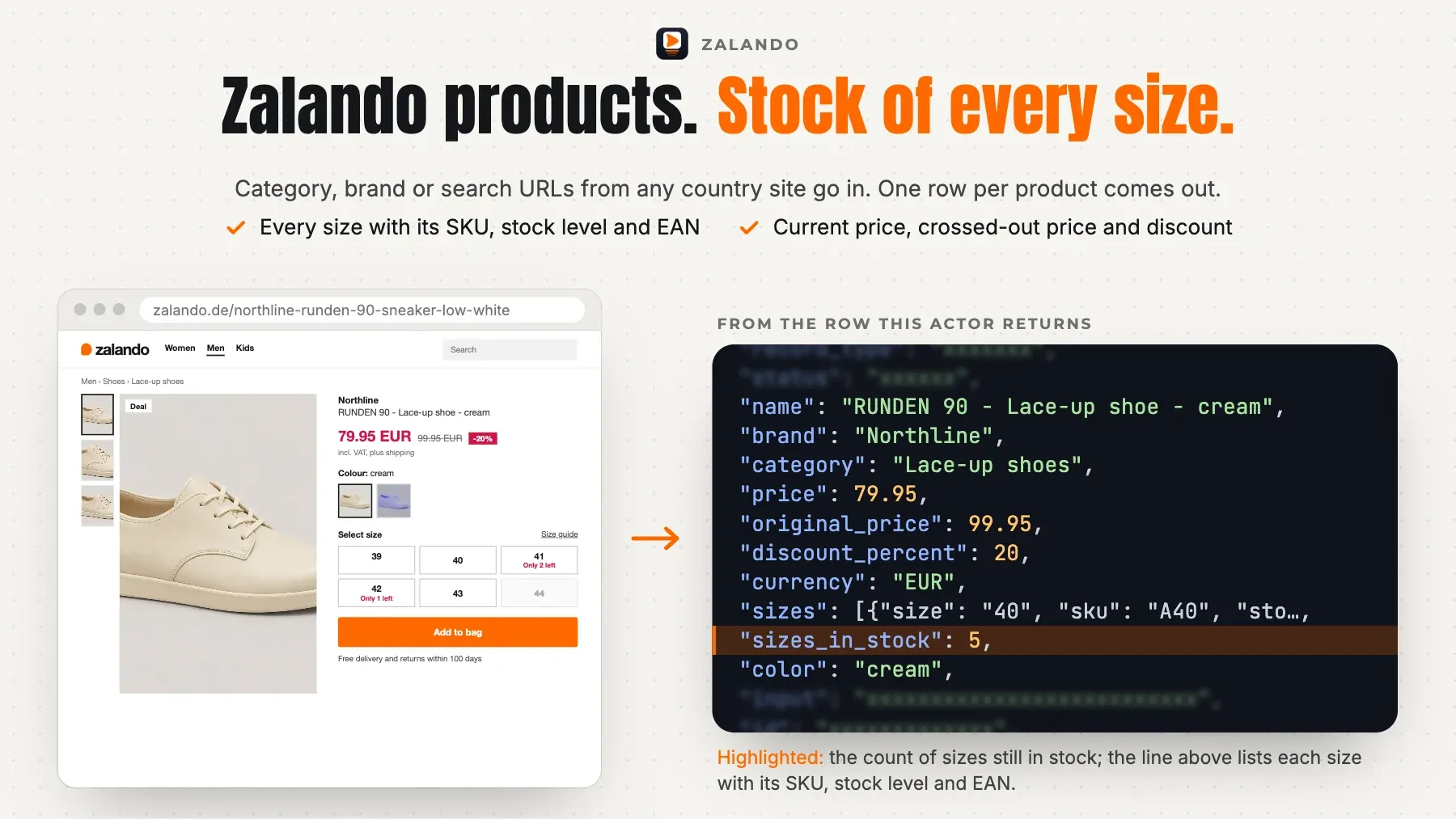
Zalando products, logged out: category, search, brand or product URLs from any Zalando country site (or search words) in, one row per product out — the SKU and URL, name and brand, the price with the original price and the discount, the currency, every size with its stock and EAN, the colour and the product's other colours, the image URLs, the flags and the category path. One free row per input carries the list's count and a verdict: COMPLETE, CAPPED (your limit) or PARTIAL. No login, no cookies, no browser, proxies handled for you.
$1.615 per 1,000 product rows on the Free plan, $1.37275 on Starter. A run start is $0.005. The default input returns about 50 rows for about $0.08575. A value that names nothing is a free row that says why.
Why this Zalando scraper
- Any Zalando country site, any list. Paste category URLs (
https://www.zalando.de/herrenschuhe/), search URLs (/katalog/?q=,/catalog/?q=,/catalogue/?q=…), brand pages (https://www.zalando.fr/nike/) or product URLs from zalando.de, .co.uk, .fr, .it, .es, .nl, .pl and the other country sites; filters and sorting in the URL are kept. Or give search words and pick the country site. Prices come in the site's currency (EUR, GBP, PLN). - The stock of every size, in the same row. With
includeDetailson (the default) each product's page is read: every size with its own SKU, its stock level as Zalando shows it (MANY,TWO,ONE,OUT_OF_STOCK) and its EAN, the count of sizes in stock, the colour, the product's other colours with their SKUs and URLs, and the category path. Turn it off for the list's cards alone (name, brand, prices, sizes, images): one call per 84 products instead of one per product. - Prices as the shopper sees them. The current price, the original (crossed-out) price, the discount in percent and an
on_saleflag, with the site's labels (Deal,Promo,Top rated,Bestseller,-20%). - Every product of a list, once. Zalando's own order, 84 products a page, to the list's last page or your
maxItems; the free row says COMPLETE or CAPPED with Zalando's own count. A product two URLs or two pages list is delivered and charged once. - Honest runs. A product URL the site does not know is a free
not_foundrow, checked on a second connection; a URL from another shop a freeinvalid_inputrow. Every input gets a row.
Who it's for
- Fashion pricing analysts — the prices, original prices and discounts of a category or a brand on several Zalando country sites, read again each week to follow sales.
- Brands and resellers — which sizes of their products and their competitors' are in stock or sold out on Zalando, with the EAN of each size.
- Market researchers — the assortment of a category (brands, colours, prices, labels) as Zalando lists it, in Zalando's own order.
Quick start
The first 100 products of a category
A search on the UK site, cards only
A brand page and a product by URL
Switching from memo23/zalando-scraper?
Your input works as it is. Each name in the left column is read as this Actor's own field and the run log says so (read <theirs> as <ours>); a name marked not read is ignored with a note. A value in the other Actor's shape, an object list or its own date form, is read too.
| memo23/zalando-scraper | this Actor | what to know |
|---|---|---|
startUrls | startUrls | Read as it is: category, search, brand and product URLs, as {"url": …} objects or plain strings. |
marketplace | country | Read as the site of your search words (www.zalando.it or it; auto = de). Your URLs keep their own site, as with the leader. |
maxItems | maxItems | Read as it is: the most product rows of the run. |
brand | not read | Not read: give the brand page's URL instead (https://www.zalando.it/nike/). |
maxConcurrency | not read | Not read: the Actor sets its own pace. |
minConcurrency | not read | Not read: the Actor sets its own pace. |
maxRequestRetries | not read | Not read: a refused call moves to a fresh connection by itself (up to five). |
cookies | not read | Not read: the Actor reads logged out and needs no cookies. |
proxy | not read | Not read: the Actor brings its own connections at no cost to you. |
What differs:
maxItemscaps the whole run (default 100, as the leader's); 0 reads every product the URLs list.- Each row is a flat record (price, original price, discount, sizes with stock and EAN, colour, images), not the site's raw product card.
- The rating is not delivered: Zalando does not show it to a visitor who is not logged in.
Output
One row per product (and one free summary row per input):
| field | meaning |
|---|---|
record_type | product on a product row (charged); target on an input's free summary row. |
status | ok, or why an input gave no row: no_results, not_found, invalid_input, failed, not_read. |
input | The URL or search words you gave that this row answers. |
id | The product's Zalando SKU (A0H15O08D-Q13). |
url | The product's page on its country site; on a summary row, the list URL read. |
name | The product's name as Zalando shows it (GT 2160 UNIS UNISEX - Low-Top-Sneaker - black/carrier grey). |
brand | The brand. |
price | The current price, in currency. |
original_price | The original (crossed-out) price; equal to price when the product is not on sale. |
discount_percent | The discount in percent, as Zalando shows it; null when the product is not on sale. |
currency | The site's currency: EUR, GBP, PLN … |
on_sale | True when the current price is under the original price. |
available | True when the product can be bought (with includeDetails; null without). |
sizes | Every size: size, its sku, its stock level (MANY, TWO, ONE, OUT_OF_STOCK) and its ean (stock and EAN with includeDetails). |
sizes_in_stock | How many sizes are not OUT_OF_STOCK (with includeDetails). |
color | The colour as Zalando names it (with includeDetails). |
color_variants | The product's other colours: sku, color, url (with includeDetails). |
images | The product's image URLs, full size. |
thumbnail | The list's main image of the product. |
flags | The site's labels on the product (Deal, Promo, Top rated, Meilleure vente, -20% …), in the site's language. |
category | The product's category (Low-Top-Sneaker; without includeDetails, Zalando's product type such as SNEAKER). |
category_path | The category path on the site (with includeDetails). |
target_group | Zalando's target group: MEN, WOMEN, KIDS, ALL … |
country | The country site the product was read on: de, co.uk, fr … |
page | The list page the product was on (84 products a page); null for a product URL. |
position | The product's place in the list, from 1. |
details_read | True when the product's page was read (stock per size, EAN, colour); false when only the list's card was (includeDetails off, or the page was not served). |
total_count | On a summary row: Zalando's own count of the list. |
pages_read | On a summary row: the list pages read. |
verdict | On a summary row: COMPLETE (read to the list's end, or the product read), CAPPED (stopped at maxItems), TRUNCATED (the list ended far under its own count) or PARTIAL (stopped early: note says why). |
rows_delivered | On a summary row: the product rows it delivered. |
note | Why a summary row has the status or the verdict it has. |
scraped_at | When this row was read (UTC). |
Example record:
Pricing
Pay for the products a run delivers, plus one run start; no platform usage is billed to you. The product price falls with your Apify plan.
| event | unit | Free | Starter | Scale | Business |
|---|---|---|---|---|---|
Product (product) | per 1,000 | $1.615 | $1.37275 | $1.1305 | $0.8075 |
Run start (start) | per run | $0.005 | $0.005 | $0.005 | $0.005 |
A product is $1.615 per 1,000 on the Free plan ($0.001615 a product), with the stock of every size included. Each run that delivers a charged product also pays the run start, $0.005 once; a run that delivers no charged product pays nothing at all. So one category of 100 products costs $0.1665 on the Free plan, and several URLs in one run share one start. The free summary row of every input, a URL that is not a Zalando country site (invalid_input), a product or list the site does not have (not_found), a list with no product (no_results), an input left at the cap or the time limit (not_read) and a refusal the run could not pass (failed) are never charged. A product is charged once a run, also when several URLs list it. A run that stops early (a timeout, an abort) is charged for the products it delivered. maxItems counts the charged rows; before the first request the log names the price of each row at your plan. Enterprise plans have their own rates: the Actor's Pricing tab shows the price for your plan.
Usage patterns
- URLs and search words —
startUrlstakes Zalando URLs as your browser shows them: a category (/herrenschuhe/), a search (/katalog/?q=sneakeron zalando.de,/catalog/?q=on zalando.co.uk,/catalogue/?q=on zalando.fr,/catalogo/?q=on zalando.it and .es,/catalogus/?q=on zalando.nl,/katalog/?q=on zalando.pl), a brand page (/nike/) or a product page (…-a0h15o08d-q13.html), from any Zalando country site; filters and sorting in the URL are kept.searchTermstakes words, one search a line, searched on thecountrysite. zalando.com itself is a country chooser: give a country site. - What a row is —
record_type=product: one product, in Zalando's order (page,position), withidits SKU.record_type=target: the free row of one input —total_count(Zalando's own count),pages_read,rows_delivered, theverdictand thestatus, withnotesaying why. - How far a list goes — A list is read 84 products a page, in Zalando's order, to its last page or until
maxItems(default 100; 0 = every product the URLs list). The run's free row per input says COMPLETE (the list's end), CAPPED (your limit, with Zalando's count) or PARTIAL (a later page was not served, or the run's time limit). WithincludeDetailson, each product is one more page: 100 products took 99 seconds on 2026-11-06 (the first row after 18 s); with it off a page of 84 products is one call.
Input configuration
| field | type | default | what it does |
|---|---|---|---|
startUrls | array | [] | Category, search, brand and product URLs from any Zalando country site, one a line: https://www.zalando.de/herrenschuhe/, https://www.zalando.co.uk/catalog/?q=sneaker, https://www.zalando.fr/nike/, or a product page (…-a0h15o08d-q13.html). A list is read page by page (84 products a page) until maxItems. Filters and sorting in the URL are kept. |
searchTerms | array | [] | Words to search on the country site below, one search a line ("nike air max", "summer dress"). Each search is read like a search URL. |
country | de / co.uk / fr / it / es / nl / pl | "de" | The Zalando site the search words are searched on; its language and currency come with it. URLs keep their own site. |
includeDetails | boolean | true | On: one product page per row adds the stock of each size (MANY, TWO, ONE, OUT_OF_STOCK), each size's EAN, the colour, the other colours of the product and the category path. Off: the list's own product cards only (name, brand, prices, sizes without stock, images), faster. |
maxItems | integer | 100 | The most product rows of the whole run; 0 = every product the URLs and searches list. |
feedback | string | A note to the people who maintain this Actor: what you needed and did not get. For example a missing field, a wrong or empty result, or the Actor you switch from or to, and why. The run does not read it: the rows and the charges stay the same. A person reads every note. |
Errors
A run does not fail because of your input. When an input cannot be used — a date that is not a date, an id in the wrong form, two settings that contradict each other — the run ends Succeeded, charges nothing, and says what to change:
- the status message starts with
INPUT REJECTED; - the dataset holds one row,
{"error": true, "code": "…", "message": "…"}, and no results; - the key-value store record
ERRORholds the same object.
From code, check error on the first row before reading results.
A URL that is not a Zalando country site (another shop, zalando.com's country chooser, a home page) is not an error: it gets one free row with status invalid_input that says why, and the run goes on with the others. A run that ends Failed is a fault on our side, never your input; it charges nothing, and we are alerted.
FAQ
Which status is which?
A summary row's status is ok (products served), no_results (the list holds no product), not_found (the site has no product or list at that URL, checked on two connections), invalid_input (not a link to a Zalando country site, a SKU without its URL, a home page), failed (the site refused every try; free) or not_read (left at maxItems, the charge limit or the run's time limit). A product row's status is ok.
Is the stock a number?
No. Zalando shows a level per size, not a count: MANY, TWO, ONE or OUT_OF_STOCK (the levels seen on 1,023 sizes on 2026-11-06), as it is on the product page. sizes_in_stock counts the sizes that are not OUT_OF_STOCK. With includeDetails off the sizes come without their stock.
Are ratings and reviews included?
No. Zalando does not show the rating or the reviews to a visitor who is not logged in (measured 2026-11-06 on 20 popular products), so the Actor does not deliver them.
Do I need Apify Proxy or my own proxy?
No. The Actor uses its own connections, at no extra cost to you.
Integration
JavaScript
Python
CLI
REST
AI agents and MCP
Apify's MCP server offers this Actor as a tool to Claude, Cursor, VS Code and any other MCP client. Connect https://mcp.apify.com?tools=hyperbach/zalando-scraper and ask, for example: "Get 100 Zalando men's shoes from zalando.de with prices, discounts and the stock of each size". The agent fills the input from the table above and reads the rows from the run's dataset. A field under the name another Actor gives it is read as this Actor's own: urls, categoryUrls, productUrls, url as startUrls; searchTerm, keywords, keyword, queries as searchTerms; marketplace, domain, site, store as country; maxListings, maxResultsPerScrape, maxResults, limit as maxItems (and more). An agent or a person can add feedback to any run and say what was needed and not delivered: a missing field, a wrong or empty result, the Actor switched from or to, and why. The run returns the same rows at the same price, and a person reads every note.
n8n, Make and Zapier
The Apify node in n8n, the Apify app in Make and the Apify integration in Zapier run this Actor on a schedule or from a trigger and read its dataset. A webhook on the run's end (Integrations on the Actor page) sends the rows on to your own endpoint. Nothing to install on our side.
Support
Disagree with a charge? Write to apify@hyperbach.com with the run ID. We will ask Apify to compensate you, and the charge comes back to your Apify account as platform credit.
Did it do the job? A short review on the Store, at any rating, helps the next buyer choose.
See also
- Amazon Product Details Scraper — Amazon products by ASIN, URL or UPC / EAN / ISBN on 21 Amazon stores: the buy-box price, every best-seller rank, the rating and the review summary.
- AliExpress Product Details Scraper — AliExpress products by URL or item id: every SKU with its own price and stock, in the country and currency you choose.
- Shopify Store Scraper — every product of a Shopify store, with its variants, prices and images.
- Alibaba Products Scraper — the products of an Alibaba.com search: price range, minimum order and the supplier with its country and verification.
- Walmart Products Scraper — Walmart products by search, category or URL: the price with the was-price, the seller and the rating.
- Coles Scraper — Coles Australia products and specials, with the price, the was-price and the unit price.
This page is generated from the Actor's schemas and a live sample — it cannot describe a field the Actor does not have.


