

Google Play - Reviews Sentiment Analysis
Pricing
from $1.00 / baseanalysiscompleted
Google Play - Reviews Sentiment Analysis
Analyze thousands of Google Play Store reviews in seconds. Leverage the power of advanced LLMs (such as GPT-OSS 120B via Groq) to automatically extract Pros, Cons, and recurring themes, providing an actionable strategic report. Find out what your customers love or hate!
Pricing
from $1.00 / baseanalysiscompleted
Rating
0.0
(0)
Developer

Fabio Borsotti
Maintained by CommunityActor stats
1
Bookmarked
3
Total users
2
Monthly active users
5 days ago
Last modified
Categories
Share
Google Play – Reviews Sentiment Analysis
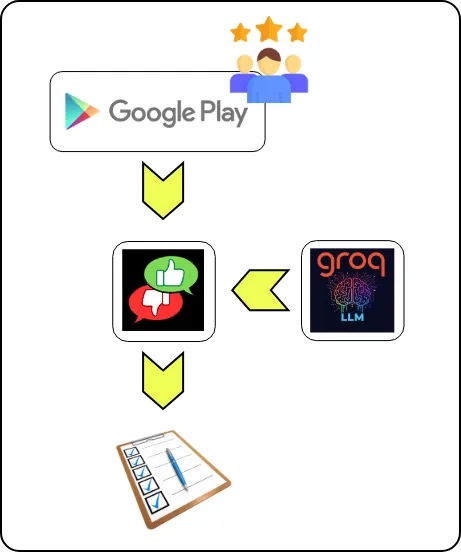
This actor analyzes hundreds or thousands of reviews of an Android app on Google Play Store in a few minutes and generates a ready‑to‑use strategic report, powered by advanced LLM models running on Groq (including GPT‑OSS 120B for the Premium tier).
What the actor does
- Automatically extracts an app's reviews from the Google Play Store using only the package name (
appId). - Processes reviews in batches, extracting recurring themes organized into pros (strengths) and cons (issues).
- Aggregates themes into synthetic statistics and generates a structured report with an executive summary, strengths, weaknesses, and actionable recommendations.
External Actors and billing
- This Actor internally calls the public Actor
curious_coder/google-play-scraperto collect Google Play reviews. - All costs related to the usage of
curious_coder/google-play-scraper(including any rentals or pay-per-event fees) are fully included and covered in the price of this Actor for the end user. - End users do not need to pay separately for
curious_coder/google-play-scraper; running this Actor is sufficient to cover all underlying Actor costs.
Tiers and LLM models
| Tier | Max reviews (hard cap) | Analysis model (map) | Report model (reduce) | Main use case |
|---|---|---|---|---|
| Base | ~200 | llama-3.1-8b-instant | llama-3.1-8b-instant | Balanced analysis for ASO, product and UX. |
| Complete | ~500 | llama-3.1-8b-instant | llama-3.1-8b-instant | Balanced analysis for ASO, product and UX. |
| Premium | ~2,000 (also limited by maxReviewsToProcess) | llama-3.1-8b-instant | gpt-oss-120b | Highest‑quality reports with very detailed summaries. |
The actual number of processed reviews is the minimum of maxReviewsToProcess, the tier limit, and 2000.
PPE billing (Pay‑per‑event)
Billing is handled via a single PPE event per run, with a different event for each tier.
| Selected tier | PPE event called | Billing frequency |
|---|---|---|
| Base | BaseAnalysisCompleted | 1 event per completed run. |
| Complete | CompleteAnalysisCompleted | 1 event per completed run. |
| Premium | PremiumAnalysisCompleted | 1 event per completed run. |
The actual cost per run is defined in the PPE configuration of your Apify account for each event.
Input parameters
| Field | Type | Required | Default | Short description |
|---|---|---|---|---|
appId | string | Yes | – | App package name on Google Play, e.g. com.fake.AppSentimentAnalysis. |
pricingTier | string | Yes | complete | base, complete, premium; controls review limits and models used. |
detailLevel | string | No | low | low, medium, high; controls report depth and length. |
maxReviewsToProcess | integer | No | 500 | Upper limit of reviews to download and analyze for the run. |
summaryPrompt | string | No | Generic default prompt | Optional prompt to adapt the focus (ASO, UX, marketing, etc.). |
recentDays | integer | No | 0 | Only include reviews from the last N days (0 = no limit) |
Output structure
The actor saves a single summary record in the default run dataset.
| Field | Description |
|---|---|
appId | Package name of the analyzed app. |
pricingTier | Tier used for the analysis (base, complete, premium). |
detailLevel | Detail level chosen for the report. |
summaryReport | Full AI report text with executive summary and recommendations. |
topPros | List of most frequent positive themes with counts. |
topCons | List of most frequent negative themes with counts. |
totalReviewsProcessed | Total number of reviews actually processed. |
Example Output (Complete JSON)


