

Simple AI Video Clipper
Pricing
from $1.00 / 1,000 results
Simple AI Video Clipper
Automatically detect the most engaging moments in videos (direct video files or long YouTube videos such as podcasts, interviews, and streams) and generate ready-to-use clips optimized for YouTube Shorts, Instagram Reels, and TikTok.
Pricing
from $1.00 / 1,000 results
Rating
0.0
(0)
Developer

Fabio Borsotti
Maintained by CommunityActor stats
0
Bookmarked
2
Total users
1
Monthly active users
5 days ago
Last modified
Categories
Share
Simple AI Video Clipper - Generate Shorts, Viral title, Hashtag, Download video clips for social media from long videos
Automatically detect the most engaging moments in videos (direct video files or long YouTube videos such as podcasts, interviews, and streams) and generate ready-to-use clips optimized for YouTube Shorts, Instagram Reels, and TikTok. Produce Title, hastag and short description for clips.
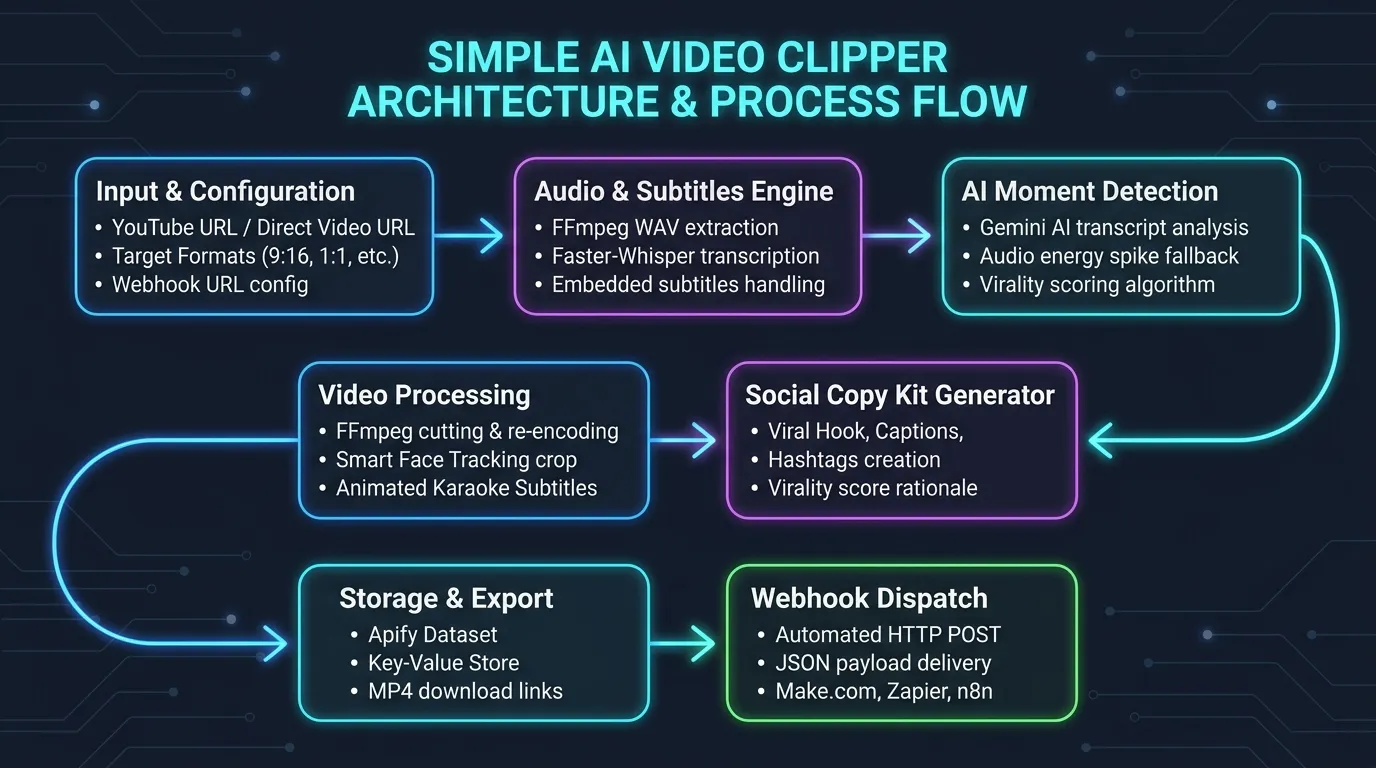
High-Level Workflow
The Actor runs an automated pipeline to ingest, analyze, and produce ready-to-use social clips:
- Input Validation: Accepts either a direct video file (
file_video) or a YouTube link (youtube_url) under strict mutual exclusivity. - Audio & Speech Extraction: Ingests audio and subtitle streams (via embedded tracks, speech-to-text, or YouTube caption streams) to obtain precise word-level timestamps.
- Salient Moment Detection: Analyzes dialogue flow, retention spikes, and pacing to identify high-potential viral highlights.
- Context Framing & Subtitles: Attaches balanced pre-roll and post-roll context buffers around each highlight and generates dynamic animated karaoke subtitles.
- Output Generation: Trims downloadable MP4 video clips (for
file_video) or produces direct timestamp links (foryoutube_url), accompanied by complete social media copy kits (viral_hook,Caption,Hashtag,Virality_score_description,transcript) and ready-to-use FFmpeg commands.
A visual overview of the end-to-end processing pipeline is shown below:
Input Parameters
Video Input Source Exclusivity Rule
The file_video and youtube_url parameters are mutually exclusive:
- Exactly one of the two parameters must be provided. If both or neither are provided, the Actor stops execution and raises a validation error.
- When
file_videois used: The video file is downloaded, processed, and automatically cut into clips. You get the pre-cut video file ready for direct download via thedownload_urlfield, whileDownload Link(download_link) is set to null (null). A ready-to-use FFmpeg command to extract and encode the clip is also provided. - When
youtube_urlis used: The video file is NOT downloaded. Instead, you get direct links to the exact timestamps of the detected clips viaDownload Link(download_link,direct_timestamp_url), whiledownload_urlremains empty/null (null). A ready-to-use FFmpeg command is also provided if you wish to extract and encode the clip locally. - Ready-to-use Social Media Copy Kit (included in both modes): Regardless of which input option is used (
file_videooryoutube_url), every output record always provides complete social media data (viral_hook,Caption,Hashtag,Virality_score_description, andtranscript) ready to be copy-pasted directly to social networks (Instagram Reels, TikTok, YouTube Shorts).
Input Parameters Table
| Parameter | Type | Required | Default | Description |
|---|---|---|---|---|
file_video | String | No* | — | Direct URL to a video file (.mp4, .mov, .mkv, .webm). Mutually exclusive with youtube_url. When used, the video is downloaded and trimmed, giving you the pre-cut video file ready for download in download_url. |
youtube_url | String | No* | — | URL of a YouTube video (e.g., https://www.youtube.com/watch?v=... or https://youtu.be/...). Mutually exclusive with file_video. The video is not downloaded; instead, you get the direct link to the exact clip timestamp in Download Link. |
max_clips | Integer | No | 5 | Maximum number of top highlight clips to extract (1 to 50). |
max_length | Integer | No | 60 | Maximum duration in seconds for each clip (10 to 300 seconds). |
targetFormat | String | No | INSTAGRAM_REELS_VERTICAL_9_16_HIGHRES_1080P_MP4 | Target format, aspect ratio, and resolution for social media clips. Supports vertical 9:16 profiles (1080p and 720p for Reels, TikTok, Shorts), square 1:1, portrait 4:5, or original format. |
burn_subtitles | Boolean | No | true | If enabled (true), burns dynamic animated karaoke-style subtitles (with active word-by-word highlight) directly onto the video. |
subtitle_style | String | No | HORMOZI_YELLOW | Visual typography preset for animated subtitles (HORMOZI_YELLOW, MRBEAST_BOUNCE, CLEAN_MINIMAL, NEON_CYAN). |
subtitle_position | String | No | CENTER | Vertical subtitle position on screen (BOTTOM, CENTER, TOP). CENTER is placed in the social safe zone above native UI elements. |
burn_hook_header | Boolean | No | false | When enabled, overlays a prominent high-contrast headline banner showing the viral hook during the opening 4 seconds. |
focus_topic | String | No | — | Optional theme or keyword filter (e.g. "artificial intelligence", "investing"). Directs AI to prioritize moments discussing this topic. |
normalize_audio | Boolean | No | false | When enabled, normalizes audio to -14 LUFS (EBU R128 broadcast standard) for loud, clear mobile speech. |
generate_thumbnails | Boolean | No | false | When enabled, extracts a high-resolution JPEG cover frame from each clip and provides a public link in thumbnail_url. |
layout_mode | String | No | AUTO_CENTER_CROP | Social video composition layout (AUTO_CENTER_CROP, PODCAST_SPLIT_STACK, BLURRED_BARS). |
smart_face_tracking | Boolean | No | false | Automatically detects speaker faces in video frames to center the vertical crop on the active speaker. |
webhook_url | String | No | — | Optional HTTP or HTTPS webhook URL. Sends a JSON POST payload with all clip data and download URLs upon run completion. |
* Exactly one of file_video or youtube_url must be specified.
Example Input: Direct Video File with Creator Enhancements
Example Input: YouTube Video Link
Pre-uploading Local Videos to Apify Key-Value Store
Use Case
If your video file is stored locally on your machine or private server rather than hosted on a public URL (such as YouTube, GitHub, or AWS S3), you can upload it directly to an Apify Key-Value Store before running the Actor.
Why use this approach?
- Bypasses Input Size Limits: Apify Actor input payloads are JSON documents limited to approximately 9 MB, making inline Base64 video encoding impractical. Uploading to a Key-Value Store supports large video files (hundreds of megabytes or gigabytes).
- Zero Base64 Overhead: Avoids the 33% payload size inflation inherent to Base64 encoding.
- High-Speed Cloud Streaming: The Actor downloads and processes the video directly within the Apify cloud infrastructure with high bandwidth and minimal latency.
Once uploaded, pass the Key-Value Store record URL to the file_video parameter to trigger processing.
Upload via cURL
Upload your local video file directly to an Apify Key-Value Store record using a binary PUT request:
Upload via Windows Powershell
Upload your local video file directly to an Apify Key-Value Store record using Invoke-RestMethod
Once uploaded, obtain the direct record URL:
Pass this URL to the file_video input parameter when running the Actor.
Output Dataset Structure
Processed results are saved to the default Apify dataset with the following structure. In both modes (file_video and youtube_url), every record provides complete, ready-to-publish social media data (viral_hook, Caption, Hashtag, Virality_score_description, and transcript):
Output Fields Table
| Field | Type | Description |
|---|---|---|
rank | Integer | Rank position of the highlight moment (1 = highest score). |
Title | String | Catchy title generated for the clip (pure text, no icons or emojis). |
score | Float | Composite engagement and virality score from 0 to 100. |
viral_hook | String | Opening 3-second hook for on-screen attention (pure text, no icons or emojis). |
Caption | String | Social media post copy with narrative context and call-to-action (pure text, no icons or emojis). |
Hashtag | Array | List of 5-8 relevant and trending hashtags for social posting. |
Virality_score_description | String | Explanation of the virality score rationale and retention triggers (pure text, no icons or emojis). |
start_time | String | Clip start timestamp formatted as HH:MM:SS. |
end_time | String | Clip end timestamp formatted as HH:MM:SS. |
duration_seconds | Float | Clip duration in seconds. |
target_format | String | Video format and resolution profile applied to the clip. |
detection_reasons | Array | Signals and factors that triggered the selection of this highlight. |
transcript | String | Spoken dialogue transcribed within the highlight segment. |
download_url | String / Null | Direct download link for the cut MP4 video clip. Populated when input is file_video; null (null) when input is youtube_url. |
Download Link (download_link) | String / Null | Direct YouTube link jumping to the highlight timestamp. Populated when input is youtube_url; null (null) when input is file_video. |
direct_timestamp_url | String / Null | Direct YouTube link jumping to the start of the clip (returned when youtube_url is used). |
clip_filename | String / Null | Filename of the trimmed clip (e.g. clip_1.mp4, returned when file_video is used). |
subtitles_url | String / Null | Download link for the animated ASS subtitle file. |
thumbnail_url | String / Null | Direct download link for the extracted high-resolution cover JPEG thumbnail (populated when file_video is used and generate_thumbnails is enabled). |
ffmpeg_command | String | Ready-to-use FFmpeg command to extract and encode the clip. |
Example Output Record (when using file_video)
Example Output Record (when using youtube_url)
Creator and Social Media Enhancements
This Actor includes dedicated features designed specifically to streamline the production workflow of content creators, social media managers, and podcast editors.
1. Animated Subtitle Styles and Visual Typography (subtitle_style)
Captions are critical for short-form retention since a significant portion of social media users browse with audio disabled. Four typography profiles are available:
HORMOZI_YELLOW(Default): High-visibility bold white text with bright yellow highlights on the active spoken word, surrounded by a heavy black outline and drop shadow.MRBEAST_BOUNCE: Dynamic green highlight featuring a subtle scale-up pop animation on each spoken word as it is delivered.CLEAN_MINIMAL: Elegant, modern light typography with refined outlines and soft golden highlights, suited for business, luxury, and educational clips.NEON_CYAN: Electric cyan glow with dark violet backing, tailored for gaming highlights, tech reviews, and nightlife content.
2. Vertical Subtitle Placement and Safe-Zone Alignment (subtitle_position)
To avoid overlapping native platform interface elements (such as TikTok captions, username links, like buttons, and audio wheels):
CENTER(Default): Positions captions in the central safe-zone of vertical video formats.BOTTOM: Aligns text in the lower third with safe margin buffers.TOP: Displays captions across the upper third of the video.
3. Viral Hook Headline Header Bar (burn_hook_header)
When burn_hook_header is set to true, a prominent, high-contrast headline banner displaying the AI-generated viral_hook is burned into the top center of the video during the first 4 seconds of playback. This grabs the viewer's attention immediately within the critical 3-second scroll window before disappearing cleanly into the body of the clip.
4. Topic and Keyword AI Guidance (focus_topic)
When processing long interviews, conferences, or multi-topic podcasts, you can specify a keyword or thematic focus (for example: "real estate", "AI agents", or "funny stories"). The AI prioritizes and scores moments that specifically discuss the requested topic, filtering out irrelevant segments.
5. Mobile Audio Normalization (normalize_audio)
Different recording sources, microphone distances, and podcast guests often produce uneven volume levels. Setting normalize_audio to true applies an EBU R128 two-pass loudness filter (-af loudnorm=I=-14:LRA=7:TP=-1.5) targeting -14 LUFS integrated loudness. This delivers consistent, broadcast-ready clarity optimized for smartphone speakers.
6. High-Resolution Cover Frame Extraction (generate_thumbnails)
When enabled (true), the Actor automatically extracts a sharp JPEG frame from the central point of the highlight clip and uploads it to the Apify Key-Value Store. The resulting thumbnail_url can be used directly as a video cover image in automated social publishing pipelines.
7. Framing Layout and Composition Modes (layout_mode)
When converting horizontal (16:9) footage into vertical (9:16) formats for Reels, TikTok, and Shorts, three composition layouts are supported:
AUTO_CENTER_CROP(Default): Crops horizontally to the center of the frame or to the detected speaker.PODCAST_SPLIT_STACK: Vertically stacks two views (top and bottom half) of a two-person interview or podcast, showing both speaker and host simultaneously without awkward horizontal panning.BLURRED_BARS: Preserves the complete original horizontal video centered in the frame, while blurring and scaling the background to fill the 9:16 vertical canvas.
8. Smart Face Tracking and Dynamic Auto-Reframe (smart_face_tracking)
When set to true, the Actor analyzes video frames using computer vision face detection to locate the primary speaker's horizontal position. Instead of blindly cropping the static center, the 9:16 crop window dynamically offsets towards the active speaker, keeping them perfectly framed.
9. Webhook Dispatch for Automated Pipelines (webhook_url)
Connect the Actor directly to automation platforms such as Zapier, Make.com, n8n, or custom API endpoints. By supplying an HTTP or HTTPS URL to webhook_url, the Actor automatically sends a POST request containing a complete JSON payload (event, status, video_title, clips_count, and the full array of results with all download URLs and social media copy) immediately upon completion.


