
Auto Captions & Subtitle Generator for TikTok, Reels, Shorts
Pricing
from $30.00 / 1,000 video minutes
Auto Captions & Subtitle Generator for TikTok, Reels, Shorts
Add animated word-by-word captions to any video with Whisper AI. TikTok, Reels and Shorts styles, 18 animations, 26 fonts, batch videos and SRT/VTT/ASS export. Works with OpenAI or OpenRouter.
Pricing
from $30.00 / 1,000 video minutes
Rating
0.0
(0)
Developer

Ingeniela
Maintained by CommunityActor stats
0
Bookmarked
2
Total users
1
Monthly active users
13 days ago
Last modified
Categories
Features
Share
Auto Captions & Subtitle Generator for TikTok, Reels and Shorts
Add animated, word-by-word subtitles to any video. The Actor transcribes the audio with Whisper (through OpenAI or OpenRouter), times every caption to the exact moment each word is spoken, and returns an MP4 with the captions burned in, plus SRT, VTT, ASS and a JSON transcript.

Real output of this Actor: a 20-second voice clip, transcribed and captioned on Apify in about 20 seconds with the TikTok viral preset. Download the full captioned MP4.
Four looks, one click
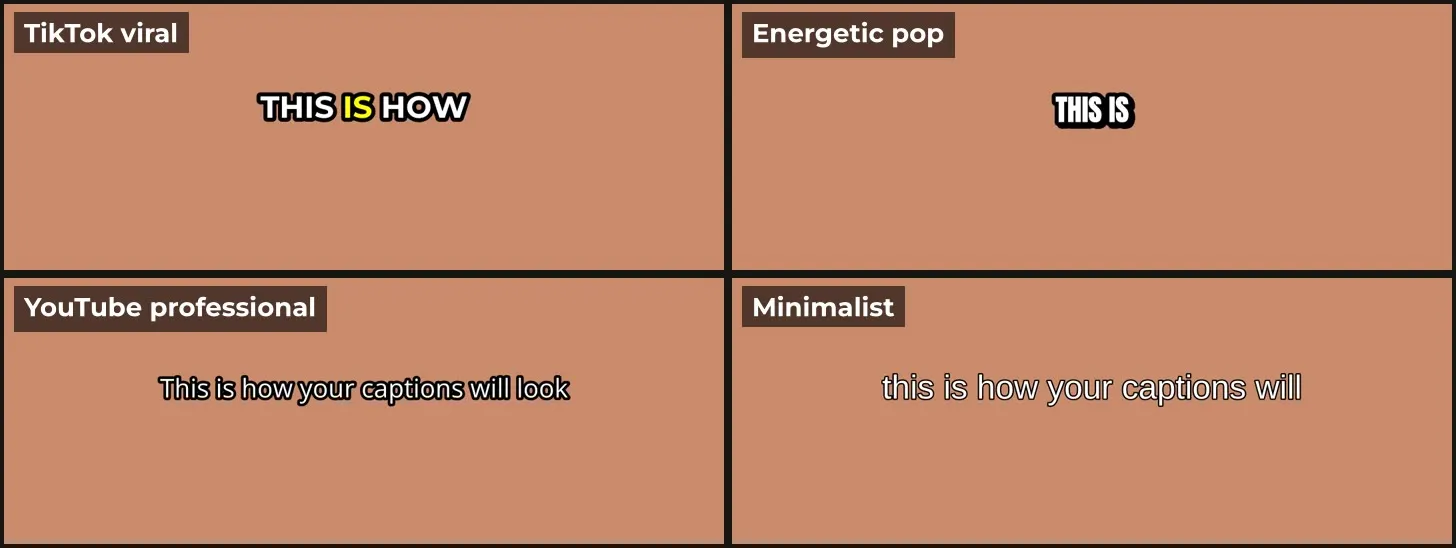
Pick a style preset, or set every detail yourself: font, size, colors, outline, position and animation. Turn on Style preview only to see the result on a frame of your video in a few seconds before captioning the whole thing.
Tutorial (1 minute)
Every result in this tutorial comes from a real run.
What it does
- Word-accurate timing. Captions and highlights follow Whisper's word timestamps, not an even split of each sentence.
- Natural pacing. A caption ends at the end of a sentence or a pause, so two sentences never share one caption.
- 18 animations. Word highlight, karaoke, pop, fade, slide, bounce, typewriter and more.
- 26 fonts built in. Montserrat, Bebas Neue, Poppins, Anton, Oswald, Bangers, Permanent Marker… Commercial fonts (Arial, Helvetica, Impact, Futura, Avenir) render with a free look-alike. You can also upload your own TTF/OTF.
- Same size on any resolution. A font size of 36 looks the same on 720p, 1080p or 4K, vertical or horizontal.
- Style presets. TikTok viral, Energetic pop, YouTube professional, Minimalist, Professional business.
- Brand-name fixes. Give a vocabulary hint (for example
Pepfine, niacinamida) and whole-word replacements ({"pepfain": "Pepfine"}). - Batch runs. Paste many URLs; every video becomes one row in the results.
- Subtitles-only mode. Turn off burn-in to get just SRT/VTT/ASS/JSON (works with audio files too).
- Free re-styling. The transcript is cached, so captioning the same video again with another style does not pay for transcription twice.
- Style preview. Test mode renders one frame with sample captions in about 10 seconds.
Smart extras
- Translate: speak Spanish, post in English. Captions are translated line by line and timed to the original speech.
- Keywords and emojis: the AI colors the words that matter and adds an emoji now and then, like the big creators do.
- Remove silences: pauses are cut before captioning, so the video is tighter and the captions stay in sync.
- Make it vertical: a horizontal video (podcast, webinar, YouTube) becomes 1080×1920 with a blurred background or a center crop.
The result also tells you what was done: extras.silenceRemovedSeconds, extras.translatedTo, extras.keywords, extras.emojis.
Input
Only the video URL is required. Everything else has sensible defaults.
Direct file links work best. Dropbox and Google Drive share links are converted to direct downloads automatically. Pages that need a login (private Drive files, Instagram/TikTok post pages) cannot be downloaded.
| Field | What it does | Default |
|---|---|---|
videoUrls | Video or audio files to caption | — |
transcriptionProvider | auto, openai or openrouter | auto |
openaiApiKey | Your own OpenAI key (optional, see Pricing) | built-in |
openrouterApiKey | Your own OpenRouter key, instead of OpenAI (optional) | built-in |
language | Spoken language (ISO code, e.g. es, en) | auto-detect |
vocabularyHint | Names and words to spell correctly | — |
wordReplacements | {"wrong": "Right"}, whole words, case-insensitive | {} |
stylePreset | Ready-made look; overrides the style fields | custom |
fontName, fontSize, bold, textCase | Font settings | Montserrat, 28, bold, normal |
primaryColour, highlightColour, outlineColour, outline, borderStyle, shadow | Colors and outline (ASS &HBBGGRR& or #RRGGBB via API) | white, yellow, black |
verticalPosition, alignment | Where captions sit (0 % = bottom) | 15 %, bottom center |
wordsPerSegment, maxWordsPerLine | Words per caption, words per line | 3, auto |
animationStyle | One of 18 animations | none |
translateTo | Translate the captions (17 languages), timed to the original speech | no |
keywords, keywordColour | Color the words that carry the message | off, green |
emojis | Add a fitting emoji next to some captions | off |
removeSilences, silenceMinSeconds | Cut pauses (jump cuts) before captioning | off, 0.6 s |
reframe | Make a horizontal video vertical: vertical-blur or vertical-crop | none |
burnCaptions | MP4 with captions, or subtitle files only | true |
relativeFontSize | Scale size with the video resolution | true |
testMode | One preview image instead of a full run | false |
Output
One dataset row per video. Files live in the run's key-value store with public links.
The transcript JSON includes every word with its start and end time, which is useful for your own editing tools.
How to use it
- Upload your video somewhere with a direct link (Dropbox, Google Drive with "anyone with the link", your CDN or an Apify key-value store) and paste it in Video URLs. Add as many as you want.
- Pick a Style preset (start with TikTok viral) and set the Spoken language.
- Optional: turn on Style preview only and click Start to see the look on one frame in a few seconds. Adjust, then turn it off.
- Click Start. A 1-minute video takes about 1 minute.
- Download the MP4 (and SRT/VTT if you need them) from the links in the results table.
Pricing
Pay per event:
| Event | Price | When it is charged |
|---|---|---|
caption-minute | US$0.03 | Each started minute of processed media |
transcription-minute | US$0.01 | Each started minute transcribed with the built-in Whisper key. Not charged when you bring your own OpenAI or OpenRouter key, or when the transcript comes from the cache |
style-preview | US$0.005 | Each test-mode preview image |
ai-caption-extras | US$0.01 | Translation, keywords or emojis for one video with the built-in AI (not charged with your own key) |
Examples: a 45-second Reel costs US$0.04 (1 minute of captions + 1 minute of transcription). Ten 1-minute videos cost US$0.40, or US$0.30 with your own OpenAI or OpenRouter key. Captioning the same video again in another style costs only the US$0.03, because the transcript is reused.
Set Maximum cost per run in the run options. The Actor stops before a video it can no longer pay for.
Limits
- Files up to 500 MB.
- Long videos work: the audio is sent in chunks (10 minutes on OpenAI, 3 minutes on OpenRouter) and the timestamps are merged.
- On OpenRouter the vocabulary hint is ignored (OpenRouter does not pass it to Whisper); use word replacements for brand names.
- The video keeps its original resolution; it is re-encoded once (H.264, CRF 20) to draw the captions.
OpenAI or OpenRouter
Both run the same Whisper model (whisper-1 on OpenAI, openai/whisper-1 on OpenRouter) at about US$0.006 per minute, with word-level timestamps. Use OpenRouter if you already have OpenRouter credits and no OpenAI account. Get a key at openrouter.ai/keys and paste it in OpenRouter API key.
Tips
- Run with Style preview only first, then caption the full video.
- For TikTok/Reels: preset TikTok viral, or 2–3 words per caption, uppercase, word highlight.
- For YouTube: preset YouTube professional, 6–10 words per caption.
- Set the language on short clips: auto-detection can confuse Spanish and Portuguese in the first seconds.
FAQ
Can I paste a TikTok or Instagram link? No, it needs the video file itself. Download the video first (or use a TikTok/Instagram downloader Actor) and pass the file link.
A brand name comes out wrong. Add it to Word replacements, for example {"pepfain": "Pepfine"}. With OpenAI you can also put it in Vocabulary hint.
Can I edit the captions afterwards? Yes. Download the SRT or ASS file, fix it in any subtitle editor (CapCut, Premiere, DaVinci, Aegisub) and re-export.
My video is horizontal. Does it work? Yes. Sizes scale with the video, so the same settings look right on 16:9, 9:16 or 1:1.
Is my video stored? Only in your own run storage on Apify, with the retention of your Apify plan.
API example
The single-field input {"videoUrl": "…"} from version 2 still works.
Development
.actor/Dockerfile builds the Apify image (FFmpeg, libass, fonts). The root Dockerfile is the separate Railway web API (src/api.py), which runs the same pipeline through ACTOR_INPUT_FILE.
Built by Ingeniela: automation and AI integrations for businesses.


