

Data Change Monitor: Alerts for Prices, Stock & Any Scraper
Under maintenancePricing
from $10.00 / 1,000 monitor checks
Data Change Monitor: Alerts for Prices, Stock & Any Scraper
Under maintenanceRe-run any Actor or task on a schedule and get only what changed since the last run: new items, removed items and field changes like price, stock, followers or rating. Alerts by webhook or email.
Pricing
from $10.00 / 1,000 monitor checks
Rating
0.0
(0)
Developer

Ingeniela
Maintained by CommunityActor stats
0
Bookmarked
2
Total users
1
Monthly active users
13 days ago
Last modified
Categories
Features
Share
Data Change Monitor: Alerts for Prices, Stock and Any Scraper
Watch any scraped data and get told only what changed. Point it at an Actor (with its input), a saved task or a dataset. Schedule it, and each run compares the results with the previous run: new items, removed items, and every field that changed, such as a price, a follower count, a rating or stock. Alerts go to a webhook (Slack, Make, Zapier, n8n) or by email, after every run or as one daily digest, and every change can be added as a row to a Google Sheet. Start in seconds with a ready template: Amazon prices, Instagram, TikTok or YouTube followers, Google Maps ratings or website text.
🔁 Schedule it daily (or hourly) and you only hear about what changed: new, removed and changed items, in one digest by email or webhook.
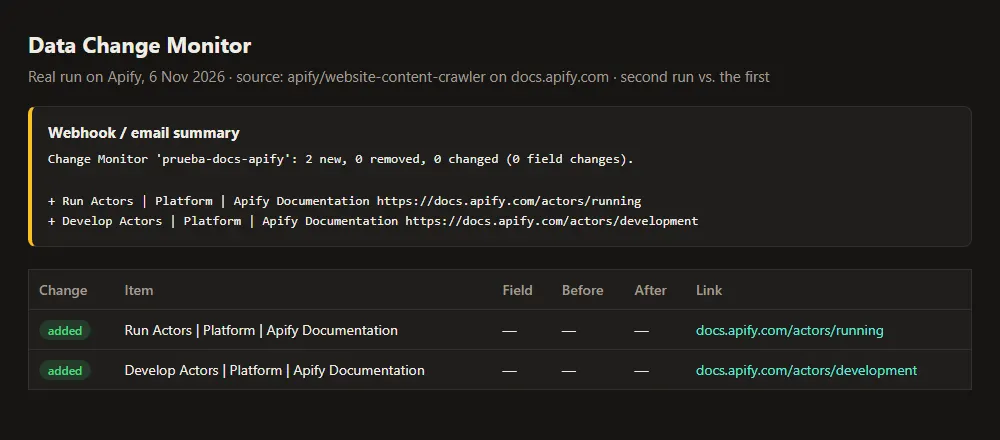
Real run on Apify watching docs.apify.com through Website Content Crawler. The first run saved the snapshot; the second found the 2 pages that were new. The text in the box is exactly what the webhook and the email contain.
Tutorial (1 minute)
The change rows in the tutorial show the output format; the run itself was tested on Apify with the Amazon template.
Ready templates
Pick a template, paste the targets, schedule it. Each template collects the data for that site at the lowest cost and compares the right fields.
| Template | Targets | Compares | Data collection (about) |
|---|---|---|---|
| Amazon prices and stock | ASINs or product links | price, list price, stock, seller, coupon, discount, rating | US$0.0025 per product |
| Instagram followers and bio | usernames or links | followers, following, posts, bio, link | US$0.0026 per profile |
| TikTok followers and likes | usernames or links | followers, likes, videos, bio | US$0.003 per profile |
| YouTube subscribers | channel links or @handles | subscribers, total views, videos, name | US$0.0013 per channel |
| Google Maps rating | place links | rating, number of reviews, open/closed, phone, website, hours | US$0.004 per place |
| Website text | page links | page text, title, description | platform usage only |
Prices written as text ("$19.99", "19,99") are compared as numbers, so you get the percent change.
Daily digest
Set When to notify to One digest per period. Schedule the monitor as often as you like (every hour, for example). Changes are collected and sent once per period (24 hours by default, 168 for weekly) in one message.
Google Sheets
Every change can be added as a row to your own Google Sheet. No API keys, about 2 minutes:
- Open the sheet and choose Extensions > Apps Script.
- Replace the code with this and save:
- Click Deploy > New deployment, type Web app, Execute as: Me, Who has access: Anyone. Authorize it.
- Copy the web app URL (it ends in
/exec) into Google Sheets web app URL.
Columns: detectedAt, monitorName, changeType, title, field, before, after, changePercent, url, itemId.
Use cases
- Competitor prices and stock (any e-commerce scraper).
- New Google Maps reviews or rating drops for your business.
- Follower and engagement changes on competitor Instagram or TikTok profiles.
- New job posts, new listings (Zillow, Airbnb), new ads in the Facebook Ad Library.
- Content changes on web pages (Website Content Crawler).
Input example
Then create a Schedule in Apify Console (for example every day at 8:00) that runs this Actor with this input.
Output (one row per change)
changeType is added, removed or changed. A run with nothing to report adds one free status row instead (baseline on the first run, no-changes afterwards), so you can always see that the check ran. The SUMMARY record has the counts and a readable text version, which is also what the webhook and the email contain.
How it works
- First run: saves a baseline snapshot and reports nothing.
- Next runs: compares with the last snapshot, then replaces it.
- Snapshots live in the named key-value store
change-monitor-state, one per Monitor name, so several monitors can share this Actor. - Timestamps (
scrapedAt,updatedAt…) are ignored automatically. Add your own noisy fields to Fields to ignore. - A source that returns 0 items is treated as a broken scrape: the run fails and the snapshot is kept, unless you allow empty results.
How to use it
- Find the Actor whose results you want to watch (for example a price, profile or reviews scraper) and copy its ID, such as
apify/instagram-profile-scraper, into Actor to run. - Paste the input you would give that Actor into Input for that Actor.
- In Item ID fields, say what identifies one item (usually
url,idorusername). In Fields to compare, list what you care about (price,followersCount…), or leave it empty to compare everything. - Add a Webhook URL (Slack, Make, Zapier, n8n) or an Email.
- Run it once to save the baseline. Then create a Schedule in Apify Console (Schedules → Create) that runs this Actor with the same input every day or hour.
Pricing
| Event | Price | When |
|---|---|---|
monitor-check | US$0.01 | Each comparison run |
change-detected | US$0.001 | Each change row |
Example: a daily check that finds 20 changes a day costs about US$0.03 a day, under US$1 a month, plus the source Actor's own usage. The source Actor and the email Actor are billed separately on your account.
FAQ
Why did the first run report nothing? The first run only saves the snapshot to compare against. Changes start from the second run.
Can I watch several things? Yes. Use a different Monitor name for each; every name keeps its own snapshot.
I get too many small changes. Set Ignore number changes smaller than (%), add noisy fields to Fields to ignore, or list only the fields you care about in Fields to compare.
Can it watch any website? Yes: pick the Website text template and paste the pages you care about.
Development


