

YouTube Comments Scraper · Comment Replies, No API Key
Pricing
from $0.80 / 1,000 comments
YouTube Comments Scraper · Comment Replies, No API Key
YouTube comments scraper, no API key, no login: 4,847 comments of 50 videos in 15 s. Each row: text, author with channel ID, likes, reply count, date, creator heart, pinned, verified mark. Top or newest, comment replies, filters, only new, a channel's latest videos, Shorts. CSV, Excel, JSON.
Pricing
from $0.80 / 1,000 comments
Rating
0.0
(0)
Developer

Instagram Data API
Maintained by CommunityActor stats
0
Bookmarked
2
Total users
1
Monthly active users
3 days ago
Last modified
Categories
Features
Share
YouTube Comments Scraper — comments and comment replies, no API key
Paste video or Short links, or channels — get one row per comment or reply: text, author with channel ID, likes, reply count, publish date, creator heart, pinned and verified marks. No login, no cookies, no API key. $1.25 per 1,000 on the Starter plan (the most used YouTube comments Actor on the Store: $1.50). Measured on 17 Nov 2026: 4,847 comments of 50 videos in 15 s.
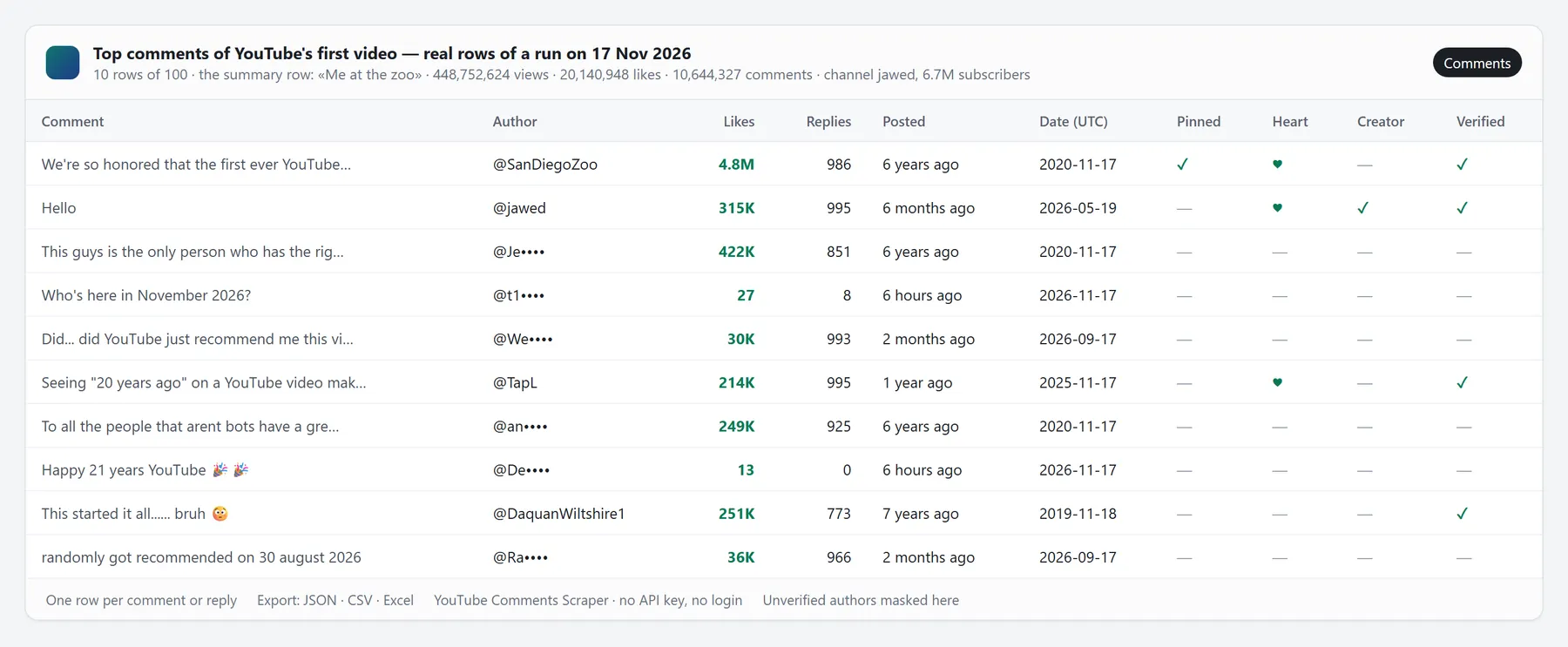
Real row, 17 Nov 2026: the pinned comment under «Me at the zoo» — @SanDiegoZoo: «We're so honored that the first ever YouTube video was filmed here!» · 4.8M likes · 986 replies · creator's heart. The video's own row: 448,752,624 views, 10,644,327 comments.
- 💬 Comments and replies — top comments or newest first; replies as rows of their own, linked by
replyToCid, with a cap per comment. - 📅 A date, not just «3 weeks ago» —
publishedAtas a UTC date with its precision, plus the edited mark. - 🏷️ The marks that matter — pinned, the creator's heart, the creator's own comments, YouTube's verified mark.
- 📺 Videos, Shorts and channels — links or ids, many in one run, or a channel's latest videos / Shorts.
- 🧰 Filters — minimum likes, contains text, only the creator's comments, only hearted, only pinned, published after; only new since the last run.
- 📊 The video in its own row — exact views, likes, number of comments, the channel and its subscribers. Free.
- 🔓 Never charged: comments left out by your filters, duplicates, videos that do not exist or have comments turned off, anything YouTube did not answer.
Try it: press Start — the prefilled «Me at the zoo» returns 100 top comments and the video's row in about 6 s.
What data does the YouTube Comments Scraper return?
One row per comment or reply, 34 fields:
| Group | Fields |
|---|---|
| The comment | cid, comment, type (comment / reply), order, voteCount, voteCountText, replyCount, hasCreatorHeart, isPinned, isEdited, replyToCid, replyLevel, commentUrl |
| When | publishedTimeText («6 years ago»), publishedAt (UTC date), publishedAtPrecision |
| The author | author, authorChannelId, authorChannelUrl, authorAvatarUrl, authorIsVerified, authorIsChannelOwner |
| The video | videoId, pageUrl, title, commentsCount, channelName, channelId, sort |
| About the row | input, inputType, notCollected, scrapedAt |
Every video also ends with one free summary row (rowType: "summary"): the video's exact views and likes, its exact number of comments, publish day, channel, subscribers, comments turned off or not — and how many comments were looked at, delivered, left out by filters, and why the list ended. A field a row could not get is null and named in notCollected — never a made-up 0.
Coming from another YouTube comments scraper? The usual names are kept: comment, cid, author, videoId, pageUrl, commentsCount, replyCount, voteCount, authorIsChannelOwner, hasCreatorHeart, type, replyToCid, title. These input names work as they are: startUrls, videoUrls, urls, maxComments, maxItems, maxCommentsPerVideo, sortCommentsBy, sortBy, oldestCommentDate, includeReplies, maxRepliesPerComment, channelUrls, maxVideosPerSource, keyword, minLikes, onlyCreatorHearted.
How much does it cost to scrape YouTube comments?
Pay per result, no subscription, no per-video fee:
| What you pay for | Free | Starter | Scale | Business |
|---|---|---|---|---|
| A comment or a reply, per 1,000 | $1.65 | $1.25 | $1.00 | $0.80 |
| Run start, per run | $0.0005 | $0.0005 | $0.0005 | $0.0005 |
- 1,000 comments on the Starter plan: $1.25 (the Free plan: $1.65). A reply is a row like a comment.
- The prefilled run (100 comments): about $0.13.
- Set Maximum cost per run in the run options: the Actor stops there, delivers what the limit paid for, and says so in the status.
Input
| Field | What it does | Default |
|---|---|---|
videos | One per line, any mix: a video link (youtube.com/watch?v=…, youtu.be/…), a Short link (youtube.com/shorts/…), a live or embed link, or the 11-character video id. | — |
maxComments | How many rows to return for each video, in the order chosen below. | 100 |
sort | YouTube's own two orders: «Top comments» (the pinned comment first, then the most liked and discussed) or «Newest first» (the pinned comment, then by time). | "TOP" |
includeReplies | On: each comment is followed by its replies (oldest first, as YouTube shows them), each a row of its own with replyToCid — the same $1.25 per 1,000 rows on the Starter plan. | false |
maxRepliesPerComment | With «Include replies»: the cap on replies read for one comment. | 10 |
channels | One per line: a handle (@NASA), a channel link (youtube.com/@NASA, /channel/UC…, /c/name, /user/name) or a channel id (UC…). | — |
maxVideosPerChannel | How many of the channel's newest videos to read comments from. | 5 |
channelContent | The channel's «Videos» tab, its «Shorts» tab, or both. | "VIDEOS" |
minLikes | Only comments with at least this many likes. | — |
containsText | Only comments whose text contains at least one of these words or phrases (one per line, any letter case). | — |
onlyCreatorComments | Only comments written by the video's own channel. | false |
onlyHearted | Only comments the video's creator marked with a heart. | false |
onlyPinned | Only the comment the creator pinned on top — one row a video, or none. | false |
publishedAfter | Only comments published on or after this day: YYYY-MM-DD, or a period back from today («7 days», «3 months»). | — |
onlyNew | Remembers which comments this monitor already delivered for each video (in a key-value store of your account, «youtube-comments-scraper-seen») and returns only comments it has not delivered before. | false |
monitorName | «Only new» memory is kept per monitor name: use different names for tasks that must not share it. | "default" |
maxConcurrency | How many requests run at the same time. | 24 |
proxyConfiguration | Apify Proxy's datacenter IPs by default — they are enough for YouTube's comments. | Apify Proxy |
Output example
A real row of 17 Nov 2026 (long texts cut here):
How fast is it?
Measured on Apify on 17 Nov 2026, default memory (512 MB), Apify Proxy:
| Job | Result |
|---|---|
| The prefilled run: 100 top comments of one video | about 6 s |
| 2,000 comments of 20 videos (100 each) | 10 s |
| 4,847 comments of 50 videos (up to 100 each) | 15 s — 295 requests, 0 retried, 0 lost |
| 1,500 rows with replies (1,410 replies) of 5 videos | 10 s |
| 3,000 newest comments of ONE video (150 pages, one after another) | 56 s |
Rows appear in the dataset while the run goes. Many videos are read side by side; one video's pages come one after another, because each page names the next.
Limits, said plainly
- Top comments: YouTube's «Top comments» list shows only part of a big video's comments — it ended at 1,188 for a video with 4.4 million on 17 Nov 2026. Newest first went on to 3,000 of 3,000 asked. The summary row says when the Top list ended early.
- Likes: exact up to 999; above that the number YouTube shows («4.8M» = 4,800,000).
voteCountTextkeeps YouTube's own text. - Dates: YouTube shows a comment's age («3 weeks ago»), not its date.
publishedAtis the run's time minus that age, exact to the unit inpublishedAtPrecision. - Replies come in YouTube's own order (oldest first), each capped by «Max replies per comment».
- Only the creator's comments with replies reads the replies of every comment: YouTube does not mark which threads the creator answered, so this is slower on big videos.
- Not included: channel-member badges (YouTube does not show them to a visitor), live chat, community posts, dislikes.
FAQ
Do I need a YouTube API key, an account or cookies?
No. The Actor reads what YouTube shows any visitor. No Google API quota, nothing to log in.
How much do 1,000 YouTube comments cost?
$1.25 on the Starter plan, $1.65 on the Free plan; the table above has every plan. You pay for delivered comments and replies only — no fee per video or per channel.
Am I charged for videos with comments turned off, deleted videos or filtered-out comments?
No. Those, duplicates and anything YouTube did not answer are free; each video gets a summary row that says what happened.
Can I try it for free?
Yes. Apify's free plan includes $5 of credit a month — about 3,000 comments at the Free-plan price.
How do I get more comments of a big video?
Choose «Newest first» and a high «Max comments per video»: on 17 Nov 2026 it read 3,000 comments of one video in 56 s. «Top comments» is YouTube's selection and ends earlier.
Can I get the replies?
Yes: tick «Include replies». Each reply is a row with type: "reply" and replyToCid = the comment it answers. «Max replies per comment» keeps a 900-reply thread from eating your budget.
How do I monitor a video for new comments?
Tick «Only new since the last run», give the task a monitor name and schedule it. Each run returns only comments the monitor has not delivered; a video with nothing new is free.
Can I get the comments of a channel's latest videos?
Yes — put the channel (@handle or link) into «Channels» and set «Latest videos per channel». Videos, Shorts or both.
Why is a field null?
The row's notCollected names every field it could not get. For example, if YouTube did not answer for the video's own page, the comments still come, without the title and channel.
Does it work with the API, Make, n8n or Zapier?
Yes. Run it through the Apify API or any Apify integration; results come as JSON, CSV or Excel.
🆕 New on the Store. Tried it? A short review on the Actor's page helps others find it.
Related scrapers
Prices on the Starter plan.
Video and social
- YouTube Shorts Scraper — a channel's Shorts or a Shorts search by keyword; with details, exact views, likes, comments and sound; 2,000 Shorts with details from 10 channels in 91 s. From $1.00 / 1,000 Shorts; $3.00 with details.
- Threads Scraper — Threads posts with view counts, the replies under a post, profiles and keyword or #hashtag search, no login; 300 replies of one post in 16 s. From $1.95 / 1,000 posts.
- Instagram Scraper — Instagram comments, posts, reels and profiles from any mix of links and usernames in one run, no login; median order 14 s on 136 client orders. From $0.27 / 1,000 comments.


