

Github Dependency Signal Monitor
Pricing
Pay per usage
Github Dependency Signal Monitor
Reads your repo's dependency manifests through a GitHub connector, scores each dependency for abandonment risk, and opens an issue listing the ones that are dying.
Pricing
Pay per usage
Rating
0.0
(0)
Developer

Abhishek Khanra
Maintained by CommunityActor stats
1
Bookmarked
1
Total users
0
Monthly active users
3 months ago
Last modified
Categories
Security
Limited permissionsShare
Dependency Signal Monitor
Find out which of your dependencies is quietly dying, before it becomes your problem
Your security scanner tells you when a package is broken. Nothing tells you when a package has been abandoned. This reads the dependencies in your repository, checks whether anyone is still looking after each one, and opens an issue in your repository listing the ones that look like they have stopped.
Tools like PkgWatch already score package health well. What they cannot do is read your repository, work out what to check, and file the result back in your own issue tracker without you handing anybody a token. That is what this does.
Why this matters
A package you depend on gets abandoned. Nobody announces it. It keeps working, so you never notice.
Two years later a security problem turns up in it, and there is nobody left to fix it. Now you are doing an emergency migration under pressure instead of a calm one you could have planned twelve months earlier.
Everything you would need to see it coming is public. When it was last released. How many people are left maintaining it. Whether the project has been archived. Whether downloads are falling away. Nobody is watching it for you.
Express, one of the most used packages on the internet, depends on escape-html. It has had no new version since September 2015 and one person maintains it.
Features
- Reads your actual dependencies, so you never maintain a list by hand
- Tells you why, in a sentence, not just a number. "No new version since September 2015, almost 11 years ago. Only one person looks after it"
- Separates dying from finished. A tiny package with no releases in years is often complete, not abandoned. This says so instead of raising a false alarm
- Files the result in your own repository, so it lands where you already work
- Updates the same issue every run instead of filling your tracker with duplicates
- Notices when you close the issue and starts a fresh one rather than editing something you have dealt with
- Never sees your GitHub token. Apify holds it and this Actor is only permitted three specific actions
- Dry run by default, so you can read the report before anything is written anywhere
Usage
- Connect GitHub. In Apify Console go to Settings, API & Integrations, MCP connectors, click Add connector and paste
https://api.githubcopilot.com/mcp/. Choose API key or bearer token and paste a GitHub personal access token with Contents read, Issues read and write. - Pick the repository to check. Any repository you can read, including public ones you do not own.
- Choose where the issue goes. By default it goes into the repository you checked. Set the two override fields to send it somewhere else.
- Run it with Dry run on and read the report in the log.
- Turn Dry run off when you are happy with it.
- Put it on a schedule. Weekly is plenty. Abandonment happens over months.
Example input
| Field | Value |
|---|---|
| GitHub connector | github-dependency-monitor |
| Repository owner | expressjs |
| Repository name | express |
| Include dev dependencies | off |
| Report anything scoring at or below | 45 |
| Dry run | off |
What it looks like
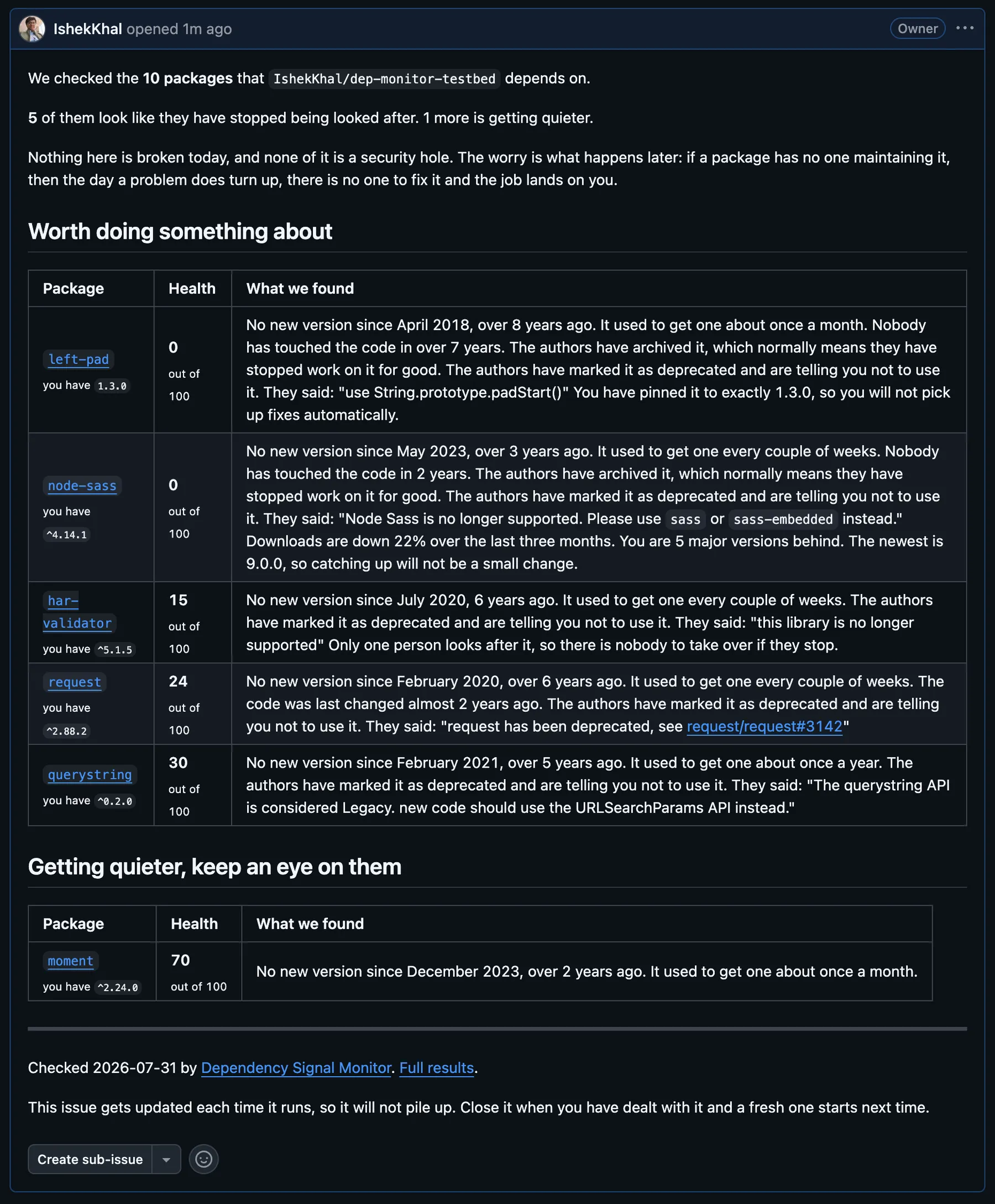 What lands in your issue tracker. One table for things worth acting on, one for things to keep an eye on.
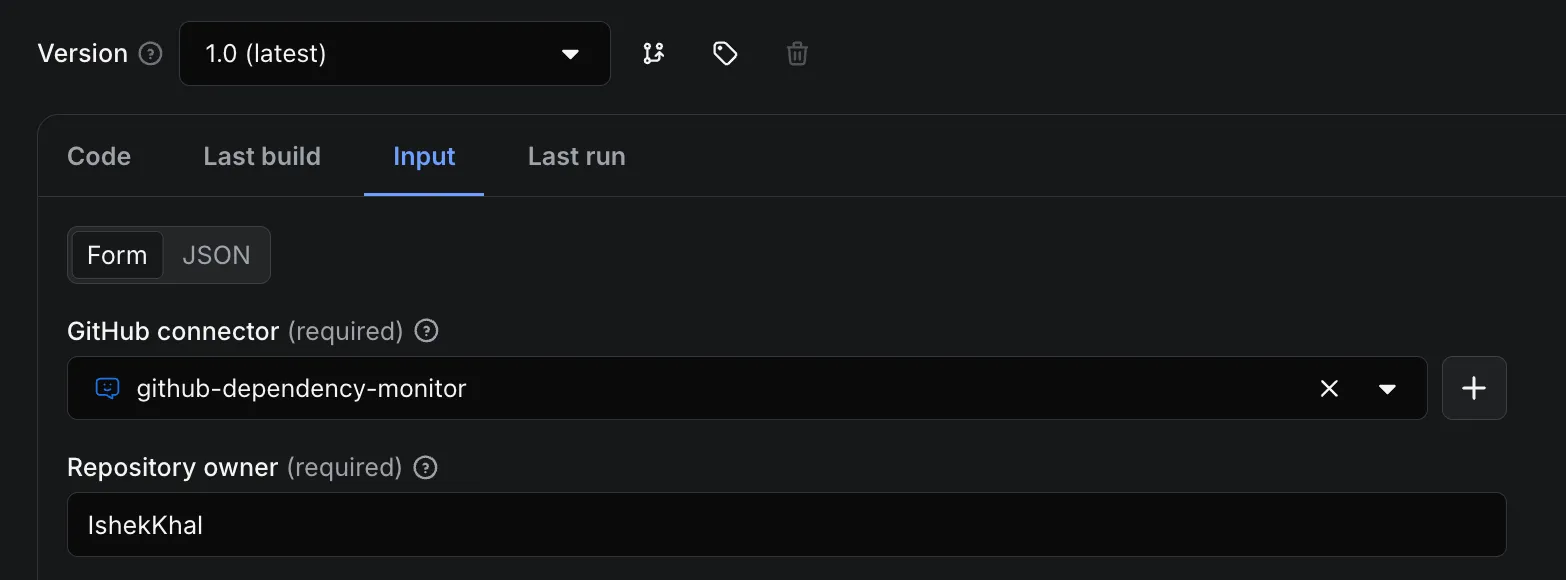 Pick a connector and a repository. Everything else has a sensible default.
 The second run edits the issue it opened rather than filing a new one.
Output
One row per dependency, in the dataset.
| Field | What it is |
|---|---|
name | Package name |
ecosystem | npm, pypi or go |
versionSpec | The version range in your manifest |
scope | runtime or dev |
healthScore | 0 to 100. Higher is healthier |
riskBand | at risk, watch or healthy |
scoreReason | Plain English explanation of the score |
signalConflict | Set when the registry and the repository disagree about the package |
lowConfidence | True when we could not check enough to be sure |
signals | Every raw measurement: last release, maintainer count, downloads trend, repository activity |
healthScoreWithoutConnectorSignals | The package's health ignoring your version constraint |
connectorContribution | How much reading your manifest changed the score |
Example row
Supported ecosystems
| Manifest | Ecosystem | Status |
|---|---|---|
package.json | npm | Full. Release history, maintainers, deprecation, downloads trend, repository activity |
requirements.txt | PyPI | Full except maintainer count, which PyPI's API does not expose |
pyproject.toml | PyPI | PEP 621 and Poetry tables. PDM and Hatch are not read yet |
go.mod | Go | Last release date and repository activity only. The module proxy exposes no maintainer or download data |
Lock files are not read. The version range in your manifest is what gets checked, because that is what governs what you can receive.
What it does not do
It does not check for security vulnerabilities. Dependabot and npm audit already do that well, and they answer a different question.
It cannot tell the difference between a package that has been abandoned and one that is simply finished. Nothing can, from the outside, because the difference is intent. Where the signals disagree it says so and asks you to look, rather than guessing.


