

Contact Details Scraper: Google Maps Leads to Emails & Phones
Pricing
from $2.00 / 1,000 website with contacts
Contact Details Scraper: Google Maps Leads to Emails & Phones
Turn Google Maps and directory lead lists into emails, phones and social profiles. Paste websites or a Google Maps dataset; it crawls each site's contact pages, renders JavaScript sites, and can verify emails. Pay only when a contact is found.
Pricing
from $2.00 / 1,000 website with contacts
Rating
0.0
(0)
Developer

Jason Faro
Maintained by CommunityActor stats
0
Bookmarked
20
Total users
13
Monthly active users
8 days ago
Last modified
Categories
Share
What does Contact Details Scraper do?
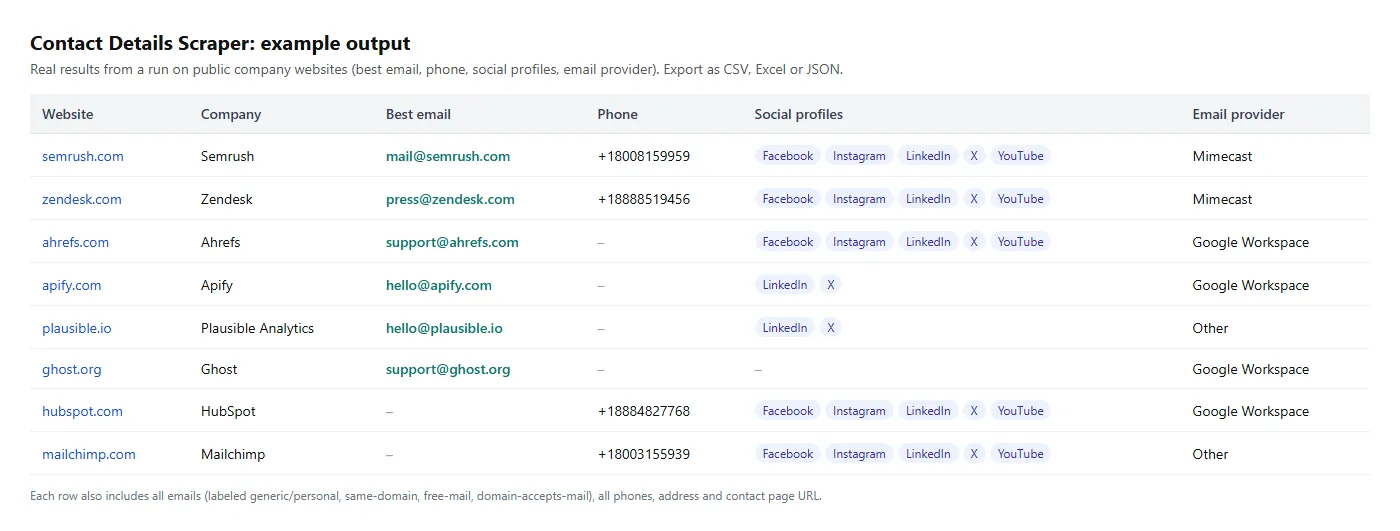
Contact Details Scraper turns Google Maps and directory lead lists into emails, phone numbers and social profiles. Give it a list of business websites, or point it at the results of a Google Maps scraper, and for every business it returns the best email, phone number, social media profiles, address and contact page, ready to export.
You pay only for results: a flat price per website where at least one email or phone number is found. Websites with no contacts, unreachable sites and errors are free, and crawling more pages never raises the price. Many contact scrapers charge for every page they load, whether or not they find anything.
For each website it crawls the homepage plus the pages most likely to hold contact details (Contact, About, Team, Locations, Impressum…). It renders JavaScript-built sites in a real browser when needed and can verify emails before you send. You can download results as CSV, Excel or JSON, or connect them to Google Sheets, n8n, Make, Zapier or your CRM.
Get emails for every roofer in Texas in 10 minutes
A step-by-step tutorial for turning Google Maps listings into an email list. The same steps work for any trade and any area.
- Scrape Google Maps. Open Google Maps Scraper and search for
roofing contractorinTexas, USA. Set the number of places, for example 300 to start, and under website keep only places with a website. Click Start. - Find the contacts. When it finishes, open Contact Details Scraper, and in Dataset pick the Google Maps run's dataset. Leave Website field as
website. Click Start. Every result keeps the business's name, category, address, Maps phone, rating and Maps URL undersource. - Verify the emails (optional). Turn on Verify emails to check each business's best email with MillionVerifier before you send anything.
- Filter to clean, sendable emails. Open the Leads view in the Output tab, export to CSV or Excel, and keep rows where:
emails.domainAcceptsMailistrue: the email's domain has a mail server.emails.sameDomainistrue: the address is on the company's own domain, not a third-party one.primaryEmailVerificationisvalid, if you turned on verification.
- Export. Download as CSV or Excel, or send the dataset straight to Google Sheets with the n8n templates below.
About 300 businesses take a few minutes per step. You pay the Google Maps scraper for the places, and this Actor only for websites where it found an email or phone number.
Why use this contact details scraper?
- Built for lead lists. It reads Google Maps, Yelp and directory datasets directly and keeps the listing details next to the contacts. You don't have to merge spreadsheets.
- Finds emails other tools miss.
- Decodes Cloudflare-protected emails and
name [at] domain [dot] comstyle addresses. - Reads schema.org business data hidden in the page.
- Renders JavaScript-built sites (React, Vue, Angular, single-page apps) in a headless browser when a plain request sees an empty page.
- Decodes Cloudflare-protected emails and
- Cleaner data.
- Placeholders (
you@example.com), image names (logo@2x.png) and tracking IDs are removed. - Phone numbers are validated and formatted in international E.164 format (
+15025610375).
- Placeholders (
- Knows which emails are worth using. Each email is labeled:
generic(info@, sales@) orpersonal- on the company's own domain or not
- from a free provider (Gmail, Yahoo…) or not
- whether its domain can receive mail (checked via MX records), which catches typos like
info@compnay.com - optionally, verified with MillionVerifier: valid, invalid, disposable, catch-all or unknown
- Picks the best contact.
primaryEmailandprimaryPhonegive you one ready-to-use value per company. - Tells you why a site came back empty. Every website without contacts gets a
noContactReason, such asblocked,js_rendered,contact_form_onlyorno_contacts_published.
Head-to-head test: same 61 websites
We ran this Actor and a popular per-page-priced contact scraper on the same 61 real small-business websites (roofers, plumbers, HVAC, landscapers), giving both the same budget of 5 pages per site:
| This Actor | Per-page scraper | |
|---|---|---|
| Cost for 61 websites | $0.18 | $0.58 |
| Websites with an email | 37 | 32 |
| Websites with a phone number | 58 | 54 |
| Phone output | Validated, one format, no duplicates | Mixed formats and duplicates, plus "uncertain" numbers that included map coordinates and IDs |
Every email and phone number this Actor returned in that run was re-checked on the page it came from: 41/41 emails and 58/58 phones were correct. (Test date: October 2026. Results on your own list will vary.)
How to scrape emails and phone numbers from a list of websites
- Click Try for free.
- Paste websites into the Websites field, one per line.
example.com,https://www.example.com/contactandjane@example.comall work. - Optionally, adjust Max pages per website (default 5), Default country for phone numbers, and Verify emails.
- Click Start.
- Download the dataset from the Output tab, or connect it to your tools.
Complete lead enrichment workflow
Chain three Actors to get a full profile of every company on your list:
- Contact Details Scraper (this Actor): emails, phones, socials, address.
- Domain Intelligence: tech stack, SaaS tools, email provider and SPF/DKIM/DMARC grade. Useful for segmenting by technology.
- Website Screenshot & PDF: a clean screenshot of each homepage (no cookie banners) for personalized outreach or website audits.
Example with the Apify Python client:
Join the three datasets on the domain.
Use it in n8n
Two free, ready-made n8n workflows run this Actor and save the results to Google Sheets:
- Find local business leads on Google Maps and save to Google Sheets: search Google Maps, find each business's email, phone and socials, and get one clean row per lead.
- Enrich company websites from Google Sheets with emails and phones: read a column of websites from your sheet and write the contacts back.
Import the template, connect your Apify and Google accounts, and run it. Each workflow has a spend cap you can change.
Input
| Field | Type | Description |
|---|---|---|
websites | array of strings | Domains, URLs or emails. They are normalized and de-duplicated. |
datasetId | string | Optional. Read websites from an Apify dataset, such as a Google Maps scraper's output. |
websiteField | string (default website) | Field in that dataset that holds the website URL. |
maxPagesPerWebsite | integer (default 5) | Homepage plus the most likely contact pages. Price doesn't depend on this. |
defaultCountry | string (default US) | Country used for phone numbers written without a country code. Country-code domains like .de and .co.uk are detected automatically. |
retryBlockedWithProxy | boolean (default true) | Retry sites that block cloud servers through Apify Proxy. Proxy use is included in the price. |
browserFallback | boolean (default true) | Render JavaScript-built homepages in a headless browser when a plain request finds no contacts. Included in the price. |
maxBrowserPagesPerWebsite | integer (default 2) | Pages the browser fallback opens per JavaScript-built site. |
verifyEmails | boolean (default false) | Verify the best email of each website with MillionVerifier (paid add-on, see Pricing). |
verifyAllEmails | boolean (default false) | Verify every email found, not just the best one. |
millionVerifierApiKey | string (secret) | Optional. Your own MillionVerifier key: verification is then not charged by this Actor. |
maxConcurrency | integer (default 15) | Number of websites processed in parallel. |
Output
Each website produces one item. This example is from a real run on apify.com; the emailVerification values are illustrative:
emailVerification and primaryEmailVerification appear only when Verify emails is on.
Main fields
| Field | Description |
|---|---|
primaryEmail / primaryPhone | The best single contact: same-domain generic inbox first, then other emails. Phones are ranked by how often they appear. |
emails[] | Every email found, with type, sameDomain, freeMailProvider, domainAcceptsMail, the pages it was found on and, when verified, emailVerification |
emailVerification | result (valid, invalid, disposable, catch_all, unknown or error), subResult, isCatchAll, isDisposable, isRoleBased, provider, checkedAt |
primaryEmailVerification | Verification result of primaryEmail, as one column for exports |
phones[] | Validated phone numbers in E.164 format, with the pages they were found on |
socialProfiles | Facebook, Instagram, LinkedIn, X/Twitter, YouTube, TikTok, Pinterest, Threads, Telegram, WhatsApp, Discord, Snapchat, Reddit, GitHub, Yelp, Linktree |
allEmails, allPhones, facebook, instagram, linkedin, x, youtube, tiktok | Flat copies for clean CSV/Excel exports (one column each) |
source | When you use a dataset ID: the business's name, category, address, phone, rating and Maps URL from that dataset |
address | Postal address from the site's structured data, when published |
contactPageUrl, contactFormUrl | Where to reach the company if there's no email |
mailboxProvider | The company's email provider (Google Workspace, Microsoft 365, Zoho, GoDaddy…) |
renderedWithBrowser | true when the site was read with the headless-browser fallback |
noContactReason | Only on websites without contacts: js_rendered, blocked, timeout, unreachable, redirect_offsite, contact_form_only, no_contacts_published or error |
status | ok, website_unreachable or error (never charged) |
Each run also saves a Run summary (RUN_SUMMARY in the key-value store): counts by status and by noContactReason, browser fallback use, verification results and charged events. It contains no personal data.
How much does it cost to extract emails from websites?
The Actor uses pay-per-event pricing. You're charged for these events:
| Event | When it's charged |
|---|---|
| Website with contacts | Once per website where at least one email or phone number was found. Sites with no contacts, sites with only social profiles, unreachable sites and errors are free. Crawling more pages, proxy retries and browser rendering don't change the price. |
| Email verified | Only when Verify emails is on. Once per unique email that gets a decisive answer: valid, invalid or disposable. catch_all, unknown and failed checks are free, and each address is verified at most once per run. If you use your own MillionVerifier key, this event is never charged. |
See the Pricing tab for current prices. Set a maximum cost per run and the Actor stays within it. When the limit is close, it stops verifying emails first and keeps finding contacts as long as the budget allows.
Tips
- Feed it the
websitefield from Google Maps, Yelp or directory scrapes to turn business listings into contactable leads. - For the cleanest outreach lists, filter on
emails.domainAcceptsMail = true,emails.sameDomain = trueand, if you verify,primaryEmailVerification = valid. - If you only need the main contact, use
primaryEmailandprimaryPhone, or the Leads view. - Check
noContactReasonand the Run summary to see why some sites came back empty.
FAQ, disclaimers and support
Is it legal? The Actor only reads public web pages, the same way a visitor's browser would. It doesn't log in, submit forms or bypass access controls. Contact details can include personal data, for example a named employee's email. You're responsible for having a lawful basis to process it and for following anti-spam laws such as GDPR, CAN-SPAM and CASL when you contact anyone.
Why didn't it find an email for some sites? Many small businesses publish only a phone number or a contact form. The noContactReason field tells you which. You still get contactFormUrl when there's a form, and if no email or phone was found at all, you aren't charged.
What does email verification send to MillionVerifier? Only the email address being checked. MillionVerifier's own terms and privacy policy apply to that check.
Did it save you time? A quick review on the Reviews tab helps other people find it.
Found a bug or a site it handles badly? Open an issue on the Issues tab and include the website. Fixes ship regularly.


