
Apple App Store Reviews API | iOS & macOS JSON
Pricing
from $1.25 / 1,000 reviews
Apple App Store Reviews API | iOS & macOS JSON
Apple App Store Reviews API. Fetch iOS and macOS app reviews on demand as structured JSON: ratings, titles, text, dates, versions, author, and helpfulness across 50+ country stores. Sort by most recent, most helpful, favorable, or critical. Built for ASO, sentiment, and AI agent workflows.
Pricing
from $1.25 / 1,000 reviews
Rating
5.0
(6)
Developer

John
Maintained by CommunityActor stats
10
Bookmarked
524
Total users
126
Monthly active users
8 days ago
Last modified
Categories
Share
Apple App Store Reviews API
The fastest way to query Apple App Store reviews for any iOS or macOS app, delivered as structured JSON and built MCP-first for Claude, AI agents, and developers.
A clean Apple App Store Reviews API. Fetch star ratings, review titles, body text, author info, app versions, dates, and helpfulness counts on demand. Works across 50+ country stores. Sort by most recent, most helpful, most favorable, or most critical. Pass a numeric App Store ID or just an app name and the API finds the right one for you. Built for App Store Optimization (ASO), sentiment analysis, competitor monitoring, churn-signal tracking, localization QA, and AI agent workflows.
This actor is fully MCP (Model Context Protocol) ready, with one click setup for Claude Code (free trial), Claude Cowork, and Claude.ai Chat.
Example code (Python): https://github.com/johnisanerd/Apify-Apple-App-Store-Reviews-API
AI Agent and MCP Integration
Watch: how to install and use the Apify MCP server with Claude (about 5 minutes).
The fastest path to use this actor is through the Apify MCP server. Once connected, Claude (or any MCP-compatible AI agent) can discover and invoke this actor directly from a natural language prompt. No glue code, no client SDK, no manual REST calls.
The Apify MCP server hosts discovery tools (search-actors, fetch-actor-details, add-actor) that let agents find and register this actor on the fly. Pick the setup that matches your Claude surface.
Option 1: One-click hosted MCP (recommended)
The quickest way in. This single hosted endpoint pre-loads all three Apple App Store actors (reviews, search, and product details) alongside Apify's discovery and docs tools, so the agent can pick the right one for any prompt without searching first.
Claude Code (terminal CLI): add it as a remote HTTP server in one command.
Claude.ai and Claude Cowork (custom connector):
- Open Settings > Connectors > Add custom connector.
- Fill in:
- Name:
Apify Apple App Store - Remote MCP URL: paste the hosted URL above.
- Authentication: Bearer token (your Apify API token).
- Name:
- Save and enable the connector.
Get your Apify API token at https://console.apify.com/account/integrations?fpr=9n7kx3. Then try a prompt:
Get the 50 most-critical Apple App Store reviews for Netflix in the US and summarize the top three complaints.
Because the connector already carries all three Apple actors, the same connection also answers "search the App Store for budget apps" and "pull the full product page for app id 363590051" without any extra setup.
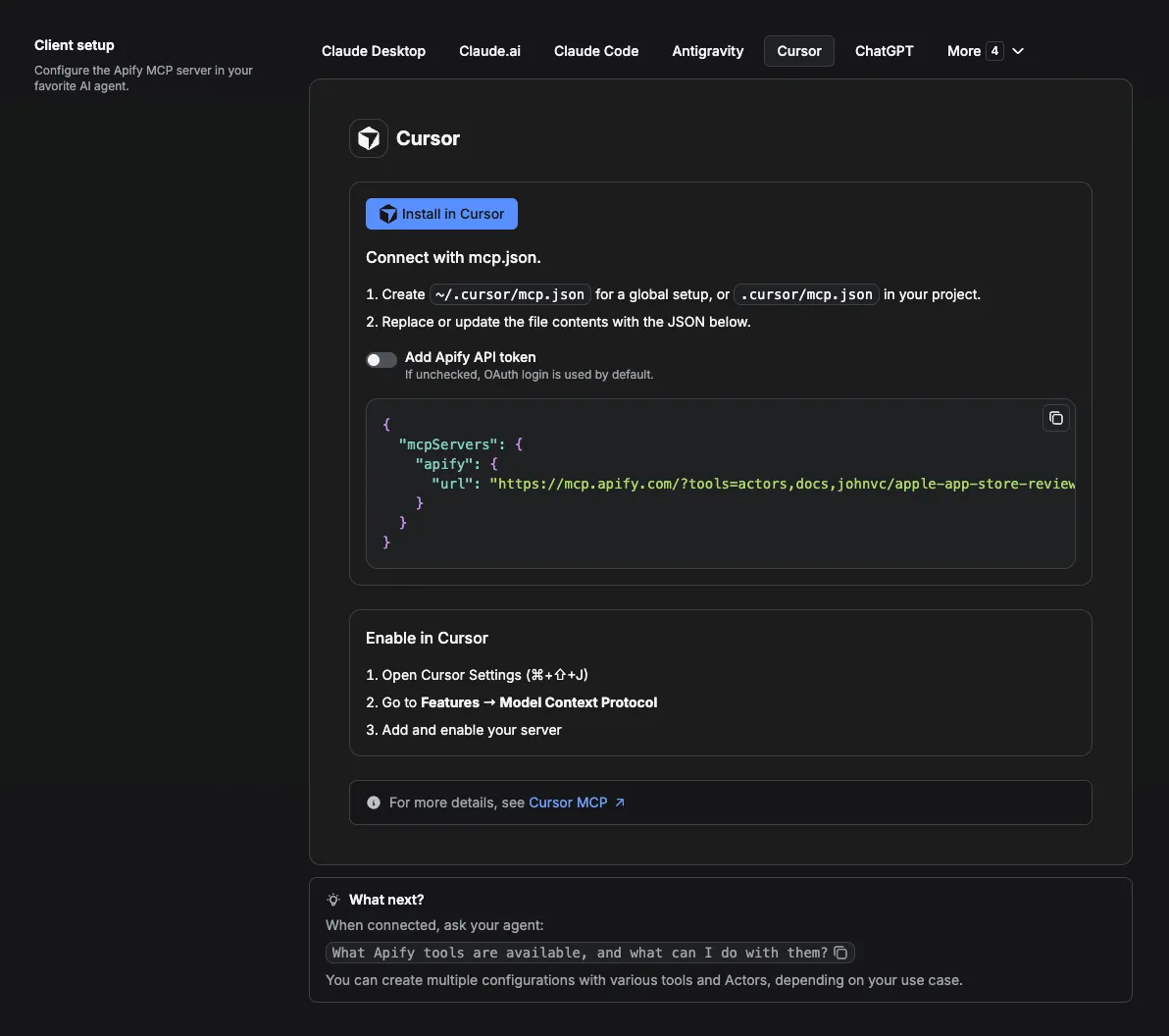
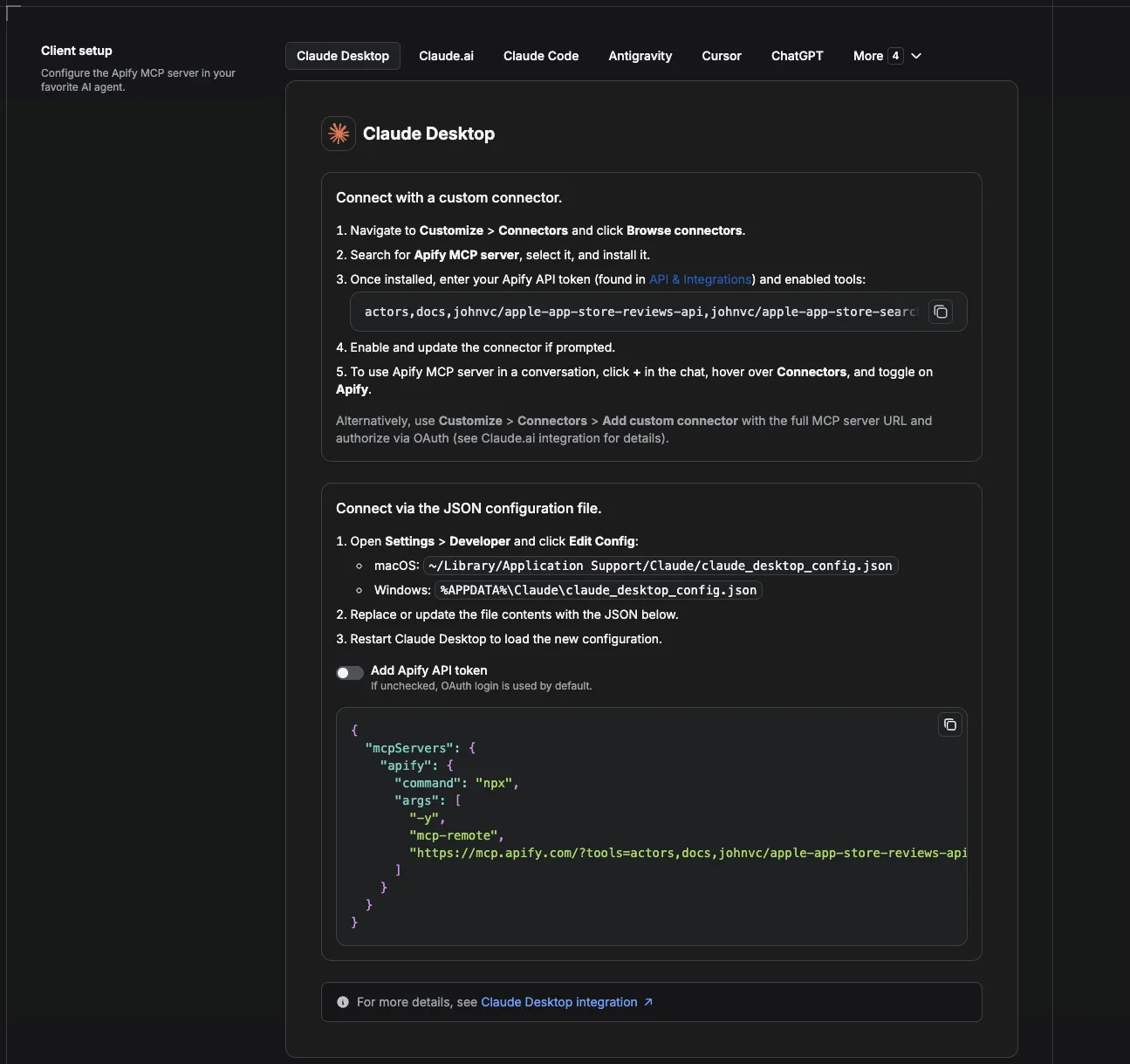
The same hosted URL works as a custom or remote MCP server in Cursor, Claude Desktop, VS Code, Windsurf, and other MCP clients. Adding it in Cursor:
And the connector running in Claude Desktop:
Option 2: Claude Code via local server (terminal CLI)
The single-command setup. Open your terminal and run:
Then add your Apify API token (one time):
Get your token at https://console.apify.com/account/integrations?fpr=9n7kx3.
Prefer to edit config by hand? Open ~/.claude.json and add:
Restart Claude Code (free trial), then try a prompt like:
Get the 50 most-critical Apple App Store reviews for Netflix in the US and summarize the top three complaints.
Claude will discover this actor via search-actors, register it as a tool, and run it. You can pass either a numeric product ID or just the app name; the actor handles the lookup.
Option 3: Claude Cowork (web)
Claude Cowork uses the hosted Apify MCP endpoint over HTTP. No local install required.
- Open Cowork.
- Go to Settings > Connectors > Add custom connector.
- Fill in:
- Name:
Apify - Remote MCP URL:
https://mcp.apify.com - Authentication: Bearer token (paste your Apify API token).
- Name:
- Save and enable the connector.
Once connected, the Apify tools appear in the tool drawer. Try a prompt:
Use Apify to pull the 100 most-recent App Store reviews for Spotify in the UK store and bucket them by star rating.
Cowork supports dynamic tool discovery, so once Claude finds this actor in a session, it stays registered as a named tool for the rest of the conversation. Subsequent prompts reuse it without re-discovery.
Option 4: Claude.ai Chat (Connectors)
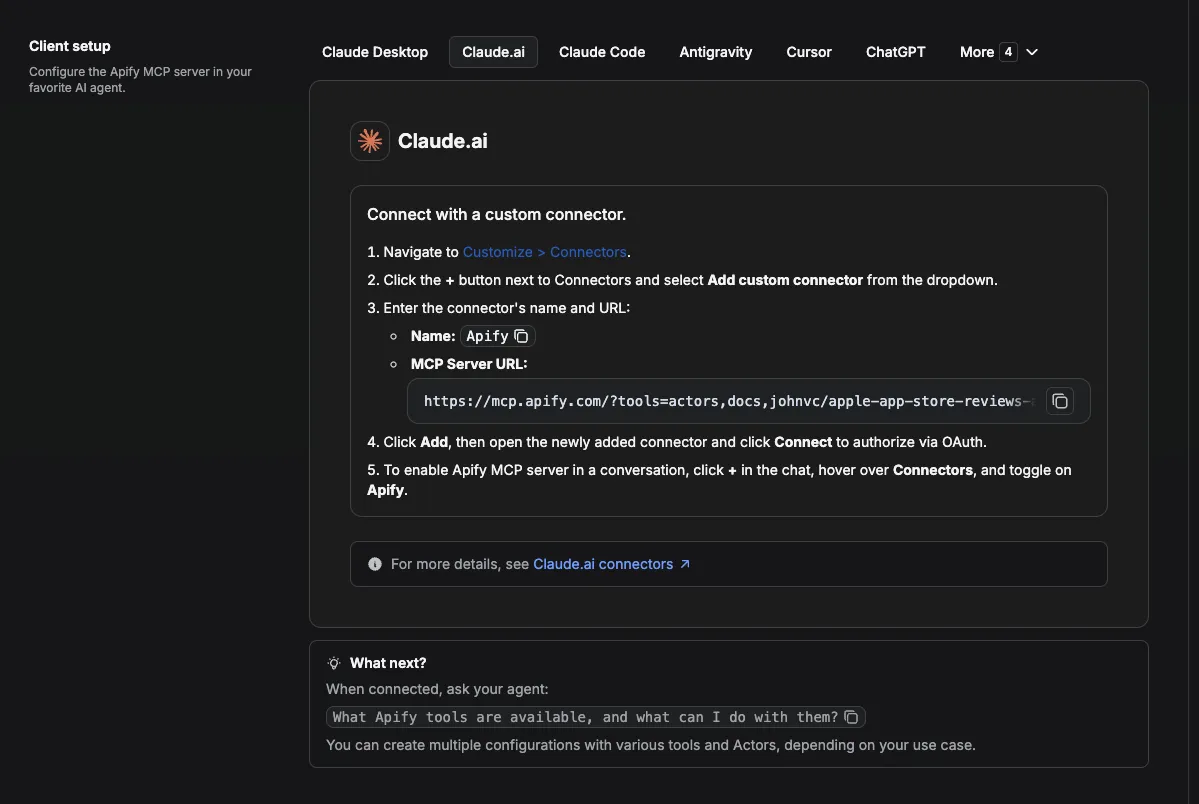
Same hosted MCP endpoint, configured through the standard Claude.ai UI.
- Open https://claude.ai/referral/uIlpa7nPLg.
- Click your profile, then Settings > Connectors > Add custom connector.
- Fill in:
- Name:
Apify - Remote MCP URL:
https://mcp.apify.com - Authentication: Bearer token (your Apify API token).
- Name:
- Save. Toggle the connector on at the start of any chat where you want App Store review data.
Then prompt as normal:
Pull the most helpful App Store reviews for Duolingo and tell me what people praise most.
Option 5: ChatGPT, n8n, Zapier, custom GPTs (direct REST)
Skip MCP entirely with a single REST call. Useful for custom GPTs, Zapier flows, n8n pipelines, or any HTTP client.
For ChatGPT custom GPT Actions, import the Apify OpenAPI spec as a custom action. Once added, ChatGPT can call this actor as a function from any custom GPT.
Why this actor is MCP-discoverable
- Title and description are tuned for the Apify MCP server's
search-actorstool: platform name, data type, and use case appear in the first 150 characters of the description. - The input schema uses MCP-friendly descriptions that read cleanly even when prefixed with
REQUIRED. Every array property declares an explicititems.typeso dynamic-discovery clients (Cursor, Cline, Claude Code, VS Code, Windsurf, Glama) can register the actor as a typed tool. - Pay-per-event pricing keeps the result-card description transparent for autonomous agents.
- Both
product_ids(exact targeting) andapp_name(auto-resolution) are accepted so agents that only have an app name can still call the actor in one shot.
💸 Pay per run with crypto (x402)
The Apple App Store Reviews API supports agentic payments via the x402 protocol. AI agents and MCP clients can pay for runs in USDC (on Base) with no Apify account or API token needed: point your agent at the Apify MCP server and it can discover, pay for, and run this Actor autonomously. Read the Apify x402 announcement for details.
What You Can Extract
Every dataset item is one review, flat and ready for analysis.
| Field | Description |
|---|---|
| Star rating | Integer 1 to 5 |
| Review title | The headline the author wrote |
| Review text | Full body of the review |
| Author name and ID | Display name plus a stable author identifier (iOS only) |
| Review date | As returned by the store, locale-formatted |
| Review date (ISO) | Best-effort ISO 8601 normalization (e.g. 2021-06-02) |
| App version reviewed | Version string captured at the time of review |
| Helpfulness | Original prose plus parsed integer helpful / total counts |
| Source product ID | Numeric Apple App Store ID this review came from |
| App platform | ios or macos, inferred automatically per app |
| Country store | The two-letter country store code applied |
| Sort order applied | Echoes which order was requested |
| Page number | Source page of pagination |
| Reviews for current version | Present for macOS apps only |
| Fetch timestamp | UTC ISO timestamp at request time |
Each row also carries the originating product ID and country store, so multi-app and multi-country runs stay self-contained.
Use Cases
- App Store Optimization (ASO): Track sentiment, monitor version-specific complaints, and benchmark competitor reviews.
- Sentiment analysis pipelines: Feed real review text into an LLM or a classical NLP model. Star ratings already labeled.
- Competitor monitoring: Watch a rival app's reviews and react to negative spikes before they show in the headline rating.
- Churn-signal tracking: Catch the first one-star reviews on a new release and triage them in your support workflow.
- Localization QA: Compare reviews from the US, UK, JP, DE, and BR stores to spot region-specific bugs and translation issues.
- AI agent feedback loops: Let an AI agent gather reviews on demand to ground its answers in real user voice.
- Investor and PM research: Quickly read what users actually say about an app, not just the headline rating.
🔌 Integrations: Automate App Store Review Monitoring
A single run answers one question ("what are people saying about my app today?"). The real value of this App Store Reviews API comes from running it on a schedule, so fresh reviews land in your stack the moment they post. See the full list of Apify platform integrations.
Tasks and Schedules (the core recipe). Save one task per app you watch (your own app, plus each competitor), then attach a schedule from the actor's Actions, then Schedule menu. Useful cron strings: 0 7 * * * (daily 7 AM), 0 */6 * * * (every 6 hours), 0 13 * * 1-5 (weekday mornings, UTC), 0 9 * * 1 (Mondays). One schedule can trigger many tasks at once, so a whole competitor set refreshes on a single timer. The Pull a competitor app's one star reviews task is a ready-made starting point.
n8n. Build a no-code monitor: a Schedule Trigger, then an Apify node that runs this actor, then a Filter that keeps rows where rating is at most 2, then a Slack or email node so new one-star reviews page you the moment they appear. See the Apify n8n integration. This API also ships a dedicated n8n community node, n8n-nodes-apple-app-store-api: in n8n open Settings, Community Nodes, and install it, then use it in any workflow or as an AI Agent tool.
Make and Zapier. The same pattern works no-code with Make and Zapier: trigger on a schedule, run the actor, route the new reviews wherever you need them.
What each run returns
Every run writes a flat dataset, one row per review, self-contained per app and country. The fields you will usually store are product_id, app_country, rating, review_title, review_text, review_date_iso, reviewed_version, and author_name. The full field reference is in the What You Can Extract table above.
Store the history (Supabase). Send each run's rows into a table so a review history accumulates over time and you can chart sentiment by app version. No-code: the n8n Apify node, then a Supabase node. Or in Python:
MCP and AI agents. Add this API as a tool in Claude or Cursor through the Apify MCP server so an agent can pull live reviews on demand (see the AI Agent and MCP Integration section at the top of this README). In Claude Code (free trial) an agent can answer "summarize this week's one-star reviews for my app" grounded in real review text.
Webhooks. For anything custom, fire an Apify webhook on ACTOR.RUN.SUCCEEDED to push each run's dataset into your own service.
Input Parameters
| Parameter | Type | Required | Default | Description |
|---|---|---|---|---|
product_ids | array of string | yes (one of) | [] | Numeric Apple App Store IDs (e.g. ["534220544"]). Find each ID in the App Store URL: apps.apple.com/<country>/app/<slug>/id<NNNNNNNN>. |
app_name | string | yes (one of) | (none) | Free-form Apple app name (e.g. netflix). If product_ids is empty, the actor resolves the ID automatically and reviews the top match. |
country | string | no | us | Two-letter Apple country store code. 50+ stores supported. |
sort | string | no | mostrecent | mostrecent, mosthelpful, mostfavorable, or mostcritical. iOS only; macOS apps always return most-recent. |
max_reviews | integer | no | 100 | Hard cap on reviews per app. 0 for unlimited (internally capped at 50 pages). |
start_page | integer | no | 1 | Page to start paginating from. Useful for resuming a long run. |
include_macos | boolean | no | true | Set false to skip macOS apps entirely. |
normalize_dates | boolean | no | true | Emit review_date_iso alongside the locale-formatted date. |
parse_helpfulness | boolean | no | true | Extract helpful_count and total_helpful_count integers from the helpfulness prose. |
output_file | string | no | auto | Local-only JSON output filename for debugging. Ignored on Apify platform. |
At least one of product_ids or app_name must be provided.
Example Inputs
Basic: most recent reviews for one app (by product ID)
Auto-resolve by app name
Multi-app competitor sweep
International sentiment comparison (Japan, most helpful)
macOS app (Xcode)
Unlimited (drain all available reviews, capped at 50 pages internally)
Example Output
Each dataset item is one review:
Pricing
Transparent pay-per-event pricing. You only pay for what you get.
| Event | Cost | When charged |
|---|---|---|
setup | $0.02 | Once at the start of each run. Also covers the optional app-name to product-id lookup. |
review | $0.0015 | Per review pushed to the dataset. |
Cost estimates
| Use case | Reviews returned | Approx. cost |
|---|---|---|
| Quick spot-check (10 reviews) | 10 | $0.035 |
| Standard scan (100 reviews) | 100 | $0.17 |
| Deep crawl (500 reviews) | 500 | $0.77 |
| Bulk competitor sweep (5 apps, 200 reviews each) | 1,000 | $1.52 |
| Maximum iOS depth (1 app, 50 pages, about 1250 reviews) | 1,250 | $1.90 |
No monthly subscription. No hidden fees. Stop the run at any time and pay only for what was already returned.
How to Get Started
- Create an Apify account at https://apify.com/?fpr=9n7kx3 if you do not have one.
- Open the actor page in the Apify store and click Try for free.
- Provide either a
product_idsarray (numeric App Store IDs) or anapp_name(free-form), then click Start. - Watch the run live in the Apify console, then download results as JSON, CSV, Excel, or RSS once it finishes.
- Optional: connect via MCP (see top of this README) to call the actor directly from Claude or any AI agent.
How to find a product ID
Open the App Store page for any app and look at the URL. The numeric ID is the part after /id:
Or skip this step entirely and pass an app_name instead. The actor looks it up for you.
🔗 Related Tools
Pulling app reviews is usually one step in a larger App Store intelligence workflow. These tools from the same catalog pair well with this App Store Reviews API:
- Apple App Store Search API: search the App Store by keyword to discover apps and their numeric product IDs, then feed those IDs straight into this reviews API.
- Apple App Store Product API: pull full app detail pages (title, developer, pricing, ratings histogram, screenshots) to sit alongside the review text you collect here.
- Yelp Reviews API: extend brand and product sentiment monitoring beyond the App Store to another major review platform.
Older alternatives such as this App Store reviews scraper exist, but it shows only a handful of users, carries no rating, and has not been updated since it was published. This API is actively maintained, resolves an app by name or numeric ID, works across 50+ country stores, and returns clean, flat JSON with parsed helpfulness counts and normalized dates.
🤖 Ask an AI assistant about this API
Open a ready-to-send prompt about the Apple App Store Reviews API in the AI of your choice:
- 💬 ChatGPT
- 🧠 Claude
- 🔍 Perplexity
- 🅒 Copilot
FAQ
Why are some fields empty on certain reviews?
Apple returns slightly different shapes for iOS and macOS apps. macOS reviews do not include review_id or author_id, and they include the reviews_for_current_version field that iOS does not. The actor flags each row with app_platform so you can branch on it cleanly downstream.
Why doesn't sort change the order for one of my apps?
Sort applies only to iOS apps. macOS apps always return reviews in most-recent order regardless of the sort value. This is a behaviour of the Apple store, not of the actor.
How many reviews does one page return?
About 25 per page on iOS and about 10 per page on macOS. Page size is fixed by Apple and cannot be changed via input.
How do I drain every review on an app?
Set max_reviews to 0 for unlimited. The actor caps internally at 50 pages as a safety guard (about 1250 iOS reviews or 500 macOS reviews), which is the practical depth of what the store exposes.
What happens if I run out of budget mid-run?
The API stops cleanly at the next review and writes a warning to the log. Reviews already pushed are charged; the rest are not. Raise your budget and re-run with start_page to resume.
Can I get developer responses?
The underlying data source does not expose developer-reply text for App Store reviews. If this changes, the actor will be updated.
Which country stores are supported?
50+ stores including US, UK, CA, AU, DE, FR, JP, KR, BR, MX, IN, and more. See the country parameter dropdown for the full list.
Does this work with AI agents and MCP?
Yes. Setup instructions for Claude Code (free trial), Claude Cowork (free trial), and Claude.ai Chat are at the top of this README. The actor is registered with the Apify MCP server and is discoverable via search-actors.
Can I run the App Store Reviews API on a schedule?
Yes, and this is the main way teams use it. Any run can be automated: save a task with your input (one per app you watch), then attach a schedule from the actor's Actions, then Schedule menu. Concrete cron strings: 0 7 * * * for daily at 7 AM, 0 */6 * * * for every six hours, 0 9 * * 1 for Mondays. One schedule can trigger many tasks at once, so an entire competitor set refreshes on a single timer. See the Integrations section above for the full monitoring recipe, and the Apify schedules docs.
Should I use an API or a web scraper for App Store reviews?
Both, and this actor is both. A plain web scraper returns messy HTML you still have to parse and babysit, while a raw store feed is rate limited and gives you unstructured data rather than analysis-ready rows. This App Store reviews scraper gives you the clean, structured result of a purpose-built API: call it yourself, pay per review, and get the same flat JSON whether you pull one app or a whole competitor set.
Can I integrate the App Store Reviews API with other apps?
Yes. It connects to almost any cloud service through Apify integrations: Make, Zapier, Slack, an n8n workflow, and webhooks on ACTOR.RUN.SUCCEEDED for custom actions. See the Integrations section above for full recipes.
Can I use the App Store Reviews API with the API?
Yes. The Apify API runs the actor, schedules it, and fetches datasets, and the apify-client package exists for both Node.js and Python. See the Option 5 REST example at the top of this README, or the actor's API tab.
Can I use the App Store Reviews API through an MCP server?
Yes. Add it as a tool in any MCP client (Claude, Cursor, and others) through the hosted Apify MCP server with the actor-specific URL https://mcp.apify.com/?tools=actors,docs,johnvc/apple-app-store-reviews-api. In Claude Code (free trial) or Claude Cowork (free trial) your agent can then answer questions like "what are the top complaints in this week's reviews?" with live data. See the Apify MCP docs.
What is App Store Optimization (ASO), and how does this API help?
App Store Optimization is the practice of improving an app's visibility and conversion in the store. Reviews and ratings are a core ASO signal: they influence ranking and they tell you which features and bugs drive sentiment. Pulling reviews as structured JSON lets you track star ratings by version, run sentiment analysis on the text, and see complaints trend up or down after each release.
How can I monitor competitor app reviews?
Point the actor at a competitor's app (by name or numeric ID), sort by mostcritical, and put it on a schedule so you catch negative spikes as they happen. Store each run in a table (see the Integrations section) to build a per-competitor history you can diff over time. The Pull a competitor app's one star reviews task is set up for exactly this.
How else can I collect app and review data?
Pair this API with related tools in the same catalog: the Apple App Store Search API to discover apps and their product IDs, the Apple App Store Product API for full app detail pages, and the Yelp Reviews API to extend sentiment monitoring to another review platform. Review data originates from the public Apple App Store.
Featured Tasks
Ready-to-run examples that show this API solving a specific problem. Each opens its own setup so you can run it on your account in one click.
- Export TikTok App Store reviews to CSV - every TikTok review row with rating, title, text, and date, exportable to CSV.
- Pull a competitor app's one star reviews - a competitor's most critical reviews first, with rating, title, and full text.
- Analyze your iOS app reviews in Claude via MCP - review sentiment analysis in Claude (free trial available) chat via MCP, grounded in real review text.
- Export App Store Reviews to CSV
- Get App Store Reviews as JSON via API
📚 App Store Reviews API Guides and Tutorials
In-depth walkthroughs for this API, published on Medium.
Apple App Store Reviews API for AI Agents: Pull iOS Ratings via MCP
A walkthrough of pulling Apple App Store ratings and reviews as structured JSON, focused on the search "app store reviews api" and on wiring the API into AI agents over MCP. It covers what the API returns and how to put it to work in an agent workflow. Published July 2026.
Where the Data Comes From
Every row this API returns is a real customer review published on the Apple App Store. The API reads the same reviews you would see on an app's public store listing and hands them back as flat JSON: rating, review_title, review_text, author_name, review_date_iso, reviewed_version, plus helpful_count and total_helpful_count parsed out of the helpfulness prose. If a field is blank on the store page, it is blank in the dataset too.
This is an independent tool. It is not affiliated with or endorsed by Apple Inc., it is not an official Apple product, and it does not claim to match any Apple service.
Which store page does a review come from?
The app's own listing on the App Store, in whichever country store you pass in country. Each row carries the product_id it was read from, the app_country that was applied, the sort_order requested, and the page_number it appeared on, so a multi-app or multi-country run stays traceable back to a specific store page.
How is this different from reading the reviews by hand?
By hand you open the Apple App Store listing for one app, click through the review pages, and paste text into a spreadsheet, one country at a time. That does not scale past a couple of apps and it leaves you with no history. One run of this API pulls up to roughly 1,250 iOS reviews for an app, works across 50+ country stores, normalizes the dates to ISO, turns the helpfulness line into integers, and writes everything to a dataset you can chart, diff week over week, or hand straight to an LLM.
🌐 About Alpha OSINT
This Actor is part of Alpha OSINT, toolset of financial and operations data sources and APIs. See the Apple App Store Reviews API source page for related tools and use cases. For support or requests for this actor, please start a ticket directly on our support page.
Last Updated: 2026.10.04


