Google Flights Deals API - Cheap Destinations
Pricing
from $2.00 / 1,000 deal returneds
Google Flights Deals API - Cheap Destinations
Find the cheapest destinations reachable from any airport as structured JSON. Each deal carries the price, the typical price for that route, the saving against it, dates, airline, stops, duration, a photo, and a booking link. Pay per deal, MCP-ready.
Pricing
from $2.00 / 1,000 deal returneds
Rating
0.0
(0)
Developer

John
Maintained by CommunityActor stats
3
Bookmarked
5
Total users
2
Monthly active users
a day ago
Last modified
Categories
Share
Google Flights Deals API | Cheap Destination Finder
The Google Flights Deals API takes an airport and returns the thirty cheapest destinations you can fly to from there, as structured JSON, sourced from Google Flights. Each one comes with the price, the typical price for that route, dates, airline, stops, duration, a photo, and a booking link.
The part nobody else gives you: which of them are actually bargains. A cheap fare and a good deal are not the same thing. Plenty of destinations in a feed like this are cheap simply because they are close, while still costing more than that route usually does. Every result carries a typical-price baseline and an is_below_typical flag, so you can separate the real discounts from the merely short flights.
Built for travel affiliates, price-alert products, fare newsletters, and AI travel agents.
Example code: Python quick-start + MCP setup on GitHub - call the API from Python, or install it as a tool in Claude, Cursor, and ChatGPT.
What you get
Per destination:
nameandcountry, plus a shortdescriptionand athumbnailprice, andaverage_price, what that route typically costssavingsandsavings_percent, the gap between themis_below_typical, true only when the deal genuinely beats its own route's usual priceoutbound_dateandreturn_datefor the specific itineraryroute,departure_airport_code,arrival_airport_codeairline,flight_durationin minutes,stopsflight_link, a booking link
An honest note on the data
Measured across three hubs on 2026-08-04, roughly 6 to 30% of the feed genuinely beats its typical price, depending on the airport. The rest are cheap in absolute terms without being discounts. That is the nature of the source, and it is exactly why the is_below_typical flag exists: it turns a list of cheap flights into a list you can actually filter for bargains.
One limit worth knowing: setting a maximum flight duration makes the source stop returning the typical-price baseline, so that one filter turns off bargain detection entirely. Every other filter, including one way, keeps it. The Actor logs a warning when you use it. Separately, airline is populated on roughly two thirds of results.
Flight price tracking data
This Actor returns a snapshot, not a time series. What makes that snapshot useful for tracking is average_price: every result carries what its route typically costs, so a single run already tells you where a fare sits against its own history.
Run it on a schedule and store the rows keyed on departure, arrival, and date, and you have built your own fare history without needing anyone else's. The is_below_typical flag is the signal to act on.
To be clear about what this does not do: it does not watch prices for you, keep history, or send anything. There is no alerting in the Actor. It is the data source you build a price-alert product on top of, not the alert itself.
Google Flights AI and agent use
Thirty concrete, bookable options from one call is a good shape for an agent. Each row carries a real price, a real date, and a link that goes straight to the booking page, so an assistant can answer "where can I go cheaply from here in October" with specifics rather than suggestions.
The bargain flag matters more for an agent than for a human: it lets the model separate a genuinely good fare from a merely short flight without needing to reason about typical prices itself.
Use cases
- Fare newsletters and deal blogs. Pull thirty destinations per hub, keep the ones flagged below typical, and you have your issue.
- Price-alert products. Watch a set of home airports and alert only on genuine discounts rather than on every cheap short-haul.
- Travel affiliate sites. Populate a "where can I go cheaply from here" page with photos, dates, and booking links.
- Trip inspiration. Filter by cabin, stops, budget, or trip length and see what comes back.
- AI travel agents. One call gives an agent thirty concrete, bookable options from an airport.
Input
| Field | Type | Description |
|---|---|---|
departureId | string | 3-letter IATA code to fly from, such as JFK. |
departureIds | array | More airports. Each is one lookup, billed per deal returned. |
tripType | select | Round trip (default) or one way. Both keep the savings baseline. |
outboundDate | string | YYYY-MM-DD. Leave blank to let the feed pick cheap dates. |
returnDate | string | YYYY-MM-DD, for a fixed round trip. |
travelDuration | select | Any, about a week, a weekend, or about two weeks. |
tripLength | string | Exact days, as 7 or a range like 5-10. |
travelClass | select | Economy, premium economy, business, or first. |
maxPrice | integer | Drop deals above this price. |
maxStops | select | Any, nonstop only, up to 1 stop, or up to 2 stops. |
maxDurationMinutes | integer | Drop deals longer than this. Turns off bargain detection, see above. |
includeAirlines / excludeAirlines | string | Comma-separated airline codes. Mutually exclusive. |
maxDealsPerAirport | integer | Cap deals returned and billed per airport. Max and default 30. |
adults / children / infants | integer | Passenger counts. |
currency, hl, gl | string | Currency, language, and country for pricing. |
There is no arrival airport. This Actor answers "where can I go cheaply from here", so the source ignores a destination by design.
Example input
Example output
How results are displayed
The Output tab opens on the Deals view: photo, destination, price, typical price, savings, bargain flag, route, dates, duration, stops, airline, and a booking link. Error rows show blank deal columns; switch to All fields to see them.
Pricing
Pay-per-result: a small start fee plus a per-deal charge, scaling down with your Apify plan.
| Plan | Per deal | Start fee |
|---|---|---|
| Free | $0.0030 | $0.001 |
| Bronze | $0.0025 | $0.001 |
| Silver | $0.00225 | $0.001 |
| Gold | $0.0020 | $0.001 |
A full thirty-destination feed from one airport costs about $0.076 at Bronze. You only pay for deals you receive; error rows are never charged.
How to get started
- Open Google Flights Deals API on the Apify Store.
- Enter a
departureIdsuch asJFK. - Optionally set dates, a budget, or a stops limit, then run it.
- Export as JSON, CSV, or Excel, or pull it from the API.
Prefer code? See johnvc's GitHub for setup guides and code examples.
Run from the API
🔌 Use this API from Claude (Google Flights MCP)
This Actor is compatible with the Model Context Protocol (MCP), so AI agents can call it as a tool. Add it through the hosted Apify MCP server using this Actor-specific URL:
https://mcp.apify.com/?tools=actors,docs,johnvc/google-flights-deals-api
If you run agents from Claude Code (free trial) or Claude Cowork (free trial), add the Apify MCP server and ask it to "find me somewhere cheap to fly from JFK in October that is actually below its usual price."
Setup walkthrough:
Apify MCP integration docs: https://docs.apify.com/platform/integrations/mcp
MCP setup, step by step
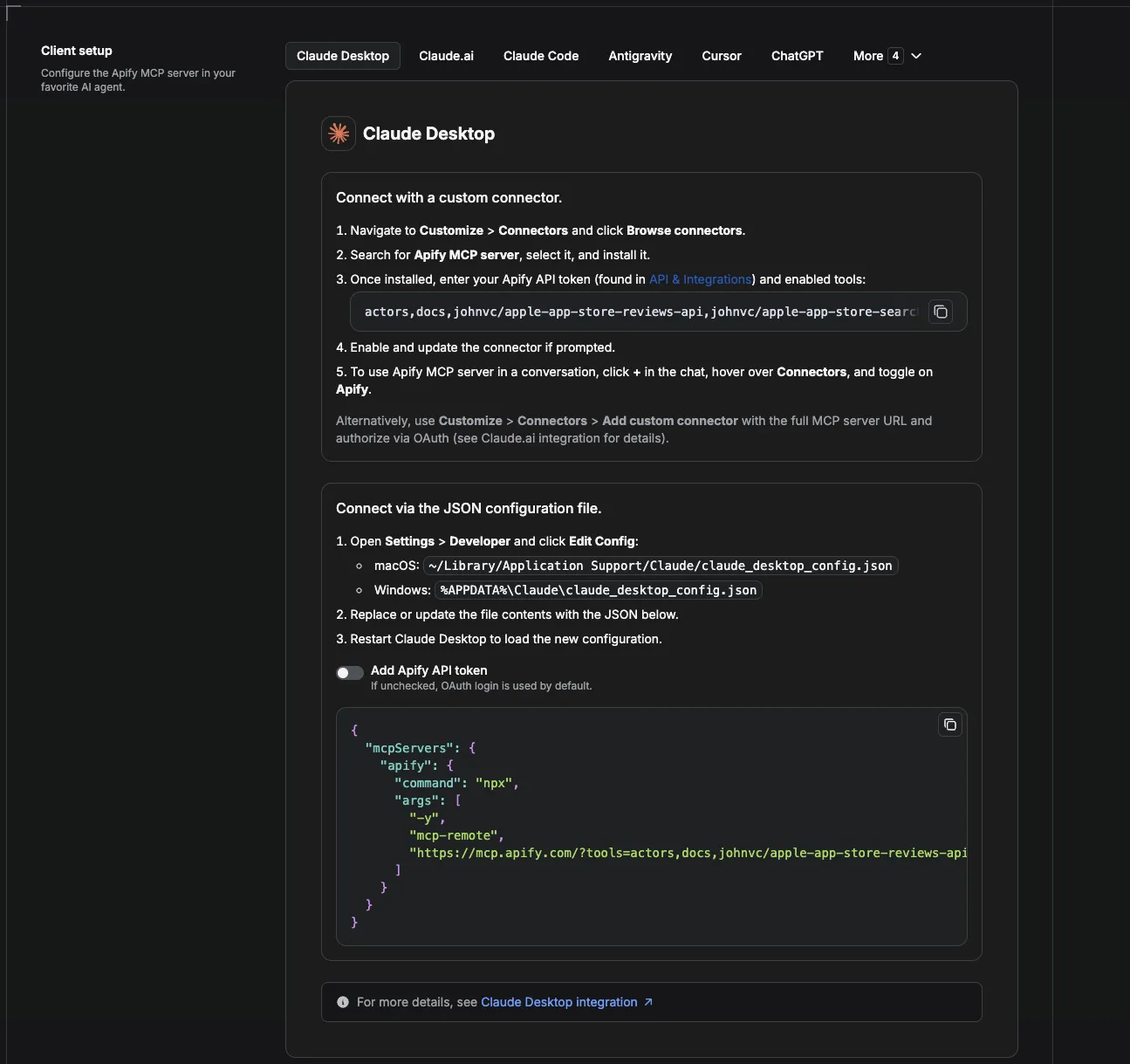
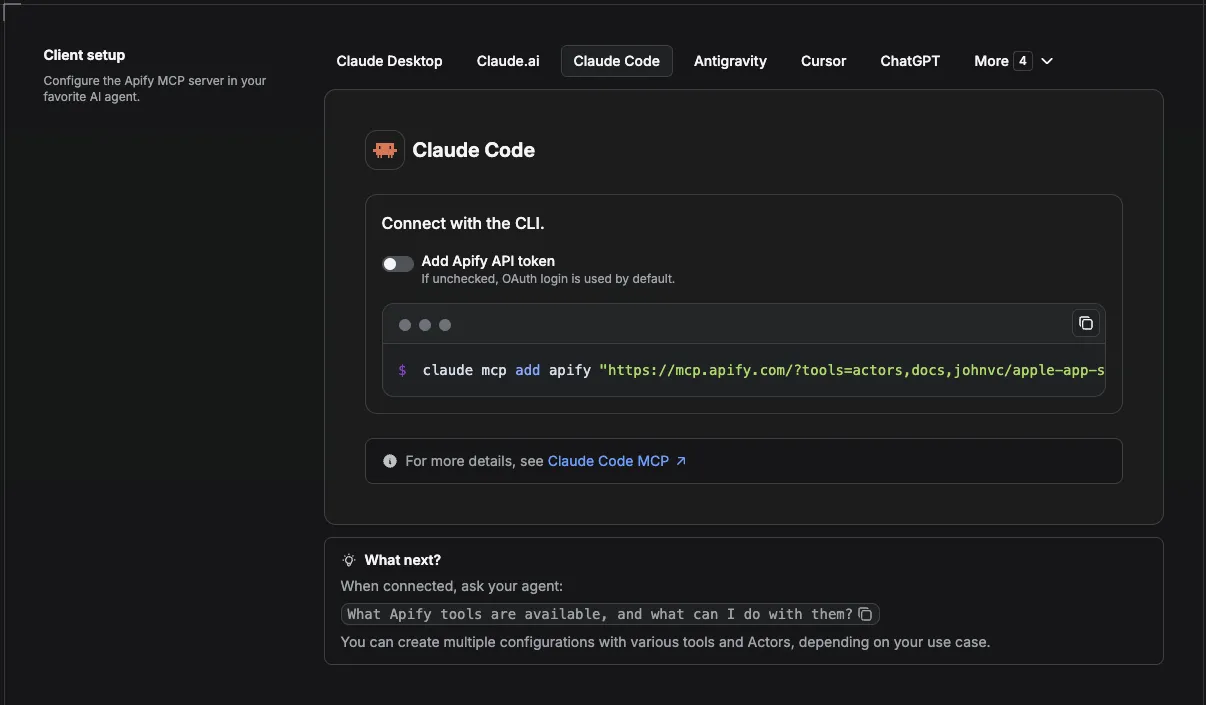
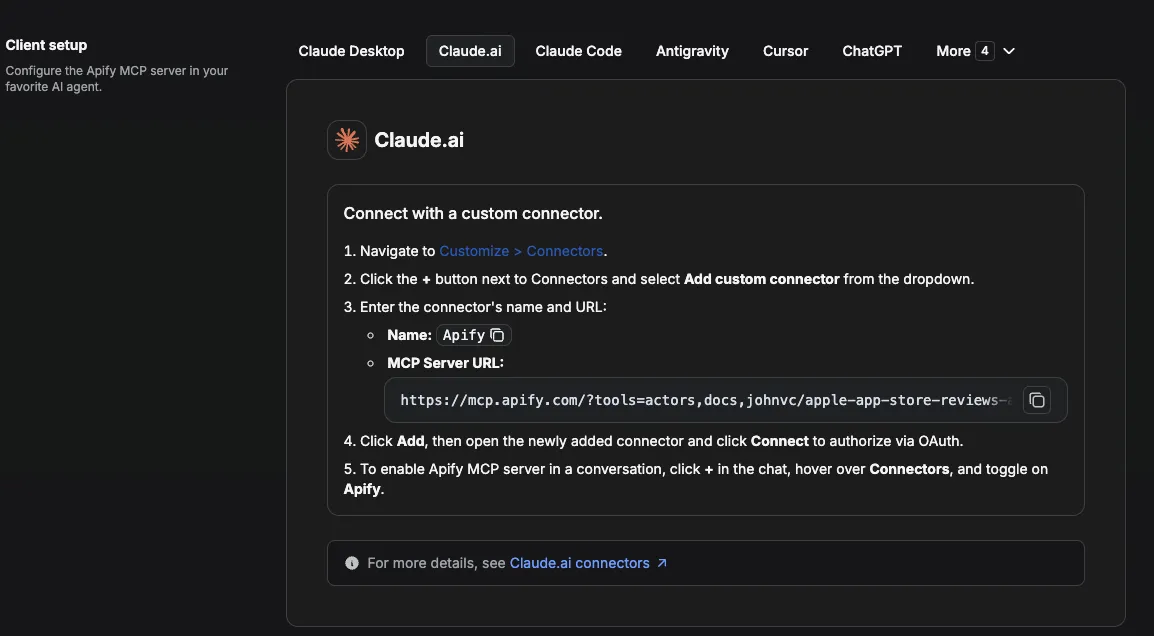
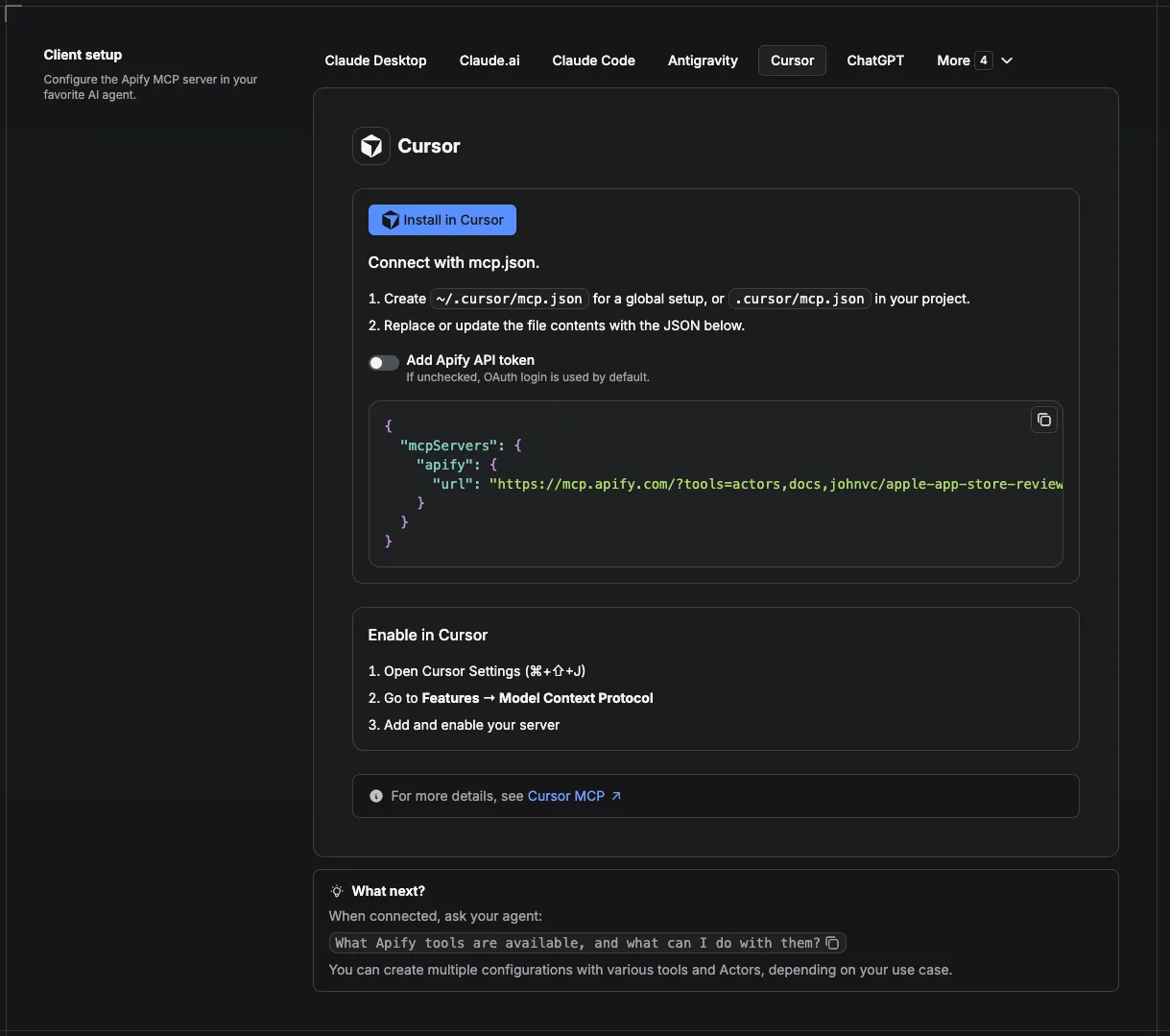
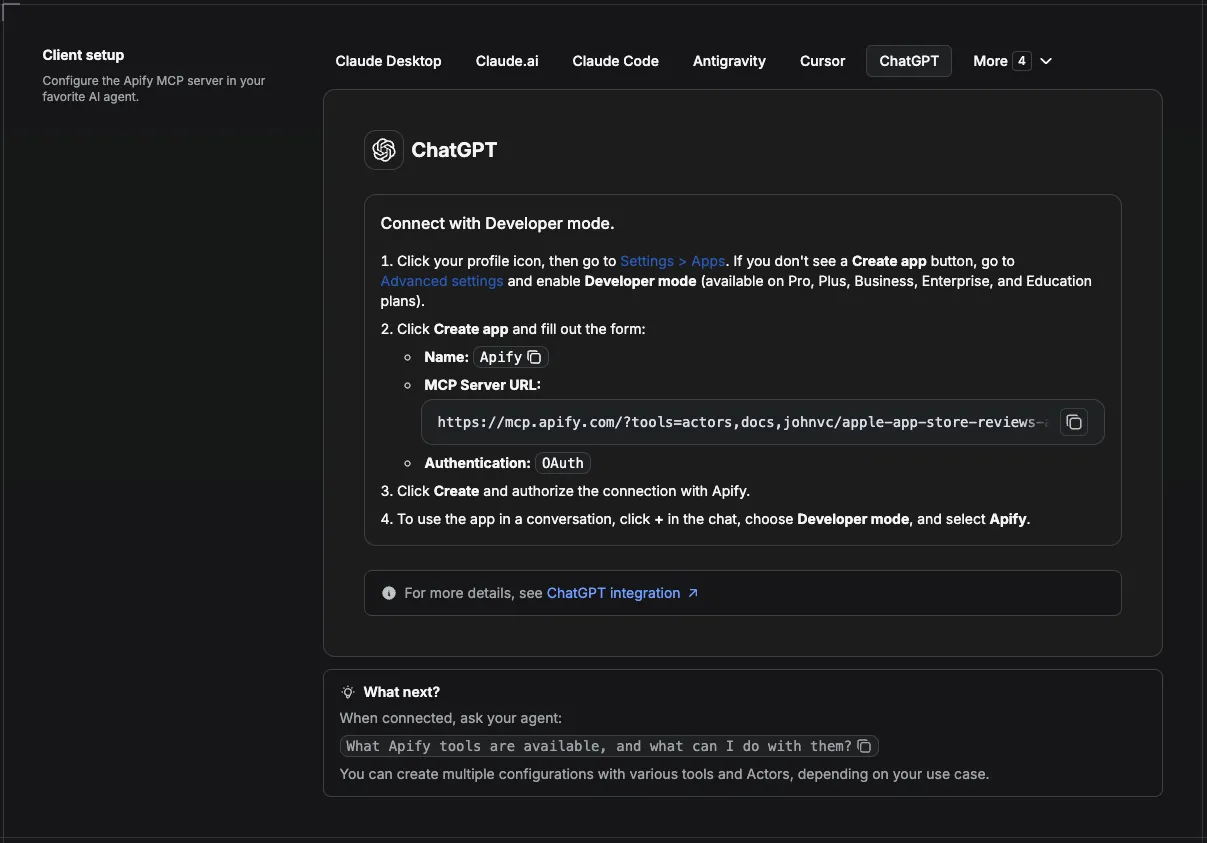
Visual setup guides for each client (source and more assets: ApifyPublicData on GitHub):
Claude Cowork Desktop (free trial)
Claude Code (free trial)
Claude (website)
Cursor
ChatGPT
💸 Pay per run with crypto (x402)
The Google Flights Deals API supports agentic payments via the x402 protocol. AI agents and MCP clients can pay for runs in USDC (on Base) with no Apify account or API token needed: point your agent at the Apify MCP server and it can discover, pay for, and run this Actor autonomously. Read the Apify x402 announcement for details.
🔌 Integrations: Automate Google Flights deals discovery
Scheduled deal alerts (the core recipe)
Save a run for your home airports as a Task, attach a daily or weekly schedule, then filter incoming rows on is_below_typical. Each row links back to the itinerary on Google Flights so a human can book it in one click. That gives you a genuine fare-drop alert rather than a firehose of cheap short-haul flights.
n8n
Use the Apify node to trigger the Actor, filter on is_below_typical, and route matches to email or Slack.
Make and Zapier
Trigger on a new dataset item, filter by savings_percent, and push into a newsletter draft or a spreadsheet.
Store history in Supabase
Insert one row per deal keyed on departure_id plus arrival_airport_code plus outbound_date. Tracking average_price over time gives you your own fare history.
MCP and AI agents
Add the Actor-specific MCP URL above and let an agent answer open-ended trip questions with real bookable options.
Webhooks
Fire a webhook on run completion to kick off downstream alerting.
Agent Skills
Ready-made skills for Claude Code (free trial) and other agents that drive this Actor. Install with npx skills add johnisanerd/<name>.
- claude-skill-google-flights-deals: genuine bargains from a home airport, scored against each route's typical price
- claude-skill-google-flights-tracking: build your own fare history with a baseline in every row
🔗 Related Tools
- Google Travel Explore API, destination ideas including hotel prices
- Google Flights Data Scraper, point-to-point flight search when you know where you are going
- Google Hotels Search Scraper, hotels, photos, and reviews once you pick a destination
- Google Maps Photos API, real imagery for places at your destination
Comparing alternatives: rainminer's Google Flights Deals Scraper reads the same deals feed and prices lower per deal. It takes a departure point and a result cap and nothing else, so there is no cabin, stops, budget, or airline filtering, and it returns the feed as-is without a typical-price baseline or a bargain flag.
FAQ
Is this an official Google product?
No. This Actor is not affiliated with, endorsed by, or connected to Google. It reads publicly visible information from Google Flights and returns it as structured JSON.
Does this send me price alerts?
No, and that distinction matters. The Actor returns a snapshot of the thirty cheapest destinations with a typical-price baseline for each. It does not watch fares over time, keep history, or notify you. Schedule it and filter on is_below_typical and you have the data layer for an alerting product; the alerting itself is yours to build.
How is this different from a flight search?
A search answers "how much is JFK to London". This answers "where can I go cheaply from JFK at all". There is no arrival airport input, because the source ignores one.
What does "below typical" actually mean?
Each result carries average_price, what that route usually costs. is_below_typical is true when this deal beats it. It matters because a cheap fare is not automatically a discount: a short hop can be cheap in absolute terms while still costing more than it usually does.
How many of the results are genuine bargains?
Measured across three hubs, roughly 6 to 30% depending on the airport. That is why the flag is there. Filter on it and you get the real ones.
Why do some deals show negative savings?
Because they cost more than that route typically does. They are not clamped or hidden, since knowing a "deal" is actually above average is useful information.
Is there anything that turns off bargain detection?
Yes, one thing: setting a maximum flight duration. The source stops returning a typical-price baseline when that filter is applied, so savings, savings_percent, and is_below_typical all disappear. Every other filter keeps them, including one way. The Actor logs a warning if you set it.
How many deals come back?
Thirty per airport. The source returns one page with no continuation, so thirty is both the default and the maximum.
Can I watch several airports at once?
Yes. Use departureIds. Each airport is one lookup and is billed per deal returned.
What is an IATA airport code?
The three-letter code that identifies an airport, such as JFK or LHR. IATA codes are the standard identifier the industry uses, and they are what departureId expects.
What counts as a typical price?
It is the reference fare the source reports for that route, which the Actor uses as the baseline for savings and is_below_typical. Airfare moves constantly with demand and season, so treat it as a comparison point rather than a fixed value.
Can I schedule this?
Yes. Save your configuration as a Task and attach a schedule. Combined with a filter on is_below_typical, that is a working fare-alert pipeline.
Should I use an API or a web scraper?
An API returns clean structured JSON with no browser to babysit, no proxies to rotate, and no markup to re-parse when the page changes.
Can I use this Actor through an MCP server?
Yes. Use the Actor-specific MCP URL above and an AI agent can call it as a tool.
🌐 About Alpha OSINT
This Actor is part of Alpha OSINT, toolset of financial and operations data sources and APIs. See the Google Flights Deals API source page for related tools and use cases. For support or requests for this actor, please start a ticket directly on our support page.
Last Updated: 2026.09.22