

Google Maps Contributor Reviews | Reviewer History API
Pricing
from $0.01 / 1,000 results
Google Maps Contributor Reviews | Reviewer History API
--> Pull a Google Maps contributor's review history as structured JSON: every review with rating, text, date, photos, and the place reviewed, plus the reviewer's level, points, and local-guide status. For reputation research, reviewer vetting, and review-fraud detection. Pay per review, MCP-ready.
Pricing
from $0.01 / 1,000 results
Rating
5.0
(1)
Developer

John
Maintained by CommunityActor stats
1
Bookmarked
13
Total users
10
Monthly active users
8.4 hours
Issues response
19 hours ago
Last modified
Share
Pull a Google Maps contributor's entire review history as clean structured JSON. Give the API a contributor ID and get back every review that reviewer has left, each with the rating, text, date, likes, photos, and the place reviewed, plus the reviewer's own profile: their Local Guide level, points, and total contributions. It turns a single reviewer into structured data for reputation research, reviewer vetting, and review-fraud detection.
What you get
One row per review, each carrying the reviewer's profile:
- Reviewer:
contributor_name,contributor_level,contributor_local_guide,contributor_points,contributor_contributions - Review:
rating,snippet(text),date,likes,review_id,link - Place reviewed:
place_info(title, address, type, coordinates, thumbnail) - Extras:
images, structureddetails, and the ownerresponsewhen present
Use cases
- Verify a reviewer is real before trusting their reviews (reputation research)
- Vet an expert witness or a public figure by their full review trail
- Detect coordinated review campaigns by profiling suspect mass reviewers
- Audit whether a reviewer only ever reviews one chain or competitor
- Map a reviewer's footprint and gauge their home region from the coordinates on every review (aggregate vetting and research, not locating individuals)
- Feed an AI agent a reviewer's history to summarize patterns and red flags
🔌 Integrations: Automate Google Maps Reviewer Monitoring
A single run answers one question: what has this reviewer posted lately? The real value comes from running the contributor reviews API on a schedule, so a suspect account's activity, a Local Guide's output, or a competitor's reviewer footprint builds up as history you can diff over time. Think of it as a Google Maps reviews scraper pointed at a person, not a place, wired into your own pipeline. See the full list of Apify platform integrations.
Tasks and schedules (the core recipe)
Save one task per reviewer you watch, each with its own contributorId and maxResultsPerContributor, then attach a single schedule that triggers all of them. In the Actor, use Actions, then Schedule. Handy cron strings:
0 7 * * *runs daily at 7 AM0 */6 * * *runs every six hours0 9 * * 1runs every Monday morning
One schedule can drive many tasks at once, so a whole watchlist of contributor IDs refreshes on the same clock. The Featured Tasks below are ready-to-run starting points.
Store the history (Supabase)
Send each run into a table so the reviewer's trail accumulates across runs. No-code: an n8n Actor node into a Supabase node. In code, run the Actor with apify-client and bulk-insert the flat rows:
n8n, Make, and Zapier
This Actor ships as an n8n community node (see the n8n integration section below), so you can drop it into a Schedule Trigger, then Actor node, then Filter, then Slack or email flow. It also connects through Make and Zapier using the same pattern.
MCP and AI agents
Point an AI agent at the Apify MCP server and let it pull a reviewer's history as a tool call (the MCP section below has the setup steps). Ask it to "pull this contributor's last 50 reviews and flag anything that looks coordinated."
Webhooks
For anything custom, add an Apify webhook on ACTOR.RUN.SUCCEEDED to push each finished run into your own service.
Input
| Field | Type | Description |
|---|---|---|
contributorId | string | A single Google Maps contributor ID (the long numeric ID from a reviewer's profile). Provide this, contributorIds, or both. |
contributorIds | array of strings | A batch of contributor IDs to fetch in one run. Merged with contributorId and de-duplicated. |
hl | string | Optional two-letter language code. Default en. |
maxResultsPerContributor | integer | Reviews per contributor, most recent first. Default 10, maximum 200. |
You can read a contributor ID from any place review's reviewer.
Example input
Sample output
Pricing
Pay-per-result: a small actor_start fee plus a per-review charge. The per-review price scales down with your Apify plan.
| Plan | Per review | Start fee |
|---|---|---|
| Free | $0.0015 | $0.001 |
| Bronze | $0.00125 | $0.001 |
You only pay for the reviews you receive. Reviews come back most recent first, up to the maxResultsPerContributor you set (default 10, maximum 200). The endpoint returns fewer if the contributor has fewer.
How to get started
- Open Google Maps Contributor Reviews on the Apify Store.
- Enter a
contributorId(or acontributorIdslist). - Run the Actor and read the reviewer's history from the dataset.
- Export as JSON, CSV, or Excel, or pull it from the API.
Prefer code? See johnvc's GitHub for setup guides and code examples.
Run from the API
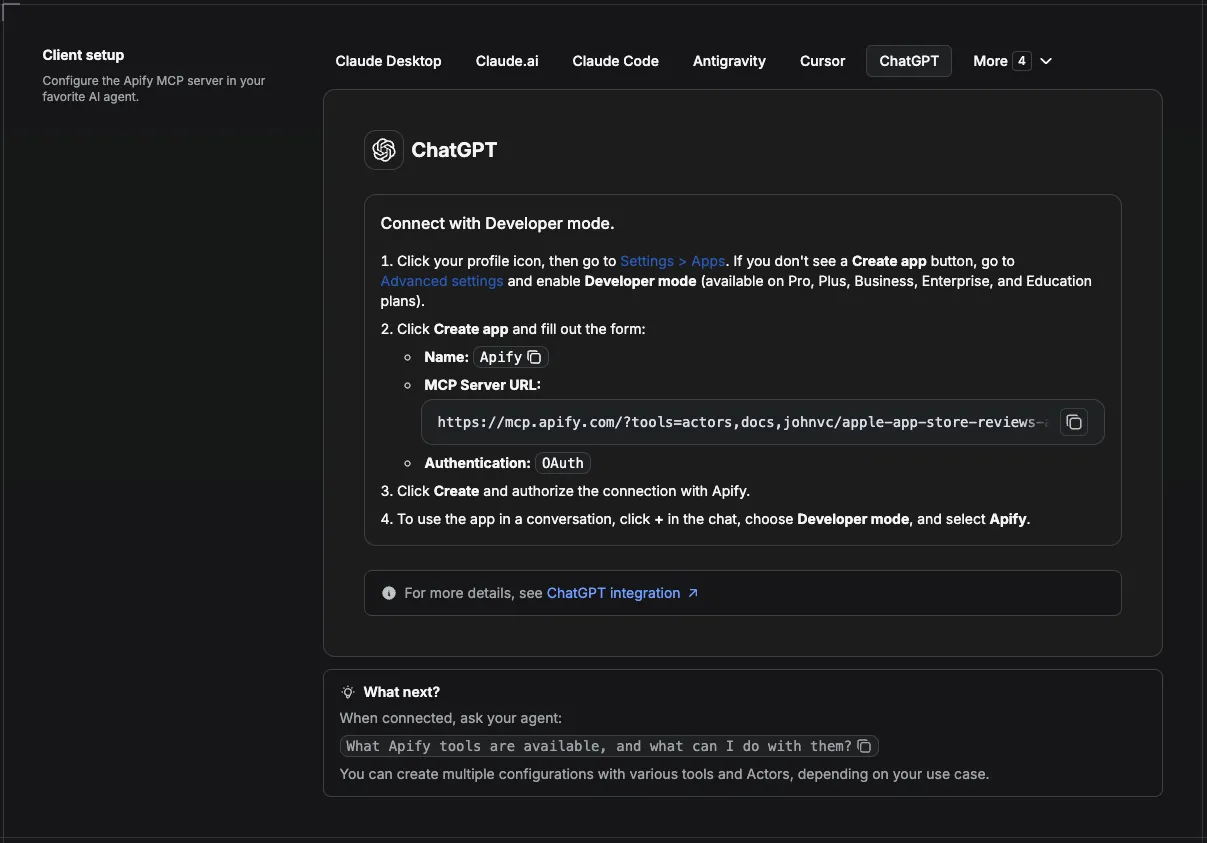
🔌 Use this API from Claude (MCP)
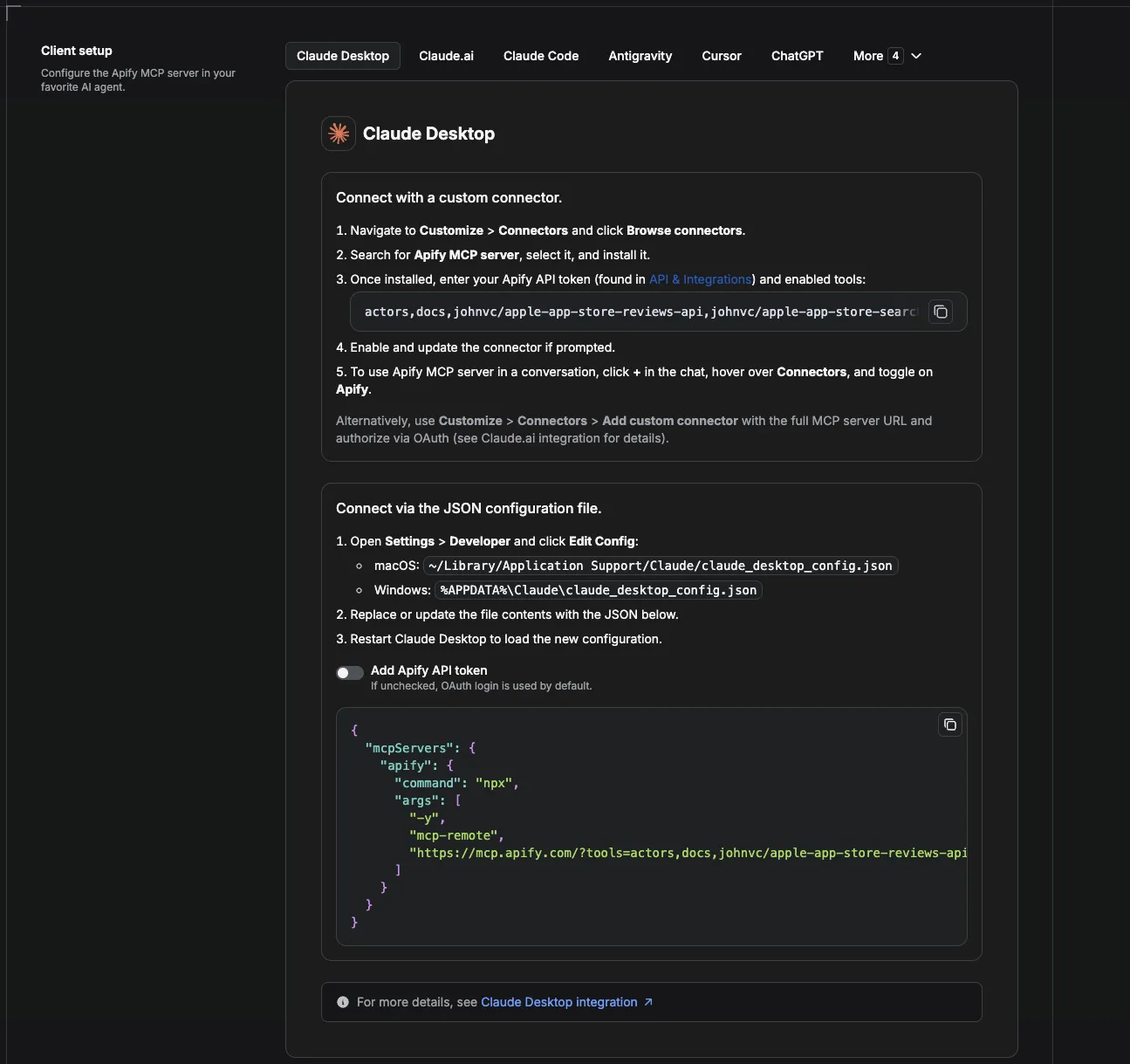
This Actor is compatible with the Model Context Protocol (MCP), so AI agents can call it as a tool. Add it through the hosted Apify MCP server using this Actor-specific URL:
https://mcp.apify.com/?tools=actors,docs,johnvc/google-maps-contributor-reviews-api
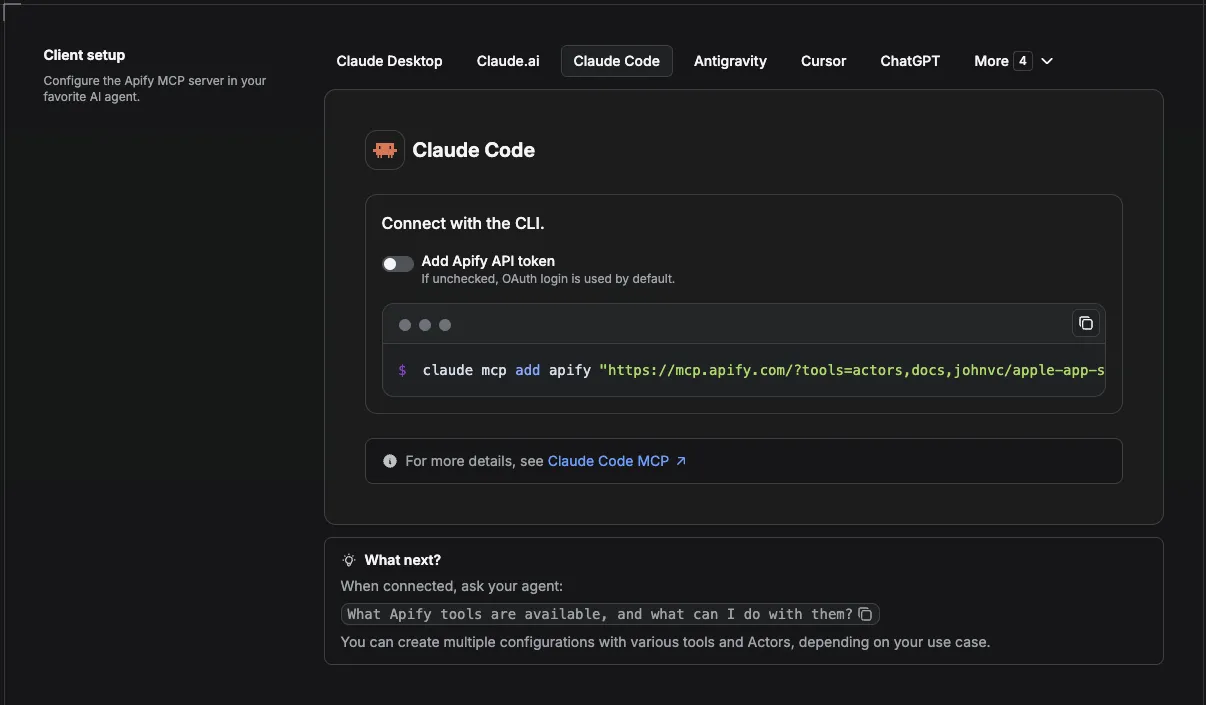
If you run agents from Claude Code (free trial) or Claude Cowork (free trial), add the Apify MCP server and ask it to "pull this reviewer's history and flag anything that looks coordinated."
Setup walkthrough:
Apify MCP integration docs: https://docs.apify.com/platform/integrations/mcp
MCP setup, step by step
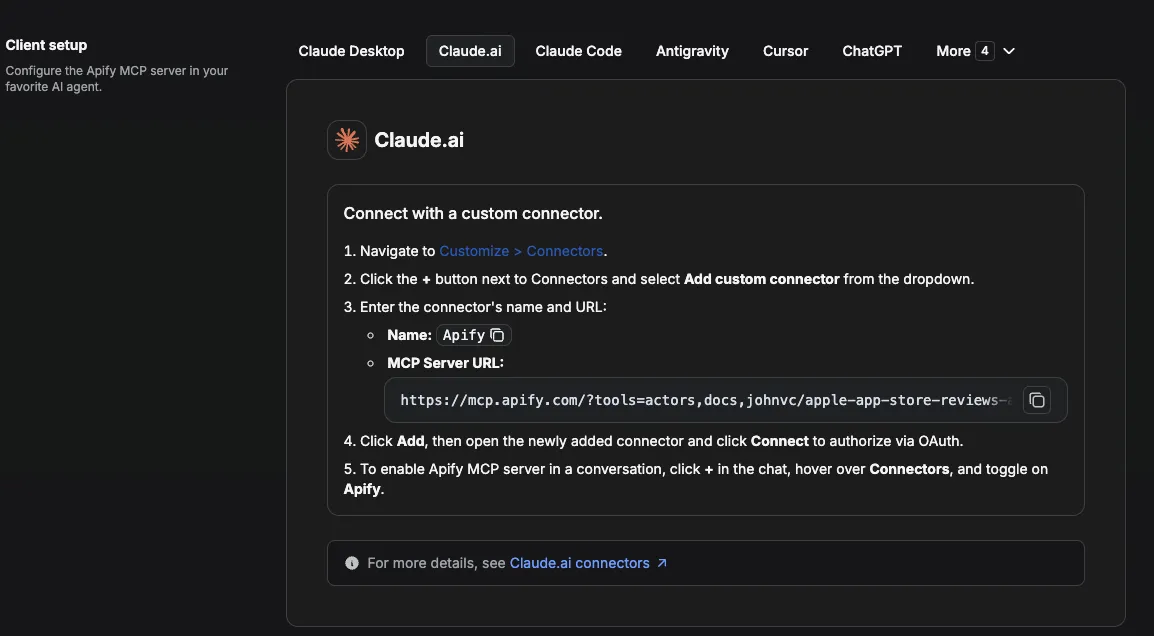
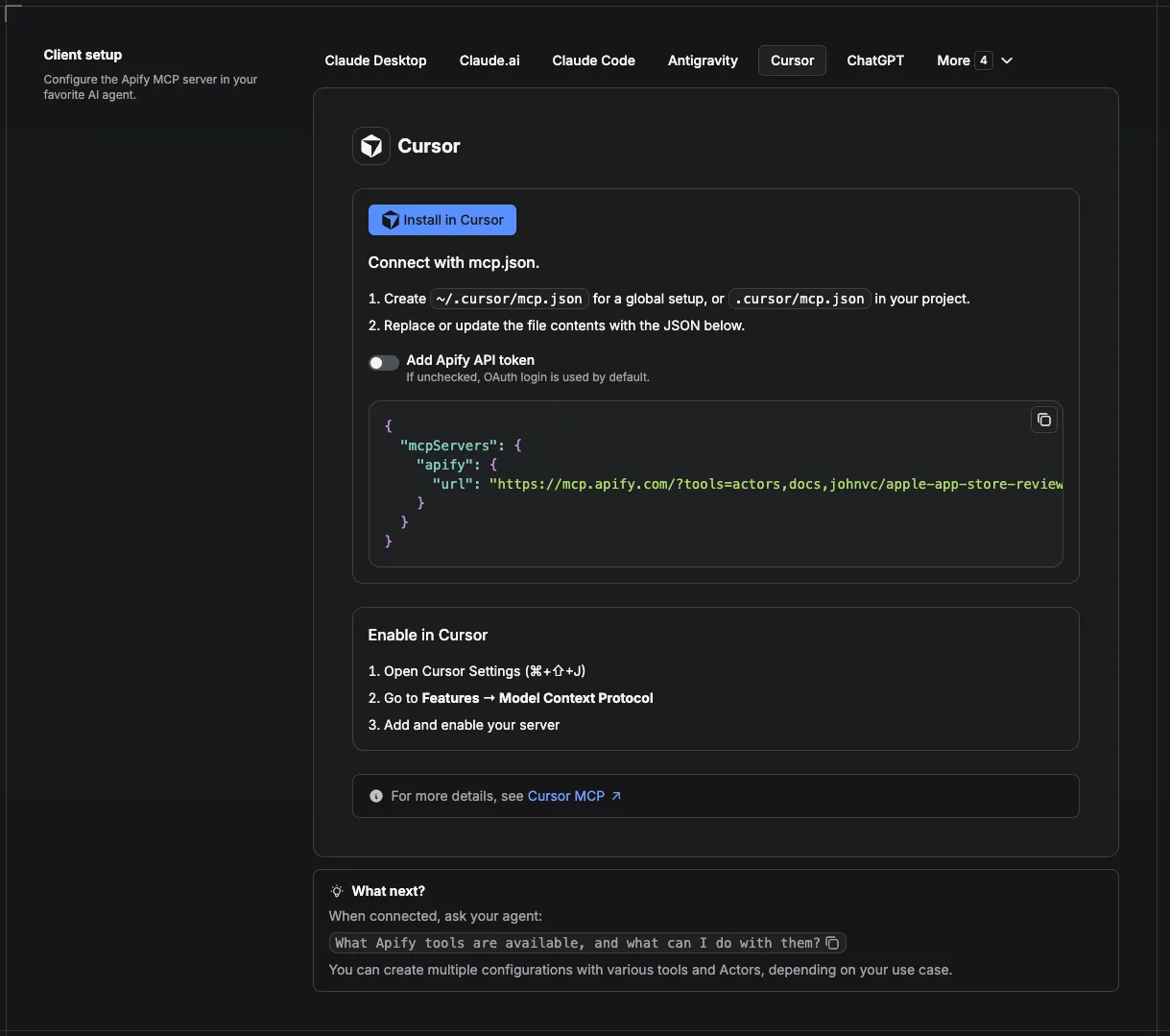
Visual setup guides for each client (source and more assets: ApifyPublicData on GitHub):
Claude Cowork Desktop (free trial)
Claude Code (free trial)
Claude (website)
Cursor
ChatGPT
Google Maps Reviews Scraper vs. Reviewer History API
A place-focused Google Maps reviews scraper pulls every review left ON a business. This API works the other way around: give it a reviewer's contributor ID and it returns every review that person left ACROSS places, with their Local Guide level and points attached. If you need reviews for one specific business, reach for a place-review tool such as the Google Maps Places API. If you need to profile a person, vet a reviewer, or detect coordinated campaigns, this reviewer history API is the right tool.
🔗 Related Tools
Complementary Actors in the same Google Maps and reviews family:
- Google Maps Reviewer Geo Profile API: takes the same contributor and estimates a reviewer's home region and travel pattern from their review coordinates. The natural next step after pulling a reviewer's history.
- Google Maps Places API: fast, cheap bulk place data. Use it to find the businesses and surface the contributor IDs you then feed here.
- Google Local API: Local Pack and business-search SERPs, for sourcing the places and brands whose reviewers you want to vet.
- Yelp Reviews API: cross-check a reputation story on a second platform when one source is not enough.
For contrast, a place-only alternative such as this Google Maps reviews scraper extracts reviews for a single business but cannot pull one reviewer's full cross-place history. It is lightly used, carries no user rating on the Store, and prices each review higher, so it fits one-off place audits rather than reviewer vetting.
FAQ
What is a contributor ID?
It is the long numeric ID that identifies a Google Maps reviewer. You can read it from any place review's reviewer profile, then pass it here to get that reviewer's full history.
How many reviews come back?
As many as you set with maxResultsPerContributor (default 10, maximum 200), most recent first. The endpoint returns fewer only if the contributor has fewer. Use contributorIds to profile several reviewers in one go.
Why is this useful for fraud detection?
The reviewer's profile (level, points, contributions) plus their review pattern across places makes it easy to spot mass reviewers, single-target campaigns, and fake-looking accounts.
Can I profile many reviewers at once?
Yes. Pass a contributorIds list; each is fetched independently and tagged with its contributor ID.
Can I tell where a reviewer is based?
Every review includes place_info with gps_coordinates and an address, so you can map a reviewer's footprint and see the region their reviews cluster in. Deeper history (raise maxResultsPerContributor) sharpens the signal by diluting travel. Use it for aggregate reviewer vetting and research, not to locate an individual.
How do I scrape Google Maps reviews for a specific reviewer?
Copy the reviewer's contributor ID from any of their reviews, paste it into contributorId, set how many reviews you want, and run. You get one clean JSON row per review, with no browser automation or page parsing to maintain on your side.
Can I scrape Google Map reviews using Python?
Yes. Install apify-client, call this Actor with a contributorId, and iterate the dataset items. The Integrations section above has a full Python snippet that runs the Actor and stores the rows in Supabase.
Can I schedule this reviewer history Actor?
Yes, and this is where most of the value lives. Save a task with your input (one per reviewer you track), then attach a schedule from the Actor's Actions, then Schedule menu. Use cron strings like 0 7 * * * for daily at 7 AM, 0 */6 * * * for every six hours, or 0 9 * * 1 for Monday mornings. One schedule can trigger many tasks, so an entire watchlist refreshes together. See the Integrations section above for the full monitoring recipe, and Apify schedules for the docs.
Should I use an API or a web scraper?
An official platform API is usually rate limited, quota bound, and often missing the reviewer-level fields you want. This Actor gives you the same data as a no-code web scraper or a clean API endpoint you call yourself, with no quotas to manage. If you have not used web scraping before, it is simply automated collection of data from public pages, delivered here as structured JSON.
Can I integrate this reviewer scraper with other apps?
Yes. Through Apify integrations the Actor connects to almost any cloud service: Make, Zapier, Slack, Google Sheets, and more, plus webhooks that fire on ACTOR.RUN.SUCCEEDED. See the Integrations section above for full recipes.
Can I use this reviewer history API with the Apify API?
Yes. The Apify API gives programmatic access to run the Actor, schedule it, and fetch datasets, and the apify-client package exists for both Node.js and Python. See the Actor's own API tab.
Can I use this API through an MCP Server?
Yes. Add it as a tool to any MCP client (Claude, Cursor, and others) through the hosted Apify MCP server using the Actor-specific URL https://mcp.apify.com/?tools=actors,docs,johnvc/google-maps-contributor-reviews-api. If you drive agents from Claude Code (free trial) or Claude Cowork (free trial), add the Apify MCP server and ask it to profile a reviewer. See the Apify MCP docs.
How can I research other Google Maps and review data tools?
Pair this with sibling Actors to cover the whole workflow: the Google Maps Reviewer Geo Profile API for a reviewer's home-region estimate, the Google Maps Places API to source businesses and contributor IDs, and the Yelp Reviews API to cross-check a reputation on a second platform. The reviews themselves come from Google Maps and its Local Guides program.
How do I get a Google Map reviews API without managing scrapers?
Use this hosted Actor: there are no proxies, browsers, or parsers to maintain. You call an endpoint or run a task, and clean structured JSON comes back. Wondering whether it is allowed? Collecting public data is broadly legal in the US; see Apify's overview of the legality of web scraping.
n8n integration
Available as an n8n community node, n8n-nodes-google-maps-contributor-reviews-api. In n8n: Settings, Community Nodes, install n8n-nodes-google-maps-contributor-reviews-api, then use it in any workflow (it also works as an AI Agent tool).
Featured Tasks
Ready-to-run examples that show this API solving a specific problem. Each opens its own setup so you can run it on your account in one click.
- Get a Google Maps Reviewer's Full Review History
- Audit a Google Maps Local Guide's Reviews
- Export a Google Reviewer's Reviews as JSON
- Vet a Google Reviewer: Spot Fake-Review Signals
- Export a Google Reviewer's Reviews to CSV
- Export a Google Reviewer's Reviews to Excel
- Download a Google Reviewer's Reviews to Excel
- Export a Google Reviewer's Reviews to XML
- Export a Google Reviewer's Reviews to an HTML Table
- Export a Google Reviewer's Reviews to JSONL
- Export a Google Reviewer's Reviews as an RSS Feed
- Map a Google Reviewer's Review Footprint
- Estimate a Google Reviewer's Home Region
- Rank a Google Reviewer's Most-Reviewed Cities
- Tell If a Google Reviewer Is Local or Traveling
- Check a Google Reviewer's Geographic Coherence
Last Updated: 2026.07.14


