

Naver AI Overview API | Korean AEO Monitoring
Pricing
from $0.01 / 1,000 results
Naver AI Overview API | Korean AEO Monitoring
Track Naver's AI Overview answers for any query: get the AI-generated overview, its cited sources, and related media as structured JSON. Monitor whether your brand appears in Naver's AI answers. Built for Korean AEO and GEO monitoring. Pay per query, MCP-ready.
Pricing
from $0.01 / 1,000 results
Rating
5.0
(1)
Developer

John
Maintained by CommunityActor stats
1
Bookmarked
9
Total users
9
Monthly active users
19 hours ago
Last modified
Categories
Share
Naver AI Overview API | Korean AEO Monitoring | 네이버 AI 브리핑 API
Track Naver's AI Overview answers for any query and get the AI-generated overview, its cited sources, and related media as structured JSON. Naver is South Korea's largest search engine, and its AI answers increasingly shape what Korean users see first. This API lets you monitor whether your brand, product, or topic appears in those answers, and which sources Naver cites. The Naver AI Overview API returns each query as one structured row you can pull once or monitor on a schedule.
This is a brand-monitoring and answer-engine-optimization (AEO) tool, not a generic scraper. Send one query or many, and get one clean row per query: the full answer as markdown, the structured text blocks, the cited references, and related media.
한국어: 네이버 AI 브리핑(AI 오버뷰) 답변을 검색어별로 추적하여, AI가 생성한 요약과 인용 출처, 관련 미디어를 구조화된 JSON으로 받아보세요. 네이버는 대한민국 최대 검색엔진이며, 그 AI 답변은 한국 사용자가 가장 먼저 보는 정보를 점점 더 좌우합니다. 이 API로 우리 브랜드, 제품, 주제가 해당 답변에 노출되는지, 그리고 네이버가 어떤 출처를 인용하는지 모니터링할 수 있습니다. 단순 스크레이퍼가 아니라 브랜드 모니터링과 답변엔진최적화(AEO)를 위한 도구로, 검색어 하나 또는 여러 개를 보내면 검색어당 한 줄의 깔끔한 결과(마크다운 전체 답변, 구조화된 텍스트 블록, 인용 출처, 관련 미디어)를 돌려줍니다.
What you get | 제공 데이터
One row per query:
ai_overview_present: whether Naver showed an AI Overviewmarkdown: the full AI Overview answer as markdowntext_blocks: the structured content blocks (paragraphs, lists) with reference indexesreferences: the cited sources, each with title, link, snippet, and sourcemedia: related videos and images, each with title, link, platform, and thumbnailrelated_questions: follow-up questions Naver associates with the answer
한국어: 검색어당 한 행을 반환합니다.
ai_overview_present: 네이버가 AI 브리핑을 표시했는지 여부markdown: AI 브리핑 전체 답변 (마크다운 형식)text_blocks: 구조화된 콘텐츠 블록 (단락, 목록)과 참조 인덱스references: 인용된 출처 (제목, 링크, 스니펫, 출처명)media: 관련 동영상 및 이미지 (제목, 링크, 플랫폼, 썸네일)related_questions: 네이버가 답변과 연관짓는 후속 질문
Use cases | 활용 사례
- Monitor whether your brand or product appears in Naver's AI answers (Korean AEO)
- Track which sources Naver cites for your category, and how that shifts over time
- Audit competitor visibility in Naver's AI Overviews across a list of queries
- Feed an AI agent the current Naver AI answer for a Korean-market topic in one call
- Build an AEO dashboard that re-runs key queries on a schedule
한국어:
- 네이버 AI 답변에 우리 브랜드나 제품이 노출되는지 모니터링 (한국형 AEO)
- 네이버가 우리 카테고리에서 어떤 출처를 인용하는지, 시간에 따라 어떻게 변하는지 추적
- 여러 검색어에 걸쳐 경쟁사의 네이버 AI 브리핑 노출 현황 점검
- 한국 시장 주제에 대한 현재 네이버 AI 답변을 한 번의 호출로 AI 에이전트에 전달
- 핵심 검색어를 주기적으로 재실행하는 AEO 대시보드 구축
🔌 Integrations: automate Naver AI Overview API monitoring
A single run answers one question ("does Naver cite us for 전기차 보조금 today?"). The real value comes from running the Naver AI Overview API repeatedly, so you catch the day the answer or its cited sources change. See the full list of Apify platform integrations.
Tasks and Schedules (the core recipe). Save one task per topic set you watch (a brand keyword list, a product category, or a competitor set), then attach a schedule from the Actor's Actions, then Schedule menu. Useful cron strings: 0 7 * * * (daily at 7 AM), 0 */6 * * * (every 6 hours), 0 9 * * 1 (Mondays). One schedule can trigger many tasks at once, so a whole Korean AEO watchlist refreshes on a single tick. The Naver AI Briefing API for GEO tracking in Korea task is a ready-made starting point.
n8n. This API ships an n8n community node (see the n8n integration section below). A four-step monitor: Schedule Trigger, then the Naver AI Overview API node, then a Filter on ai_overview_present, then Slack or email when your brand is missing from references.
Make and Zapier. The same pattern works no-code with Make and Zapier: trigger on a schedule, run the Actor, and route each new row where you need it.
Store the history (Supabase). Send each run's rows into a table so a Korean AEO history accumulates across runs. No-code: the n8n Actor node, then a Supabase node. Or in Python (each row carries query, ai_overview_present, markdown, references, media, related_questions, fetched_at):
MCP and AI agents. Add this API as a tool in Claude Code (free trial), Claude Cowork, or Cursor through the Apify MCP server, so an agent can answer "did our brand appear in 네이버 AI 브리핑 this week?" in chat (see the Use this API from Claude section below).
Webhooks. For anything custom, fire an Apify webhook on ACTOR.RUN.SUCCEEDED to push each run's dataset into your own service.
한국어: 한 번의 실행은 하나의 질문에 답하지만, 진짜 가치는 이 API를 주기적으로 실행해 답변과 인용 출처가 바뀌는 시점을 포착하는 데 있습니다. 작업(Task)을 주제별로 저장하고 예약 실행을 연결하세요 (0 7 * * *는 매일 오전 7시). 하나의 스케줄이 여러 작업을 한 번에 실행합니다. 데이터는 Make, Zapier, n8n, Supabase, 그리고 ACTOR.RUN.SUCCEEDED 웹훅으로 흘려보낼 수 있습니다. 자세한 레시피는 위 Integrations 섹션을 참고하세요.
Input | 입력
| Field | Type | Description |
|---|---|---|
query | string | A single query, in Korean or any language, e.g. 당뇨병 증상. Provide this, queries, or both. |
queries | array of strings | A batch of queries to check in one run. Merged with query and de-duplicated. |
한국어:
| 필드 | 유형 | 설명 |
|---|---|---|
query | 문자열 | 단일 검색어. 한국어 또는 다른 언어 모두 가능, 예: 당뇨병 증상. 이 값, queries, 또는 둘 다 입력하세요. |
queries | 문자열 배열 | 한 번의 실행에서 확인할 검색어 묶음. query와 병합되고 중복은 제거됩니다. |
Example input | 입력 예시
Sample output | 출력 예시
한국어: 각 검색어는 위와 같은 한 행으로 반환됩니다. markdown에는 전체 답변이, references에는 네이버가 인용한 출처가, media에는 관련 동영상과 이미지가 담깁니다. AI 브리핑이 없으면 ai_overview_present는 false가 되고 짧은 note가 함께 제공됩니다.
Pricing | 요금
Pay per query: a flat $0.012 per query resolved, whether or not an AI Overview is shown (the lookup is performed either way). No setup fee, no per-run fee. Batch many queries in one run to monitor a whole topic set.
한국어: 검색어당 과금: 해결된 검색어당 정액 $0.012이며, AI 브리핑 표시 여부와 관계없이 부과됩니다(조회는 어느 경우든 수행되기 때문입니다). 설정 비용이나 실행당 비용은 없습니다. 한 번의 실행에 여러 검색어를 묶어 주제 세트 전체를 모니터링하세요.
How to get started | 시작하기
- Open Naver AI Overview API on the Apify Store.
- Enter a
query(or aquerieslist of brand or topic terms). - Run the Actor and read the AI Overview, its sources, and media from the dataset.
- Export as JSON, CSV, or Excel, or pull it from the API. Schedule it to track changes.
Prefer code? See the Naver AI Overview API example repo for a Python quick-start and MCP setup walkthroughs.
한국어:
- Apify 스토어의 Naver AI Overview API를 엽니다.
query(또는 브랜드나 주제 검색어 목록인queries)를 입력합니다.- Actor를 실행하고 데이터셋에서 AI 브리핑, 출처, 미디어를 확인합니다.
- JSON, CSV, Excel로 내보내거나 API로 가져옵니다. 변화를 추적하려면 예약 실행을 설정하세요.
코드로 사용하고 싶으신가요? Naver AI Overview API 예제 저장소에서 파이썬 빠른 시작과 MCP 설정 가이드를 확인하세요.
Run from the API | API로 실행하기
한국어: 위 curl 명령에서 YOUR_APIFY_TOKEN을 본인의 Apify API 토큰으로 바꾸면, 실행이 끝난 뒤 데이터셋 결과를 곧바로 받아볼 수 있습니다.
🔌 Use this API from Claude (MCP) | Claude에서 사용하기 (MCP)
Model Context Protocol (MCP) lets an AI assistant call external tools the same way it calls built-in features. With the Apify MCP server, your agent can run this Actor, read the dataset, and summarize whether your brand appears in 네이버 AI 브리핑 (Naver AI Overview) without you writing curl or Python first.
This Actor is MCP-ready. Connect through Apify's hosted server and load only the tools you need for Naver monitoring.
한국어: **모델 컨텍스트 프로토콜(MCP)**은 AI 어시스턴트가 내장 기능을 호출하듯 외부 도구를 호출하도록 해줍니다. Apify MCP 서버를 사용하면, 직접 curl이나 파이썬을 작성하지 않고도 에이전트가 이 Actor를 실행하고 데이터셋을 읽어 우리 브랜드가 네이버 AI 브리핑에 노출되는지 요약해 줍니다. 이 Actor는 MCP를 지원하므로, Apify 호스팅 서버에 연결한 뒤 네이버 모니터링에 필요한 도구만 불러오면 됩니다.
What you need first | 먼저 필요한 것
- An Apify account (free tier is enough to try a few queries).
- An Apify API token from API & Integrations in Apify Console. Keep it private; the agent uses it to run Actors on your behalf.
- An MCP-capable client such as Claude Code (free trial), Claude Cowork (free trial), Claude on the web, Cursor, or ChatGPT (with MCP support).
한국어:
- Apify 계정 (무료 등급으로도 몇 개의 검색어를 시험해볼 수 있습니다).
- Apify Console의 API & Integrations에서 발급하는 Apify API 토큰. 비공개로 보관하세요. 에이전트가 사용자를 대신해 Actor를 실행할 때 사용합니다.
- MCP를 지원하는 클라이언트 (예: Claude Code (무료 체험), Claude Cowork (무료 체험), 웹 버전 Claude, Cursor, 또는 MCP를 지원하는 ChatGPT).
Actor-specific MCP URL | 이 Actor 전용 MCP URL
Use this URL so the server loads Actor discovery, Apify docs, and this Actor as a callable tool (not every scraper in the Store):
You can also build the same URL visually at mcp.apify.com and copy the config into your client.
한국어: 아래 URL을 사용하면 서버가 Actor 검색, Apify 문서, 그리고 이 Actor만 호출 가능한 도구로 불러옵니다(스토어의 모든 스크레이퍼가 아니라). mcp.apify.com에서 같은 URL을 시각적으로 만들어 클라이언트 설정에 붙여 넣을 수도 있습니다.
MCP setup, step by step | MCP 설정 단계별 안내
Step 1 - Choose how to sign in | 1단계 - 로그인 방식 선택
- OAuth (recommended): Point your client at
https://mcp.apify.com(or the Actor-specific URL above). On first connect, your browser opens so you can sign in to Apify and approve access. No token pasted into chat. - Bearer token: If your client needs a static config, add
Authorization: Bearer YOUR_APIFY_TOKENin the MCP server headers. ReplaceYOUR_APIFY_TOKENwith the token from Apify Console.
한국어:
- OAuth (권장): 클라이언트를
https://mcp.apify.com(또는 위의 Actor 전용 URL)로 연결합니다. 처음 연결할 때 브라우저가 열려 Apify에 로그인하고 접근을 승인합니다. 채팅에 토큰을 붙여 넣을 필요가 없습니다. - Bearer 토큰: 정적 설정이 필요한 클라이언트라면 MCP 서버 헤더에
Authorization: Bearer YOUR_APIFY_TOKEN을 추가하세요.YOUR_APIFY_TOKEN은 Apify Console의 토큰으로 바꿉니다.
Step 2 - Add the server in your client | 2단계 - 클라이언트에 서버 추가
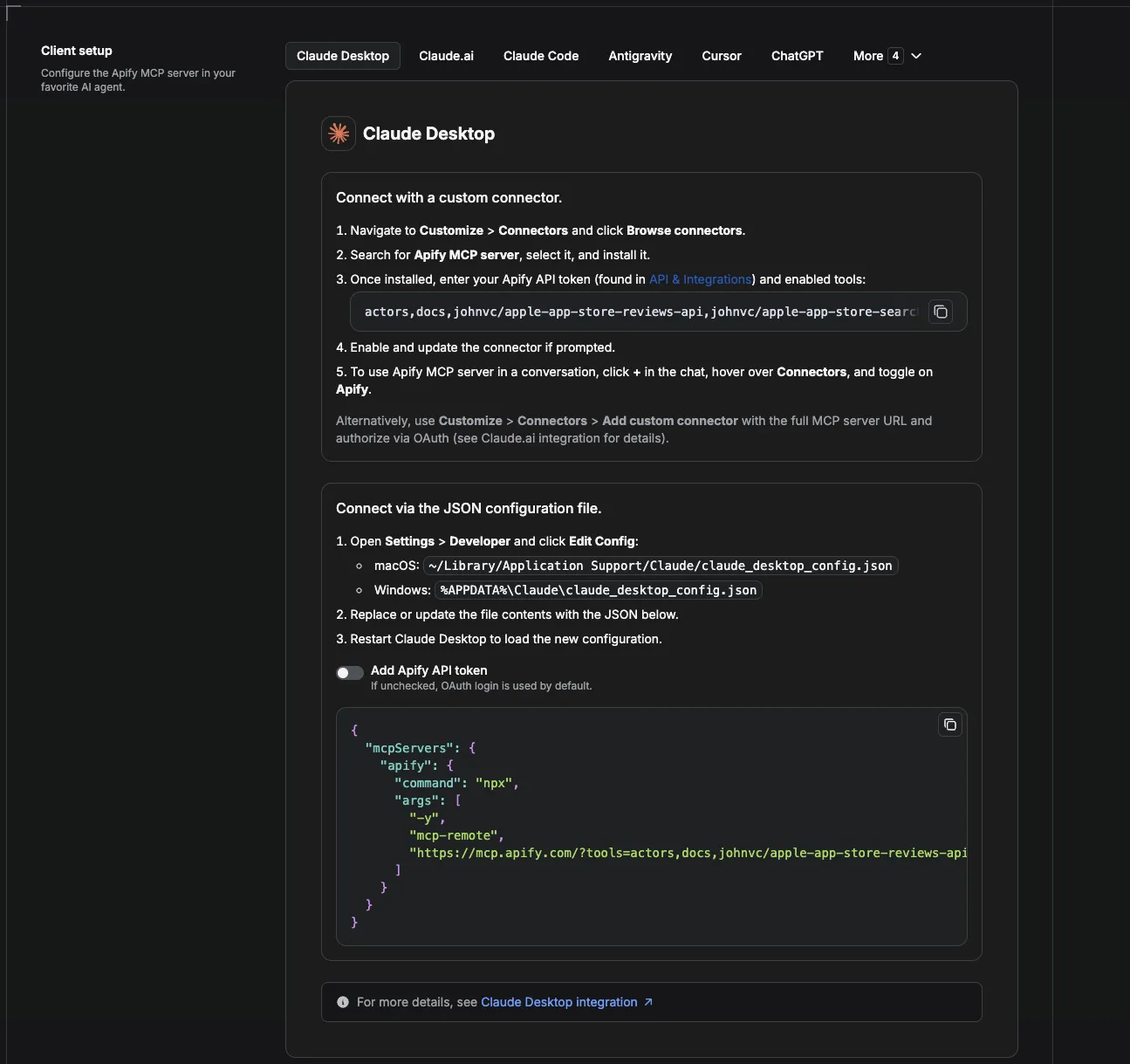
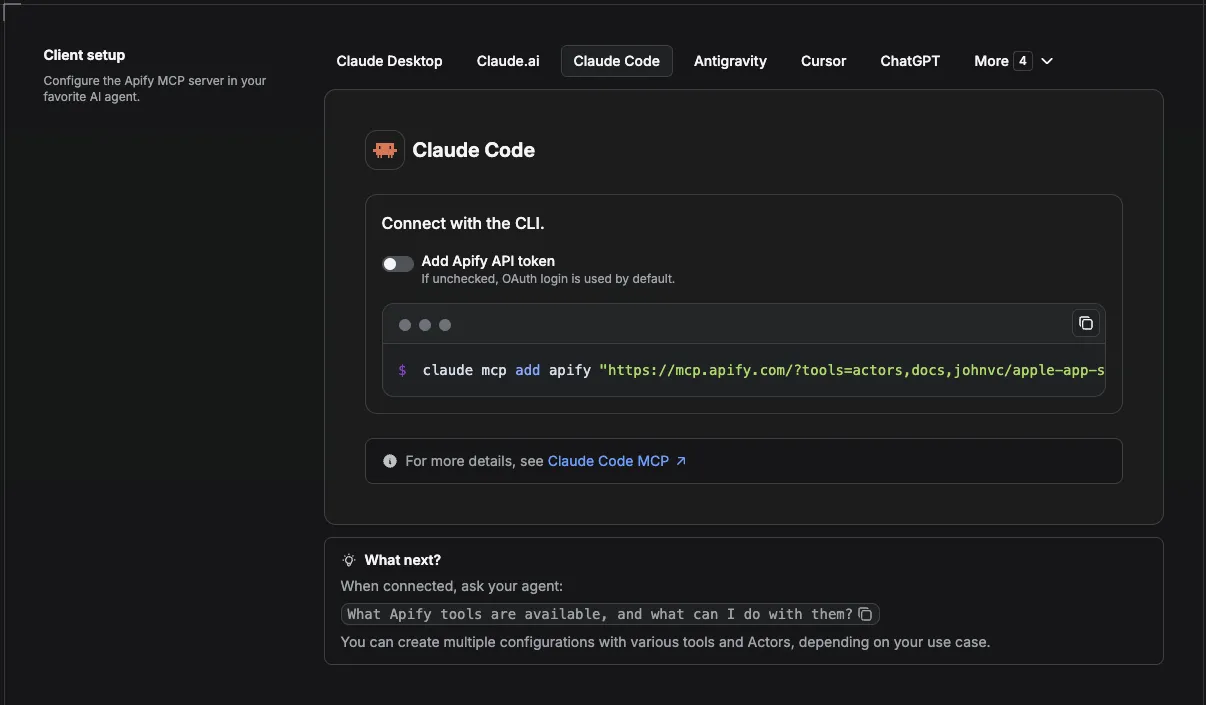
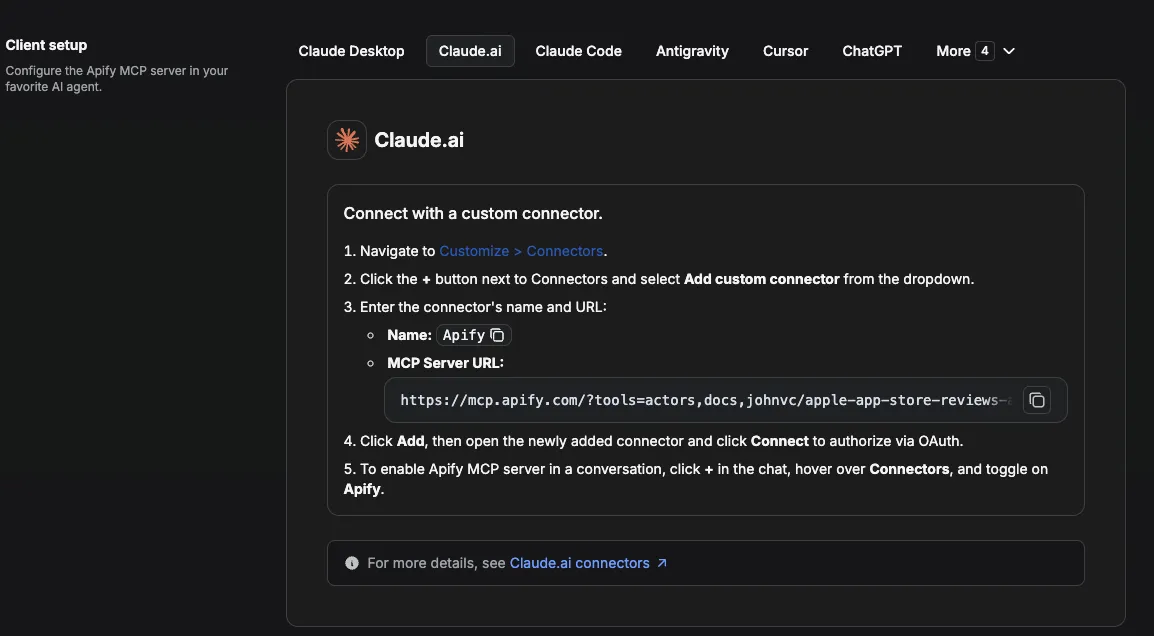
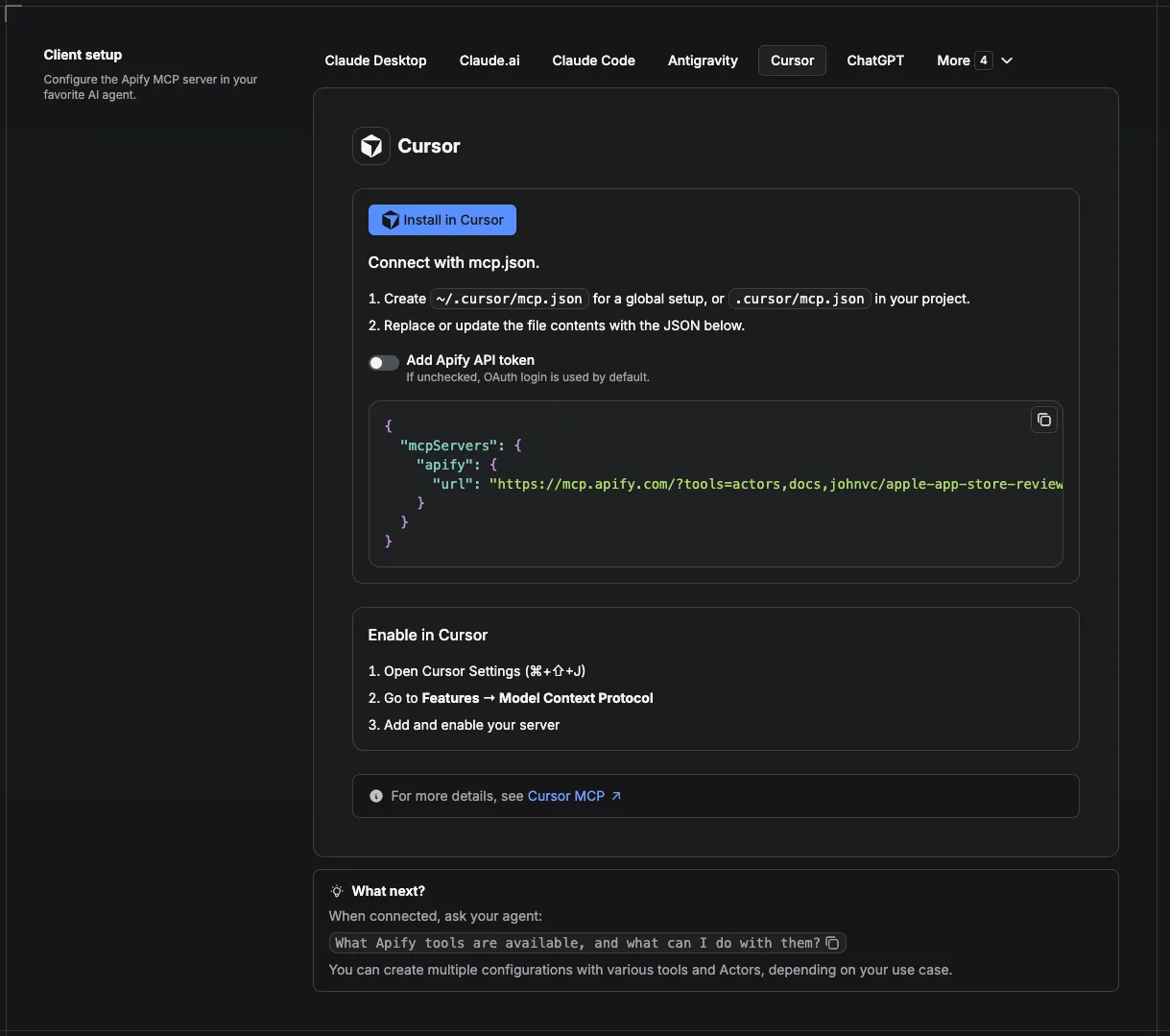
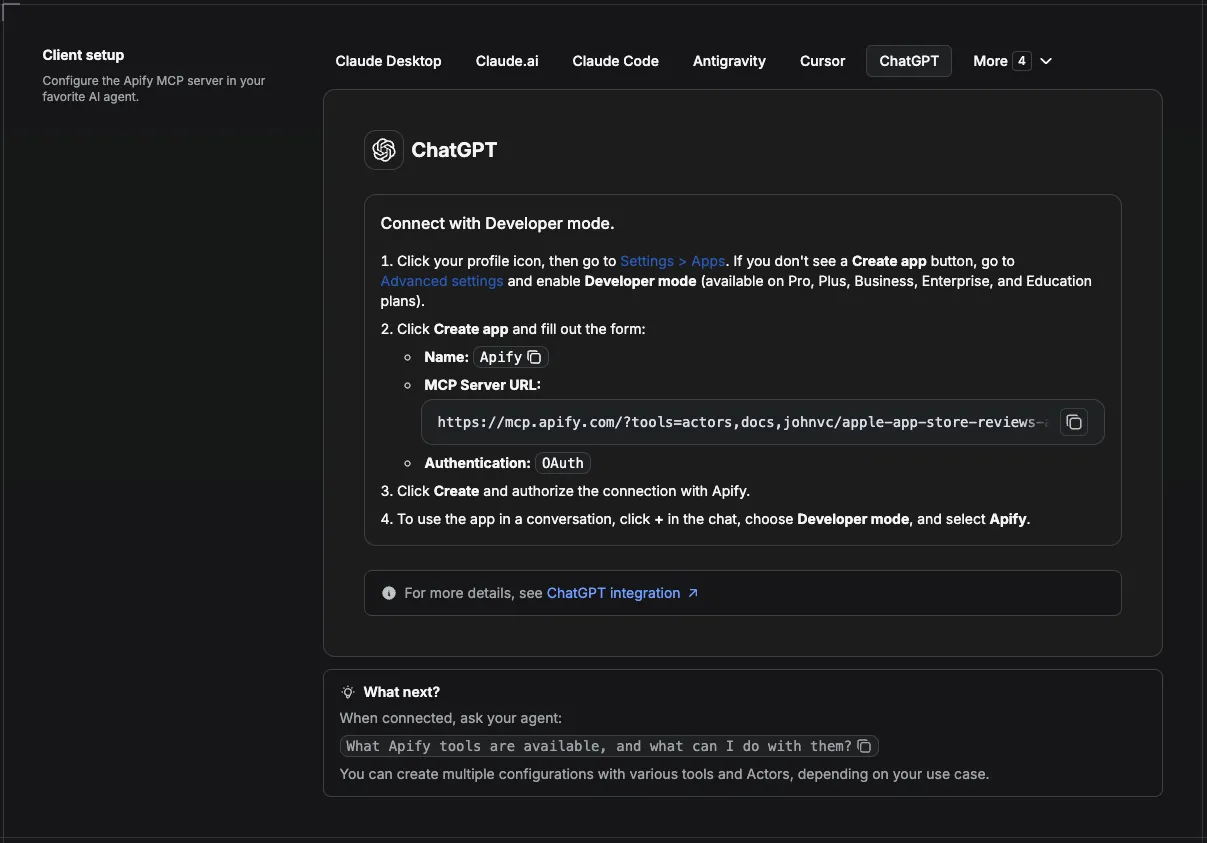
Open your client's MCP settings (see screenshots below) and add the Apify server URL from the previous section. Restart or reload MCP if the client asks you to.
한국어: 클라이언트의 MCP 설정(아래 스크린샷 참고)을 열고 앞 단계의 Apify 서버 URL을 추가합니다. 클라이언트가 요청하면 MCP를 재시작하거나 다시 불러오세요.
Step 3 - Confirm the tool is available | 3단계 - 도구 사용 가능 여부 확인
In a new chat, ask the agent to list MCP tools or to "fetch details for johnvc/naver-ai-overview-api." You should see a way to run the Naver AI Overview Actor with a query or queries input.
한국어: 새 대화에서 에이전트에게 MCP 도구 목록을 보여달라고 하거나 "johnvc/naver-ai-overview-api의 상세 정보를 가져와줘"라고 요청하세요. query 또는 queries 입력으로 Naver AI Overview Actor를 실행하는 방법이 보여야 합니다.
Step 4 - Run a Korean AEO check | 4단계 - 한국형 AEO 점검 실행
Paste a prompt in English or Korean. The Actor accepts Korean queries such as 당뇨병 증상 or 우리 브랜드명 + 제품 카테고리.
Example prompts:
- English: "Using the Naver AI Overview API, check whether our brand is cited in Naver's AI answer for these queries:
전기차 보조금,당뇨병 증상. Summarizeai_overview_present, the answer excerpt, and whichreferencesmention us." - Korean: "Apify의
johnvc/naver-ai-overview-api로 다음 검색어의 네이버 AI 브리핑을 조회해줘:전기차 보조금,우리브랜드 대체제 추천. 각 쿼리마다 AI 답변이 있는지, 우리 브랜드/도메인이references에 나오는지 표로 정리해줘."
한국어: 영어 또는 한국어로 프롬프트를 입력하세요. Actor는 당뇨병 증상이나 우리 브랜드명 + 제품 카테고리 같은 한국어 검색어를 그대로 받습니다. 위의 한국어 예시 프롬프트를 그대로 사용하면 됩니다.
Step 5 - Read the results | 5단계 - 결과 확인
The agent returns structured rows: markdown (full answer text), references (cited sources), media, and ai_overview_present. Use that for AEO reporting or follow-up questions in the same thread.
한국어: 에이전트는 markdown(전체 답변 텍스트), references(인용 출처), media, ai_overview_present로 구성된 구조화된 행을 반환합니다. 이를 AEO 보고서에 활용하거나 같은 대화에서 추가 질문에 사용하세요.
Video walkthrough: YouTube - Apify MCP setup
Full platform docs: Apify MCP integration
한국어: 영상 안내: YouTube - Apify MCP 설정 · 전체 플랫폼 문서: Apify MCP 연동
Visual setup by client | 클라이언트별 설정 화면
Screenshots show where to paste the server URL in each app (more assets: ApifyPublicData on GitHub).
한국어: 아래 스크린샷은 각 앱에서 서버 URL을 붙여 넣는 위치를 보여줍니다 (추가 자료: GitHub의 ApifyPublicData).
Claude Cowork Desktop (free trial)
Claude Code (free trial)
Claude (website)
Cursor
ChatGPT
🔗 Related Tools
Track the rest of the Korean and AEO answer-engine landscape with the sibling APIs in this suite:
- Naver Search API (Web, News, Image, Video, Shopping) pulls Naver's classic organic results across every vertical, so you can compare the AI Overview answer against the ranked pages behind it.
- Google AI Overview API runs the same brand and citation monitoring for Google's AI Overviews, the Western counterpart to 네이버 AI 브리핑.
- Brave AI Mode API tracks Brave's privacy-first AI answers, another engine to watch in a full AEO dashboard.
- Bing Copilot AI Answers API covers Microsoft Copilot answers, so one workflow can watch Naver, Google, Brave, and Bing together.
For comparison, some general Naver Actors on the Store target blog posts or place listings rather than the AI Overview answer box. One example, this Naver blog scraper, still carries a generic "scrapes titles of websites" listing description and is priced at $0.35 per result, many times this API's per-query rate, with limited usage. This API is purpose-built for Naver's AI Overview and returns the answer, its cited sources, and related media as clean, structured JSON.
한국어: 이 스위트의 자매 API로 한국 검색과 AEO 답변 엔진 전반을 함께 추적하세요: Naver Search API (네이버 정통 검색 결과), Google AI Overview API, Brave AI Mode API, Bing Copilot API. 참고로 스토어의 일부 범용 네이버 Actor는 AI 브리핑이 아니라 블로그나 플레이스 데이터를 대상으로 하며 결과당 요금이 훨씬 높습니다. 이 API는 네이버 AI 브리핑 전용으로 답변, 인용 출처, 관련 미디어를 깔끔한 구조화 JSON으로 반환합니다.
FAQ | 자주 묻는 질문
What is an AI Overview?
It is the AI-generated answer Naver shows at the top of results for many informational queries, with cited sources. This API returns that answer and its sources as structured data.
Do I get charged if no AI Overview is shown?
Yes, a flat per-query fee, because the lookup runs either way. The row will have ai_overview_present: false and a short note.
Which queries return an AI Overview?
Informational and question-style queries (symptoms, how-to, comparisons, definitions) are most likely. Navigational or very niche queries often have none.
Can I monitor many terms at once?
Yes. Pass a queries list; each is checked independently and returned as its own row.
Is the answer in Korean?
Yes, Naver answers in Korean. The markdown field gives you the full answer text to translate or analyze.
What is AEO, and why does it matter for Naver?
Answer engine optimization (AEO) is the practice of making sure your brand is the source an AI answer cites, not just a ranked blue link. On Naver, South Korea's largest search engine, the AI Overview (네이버 AI 브리핑) sits above the classic results, so the brands and sources it names capture attention first. This API measures that: for each query it returns whether an overview appeared, the answer text, and every cited source. See search engine optimization for background on the wider category.
Can I schedule this Naver AI Overview API?
Yes, and this is the main way to use it. Any run can be automated on a schedule: create a saved task with your queries, then attach a schedule from the Actor's Actions, then Schedule menu. Concrete cron strings: 0 7 * * * for daily at 7 AM, 0 */6 * * * for every six hours, 0 9 * * 1 for Mondays. One schedule can trigger many tasks at once, so a full Korean AEO watchlist refreshes on one tick. See the Integrations section above for the complete monitoring recipe, including Supabase history and Slack alerts.
Should I use an API or a web scraper?
An official search API is rate limited, quota bound, and usually does not expose the AI Overview answer box at all. This Actor gives you the same data either as a no-code web scraper you run in the Console or as a clean API endpoint you call yourself, with no quota to manage. If you prefer the classic web scraping route, run it from the Console; if you prefer code, call the API endpoint shown above.
Can I integrate this Naver scraper with other apps?
Yes. Through Apify integrations the Actor connects to almost any cloud service: Make, Zapier, Slack, Google Sheets, and more, plus webhooks that fire on ACTOR.RUN.SUCCEEDED for custom actions. See the Integrations section above for ready-made recipes.
Can I use the Naver AI Overview API with the Apify API?
Yes. The Apify API gives programmatic access to run the Actor, schedule it, and fetch datasets, and the apify-client package exists for both Node.js and Python. See this Actor's own API tab for ready-made snippets, or the Run from the API section above for a one-line curl call.
Can I use this Actor through an MCP server?
Yes. The Actor can be added as a tool to any MCP client (Claude, Cursor, and others) through the hosted Apify MCP server. Use the Actor-specific URL https://mcp.apify.com/?tools=actors,docs,johnvc/naver-ai-overview-api so the client loads only this Actor. In Claude Code (free trial) or Claude Cowork (free trial), point the client at that URL and ask it to check 네이버 AI 브리핑 for your keywords. See the Apify MCP docs and the Use this API from Claude section above.
How can I track other AI search tools?
Korean AEO is one engine in a wider answer-engine landscape. Pair this with the Google AI Overview API, the Brave AI Mode API, and the Bing Copilot AI Answers API to watch every major AI answer box, and the Naver Search API to compare against Naver's classic ranked results. See Related Tools above.
한국어:
AI 브리핑(AI 오버뷰)이란 무엇인가요? 네이버가 많은 정보성 검색어에 대해 결과 상단에 보여주는, 출처가 인용된 AI 생성 답변입니다. 이 API는 그 답변과 출처를 구조화된 데이터로 반환합니다.
AI 브리핑이 표시되지 않아도 과금되나요? 네, 조회는 어느 경우든 수행되므로 검색어당 정액 요금이 부과됩니다. 해당 행은 ai_overview_present: false와 짧은 note를 갖습니다.
어떤 검색어에서 AI 브리핑이 나오나요? 증상, 방법, 비교, 정의 같은 정보성·질문형 검색어에서 가장 자주 나옵니다. 단순 이동형(내비게이션) 검색어나 매우 좁은 검색어는 없는 경우가 많습니다.
여러 검색어를 한 번에 모니터링할 수 있나요? 네. queries 목록을 전달하면 각 검색어가 독립적으로 조회되어 각각의 행으로 반환됩니다.
답변은 한국어로 나오나요? 네, 네이버는 한국어로 답합니다. markdown 필드에 전체 답변 텍스트가 담기므로 번역하거나 분석할 수 있습니다.
n8n integration
Available as an n8n community node, n8n-nodes-naver-ai-overview-api. In n8n: Settings, Community Nodes, install n8n-nodes-naver-ai-overview-api, then use it in any workflow (it also works as an AI Agent tool).
Featured Tasks
Ready-to-run examples that show this API solving a specific problem. Each opens its own setup so you can run it on your account in one click.
- Check if your brand appears in Naver AI Briefing - Run your brand keywords through Naver AI Briefing and get the AI answer text plus cited sources as JSON.
- Naver AI Briefing API for GEO tracking in Korea - Track Naver AI Briefing answers for your Korean GEO keywords by API.
- See which sources Naver AI Briefing cites for a query - Get the citation list behind a Naver AI Briefing answer: the cited sources in order plus the AI answer text, returned as structured JSON.
- Monitor Naver AI Briefing for K-beauty keywords - Batch-check Naver AI Briefing answers for K-beauty keywords.
- Check Naver AI Briefing from Claude via MCP - Connect this MCP-ready API to Claude and fetch Naver AI Briefing answers with cited sources in chat.
- Check Naver AI Briefing for many keywords at once - Check Naver AI Briefing across a list of keywords in one run.
- Export Naver AI Briefing results to CSV - Export Naver AI Briefing results to CSV for any keywords.
Last Updated: 2026.07.14


