

3D Model Renderer: STL, 3MF, OBJ, GLB & OpenSCAD to PNG
Pricing
Pay per event
3D Model Renderer: STL, 3MF, OBJ, GLB & OpenSCAD to PNG
Render STL, 3MF, OBJ, GLB/glTF, PLY and OpenSCAD models to PNG images, four-view sheets and turntable GIF or MP4, measure size, volume and watertightness, and convert between STL, 3MF, OBJ and GLB. OpenSCAD errors come back with line numbers for people and AI agents.
Pricing
Pay per event
Rating
0.0
(0)
Developer

Jumble Mog
Maintained by CommunityActor stats
0
Bookmarked
2
Total users
1
Monthly active users
8 days ago
Last modified
Categories
Security
Limited permissionsShare
Turn 3D models and OpenSCAD code into images, measurements and printable files, without installing anything. Send OpenSCAD code, or STL, 3MF, OBJ, GLB/glTF, PLY and OFF files as links or uploads, and get back PNG images from any angle, a four-view sheet with the model's size, a turntable GIF or MP4, the model's size, volume, surface area, weight and watertightness, and the model as STL, 3MF, OBJ or GLB (SVG, DXF or PDF for 2D designs). OpenSCAD errors come back with file and line, so a person or an AI agent can fix the design. Many models per run, pay per model, and models that can't be read are free.
What it does
- Compiles OpenSCAD with a current OpenSCAD build and its fast Manifold engine, with the BOSL2, MCAD, Round-Anything and threads.scad libraries ready to
include. Set a design's variables without editing it, like OpenSCAD's Customizer, and get itsecho()output back. - Reads the common 3D formats: STL (binary and ASCII), 3MF (with colors, components and multi-file projects from Bambu Studio and PrusaSlicer), OBJ, glTF and GLB (with materials and textures), PLY (with vertex colors) and OFF. Models can also come in ZIP archives, GitHub repositories and folders, and Google Drive or Dropbox share links.
- Draws clear images: an iso view in perspective with a soft shadow, and front, back, left, right, top and bottom views in orthographic projection, like a technical drawing. Thin outlines on sharp edges make parts easy to read. The model's own colors and textures are kept; any background color or transparent; up to 4096 pixels.
- Makes a four-view sheet: iso, front, right and top in one image, with the size and volume underneath. One picture shows the whole model, for listings and catalogs, or for an AI model that has to look at a design.
- Makes turntables: a looping GIF and/or MP4 of the model turning once, 1 to 20 seconds long, up to 1080 pixels.
- Measures: size and bounding box in millimetres, volume in cm³, surface area, the weight printed solid in a chosen material, triangles, vertices, the number of separate bodies, and whether the mesh is watertight and manifold.
- Converts: to STL, 3MF (with colors), OBJ and GLB (Y up in metres, as glTF viewers and AR expect). 2D OpenSCAD designs become SVG, DXF (for laser cutters and CNC) and PDF.
- Errors you can act on: an OpenSCAD mistake comes back as
{"file", "line", "message", "source"}with the call trace, for examplebroken.scad:2: Parser error: syntax error (at: translate([5,0,0) sphere(3);). Warnings such as unknown modules or variables come with their line too. - The file straight from the API: the first file you ask for (the PNG by default) is also the run's
OUTPUT, so the run-sync endpoint answers with the image itself. - Safe with untrusted files: OpenSCAD and the renderer run as an unprivileged user in a throwaway folder, with time and file size limits.
Who it's for
- AI agents and LLM apps that design objects. Language models write OpenSCAD well but can't see what they made. This Actor shows them: the four-view sheet goes straight to a vision model, and errors with line numbers let the agent fix its own code.
- 3D printing services, marketplaces and print farms that need thumbnails, sizes and volumes for quotes, and a watertightness check, for uploaded STL and 3MF files.
- E-commerce and product teams making product images and turntable videos from CAD exports and glTF models.
- Makers and educators sharing parametric OpenSCAD designs: render every variant of a design, with an image and an STL for each.
- Developers and automation builders (n8n, Make, Zapier) who need 3D rendering in an app without running OpenSCAD or a GPU themselves.
How to use it
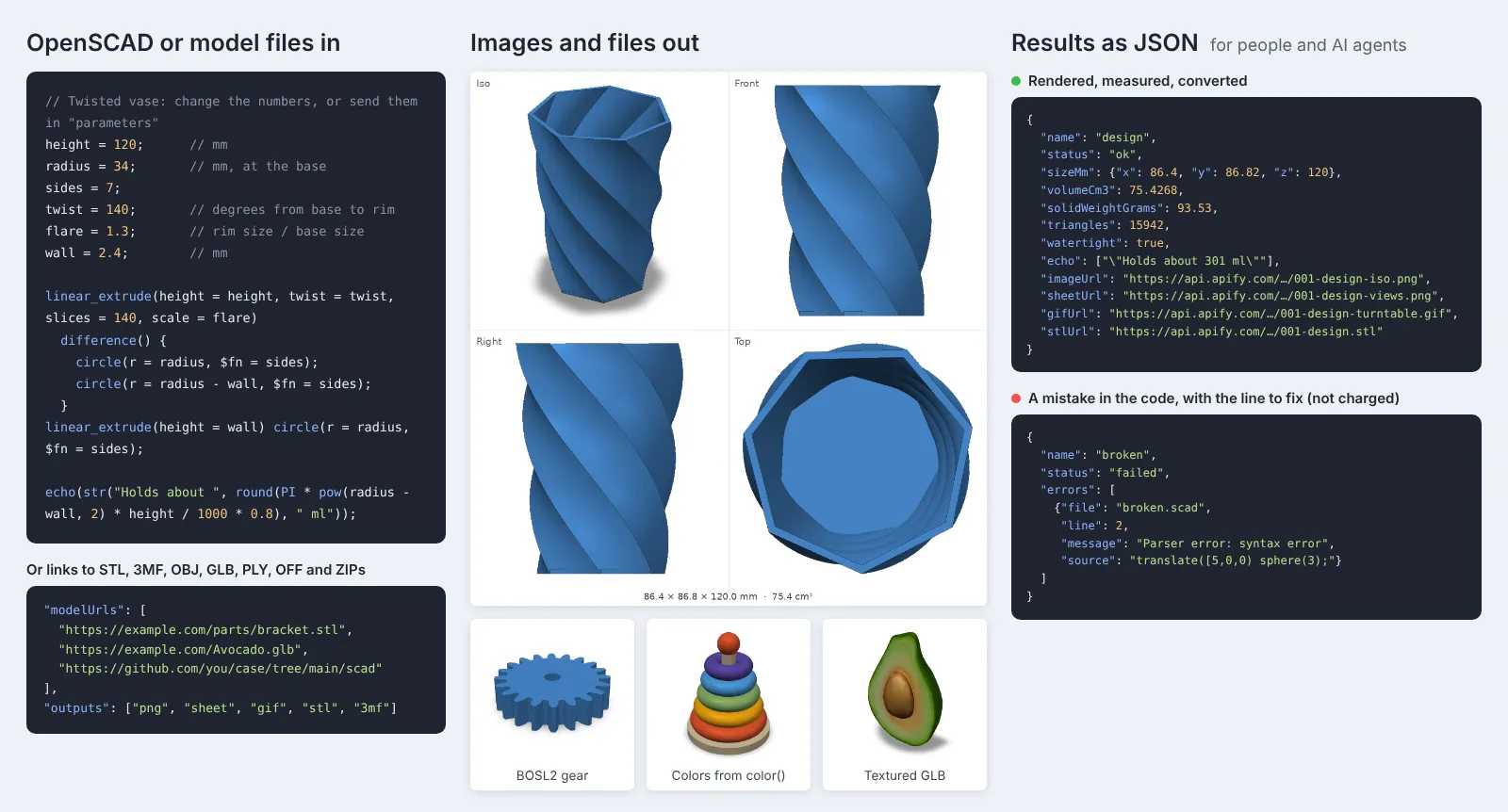
- Paste OpenSCAD code into OpenSCAD code, add links in Links to models, or upload files. The example is the twisted vase in the picture above.
- Pick what to make: PNG views, the four-view sheet, a GIF or MP4 turntable, STL, 3MF, OBJ or GLB files, or SVG, DXF and PDF for 2D designs. If you like, choose the views, image size, colors and background.
- Click Start. Each model appears in the Output tab with its images, measurements and files, or with its errors.
You can also run it through the Apify API, on a schedule, or from Make, n8n, Zapier and other integrations.
How-to examples
How to make a PNG thumbnail of an STL file
Result: a PNG of the model from an angle in imageUrl, a four-view sheet with its size, and the model's sizeMm, volumeCm3, surfaceAreaCm2, solidWeightGrams and watertight check. STL, 3MF, OBJ, GLB/glTF, PLY and OFF files all work.
How to render OpenSCAD code to an image and an STL online
Result: a picture of the cup and an STL ready for a slicer, without installing OpenSCAD. For a parametric design, send parameters such as {"width": 80}, or several sizes of one design in models.
How to make a turntable GIF of a 3D model
Result: a 512 px thumbnail and a spinning GIF for every model in the GitHub folder, for a shop listing, a README or a print-farm catalog. Use mp4 for a video instead.
How to let an AI agent design and check 3D models
Add this Actor to the Apify MCP server with https://mcp.apify.com/?tools=jumblemog/3d-model-renderer. The agent writes OpenSCAD code, looks at the image to check the shape, and reads the size and volume, so it can fix the design before the user prints it. OpenSCAD errors come back in errors.
FAQ
Can it convert between 3D formats? Yes, to STL, 3MF (with colors), OBJ and GLB. 2D OpenSCAD designs become SVG, DXF and PDF.
Does it tell me how much a print weighs? It gives the weight printed solid, from the volume and materialDensity: 1.24 g/cm³ for PLA by default, 1.04 for ABS, 1.27 for PETG. Infill makes real prints lighter.
Does it check that a model is printable? It reports whether the mesh is watertight and how many separate bodies it has.
Do I need OpenSCAD or Blender installed? No. Everything runs in the cloud.
Does it work with Zapier, Make or n8n? Yes. Call the Actor with its Apify app or an HTTP request, for example to make thumbnails for every uploaded file.
Input
| Field | What it does |
|---|---|
openscadCode | One OpenSCAD design as text, 3D or 2D. |
modelUrls | Links to .stl, .3mf, .obj, .glb, .gltf, .ply, .off or .scad files, GitHub file pages, repositories and folders, GitLab file pages, Google Drive or Dropbox share links, or ZIP archives. |
uploads | Model files or ZIP archives uploaded in the input form. |
outputs | Any of png, sheet, gif, mp4, stl, 3mf, obj, glb, svg, dxf, pdf (default: a PNG, plus an STL for OpenSCAD designs). Measurements always come in the results. |
parameters | Variables for an OpenSCAD design, like the Customizer: {"width": 40, "label": "Hi", "holes": true, "size": [10, 20, 5]}. |
views | Angles for the PNG images: iso (default), iso-back, front, back, left, right, top, bottom. |
imageSize | Width and height of the images and the sheet, 128 to 4096 pixels (default 1024). |
color | Color for models without colors of their own, such as #f28c28 (default #4a90d9). |
background | Background color, or transparent (default white). |
modelColors | Draw the colors and textures in the files (default on). |
edges | Outline sharp edges (default on). |
shadow | Soft shadow under iso views and turntables (default on). |
projection | auto (default: iso views in perspective, the others orthographic), perspective or orthographic. |
animationSeconds | Length of one turn of the turntable, 1 to 20 seconds (default 3). |
animationSize | Width and height of the turntable, 128 to 1080 pixels (default 512). |
upAxis | Which way is up in mesh files: auto (default), z or y. |
units | Units of mesh files: auto (default: millimetres, and metres for glTF), mm, cm, m or in. |
materialDensity | Grams per cm³ for solidWeightGrams (default 1.24, for PLA). |
inputFormat | The format of linked files when it can't be told from the name or contents. Empty: automatic. |
mainFile | The model to render inside a ZIP archive or repository, such as box.scad. Empty: the OpenSCAD file nearest the top, or else every model. |
models | More models: OpenSCAD code strings, or objects with openscadCode or url and optional name, parameters, inputFormat, mainFile, upAxis, units and color. |
renderTimeoutSecs | OpenSCAD time limit per model, 5 to 900 seconds (default 120). |
maxModels | Stop after this many models (default 100). |
Example: one parametric design in two sizes, with an image and an STL for each:
Example: thumbnails and turntables for every model in a GitHub folder:
Output
Each model becomes one dataset item, and its files are saved in the run's key-value store. This is the vase from the picture, with two views, the sheet, a turntable and an STL:
volumeCm3andsolidWeightGramsare given for watertight models only.watertightmeans the surface is closed (every edge is shared by an even number of triangles, which slicers accept).manifoldis the stricter test: every edge joins exactly two triangles. The vase isn't manifold because its base touches the twisted wall along a few edges.bodiescounts the separate pieces, so a model that should be one part but has loose pieces shows up.- 2D designs have
"dimension": "2d",sizeMmwithxandyonly, a PNG preview and the SVG, DXF and PDF files.
When a design can't be compiled, the item says where and why, and isn't billed:
Download your files within your plan's data retention period, or copy them to your own storage, because run storage expires.
Pricing
You pay per model rendered, at the price shown on this page, whatever still images and files you pick. Turntables are charged per second of animation on top: a 3-second turn counts as 3 seconds, and a GIF and an MP4 of the same turn count once. Models that can't be read or compiled are never charged. If you set a maximum cost per run, the Actor stops before a model that wouldn't fit.
Speed
Measured on Apify with the default 2 GB of memory. One 1024-pixel iso image of each of six OBJ and GLB models, from 1,000 to 100,000 triangles, took 0.8 to 6.8 seconds per model, and 30 seconds for the whole run. The vase above, compiled and drawn from two angles with the four-view sheet, a 3-second GIF and MP4 and an STL file, took 7.2 seconds, and 3DBenchy (225,000 triangles) with all of that took 40 seconds. Turntables take the most time: 4.4 of the 6.4 seconds of a gear with all outputs. A design with a mistake is reported in 0.05 seconds. Starting a run adds about 10 seconds, so send many models in one run when you can. Runs with more memory get more CPU, which helps with big models.
Tips and limits
- OpenSCAD:
$fnsets how smooth curves are. Designs withminkowski()orhull()of many shapes are slow, so raiserenderTimeoutSecsfor them.include,useandimport()work with files in the same ZIP archive or GitHub folder. A design that makes only 2D shapes gives a PNG preview and SVG, DXF and PDF files; extrude it withlinear_extrude()to get 3D outputs. - Units and orientation: STL, OBJ, PLY and OFF files don't record units, so they're read as millimetres, the 3D printing convention, unless you set
units. glTF and GLB are metres and Y up by definition and are converted. OBJ files are read as Y up; setupAxistozfor CAD exports that come out lying on their side. Images and measurements use Z up, with the model's front facing −Y, as in slicers. - Colors and textures: OpenSCAD's
color(), 3MF colors, glTF materials and textures, and PLY vertex colors are drawn. OBJ materials and textures need the.mtland image files next to the OBJ, for example in a ZIP archive. - Weight is for a print that is solid all the way through. Infill makes real prints lighter.
- Files can be up to 300 MB, and ZIP archives up to 5,000 files and 1 GB unpacked. For meshes over 250,000 triangles, turntables are drawn from a simplified copy, where the difference doesn't show; still images and measurements always use the full mesh.
For AI agents and developers
This Actor works with the Apify MCP server, so AI agents can call it as a tool: pass OpenSCAD in openscadCode (or links in modelUrls), ask for sheet to see the model from four sides in one image, and read sheetUrl, sizeMm and volumeCm3 from the dataset item. If status is failed, errors says which line to fix; echo returns what the design printed. For a direct API call that waits for the result:
To get the image itself as the response, call run-sync instead. It returns the run's OUTPUT, the first file you asked for (or the first model's errors as JSON):
Credits
3D designs are compiled by OpenSCAD (GPL-2.0) with the Manifold engine (Apache-2.0) and the BOSL2 (BSD-2-Clause), MCAD (LGPL-2.1), Round-Anything (MIT) and threads.scad (CC0) libraries. Models are read and converted with trimesh (MIT) and fast-simplification (MIT), drawn with VTK (BSD-3-Clause) through PyVista (MIT) on Mesa (MIT), and animated with FFmpeg (GPL) and librsvg (LGPL-2.1). Each runs unmodified as a separate program or library. The avocado in the picture is from the Khronos glTF Sample Assets (CC0).


