

Map Chart Generator: Data to Choropleth & Bubble Maps
Pricing
Pay per event
Map Chart Generator: Data to Choropleth & Bubble Maps
Turn data into map images: values by country, US state or county, or province of any country as a choropleth, bubbles or categories, or coordinates as points. From JSON, CSV, a link or an Apify dataset to PNG, SVG, PDF or HTML. For AI agents.
Pricing
Pay per event
Rating
0.0
(0)
Developer

Jumble Mog
Maintained by CommunityActor stats
0
Bookmarked
2
Total users
1
Monthly active users
2 days ago
Last modified
Categories
Share
Turn data into map images. Give values by country, US state, US county or the provinces of any country, or places with latitude and longitude, and get back a clean, labeled map as PNG, SVG, PDF, WebP, JPEG or an interactive HTML page with a download link. Colored regions (choropleth maps), bubbles sized by value, category maps and point maps, with a legend, title and source line. The data can be a list of values, JSON rows, CSV, a link to a data file or Google Sheet, or the dataset of another Actor run, such as places from Google Maps. Region names are recognized in many spellings and 26 languages, and codes like FR, FRA, TX or a county's FIPS code work too. Made for people, automations and AI agents that need a map without a GIS tool.
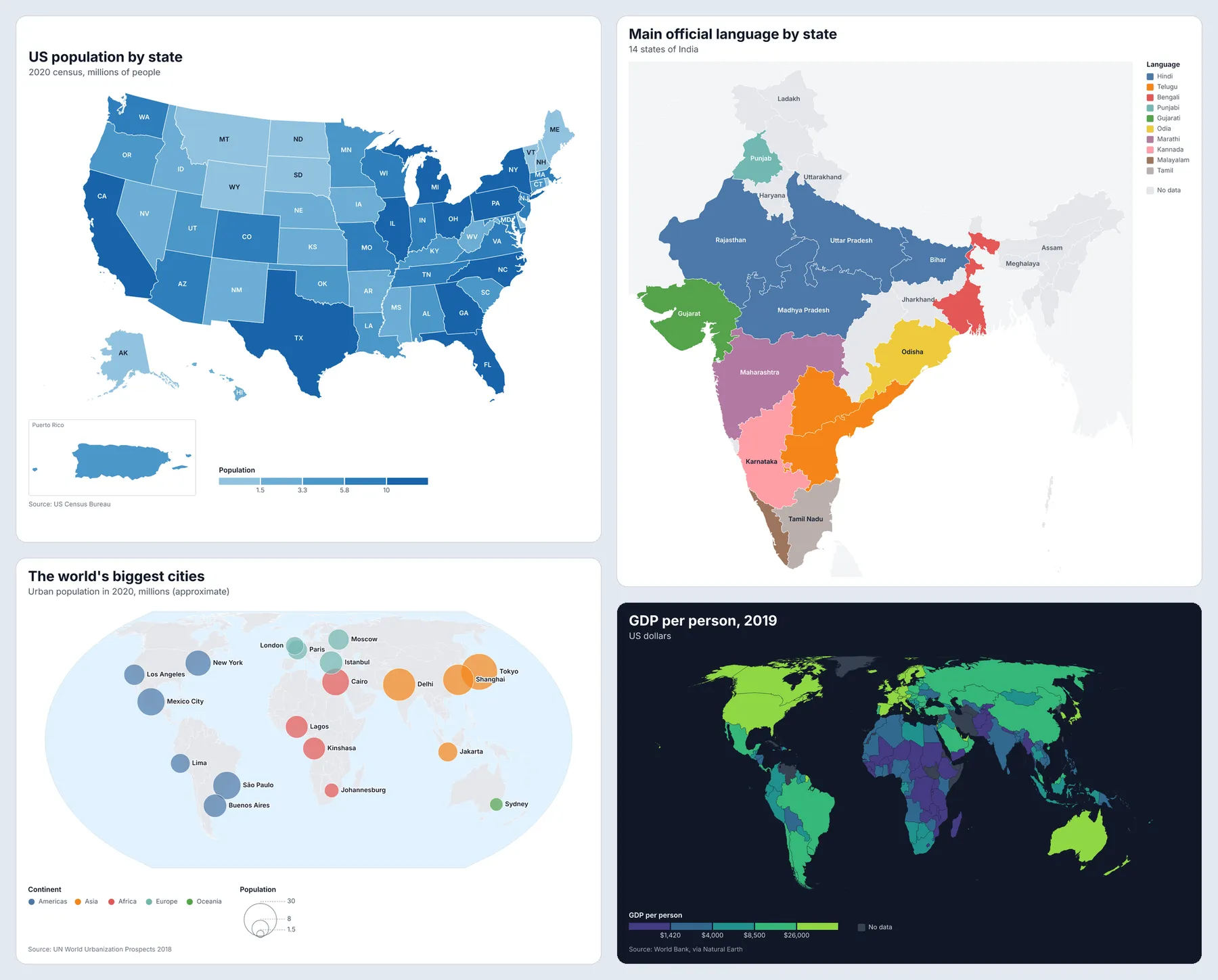
What it does
- Maps from region names: 242 countries and territories, the 50 US states with DC and Puerto Rico, 3,230 US counties, and 4,596 states, provinces, prefectures and departments of 251 countries and territories (Bavaria, Ontario, Maharashtra, Île-de-France), plus 286 larger regions for 42 countries, such as France's 18 regions and Italy's 20. The map is picked from the names: country names give a world map, zoomed to the continent when all the data is there; state names a US map;
Cook County, ILorHarris, TXa county map; and province names the provinces of their country. - Names in any spelling: names, ISO codes (
DE,DEU,276), US postal and FIPS codes, local and older names (Deutschland,Côte d'Ivoire,Burma,Swaziland), World Bank style names (Korea, Rep.,Egypt, Arab Rep.), names in 26 languages (Allemagne,德国,Россия), and close misspellings, which are reported as guesses. Names that can't be matched are listed in the results, never dropped silently. - Four kinds of map: colored regions (choropleth) for rates and amounts, bubbles for totals, categories for text values (
{"Texas": "Open", "Ohio": "Coming soon"}), and points from coordinates, sized and colored by any column. Places with coordinates can also be counted or added up per region, which turns a list of places into a map of where they are. - Classes that read well: tidy class breaks (quantiles, equal intervals, natural breaks or your own) or a smooth gradient, with 60 color schemes (single-hue, multi-hue, diverging around a midpoint, and categorical), your own colors, and a no-data color. Skewed data such as population gets classes automatically, so a few big regions don't wash out the rest.
- Labels that fit: region names, codes, values or both, written only where they fit inside the region and don't overlap. US states get their two-letter codes by default.
- Zoom anywhere: a continent, a part of the world (Middle East, Southeast Asia, Scandinavia, the Balkans, the European Union), a part of the US (New England, the Midwest, the Lower 48), a state (also on a county map) or a few countries. Far-away parts with data are drawn in insets, such as Puerto Rico next to the US or the overseas departments of France. The projection is picked for the area (Equal Earth for the world, Albers USA for the US, a conic projection turned to the area for countries), or choose one of 10, including a globe.
- Your own map: a GeoJSON or TopoJSON file of sales territories, districts or ZIP code areas, matched to the data by name or ID.
- Seven formats: PNG at 1x to 4x pixel density, SVG and PDF that stay sharp at any size, lossless WebP, JPEG, an interactive HTML page that shows each region's value on hover, and the Vega spec to embed in your own web pages. One charge per map, whatever the number of formats.
- Look: light or dark theme, any background or water color, transparent PNGs, 13 fonts, value prefixes and suffixes (
$,%), number formats and locales (de-DEwrites 1.234,5), and Chinese, Japanese and Korean names. - Facts with every map: the map and projection used, the class breaks, the smallest and largest values, how many regions matched, and the names that weren't matched or were guessed, so an agent can check its map and fix its data.
- Image straight from the API: the first map is also the run's
OUTPUT, so the run-sync endpoint answers with the image itself.
Who it's for
- AI agents and LLM apps that answer "where" questions with a map: pass region names and numbers, and show the image in a chat, report or slide. The results list the names that didn't match, so the agent can correct them.
- Analysts, journalists and marketers who need a clean choropleth for a report, article or deck without opening a GIS tool.
- Apify users who want to see scraped data on a map: places from Google Maps as points or counted per county, prices by country, stores by state, job listings by region.
- Automation builders in n8n, Make or Zapier who send a weekly map of sales by region to Slack or email.
- Developers who need server-side map images without a browser, a map server or map tiles.
How to use it
- Put your data in Values by region (
{"France": 120, "Germany": 95}), Data rows, CSV data, a Data file link or an Apify dataset. - Add a title, and pick colors, labels and where to zoom, or keep the defaults: the map, the columns and the colors are chosen from the data.
- Click Start. The map appears in the Output tab with its download links.
For many maps in one run, put them in More maps. You can also run it through the Apify API, on a schedule, or from Make, n8n, Zapier and other integrations.
How-to examples
Each example below is a complete input, checked with a run of the Actor.
How to make a map of values by country (a choropleth)
Result: a PNG map of Europe with the six countries shaded by value and their names and values written on them. The map zooms to the countries with data by itself, and all 6 names were matched ("matchedRegions": 6).
How to make a US state map from a spreadsheet
Result: the US states with Alaska and Hawaii moved in, the six states shaded and labeled, and a legend from $200k to $400k. State names, postal codes and FIPS codes all work, and so do counties by name and state or by FIPS code.
How to plot places on a map, sized by a number
Result: a map of the United Kingdom (picked from where the points are) with a labeled circle per city, sized by orders. The results of a Google Maps scraper work as they are, with datasetId.
How to let an AI agent draw maps
Add this Actor to the Apify MCP server with https://mcp.apify.com/?tools=jumblemog/map-chart-generator. The agent sends region names and values, or rows with coordinates, and shows the user imageUrl. Names it had to guess are listed in the result, so the agent can check them.
FAQ
Which maps are there? World countries, the provinces and states of every country, US states and US counties, with zooms to continents, regions such as the EU or Southeast Asia, and US regions such as the Lower 48.
Do I need map files or an API key? No. The map data is built in, and you give names, codes or coordinates.
Can I get SVG or PDF? Yes. formats takes PNG, SVG, PDF, WebP, JPEG, an interactive HTML page that shows values on hover, and the Vega spec.
Does it find addresses? No. Points need latitude and longitude. Regions only need their names or codes.
Does it work with Zapier, Make or n8n? Yes. Call the Actor with its Apify app or an HTTP request and send imageUrl to a report, email or Slack.
Input
| Field | What it does |
|---|---|
values | Region names with their values, such as {"France": 120, "Spain": 80}. Text values color the regions by category. |
data, csv, dataUrl, datasetId | Rows as JSON, CSV or TSV text, a link to a public CSV, TSV or JSON file or Google Sheet (up to 30 MB), or an Apify dataset (up to 100,000 items). |
map | auto (default), world, us-states, us-counties, provinces, regions, continents or custom. |
country | The country for provinces or regions, such as France, DE or JPN. Detected from the names otherwise. |
mapType | auto, choropleth (colored regions), bubble or points. |
focus | Where to zoom: Europe, Middle East, Scandinavia, New England, Texas, or any countries or provinces. |
projection | auto, equalEarth, naturalEarth1, mollweide, mercator, equirectangular, conicEqualArea, conicConformal, albersUsa, orthographic (a globe) or transverseMercator. |
aggregate | How rows for the same region combine: auto (added up, and the latest year when there's a year or date column), sum, mean, median, min, max, count, first or last. |
regionField, valueField | The columns with the region names and the values. Found automatically by default; nested fields like address.state work. |
latitudeField, longitudeField, sizeField, colorField, labelField | For points: the coordinate columns (found automatically, including location.lat), and the columns that size, color and name them. |
colorScheme, colors, reverseColors | One of 60 schemes (blues, viridis, redBlue, tableau10...), or your own colors from low to high. |
classification, classes, breaks | auto, continuous (a gradient), quantile, equal, jenks or custom; the number of classes (5); your own class boundaries. |
categoryColors, categoryOrder | A color for each category, and their order in the legend. |
domainMin, domainMax, midpoint, missingColor | The ends of a gradient, the middle of a diverging scheme, and the color of regions without data. |
title, subtitle, sourceNote, legendTitle | The text on the map. The legend title defaults to the value column's name, made readable (gdp_per_capita becomes GDP per capita). |
labels, labelSize, language | auto, none, names, values, namesAndValues or codes; their size; and the language of the names (26 languages). |
legend, valuePrefix, valueSuffix, valueFormat, locale | The legend's place (auto, bottom, right or none) and how numbers look ($, %, ,.0f, de-DE). |
width, height, theme, font | The size in CSS pixels (1,000 wide by default, with the height that the area's shape needs), light or dark, and one of 13 fonts. |
backgroundColor, oceanColor, borderColor, borderWidth | The background (or transparent), the water and the borders between regions. |
bubbleColor, pointColor, maxBubbleSize, pointSize, opacity | How bubbles and points look. |
includeAntarctica | Show Antarctica on world maps that have no data there. |
geojson, geojsonUrl, geojsonKeyField | Your own map as GeoJSON or TopoJSON, and the feature property with the names or codes the data uses. |
formats, scale | Any of png (default), svg, pdf, webp, jpg, html and vega, and the pixel density of PNG, WebP and JPEG (2 by default). |
name, inlineImage, maps, maxMaps | The files' name, the image as a base64 data URI in the results, more maps in one run, and the most maps per run (100). |
The data, title, text and column settings in the form belong to the map in the form, and each entry in More maps (maps) is an object with its own. An entry without data maps the form's data, so one dataset can be drawn several ways in one run. The other settings (map, zoom, colors, labels, look and output) apply to every map unless an entry sets its own.
The quickest map: values by country (the numbers here are an example):
Places from a Google Maps scraper run, counted per US state:
The same places as points, sized by their number of reviews and colored by category:
US counties by FIPS code, zoomed to the Lower 48, as percentages:
The provinces of a country, with names on the map:
Categories with their own colors:
Your own map of sales territories, from a GeoJSON file:
One dataset drawn three ways in one run: the places as points (the map in the form), the number of places per state, and their average rating per state:
Output
Each map becomes one dataset item, and the files are saved in the run's key-value store:
Names that didn't match are listed in unmatched with how many rows had them, and spelling guesses in guessed (such as {"input": "Germny", "matched": "Germany"}). When a map can't be drawn, the item says why and isn't billed:
Download your files within your plan's data retention period, or copy them to your own storage, because run storage expires.
Pricing
You pay per map created, at the price shown on this page, whatever the number of formats (PNG, SVG, PDF, WebP, JPEG, HTML and Vega files of the same map count once). Maps that can't be drawn are never charged. If you set a maximum cost per run, the Actor stops when the next map wouldn't fit.
Speed
One map usually takes about 4 seconds through the API, from request to image, most of it the run starting up. Each further map in the same run adds about 0.5 to 1.5 seconds as PNG, and a map of all 3,230 US counties in all seven formats takes about 5.5 seconds. The default 1 GB of memory is enough for most maps; give big batches or maps with many thousands of points 2 GB or more, which also brings more CPU.
Tips and limits
- County names need their state, because many repeat (31 counties and parishes are named Washington): write
Cook County, ILorHarris, TX, add a state column, or use 5-digit FIPS codes. Names that fit more than one region are listed inunmatchedwith the candidates. - Province and country borders come from Natural Earth 5.1.2, which shows the boundaries in place on the ground; recent changes to provinces may be missing. For other borders, or smaller areas such as districts and ZIP codes, use your own GeoJSON map.
- This draws regions and points on outline maps, not street maps or satellite images: a map covers at least a degree or two, so points in one city are shown on the outlines of their state or region.
- Points: up to 20,000 per map, with labels for up to 30 points unless you choose a label column. Categories: the 19 most common get their own colors, and the rest are grouped as Other.
- Data: up to 100,000 dataset items, and data and map files up to 30 MB. Each map has a 180-second limit.
- Datasets: Apify lets this Actor read only the dataset picked in its Apify dataset field (
datasetIdat the top of the input), so maps in More maps can use that dataset but no other. To map several datasets, run once per dataset. - Data file links: CSV, TSV and JSON files, GitHub file links, and Google Sheets links (the sheet must be shared as "Anyone with the link" or published to the web). Every site's robots.txt is checked first, and its crawl delay kept.
- SVG files keep their text as text, with common fallback fonts named, so it stays editable in Illustrator, Figma or Inkscape.
For AI agents and developers
This Actor works with the Apify MCP server, so AI agents can call it as a tool: pass region names and numbers in values (or rows in data), and read imageUrl, unmatched and guessed from the dataset item. For a direct API call that waits for the result:
To get the image itself as the response, call run-sync instead. It returns the run's OUTPUT, which is the first map (or the error as JSON):
Credits
- Map data: Natural Earth (public domain) for countries, provinces, regions and their names in many languages, and US Atlas (ISC license) for US states and counties, made from the US Census Bureau's cartographic boundary files (public domain).
- Drawing: Vega (BSD-3-Clause) through vl-convert (BSD-3-Clause), Shapely and NumPy (BSD-3-Clause), Pillow (MIT-CMU) and fontTools (MIT).
- Fonts (SIL Open Font License): Inter, Roboto, Open Sans, Lato, Montserrat, Poppins, Source Sans 3, Noto Sans, IBM Plex Sans, Nunito, Arimo (drawn for Arial), Noto Serif and JetBrains Mono from Google Fonts, and Noto Sans CJK.
- Example data in the picture above: US Census Bureau (2020 census), UN World Urbanization Prospects 2018 (approximate city populations), and World Bank GDP figures as published in Natural Earth.
- This Actor isn't affiliated with Natural Earth, the US Census Bureau, Vega or the projects above.


