

Shift Scheduler: Employee Scheduling & Staff Rota Generator
Pricing
Pay per event
Shift Scheduler: Employee Scheduling & Staff Rota Generator
Make staff schedules (rotas) with Google OR-Tools: shifts with roles and headcounts, availability, time off, weekly hours, rest rules, fairness and preferences. Every gap explained. Rota image, PDF, Excel and calendar files. From text, JSON, CSV or Google Sheets. For AI agents.
Pricing
Pay per event
Rating
0.0
(0)
Developer

Jumble Mog
Maintained by CommunityActor stats
0
Bookmarked
2
Total users
1
Monthly active users
2 days ago
Last modified
Categories
Share
Make a fair staff schedule in seconds, with every shift covered as far as your team allows and a plain reason for every gap. Tell it who works for you (their roles, hours, days off and preferences) and which shifts need people, as short text lines, JSON, CSV or a Google Sheet, and it works out who works when, keeping to roles and headcounts, availability and time off, weekly hours, rest between shifts, days in a row, fixed shifts, requests, fairness and labor cost. Every schedule comes back with each assignment, each person's hours, the staffing of every shift, why any place stayed empty and what would fill it, plus a rota image, a PDF, a web page, an Excel workbook, a CSV and calendar files for the whole team and for each person. It uses Google's OR-Tools CP-SAT solver, the open-source engine behind many workforce planning systems. Made for managers of cafés, restaurants, shops, clinics, care homes, call centers and warehouses, for HR and workforce developers, and for AI agents that need a real schedule from one API call.
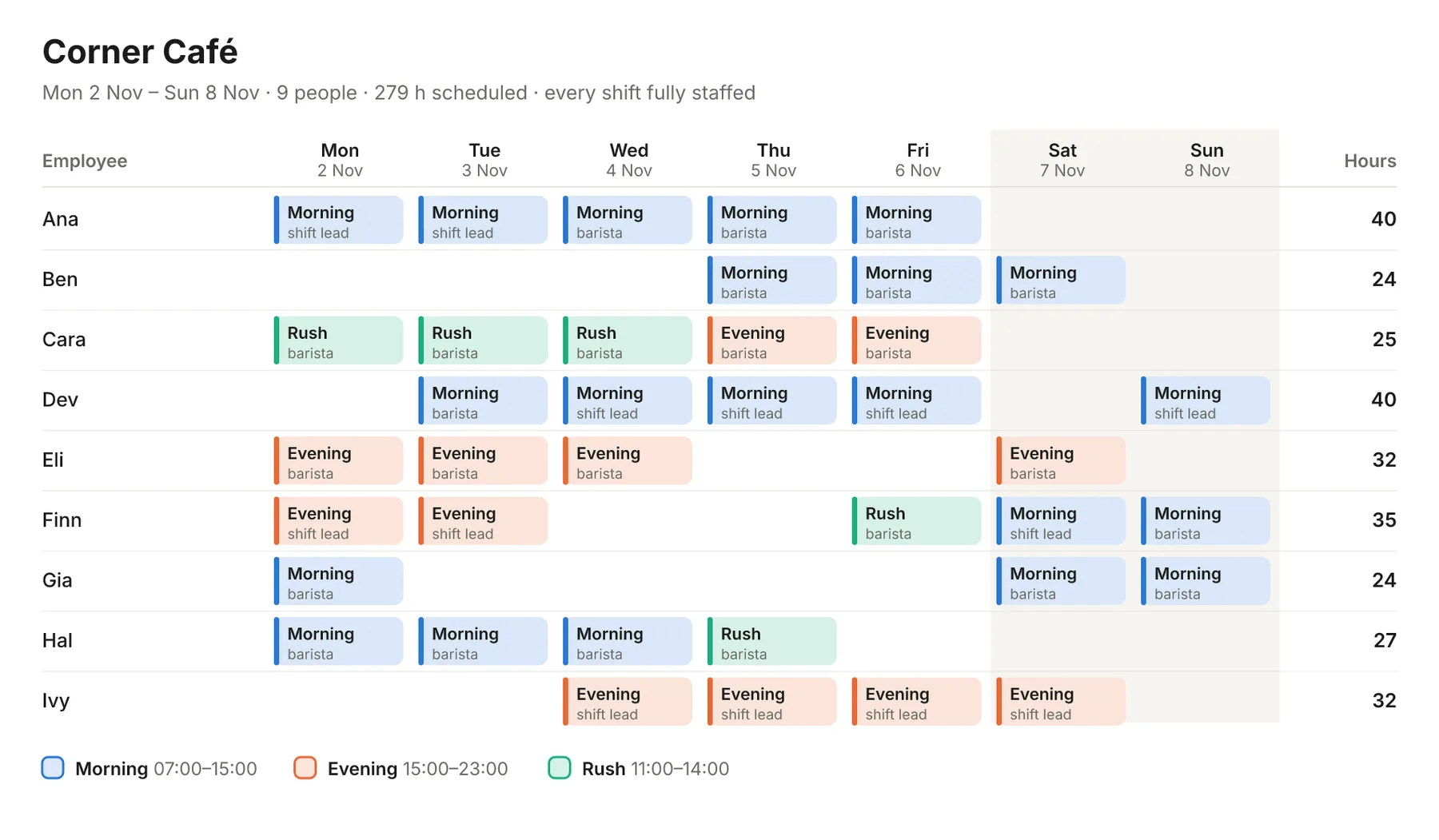
What it does
- Covers every shift as fully as the rules allow: the people needed per shift, in total or by role (2 baristas and a shift lead), changing by day if you like (more on Fridays and Saturdays). More important shifts are staffed first, and roles few people can do are kept for those people.
- Keeps the hard rules: skills, availability, approved time off, the most hours, days and shifts a week, rest between shifts (no closing at 23:00 and opening at 07:00), the most days in a row, one shift a day or split shifts, and no overlaps, with overnight shifts handled across midnight.
- Gives people their hours: minimum hours (contracts), target hours, and maximum hours, per person or for everyone.
- Respects requests: times people would rather not work, shifts they prefer and fixed shifts they must work. Requests are kept whenever staffing and hours allow, and the result says which weren't.
- Shares the work fairly: hours in proportion to each person's limit, weekend and night shifts spread evenly, days off kept together and start times kept steady from day to day.
- Keeps labor cost down: give hourly costs and choose the lowest-cost goal, or let cost break ties.
- Explains every gap: for each place nobody could fill, who could work that role and the rule that stopped each of them, such as "Only one person can work as charge nurse: Teo (36 of 40 h) would go over the weekly hours limit." Then advice on what would close the gaps: training another person for a role, allowing more hours, or more availability on the busiest days.
- Files people can use: a rota image (PNG) and PDF to print or post, a web page that reads well on phones, an Excel workbook (rota grid, every shift, coverage, people and gaps), a CSV of every assignment, JSON, and calendar files (.ics) for Google Calendar, Outlook and Apple Calendar, one for the team and one per person.
- Reads what you have: short text lines like "Ana: barista, shift lead; 30-40 h; off Sun", JSON objects with many spellings of each field, CSV or TSV, Excel files, or a Google Sheet link.
- Many schedules in one run: one per location, team or week, up to 50, each with its own people, shifts and rules.
Who it's for
- Restaurants, cafés, bars and shops: weekly rotas with opening and closing shifts, rush hours, weekend peaks and part-timers.
- Clinics, care homes and hospitals: 24/7 cover with day and night shifts, 12-hour shifts, charge nurses, rest rules and contracted hours.
- Call centers, support teams and warehouses: staffing that follows demand through the day and week, with skills and fair weekends.
- Security, cleaning, events and volunteers: many sites, shifts at odd hours, people with limited availability.
- HR, workforce and payroll developers: a scheduling API for apps, spreadsheets and no-code flows (Make, n8n, Zapier), billed per schedule with no monthly plan.
- AI agents and LLM apps: language models can't build a schedule that keeps dozens of rules at once. An agent can pass the team and shifts in plain text and get back a checked schedule, with reasons it can explain.
How to use it
- List your people in Employees, one per line, such as
Ana: shift lead, barista; 30-40 h; off Sun; prefers mornings. The form starts with a nine-person café, so you can click Start right away. - List the shifts in Shifts, such as
Morning 07:00-15:00: 1 shift lead, 2 barista; daily. - Set the Start date (empty means next Monday), the Number of days and any Rules that differ from the defaults (40 hours a week, 11 hours rest, 6 days in a row).
- Click Start. The Schedules view shows the rota image and summary, Assignments every shift worked, People each person's hours and calendar link, and Gaps any place left empty with the reason.
You can also run it through the Apify API, on a schedule (every Thursday for next week, say), or from Make, n8n, Zapier and other integrations.
Writing employees and shifts
An employee as text: the name, a colon, the roles they can work, then any of these parts separated by semicolons:
| Part | Examples |
|---|---|
| Weekly hours | 36 h (target), 20-32 h (minimum and maximum), max 30 h, min 16 h |
| Times they can't work | off Sun, no Tue after 17:00, unavailable 2026-11-05, never nights |
| The only times they can work | available weekdays, only Mon-Fri after 15:00, weekends |
| Requests | prefers mornings, avoid weekends, would rather not work Fri nights |
| Fixed shifts | always Mon Morning, fixed: Sat Evening as shift lead |
| Limits | max 5 days, max 4 shifts, 4 days in a row |
| Cost | $18/h, €15.50 |
An employee as an object (field names are matched loosely, so Name, employee, roles, wage or availability work too):
A shift as text: the name and times, then the people needed, in total (3) or by role (1 shift lead, 2 barista), and the days it runs (daily, Mon-Fri, weekends, Sat, 2026-12-24), with optional parts such as 30 min break (unpaid), max 4 (extra people allowed) or priority high.
A shift as an object:
The headcount can change by day with "staff": {"Mon-Thu": 2, "Fri-Sat": 4, "default": 3} or seven numbers, Monday first. Places beyond the named roles can go to anyone on the team.
Times can be weekdays (Mon, Mon-Fri, weekends), dates (2026-11-05, Nov 5-9, 2026-11-05 to 2026-11-09), shift names (Morning), parts of the day (mornings, evenings, nights) or clock times (after 17:00, before 10am, 08:00-12:00), alone or together, such as Tue after 17:00 or Sat Evening.
Examples
A café week as text (the form's example):
A ward around the clock for four weeks, with 12-hour shifts, a senior nurse on every shift and contracted hours:
A restaurant where Friday and Saturday need more people, with approved time off, a fixed shift and the lowest labor cost:
From a spreadsheet: put employees in a Google Sheet with columns such as name, skills, minHours, maxHours, unavailable, prefer and cost, share it as "Anyone with the link", and pass the link:
Several schedules in one run, sharing the rules:
How-to examples
Each example below is a complete input. The result line is what the run says in summary.
How to make a staff rota for a café or shop
Write each person and each shift as a line of text:
Result: "Scheduled 38 shifts (279 hours) for 9 of 9 people, Mon 2 Nov to Sun 8 Nov. Every shift is fully staffed. Hours per person range from 24 to 40. Everyone got their minimum hours. 3 of 3 shifts people asked to avoid were kept free." The rota comes as a picture, a PDF, a phone-friendly web page, an Excel workbook, a CSV and calendar files.
How to find out why a shift can't be filled
Result: "Scheduled 12 shifts (96 hours) for 3 of 3 people, Mon 2 Nov to Sun 8 Nov. 2 places in 2 shifts couldn't be filled; see gaps for why." Each gap says why, such as "Ana (Sat) can't work then; Cara (16 of 16 h) would go over the weekly hours limit", and advice says what would fill it: more hours or more staff.
How to schedule nurses around the clock with 12-hour shifts
Result: a four-week rota with a senior nurse on every shift, at least 12 hours of rest between shifts and no more than 4 days in a row. The full ten-person example is in Examples above.
How to let an AI agent make a schedule
Add this Actor to the Apify MCP server with https://mcp.apify.com/?tools=jumblemog/shift-scheduler. The agent writes the team and shifts as the short lines above, straight from what the manager said, and passes on the summary, the gaps and the rota's links.
FAQ
What rules does it follow? Availability and days off, minimum and maximum hours, roles and skills, rest between shifts, days in a row, approved time off and fixed shifts. Preferences such as "prefers mornings" and "avoid weekends" are kept where they can be.
Is the schedule fair? Hours are shared in proportion to each person's limit, and weekend and night shifts are spread evenly. It can also aim for the lowest labor cost.
What if there aren't enough people? It still makes the best schedule it can and lists each gap with the reason and what would fill it.
Can I import it into Google Calendar or Excel? Yes. Each run gives an Excel workbook, a CSV, and calendar files (.ics) for Google Calendar, Outlook and Apple Calendar, one for the team and one per person.
Does it work with Zapier, Make or n8n? Yes. Call the Actor with its Apify app or an HTTP request and send the PDF or picture to the team.
Input
| Field | What it's for |
|---|---|
employees | The people: text lines or objects with name, skills, minHours, maxHours, targetHours (or hours), unavailable, available, prefer, avoid, fixed, maxDaysPerWeek, maxShiftsPerWeek, maxConsecutiveDays, minRestHours, cost. |
shifts | The shifts: text lines or objects with name, start, end (or time), staff, roles, days, skip, break, maxStaff, priority, night. |
employeesCsv, shiftsCsv | The same as CSV or TSV text, or a link to a CSV, Excel or JSON file or a Google Sheet. |
startDate, days, endDate, closedDates | The period: a start date (default next Monday), up to 92 days, and days with no shifts. |
maxHoursPerWeek, minHoursPerWeek | Weekly hours for everyone (default at most 40), unless a person's own limits say otherwise. |
minRestHours, maxConsecutiveDays, maxDaysPerWeek, maxShiftsPerWeek, maxShiftsPerDay | Rest between shifts (default 11 hours), days in a row (default 6), days and shifts a week, and shifts a day (default 1). |
weekendDays, fairness, daysOffTogether | Which days are the weekend, sharing hours, weekends and nights fairly, and keeping days off together. |
goal | balanced (default), cost or preferences: what matters most once shifts are staffed and minimum hours met. |
timeOff, fixedShifts | Approved time off (or "soft": true requests) and shifts someone must work. |
title, timeFormat, timezone | The schedule's name, 24-hour or 12-hour times, and the time zone for calendar files. |
timeLimitSeconds | The most time the solver spends improving the schedule (default 20). |
schedules | Several schedules in one run. |
Output
One dataset item per schedule (shortened here):
When a place can't be filled, the schedule is short-staffed and gaps explains it:
table is the rota as Markdown, ready for a chat reply, an email or a wiki. The run's OUTPUT record holds every schedule as one JSON object, so the run-sync API endpoint answers with them directly.
How it works
The schedule is a constraint programming model solved by OR-Tools' CP-SAT solver in stages, so a more important goal is never traded for a lesser one: first keep the fixed shifts, then staff every shift as fully as the rules allow (more important shifts and scarcer roles first), then, without losing any of that, give people their minimum and target hours and respect their requests and preferences (and labor cost, with the cost goal), and last share hours, weekends and nights fairly, keep days off together, keep start times steady and keep cost down. The hard rules hold at every stage. A quick schedule built by hand rules gives the solver its starting point, and each stage stops once its answer has stopped improving, since proving an answer best can take far longer than finding it.
Gaps are explained after solving: for each empty place, every person who can work the role is checked against the finished schedule, and the first rule that stops them is reported.
Checks
Every finished schedule in the tests is checked against the hard rules by separate code from the solver's: skills, availability, time off, one shift a day, overlaps, rest between shifts (across midnight too), weekly hours, days and shifts, days in a row and the places in each role. The tests also check that hours follow each person's limit, that preferences choose which shifts someone gets rather than how many, that fixed shifts are kept or explained, that the cheapest people get the hours under the cost goal, and that every gap has a reason. 29 tests pass.
Pricing
You pay per schedule made, at the price shown on this page, with every file included. Schedules that can't be made are never charged. Solving past the first 30 seconds of a schedule adds a small solver time charge per started 10 seconds, so with the default 20-second time limit it never applies. If you set a maximum cost per run, the Actor checks before each schedule that it fits and shortens the time limit to stay within it.
Speed
A small team's week (up to about 15 people) solves in a few seconds, and a run through the API answers in about 15 seconds, including the cloud container starting and the files being saved. Larger schedules use the time limit: 30 people over four weeks are fully staffed within the default 20 seconds, and 60 to 120 seconds give better hours and a fairer spread. The result says when the solver was still improving as its time ran out.
Tips and limits
- Weeks are 7-day blocks from the start date, so start on the day your pay week starts. In a short last week, maximum hours apply in full, and minimum and target hours in proportion to its days.
- Overnight shifts (22:00-06:00) belong to the day they start. A shift counts as a night shift when at least half of it falls between 22:00 and 06:00, or when you mark it
night. - Availability versus requests:
unavailable,availableand time off are rules;avoidandpreferare requests the schedule keeps when it can. Time off with"soft": trueis a request. - Roles: names are matched without case or a plural s, so "Baristas" matches "barista". A shift's headcount beyond its named roles can go to anyone.
- Costs: people without a cost count at the team's average cost when comparing schedules, so leaving a wage out doesn't make someone look free;
laborCostadds up only the costs given. - Calendar files use local times as written unless you set a time zone such as Europe/London.
- Limits: 500 employees, 60 shifts and 92 days per schedule, 4,000 shift occurrences, 50 schedules per run, and up to 600 seconds of solving per schedule. A run stops once schedules that can't be made have taken 3 minutes.
- Links: CSV, TSV, JSON and Excel files, GitHub file links and Google Sheets links (shared as "Anyone with the link" or published to the web). Every site's robots.txt is checked first.
For AI agents and developers
This Actor works with the Apify MCP server, so AI agents can call it as a tool: send the team and shifts as text lines and read summary, table, gaps and advice from the result. A direct API call that waits for the answer:
run-sync instead returns the run's OUTPUT: the status, how many schedules were made and every schedule as JSON.
In Python, with the apify-client package:
Credits
- Scheduling: Google OR-Tools CP-SAT (Apache License 2.0).
- Files: openpyxl (MIT) for Excel, and vl-convert (BSD-3-Clause) for the PNG and PDF, with the Inter font (SIL Open Font License).
- Time zones: tzdata (Apache License 2.0).


