

Silence Remover: Cut Pauses from Video & Audio
Pricing
Pay per event
Silence Remover: Cut Pauses from Video & Audio
Automatically cut silences, pauses and dead air out of videos, podcasts, lectures and voice recordings. Jump-cut style editing with adjustable pause length and padding, frame-accurate A/V sync, and a JSON cut list for your editor. MP4, MOV, MP3, WAV and more.
Pricing
Pay per event
Rating
0.0
(0)
Developer

Jumble Mog
Maintained by CommunityActor stats
0
Bookmarked
2
Total users
1
Monthly active users
11 days ago
Last modified
Categories
Security
Limited permissionsShare
Automatically remove silences, pauses and dead air from videos, podcasts, lectures, interviews, tutorials and voice recordings. This Actor finds every pause in the speech and cuts it down, the way an editor makes jump cuts, then gives you the tightened video or audio file and a cut list with every timestamp. Picture and sound stay in sync, the cuts are smooth, and you choose how tight the result is. No API key, no editing software and no manual scrubbing.
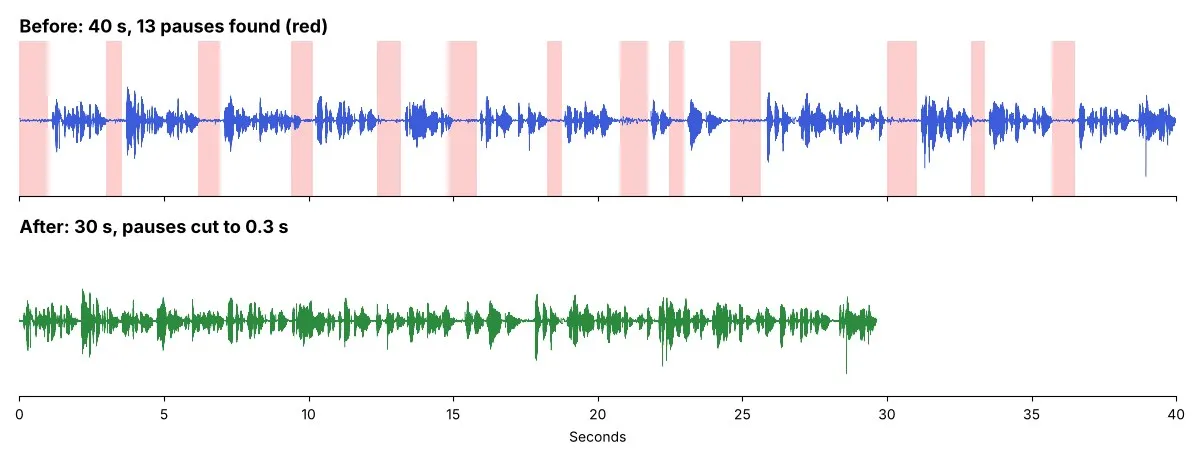
Listen: before (40 s) and after (30 s), default settings. Sample: LibriVox recording of The Art of War (public domain).
What it does
- Finds the pauses automatically: the silence level is worked out for each file from its own background noise and speech, so it works for quiet studio recordings and noisy phone videos alike. You can also set a fixed level.
- Cuts them cleanly: pauses longer than your minimum (0.5 s by default) are cut, keeping a little padding (0.15 s) before and after each phrase so no word gets clipped. Every cut gets a 5 ms fade, so there are no clicks.
- Videos stay in sync: frames and sound are cut on the same timestamps, also for variable-frame-rate phone recordings. The result is an MP4 (H.264 + AAC) up to 1080p.
- Audio keeps its format: MP3 stays MP3, WAV stays WAV, at the original sample rate. Or convert to MP3, WAV, FLAC, M4A, OGG or Opus.
- Cut list for your editor or code: every file also gets a JSON list of kept and removed segments in seconds. Choose cut-list-only mode to skip rendering and do the edit in Premiere, DaVinci Resolve, Final Cut, CapCut or your own pipeline.
- Clear numbers: original and new length, seconds and percentage removed, number of pauses cut.
- Takes files from anywhere: direct links, Google Drive and Dropbox share links, or uploads. Files up to 2 GB and 6 hours.
- Fair billing: you pay per minute of input. Files that fail cost nothing.
Who it's for
- YouTubers, TikTokers and course creators who want jump-cut pacing without hours of editing.
- Podcasters tightening interviews and solo episodes.
- Teachers and trainers shortening lecture and screen recordings.
- Developers and AI agents building automated video pipelines: cut first, then caption, translate or publish.
How to use it
- Paste links to videos or audio files, or upload them.
- Keep the defaults, or make the cut tighter (shorter minimum pause, less padding) or gentler.
- Click Start. Each tightened file appears in the Output tab with a download link and its cut list.
You can also run it through the Apify API, on a schedule, or from Make, n8n, Zapier and other integrations.
How-to examples
Each example below is a complete input, checked with a run of the Actor on a short test file.
How to remove silence from a video or podcast automatically
Result: the file without its pauses in outputUrl, plus removedSeconds, removedPercent and pausesRemoved. A 9-second test file with two 1.5-second pauses came back 6.64 seconds long: "removedSeconds": 2.4, "removedPercent": 26.6, "pausesRemoved": 2. Each cut pause keeps 0.15 seconds on either side, so speech isn't clipped.
How to make fast jump cuts for YouTube or TikTok
Result: every pause of 0.3 seconds or more is cut down to about 0.16 seconds, for the tight talking-head style. Use "minPauseSeconds": 1.0 to remove only long gaps.
How to get a cut list for Premiere, DaVinci Resolve or Final Cut
Result: no new file is rendered. keepSegments and the file at cutListUrl list the parts to keep and cut, in seconds of the original, such as [[0.0, 2.15], [3.35, 5.65], [6.85, 9.04]]. Make the edit in your own editor or script.
How to let an AI agent tighten recordings
Add this Actor to the Apify MCP server with https://mcp.apify.com/?tools=jumblemog/silence-remover. The agent sends the links in mediaUrls and gives the user outputUrl, or reads keepSegments when it does the edit itself.
FAQ
Does it need a silence level? No. It measures each file's background noise and sets the level itself. Set thresholdDb, such as -40, to choose your own.
Does it work on audio files? Yes. Podcasts and voice notes in MP3, WAV, M4A, FLAC and other formats keep their format, or set audioFormat to convert them.
Do the video and sound stay in sync? Yes. Picture and sound are cut at the same points.
Is there a watermark? No.
Does it work with Zapier, Make or n8n? Yes. Call the Actor with its Apify app or an HTTP request, and pass outputUrl to the next step.
Input
| Field | What it does |
|---|---|
mediaUrls | Links to video or audio files, or Google Drive and Dropbox share links. |
files | Files uploaded from your computer or picked from an Apify key-value store. |
minPauseSeconds | Shortest pause that gets cut (default 0.5). Use 0.3 for fast jump cuts, 1.0 to remove only long gaps. |
paddingSeconds | Part of each pause kept before and after speech (default 0.15, so cut pauses become 0.3 s). |
thresholdDb | Empty (default) finds the silence level automatically; or set one, such as -40. |
output | media (default): tightened file plus cut list. cutList: only the timestamps. |
audioFormat | same (default) keeps audio formats and makes videos MP4; or mp3, wav, flac, m4a, ogg, opus for audio only. |
maxFiles | Stop after this many files (default 100). |
Example:
Output
Each file becomes one dataset item. The tightened file and the cut list are saved in the run's key-value store:
The cut list file has the settings and both lists, in seconds of the original file:
A file that couldn't be downloaded or read gets status: "failed" and an error that says why, and isn't billed. Download your files within your plan's data retention period, or copy them to your own storage, because run storage expires.
Pricing
You pay per started minute of input, at the prices shown on this page:
- Minute of audio processed: audio files, and any file in cut-list-only mode.
- Minute of video processed: videos that are re-rendered without their pauses (re-encoding video takes much more computing than audio).
A 10-minute video is 10 minutes; a 20-second clip is 1 minute. Files that fail are never charged. If you set a maximum cost per run, the Actor stops before a file that wouldn't fit.
Speed
Measured on Apify at the default 4 GB of memory:
- Audio is fast: an 8.5-minute audiobook chapter took 7 seconds, so an hour-long podcast takes about a minute.
- Cut lists take about as long as audio, also for videos, because nothing is re-encoded.
- Video is re-encoded, which takes about as long as the video itself at 1080p: a 3-minute 1080p WebM took just under 3 minutes. Smaller videos are quicker, and giving the run more memory gives it more CPU, which speeds video up.
Tips and limits
- Silence detection listens for quiet, not for words: background music or constant loud noise under the speech hides the pauses. Clean such recordings first (for example with a noise remover) or set
thresholdDbyourself. - Videos are re-encoded to H.264 MP4. Inputs above 1080p are rendered at 1080p (vertical videos at 1080 x 1920), and phone videos come out upright. Use the cut list to apply the edit at full resolution in your editor.
- Only the first audio track is used, and multichannel audio comes back as stereo.
- Links to YouTube, TikTok, Instagram, Facebook, X, Vimeo, SoundCloud and Spotify aren't supported, because those platforms' terms don't allow downloading. Use your own copy of the file.
For AI agents and developers
This Actor works with the Apify MCP server, so AI agents can call it as a tool: pass mediaUrls and read outputUrl (or keepSegments) from each dataset item. Every item has the same documented fields, and status tells you whether a file succeeded. For a direct API call:
Privacy
Files are downloaded into the run, processed there and saved only to your own Apify storage. Nothing is sent to an outside service.
Credits
- Audio and video processing: FFmpeg with x264.


