

Statistics Calculator: A/B Test, t-Test, ANOVA, Regression
Pricing
Pay per event
Statistics Calculator: A/B Test, t-Test, ANOVA, Regression
A/B test significance, t-tests, ANOVA, chi-square, correlation, linear and logistic regression, sample size and more, with plain-language results, effect sizes, assumption checks and charts. From numbers, CSV, Excel, Google Sheets or an Apify dataset. Checked against R. For AI agents.
Pricing
Pay per event
Rating
0.0
(0)
Developer

Jumble Mog
Maintained by CommunityActor stats
0
Bookmarked
2
Total users
1
Monthly active users
2 days ago
Last modified
Categories
Share
Run the statistics behind a decision and get the answer in plain words. A/B test significance, t-tests, ANOVA, Mann-Whitney and Kruskal-Wallis tests, paired and before/after tests, chi-square and Fisher's exact tests, correlations, linear and logistic regression, descriptive statistics, normality tests, outlier detection and A/B test sample sizes. Give it conversion counts, groups of numbers, a table of counts, JSON rows, CSV, a link to a CSV, Excel file or Google Sheet, or an Apify dataset. Every analysis comes back with a one-sentence conclusion, a short write-up, the test and p-value, effect sizes with confidence intervals, assumption checks and a chart. The numbers match R's on its classic test datasets. Made for marketers, analysts, researchers, students, automations and AI agents that need statistics they can trust from one API call.
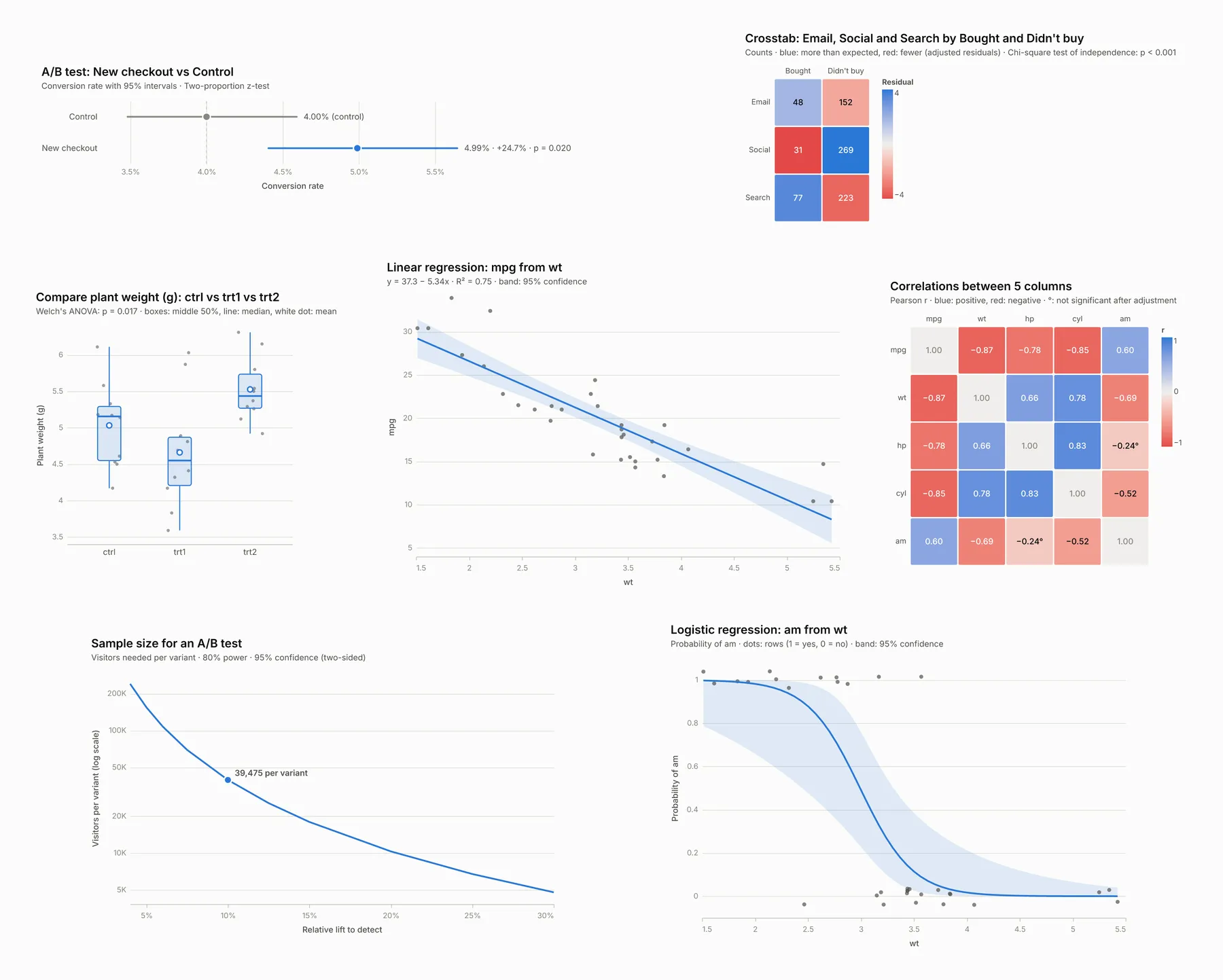
What it does
- A/B tests of conversion rates: two or more variants from visitors and conversions (or users and orders, sessions and sign-ups, emails sent and clicks). You get each variant's rate with its interval, the lift in percentage points and in percent with confidence intervals, a two-proportion z-test (Fisher's exact test when counts are small), the Bayesian chance that each variant beats the control and its expected loss, a sample ratio mismatch check that catches broken traffic splits, the lift the test could have detected, and Holm-adjusted p-values when several variants share one control.
- Comparing groups: Welch's t-test for two groups and Welch's ANOVA for more, with Games-Howell pairwise comparisons, or Student's t-test and the classic ANOVA with Tukey's HSD. Mann-Whitney U and Kruskal-Wallis with Dunn's test are run alongside, and used instead when small groups aren't normal. Effect sizes: Hedges' g with its interval, rank-biserial correlation, omega and epsilon squared.
- Paired and before/after data: paired t-test or Wilcoxon signed-rank test, with how many went up and down; repeated-measures ANOVA with the Greenhouse-Geisser correction or the Friedman test (with Kendall's W) for three or more conditions, plus pairwise tests.
- One sample against a target: one-sample t-test and Wilcoxon test against a benchmark, or an exact binomial test of a rate against a target rate, with Wilson intervals.
- Correlation: Pearson (with a Fisher-z interval), Spearman and Kendall for a pair of columns, or a full correlation matrix with adjusted p-values and a heatmap.
- Regression: linear regression with confidence intervals, standardized coefficients, VIF, Breusch-Pagan (and heteroscedasticity-robust HC3 errors when it's needed), Durbin-Watson, Jarque-Bera and the most influential rows; logistic regression with odds ratios, average marginal effects in percentage points, McFadden's R², a likelihood-ratio test, AUC, accuracy and a confusion matrix. Text columns become categories, and predictions for new rows come with their intervals.
- Crosstabs: chi-square test of independence with adjusted residuals that show which cells drive it, Cramér's V, a Monte Carlo p-value when expected counts are small, Fisher's exact test, the odds ratio and relative risk for 2 × 2 tables, and goodness-of-fit tests against an even or planned split.
- Descriptive statistics: count, mean with its interval, standard deviation, median, quartiles, range, skewness, kurtosis, missing values and outliers per column, the most common values of category columns, and everything by group.
- Normality tests: Shapiro-Wilk and D'Agostino-Pearson, with a histogram and a Q-Q plot.
- Outliers: IQR fences, z-scores, modified z-scores (median and MAD) or the generalized ESD (Grubbs) test, each outlier listed with its row and label.
- Sample size and power: the visitors an A/B test needs per variant to detect a lift, or the smallest lift a given number of visitors can detect, for conversion rates or averages, for two or more variants, with how many days it takes at your traffic.
- Plain-language results: a summary written the way an analyst would explain it, a one-line conclusion, assumption checks, warnings (such as a sample ratio mismatch or too few events per predictor) and notes on every choice made.
- Charts: one per analysis, as PNG, SVG, PDF or interactive HTML, light or dark.
- Many analyses in one run: up to 500, each with its own data and settings, in one call.
Who it's for
- Marketers, growth and product teams: check whether an A/B test winner is real, plan how long a test needs to run, and catch broken traffic splits before trusting a result.
- Analysts and data teams: defensible tests without writing code, with effect sizes and assumption checks that hold up in review.
- Researchers and students: t-tests, ANOVA, chi-square, correlation and regression reported the way papers report them (t(17.8) = 1.86, p = 0.079), with effect sizes and their intervals.
- AI agents and LLM apps: language models are unreliable at arithmetic and p-values. An agent can send the numbers and get back verified statistics and a sentence it can pass on.
- Apify users: test what your scrapers collect, such as prices, ratings or review counts by category, straight from a run's dataset.
How to use it
- Leave Analysis on Auto or pick one, and put your data in one of the Data fields. The form starts with an A/B test (Control: 192 conversions from 4,800 visitors; New checkout: 237 from 4,750), so you can click Start right away.
- For data rows, name the columns the analysis needs (the outcome, the group column, the predictors) or leave them empty to have them found.
- Click Start. The Results view shows each analysis with its chart, conclusion, test, p-value and effect size, and the Write-up view the full summary, assumption checks and notes.
You can also run it through the Apify API, on a schedule, or from Make, n8n, Zapier and other integrations.
Examples
An A/B test with three variants and a planned 50/30/20 split:
Two groups of numbers (a t-test, or Mann-Whitney when the data call for it):
The average of minutes to first project is 14 in New onboarding and 11.1 in Old onboarding: New onboarding is 2.91 higher, or 26.3% more (95% CI for the difference 1.61 to 4.21). The difference is statistically significant (Welch's t-test, t(14) = 4.8, p < 0.001), and its size is Hedges' g = 2.27 (large).
Before and after, matched by position:
A regression from CSV, with a prediction:
A chi-square test from a table of counts:
The rows and columns are related (χ²(2) = 25.9, p < 0.001; Cramér's V = 0.18, small; n = 800). Didn't buy is more common for Social (89.7% vs 80.5% overall) and Bought is more common for Search (25.7% vs 19.5% overall).
How many visitors an A/B test needs:
To detect a 10% relative lift from a 4.00% conversion rate (to 4.40%, 0.40 percentage points) with 80% power at 95% confidence (two-sided), you need 39,475 visitors per variant (78,950 in total for 2 variants). At 5,000 visitors a day, the test takes 16 days (about 2.3 weeks); run it for whole weeks so every weekday is counted equally.
Several analyses of a Google Sheet in one run:
How-to examples
Each example below is a complete input. The result line is what the run says in summary.
How to check if an A/B test result is statistically significant
Result: "New checkout converted 4.86% of visitors (391 of 8,040) against 4.00% (320 of 8,000) for Control: a relative lift of +21.6% (95% CI +5.2% to +40.5%), or +0.86 percentage points. The difference is statistically significant (two-proportion z-test, p = 0.008), so New checkout very likely converts better than Control. Bayesian view: a 99.6% chance that New checkout beats Control."
How to calculate the sample size for an A/B test
Result: "To detect a 10% relative lift from a 4.00% conversion rate (to 4.40%, 0.40 percentage points) with 80% power at 95% confidence (two-sided), you need 39,475 visitors per variant (78,950 in total for 2 variants). At 5,000 visitors a day, the test takes 16 days (about 2.3 weeks)..."
How to compare two groups of numbers (t-test or Mann-Whitney)
Result: "The average of minutes to first project is 14 in New onboarding and 11.1 in Old onboarding: New onboarding is 2.91 higher, or 26.3% more (95% CI for the difference 1.61 to 4.21). The difference is statistically significant (Welch's t-test, t(14) = 4.8, p < 0.001), and its size is Hedges' g = 2.27 (large)." The test is picked from the data: a t-test here, Mann-Whitney when the numbers are skewed or have outliers.
How to let an AI agent run statistics
Add this Actor to the Apify MCP server with https://mcp.apify.com/?tools=jumblemog/statistics-calculator. Language models often get p-values and confidence intervals wrong, so the agent sends the numbers and passes on the summary, which says in plain words what the result means.
FAQ
Which test does it use? It picks one from your data and says why: z-tests and chi-square for counts, t-tests or Mann-Whitney for two groups, ANOVA or Kruskal-Wallis for more, paired tests for before-and-after data, and regression and correlation for relationships.
Are the results correct? The methods come from SciPy and statsmodels and were checked against R.
Does it check the A/B test setup? Yes. It warns about a sample ratio mismatch when the visitor split doesn't match the planned one (expectedSplit, 50/50 by default).
Can it read my spreadsheet? Yes: CSV text, JSON rows, a link to a CSV or Excel file, a public Google Sheet or an Apify dataset, with several analyses in one run.
Does it work with Zapier, Make or n8n? Yes. Call the Actor with its Apify app or an HTTP request and post the summary to Slack or email.
Input
| Field | What it does |
|---|---|
analysis | auto (default), abTest, compareGroups, paired, oneSample, correlation, regression, crosstab, describe, normality, outliers or sampleSize. Inside tasks, common names such as t-test, anova, mann-whitney, wilcoxon, chi-square, fisher, pearson, logistic and power work too. |
analyses, tasks | Several analyses of the same data, or many analyses each with its own data and settings (up to 500 per run). Settings outside tasks apply to every task. |
variants | A/B test counts: [{"name": "A", "visitors": 4800, "conversions": 192}, ...], control first. Other names for the counts (users, sessions, trials, orders, clicks, sign-ups) and rates work too. |
groups | Each group's numbers: {"Control": [...], "Treatment": [...]}. |
values | One list of numbers. |
table | Counts for a crosstab, with or without labels: [["", "Yes", "No"], ["Women", 30, 10], ["Men", 20, 25]] or [[30, 10], [20, 25]]; one list of counts for goodness of fit. |
data, csv, dataUrl, datasetId | Data rows as JSON, CSV or TSV text, a link to a public CSV, TSV, JSON or Excel file, Google Sheet or GitHub file (up to 30 MB), or an Apify dataset (up to 500,000 items). |
outcome, groupField, predictors, columns, subjectField, rowField, columnField, countField, categoricalColumns, labelField | The columns to use: the measured or predicted column, the group column, regression predictors, the columns to correlate or describe (or one column per group), the subject column of paired data in long form, the two columns of a crosstab and an optional count column, number columns to treat as categories, and a column that names each row. Found by themselves when left empty; nested fields like stats.views work. |
confidenceLevel, alpha | 95 by default, or a significance level such as 0.01. |
alternative | two-sided (default), greater or less: the variant, second group or data above (or below) the control, first group or test value. |
method | auto (default), parametric or nonparametric. |
equalVariances | Off by default (Welch's tests); on for Student's t-test, the classic ANOVA and Tukey's HSD. |
correction | holm (default), bonferroni, fdr_bh or none, for several comparisons. |
control, testValue, correlationMethod, valueLabel | The control group's name, the target of a one-sample test (a number, or a rate such as 5 for 5%), pearson, spearman or kendall, and what the numbers measure (for sentences and axis titles). |
regressionType, robustErrors, reference, predict | auto, linear or logistic; auto, always or never for HC3 errors; the reference level of category predictors; and new rows to predict. |
baselineRate, minimumDetectableEffect, mdeType, power, numberOfVariants, dailyTraffic, sampleSizePerVariant, standardDeviation, effectSize, expectedSplit | A/B test planning: the current rate (4 or 0.04 for 4%), the lift to detect (relative % or absolute), power (80), variants, daily visitors, visitors you have, or a standard deviation or Cohen's d for averages; and the planned split for the sample ratio check or goodness of fit. |
outlierMethod, outlierThreshold | iqr (default), zscore, modifiedZ or grubbs, and the cut-off (1.5, 3 and 3.5 by default). |
chart, chartFormats, chartTheme, title | Charts on or off, png (default), svg, pdf and html, light or dark, and a title. |
Output
Each analysis becomes one dataset item. This is the item for the form's A/B test, shortened:
- Every item has the same top-level fields:
conclusion,summary,test,pValue,significant,statistic,effectSize,n,assumptions,warnings,chartUrlandnotes.resultsholds everything else for that analysis: group statistics and pairwise comparisons, regression coefficients and diagnostics, crosstab counts and residuals, and so on. - Numbers are rounded to four significant digits. Rates and lifts in
resultsare in percent (ratePct,relativeLiftPct) or percentage points (differencePoints). - Analyses that can't run have
"status": "failed"and anerrorthat says what to change. They are never charged.
The run's key-value store also has the charts and OUTPUT, with up to 200 results as JSON.
How the tests are chosen
- A/B tests: a two-proportion z-test (the same as R's
prop.testwithout continuity correction), or Fisher's exact test when any expected count is below 5. With more than two variants, each is compared with the control and the p-values are adjusted (Holm by default), and a chi-square test checks all variants together. - Two groups: Welch's t-test, which doesn't assume equal spreads. In Auto mode the Mann-Whitney U test is used instead when a group of fewer than 30 values fails a Shapiro-Wilk test; with 30 or more values the t-test is reliable anyway. Both are always reported.
- Three or more groups: Welch's ANOVA with Games-Howell comparisons; with equal variances on, the classic ANOVA with Tukey's HSD; rank-based, Kruskal-Wallis with Dunn's test.
- Paired data: the paired t-test or the Wilcoxon signed-rank test on the differences; repeated-measures ANOVA (Greenhouse-Geisser corrected) or the Friedman test for three or more conditions.
- Crosstabs: the chi-square test without continuity correction; Fisher's exact test for 2 × 2 tables with small expected counts or a one-sided hypothesis; a Monte Carlo p-value from 20,000 random tables with the same totals when more than 20% of expected counts are below 5.
- Regression: linear for a number outcome, logistic for a yes/no outcome. Robust (HC3) standard errors switch on when the Breusch-Pagan test finds the residuals' spread changing. Perfect separation in logistic regression is reported, not hidden.
- One-sided tests get two-sided intervals whose bound on the tested side matches the test (90% intervals for a one-sided test at 95%), so the interval and the p-value always agree.
Accuracy
These results are checked in the Actor's test suite against R 4's output:
| Data | Analysis | R | This Actor |
|---|---|---|---|
sleep | Welch's t-test | t = 1.861, df = 17.78, p = 0.0794, CI −0.205 to 3.365 | the same |
sleep | Paired t-test | t = 4.062, df = 9, p = 0.00283, CI 0.700 to 2.460 | the same |
PlantGrowth | Welch's ANOVA | F = 5.181, df = 2 and 17.13, p = 0.0174 | the same |
PlantGrowth | ANOVA and Tukey's HSD | F(2, 27) = 4.846, p = 0.0159; trt2 − trt1 = 0.865 (0.174 to 1.556), p = 0.012 | the same |
PlantGrowth | Kruskal-Wallis | H = 7.988, p = 0.0184 | the same |
mtcars | lm(mpg ~ wt) | −5.344 (SE 0.559), CI −6.486 to −4.203, R² = 0.753, F = 91.38 | the same |
mtcars | lm(mpg ~ wt + hp + factor(cyl)) | R² = 0.857, adjusted 0.836, F(4, 27) = 40.53 | the same |
mtcars | glm(am ~ wt, binomial) | −4.024 (SE 1.436), p = 0.0051, AIC = 23.18 | the same |
mtcars | cor.test(wt, mpg) | r = −0.868, CI −0.934 to −0.744 | the same |
mtcars | chisq.test(cyl, am) | χ² = 8.741, df = 2 | the same, with a Monte Carlo p-value because counts are small |
| — | power.prop.test(0.04, 0.044, power = 0.8) | n = 39,474.6 per group | 39,475 per variant |
| — | prop.test(c(237, 192), c(4750, 4800), correct = FALSE) | χ² = 5.448, p = 0.0196 | z = 2.334, p = 0.0196 |
The calculations use SciPy and statsmodels, the standard scientific Python libraries.
Pricing
You pay per analysis, at the price shown on this page, with its summary, effect sizes, assumption checks and chart included. Analyses that can't run are never charged. If you set a maximum cost per run, the Actor stops before the analyses that wouldn't fit.
Speed
One analysis through the API answers in about 10 seconds, most of it the cloud container starting, and each further analysis in the same run adds a fraction of a second. So when you have several, send them together in tasks (up to 500 per run).
Tips and limits
- Significance isn't size: a tiny difference can be significant with enough data, and a large one can miss with too little. Read the effect size and its interval, which every test result includes.
- Peeking: checking an A/B test every day and stopping at the first significant result inflates false positives. Plan the sample size first with
sampleSize, then test once. - Missing values: blanks, NA, n/a, null, "-" and "?" are skipped, and each analysis uses the rows that have its values. Numbers like
$1,234,45%and1.2kare read as numbers. - Yes/no outcomes can be 1/0, true/false, yes/no or two labels such as converted/not converted.
- Limits: 500,000 rows or dataset items, files up to 30 MB, 500 analyses per run, 30 columns in a correlation matrix, 50 groups, crosstabs up to 50 × 50 and 30 levels per category predictor.
- Datasets: Apify lets this Actor read only the dataset picked in its Apify dataset field.
- Data file links: CSV, TSV, JSON and Excel files, GitHub file links, Gist links and Google Sheets links (shared as "Anyone with the link" or published to the web). Every site's robots.txt is checked first, and its crawl delay kept.
For AI agents and developers
This Actor works with the Apify MCP server, so AI agents can call it as a tool: send the numbers and read conclusion, summary, pValue and effectSize from the result. A direct API call that waits for the answer:
run-sync instead returns the run's OUTPUT: the status, how many analyses ran and every result as JSON.
In Python, with the apify-client package:
Credits
- Statistics: SciPy (BSD-3-Clause), statsmodels (BSD-3-Clause), NumPy and pandas (BSD-3-Clause).
- Data files: openpyxl (MIT).
- Charts: Vega-Lite (BSD-3-Clause) through vl-convert (BSD-3-Clause), with the Inter font (SIL Open Font License).
- Test data: the
sleep,PlantGrowthandmtcarsdatasets that ship with R.


