

Time Series Forecasting (Chronos-2): Sales, Demand, Traffic
Pricing
Pay per event
Time Series Forecasting (Chronos-2): Sales, Demand, Traffic
Forecast sales, demand, traffic, prices or any time series with Amazon's Chronos-2 model: prediction intervals, backtest accuracy, seasonality, a plain-language summary and a chart per series. From values, CSV, Excel, Google Sheets or an Apify dataset. For AI agents.
Pricing
Pay per event
Rating
0.0
(0)
Developer

Jumble Mog
Maintained by CommunityActor stats
0
Bookmarked
2
Total users
1
Monthly active users
2 days ago
Last modified
Categories
Share
Forecast any time series with Amazon's Chronos-2 model, with no training or tuning. Give it sales, demand, web traffic, prices, energy use, sign-ups or sensor readings, as a list of numbers, JSON rows, CSV, a link to a CSV, Excel file or Google Sheet, or an Apify dataset. Every series gets a forecast with prediction intervals, a backtest of its accuracy on its own recent past, its seasonal pattern, a summary in plain words and a chart. Dates, time steps, separate series and gaps are worked out from the data, and what you already know about the future (planned promotions, prices, public holidays) is used by the model. Made for analysts, e-commerce and operations teams, automations and AI agents that need a forecast they can check from one API call.
What it does
- Forecasts from a foundation model: Chronos-2 is Amazon's open forecasting model (Apache-2.0, 120 million parameters), pretrained on a large collection of time series. Amazon reports state-of-the-art zero-shot accuracy among public models on the fev-bench, GIFT-Eval and Chronos Benchmark II benchmarks. It runs inside the Actor, so your data isn't sent to any other service, and it needs no training: one series of a dozen values or thousands of series with years of history work the same way.
- Prediction intervals: the ranges the actual values should fall in, 80% and 95% by default or any levels you choose, and any extra quantiles (such as q90 for a 90% service level in stock planning).
- A backtest on your own data: each series is also forecast from its earlier history and checked against what really happened, with MAE, RMSE, MAPE, sMAPE, WAPE and MASE, how much better it did than simply repeating the last cycle, and how often the intervals held the actual values. You see how far to trust each forecast before you use it.
- Covariates and known future values: columns such as promotion, price, temperature or events help the model. Add rows for future dates with the value left empty and the covariates filled in (a promotion planned for next Friday), and the forecast uses them. Public holidays of a country or region (
US,GB,DE-BY,IN) can be added with one setting. - Many series in one run: long data (one row per date and store, product or ticker) is split into series by itself, and so is wide data (one column per series). Up to 5,000 series per run, forecast in batches.
- Any time step: minutes, hours, days, business days, weeks, months, quarters (fiscal ones too) and years. Irregular events such as orders, posts or sign-ups are put on a daily, weekly or monthly grid and added up, averaged or counted. Gaps are left for the model, which handles missing values itself.
- Seasonality and change: the strongest repeating pattern (daily, weekly, yearly) with when it peaks ("highest on Saturdays", "in May"), and how the forecast compares with the previous period and with the same period a year earlier.
- Unusual values: an optional check of the history for spikes, drops and data errors, each listed with the range the model expected.
- A summary in plain words for every series, ready for a report, a Slack message or an AI agent's answer.
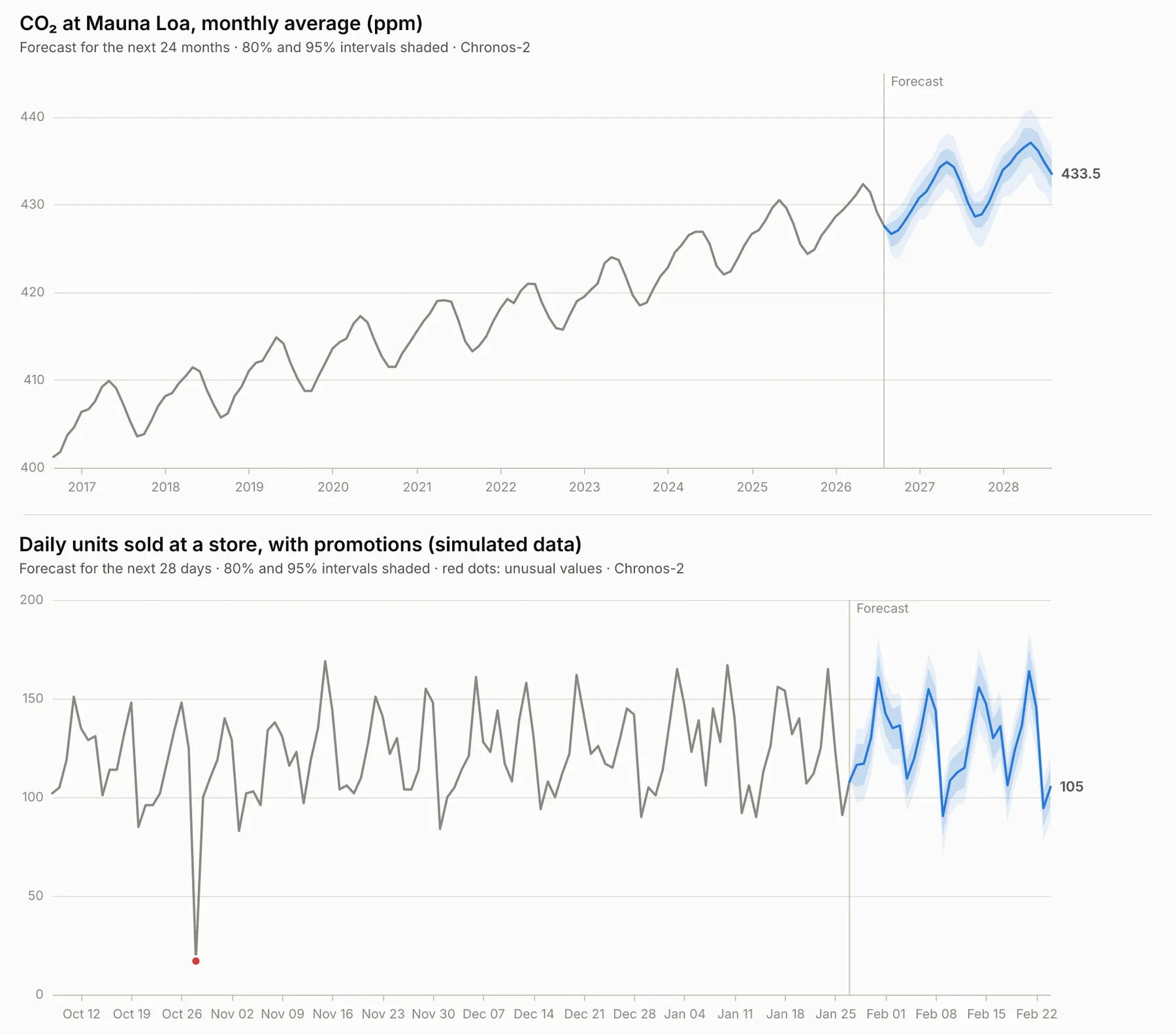
- Charts: the history, the forecast and its intervals in one clean chart per series, as PNG, SVG, PDF or an interactive HTML page.
- Tables and JSON: each forecast step as a row in the dataset's Forecast view and in
forecast.csv, and every forecast as JSON in the run'sOUTPUT, so therun-syncAPI endpoint answers with them directly.
Who it's for
- E-commerce and retail: demand and sales per product or store for stock and staffing, with promotions and holidays.
- Finance and analysts: revenue, costs, orders and KPIs by month or quarter, with a range instead of a single number.
- Marketing, SEO and product teams: web traffic, sign-ups, installs, search interest and ad spend.
- Operations and energy: call volumes, support tickets, deliveries, electricity load and sensor readings at hourly or 15-minute steps.
- AI agents and LLM apps: language models are poor at extrapolating numbers. An agent can send a list of values and get back a calibrated forecast, its accuracy and a summary to pass on.
- Apify users: forecast what your scrapers collect over time, such as prices, reviews per day, followers or search interest, straight from a run's dataset.
How to use it
- Put your data in Data rows, Values, Several series, CSV data, a Data file link or an Apify dataset. The form starts with five years of monthly CO₂ readings, so you can click Start right away to see a result.
- Set Steps to forecast if you like, or leave it for a sensible default (12 months, 30 days, 13 weeks...). Columns, time step and series are found by themselves; set them when the guess is wrong.
- Click Start. The Overview shows each series with its chart, summary and accuracy, and the Forecast view every forecast step with its intervals.
You can also run it through the Apify API, on a schedule, or from Make, n8n, Zapier and other integrations.
How-to examples
How to forecast monthly sales from a list of numbers
Result: the next 12 months, each with a forecast and 80% and 95% intervals, a chart, and a summary written in plain words, such as "Forecast for the next 12 months (...): 193 per month on average, 2,311 in total, 13.2% more than the previous 12 months... The history has a strong yearly pattern, highest in July and lowest in November." A backtest on the last months says how far off the model was on your own data.
How to forecast a CSV file or Google Sheet
Result: 24 months of CO₂ readings forecast from NOAA's record since 1958. The date column and the monthly step are found by themselves. A public Google Sheet link works the same way.
How to forecast demand for many products at once
Result: one item per product with 8 weekly forecasts, the 50% and 90% intervals and the 95% quantile, which is the stock level that covers demand 19 weeks in 20. crossLearning lets short, related series learn from each other. Up to 1,000 series fit in one run, or rows in long format with seriesFields such as store and product.
How to let an AI agent forecast numbers
Add this Actor to the Apify MCP server with https://mcp.apify.com/?tools=jumblemog/time-series-forecasting. Language models are poor at extrapolating numbers, so the agent sends the values and passes on the summary, the forecast and its accuracy instead of guessing.
FAQ
Do I need to train a model? No. Chronos-2 is a pretrained forecasting model, so it forecasts any series straight away, with no training or tuning.
How accurate is it? Every run says so for your data: the backtest forecasts the last part of the history from the part before it and reports the error (WAPE or MAPE) and how much better it did than repeating the last cycle.
Can it use promotions, prices or holidays? Yes. Columns in covariateFields help predict the values, including their planned future values, and holidays adds a country's or region's public holidays.
Can it find anomalies? Yes. detectAnomalies marks unusual values in the recent history.
Does it work with Zapier, Make or n8n? Yes. Call the Actor with its Apify app or an HTTP request on a schedule, and send the summary or the chart on.
Input
| Field | What it does |
|---|---|
data | Rows as JSON: [{"date": "2025-01", "sales": 1200}, ...], long or wide, or an object of dates and values ({"2025-01": 1200, ...}). |
values, dates, startDate, seriesName | One series as a list of numbers, oldest first, with a date for each value or the date of the first one (2025-01-01 daily, 2025-01 monthly, 2025-Q1 quarterly, 2025 yearly). Without dates the forecast counts steps. |
series | Named series, each with its own values and dates: [{"name": "Store A", "values": [...], "startDate": "2025-01-01", "frequency": "day"}]. A series can carry covariates, whose lists may run into the future. |
csv, dataUrl, datasetId | CSV or TSV text with a header row; a link to a public CSV, TSV, JSON or Excel (.xlsx) file, Google Sheet or GitHub file (up to 30 MB); or an Apify dataset (up to 500,000 items, including lists of dated items inside each item). |
dateField, valueFields, seriesFields, covariateFields | The date column, the columns to forecast, the columns that tell series apart (store, product, ticker) and the columns that help predict the values (price, promotion). Found by themselves except covariates; nested fields like stats.views work. |
frequency | auto (default), minute, 5min, 15min, 30min, hour, day, business day, week, month, quarter or year. A coarser step than the data's adds values up or averages them per step. |
aggregate | How values in the same step combine: auto, sum, mean, median, min, max, first, last, or count to forecast the number of rows per step. |
fillMissing | Steps without data: auto (left as gaps, or 0 for counts and summed events), leave, zero, previous or interpolate. |
horizon | Steps to forecast, up to 1,024. Default: the future rows the data lists, or 48 hours, 30 days, 22 business days, 13 weeks, 12 months, 8 quarters or 5 years. |
intervals, quantiles | Prediction intervals in percent ([80, 95]), and extra quantiles between 0 and 1 ([0.05, 0.9]). |
holidays | A country or region code whose public holidays the model gets as a known covariate, for daily, business-day, weekly and hourly data. |
nonNegative | auto (no negative forecasts when the history has none), yes or no. |
crossLearning, contextLength | Let the model learn across all series of the run (for short related series), and limit how much recent history it reads (up to 8,192 steps). |
backtest, backtestWindows | The accuracy check (on by default) and how many past windows it tests (3, or 1 for runs of more than 100 series). |
detectAnomalies | Look for unusual values in the last 512 steps of each history. |
chart, chartFormats, chartTheme, chartHistory, title | Charts on or off, png (default), svg, pdf and html, light or dark, how many past steps to show, and the first chart's title. |
maxCharts, maxSeries | The most charts (25) and series (1,000; up to 5,000) per run. |
The quickest forecast, a list of monthly values (made-up numbers):
A CSV file from a link, choosing the column to forecast (NOAA's monthly CO₂ record since 1958):
Daily sales per store and product in long format, with planned promotions and Bavarian public holidays (shortened: real data would have months of rows). The rows for the coming days have no units, only the promotions, and the forecast covers those days:
A public Google Sheet with a date column and one column per product, 13 weeks ahead:
The items of a scraper run, such as one row per product and day with a price, forecasting the price of each product:
Several series at once, with the interval levels and quantiles a stock planner needs:
Output
Each series becomes one dataset item. This is the item for the first example above, shortened to two forecast steps:
forecasthas one row per step with the median forecast, the interval bounds (lower80,upper80...) and any extra quantiles (q95). Weekly, monthly, quarterly and yearly steps also get aperiodlabel such as2026-W03,2026-01or2026-Q1.backtestErrorPctis the headline error of the backtest: WAPE for amounts that add up (sales, orders, visits) or when values are near zero, otherwise MAPE.improvementVsNaivePctis how much smaller the error was than repeating the last cycle; below zero means the simple rule did better on that window, which happens with short or erratic histories.unusualValueslists each spike or drop with its date, value, expected value and range, a score andaboveorbelow.covariatesnames the columns used, and which of them had known future values.- Series that can't be forecast have
"status": "failed"and anerrorthat says why. They are never charged.
The run's key-value store also has forecast.csv (every step of every series, ready for Excel or Google Sheets), the charts, and OUTPUT with the forecasts of up to 300 series as JSON.
Accuracy
Chronos-2 has no knowledge of your business, so a forecast is only as good as the history and covariates it gets. That's why every forecast comes with a backtest. Some results from our tests:
- NOAA's Mauna Loa CO₂ record (monthly since 1958, 24 months ahead): an average error of 0.1% (MAPE) over three past two-year windows, 86% less error than repeating the previous year, and the 80% interval held 97% of the actual values.
- Simulated daily sales of two stores with a weekly pattern, promotions, holidays and injected data errors (28 days ahead): an average error of about 6% (WAPE), 41% to 48% less error than repeating the last week. Giving the model the promotion calendar as a covariate cut the error from 11–13% to 6–7% on promotion-heavy series, and the injected spikes and drop were the only values flagged as unusual. These numbers come from simulated data, so treat them as an illustration.
- Short histories (less than two cycles, such as a year of monthly data) are harder for any method: expect larger errors and wider intervals, and read the backtest.
Pricing
You pay per series forecast, at the price shown on this page, with its intervals, backtest, summary and chart included. Series that can't be read or forecast are never charged. If you set a maximum cost per run, the Actor stops before the series that wouldn't fit.
Speed
A forecast through the run-sync API endpoint usually answers in 8 to 20 seconds from the request, most of it the run starting up and loading the model; the forecast itself takes about a second. At the default 2 GB of memory, 300 daily series with their backtests took 84 seconds in all. Apify gives one CPU core per 4 GB, so more memory speeds up big batches, while 2 GB of memory is enough for most runs.
Tips and limits
- Give it enough history: at least two full cycles of the pattern you care about (two years of monthly data for a yearly pattern, a few weeks of daily data for a weekly one). The model reads up to the last 8,192 steps.
- Future rows: rows with dates after the last value and the value left empty set the horizon and carry the known future covariates. A covariate without future values still helps the model through its past.
- Amounts or levels: amounts that add up (sales, orders, visits) are summed when steps are combined, and levels (prices, temperatures, rates) averaged, guessed from the column name. Set
aggregatewhen the guess is wrong. - Dates like 03/04/2025 are read month first unless the data shows otherwise (a 13 or higher in the first place, or dots), and a note says so. ISO dates (
2025-04-03) are never ambiguous. - Time zones are dropped and the local time kept, so hourly data across a daylight saving change stays on its clock.
- Limits: 500,000 rows or dataset items, files up to 30 MB, 5,000 series per run, 100,000 steps per series (the most recent are kept) and 1,024 forecast steps.
- Datasets: Apify lets this Actor read only the dataset picked in its Apify dataset field.
- Data file links: CSV, TSV, JSON and Excel files, GitHub file links, Gist links and Google Sheets links (shared as "Anyone with the link" or published to the web). Every site's robots.txt is checked first, and its crawl delay kept.
For AI agents and developers
This Actor works with the Apify MCP server, so AI agents can call it as a tool: send numbers in values with a startDate (or rows in data), and read summary, forecast and backtestErrorPct from the result. A direct API call that waits for the forecast:
run-sync instead returns the run's OUTPUT: the status, the number of series forecast, a link to forecast.csv and each series' summary, forecast, backtest and chart link as JSON.
In Python, with the apify-client package:
Credits
- Forecasting model: Chronos-2 by Amazon (Apache-2.0), run with PyTorch (BSD-3-Clause) and Hugging Face Transformers (Apache-2.0).
- Data handling: pandas and NumPy (BSD-3-Clause), holidays (MIT) and openpyxl (MIT).
- Charts: Vega-Lite (BSD-3-Clause) through vl-convert (BSD-3-Clause), with the Inter font (SIL Open Font License).
- Example data: the Mauna Loa monthly CO₂ record of NOAA's Global Monitoring Laboratory, as packaged by datasets/co2-ppm (ODC Public Domain Dedication and License). The store sales in the picture are simulated.


