

Zillow Scraper: Listings, Prices & Zestimates
Pricing
from $1.40 / 1,000 listings
Zillow Scraper: Listings, Prices & Zestimates
Zillow scraper for real estate listings: paste a Zillow search and get one record per home with price, Zestimate, beds, baths, living area, address, status, broker and pictures. Monitor a search on a schedule for new listings, price changes and removals.
Pricing
from $1.40 / 1,000 listings
Rating
0.0
(0)
Developer

Kaleidoscope Labs
Maintained by CommunityActor stats
1
Bookmarked
2
Total users
1
Monthly active users
6 days ago
Last modified
Categories
Features
Share
What can this Zillow scraper do?
Scrape Zillow listings from any search page: paste a Zillow search and get one record per home, with its price, Zestimate, beds, baths, living area, address, map point, status, broker and pictures.

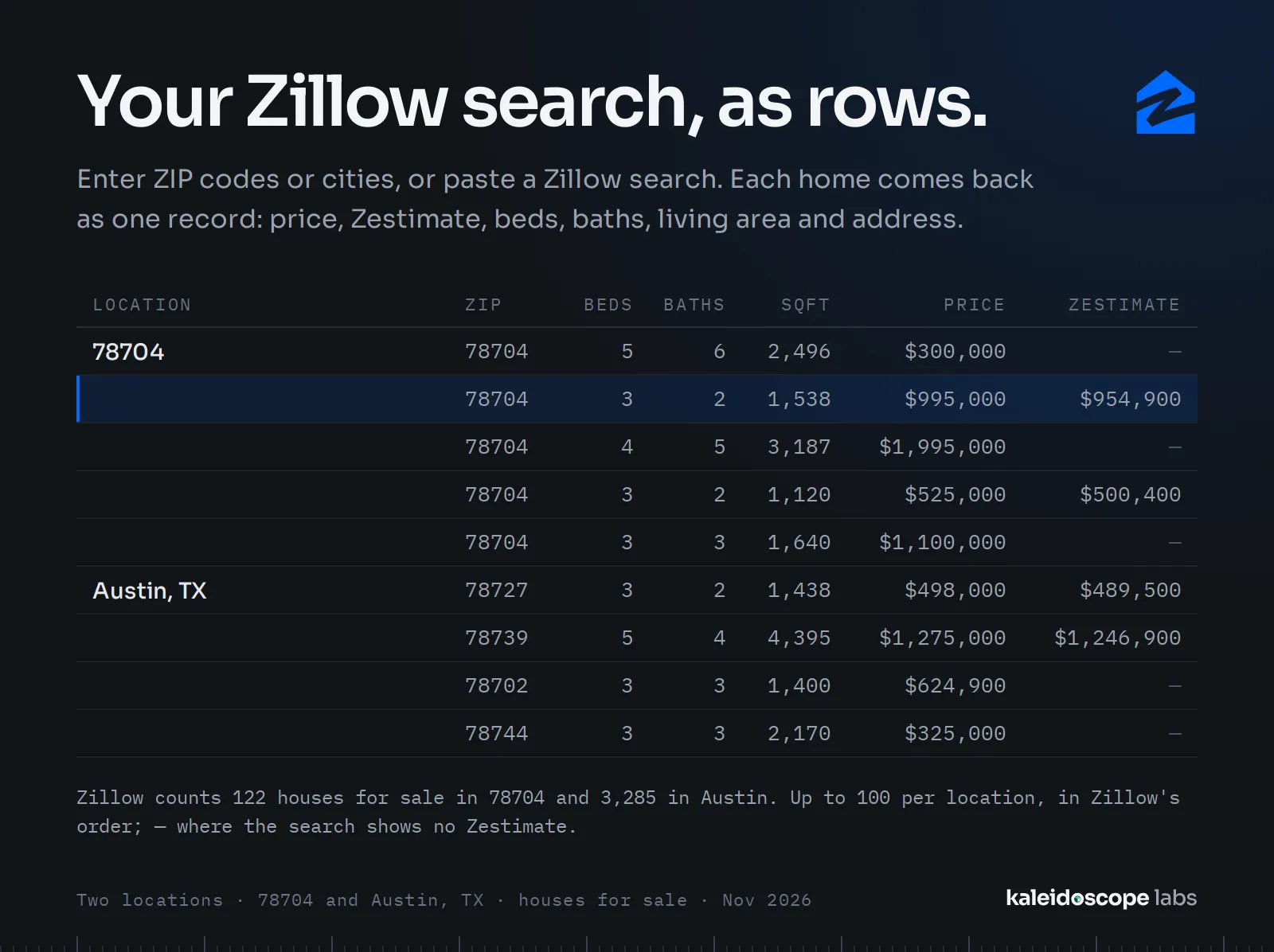
- 🏠 Listings: the homes of the Zillow searches you paste, for sale or sold: a city, a ZIP code or a neighborhood, with the filters Zillow writes into the address.
- 📍 Places without an address: enter ZIP codes or cities, for sale or sold, and one home type.
- 💲 Prices: the price, the last price change, the Zestimate, the rent Zestimate and the tax assessed value, where the search shows them.
- 🔔 Monitor: on a schedule, each run stores only the listings new since the last one, or also price and status changes and removed listings.
- 🧾 A summary you can check: each run says, per search, how many results Zillow counts and how many listings were stored.
The prefilled input stores the homes among the 20 newest results of one Austin ZIP code.
What data can you get from Zillow?
One record per home. The Output tab's schema describes every field.
| Data | Field | Listings with a value |
|---|---|---|
| Zillow's property ID and the listing's link | zpid, url | 100% |
| Status, how it is offered, the kind of home | status, statusText, marketingStatus, homeType | 100% |
| The search it came from and its place in the results | searchUrl, position | 100% |
| Price, last price change and its date | price, priceChange, priceChangedAt | price 100%, a change 46% |
| For a sold home: when, and the price where Zillow shows one | soldAt, soldPrice | sold homes: date 100%, price 75% |
| Zestimate, rent Zestimate, tax assessed value | zestimate, rentZestimate, taxAssessedValue | 57%, 61%, 86% |
| Bedrooms, bathrooms, living area (sqft), lot | bedrooms, bathrooms, livingArea, lotArea | 97%, 98%, 96%, 87% |
| Address in parts, point on the map | address, lat, lon | 100%, 99.7% |
| Broker, builder, next open house, days on Zillow | brokerName, builderName, openHouse, daysOnZillow | 72%, 4%, 1.7%, 97% |
| The listing's kinds (by owner, foreclosure, auction…) | flags, showcase, zillowOwned | 100% |
| Pictures | pictures | 100% |
| What the record lacks, and why | missing | where a part is missing |
| In a monitor: why it is in the results, what it was before | change, previous, priceHistory | in a monitor |
Shares counted on 135,394 homes for sale from 199 cities in November 2026; the sold row on 322 sold homes from three places (a sale price depends on the state). The values are Zillow's, as its search pages show them; nothing is estimated.
What can you use Zillow data for?
- Real estate market research: every listing of a ZIP code with price, Zestimate and days on Zillow.
- New-listing alerts: a daily monitor of a search's newest listings, sent by e-mail, webhook or to a CRM.
- Track price drops and removals: each price or status change with what it was before.
- Lead generation: the brokerages behind an area's listings.
How to use Zillow Scraper
- Create a free Apify account, or sign in.
- On www.zillow.com, open the search you want and copy the address bar, such as
https://www.zillow.com/austin-tx/sold/. - Paste it into Search URLs (one per line) and set Listings per search, or enter ZIP codes or cities under Locations.
- Click Start. Export the records as JSON, CSV or Excel, or read them from the API.
How much does it cost to scrape Zillow?
| Event | Price | When |
|---|---|---|
| Listing | $0.002 each | each listing stored |
| Removed listing | $0.002 each | each listing a monitor reports as removed |
| Search check | $0.002 each | each search a monitoring run reads, new listings or not |
| Example | Cost |
|---|---|
| 1,000 listings | $2.00 |
| The prefilled input (up to 20 listings) | up to $0.04 |
| A monitor's run of one search that finds 12 new listings and 1 removed | $0.028 |
| A monitor's run of one search that finds nothing new | $0.002 |
Prices shown are for Apify's free plan; on paid plans they are up to 30% lower. The platform also charges $0.00005 when a run starts. Apify's free plan gives you $5 of usage a month, which covers about 2,500 listings. Not charged: a page that could not be read, a result that is not a single home, a search Zillow does not have, and a listing a monitor finds unchanged.
Input recipes
The newest listings of a ZIP code
Listings per search is how many of each search's first results to store; 0 stores all its pages show. A run reads at most 200 searches.
ZIP codes or cities, without an address
Locations takes a five-digit ZIP code or a city with its state's two letters, one per line. Home type (houses, condos, townhomes, multiFamily, land, manufactured) does not go with "sold". Both settings apply to Locations only.
Only new listings, every morning
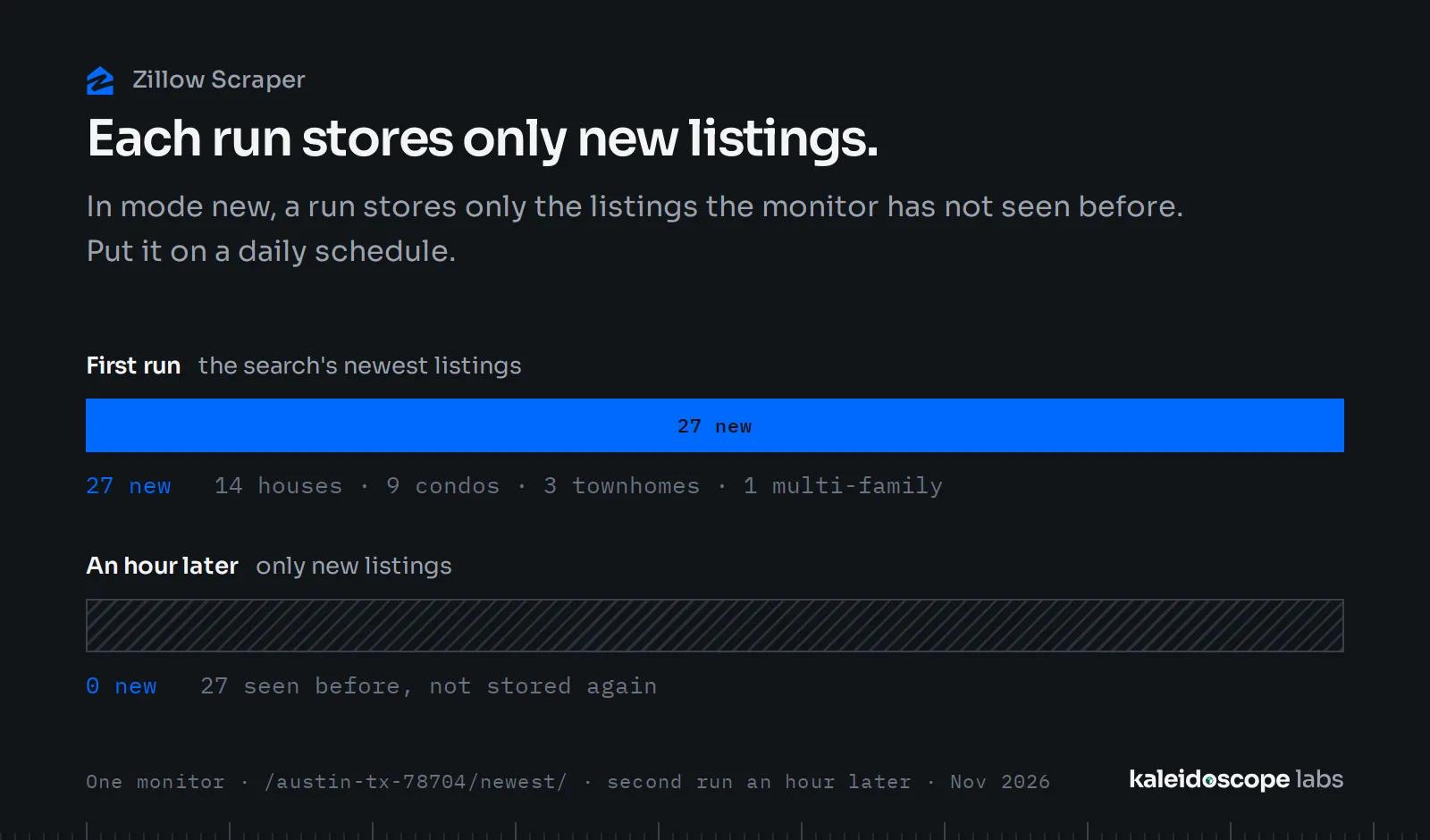
Put it on a daily schedule. mode is all, new or changes; see Monitoring below.
Output example
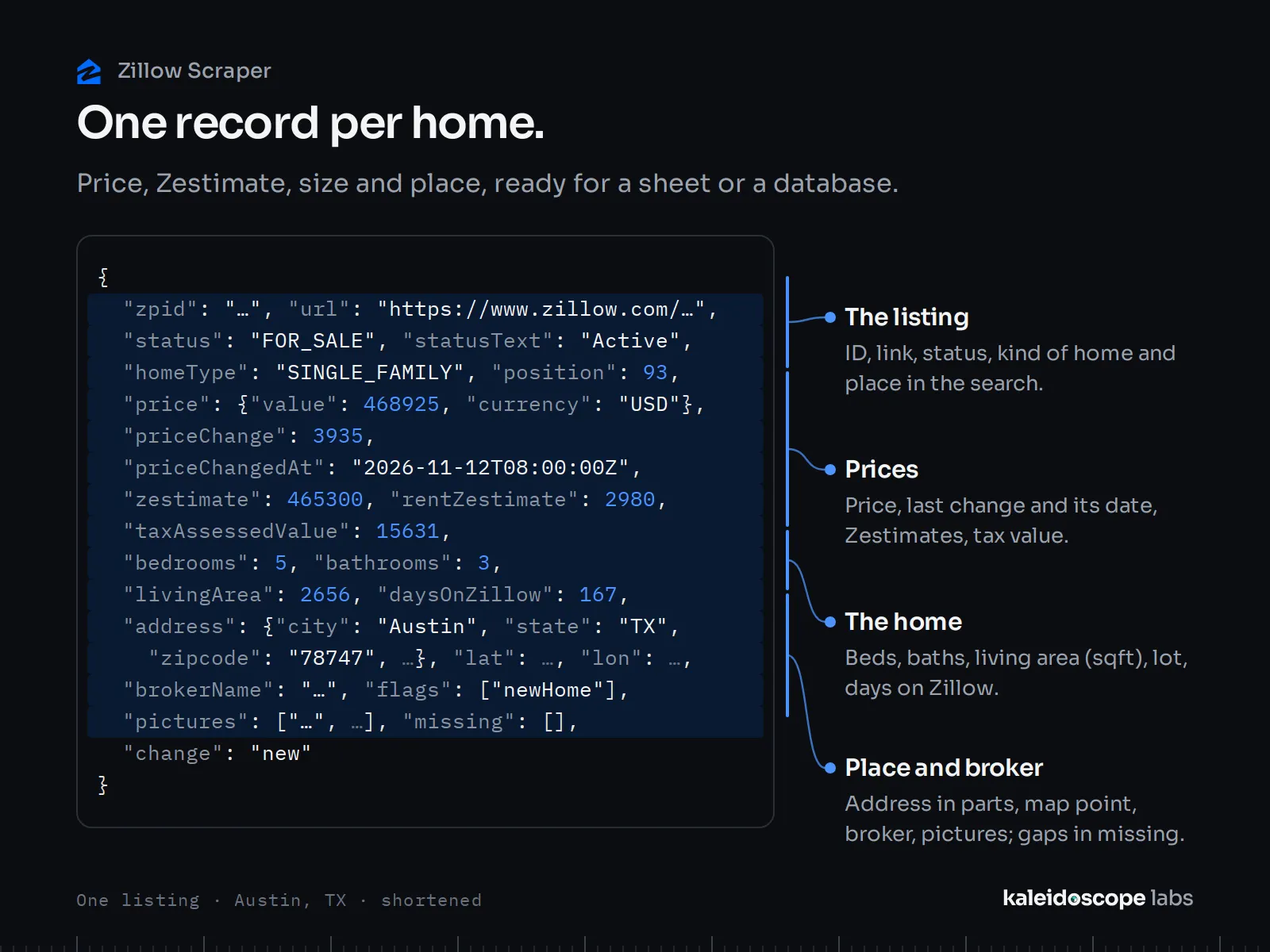
A listing from a monitor's first run of https://www.zillow.com/austin-tx/ (one picture of its list shown):
In mode all, a record has no change. Each run also writes RUN_SUMMARY to its key-value store: per search, the results Zillow counts (listed), shows (shown) and the run stored (stored), and whether the run is complete.
Monitoring: new, changed and removed listings
Choose What a run stores and put the run on a schedule. Each run then stores only what changed since the monitor's last run, and charges one search check per search it reads.
- New listings (
new): a listing the monitor has not seen among the search's first results, up to Listings per search. Use the search's newest form. - New, changed and removed listings (
changes): also a listing whose price or status changed, withchange"changed",previous(the price and status before) andpriceHistory(up to 20 prices the monitor has seen, each with itssince). - Removed listings: stored with
change"removed", the link and the last price and status seen. Told only when two runs in a row read the whole search (Listings per search0, at most 820 results) without it. On a filtered search such as/newest/, a home that leaves the list is reported as removed even when still for sale: for removals, monitor the place itself. - Start from now (
startFromNow): the first run records the current listings without storing them. - State: a key-value store of your account named
zillow-monitor, one record per search and Monitor name; delete it to start afresh. A listing unseen for 30 days leaves it.
Integrations and API
Make, Zapier, n8n, Slack, Google Sheets, webhooks, the Apify API and its JavaScript and Python clients. Run a recipe and get its records in one call (your Apify API key in APIFY_TOKEN):
Building on this Actor
- Output stability: fields are added, never renamed or removed without a new major version; every change is in the changelog.
- What a run's end means: a finished run read everything it was given, or names what it could not read in its closing message and
RUN_SUMMARY(ended,complete). An input the Actor cannot read ends SUCCEEDED with nothing charged, andRUN_SUMMARYhasinputError.
missing reason | Meaning |
|---|---|
| notGiven | The page does not give this part, such as a price on many sold homes |
| unexpectedValue | Zillow gave the value in a form the Actor does not read |
inputError | Meaning |
|---|---|
| noQuery | No search was given |
| noReadableLine | No line is a Zillow search or place this Actor reads |
| invalidSetting | A setting is out of range, or two settings do not go together (sold and a home type) |
For AI agents
AI agents can call it through the Apify MCP server (setup prompt for your agent). Connect an MCP client to https://mcp.apify.com?tools=kaleidoscopelabs/zillow-scraper with your Apify API key.
- Minimal input:
{"searchUrls": ["<a search address from www.zillow.com>"]}stores up to 100 listings, or{"locations": ["78704"]}for a ZIP code. - Fields to read:
price.value,zestimate,bedrooms,bathrooms,livingArea,address,status,url. - What to know: an empty dataset with
inputErrorinRUN_SUMMARYis a wrong input; in a monitor, an empty dataset means nothing new.
Tips
- Split large searches by ZIP code, neighborhood, home type or price limit: Zillow shows at most 820 results of a search.
- One schedule per monitor: two runs of one monitor at once both store what is new. Give two monitors on one search each a Monitor name.
FAQ
Is it legal to scrape Zillow?
This Actor reads Zillow's public search pages signed out, as any visitor sees them, and never logs in. Whether your use is allowed depends on what you do with the data and where you are; ask a lawyer when in doubt.
Does it collect personal data?
It reads public listings, not people. Some fields can carry personal data: address, and brokerName where a brokerage carries an agent's name. If you store or use such details, data-protection law such as the GDPR or CCPA may apply to you; ask a lawyer when in doubt.
Why did I get fewer listings than Zillow counts?
Zillow shows at most 20 pages of a search, 820 results; the log and summary say so (largerThanShown). A result that is not a single home (a builder's community) is not stored.
Which Zillow addresses can I paste?
A place's page with at most one filter in the path: /austin-tx/, /austin-tx-78704/, /austin-tx/sold/, /austin-tx/newest/, /austin-tx/houses/, /austin-tx/under-400000/. A line with two filters, or one for beds, baths or a sort, is skipped rather than read as the whole place, and the log says why.
What happens when Zillow does not answer?
The run tries a page again a few times. A page it still cannot read is named in RUN_SUMMARY and not charged; run again later.
Limits and what this Actor does not do
- Locations search by ZIP code or city, for sale or sold, and one home type; not by beds, baths, price range or sort.
- A search address with a map or filter state (searchQueryState after a question mark) is not read yet.
- Rentals, buildings and a home's own page (description, agent, price history) are not read yet.
- A home two searches of a run both list is stored and charged once.
- Nothing behind a sign-in. A monitor's price history starts with its first run.
Support and feedback
Open an issue on the Issues tab for a bug or a feature you need. If the Actor saves you time, a review in Apify Store helps others find it.
Other Actors
| Actor | What it gives |
|---|---|
| ImmoScout24 Scraper | Listings of ImmobilienScout24 searches in Germany, with details and a monitor of new, changed and removed listings |
Zillow Scraper is an independent tool, not affiliated with, endorsed by or sponsored by Zillow or its owners. Zillow and Zestimate are trademarks of their respective owners.


