

EmailReach Email And Social Scraping
Pricing
$3.00 / 1,000 results
EmailReach Email And Social Scraping
Scrapes emails and social profiles from any website using emailreach.io, so sales teams, recruiters, and marketers can build contact lists without manual research.
Pricing
$3.00 / 1,000 results
Rating
0.0
(0)
Developer

Kawsar
Maintained by CommunityActor stats
0
Bookmarked
3
Total users
2
Monthly active users
4 months ago
Last modified
Categories
Share
EmailReach Email and Social Scraping: Find Business Emails and Social Profiles from Any Website
You have a list of companies. You don't have their emails.
You know who you want to reach. The companies are there, the websites are there, but getting from a company website to an actual email address takes about 10 minutes per company when you do it by hand. Multiply that by 500 prospects and you've burned two full work weeks on copy-paste research before a single email goes out.
Your pipeline sits empty the whole time.
Most outreach doesn't fail because of a bad pitch. It fails because you never found the right person to send it to.
Where the data comes from
EmailReach crawls websites and pulls every email address and social media profile it finds. This Apify actor runs that process automatically across any list of domains you give it, one at a time, in sequence, until it's done.
Sales teams use it for cold outreach. Recruiters use it to track down hiring managers. PR agencies use it to build journalist lists without spending a week at a keyboard. If your job involves finding business contact info at any real volume, manual lookup just doesn't work.
How to run it
Add your domains to the urls field, one per line. Ten websites or a thousand, the setup is the same.
The actor calls the EmailReach API for each domain. EmailReach crawls the live site and extracts every email and social profile it finds, not from a cached database, but from the page as it exists right now. When it's done, results go into the Apify dataset. Download as CSV or JSON, pipe it to a CRM, or connect it to Google Sheets or Zapier.
What you get for each domain
- Primary email (the most likely contact for the business)
- All email addresses found across the site
- First Facebook page URL, or null
- First LinkedIn company or personal profile, or null
- First Twitter/X profile, or null
- First Instagram profile, or null
The cost of doing this manually
83 hours. That's what 500 companies looks like at 10 minutes each.
And that's before accounting for the copy-paste mistakes, the contacts who left six months ago, the emails buried on a page you didn't find. Manual research at this scale is slow and inaccurate. The teams that hit their outreach targets are usually the ones who stopped doing it manually first.
What teams have done with it
Case study 1: SaaS company builds a 2,000-lead list in 30 minutes
A B2B SaaS startup wanted to reach out to e-commerce brands with under 50 employees. Their growth team compiled a list of 500 brand websites from a niche directory and ran them through this actor. Within 30 minutes, they had primary contact emails and LinkedIn pages for 1,847 of those brands. They loaded the results directly into their CRM and launched a cold email sequence the same day, booking 14 demos in the first week.
Case study 2: Recruitment agency enriches 3,000 candidate records
A recruitment firm had company names and websites for 3,000 companies in their ATS but no contact emails. They exported the domain list, ran it through the actor in bulk, and recovered verified emails for 2,600 records. They also got LinkedIn company pages, which let their team find hiring managers directly. Total time saved: roughly 40 hours of manual research.
Case study 3: PR firm builds a journalist database for a product launch
A PR agency needed direct contact emails for 200 tech journalists and bloggers before a product launch. They ran the publication websites through the actor and got email addresses and Twitter profiles for 178 of them. With Twitter handles in hand, they could cross-reference public bios to find the right beat reporter at each outlet.
Case study 4: Affiliate manager sources partnership leads at scale
An affiliate program manager needed to reach 1,000 niche bloggers. They scraped blog URLs from several directories and ran them through the actor overnight using Apify scheduling. Next morning: a spreadsheet with emails, LinkedIn profiles, and Instagram accounts ready to go.
Use cases
- Sales prospecting: build targeted email lists from company websites, partner directories, and niche blogs without touching a spreadsheet manually
- CRM enrichment: run a bulk domain list through the extractor to fill in contact emails and social handles you're missing
- Recruitment outreach: get direct emails and LinkedIn profiles from company websites before you reach out
- Agency client research: pull contact info before writing a cold pitch, so you're not guessing who to address it to
- PR and media outreach: scrape editorial emails from news sites and blogs to build a journalist database you actually own
- Affiliate and partnership outreach: find business emails from niche directories to pitch collaboration
Input
| Parameter | Type | Default | Description |
|---|---|---|---|
urls | array of strings | required | One or more website URLs to extract contacts from. Add one per line. Works for single domains or bulk lists. |
maxItems | integer | 100 | Maximum number of URLs to process per run. Max: 1000. |
requestTimeoutSecs | integer | 90 | How long to wait for the EmailReach API per URL. EmailReach crawls the target site, so 60-90 seconds is usually right. |
Example input
Output
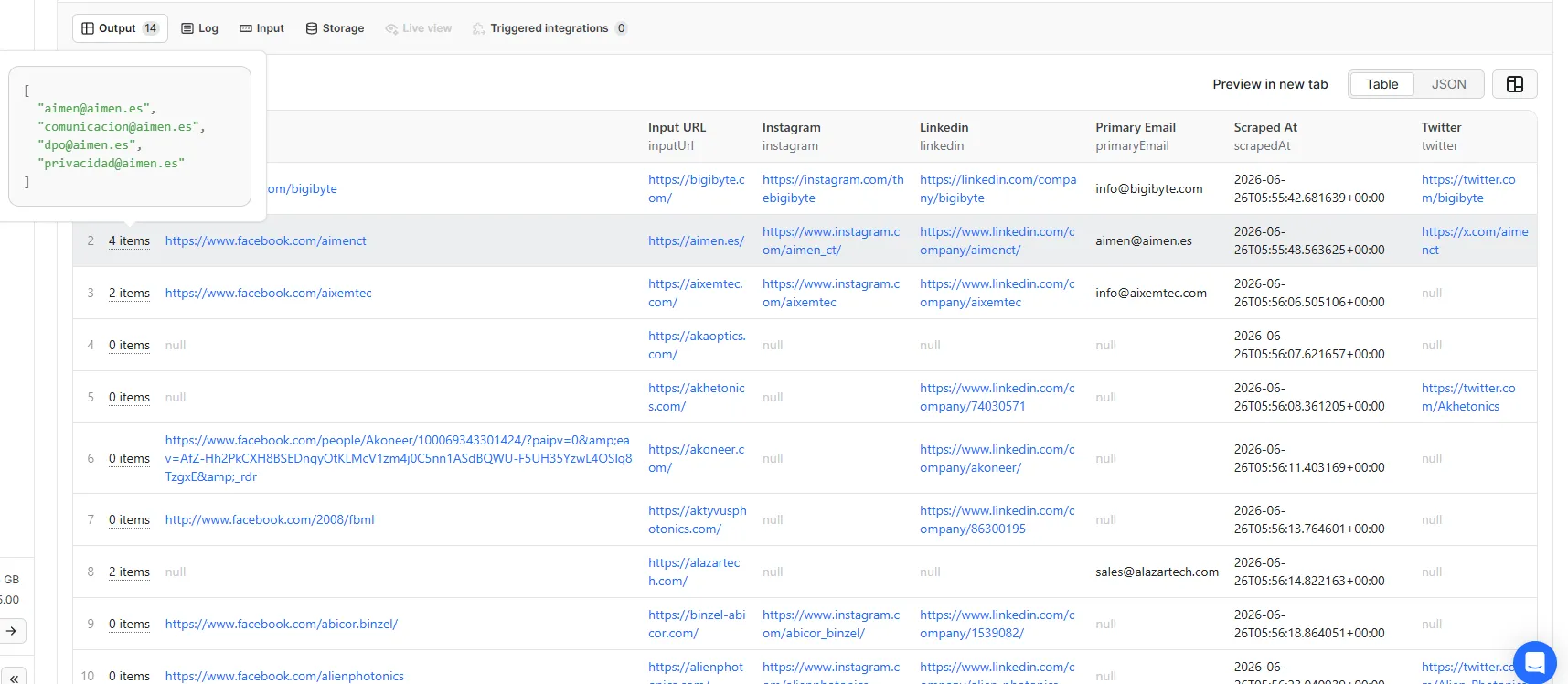
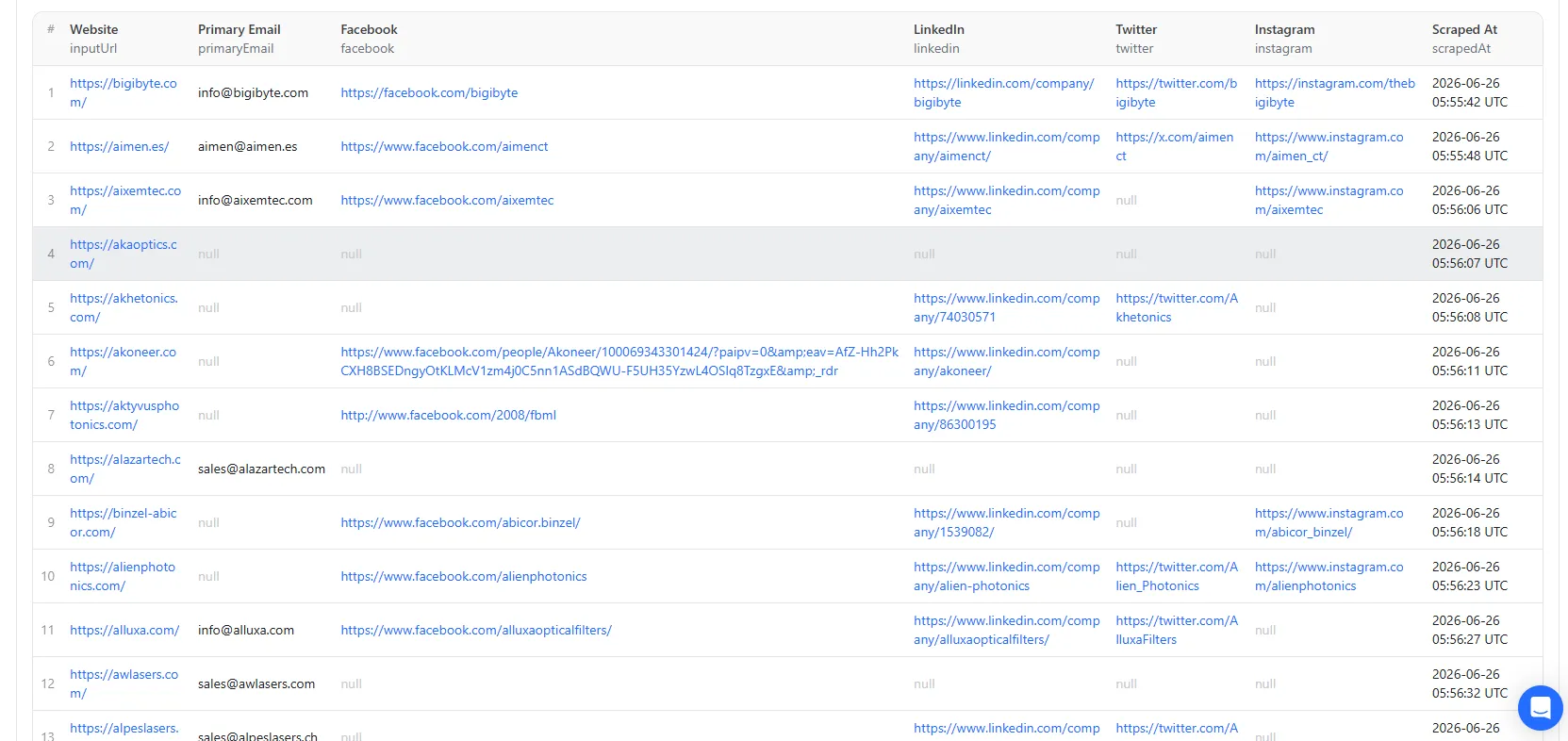
One record per URL goes into the Apify dataset. Here's what a result looks like:
Social fields come back as null if nothing was found. If an extraction fails for a URL, you'll see an error field on that record instead.
| Field | Type | Description |
|---|---|---|
inputUrl | string | The website URL submitted |
primaryEmail | string | The primary contact email for the domain |
emails | array | All email addresses found on the site |
facebook | string | First Facebook URL found, or null |
linkedin | string | First LinkedIn URL found, or null |
twitter | string | First Twitter/X URL found, or null |
instagram | string | First Instagram URL found, or null |
scrapedAt | string | ISO 8601 timestamp |
error | string | Error message if the extraction failed |
Sample results from the Apify platform
How it works
- You submit a list of URLs.
- For each one, the actor calls the EmailReach API, which crawls the site and pulls emails and social links.
- The actor structures the response: primary email, full email list, and the first social profile for each platform.
- Results go into the Apify dataset. Export as CSV or JSON, or connect them to another tool.
FAQ
Can I process hundreds of domains at once?
Yes. Add them all to the urls field, set maxItems to whatever number you need, and run it. Duplicates are filtered out automatically.
How long does each URL take?
EmailReach crawls the live site before it responds, so expect somewhere between 10 and 60 seconds per domain. Larger sites take longer. Setting requestTimeoutSecs to 90 covers most cases.
What if a site has no emails?
You still get a record: primaryEmail will be null and emails will be empty. Easy to filter those out in whatever tool you're importing into.
What if an extraction fails?
The actor logs it, writes a record with the error field filled in, and moves to the next URL. A single failure won't stop the run.
Can I run this on a schedule? Yes. Set up a schedule in Apify and point it at your list of domains. Weekly runs work well for keeping contact data from going stale.
Can I push results to Google Sheets or a CRM? Apify integrations cover that. Google Sheets, Zapier, Make, Airtable, HubSpot all connect without custom code.
Integrations
Connect this actor with other tools using Apify integrations. Works with Make, Zapier, Slack, Airbyte, GitHub, Google Sheets, Google Drive, and more. You can also set up webhooks to trigger actions downstream as soon as results come in.


