

Lenovo Warranty Lookup: Bulk Serial Number Check
Pricing
$5.00 / 1,000 found warranty results
Lenovo Warranty Lookup: Bulk Serial Number Check
Get product, warranty, expiration, upgrade, EOS, and specification data from Lenovo serial numbers. Unknown serials and source errors stay visible and free; pay only for found devices.
Pricing
$5.00 / 1,000 found warranty results
Rating
0.0
(0)
Developer

KazKN
Maintained by CommunityActor stats
0
Bookmarked
2
Total users
1
Monthly active users
6 days ago
Last modified
Categories
Features
Share
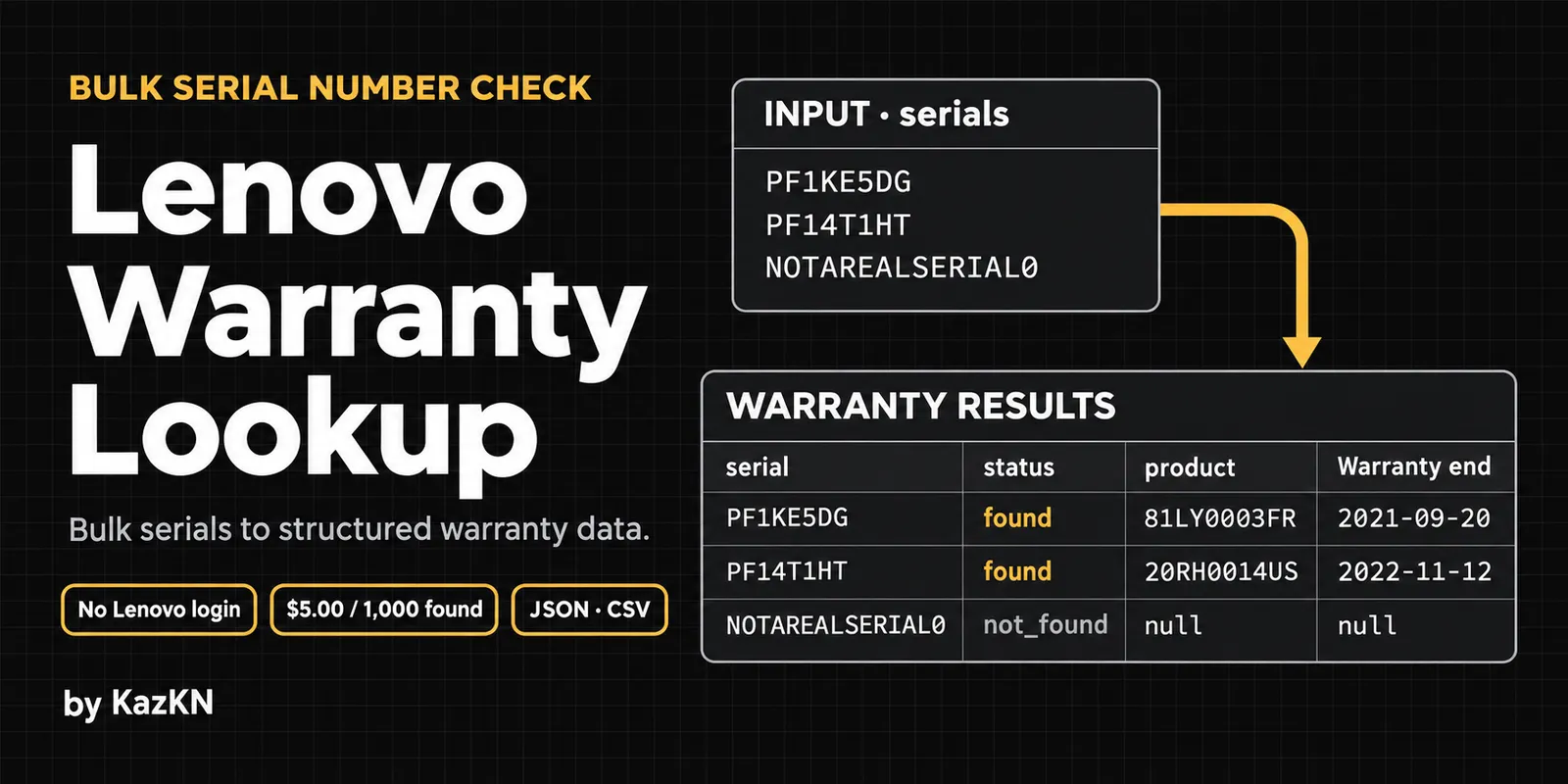
Lenovo warranty lookup turns a list of serial numbers into structured product, warranty, expiration, upgrade, EOS, and specification rows.
$5.00 per 1,000 found devices. Unknown serials, invalid entries, and source errors are free. Built for MSPs, ITAD providers, refurbishers, resellers, and IT asset teams.
⚡ At a glance
| Item | Details |
|---|---|
| You give | Lenovo serial numbers |
| You get | 31 fields per device: identity, coverage, specifications, diagnostics |
| Price | $0.005 per found device; $5.00 per 1,000. Other rows free; platform usage included |
| Speed | 3 serials in 2.016 seconds, control run 2026-11-19 |
| Login needed | No Lenovo login; Apify token for API calls |
| Export formats | JSON, CSV, Excel, XML |
🤖 Copy-paste for your AI agent
Run the Actor and return dataset items in one request:
Connect the Actor to an MCP-compatible agent:
Paste this request to your agent:
Use this MCP URL with an MCP-compatible agent.
👀 What you get: a real run
Run TRlzbP6e46CyL0hJK (build 0.1.4), 2026-11-19: 3 rows in 2.016 seconds, with 2 found, 1 not_found, and 0 blocked rows. Result charges: $0.01. Measured platform usage: $0.00020773, included in the price.
| Input serial | Status | Product ID | Warranty end | Charge |
|---|---|---|---|---|
PF1KE5DG | found | 81LY0003FR | 2021-09-20 | $0.005 |
PF14T1HT | found | 20RH0014US | 2022-11-12 | $0.005 |
NOTAREALSERIAL0 | not_found | null | null | $0.00 |
PF1KE5DG: product81LY0003FR, shipped to FR on 2019-06-28; warranty ended 2021-09-20; EOS 2025-06-14.
🚀 Quick start (3 steps, no code)
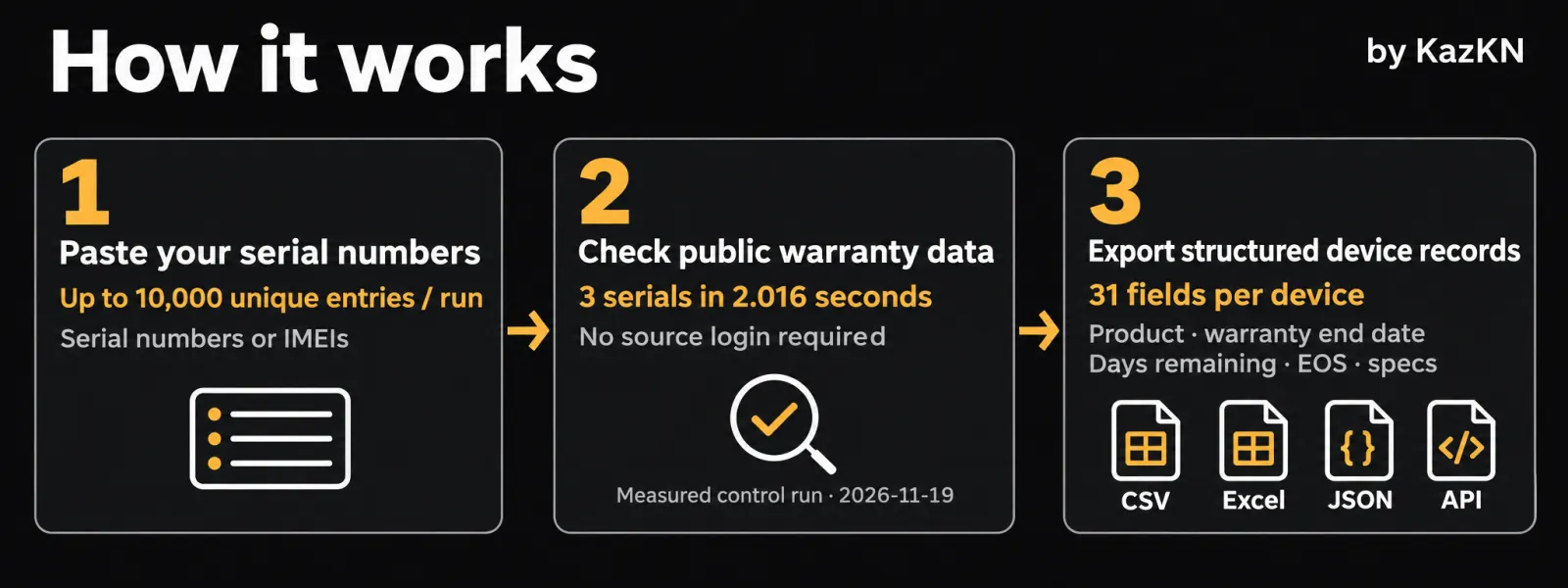
- Open Lenovo Warranty Lookup on Apify and start a run.
- Paste your Serial numbers, set Maximum serial numbers, and select Start.
- Open Output, then download CSV, Excel, or JSON.
Tip: Save the input as an Apify task with a schedule. Compare checkedAt snapshots and route renewals with expiresWithin90Days.
🎯 Who uses it and for what
| Who | What they do with it | Example |
|---|---|---|
| MSPs and IT operations | Fleet renewal and support audits | End date, days left, 90-day flag |
| ITAD and refurbishers | Enrich and grade incoming devices | Product, ship date, warranties, specs |
| Resellers | Enrich device listings | Product, image, support URL |
| IT asset managers | Refresh CMDB records and track EOS | Status, coverage, EOS, checkedAt |
⚖️ What the Actor handles
| Capability | Implementation |
|---|---|
| Data | 31 structured fields per processed serial |
| Login or key | Apify token for API calls; no Lenovo login |
| Bulk volume | Up to 10,000 unique entries per run |
| Export | JSON, CSV, Excel, XML |
| Retries | Up to 3 datacenter attempts, then up to 2 residential attempts when enabled |
| Price | $5.00 per 1,000 found devices; other rows free |
💰 Pricing
Only found rows trigger the $0.005 result event: $5.00 per 1,000 found devices. Platform usage is included.
| Found devices | Price per found device | Total |
|---|---|---|
| 100 | $0.005 | $0.50 |
| 1,000 | $0.005 | $5.00 |
| 10,000 | $0.005 | $50.00 |
not_found, invalid_input, and source_error rows are free.
📥 Input
| Field | Required | What it does | Example |
|---|---|---|---|
serials | Yes | Serial numbers, normalized and deduplicated. | ["PF1KE5DG", "PF14T1HT"] |
maxItems | No | Unique-entry cap. Default 100; maximum 10,000. | 500 |
country | No | Two-letter code for Lenovo and support URLs. Default us. | us |
language | No | Two-letter code for Lenovo and support URLs. Default en. | en |
useResidentialFallback | No | Up to two residential attempts after datacenter retries. Default true. | true |
maxConcurrency | No | Parallel lookups from 1 to 8. Default 3. | 3 |
requestTimeoutSecs | No | HTTP attempt timeout from 5 to 60 seconds. Default 30. | 30 |
Full example input:
📤 Output
Every processed serial produces one row with the same 31 fields. Product values are null for non-found rows, while collection fields remain empty arrays.
| Field | Type | What it contains |
|---|---|---|
serial | string | Normalized serial number |
found | boolean | Validated device data returned |
status | string | Row result state |
productName | string or null | Product display name |
machineType | string or null | Machine type |
model | string or null | Model suffix |
product | string or null | Product identifier |
brand | string or null | Brand group code |
series | string or null | Series identifier |
subSeries | string or null | Sub-series identifier |
group | string or null | Product group |
shipDate | string or null | Ship date |
shipToCountry | string or null | Destination country |
buildDate | string or null | Build date |
popDate | string or null | Proof-of-purchase date |
warrantyStatus | string or null | Lenovo coverage label |
inWarranty | boolean or null | Coverage from source flag and end date |
currentWarrantyName | string or null | Current or last coverage name |
currentWarrantyEndDate | string or null | Coverage end date |
daysRemaining | integer or null | Days left, clamped at zero |
expiresWithin90Days | boolean or null | Covered with 90 days or less left |
baseWarranties | array | Base coverage entries |
upgradeWarranties | array | Upgrade warranty objects |
contractWarranties | array | Contract warranty objects |
eosDate | string or null | End-of-service date |
specifications | array | {name, value} hardware pairs |
productImage | string or null | Product image URL |
supportUrl | string or null | Product warranty URL |
checkedAt | string | UTC lookup timestamp |
errorCode | string or null | Source or input error code |
errorMessage | string or null | Row diagnostic |
Real PF1KE5DG row from the control run, with long warranty and specification arrays shortened:
🧑💻 Use it from your code
Python with apify-client:
JavaScript with apify-client:
REST endpoints:
| Operation | Endpoint |
|---|---|
| Run and wait for dataset items | POST https://api.apify.com/v2/acts/kazkn~lenovo-warranty-lookup/run-sync-get-dataset-items |
| Start an asynchronous run | POST https://api.apify.com/v2/acts/kazkn~lenovo-warranty-lookup/runs |
| Read dataset items | GET https://api.apify.com/v2/datasets/{datasetId}/items?format=json |
| Read run status | GET https://api.apify.com/v2/actor-runs/{runId} |
❓ FAQ
Do I need a Lenovo login or partner ClientID?
No. The Actor reads public data available to logged-out visitors; Apify API calls use your Apify token.
Is this an official Lenovo product?
No. This independent Actor is maintained by KazKN, with no Lenovo affiliation or logo.
What am I charged for?
Only found rows trigger the $0.005 result event. not_found is a valid unknown-serial result; source_error and invalid_input carry diagnostics, and all three are free.
Are there input limits?
Yes. Each run accepts 10,000 unique entries; split larger inventories across runs.
Does the Actor handle blocking and rate limits?
Yes. Retryable failures get up to three datacenter attempts, then up to two residential attempts when enabled. Exhausted attempts produce free source_error diagnostics.
Can I schedule recurring fleet checks?
Yes. Save an Apify task with a schedule, then compare checkedAt and expiresWithin90Days across snapshots.
What data does the Actor collect, and who decides how to use it?
The Actor reads public product, warranty, and specification data without a login, using your serials. You decide how to use the exported data and retain responsibility for your usage policies.
What happens when Lenovo changes its support service?
Request and response failures remain visible as source_error diagnostics instead of empty results.


