

Reel.farm Database Scraper
Pricing
Pay per usage
Go to Apify Store
Reel.farm Database Scraper
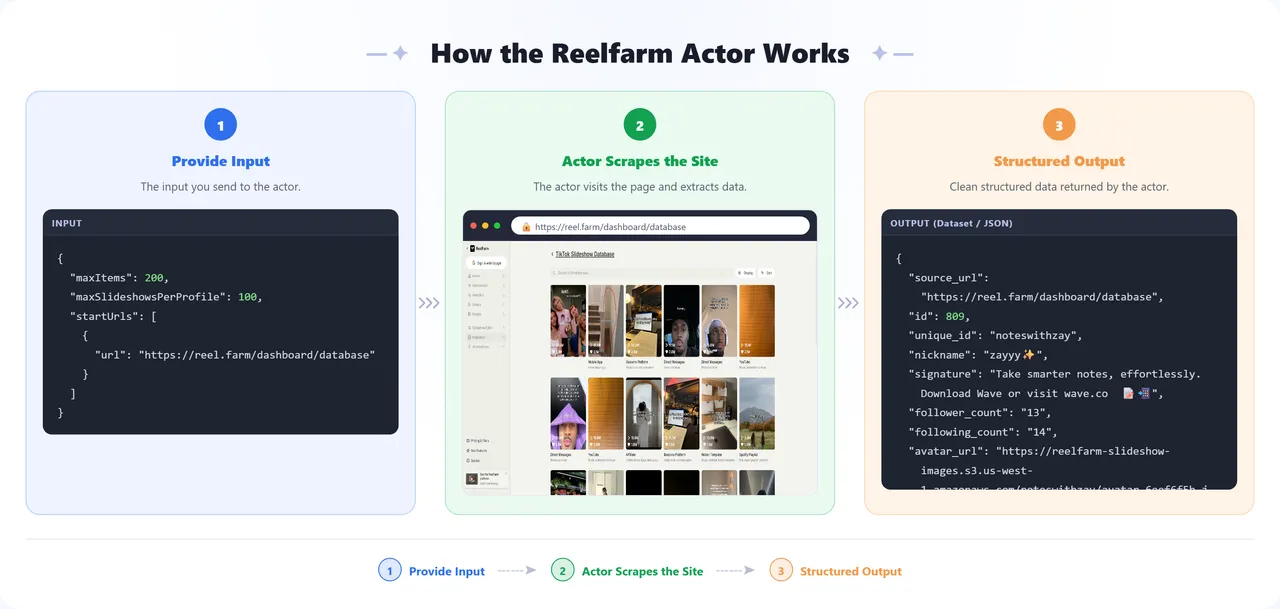
Scrapes reel.farm's public TikTok Slideshow Database listing pages (dashboard/database, optionally filtered by niche/product/region): profiles, niches, products, and slideshow metrics.
Pricing
Pay per usage
Rating
0.0
(0)
Developer
Parsedom Inc
Maintained by CommunityActor stats
0
Bookmarked
3
Total users
2
Monthly active users
2 months ago
Last modified
Categories
Share
Reel.farm Creator Database Scraper
Automatically collects creator/profile data from Reel.farm's TikTok Slideshow Database — no manual copy-pasting required.
What You Get
For every creator profile in the database, you'll receive:
- Profile info – username, display name, bio, follower/following counts, avatar image
- Campaign details – product being promoted, product category, niche, region
- Audience data – top countries where the creator's followers are located
- Slideshow performance – likes, views, bookmarks, and images for each of the creator's slideshows
Results are delivered as:
- A ready-to-download CSV file (one row per slideshow)
- A structured dataset you can export as Excel, JSON, or CSV directly from Apify
- A short summary showing how many listing URLs and rows were processed
Input Guide
| Field | What to put in it |
|---|---|
| Listing Page URLs | One or more Reel.farm TikTok Slideshow Database listing URLs, e.g. https://reel.farm/dashboard/database/niche/self-improvement for a single niche, https://reel.farm/dashboard/database/medium/mobile-app for a product medium, or the plain https://reel.farm/dashboard/database to scrape the whole database. Add one entry per listing you want. |
| Max Items | Maximum number of dataset rows to scrape per listing URL. Leave the default while testing, raise it (or set to 0 for unlimited) once you're happy with the results. |
| Proxy Configuration | Leave as-is unless you're seeing blocked or failed requests. |
How to Run It
- Add your Listing Page URL(s) — see the Input Guide above for examples.
- Set Max Items to control how many rows come back per listing URL.
- Start the run — the actor fetches each listing URL, retries on temporary errors, and saves progress as it goes, so a run that's stopped partway through can safely be resumed without starting over.
Good to Know
- A large Max Items value (or
0for unlimited) can take a while if your listing covers a lot of profiles; start small to confirm everything looks right first. - No sensitive data (passwords, payment info, etc.) is collected or stored — only the public-facing creator/campaign information described above.
🤝 Support
Need help or have questions?
- Email us at info@parsedom.com
- Or visit https://parsedom.com
- Visit our profile on Fiverr: https://www.fiverr.com/s/rEmNqEb
- Apify public page: https://apify.com/kinaesthetic_millionaire
- You can also contact us if you want to build a custom actor.
Ready to scrape more listings? Add your URLs and start scraping! 🚀


