

Website Uptime Checker
Pricing
from $1.50 / 1,000 results
Website Uptime Checker
Monitors websites and APIs for availability, response time, SSL certificate expiry, and expected content, sending email or webhook alerts when something goes wrong.
Pricing
from $1.50 / 1,000 results
Rating
0.0
(0)
Developer

Parsedom Inc
Maintained by CommunityActor stats
0
Bookmarked
2
Total users
1
Monthly active users
20 days ago
Last modified
Categories
Share
Website Uptime Checker monitors any list of websites or APIs for availability, response time, SSL certificate expiry, and expected page content, and stores a structured result for every check. Give it a list of URLs and get back status codes, response times, and downtime alerts — no server or cron job to maintain.
✨ Features
- Check a single site or a large batch — monitor one URL or hundreds in the same run
- Bulk import from a file — paste URLs, upload a
.txt/.csvfile of websites, or link to a remote hosted list (e.g. a raw GitHub file or a published Google Sheet CSV export) - Availability checks — sends a request to each URL and classifies the response (online, redirect, client error, or server error/offline)
- Response time tracking — measures how long each check took, in milliseconds
- SSL certificate monitoring — warns before an HTTPS certificate expires
- Keyword/content check — verify a page contains expected text, catching "soft down" pages (e.g. maintenance screens) that still return HTTP 200
- Email, Slack, Discord, and webhook alerts — get notified through whichever platform your team already uses when a site goes down, recovers, responds slowly, or its SSL certificate is expiring
- Downloadable CSV summary — a plain
url,statusreport (e.g.https://example.com,OK) saved alongside the detailed dataset, so you can skim results at a glance - Proxy support — optionally route checks through a proxy, e.g. to monitor geo-restricted content
🔧 Input Configuration
What to put in the input
At minimum, add the website(s) you want to monitor under Start URLs — that's the only required field, and the defaults for everything else work well for most use cases. From there:
- Checking one homepage? Just add that single URL and run it.
- Checking a large batch? Paste multiple URLs, upload a
.txt/.csvfile of website addresses, or link to a remote hosted file (e.g. a raw GitHub file or a published Google Sheet CSV export) — one URL or domain per line. - Want to be notified when something breaks? All notification fields are optional — pick whichever your team actually checks, none of them are required: Alert email address (plus Postmark server token and Sender email), Slack webhook URL, Discord webhook URL, and/or a generic Alert webhook URL for other tools (Zapier, Make, n8n). Leave all of them blank and the actor still checks every URL and stores full results — you just won't get pinged.
- Want a "the run is done" ping even when nothing is wrong? Turn on Notify when the run completes (also optional, off by default) to get a one-time summary like "8/10 sites online" through whichever channel(s) above you configured.
- Running this on a schedule? Raise Consecutive failures before alert so a single slow blip doesn't trigger a false alarm.
- Everything else (timeout, retries, concurrency, SSL warning window, keyword check) is an optional tuning knob — leave the defaults unless you have a specific reason to change them.
How to get a Slack, Discord, or email webhook/credential
None of this is required — skip this section entirely and the actor still checks every URL and stores full results. Set up only the channel(s) you actually want to be notified through.
Slack webhook URL
- Go to api.slack.com/apps and create a new app ("From scratch"), picking the workspace you want alerts posted to.
- Open Incoming Webhooks under Features, switch it on, then click Add New Webhook to Workspace and choose a channel.
- Copy the generated URL (starts with
https://hooks.slack.com/services/...) into Slack webhook URL in this actor's input.
- Official guide: Sending messages using incoming webhooks
- Video walkthrough: How To Make an Incoming Webhook in Slack
Discord webhook URL
- In your Discord server, open the target channel's Edit Channel → Integrations → Webhooks.
- Click New Webhook, give it a name, then click Copy Webhook URL.
- Paste that URL into Discord webhook URL in this actor's input.
- Official guide: Intro to Webhooks
- Video walkthrough: How to Create a Webhook on Your Discord Server
Email alerts (Postmark server token + sender email)
- Sign up at postmarkapp.com and create a server in your account.
- Open that server's API Tokens tab and copy the Server API Token into Postmark server token.
- Under Sender Signatures, add and verify the address you want alerts to come from, then use that same address as Sender email.
- Official guide: Managing sender signatures
Generic webhook URL (Zapier, Make, n8n, or your own endpoint)
Any URL that accepts a JSON POST request works here. In Zapier, Make, or n8n, create a scenario/zap that starts with a "Webhook" trigger step — each of those tools gives you a unique URL for that step, which you then paste into Alert webhook URL.
| Field | Type | Required | Default | Description |
|---|---|---|---|---|
startUrls | array | ✅ | [{ "url": "https://apify.com" }] | Websites to check. A single URL is fine, or check many at once by pasting a list, uploading a .txt/.csv file, or linking to a remote hosted file |
httpMethod | string | — | HEAD | HEAD (faster) or GET (loads full response body) |
requestTimeoutSecs | integer | — | 30 | How long to wait for a response before considering that attempt failed |
maxRequestRetries | integer | — | 2 | Retries after a connection failure (DNS error, timeout, refused) before reporting a URL offline. A received status code like 404 or 500 is never retried |
minConcurrency | integer | — | 1 | How many URLs to check in parallel at the start of the run |
maxConcurrency | integer | — | 10 | The run ramps up parallel checks after a streak of successes, but never above this many at once |
keyword | string | — | — | Optional text that must be present on the page, or the check is reported as offline. Forces a GET request |
maxResponseTimeMs | integer | — | 0 | If greater than 0, alert when an online site responds slower than this threshold |
checkSsl | boolean | — | true | For https:// URLs, warn when the SSL certificate is about to expire |
sslExpiryWarningDays | integer | — | 14 | Alert when the SSL certificate expires within this many days |
failureThreshold | integer | — | 1 | Consecutive failed checks (tracked across runs) required before a DOWN alert fires |
email | string | — | — | Not required. Email address to notify. Requires postmarkToken and senderEmail to actually send |
postmarkToken | string | — | — | Not required. Postmark server token, used to send alert emails |
senderEmail | string | — | — | Not required. The "From" address for alert emails (must be a Postmark-verified sender) |
webhookUrl | string | — | — | Not required. A generic webhook (Zapier, Make, n8n, custom endpoint) that receives a raw JSON POST for every alert |
slackWebhookUrl | string | — | — | Not required. A Slack incoming webhook URL to post alerts to a channel |
discordWebhookUrl | string | — | — | Not required. A Discord channel webhook URL to post alerts to a channel |
notifyOnCompletion | boolean | — | false | Not required. Sends a one-time run summary through the configured channel(s) above when the run finishes |
proxyConfiguration | object | — | { "useApifyProxy": false } | Optional proxy to route checks through |
Supported URL types:
Any absolute http:// or https:// URL — a homepage, a specific page, or an API endpoint you want to monitor.
📦 Output
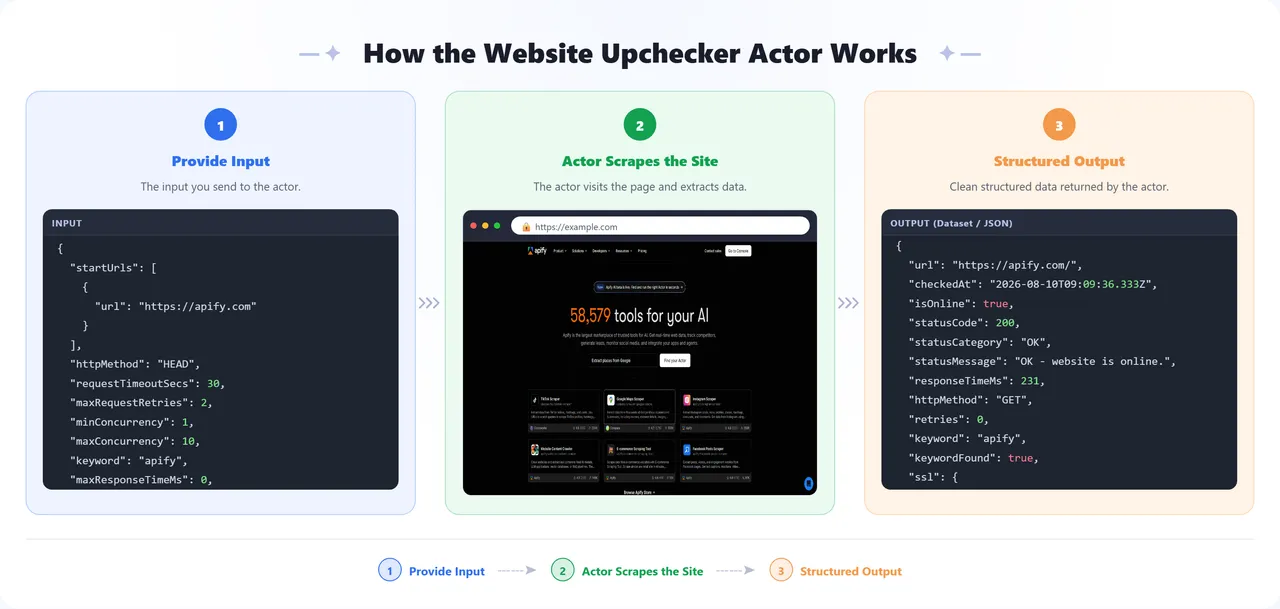
The dataset schema defines two views: Overview, a compact table of URL, online status, status code, category, response time, and check timestamp; and Full details, which adds the HTTP method used, keyword check results, SSL certificate info, alerts sent, and any connection error.
Every run also saves a plain CSV report to the key-value store under the key OUTPUT_REPORT — a simple two-column url,status file, e.g.:
Find it on the Output tab, or download it directly from the run's key-value store.
Sample dataset output:
You can download the dataset in various formats such as JSON, HTML, CSV, or Excel.
💡 Uses of This Data
- Getting paged the moment a production site or API goes down
- Tracking response time trends to catch performance regressions before they become outages
- Getting ahead of SSL certificate expiry instead of finding out from an angry user
- Verifying a status page or maintenance banner isn't stuck live on a "recovered" site
- Feeding uptime history into an internal dashboard or incident report
🚀 How to Use
- Sign up for a free Apify account — includes $5 monthly credit.
- Open the actor page and click Try for free.
- Fill in the Input fields — at minimum, add the URLs you want to monitor under Start URLs.
- Click Start and wait for the run to complete.
- Download results from the Output tab in JSON, CSV, or Excel format.
You can also run this actor via the Apify API or integrate it directly into your workflows using Zapier, Make, or n8n. Schedule it on Apify to run every few minutes for continuous monitoring, and raise failureThreshold so a single slow response doesn't trigger a false alarm.
⚠️ Limitations & Known Issues
- JavaScript-rendered content — the actor checks the raw HTTP response, not a rendered page, so a keyword that only appears after client-side JavaScript runs won't be found.
- Rate limiting — checking the same site very frequently may trigger rate limits on the target server; space out scheduled runs accordingly.
📝 Notes
- No notification field is mandatory —
email/postmarkToken/senderEmail,webhookUrl,slackWebhookUrl,discordWebhookUrl, andnotifyOnCompletionare all optional. Leave every one of them blank and the actor still checks every URL and stores full results in the dataset and CSV report; you simply won't be notified anywhere. - Email alerts need all three email fields —
email,postmarkToken, andsenderEmailmust all be set together for emails to actually send. - Mix and match channels freely — e.g. Slack for your team plus email for yourself; every configured channel gets every alert.
🤝 Support
Need help or have questions?
- Email us at info@parsedom.com
- Or visit parsedom.com
- Visit our profile on Fiverr: fiverr.com/s/rEmNqEb
- Apify public page: apify.com/kinaesthetic_millionaire
- You can also contact us if you want to build a custom actor.
Ready to keep your sites online? Add your URLs and start monitoring! 🚀


