
Google Ads Transparency Scraper & Ad Monitor
Pricing
from $1.00 / 1,000 ads
Google Ads Transparency Scraper & Ad Monitor
Get competitors' Google ads from the Ads Transparency Center by domain, advertiser name or ID: formats, first/last shown dates, previews, and optionally ad text, landing pages, countries and impressions. Monitoring mode returns only new ads on each scheduled run. No login, no proxies.
Pricing
from $1.00 / 1,000 ads
Rating
0.0
(0)
Developer

Koivu Data
Maintained by CommunityActor stats
0
Bookmarked
2
Total users
1
Monthly active users
a month ago
Last modified
Categories
Security
Limited permissionsShare
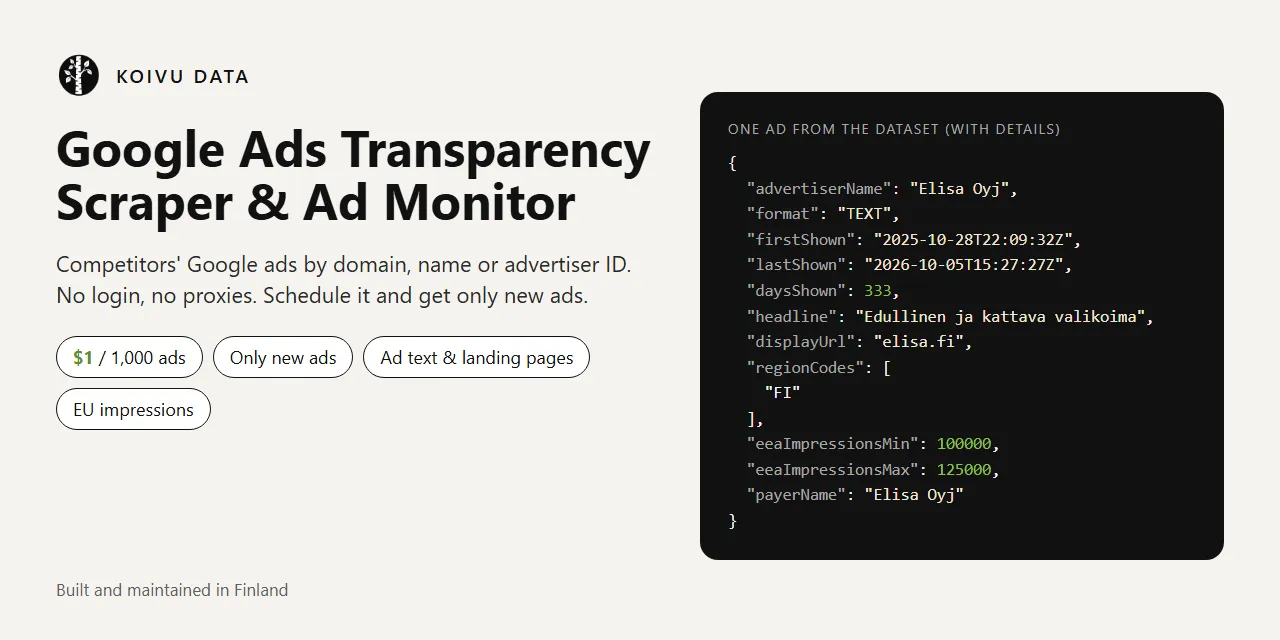
Google Ads Transparency Scraper & Ad Monitor shows which Google ads a company runs, without a Google account, API key or proxies. It reads Google's public Ads Transparency Center (adstransparency.google.com) and returns one clean JSON row per ad: advertiser, format, first and last shown date, how long it has been running, a preview image and a link to the ad. Download the results as JSON, CSV or Excel.
Built for competitor monitoring: turn on Only new ads, put the Actor on a schedule, and every run returns just the ads your competitors launched since the previous run. A run that finds nothing new costs only the $0.002 start fee.
Try it now: the prefilled input fetches the 20 most recently shown ads for nike.com and for one advertiser ID, in a few seconds, for about $0.04.
- Search by domain (
nike.com), advertiser name, advertiser ID or a link copied from the Transparency Center - Filters: country, format (text, image, video), platform (Search, YouTube, Shopping, Maps, Play) and date range
- Only new ads mode for scheduled competitor monitoring (the memory is kept per saved task)
- Optional ad details: headline and description when Google provides them as text, landing page, YouTube video, product title for Shopping ads, all image variations, countries with first/last shown dates and impression ranges per platform, EU audience targeting and the paying entity
- No browser and no proxies
- Clear errors for unknown advertisers, empty domains and invalid links. Failed targets cost nothing
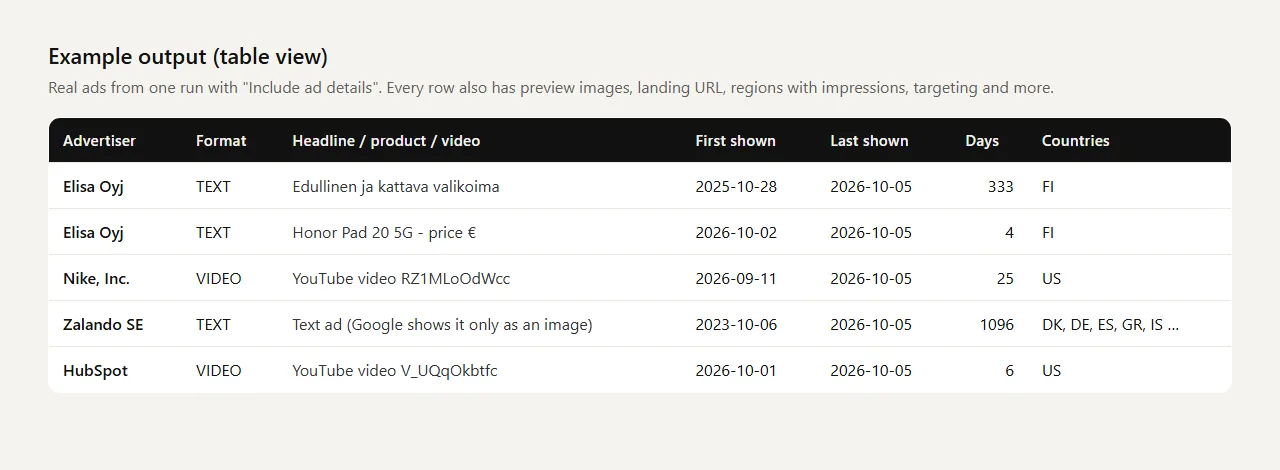
What data can you get from the Google Ads Transparency Center?
| Field | Example | Notes |
|---|---|---|
advertiserName, advertiserId | Elisa Oyj, AR15140697052062679041 | The advertiser account that paid for the ad |
advertiserCountry, advertiserLegalName, advertiserVerified | FI, Elisa Oyj, true | From the advertiser's Transparency Center profile |
creativeId, url | CR13279419012371972097, link | Stable ad ID and the ad's page in the Transparency Center |
format | TEXT, IMAGE, VIDEO | |
firstShown, lastShown, daysShown | 2025-10-28T22:09:32Z, 2026-10-05T15:27:27Z, 333 | UTC. daysShown is Google's count of days the ad ran |
previewImageUrl | https://tpc.googlesyndication.com/archive/simgad/... | Rendered preview or the image of the ad |
matchedDomain | elisa.fi | For domain searches |
With ad details: headline, description, displayUrl | Honor Pad 20 5G - price € | When Google provides the ad as text (see Limitations) |
landingUrl, landingDomain | https://www.nike.com/retail/ | Click-through URL when it appears in the preview |
youtubeVideoId, youtubeUrl | RZ1MLoOdWcc | Video ads hosted on YouTube |
productTitle, merchant | Electrolux LYB1AE8W0 kaappipakastin, Verkkokauppa.com | Shopping ads |
adType | SEARCH_TEXT, LOCAL, SHOPPING_PRODUCT, VIDEO, OTHER | Type of the rendered preview; null when Google only shows an image |
adTexts | ["elisa.fi", "Edullinen ja kattava valikoima", ...] | All visible text of the preview, in order |
imageUrls, variationCount | All image variations (A/B versions) of the ad | |
regions | [{"region": "FI", "firstShown": "2025-10-28", "impressionsMin": 100000, "impressionsMax": 125000, "platforms": [...]}] | Countries where the ad ran. Impression ranges are published by Google mainly for the EU/EEA |
eeaImpressionsMin, eeaImpressionsMax | 100000, 125000 | Total EU/EEA impressions (Digital Services Act data) |
targeting | {"demographics": {"included": true, "excluded": false}, ...} | Which targeting categories were used (EU ads) |
payerName | Elisa Oyj | Who paid for the ad |
The dataset has three ready-made views: Ads, Ad copy and Countries and reach.
Ad text, landing pages and EU impressions (Include ad details)
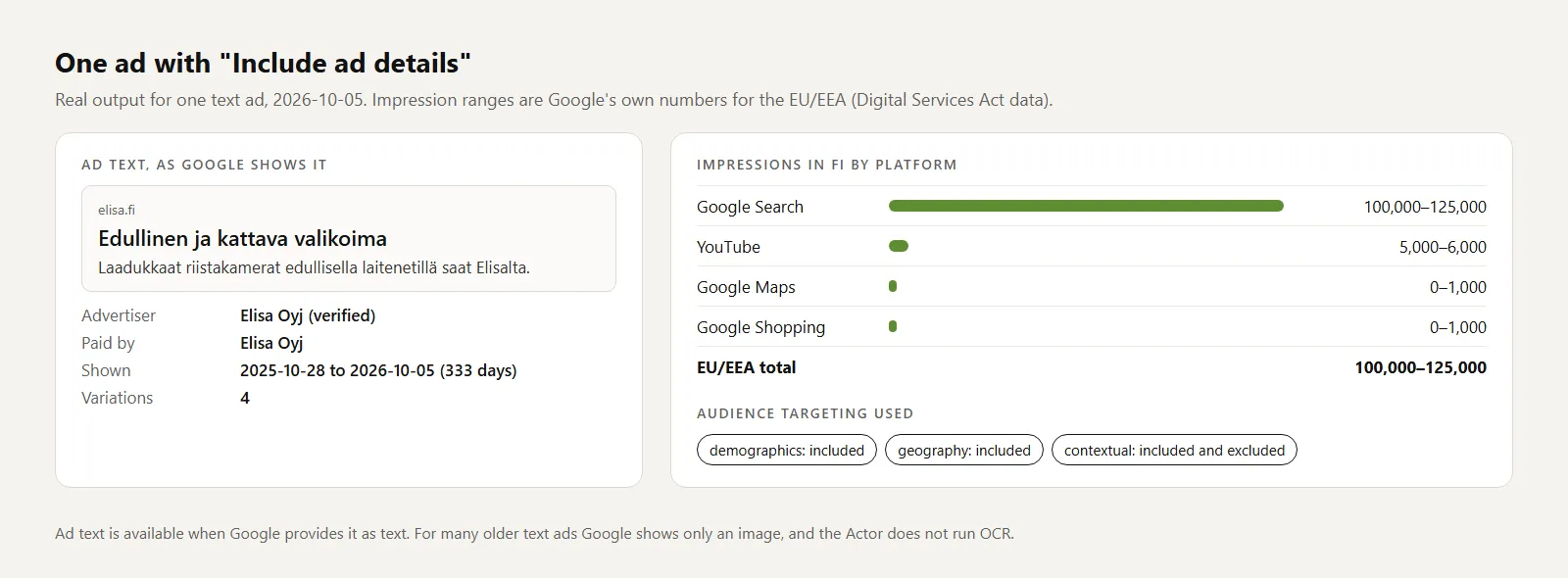
Switch on Include ad details and the Actor opens every ad. You get the ad text when Google provides it as text, the landing page, the YouTube video, Shopping product titles, all image variations, and for ads shown in the EU/EEA Google's own impression ranges per country and platform, the targeting categories used and who paid.
In a cloud test with 100 ads from five targets, details gave countries for all 100 ads, a landing page for 32, a YouTube video for 26 and a text headline for 19.
How to scrape the Google Ads Transparency Center
- Add one or more targets: a domain (
nike.com), an advertiser name (Zalando SE), an advertiser ID (AR16735076323512287233) or a link copied from adstransparency.google.com. - Set Max ads per target. The most recently shown ads come first.
- Optional: choose a country, format, platform or date range, and switch on Include ad details.
- Click Start.
- Download the results as JSON, CSV, Excel or HTML from the run's Output or Storage tab, or read them through the API.
Which target type should I use?
A domain returns ads of every advertiser account that promotes that website, including agencies and resellers. An advertiser ID returns exactly one account. A name is resolved with the Transparency Center's own search; by default the matching account with the most ads is used, and the run summary lists the other matches with their IDs. A pasted link keeps its filters, such as the country.
How to monitor competitors' Google ads
- Save your input as a task and enable Only new ads since the last run.
- Create a schedule for the task, for example daily.
- Connect an integration (Slack, Google Sheets, Zapier, Make, n8n or a webhook) to receive each new batch.
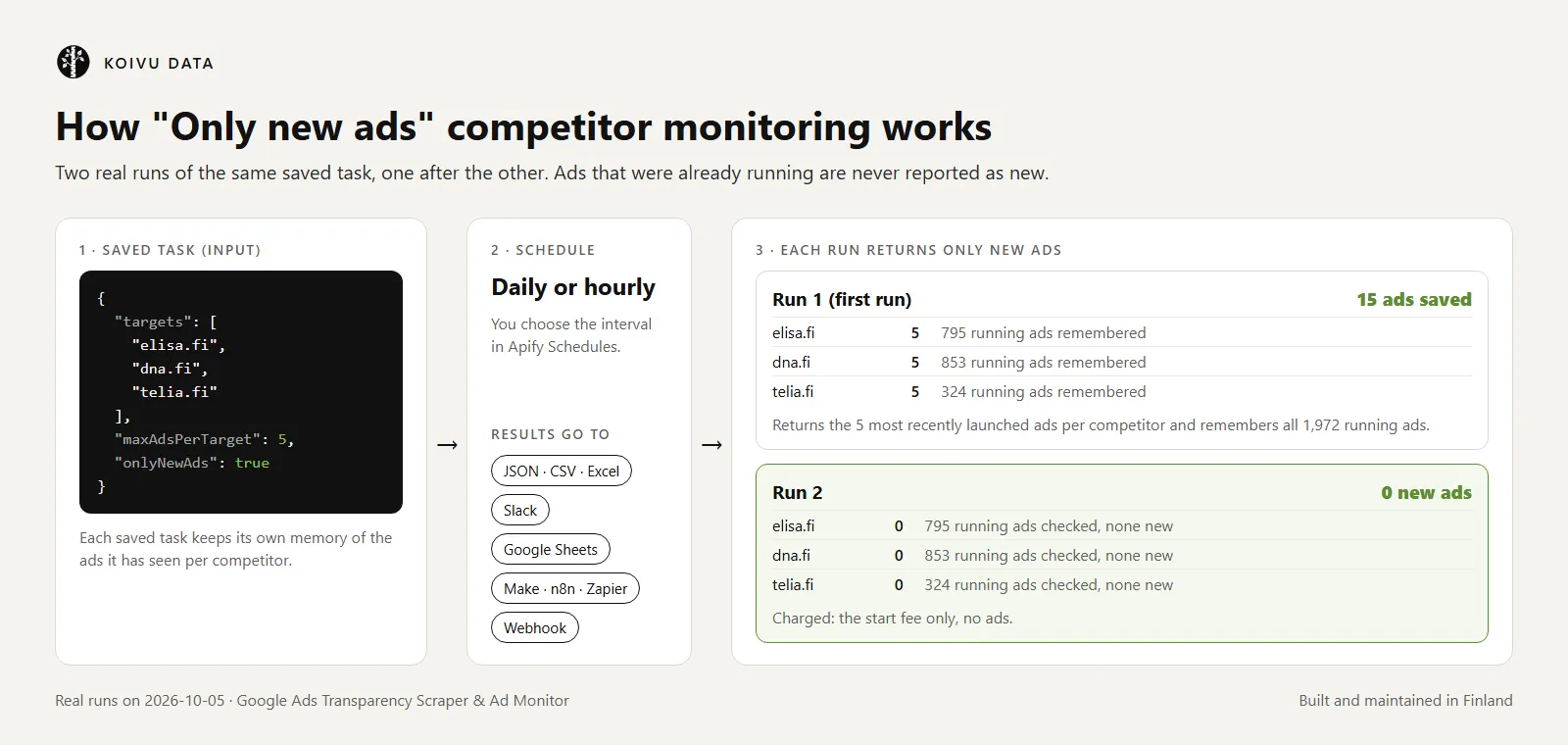
The first run returns the most recently launched ads (up to your limit) and remembers every ad that is currently running, so old ads are never reported as new. Later runs return only ads that appeared after that, including ads that Google publishes in the Transparency Center a few days late. If more new ads exist than your limit allows, the rest come in the next run. Each saved task keeps its own memory.
Can I see how much competitors spend on Google Ads?
Not directly. For regular commercial ads the Transparency Center does not publish spend, bids or budgets, so a spend figure cannot be read from it. What you can get: how many ads a competitor runs, how long each one has been running (daysShown), on which platforms, and for ads shown in the EU/EEA, Google's impression ranges per country and platform. Those are useful signals of effort, not spend.
Can I see which keywords competitors bid on?
No. Google does not publish targeted keywords in the Transparency Center. With ad details you get the ad text when Google provides it as text, which often hints at the keywords, but not a keyword list.
How much does it cost to scrape the Google Ads Transparency Center?
This Actor uses pay per event pricing. Apify platform usage is included in these prices.
| Event | Price |
|---|---|
| Actor start | $0.002 per run |
| Ad saved | $0.001 per ad ($1.00 per 1,000 ads) |
| Ad details (only with Include ad details) | +$0.001 per ad (+$1.00 per 1,000 ads) |
Examples:
- The prefilled run (2 targets × 20 ads, no details): 40 ads + start = about $0.04.
- 1,000 ads cost about $1.00, or $2.00 with details.
- Monitoring 10 competitors daily with Only new ads, about 3 new ads per competitor per day, with details: 30 runs × $0.002 = $0.06, plus 900 ads × $0.002 = $1.80, so about $1.86 per month. Without details about $0.96 per month.
Never charged: targets that fail and ads removed by your filters. A run with nothing new costs only the start fee. You can cap any run with Maximum cost per run in the run options; the Actor stops cleanly at the cap.
Is there a free Google Ads Transparency scraper?
The Transparency Center website itself is free to browse by hand. This Actor is not free, but Apify's Free plan includes $5 of usage credit every month. With this Actor that covers about 4,800 ads per month without details (for example 100 runs of 48 ads), or about 2,400 with details.
Limitations
We prefer to tell you up front:
- Ad text is not available for every ad. For many text ads, especially older ones, Google's Transparency Center shows only a rendered image of the ad. Those rows have
previewImageUrlandimageUrlsbut noheadline. The Actor does not run OCR on images. - Impression numbers are published by Google mainly for ads shown in the EU/EEA (and for election ads). For other countries the
regionslist shows dates but no impressions. - Landing pages are returned when they appear in Google's preview of the ad. Many video ads include them; many search ads do not.
- Video ads: with ad details, ads hosted on YouTube come with the video ID and URL, not the video file.
- Date filters work for roughly the last 12 months. Ads themselves can be older:
firstShowncan go back years. - Counts are estimates.
totalAdsEstimatein the summary is the range Google shows (for example 6,000–7,000). - Name search depends on Google's suggestions. If a name matches several companies, check
resolvedAdvertisersin the summary or use the advertiser ID. - The Actor relies on the Transparency Center's web interface, which Google can change. Apify test-runs the Actor every day and a breakage is fixed before new features, but a change can cause a short outage.
Input
| Input | Description |
|---|---|
targets | Domains, advertiser names, advertiser IDs or Transparency Center links. Required. Filters inside a pasted link (region, format, platform, dates) are applied to that line. |
maxAdsPerTarget | Maximum ads saved per target, most recently shown first (default 100). |
includeAdDetails | Open every ad and add ad text, landing page, video, countries, impressions and targeting. Slower and charged per ad. |
onlyNewAds | Return only ads that are new since the previous run of the same task. |
region | Two-letter country code (US, GB, DE, FI, ...). Empty means all regions. |
adFormat | ALL, TEXT, IMAGE or VIDEO. |
platform | ALL, SEARCH, YOUTUBE, SHOPPING, MAPS or PLAY. |
dateFrom, dateTo | Ads shown at least once in the range. Absolute (2026-09-01) or relative (30 days, 3 months). |
maxAdvertisersPerName | For name searches: how many matching accounts to include (default 1, largest first). |
stateKey | Advanced: name of the monitoring memory slot (defaults to the task ID). |
proxyConfiguration | Not needed normally. |
Output
One ad, with details:
Every run also saves a summary to the key-value store record OUTPUT: per target status, number of ads, Google's estimate of the total number of matching ads, the advertiser accounts a name was resolved to, and a clear reason for every target that failed.
Use cases
- Competitor monitoring: get a list of every new ad your competitors start running, every morning, in Slack, Google Sheets or your own database.
- Ad creative research: collect competitors' headlines, offers, landing pages and videos, and see which ads have been running the longest (a long run is a common sign that an ad works).
- Agencies and pitches: show a prospect what their competitors run on Search, YouTube and Shopping, by country.
- Market and DSA research: export EU impression ranges and targeting categories for a set of advertisers.
- Brand protection: check which advertisers run ads that point to your domain.
Use it from Python, JavaScript, n8n or AI agents
Google Ads Transparency Center API in Python
Run the Actor through the Apify API and get the ads back as JSON. This is not an official Google API: the Actor reads the same public data as the website.
JavaScript
n8n, Make and Zapier
Use Apify's integration for n8n, Make or Zapier to start the Actor or a saved task and pass the ads to the next step of your workflow. For monitoring, schedule the task in Apify and let the integration react to each finished run.
AI agents (MCP)
AI agents connected to the Apify MCP server can find this Actor by searching for Google Ads Transparency and call it as a tool to list or monitor an advertiser's ads.
FAQ
Do I need a Google account, Google Ads account or API key?
No. The Actor reads the public Ads Transparency Center, the same pages anyone can open in a browser without logging in.
How do I find an advertiser ID?
Open adstransparency.google.com, search for the company and copy the link of its page. You can paste that link directly as a target. The ID is the part that starts with AR.
Why does a domain search return ads from several advertisers?
Google lists every advertiser account whose ads point to that domain: the brand itself, its agencies, local subsidiaries and sometimes resellers. Use the advertiser ID if you want only one account.
How fresh is the data?
As fresh as the Transparency Center. In our tests the lastShown times of active ads were from the same day. Google can publish some ads with a delay; monitoring mode looks a few days back so late ads are still reported once.
How far back can I go?
Ads currently in the Transparency Center can have a firstShown date years back. Date filters work for about the last 12 months.
Can I download the video ads?
The base output includes a preview image URL. With Include ad details, video ads hosted on YouTube also get the video ID and URL. The Actor does not download video files.
Is it legal to scrape the Google Ads Transparency Center?
The Actor reads data that Google publishes for transparency, without logging in or bypassing any access control, at a moderate request rate. Google's Terms of Service restrict automated access that violates machine-readable instructions such as robots.txt; at the time of writing the Transparency Center publishes no such restrictions. Advertiser names can belong to individuals, so make sure you have a legitimate purpose and follow applicable laws such as the GDPR. If you are unsure, consult a lawyer.
Support, maintenance and changelog
This Actor is built and maintained in Finland by Koivu Data, a small data tools studio in the EU.
- Found a bug or need a field? Open an issue on the Issues tab and include your run link, so the problem can be reproduced.
- Maintenance: the parser is covered by unit tests on saved Transparency Center responses, and Apify test-runs the Actor every day. If Google changes the Transparency Center, fixing the Actor comes before new features.
- Data and privacy: the Actor reads only public Transparency Center data and saves results only to your Apify account.
- Changelog (full history on the Changelog tab):
- 0.1.6 (2026-10-05): README reorganized around common questions, new images from real runs, changelog added. No changes to the scraping code or output.
- 0.1.5 (2026-10-05): first complete version.
An honest review on the Reviews tab helps other users decide and tells us what to improve.


