

News Scraper & Monitor: RSS Feeds & Keyword Alerts
Pricing
from $0.80 / 1,000 articles
News Scraper & Monitor: RSS Feeds & Keyword Alerts
Monitor news by keyword, website or any RSS, Atom or JSON feed. Finds feeds and news sitemaps, merges duplicates across sources and returns only new articles: title, publisher URL, date, summary, language, matched keywords. Optional full text. Respects robots.txt.
Pricing
from $0.80 / 1,000 articles
Rating
0.0
(0)
Developer

Koivu Data
Maintained by CommunityActor stats
0
Bookmarked
2
Total users
1
Monthly active users
a month ago
Last modified
Categories
Security
Limited permissionsShare
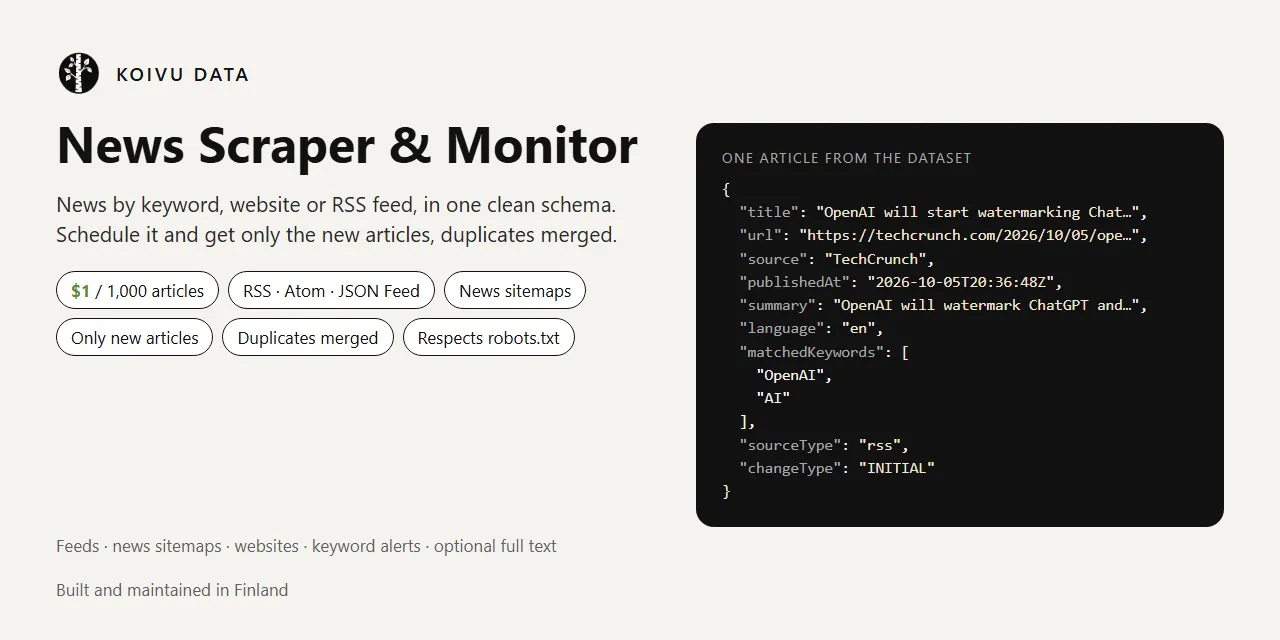
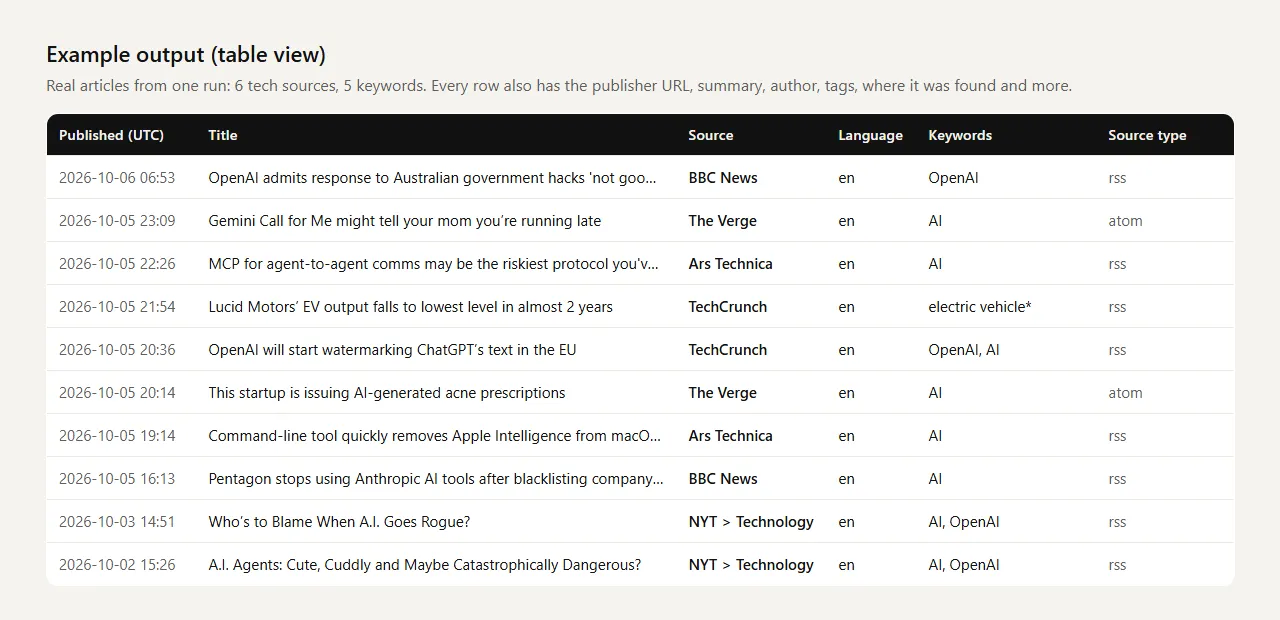
News Scraper & Monitor collects news articles from the sources you choose and keeps watching them for you. Give it RSS, Atom or JSON feed URLs, news sitemaps or just websites (the Actor finds their feed and news sitemap itself), add keywords if you want only some topics, and get every article in one clean schema: title, the publisher's own URL, source, publication date, summary, language, matched keywords and where it was found.
Built for monitoring: turn on Only new articles, put the Actor on a schedule, and every run returns only the articles published since the previous run. The same story found in a feed, a sitemap and a second feed of the publisher is merged into one row. A run that finds nothing new costs $0.0005 plus $0.0001 per source checked.
Try it now: the prefilled input reads the newest 20 articles from BBC World and NPR News in a few seconds, for about $0.02.
- Any feed: RSS 2.0, RSS 1.0 (RDF), Atom and JSON Feed, plus Google-News-format news sitemaps
- Websites: paste
techcrunch.comand the Actor reads the site's news sitemap and main feed - Keyword alerts with whole-word, phrase and prefix matching (
nokia*also finds Nokian, handy for Finnish and other inflected languages), exclude words, languages and published since - Only new articles across runs, with a separate memory for each saved task. Duplicates are merged across sources
- Optional full article text where the site's robots.txt allows it. Paywalled articles are skipped, never bypassed
- Polite and transparent: an honest user agent, robots.txt checked for every URL, no proxies, no browser. Sources that refuse access are reported, not worked around
What data can you get from news feeds?
| Field | Example | Notes |
|---|---|---|
title | OpenAI will start watermarking ChatGPT's text in the EU | Headline as the publisher wrote it |
url | https://techcrunch.com/2026/10/05/openai-will-... | The publisher's own article URL, with tracking parameters (utm_*, fbclid ...) removed |
source, sourceDomain | TechCrunch, techcrunch.com | Feed or publication name, and the article's domain |
publishedAt | 2026-10-05T20:36:48Z | UTC. From the feed or sitemap (GDELT: when GDELT first saw the article) |
summary | OpenAI will watermark ChatGPT and Codex text in the EU ... | The publisher's own teaser from the feed, plain text, at most 500 characters. Sitemaps carry no summary |
language | en | ISO 639-1, from the feed or sitemap, detected from the text if the feed has none |
author, categories, imageUrl | Aditya Mehta, ["AI", "OpenAI"] | When the feed publishes them |
matchedKeywords, matchedIn | ["OpenAI", "AI"], title | Which of your keywords matched, and where: title, summary, tags (or articleText for GDELT) |
sourceType, feed, foundIn | rss, https://techcrunch.com/feed/ | rss, atom, jsonfeed, news-sitemap or gdelt; every feed where the same article was found |
alsoPublishedBy | [{"source": "...", "url": "..."}] | With Same story deduplication: other publishers of a near-identical headline |
changeType, firstSeenAt | NEW | Monitoring only: INITIAL or NEW |
fullText, fullTextStatus, wordCount | ok, 930 | With Fetch full article text only. Status ok, free_part, paywalled, robots_disallowed ... (see Limitations) |
articleId, input, scrapedAt | 9f60551228058223 | Stable ID from the normalized URL, the input line and the time of the run |
The dataset has four ready-made views: Articles, Monitoring: new articles, Sources and duplicates and Full text.
Sources the Actor reads (and the ones it does not)
| Source | How | Notes |
|---|---|---|
| RSS, Atom and JSON feeds | The feed URL you give | Any public feed. Unchanged feeds are not downloaded again in monitoring (HTTP ETag / Last-Modified) |
| News sitemaps | A sitemap URL, or found in the website's robots.txt | Lists a publisher's recent articles (often the last 48 hours) with titles, dates and keywords. Some sites list far more articles here than in their RSS feed |
| Websites | techcrunch.com, https://www.hs.fi | The Actor reads robots.txt for a news sitemap and the home page for a feed link, then falls back to common feed addresses |
| GDELT DOC 2.0 API (experimental, off by default) | Your keywords | Worldwide keyword search in the GDELT Project's open news index. See Limitations: often busy |
| Google News | Not supported | news.google.com's robots.txt disallows automated access to its RSS feeds, and this Actor follows robots.txt. A Google News URL in Feeds is refused with that reason and costs nothing |
| Bing News RSS | Not supported | Bing's feed terms allow only personal, non-commercial use |
How to scrape news by keyword, website or feed
- Add one or more sources to Feeds, sitemaps or websites, one per line: a feed URL (
https://feeds.bbci.co.uk/news/world/rss.xml), a news sitemap URL or a website (techcrunch.com). - Optional: add Keywords to keep only matching articles, for example your brand, competitors or topics.
- Set Max articles per run (newest first).
- Click Start.
- Download the results as JSON, CSV, Excel or HTML from the run's Output or Storage tab, or read them through the API. The key-value store record
OUTPUTsays, per source, what was read, how many articles matched and why a source failed.
Keyword syntax
| Keyword | Matches | Does not match |
|---|---|---|
nokia | Nokia, Nokia's, NOKIA | Nokian, Nokialle |
nokia* | Nokia, Nokian, Nokialle, Nokiasta | Snokia |
electric vehicles | electric vehicles, Electric-vehicles | electric vehicle |
electric vehicle* | electric vehicle, electric vehicles |
Keywords are case-insensitive and are matched in the title, the summary and the feed's tags. Separate several keywords on one line with commas, or put each on its own line. Exclude keywords use the same syntax and drop an article when they match.
How do I find a site's RSS feed?
Many sites link their feeds on an "RSS" page or in the page footer. You can also simply paste the website: the Actor looks for the feed link in the home page and for a news sitemap in robots.txt. If it finds neither, the run summary says so and nothing is charged for that source.
How to monitor news for new articles
- Save your input as a task and enable Only new articles since the last run.
- Create a schedule for the task, for example every hour or every morning.
- Connect an integration to receive each run's new articles: Slack, email, Google Sheets, Zapier, Make, n8n or a webhook.
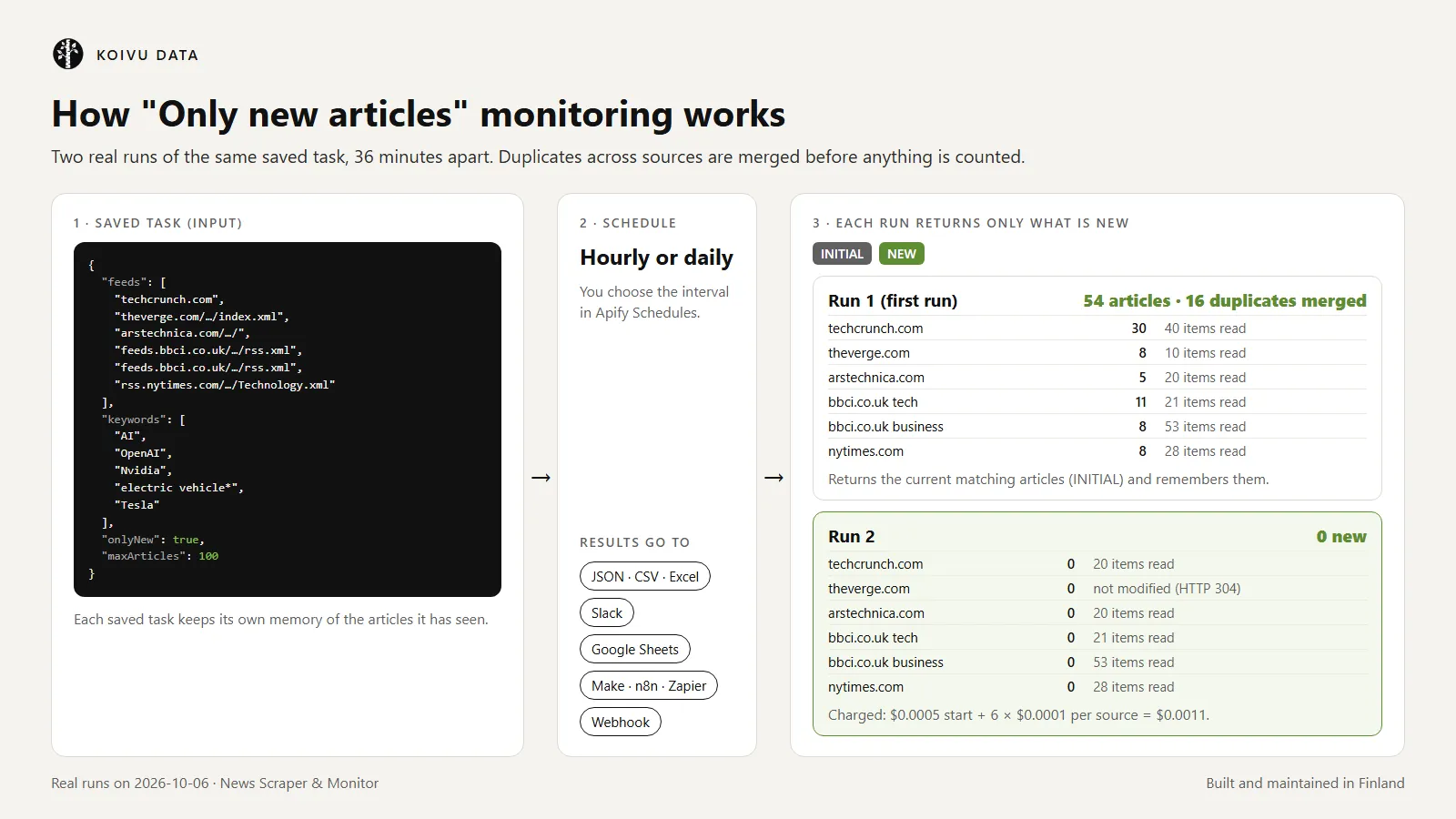
The first run returns the current articles that match your filters (marked INITIAL) and remembers them. Turn off Return current articles on the first monitoring run to start silently. Later runs return only articles that were not seen before (NEW). An article counts as seen if its URL (without tracking parameters, www., AMP suffixes and the like) or a near-identical headline from the same publisher was seen before, so a story that moves from one feed to another is not reported twice. If you add a source to a task later, its current articles come once as INITIAL, not as a flood of NEW rows.
If more new articles exist than Max articles per run, the newest are returned and the rest are skipped (the summary counts them). If the run stops at your cost limit, the remaining new articles come in the next run. Changing the keywords, exclude keywords, Apply keywords to feeds, languages, GDELT countries, an absolute Published since date or the duplicates setting starts a new memory (the first run after the change is again INITIAL); adding or removing feeds does not.
Brand and competitor alerts in Slack
Monitor the feeds and websites of the media you care about with your brand, product and competitor names as keywords. Schedule the task hourly and connect Apify's Slack integration: each run posts only the new matching headlines with links. A quiet hour costs $0.0005 plus $0.0001 per source.
How much does it cost to scrape news?
This Actor uses pay per event pricing. Apify platform usage is included in these prices.
| Event | Free and Bronze tiers | Silver tier | Gold tier and higher |
|---|---|---|---|
| Actor start | $0.0005 per run | $0.0005 | $0.0005 |
| Source checked (a feed, sitemap or website read successfully, or one GDELT search) | $0.0001 per source | $0.0001 | $0.0001 |
| Article saved (one dataset row) | $0.001 per article ($1.00 per 1,000) | $0.0009 | $0.0008 |
| Full text (only with Fetch full article text, only when text was extracted) | $0.001 per article | $0.0009 | $0.0008 |
Your discount tier comes from your Apify subscription plan. Examples at the Free and Bronze tier prices:
- The prefilled run (2 feeds, 20 articles): $0.0005 + 2 × $0.0001 + 20 × $0.001 = about $0.02.
- Export 1,000 articles from 10 feeds and sitemaps: about $1.00.
- Monitoring 20 feeds every hour with about 10 new matching articles a day: 720 runs × ($0.0005 + 20 × $0.0001) = $1.80, plus 300 articles × $0.001 = $0.30, so about $2.10 per month.
- A morning digest of 50 sources: 30 runs × $0.0055 = $0.17 per month plus the articles.
Never charged: sources that fail (not found, refused, disallowed by robots.txt, not a feed), duplicates merged into another row, articles removed by your keywords or filters, and full text that could not be extracted (paywalled, disallowed or too short). You can cap any run with Maximum cost per run in the run options; the Actor stops cleanly at the cap.
Is there a free news scraper?
RSS feeds themselves are free, and a feed reader is enough for reading news. This Actor is not free: it saves you writing and running the parts around the feeds, which are finding feeds and news sitemaps, keyword matching, deduplication across sources, the "only new" memory, scheduling and integrations. Apify's Free plan includes $5 of usage credit every month, which covers about 4,500 articles with this Actor.
Limitations
We prefer to tell you up front:
- No Google News. news.google.com's robots.txt disallows automated access to its RSS feeds, and we follow robots.txt. If you need Google News results specifically, this is not the right tool.
- Not a search engine of all news. The Actor reads the sources you list. Keywords filter those sources; they do not search the whole web. The optional GDELT search is the only worldwide keyword search, and it is unreliable (next point).
- GDELT is experimental and often busy. GDELT's free API asks for at most one request every 5 seconds. In our tests on 6 October 2026 it refused 22 of about 25 requests as rate-limited (HTTP 429), from a home connection and from Apify's servers alike, even with minutes between requests; the three answers it gave contained no articles, even for nokia over three days. The Actor waits once, retries once, never works around the limit, and continues with your feeds. In monitoring, the next successful GDELT search covers the time since the last successful one (up to 3 months). GDELT matches the full article text in English translation: write GDELT keywords in English (names work in any language). GDELT returns no summary, and its date is when GDELT first saw the article.
- Feeds show only recent articles. A feed typically lists the newest 10–100 items and a news sitemap the last day or two. The Actor cannot fetch older articles than the source publishes; for a continuous record, use monitoring.
- Some sites refuse automated readers. For example, The Guardian's feeds answered our honest user agent with HTTP 403 in testing. Such sources are reported with the reason and are not charged. The Actor never retries with a disguised browser identity, rotating IPs or proxies.
- robots.txt is followed for every URL, including redirects, feeds and article pages. If a site's robots.txt cannot be read because of a server error, nothing is fetched from that site in that run (RFC 9309).
- Websites without a feed link or news sitemap cannot be read; paste the feed URL instead. Yle (yle.fi), for example, publishes feeds such as
https://yle.fi/rss/uutiset/tuoreimmatbut does not link them from its home page. - Full text is extracted from the article page (structured data first, then the main text). It works on most news sites, but not on pages that load the text with JavaScript. Subscriber-only articles return
fullTextStatus: paywalledand no text, even if the page source contains it. When a publisher marks only part of an article as paywalled, you get the part a visitor without a subscription sees (free_part). Other statuses:ok,robots_disallowed(robots.txt disallows the page, or the site's robots.txt could not be read or refused access, in which case nothing is fetched there; on 9 October 2026 this applied to npr.org articles from Apify's cloud),consent_page,bot_check,no_text(too little text, often JavaScript pages) andhttp_<code>. In our tests on 6 October 2026, all Helsingin Sanomat articles were subscriber-only, Ilta-Sanomat articles werefree_part, and Yle, BBC and TechCrunch wereok. - Language comes from the feed or sitemap. When a feed does not declare it, the Actor guesses from the words of the title and summary for about a dozen European languages; otherwise it is
null, and such articles are dropped if you filter by language. - Deduplication uses normalized URLs and near-identical headlines. Two different articles with the same headline from the same publisher (for example a recurring "Live updates" title) can be merged; use Same URL only to avoid that.
Input
| Input | Description |
|---|---|
feeds | Feed URLs, news sitemap URLs or websites, one per line. |
keywords | Words or phrases to keep (see Keyword syntax). Empty = every article. |
maxArticles | Maximum articles saved per run, newest first (default 100). |
onlyNew | Monitoring: return only articles that are new since the previous run of the same task. |
returnExistingOnFirstRun | Monitoring: whether the first run (and a newly added source) returns the current articles (default on). |
excludeKeywords | Drop articles that mention any of these. |
keywordsFilterFeeds | On (default): keep only feed articles that match a keyword. Off: keep all, and only tag matches. |
languages | ISO 639-1 codes, for example en, fi, sv. |
publishedSince | Absolute (2026-09-01) or relative (24 hours, 7 days). |
dedupe | article (default), story (also merge near-identical headlines across publishers) or url. |
fetchFullText | Extract the article text where robots.txt allows; paywalled articles are skipped. |
searchGdelt, countries | Experimental worldwide keyword search with GDELT, optionally limited to publisher countries (FI, US). |
stateKey | Advanced: name of the monitoring memory slot (defaults to the task ID). |
Output
One article from a real run (the list of categories shortened):
Every run also saves a summary to the key-value store record OUTPUT: for each source the type (feed, sitemap, website, GDELT), the URLs it was read from, items in the source, items matching your filters, notes (for example "not modified since the previous run") and a clear reason for every source that failed; plus counts of duplicates merged and of articles removed by each filter.
Use cases
- PR and brand monitoring: watch the outlets that matter to you for your company, products and people, and get each new mention once.
- Competitor news: follow competitors' names across trade media and their own newsroom feeds.
- Investor research: collect company and sector news from business media feeds into a spreadsheet or database.
- AI agents and RAG pipelines: a clean, deduplicated stream of headlines, summaries and links (optionally full text where allowed) for summarizing, classification or retrieval.
- Alerts to Slack, email or a webhook: schedule a task with keywords and connect an integration.
- Media archives and newsletters: keep a running record of everything a set of publishers releases.
Use it from Python, JavaScript, n8n or AI agents
News API in Python
JavaScript
n8n, Make and Zapier
Use Apify's integration for n8n, Make or Zapier to start the Actor or a saved task and pass the articles to the next step. For monitoring, schedule the task in Apify and let the integration react to each finished run.
AI agents (MCP)
AI agents connected to the Apify MCP server can find this Actor by searching for news monitor or RSS feed and call it as a tool to read or monitor a set of news sources.
FAQ
Is it legal to scrape news feeds?
Publishers offer RSS feeds and news sitemaps so that software can read them. The Actor reads only those public files and pages, identifies itself honestly, follows each site's robots.txt and stops at paywalls, consent pages and bot checks. By default it stores only headlines, the publisher's own short teaser and links. Headlines and teasers are still the publishers' content: use them in line with copyright law and the publishers' terms, for example for monitoring and linking rather than republishing. If you turn on full text, you are responsible for having the right to store and use it. If you are unsure, consult a lawyer.
Does it read Google News?
No. news.google.com's robots.txt disallows automated access to its RSS feeds, and this Actor follows robots.txt. Paste the feeds of the publishers you care about instead, or try the experimental GDELT search for worldwide keyword coverage.
Can it get articles behind a paywall?
No. Paywalled articles still appear with their headline, teaser and link if the publisher's feed lists them, but full text is never extracted from them.
How fresh is the data?
Live. Every run reads the sources at that moment. How quickly an article appears depends on the publisher's feed; most news feeds update within minutes.
Why did a source fail?
The run summary (OUTPUT) gives the reason for every source: not found, refused by the site (HTTP 403), disallowed by robots.txt, not a feed, or no feed found on the website. Failed sources are never charged.
Can I get articles older than what the feed shows?
No. Feeds and news sitemaps contain only recent articles. Start monitoring now to build a continuous record.
Support, maintenance and changelog
Built and maintained in Finland by Koivu Data, a small data tools studio in the EU.
- Found a bug, a feed that does not parse or a missing field? Open an issue on the Issues tab with your run link, so the problem can be reproduced.
- Maintenance: every parser is covered by unit tests on saved real feeds, sitemaps and pages, and Apify test-runs the Actor every day.
- Data and privacy: the Actor reads only public feeds, sitemaps and pages and saves results only to your Apify account. Keyword search results from GDELT come from the GDELT Project.
- Changelog (full history on the Changelog tab):
- 0.1 (2026-10-06): first version with feeds, news sitemaps, website discovery, keyword filters, deduplication, monitoring, optional full text and experimental GDELT search.
An honest review on the Reviews tab helps other users decide and tells us what to improve.


