
Threads Scraper: Posts, Replies & Profiles, from $0.99/1K
Pricing
from $0.79 / 1,000 replies
Threads Scraper: Posts, Replies & Profiles, from $0.99/1K
From $0.99/1K replies, $1.49/1K posts, $1.99/1K profiles. Fastest Threads scraper in our head-to-head tests. No login, no start fee. Profiles, profile posts, post URLs with threaded replies, keyword & #tag search. Date, language & keyword filters, views, only-new.
Pricing
from $0.79 / 1,000 replies
Rating
5.0
(1)
Developer

Laptime
Maintained by CommunityActor stats
0
Bookmarked
2
Total users
1
Monthly active users
a day ago
Last modified
Categories
Features
Share
Threads Scraper gets posts, replies and profiles from Meta Threads by username, post link or keyword: text, likes, replies, reposts, views, followers and bio links. No login, no cookies.
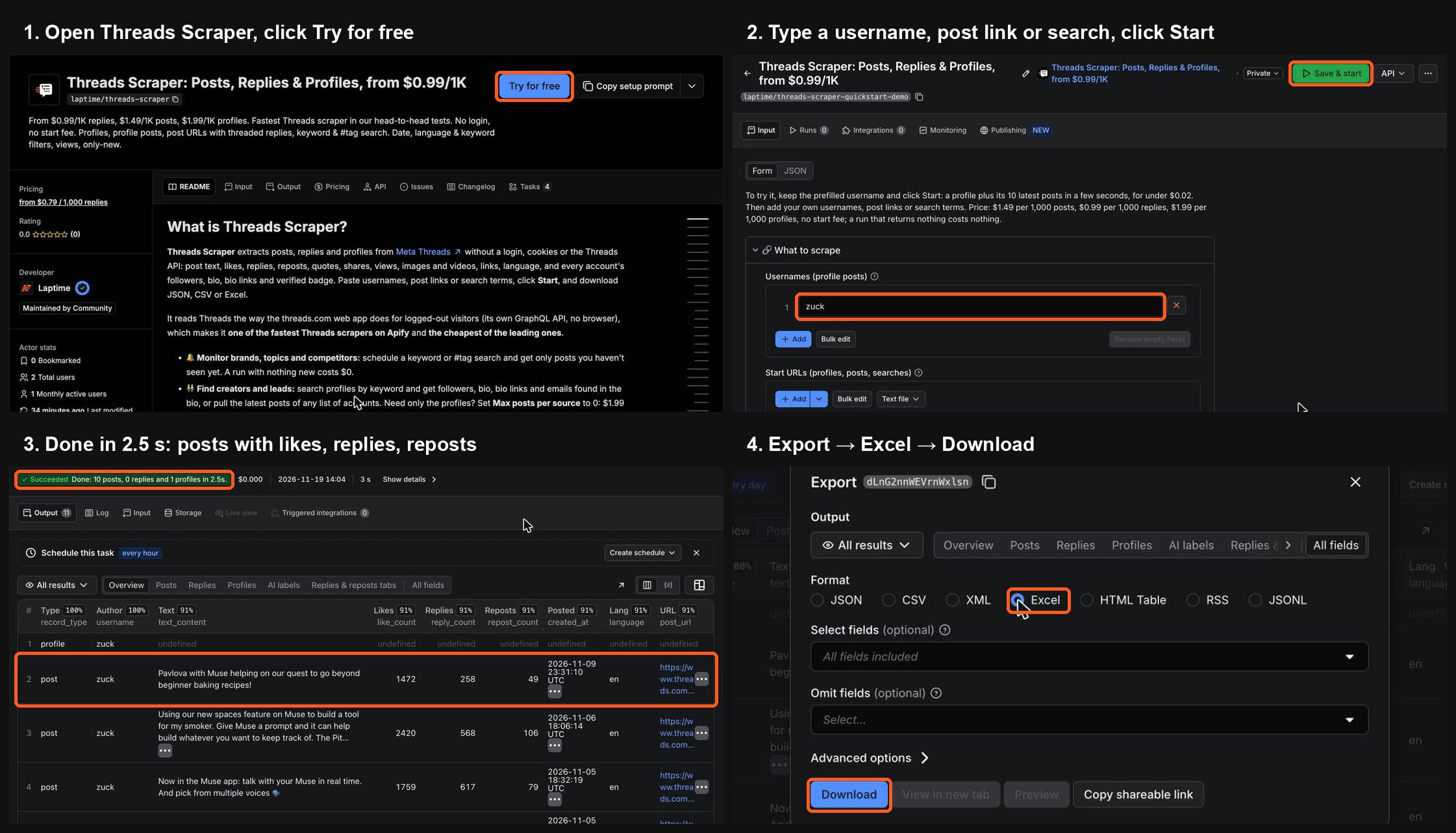
No coding: click Try for free, keep the example input, click Start, export to Excel.
Why this one
- 💰 The cheapest of the leading Threads scrapers: $1.49/1K posts; a profile with its 20 latest posts ≈ $0.03. No start fee; failed and empty runs are free.
- ⚡ Fastest in our head-to-head tests: 20 profile posts in 2.9 s (others: 5.0 s and 8.0 s), 20 search posts in about 3 s (other: 11.7 s) (compare).
- 🔎 Search past the 20-post wall: logged-out Threads search shows about 20 posts; this one walks back through time for hundreds or thousands.
- 🔔 Only new posts: schedule a keyword or account and get only posts you haven't seen. Nothing new costs $0.
- 🔁 Drop-in: futurizerush's field names, and the inputs of futurizerush, lergassy, automation-lab, watcher.data and igview, run unchanged.
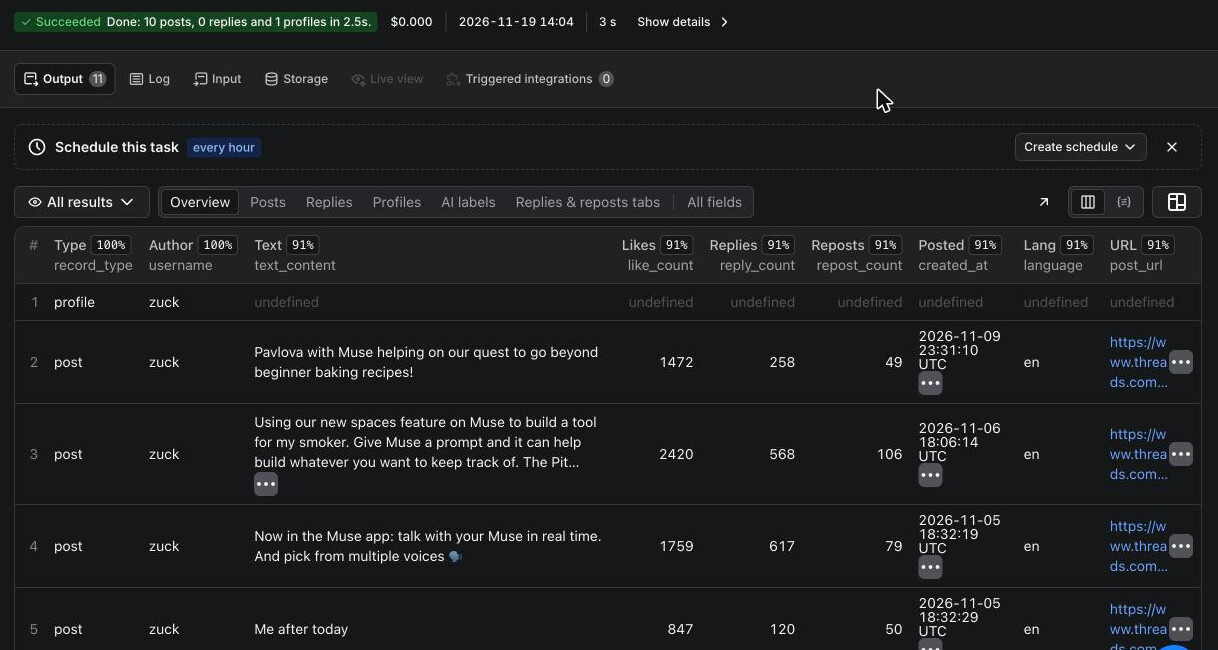
A real run of the default input: @zuck's profile and 10 latest posts in 2.5 s, one row per post with likes, replies, reposts, date and language.
What is Threads Scraper?
Threads Scraper extracts posts, replies and profiles from Meta Threads without a login, cookies or the Threads API: post text, likes, replies, reposts, quotes, shares, views, images and videos, links, language, and every account's followers, bio, bio links and verified badge. Paste usernames, post links or search terms, click Start, and download JSON, CSV or Excel.
It reads Threads the way the threads.com web app does for logged-out visitors (its own GraphQL API, no browser).
- 🔔 Monitor brands, topics and competitors: schedule a keyword or #tag search and get only posts you haven't seen yet. A run with nothing new costs $0.
- 🧑🤝🧑 Find creators and leads: search profiles by keyword and get followers, bio, bio links and emails found in the bio, or pull the latest posts of any list of accounts. Need only the profiles? Set Max posts per source to 0: $1.99 per 1,000 accounts.
- 💬 Read whole conversations: a post plus its replies, threaded, with
depth,parent_post_idandroot_post_idon every reply. - 🤖 Build AI datasets: clean text with Threads' own language label, engagement counts and dates, filtered by language, likes, replies, reposts or views before you pay for a row.
- 🎯 Score leads and sentiment with AI (optional): sentiment, intent, a 0-100 lead score with its reason, brands named, and summaries of a post's replies, added while the scrape runs. Off by default; bring your own LLM key and the AI is free.
✅ Verified working on 19 November 2026: the default input below ran on Apify three times and returned a profile plus 10 posts in 1.6–3.9 s (2.9–5.2 s including start-up). We re-run the benchmarks every month and update this date.
How does it compare to other Threads scrapers?
Speed, measured head to head on Apify on 18 Nov 2026, same input, each Actor's default settings. Time is the run's total time as Apify reports it, start-up included.
| Task | Laptime | lergassy | futurizerush |
|---|---|---|---|
| @zuck: profile + 20 latest posts | 2.9 s | 5.0 s | 8.0 s |
| "espresso", 20 newest posts | 2.8–3.2 s | 11.7 s |
Price for the same job at each Actor's Free plan list price (18 Nov 2026):
| Job | Laptime | lergassy | futurizerush | automation-lab | watcher.data |
|---|---|---|---|---|---|
| 1,000 posts | $1.49 | $2.00 | $2.58 | $5.02 | $8.00 |
| 1 profile + 20 posts | $0.032 | $0.044 | $0.13 | $0.125 | |
| A run that finds nothing | $0 | $0 | $0.08 | $0.02 | $0 |
| 1,000 profiles only (followers, bio, links) | $1.99 | $4.00 | $2.58 | $5.02 |
Apify's own Threads Profile Scraper charges $5.00 per 1,000 profiles: here it's $1.99, with bio links, emails and phones found in the bio.
List prices used: lergassy $2.00 per 1,000 posts and $4.00 per 1,000 profiles; futurizerush $2.50 per 1,000 results plus $0.02 per GB of memory per run (it runs at 4 GB, so $0.08 per run); automation-lab $5.00 per 1,000 posts or profiles plus $0.02 per run; watcher.data $8.00 per 1,000 results.
What data can you extract from Threads?
Over 60 fields, every one documented (type, meaning, when it's empty) in the Output tab's schema.
| 📝 Post text, links, @mentions, #hashtags, topic tag | ❤️ Likes, replies, reposts, quotes, shares | 👁️ Views (optional) |
| 📅 Posted date (ISO 8601 and Unix) | 🌍 Language (Threads' own detection) | 🖼️ Images, carousels, GIFs with sizes and alt text |
| 🎬 Videos with thumbnails | 🔗 Link preview card (URL, title, image) | 🔁 Quoted post (author, text, link) |
| 💬 Replies with depth, parent and root IDs | 👤 Author, user ID, verified badge, picture | 👥 Followers, bio, bio links, profile tags |
| 📧 Emails and phone numbers found in bios | 📌 Pinned, edited, paid partnership, AI-generated, spoiler flags | 🔑 Stable post_id and user_id for upserts |
What can it do?
- Profiles and their posts: any public account, newest first, as far back as you want. Each username also returns one profile row (followers, bio, bio links, verified).
- A profile's Replies and Reposts tabs: what an account answered (each reply with
parent_text, the post it answered) and what it reposted (the original posts, withreposted_byandreposted_at). Pick them in Profile tabs. Threads shows logged-out visitors the latest ~15 replies and ~25 reposts per account. - Any way you type it:
zuck,@zuck, threads.com, threads.net or instagram.com profile links, post links with tracking parameters, share links. A link pasted into the wrong field still runs. - Posts with their replies: paste a post link (threads.com, threads.net or
/t/short links) and get the post plus its replies, threaded. Folded sub-threads are opened down to the depth you choose. - Keyword and #tag search: Threads' top or recent results, in any language or emoji; put a term in quotes (
"ai agents") for that exact phrase. Logged-out visitors get one page (~20 posts) per search; this Actor walks back through time with Threads' own date filter, several date windows at once, so a search returns hundreds or thousands of posts. - Find profiles: search accounts by keyword (about 50 per term) with followers, bio and links.
- Filters before you pay: date window ("7 days", "2026-11-01"), languages, minimum likes, replies, reposts or views, must-contain and must-not-contain words, exact match, posts from one account only, and only posts that really contain your search words (every search row carries
keyword_match). - Profiles only: set Max posts per source to 0 for one profile row per account (followers, bio, bio links, emails), no posts.
- Monitoring: Only new posts remembers what earlier runs delivered, so a scheduled run returns only new posts and costs nothing when there's nothing new.
- View counts: optional, read from each post's own page (the only place Threads shows them).
- AI enrichment (optional, off by default):
aiSentiment,aiIntent(buying intent, recommendation request, complaint, question…),aiLeadScorewithaiLeadReason,aiEmotion,aiTopic,aiEntities(brands named), your own yes/no questions, andaiThreadSummaryon post links (what the replies say). Rows the AI skips or can't label are never charged for AI.
How to scrape Threads
- Create a free Apify account. No credit card needed.
- Open Threads Scraper and type a username (like
zuck), paste a post link, or add a search term. - Set Max posts per source (and Max replies per post for post links). Start small to test.
- Click Start. Most runs finish in seconds.
- Download your Threads data as JSON, CSV, Excel or HTML, or fetch it with the API.
Quick start input (the prefilled default):
How much does it cost to scrape Threads?
Threads Scraper uses pay-per-event pricing. Platform usage and proxies are included; failed and empty runs cost nothing.
| You want | Cost |
|---|---|
| 1,000 posts | $1.49 |
| 1,000 replies | $0.99 |
| 1,000 profiles | $1.99 |
| 50 accounts with their 20 latest posts | $1.59 |
| A post with 500 replies | $0.50 |
| A daily monitor for a month (30 runs, 50 new posts a day) | $2.24 |
| AI labels on 1,000 rows (optional) | +$0.30 |
| A yes/no question or custom label on 1,000 rows (optional) | +$0.05 each |
| AI summary of a post's replies (optional) | +$0.003 per post |
| AI with your own LLM key | +$0 |
Worked example: 50 accounts with their 20 latest posts = 50 profiles × $0.00199 + 1,000 posts × $0.00149 = $1.59. 10,000 replies = $9.90.
Works on the Apify free plan: the $5 of monthly platform credit covers about 3,400 posts with this Actor, no card needed.
Input
Combine any of the three sources; they all run:
- Usernames: accounts to scrape (
zuck,@nasaor a profile URL). Each returns a profile row and its latest posts. - Start URLs: profile links, post links (the post plus its replies) and search links (
https://www.threads.com/search?q=coffee, with&filter=recentor&serp_type=tags). - Search terms: keywords, or
#tagfor a topic tag. Search sort chooses top or recent; Search for chooses posts or profiles.
| Field | Default | What it does |
|---|---|---|
maxPostsPerSource | 20 | Posts per username or search term; 0 = profile rows only |
maxReplies | 20 | Replies per post link (and per post with repliesForAllPosts) |
maxReplyDepth | 3 | How deep nested replies are followed |
maxItems | 1000 | Hard cap on all rows of the run |
postedAfter, postedBefore | "7 days", "24 hours" or "2026-11-01" | |
languages | ISO codes, e.g. ["en", "es"] | |
minLikes, minReplies, minReposts, minViews | 0 | Engagement floors |
includeKeywords, excludeKeywords | Must-contain and must-not-contain words | |
exactMatch, searchFromUsername | Threads' own exact-phrase and "from" search filters | |
requireKeywordInText | false | Searches: keep only posts whose text contains every search word |
onlyNew, monitorName | false | Skip posts earlier runs delivered |
includeViews | false | Add view_count (one extra page read per post) |
includeProfileInfo | true | A profile row per username |
profileTabs | ["posts"] | Profile tabs to read: posts, replies, reposts |
aiAnalysis, aiContext, aiFlags, aiCustomLabels | off | AI labels, lead score against what you sell, ready-made yes/no flags, your own questions |
aiThreadSummary | false | AI summary of the replies under each post link |
aiApiKey | Your own OpenRouter, OpenAI, Anthropic or Gemini key: no AI fees |
Output
One row per post (record_type: "post"), reply ("reply") and profile ("profile"). The Posts, Replies and Profiles views in the Output tab show each kind as a table. A real post row (media URLs shortened):
A reply
A profile
Recipes
Daily brand monitor (only new posts)
Schedule this input daily (Console > Schedules). Each run returns only posts no earlier run delivered; a quiet day costs $0.
Find creators in a niche
Accounts matching a keyword with followers, bio, bio links and emails from the bio.
Competitor posts with engagement
The last 30 days of several accounts, only posts with real traction, with view counts.
AI dataset: a topic in English, with replies
Leads with AI: who wants a tool like yours
Sort the AI labels view by aiLeadScore: 80+ means the author is looking for what you sell, now.
Every reply of a post, threaded
Up to 500 replies, three levels deep, with depth, parent_post_id and root_post_id to rebuild the conversation.
What an account replies and reposts
Benchmarks
Measured on Apify on 18 Nov 2026 (datacenter proxy, 512 MB). "Time" is the Actor's own working time; start-up adds about 1 s.
| Job | Rows | Time | Rows per second |
|---|---|---|---|
| Default input: profile + 10 posts (×3, 19 Nov) | 11 | 1.6–3.9 s | up to 6.9 |
| A profile's replies + reposts tabs (19 Nov) | 40 | 2.7 s | 15 |
| 2 accounts × 20 posts | 42 | 4.5 s | 9.3 |
| A post + 100 replies | 101 | 5.3 s | 19 |
| A post + every reply Threads shows (175) | 180 | 16.1 s | 11 |
| "espresso", 20 newest posts (×3) | 20 | 1.2–1.9 s | up to 16 |
| "coffee", 200 newest posts (×2) | 200 | 6.8–9.3 s | up to 30 |
| 5 accounts × 200 posts | 1,000 | 18.6 s | 54 |
| "coffee", 1,000 newest posts | 1,000 | 31 s | 32 |
Platform cost to us was $0.006 per 1,000 rows on the large jobs: you pay only the per-row prices above.
Switch from another Threads scraper
Inputs written for the popular Threads scrapers run here unchanged; the log lists every field it translated.
| If you used | These inputs work as they are |
|---|---|
| futurizerush/meta-threads-scraper | mode (user, search, profiles, post_link), usernames, keywords, post_links, max_posts, search_filter, start_date, end_date, search_language |
| lergassy/threads-scraper | mode (posts, profile, search, thread, users), usernames, keywords, postUrls, maxPosts, maxRepliesPerPost, searchTypes, postedAfter, postedBefore, filterKeywords, strictKeywordMatch, languages, minLikes, includeProfile, monitoringStoreName, concurrency |
| automation-lab/threads-scraper | mode (posts, profile, search, urls), usernames, searchQueries, postUrls, maxPosts, searchSort, postedAfter, postedBefore, includeProfile |
| watcher.data/search-threads-by-keywords | keywords, maxItemsPerKeyword, sortByRecent |
| igview-owner/threads-search-scraper | searchQuery, sort, from, after, before, maxPosts |
| apify/threads-profile-api-scraper | usernames with "maxPostsPerSource": 0 (profile rows only) |
| Replies and reposts tabs | futurizerush mode: user_replies / user_reposts, lergassy mode: replies / reposts, quarra accountReplies / accountReposts, profileContent |
| Many others | maxResults, maxResultsPerInput, lastDays, onlyNewSinceLastRun, watchName, requireKeywordMatch, replyDepth, repliesSort, includeNestedReplies, searchType: "recent" / "hashtag" / "accounts" |
Output fields use futurizerush's names where it has them: post_url, post_code, text_content, created_at, created_at_timestamp, like_count, reply_count, repost_count, quote_count, share_count, view_count, media_type, media_urls, hashtags, mentions, urls, is_reply, reply_to_username, is_quote_post, is_pinned, is_edited, is_paid_partnership, reply_control, language, topic_tag, username, user_id, display_name, profile_url, is_verified, followers_count, bio, bio_links, emails, phones, profile_tags, requested_username, scraped_at and record_type.
Integrations and API
- Schedule runs to track accounts or keywords daily, with Only new posts on.
- Integrate with Make, Zapier, n8n, Google Sheets, Slack, Airbyte or any webhook.
- AI agents and MCP: use it as a tool in Claude, ChatGPT or Cursor: add
https://mcp.apify.com?tools=laptime/threads-scraperto your MCP client. Every input and output field is described for agents.
Use Threads Scraper as a Threads API in Python
In JavaScript
FAQ
Do I need a Threads or Instagram account?
No. It reads what Threads shows any logged-out visitor. No login, cookies or API key, so no account of yours can be blocked.
Why do some search results not contain my keyword?
Threads' search also returns posts it matched on the author, the topic or a translation; in a test on 18 Nov 2026, 6 of the 10 top "espresso" posts didn't contain the word. Every search row says so in keyword_match (true or false). Turn on Only posts that contain the search words (requireKeywordInText) and the others are dropped before they are charged.
How many posts can I get from one search?
Threads shows logged-out visitors about 20 posts per search. This Actor keeps going by asking for older and older date windows, several at a time, so searches return hundreds or thousands of posts. With Search sort = recent and Posted after, you get everything in the window that Threads' search finds, newest first.
Why is view_count empty?
Threads shows view counts only on a post's own page. Turn on View counts (or set Min views) and the Actor reads that page for each post. It's off by default because it adds one request per post.
Why do I get fewer replies than the reply count?
reply_count counts every direct reply, including ones Threads hides from logged-out visitors (hidden by the author, restricted or filtered). The scraper returns every reply Threads shows publicly, in both its top and recent order: on a post with 250 replies that was 175 (plus nested replies) in our test.
Can it scrape private profiles?
Their posts, no: private profiles show their posts only to approved followers. You still get the profile row (followers, bio, is_private: true); the run names the profile as private in its status message and in RUN_STATS, and charges nothing for the posts it can't see.
What does a run cost when something goes wrong?
Nothing for what failed. There is no start fee, rows are charged only when delivered, and a run that returns nothing costs nothing. A missing username or deleted post is reported per input, and the other inputs still run.
Can it read a profile's replies and reposts?
Yes: Profile tabs → replies and/or reposts. Threads shows logged-out visitors the latest ~15 replies and ~25 reposts of an account, and that is what you get (no login is ever used). A reply row carries parent_text and parent_post_id; a repost row is the original post with reposted_by and reposted_at.
How does the AI enrichment work, and what does it cost?
It is off by default. Turn on AI labels and every post and reply gets sentiment, intent, a lead score with its reason, emotion, topic, brands named and language, for $0.30 per 1,000 labelled rows. Media-only rows and rows the AI can't label are not charged. With your own OpenRouter, OpenAI, Anthropic or Gemini key, the AI events are never charged. On Apify's free plan our AI covers the first 100 rows per run.
Is it reliable?
A daily automated check runs the default input and alerts us when it returns nothing or a key field goes empty. When Threads ships a new version of its web app, the scraper re-reads the new query IDs from Threads' own pages on the fly, and a slow or blocked IP is swapped for a fresh one instead of waiting. A run that can't return anything fails with the reason and costs nothing.
Is it legal to scrape Threads?
Scraping publicly available data is generally legal, but personal data is protected by laws such as GDPR in the EU and other regulations around the world. Only scrape what you have a legitimate reason to use, don't collect personal data without a lawful basis, and check Threads' terms of use. If you're unsure, ask a lawyer. Read more in Apify's blog post on the legality of web scraping.
Where are the run statistics?
In the run's key-value store: RUN_STATS has the counts per input, speed, requests and any errors, and TIP has short usage tips.
Related Actors
The same engine, with a form made for one job:
- Threads Search Scraper: keyword and #tag search, past the 20-post page, $1.49/1K.
- Threads Profile Scraper: profiles with followers, bio links and emails, $1.99/1K.
- Threads Replies Scraper: replies of any post, threaded with depth and parent, $0.99/1K.
Other Laptime scrapers that pair well with this one, all with no start fee:
- Reddit Scraper: posts and full comment threads from subreddits, URLs, search and users, from $0.49/1K.
- Bluesky Scraper: posts, replies, search, profiles, feeds and trends, from $0.79/1K.
- Instagram Comments Scraper: every comment of a post or reel, no cap, $0.80/1K.
Changelog
See the Changelog tab.
Feedback and support
Found a bug or need a field? Open an issue on the Issues tab; issues are answered within a day.
If Threads Scraper saved you time, a short review on the Reviews tab helps other people find it. We read every one, thank you!


