

FDIC Bank Institution Monitor
Pricing
$3.00 / 1,000 fdic results
FDIC Bank Institution Monitor
Build a weekly, source-linked FDIC bank directory with institution names, addresses, reported activity, state and certificate filters, and record provenance.
Pricing
$3.00 / 1,000 fdic results
Rating
0.0
(0)
Developer

Ledger Star
Maintained by CommunityActor stats
0
Bookmarked
2
Total users
1
Monthly active users
25 days ago
Last modified
Categories
Share
Give bank-vendor and account-operations teams a weekly, source-linked refresh of FDIC institution names, locations, certificates, and reported activity. Compare stable institution records before updating directories or internal reference data.
What you get
- Official FDIC institution records with stable certificate identifiers and common business details.
- Optional active, inactive, state, and certificate filters for repeatable institution research.
- A bounded snapshot or retained content-version monitoring mode, with scan status and source provenance.
What data you get
Each row is an institution record. Values absent from the official source remain null. Malformed rows produce a small uncharged diagnostic and never include the rejected source payload. This Actor does not return individual contacts, officers, customer information, or inferred values.
| Field | What it means |
|---|---|
bankCertificate | FDIC certificate number identifying an institution. |
businessName | Institution name as published by FDIC. |
active | FDIC ACTIVE 1/0 mapped to true/false; null if absent or outside that documented value domain. |
bankClass | FDIC institution class code. Consult FDIC definitions before interpreting codes. |
address | Business address from the source record. |
city | Institution city. |
state | Two-letter state code. |
zip | Source postal code retained as text. |
website | Source-reported institution website, when available. |
establishedDate | Source establishment date, preserved in source format. |
insuredDate | Source deposit-insurance date, preserved in source format. |
status | ok for a valid row or source_error for an uncharged diagnostic. |
error | Plain diagnostic explanation; null for valid rows. |
source | Source label identifying FDIC institutions. |
sourceUrl | Official API endpoint used for verification. |
retrievedAt | UTC time the Actor retrieved and handled the row. |
scrapedAt | UTC time the run began. |
sourceUpdatedAt | UTC midnight date derived from FDIC DATEUPDT, or null. This is the row update date, not necessarily an event date. |
indexUpdatedAt | Source index creation timestamp, not a record-specific revision date. |
freshnessDays | Days since sourceUpdatedAt, or null when unavailable. |
recordVersion | Hash of normalized business values, excluding retrieval and index timestamps. |
dedupeId | Certificate plus content version, used by retained monitoring. |
Quick start
- Open the Actor in Apify Console and leave certificates blank to include all matching institutions.
- Choose a state such as
TX, selectactiveasall, and keep the default caps for a bounded first run. - Start the Actor, inspect
completeandtruncated, then export the dataset as JSON, CSV, or Excel.
This weekly workflow serves bank vendors and account-operations teams that reconcile institution directories after FDIC's weekly snapshot update. A measured Apify run on September 29, 2026 requested 20 rows using STALP:TX AND ACTIVE:1; it saved 20 normalized institution records and recorded exactly 20 result events in 9.21 seconds. It stopped at the configured result cap (complete: false), so this is a bounded sample, not a complete Texas directory. At $0.003 per result, 20 successfully saved rows cost $0.06 at the listed event price. The owner-run platform usage was $0.00369; that development cost is separate from the customer result price and does not predict every run.
Who uses it
- Bank vendors and account operations teams refresh institution names, business addresses, and reported activity after weekly FDIC updates.
- Market researchers maintain a structured institution reference list with stable FDIC identifiers.
- Data operations teams compare institution snapshots and verify source changes before updating internal records.
Input
| Input | Purpose |
|---|---|
state | Optional uppercase two-letter state code. |
certificates | Optional list of numeric FDIC certificate strings. |
active | all (default), active, or inactive. |
newSince | off repeats snapshot rows; lastRun suppresses retained identical versions. |
maxItems | Successfully delivered result limit, 1 to 10,000; default 20. |
Tips for good input
- Good:
"state": "TX". Bad:"state": "Texas"; the filter uses a two-letter source code. - Good:
"certificates": ["1184"]. Bad: an institution name; this field accepts certificate numbers. - Good:
"active": "all"when reviewing both current and inactive records. Bad: assume the default excludes inactive institutions.
Sample output
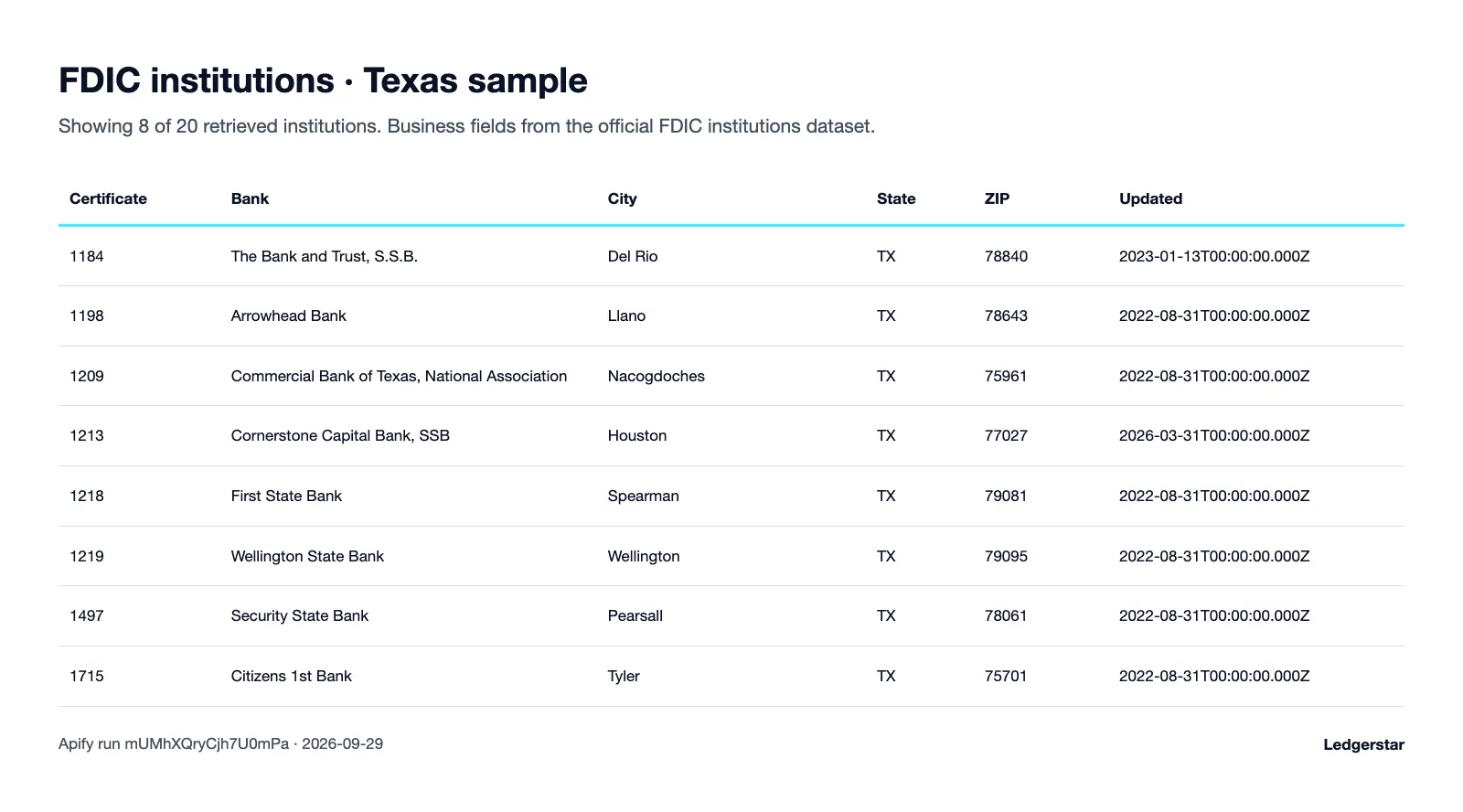
The JSON row below is the first saved record from Apify run mUMhXQryCjh7U0mPa on September 29, 2026. Twenty records were saved; the run stopped at the result cap.
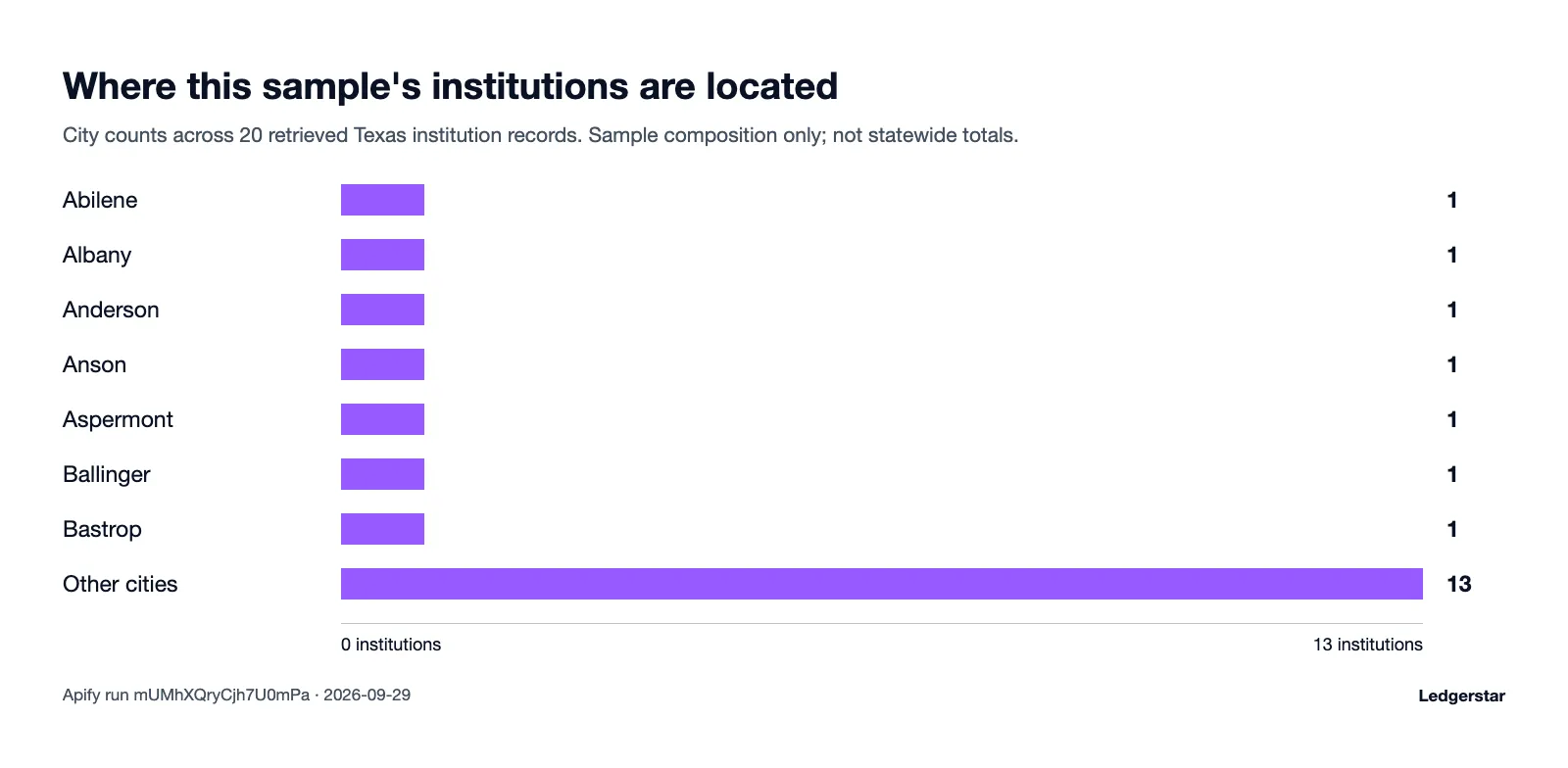
City mix in the 20-record Apify run on September 29, 2026. This capped sample is not a statewide distribution.
Alert mode: only new records
newSince: "off" is the default and returns the current bounded snapshot again on each new run. Those saved rows are delivered results and are chargeable. Set newSince: "lastRun" to establish a baseline and suppress content versions already in the retained ledger on later runs. This is content comparison, not a calendar date watermark; it does not assert that every record changed since a particular date was observed.
In monitoring mode, the cursor resumes bounded scans and is tied to the FDIC index. A rebuild between scheduled runs restarts the scan from offset zero. A rebuild after pagination starts stops the run and resets the cursor for a later retry. The cursor advances only after a delivered result, diagnostic, or recognized duplicate. The ledger keeps up to 200,000 versions for 3,650 days. Pruning can allow an old version to reappear. Dataset and state writes are separate, so a crash between them can also cause repeats. Overlapping runs are unsupported; there is no exact-once guarantee.
Pricing
$3.00 per 1,000 results, or $0.003 for each successfully saved result event. Snapshot rows are charged again on each new run. Retained duplicates and diagnostics are not billed as results.
| Results | Cost |
|---|---|
| 100 | $0.30 |
| 1,000 | $3.00 |
| 10,000 | $30.00 |
These are arithmetic estimates at the listed event price; they are not benchmarks for source completeness or processing time. A result limit is a maximum, not a promise that the source contains that many matching institutions. Check the listing price and use Apify's maximum charge control before running.
Use it through the API
Use your Apify token in your own environment. FDIC currently serves the public API without an Actor-side key; access rules can change.
Integrations
Export CSV for Google Sheets, or pass dataset records through Zapier and Make after a run completes. Slack workflows can notify a team when a monitoring run contains new saved rows. The Apify API can schedule runs and retrieve output. Preserve sourceUrl, timestamps, and dedupeId when moving records into another system, and check completion status before replacing a reference table with a capped result.
Data source and compliance
The Actor reads the official FDIC Bank Data API institutions index. FDIC publishes bank data and update guidance through its data downloads page. Institution snapshots are updated weekly. DATEUPDT is an institution row update date; it is not necessarily the date of a legal or operational event. The index creation timestamp is reported separately and is not a substitute for row freshness.
The output is limited to corporate institution information. No customer, account, officer, or individual contact records are collected. Source access requirements may change; failures are surfaced as errors rather than an empty successful result. Use the FDIC source link to verify important facts. This Actor is an independent tool and is not endorsed by FDIC. Its output is factual research data, not legal, safety, credit, or investment advice.
FAQ
Is it legal to use this data? The Actor reads public official business records. You remain responsible for your use, applicable terms, and any obligations attached to your downstream use.
How often is the data updated? FDIC institution snapshots update weekly. More frequent runs do not create a newer source snapshot.
How do I get only new records?
Choose lastRun for retained content-version comparison. It is not a date filter or a guarantee of every intervening change.
Does active mean insured or financially healthy?
No. It reflects the FDIC source activity flag. It is not a safety rating or recommendation.
Does a missing institution mean it closed? Not by itself. Filters, bounded scans, and source changes can affect results. Verify status with FDIC.
What does sourceUpdatedAt mean?
It is DATEUPDT converted to UTC midnight. It describes the source row update date, not necessarily a specific event.
Why are some output fields null? Unknown source values stay null. The Actor does not infer missing values.
Why did I get fewer results than requested?
The filter may match fewer rows, or scan and page limits may stop processing. Check complete, truncated, and stopReason.
Will repeated snapshots cost money?
Yes. Snapshot mode saves and charges for successfully delivered rows again. lastRun suppresses versions retained as already delivered.
Are contacts or customer details included? No. Output fields are limited to corporate institution details and provenance.
Does monitoring guarantee exactly-once delivery? No. State and dataset writes are separate. Retention pruning, crashes, and overlapping runs can produce repeats.
Can I schedule this Actor? Yes. Weekly schedules align with the published snapshot cadence. Avoid overlapping runs for the same monitoring scope.
More from Ledgerstar
See the Ledgerstar Apify Store for related source-linked business data tools and their current availability.
Support
Support: open an issue on this Actor's Issues tab in Apify Console.


