

Figma Templates Scraper
Pricing
from $4.64 / 1,000 templates
Figma Templates Scraper
Scrape Figma Community design templates: title, author, likes, duplicates, tags, category, and public template details from category or search pages.
Pricing
from $4.64 / 1,000 templates
Rating
0.0
(0)
Developer

Lexis Solutions
Maintained by CommunityActor stats
0
Bookmarked
1
Total users
1
Monthly active users
3 months ago
Last modified
Categories
Share
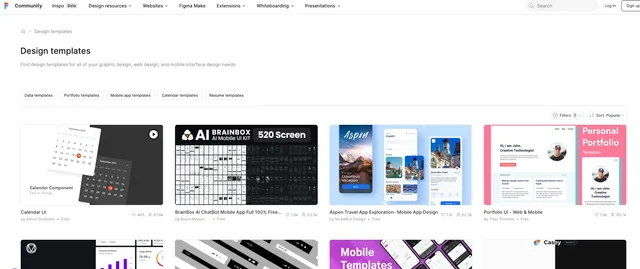
Figma Community Design Templates (figma.com/community/design-templates) is Figma's hub of publishable design template files, organized by category and editor type. This actor starts from Figma Community category/search pages or direct template URLs and extracts structured data for each design template into an Apify dataset.
Introduction
The Figma Templates scraper is built specifically for Figma's design-template listings — a niche distinct from a generic Figma Community crawl. It follows category/search URLs to discover templates, then visits each template's page to collect title, author, likes, duplicates (remixes), tags, category, and other public details.
Use Cases
- Design asset discovery: Build structured lists of Figma design templates by category.
- Creative market research: Compare template popularity (likes, duplicates), tags, and categories.
- Trend tracking: Monitor which template styles and editors are gaining traction over time.
- Directory enrichment: Feed template metadata into internal design-asset catalogs or research tools.
- Analytics pipelines: Export structured template data for BI tools and dashboards.
Input
Provide the following fields:
startUrls(array, required): Figma Community design template category/search URLs, or direct template detail URLs.maxItems(integer, optional): Maximum number of templates to scrape per category/search start URL. Use0or leave empty to scrape all templates found.proxyConfiguration(object, optional): Apify proxy settings. Not required — the scraper works without a proxy.
Notes:
- If a
startUrlis a Figma Community category/search URL (e.g. ending with/community/design-templates), the actor discovers template links from that page. - If a
startUrlis a direct template URL such as/community/file/<id>, the actor scrapes that template directly. maxItemsis applied per category/search start URL; direct template URLs always return one item each.
Input Example
Output
Each dataset item contains fields like:
The exact fields may vary by template because Figma does not expose every detail (e.g. tags, tagline) consistently on every listing.
Why use the Figma Templates Scraper?
- Focused: Built specifically for Figma Community design-template pages, not a generic Community crawl.
- Structured output: Ready-to-use JSON records for research, cataloging, and automation.
- Per-URL limits:
maxItemsis enforced per category/search start URL. - Flexible input: Supports both category/search URLs and direct template URLs.
- Rich details: Extracts likes, duplicates, tags, category, and author profile data.
- Apify-native: Works with Apify datasets, request queue, proxy configuration, schedules, and API access.
FAQ
-
How many templates can it extract? Controlled by
maxItemsper category/search start URL. Direct template URLs are scraped one by one. -
Do I need proxies? No. The scraper runs without a proxy. You can optionally add one (e.g. residential) if you hit anti-bot blocks at higher volume.
-
Can I start from a direct template URL? Yes. Direct Figma Community template URLs are supported.
-
Why are some fields empty? Some fields depend on what the template's creator filled in — tags, tagline, and description are optional on Figma and may be missing on some templates.
-
What if Figma changes their website structure? The actor may require updates to keep extraction stable.
Need to scrape similar design and creative-asset data?
Check out related scrapers from this repository:
- n8n Workflow Templates Scraper — n8n workflow templates from n8n website.
- n8n Integrations Scraper — n8n integrations from n8n website.
- ChatGPT Marketplace Scraper — ChatGPT marketplace from OpenAI website.
Need help or want a custom solution?
Lexis Solutions is a certified Apify Partner. We can help with custom data extraction projects.
Contact us over Email or LinkedIn.
Support Our Work
If you're happy with our work and scrapers, you're welcome to leave us a company review here and leave a review for the scrapers you're subscribed to.
Image Credit
Image credit: https://www.figma.com


