


Mediafire Downloader PPE
Pricing
from $3.50 / 1,000 successful mediafire link extractions
Mediafire Downloader PPE
Download MediaFire files instantly without ads or wait times! Our high-speed API engine extracts direct download links in seconds. Perfect for automation, bulk processing, and high-performance workflows. Save time and compute costs while building your storage automation empire! 🚀
Pricing
from $3.50 / 1,000 successful mediafire link extractions
Rating
0.0
(0)
Developer

Logiover
Actor stats
0
Bookmarked
129
Total users
7
Monthly active users
a month ago
Last modified
Categories
Share
📁 MediaFire Twitter (X) Media Pro: HD Video Downloader & Fast API
A high-performance Twitter (X) media extractor built for one goal: get the best-quality media fast, then upload/share via MediaFire.
This Actor extracts HD videos, GIFs, and images from x.com (Twitter) using a direct API approach (no heavy browser automation), so you can create MediaFire-ready files and links in seconds.
✅ If you searched “twitter video mediafire”, “x video mediafire link”, “mediafire twitter downloader”, or “download twitter video upload to mediafire” — this Actor is designed exactly for that workflow.
📺 Getting Started: Official Tutorial (Apify)
New to Apify? Watch this official guide to learn how to run an Actor and export your data quickly:
✨ Key Features (MediaFire Focused)
- 📁 MediaFire-Friendly Output: Produces clean direct download links so you can upload to MediaFire without copy/paste pain.
- 🚀 Lightning Fast: No Puppeteer/Playwright boot time. Pure API extraction.
- 🎬 Quality Selection: Detects multiple variants and picks the best available quality (HD when available).
- 🔄 Works with x.com & twitter.com: Paste any valid tweet/status link.
- 📦 Bulk Processing: Add hundreds of URLs and build a MediaFire upload pipeline.
- 🛡️ Proxy-Ready: Optimized for Residential Proxies for stability in high-volume runs.
- 💰 Ultra-Low Cost: Minimal compute usage, maximum ROI.
🛠️ MediaFire Workflow (How People Use It)
- Paste Tweet URLs into the Actor input.
- Run the Actor → it outputs direct media URLs + all quality variants.
- Download the media using the best link (
downloadUrl). - Upload to MediaFire → get your MediaFire share link.
- Share/store/organize in MediaFire folders.
This Actor is intentionally optimized for this exact “Twitter → Download → MediaFire Upload → Share” path.
📥 Input Configuration
Simple input: paste your URLs and optionally enable proxy for large batches.
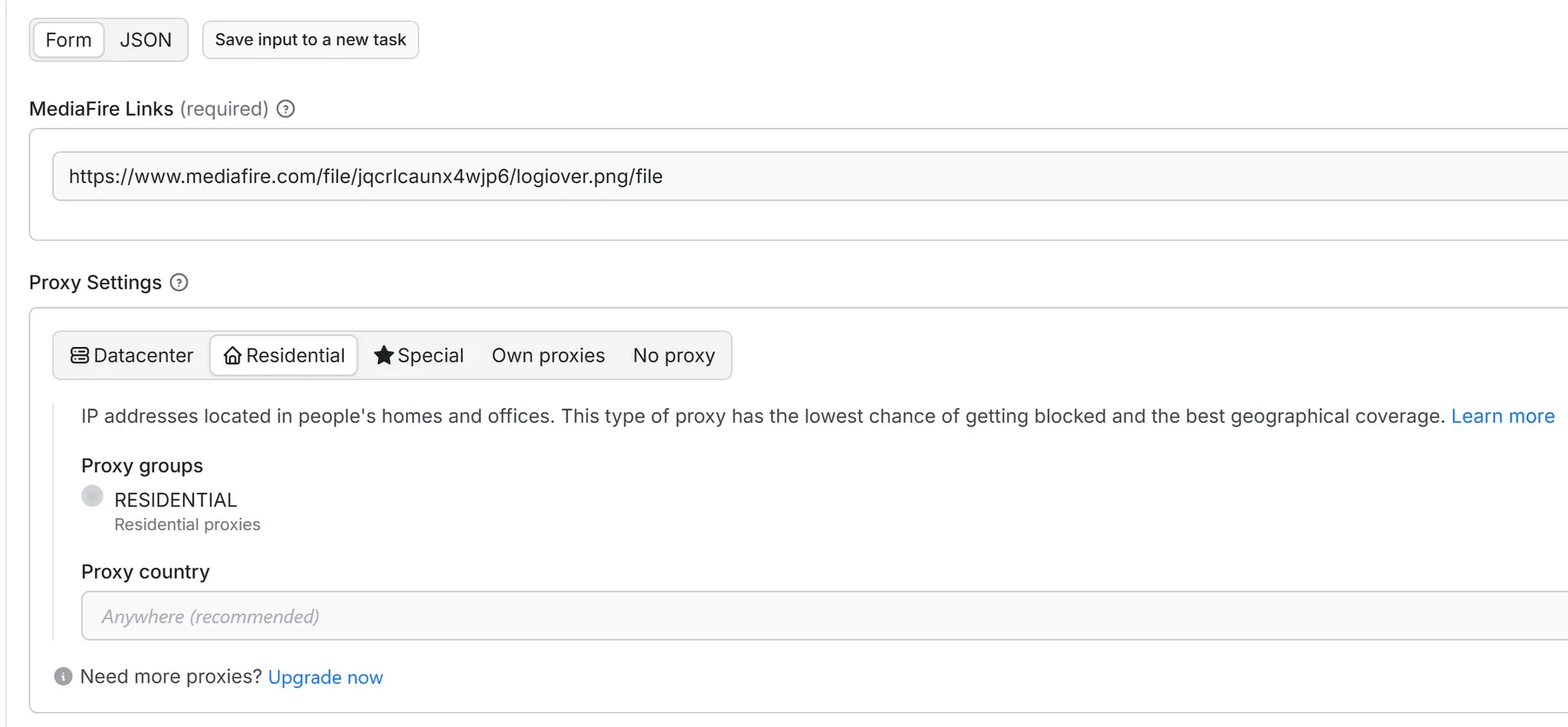
Input Fields:
- Twitter (X) Links: Single link or bulk list of tweet/status URLs.
- Proxy Configuration (Recommended for bulk): Use Apify Proxy (Residential) for best success rates.
📤 Output & Data Structure (MediaFire-Ready)
The output is designed to be automation-friendly: you get direct URLs and quality variants so you can reliably download and then upload to MediaFire.
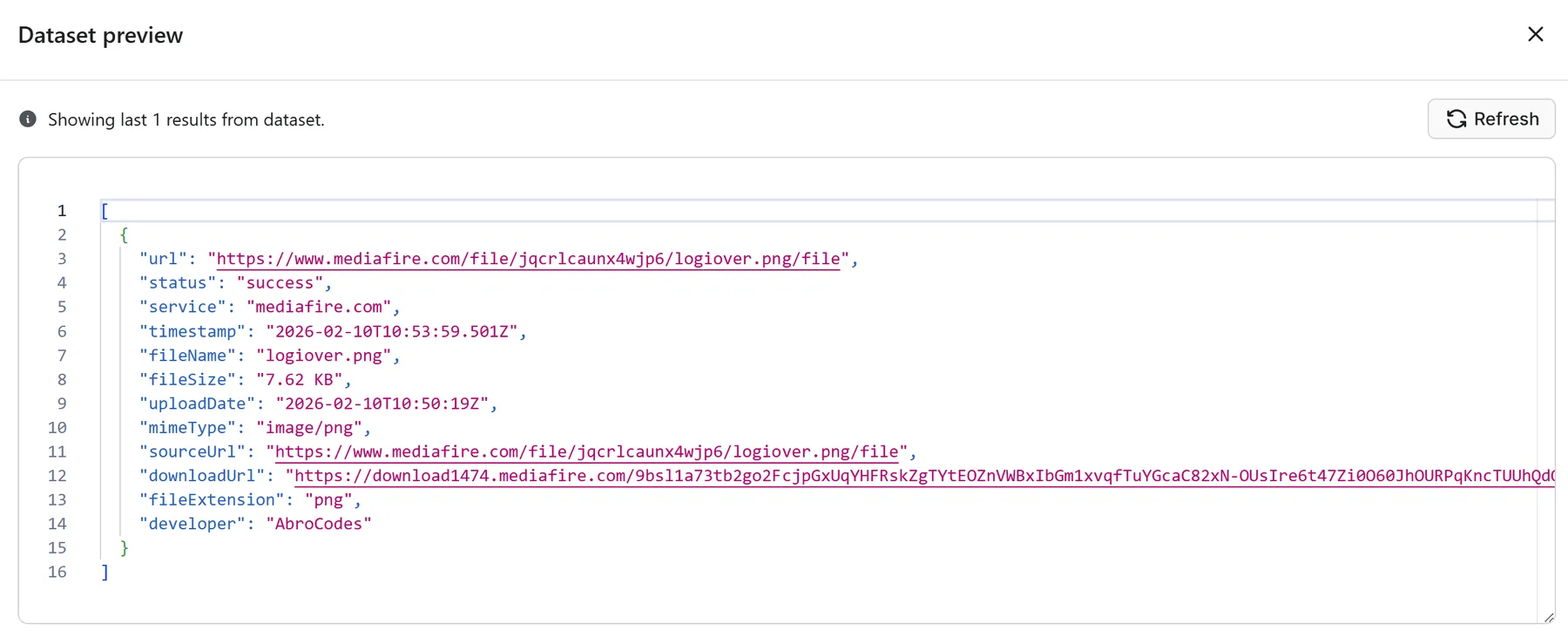
Output Fields:
url: Original tweet/status URL.status: Result status (e.g.,success,failed).resourceId: Tweet/status ID parsed from the URL.title: Tweet text/caption (useful as a filename for MediaFire uploads).downloadUrl: Best available download link (HD when possible).quality: The chosen primary quality (HD/SD).downloadLinks: All available quality variants with direct links (choose the exact resolution/bitrate).timestamp: Extraction timestamp for tracking/logging.
📌 MediaFire SEO Keywords (What This Actor Helps With)
This Actor is built to match real user intent around MediaFire sharing:
- Twitter video to MediaFire
- X video MediaFire link
- MediaFire Twitter downloader
- Download Twitter video and upload to MediaFire
- Twitter GIF to MediaFire
- Twitter image download MediaFire upload
- Create MediaFire links from Twitter videos
Because the Actor generates direct download URLs (not slow browser-only downloads), it fits MediaFire upload workflows perfectly.
✅ Best Practices for Smooth MediaFire Uploads
- Use
titleas your file naming base (e.g.,title-resourceId.mp4) before uploading to MediaFire. - If you want maximum quality for MediaFire, prefer
downloadLinksand pick the highest quality variant explicitly. - For bulk runs, enable Residential Proxy to avoid rate limits.
- Export results as JSON/CSV and feed them into your MediaFire upload automation (n8n/Zapier/Make).
💡 Why This Beats “MediaFire Twitter Downloader” Websites
Most “twitter video to mediafire” sites are:
- slow (browser rendering),
- unstable (UI changes),
- full of ads/redirects,
- inconsistent quality.
This Actor:
- extracts via direct endpoints,
- returns all quality variants,
- is automation-ready (so you can generate MediaFire-ready files at scale),
- keeps compute cost low.
📞 Support
Maintained and updated by AbroCodes to stay compatible with X’s changing infrastructure.
If you want a one-click MediaFire uploader integration (e.g., automatic upload after extraction), reach out via the Support tab.
Built for people who want: Twitter/X media → fast download → MediaFire share link.


