

Hacker News Scraper & Change Monitor
Pricing
from $0.08 / 1,000 verified item or profiles
Hacker News Scraper & Change Monitor
Search Hacker News, export ranked stories and comments, inspect public author submissions, and track new or updated observations with clear coverage.
Pricing
from $0.08 / 1,000 verified item or profiles
Rating
0.0
(0)
Developer

Luka
Maintained by CommunityActor stats
0
Bookmarked
2
Total users
1
Monthly active users
11 days ago
Last modified
Categories
Share
Turn Hacker News topics and discussions into a repeatable research feed. Find stories and comments, export their public context, and see what is new or updated when you run the same watch again.
- Search a topic or collect Top, Newest, Best, Ask HN, Show HN and Jobs.
- Keep source IDs, discussion links, points, dates and optional comments together.
- Follow repeat observations with stable item and change IDs.
🚀 Start in 60 seconds
- Keep Get current data → Keyword search.
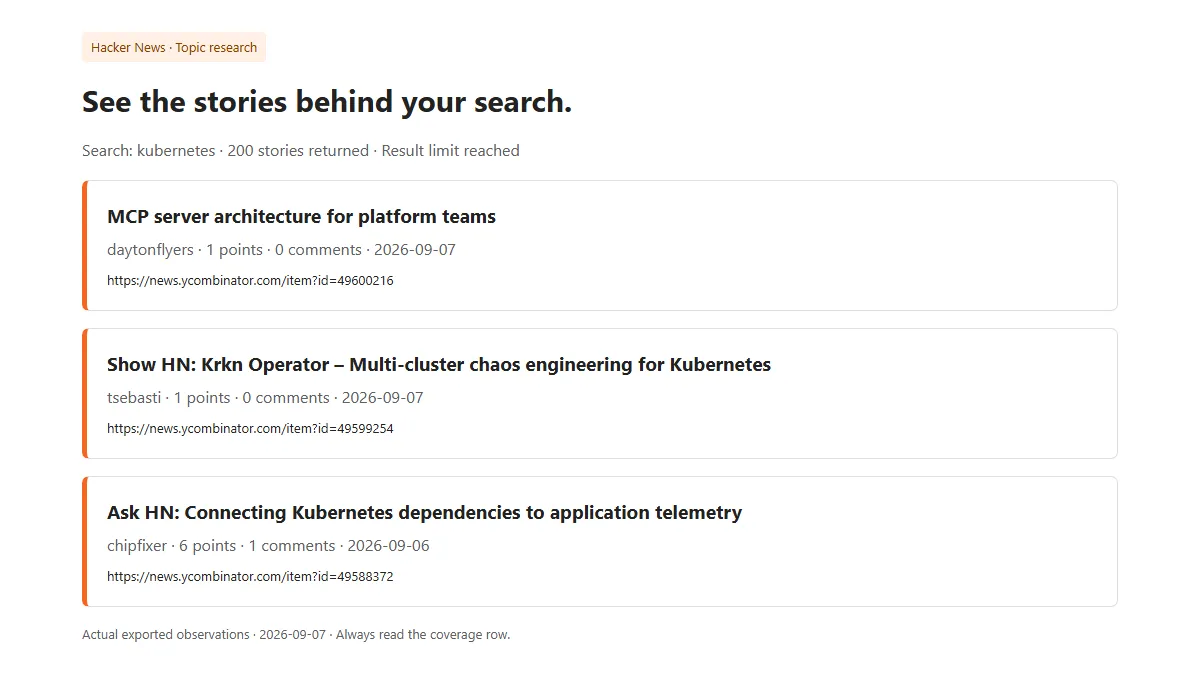
- Enter a topic, such as
kubernetes, and choose a result limit. - Run the Actor and export the Results as JSON, CSV or Excel. Read the coverage row alongside the items.
The default returns up to 200 newest matching stories. On the Free or Starter tier, 200 results cost $0.037 including the collection charge. To try one result, set Maximum results to 1: $0.002175. Comments are off by default.
🎯 Choose the right workflow
| Source | Use it for | Required input |
|---|---|---|
| Keyword search | Topics, products, stories and comments | Search words, or an empty search |
| Ranked feed | The current Top, Newest, Best, Ask, Show or Jobs list | A feed |
| Known items | A discussion or comment you already know | Item IDs from its id= link |
| User submissions | Public submissions by an author | Public username |
Use Get current data for exports. Use Track new and updated items for sequential repeat checks with the same inputs and watch name. The first monitoring run saves a starting point by default. Subsequent runs compare against that saved watch. Existing matches can optionally be emitted as NEW.
NEW means first observed by this watch; UPDATED means its contents, points or discussion data changed. It does not mean a product is newly launched. Dropping out of a feed or search never creates a removal event.
📦 What you get
Results contain item, optional profile, change and coverage rows. Filter by recordType in your downstream workflow. Each item includes its source ID, title/text when available, public author, points, reported comment count, publication time and canonical Hacker News link. Missing source fields are null.
Optional comments stay inside their parent item's comments array, with IDs, text, author, depth and parent links. Their count and depth may be limited; commentsCoverage makes this visible. Public profiles include biography, karma and a submission count, without private account information.
For JSON processing, use stableId to update current records and changeId to deduplicate change events. CSV exports can contain nested comments as structured values; JSON keeps the full structure.
🎛️ Input guide
Search and filters: choose date or relevance order, item types, author, minimum points/comments, a UTC date range and an optional linked website domain. Domain filtering includes subdomains. External pages are not fetched.
Comments: default five direct replies per item when enabled. Raise the count up to 100 and depth up to 10. There is also a total limit of 10,000 included comments per run. Truncation remains visible.
User submissions: stories are included by default; add Comments to item types to include the author's comments. A requested public profile adds one paid row beyond the item limit.
Limits: up to 10,000 paid items and 500 explicitly supplied IDs. Feed size, time, unavailable records and output size can reduce delivery. Set the spending limit high enough for the maximum requested count; a lower limit is rejected before collection.
Monitoring: keep the same watch name, source, filters, comment settings and result limit. Changed settings create a separate watch. Run the same watch sequentially. If a run has unfinished delivery, recover that original run before starting another. Watches retain up to 10,001 observed identities; start a new watch when this is reached.
💰 Pricing
Each verified collection costs $0.002, including a verified empty collection. Each delivered item or public profile adds the rate below. Unverified failed collections and their data are free.
| Apify tier | Per item/profile | 200 results, including collection | 1,000 results, including collection |
|---|---|---|---|
| Free | $0.000175 | $0.037 | $0.177 |
| Starter | $0.000175 | $0.037 | $0.177 |
| Scale | $0.00015 | $0.032 | $0.152 |
| Business | $0.00008 | $0.018 | $0.082 |
Enterprise tiers use the Business rate. The rates follow the active tiered offer; check your tier before running. Requested nested comments, NEW/UPDATED rows and coverage are included. Current observations are charged again on repeat monitoring even when unchanged. A collection with no matches costs $0.002; a run with 100 items plus one requested profile charges for 101 records. Platform usage pass-through is off.
The fixed collection charge means tiny runs are not always cheaper than a per-result-only alternative. Compare the complete requested workload, including comments and any profile row.
✅ Coverage you can trust
COMPLETE means the requested current source scope was exhausted; EMPTY_CONFIRMED means a verified scope contained no matching items. CAPPED means a declared result, comment, size or time boundary limited collection. PARTIAL means some requested data could not be verified. FAILED means no trustworthy collection was delivered.
Ranked feeds are snapshots of the lists Hacker News publishes, not a complete archive. Keyword search uses the public search index and can lag behind current item pages. Newest searches divide broad time ranges when needed; relevance searches remain capped at 1,000 matches. Narrow the date range for a more focused export. Search estimates can change during collection, and very dense time windows may remain capped.
Deleted/dead flags are reported only when explicitly supplied by the source. Missing items, changing ranks, delayed indexing and incomplete comment trees never prove deletion. A partial watch retains older observations and emits changes only for verified current records.
🔌 API and automation
Call luminar/hackernews-scraper-monitor from the Apify API, or use the Apify integration in n8n, Make or Zapier. For a topic watch:
Run sequentially with unchanged settings. Store current items by stableId; filter recordType=change for notifications and deduplicate with changeId. This Actor only returns data; it does not create schedules, send messages or change other services.
⚠️ Not yet supported
- Complete global historical coverage, or more than the source search window in relevance order.
- Inferred removals, sentiment or virality scores, and private account data.
- External article crawling, GitHub enrichment, posting, voting or messaging.
- Concurrent runs of the same watch, automatic migration of incompatible old watches, or an unlimited saved history.
❓ FAQ and support
Does an empty result mean the source was blocked? No. Verified empty and unverified failure have different coverage and billing.
Are all comments always included? No. The selected count/depth, total comment budget and source availability determine coverage. Check commentsCoverage.
Why did an old story appear as NEW? It was newly observed by your saved watch. The source publication date is separate.
What should I send with a support request? The Apify run ID, your intended result and the relevant coverage row. Keep passwords and private credentials out of support messages.


