

Whatnot Marketplace Scraper & Monitor
Pricing
from $0.60 / 1,000 whatnot marketplace rows
Whatnot Marketplace Scraper & Monitor
Search public Whatnot listings, sellers, categories and shows, inspect listing details, or track reliable marketplace changes with stable IDs and explicit coverage.
Pricing
from $0.60 / 1,000 whatnot marketplace rows
Rating
0.0
(0)
Developer

Luka
Maintained by CommunityActor stats
0
Bookmarked
2
Total users
1
Monthly active users
10 days ago
Last modified
Categories
Share
Collect public Whatnot marketplace data without building your own crawler. Search products and live shows, inspect seller activity, open exact listings, or run the same scope repeatedly to receive reliable NEW, UPDATED, and confirmed ENDED changes.
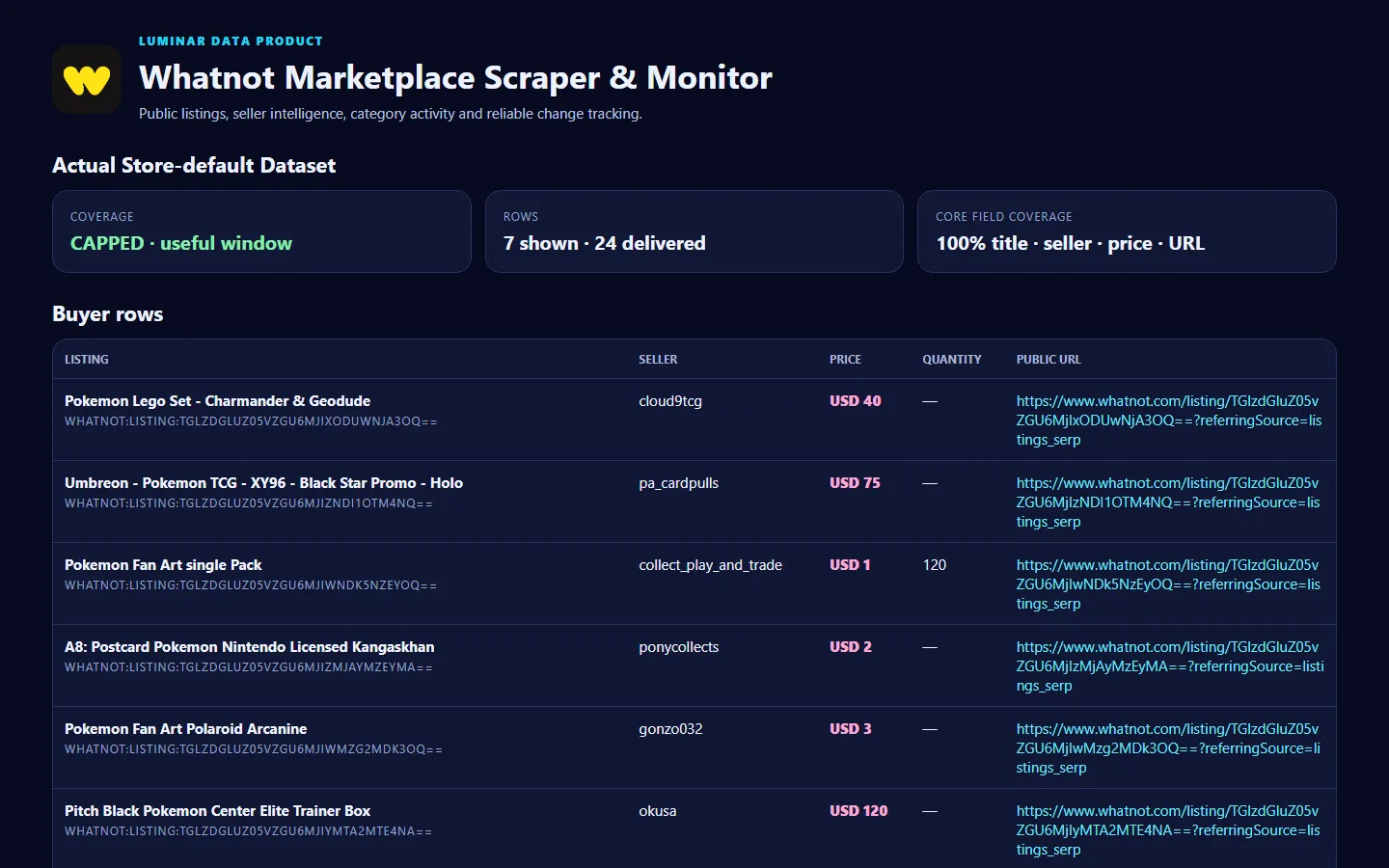
The default run is deliberately simple: pokemon product search, core fields, and at most 100 rows. Every result has a stable ID and public URL, while every run explains whether its coverage was complete, capped, partial, blocked, failed, or a confirmed empty result.
🚀 Start in 60 seconds
- Leave What do you want to collect? on Search the marketplace.
- Replace
pokemonwith your keyword, or keep it for the first run. - Set Maximum result rows to the number you need.
- Click Start.
- Open Marketplace records for the clean table or Run summary for coverage, field-completeness and billing totals.
Cheapest useful input:
🎯 Choose the right workflow
| Workflow | Use it when you need | Typical output |
|---|---|---|
| Search the marketplace | Products, live shows, sellers or categories matching keywords or a public Whatnot search URL | Flat listing, livestream, seller and category rows |
| Seller profile and shop | A public seller snapshot and the shop/show links visible on the profile | Seller metrics plus requested public child rows |
| Category and shows | A public category page and the current activity visible there | Category, livestream and public seller rows |
| Exact listing details | One or more known public listing URLs | Detailed listing rows with extra fields where published |
| Track changes | Repeat the same search, seller, category or listing scope | NEW, UPDATED and two-scan-confirmed ENDED rows |
For Search, start with PRODUCT. Choose LIVESTREAM, USER, CATEGORY, or UNIVERSAL only when you need those public result types. For monitoring, schedule identical input and keep the same Monitoring scope name.
📦 What you get
All marketplace rows share the same dependable envelope:
| Field | Meaning |
|---|---|
recordType | listing, livestream, seller, category, change, or coverage |
stableId / sourceId | Joinable Whatnot-derived identity that remains stable across repeat runs |
url | Canonical public Whatnot page |
title | Public listing, show, seller or category title |
sellerUsername / sellerUrl | Public seller identity when the source associates one |
price / currency | Numeric displayed price and ISO currency |
quantity, currentBid, bidCount | Public commerce fields when shown |
listingStatus | Public listing or livestream status |
imageUrls | Public image gallery available on the selected surface |
rating, reviewCount, followerCount, soldCount | Public seller metrics when shown |
activeViewers, startsAt, categoryName, rank | Public show/category signals when shown |
sourceCreatedAt, sourceUpdatedAt | Source-published timestamps when shown |
observedAt | UTC observation time |
Example listing row:
Nullable fields are honest: null means the selected public Whatnot surface did not publish that field. It is never replaced with a guess.
🎛️ Input guide
- Search keywords / Whatnot search URLs — use one or combine several; duplicate records are merged by stable ID.
- Seller usernames — public handles only;
@is accepted. - Category URLs — public
/tag/or/category/pages. - Listing URLs — exact public
/listing/pages. - Listing detail level — Core is the fast, low-cost default. Detailed opens every product listing page and uses its own event price.
- Include public category sellers — adds seller rows associated with shows on a category page; no unsupported rank is inferred.
- Maximum result rows — hard run-wide cap, from 1 to 100.
- Maximum rows per target — keeps one large target from consuming the entire run.
- Maximum loading rounds — bounds infinite loading; a reached bound is reported as
CAPPED. - Maximum charge for this run — preflight refusal when the active worst-case event bill would exceed your limit.
The Product input contains no cookie, login, token, proxy, session, diagnostic, or fault controls.
💰 Pricing
Pay only when at least one target returns trustworthy work, plus delivered rows. Fully failed or blocked runs have no source/result charge; coverage rows are always free.
| Event | Free | Bronze | Silver | Gold / Platinum / Diamond |
|---|---|---|---|---|
| Verified run source | $0.0120 | $0.0120 | $0.0120 | $0.0120 |
| Marketplace row | $0.80 / 1,000 | $0.75 / 1,000 | $0.70 / 1,000 | $0.60 / 1,000 |
| Detailed listing row | $8.00 / 1,000 | $8.00 / 1,000 | $8.00 / 1,000 | $8.00 / 1,000 |
| Comparable monitoring run | $0.0500 | $0.0500 | $0.0500 | $0.0500 |
| Delivered change | $0.80 / 1,000 | $0.75 / 1,000 | $0.70 / 1,000 | $0.60 / 1,000 |
A 100-row core run is $0.092 on Free and $0.072 on Gold before any plan-specific Apify platform costs. The leading broad competitor's captured active row price is about $0.30 for 100 rows on Free and $0.10 on Gold, including its start event. On the measured 71-row representative workload, our bill is $0.0688 on Free and $0.0546 on Gold, versus about $0.2131 and $0.0711 for the leader.
The fixed source event is charged once per successful run, not once per query. It covers source access while every delivered core row stays below the leader's per-row price. The small-run crossover is transparent: our total becomes lower at 6 rows on Free, 10 on Bronze, 15 on Silver, and 30 on Gold/Platinum/Diamond. Below those points, the leader can be cheaper; from those points onward, this Actor is cheaper for the comparable core row.
Detailed mode is intentionally separate and capped at 25 rows: one public page is opened per listing, so its cost must not be hidden inside the low marketplace-row price.
Normal scraping fails a target closed when the public result window does not provide query-bound stable IDs; it never silently switches to a materially more expensive scope. Monitoring uses the stricter complete-scan path needed to evaluate absence, which is why its fixed event is priced separately.
✅ Coverage you can trust
Every run writes one free coverage row:
COMPLETE— every target reached a stable public result window within the limits.EMPTY_CONFIRMED— the expected result surface loaded and explicitly confirmed no matches.CAPPED— a declared limit stopped the walk; useful rows are returned, but the result is not called complete.PARTIAL— some targets completed while another failed or was blocked.BLOCKED— public source access was blocked; this is never disguised as empty.FAILED— the source or parser could not establish a trustworthy result.
Monitoring state changes only after paid delivery is acknowledged and only on trustworthy coverage. A listing missing once stays active with one absence. It becomes ENDED only after a second comparable complete scan also misses it. FAILED, PARTIAL, CAPPED, or BLOCKED runs never end unseen records and never advance the baseline.
The first Monitor run defaults to Create baseline without NEW rows, preventing an expensive first-run change flood. Choose Return current rows as NEW only when that is the outcome you want.
🔌 API and automation
Run from JavaScript:
For monitoring, use one saved Task with identical input and a sequential schedule. Read OUTPUT first: automate downstream actions only when coverageStatus is COMPLETE or when your workflow explicitly accepts a capped/partial dataset.
Exports work through Apify Dataset in JSON, CSV, Excel, XML and other supported formats.
⚠️ Not yet supported
- Login-only or personalized data, private messages/contacts, orders, inventory management, imported account cookies/tokens, or CAPTCHA solving.
- Guaranteed population of fields Whatnot does not publish on a selected public page.
- Historical sold-price estimates, investment scores, sentiment scores, alerts, or outbound messaging.
- Concurrent runs that write the same monitoring namespace; schedule one scope sequentially.
- More than four targets or 100 result rows in one run. Split a larger job into separate saved Tasks.
❓ FAQ and support
Why is a field null?
Whatnot publishes different fields for listings, shows, profiles and categories. The Actor preserves that distinction instead of inferring missing values.
Why did I receive fewer rows than requested?
Open the coverage row. The public scope may have ended naturally, explicitly returned no matches, or hit a declared cap.
Does one missing listing mean it ended?
No. ENDED requires two complete comparable misses. Anything less remains active or not observed.
Why does Detailed cost more?
Core search reuses the marketplace result surface. Detailed opens each listing page separately for additional public fields.
Can I use several targets?
Yes, within the input limits. Duplicate stable IDs are merged and not billed twice.
For support, include the run ID, workflow, coverage status and a public target URL. Never send account cookies, passwords or private tokens.


