
Zara Product Scraper & Price Monitor
Pricing
from $0.80 / 1,000 zara product rows
Zara Product Scraper & Price Monitor
Search Zara by keyword, paste a category or sale URL, or paste product URLs. Get typed rows with price, discount, stock, colours, sizes and a working link, or track price and stock changes between runs.
Pricing
from $0.80 / 1,000 zara product rows
Rating
0.0
(0)
Developer

Luka
Maintained by CommunityActor stats
0
Bookmarked
2
Total users
1
Monthly active users
23 days ago
Last modified
Categories
Share
Search Zara by keyword, paste a category or sale URL, or paste product URLs — and get clean, typed rows with price, discount, stock, colours, sizes and a working product link. Turn on change tracking and the same run becomes a price and stock monitor.
Every row is either a real value or null. No "-" placeholders, no unresolved image templates, no colour counts standing in for colours.
Start in 60 seconds
Paste one keyword, press Start. That is the whole first run.
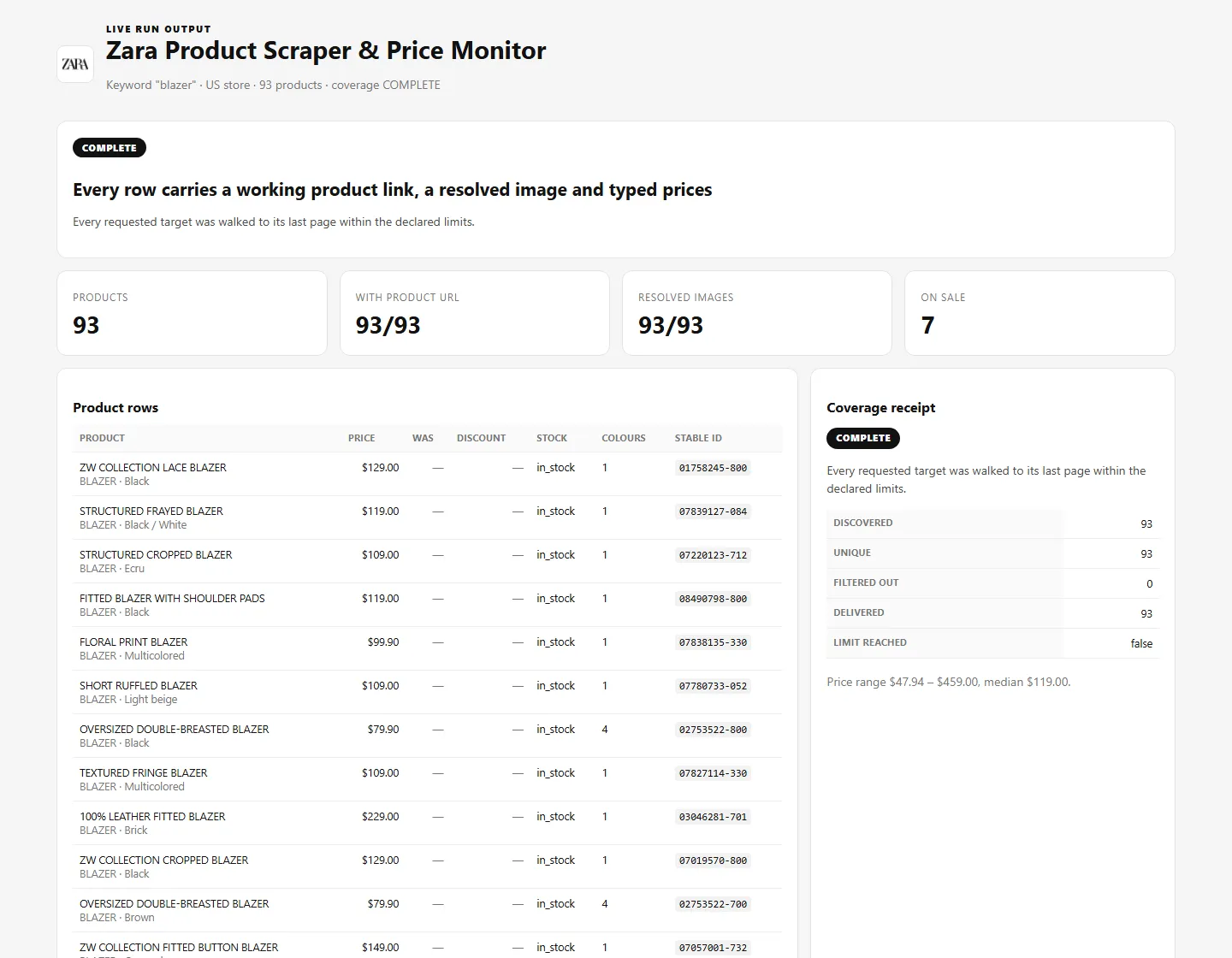
That run returns about 90–130 blazers with prices, stock, colours and a clickable link to each product, and tells you plainly whether it reached everything.
What you get
| Field | What it is |
|---|---|
name, description | Product name and description |
productUrl | Canonical Zara product page URL — clickable, joinable |
price, originalPrice, discountPercent | Numbers in the storefront currency. originalPrice is null when the item is not on sale — never a dash |
currency | ISO currency code of that storefront |
availability | in_stock, low_on_stock, coming_soon or out_of_stock |
colors[] | Every colourway with name, hex code, price and availability |
sizes[] | Per-size availability, price and SKU (with detail enabled) |
composition[] | Fabric composition by garment part (with detail enabled) |
imageUrl, imageUrls[] | Resolved image URLs that actually open |
styleId, colorId, displayReference | Stable Zara identifiers |
section, familyName, subfamilyName | Zara's own taxonomy |
country, language, scrapedAt | Where and when the row came from |
Change rows add changeType (NEW / UPDATED / ENDED), changedFields, previousPrice, currentPrice and priceDelta.
Input: three ways in
Keyword — searchQueries: ["blazer"]
Uses Zara's own product search, so results genuinely match the keyword.
Category or sale page — categoryUrls: ["https://www.zara.com/us/en/woman-new-in-l1180.html"]
Any Zara category, New In or sale page. Paged to the end unless you set a lower limit.
Exact products — productUrls: [...]
Scrape or monitor specific items. Product URLs always return full detail including per-size availability.
You can combine all three in one run. Duplicates reached through several targets are merged, not billed twice.
Prices are per storefront: country and language select the catalogue and the currency.
Price and stock monitoring
Set trackChanges: true and schedule the run.
- The first run stores a baseline and returns products only — no flood of fake "new" rows.
- Later runs return the products plus
NEW,UPDATEDandENDEDchange rows withpreviousPriceandpriceDelta. - A product must be missing twice in a row before it is reported as
ENDED, because one absence is not proof of removal. - If a run is blocked, capped or partial, the baseline is not updated and nothing is reported as ended. A broken run can never corrupt your history.
Coverage — you always know what you got
Every run returns a coverage row and a run summary saying exactly what happened:
| Status | Meaning |
|---|---|
COMPLETE | Every target was walked to its last page |
FILTERED | Scope completed; your filters removed some products |
CAPPED | A limit you set was reached first |
PARTIAL | Some targets completed, others did not |
EMPTY_CONFIRMED | The source loaded and confirmed nothing matches |
BLOCKED / FAILED | The source did not answer reliably — reported as such, never disguised as an empty result |
A keyword with no matches returns nothing — and costs nothing
Zara answers a keyword it cannot match with a "you might also like" suggestion set: unrelated products, HTTP 200, no error. Selling those to you as search results is a real behaviour in this category.
This Actor detects that case and returns EMPTY_CONFIRMED with zero rows and zero row charges. You are never billed for products you did not ask for.
Pricing
| Event | Price | When |
|---|---|---|
| Verified target | $0.0058 | Once per keyword, category or product URL that returned a trustworthy result. Blocked or failed targets are free |
| Product row | $0.0009 | One unique product or verified change row |
| Product row with sizes and composition | $0.0015 | Replaces the product row price when fetchDetails is on |
| Monitoring target | $0.0068 | Once per target on a change-tracking run that produced a comparable scan |
200 products = $0.1858. No start fee.
maxProducts and maxBuyerChargeUsd cap the run before it begins: if the worst case would exceed your limit, the run refuses to start rather than surprising you.
Untrustworthy output is always free. Blocked targets, failed targets and suppressed non-matching search results are never charged.
Automation and exports
- Schedule it. Set
trackChanges: trueand run it daily or weekly; the change feed is the point of a scheduled run. - Export it. Dataset rows download as JSON, CSV, Excel, XML or HTML from the Storage tab, or through the Apify API.
- Wire it up. Apify integrations (webhooks, Slack, email, Make, Zapier) fire on run completion, so a price drop can reach you without polling.
- Views. The dataset ships Overview, Products, Changes and Coverage column views; each changes the columns, not which rows exist, and
recordTypealways stays visible.
FAQ and support
Why does a row show null for the was-price?
Because the product is not on sale. A dash or an empty string would break spreadsheet and BI typing, so the field is genuinely null.
I asked for sizes but sizes is empty.
Size data only exists when fetchDetails is on. Without it the run has no size data, and the size filter is honestly not applied rather than silently faked.
The run says CAPPED. Did it fail?
No. It means one of your limits was reached before the scope was finished. Raise maxProducts, maxProductsPerTarget or maxPagesPerTarget, or narrow the scope.
My keyword returned nothing.
That is EMPTY_CONFIRMED: Zara has no genuine match. You were not charged for rows. Try a broader keyword or a category URL.
Can I monitor a different country?
Yes. Each country and language combination is its own scope with its own baseline, so a US monitor and an ES monitor never mix.
Collects publicly available product information from Zara's own public storefront. No login, no account data, no personal data.


