


SAM.gov Opportunities Monitor
Pricing
from $7.00 / 1,000 results
SAM.gov Opportunities Monitor
Automated monitor for SAM.gov that emits only NEW and UPDATED opportunities — no duplicates, no noise. Ideal for alerts and automations.
Pricing
from $7.00 / 1,000 results
Rating
5.0
(1)
Developer

Mikhail Mamaev
Maintained by CommunityActor stats
0
Bookmarked
5
Total users
1
Monthly active users
2 days ago
Last modified
Categories
Share
SAM.gov Opportunities Monitor (NEW / UPDATED)
Automated monitor for SAM.gov opportunities.
Find out only when something actually changes — new opportunities or meaningful updates — and get notified automatically.
Designed for contractors, bid & capture teams, consultants, and anyone tracking federal opportunities on a regular basis.
What problem this actor solves
SAM.gov updates constantly.
Manually checking it means:
- missing opportunities
- wasting time on unchanged listings
- information overload
This actor solves that by:
- running on a schedule
- remembering what it has already seen
- notifying you only when there is a NEW or UPDATED opportunity
No duplicates. No noise. Only signals.
How it works
Each time the actor runs:
-
It checks SAM.gov using the official API.
-
Compares results with previous runs.
-
Detects changes:
- NEW — a new opportunity appeared
- UPDATED — an existing opportunity changed (fingerprint of key fields)
-
Saves only those changes.
-
Sends notifications (optional).
That’s it.
Quick setup
Step 1. Get a SAM.gov API key (required)
This actor uses the official SAM.gov API.
You need your own (free) API key.
On SAM.gov:
- Sign in or create an account
- Generate an API key in your account settings
Step 2. Add the API key to the actor
In the actor input form, paste your SAM.gov API key into the field “SAM.gov API key”.
The value is stored encrypted and is never visible to anyone, including the actor author.
Where is my API key stored?
Your API key is stored as an encrypted secret input. It can only be decrypted during the actor run and is never visible to the actor author or other users.
Step 3. Create a Task
This actor is meant to run automatically, not manually.
In Apify Console:
- Open the actor
- Click Create task
- Configure input (see example below)
- Save the task
Step 4. Set a Schedule
Inside the task:
- Set a schedule (recommended: every 6–12 hours)
- Enable the task
Now the monitoring runs automatically.
Filters and targeting
Cut the feed down to only what you can actually bid on. Mix and match any of these:
- Posted date window or response deadline window
- States (single state sent to API, multiple states filtered locally)
- NAICS codes (single code sent to API, multiple codes filtered locally)
- Procurement types (Solicitation, Award Notice, Sources Sought, etc.)
- Set-aside codes (SBA, 8A, HUBZone, SDVOSB, WOSB, and more)
- Status (e.g., active)
- Notice ID / Solicitation number
- Organization name or code
- Classification code (PSC)
- Title keyword
The actor still emits only NEW/UPDATED items even after heavy filtering.
Example input
Email notifications
You can receive email notifications using Apify Monitoring → Alerts.
This is the simplest and recommended way to get notified when new or updated opportunities are detected.
How it works:
- Create a Task for this actor and set a schedule.
- Open the actor page and go to Monitoring → Alerts.
- Create a new alert with:
- Metric: Number of results
- Condition: is greater than
0
- Enable Email notifications and enter your email address.
- Save and enable the alert.
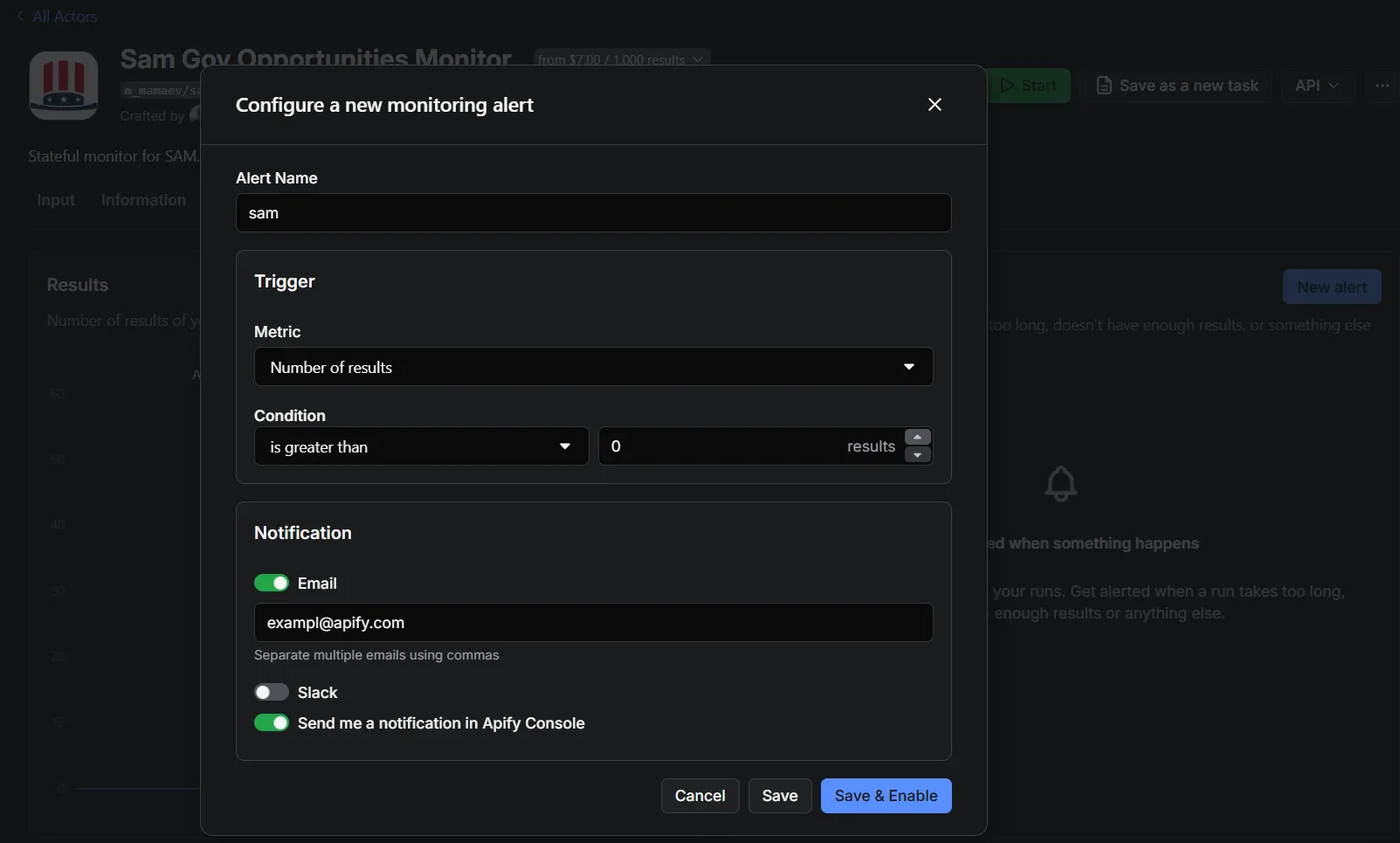
You will now receive an email only when the actor finds NEW or UPDATED opportunities. If no changes are detected, no email is sent.
Webhooks
If you set webhookUrl, the actor will POST each detected change to that URL as JSON:
- One request per change
- Header:
Content-Type: application/json
leave empty to disable
What can I put into webhookUrl?
Any endpoint that accepts a POST request, for example:
- Zapier “Catch Hook”
- Make.com “Custom webhook”
- n8n webhook trigger
- Your own server (Express/Fastify/Django/etc.)
- Slack/Discord via automation tools
Example: detected NEW opportunity
This is what you receive when a new opportunity is detected:
This object is:
- sent to your webhook (if configured)
- written to the default dataset
- used to trigger email or Slack notifications via Apify Automations
Field highlights:
event— what happened (NEW or UPDATED)title— opportunity titledeadline— response deadlineemail— official contact emailsamUrl— direct link to the opportunity on SAM.govsolicitationNumber— solicitation number (when available)opportunityType— notice/opportunity type from SAM.govsetAsideCode— set-aside code (e.g., SBA, 8A)
Output: dataset contains only changes
The actor pushes only NEW/UPDATED events to the default dataset. This is ideal for:
- alerts (email / Slack / Teams)
- CRM ingestion
- change-based automation
- pay-per-change usage
noticeId is unique per opportunity and can be treated as a primary-like key.
You pay only for emitted change events, not for how many pages the actor scans.
Common NAICS Codes
- 236220 - Commercial and Institutional Building Construction
- 541330 - Engineering Services
- 541512 - Computer Systems Design Services
- 541519 - Other Computer Related Services
- 541611 - Administrative Management and General Management Consulting
- 541690 - Other Scientific and Technical Consulting Services
- 541715 - Research and Development in Physical, Engineering, and Life Sciences
- 561210 - Facilities Support Services
- 562910 - Environmental Remediation Services
Full list: https://www.census.gov/naics/
Notes & caveats
- The actor stores its state in key-value store
sam-monitor-state, keySTATE. - STATE is pruned every 10 runs (entries not seen in ~180 days are removed).
More about API requests: SAM.gov Get Opportunities Public API


