

Threads Post Tracker — Posts, Views & Engagement History
Pricing
$2.00 / 1,000 successful observations
Threads Post Tracker — Posts, Views & Engagement History
Track public Threads posts from URLs, accounts or keywords. Export content, available engagement metrics and changes between runs. No login required.
Pricing
$2.00 / 1,000 successful observations
Rating
0.0
(0)
Developer

SUNGHWAN CHO
Maintained by CommunityActor stats
0
Bookmarked
2
Total users
1
Monthly active users
10 days ago
Last modified
Categories
Features
Share
Threads Post Tracker | Threads Scraper for Posts, Views & Engagement Changes (2026)
Languages: English · 한국어
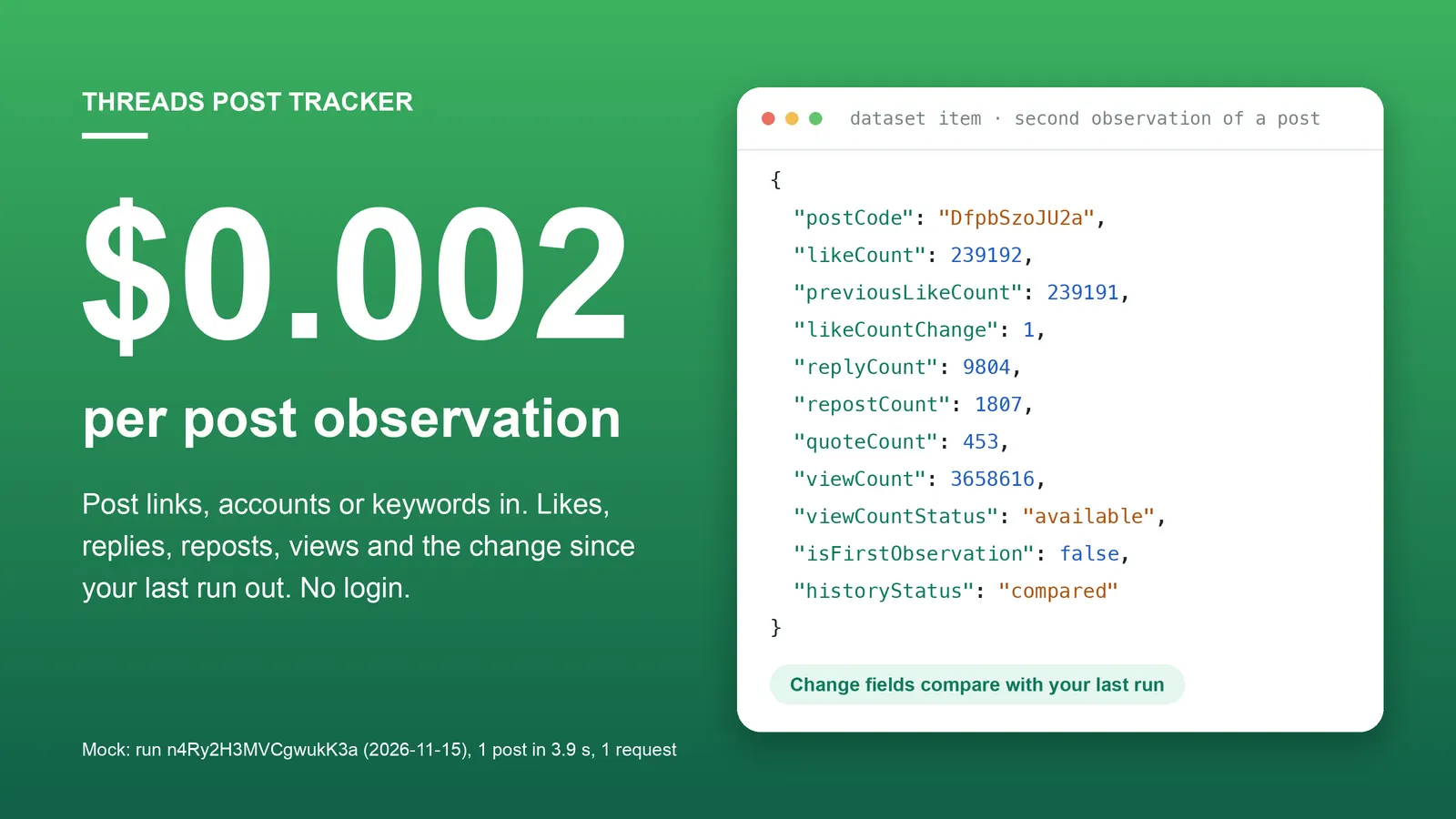
Enter Threads post links, account names or keywords and get one flat JSON row per public post: text, posting time, likes, replies, reposts, quotes, shares, views where the public page shows them, media links, and the change in each count since your previous run. No Threads login, no cookies, no API key.
This is a beta release. It reads what Threads shows to a logged-out visitor, and that window can be incomplete, especially for keyword search and replies. Every run writes a RUN_SUMMARY record that says, per target, what was read and why collection stopped. Counts that Threads does not show stay null; they are never guessed.
Free plan: Apify's $5 monthly credit covers 2,500 post observations with this Actor.
Why choose this Actor?
$0.002 per observation, and nothing else.
One observation is one post or profile row saved. There is no start fee, and view lookups and author follower lookups are included in the same price.
Change tracking is built in.
With recordHistory on (the default) the Actor saves each observation in a key-value store in your account and returns previousLikeCount, likeCountChange, viewCountChange and the same pairs for replies, reposts, quotes and author followers on the next run. Schedule one input and you have a time series.
Missing is null, with a reason.
A count that is not in the public response is null, not 0. viewCountStatus says whether views were available, hiddenBySource, notFoundInResponse, notChecked or lookupFailed, and historyStatus says whether a comparison was possible.
An honest coverage report in every run.
RUN_SUMMARY lists each target with its status, stop reason, pages read, and how many rows had each metric. A target that could only be read in part is marked partial.
Measured, not estimated. One post with views and change fields took 3.9 seconds and one request in run n4Ry2H3MVCgwukK3a; the three newest posts of an account took 4.3 seconds and one request in run yPoLrXdv8ceyQh67i (both build 0.1.26, 2026-11-15, 256 MB).
Quick start
Track one post. Replace the link with your own public post link. Each run costs one observation ($0.002).
Open the Actor, paste post links, and click Start. Run it again with the same historyStoreName and the change fields are filled. Export the dataset as JSON, CSV or Excel.
The Actor does not schedule itself. Save the input as an Apify task and add a schedule when you want recurring tracking.
Copy to your AI assistant
Paste this into ChatGPT, Claude, Cursor or another assistant so it can call the Actor for you:
Use it over MCP
Add this server to Claude Desktop, Cursor or any MCP client, authenticated with your Apify token:
The agent has to pick a mode and fill the matching list (postUrls, usernames or keywords); everything else has a default.
Key features
- Seven collection modes. Post links, account posts, account reposts, account replies, replies under a post, keyword search (top or recent), and profile discovery.
- Engagement counts as numbers.
likeCount,replyCount,repostCount,quoteCount,shareCount, andviewCountwhere the public page shows it. - Change since the previous observation.
previous…and…Changefields for likes, replies, reposts, quotes, views and author followers, withpreviousScrapedAtandpreviousRunId. - Only-new mode.
onlyNewSinceLastRunoutputs only posts the history store has not seen before. - Views with their own status.
viewCountStatus,viewCountSourceandviewCountObservedAttell you where a view count came from and when. - Content fields. Text, posting time, detected language, topic tag, hashtags, mentions, links, link preview, and media links with their types.
- Thread and reply context. For post links: the same author's thread with
threadPosition. For account replies: the parent post's link, text and counts when the page shows them. - Extra post parts when present. Attached long text, poll options and votes, music title and artist, stickers.
- Three independent limits.
maxPostsper target,maxRequestsfor the whole run,maxPagesper target, plus your maximum charge. - Run report.
RUN_SUMMARYwith per-target status, stop reason, metric coverage and billing counts.
How to track Threads posts
Track specific posts on a schedule
One row per link, with views. Schedule the same input (daily, hourly) and keep the same historyStoreName; from the second run on, the change fields are numbers.
A post together with the author's thread
includeThread: true (the default) also returns the same author's posts that the linked page shows as one thread. Each of them is a separate row and a separate observation. threadOrderStatus is confirmed only when the page gives a consistent order.
The latest posts of an account
Replies and reposts are left out in this mode; use user_replies or user_reposts for those.
Only posts you have not seen before
Outputs a row only for a post that is new to the history store. Posts that are already known are still read and checked, and each of them counts as one observation even though no row is written. To keep an engagement time series, leave this off.
Keyword search
recent results are sorted newest first, but they are not guaranteed to be the latest N posts; the public search window can have gaps. searchUnverifiedIntervals in RUN_SUMMARY lists time ranges the Actor could not verify.
Replies under a post
Find accounts for a keyword
Returns recordType: "profile" rows: username, profile link, follower count and verified flag. One public result window per keyword, no paging, no metric history.
Collection modes
mode | Needs | Result |
|---|---|---|
post_link | postUrls | The linked posts, plus the same author's thread when includeThread is on. |
user | usernames | The account's own posts (no replies, no reposts). |
user_reposts | usernames | Posts the account reposted, with repostedByUsername, repostCode and repostedAt. |
user_replies | usernames | The account's replies, with the parent post's link, text and counts when shown. |
post_replies | postUrls | Replies under the post. Direct replies carry the post's code in parentPostCode; rootPostCode is the post you asked for. |
search | keywords | Top or recent public results for the keyword, with keywordMatch. |
profiles | keywords | Accounts found for the keyword (one public window). |
Input parameters
| Field | Type | Default | Description |
|---|---|---|---|
mode | string | post_link | One of the seven modes above. |
postUrls | array of strings | — | Required for post_link and post_replies. threads.com or threads.net post links, or /t/CODE links. 1 to 100 entries. |
usernames | array of strings | — | Required for user, user_reposts, user_replies. Handles (threads or @threads) or profile URLs. |
keywords | array of strings | — | Required for search and profiles. One query per entry. |
maxPosts | integer | 20 | 1 to 10,000. Upper bound on observations per target, including known posts checked by onlyNewSinceLastRun. The public source may give fewer. |
searchSort | string | top | top or recent. Used by search. |
startDate | string | — | Inclusive UTC date, YYYY-MM-DD. Search sends the window to Threads and filters the output; account modes page until eligible posts are found, within the request and page limits. |
endDate | string | — | Inclusive UTC end date, YYYY-MM-DD. |
includeThread | boolean | true | post_link: also return the same author's posts shown on the linked page. Not a claim of the complete conversation. |
includeAuthorProfile | boolean | false | Fetch the author's follower count when the page does not include it. One extra request per author. |
recordHistory | boolean | true | Save each post observation and return the change fields. |
onlyNewSinceLastRun | boolean | false | Output only first observations. Needs recordHistory. Known posts that are re-checked are charged; posts whose history cannot be read are skipped without a charge. |
historyStoreName | string | threads-observed-metrics-v1 | The key-value store in your account that keeps observations. Letters, digits and hyphens, 2 to 63 characters. Use one name per campaign. |
maxRequests | integer | 20 | 1 to 20,000. Limit for all HTTP requests of the run, including retries, view lookups and profile lookups. |
requestIntervalMillis | integer | 1200 | 1,000 to 30,000. Requests are sent one at a time with at least this spacing. |
proxyConfiguration | object | no proxy | Leave as is. Paid runs use direct requests and reject proxy settings. |
enablePagination | boolean | true | Follow public cursors for account, reply and search results. profiles stays a single window. |
maxPages | integer | 5 | 1 to 500. Pages per target. |
pageSize | integer | 25 | 1 to 50. Rows requested per continuation; Threads may return fewer or more. |
maxPageRetries | integer | 1 | 0 to 2. Retries for an empty first page, a failed continuation or a failed view lookup. Login walls, challenges, rate limits and denied requests stop without retry. Every attempt counts toward maxRequests. |
includeViews | boolean | false | Look up missing view counts from each post's public page. Normally one extra request per unique post. |
The three limits are independent: raising maxPosts does not raise maxRequests or maxPages. For a larger job raise all three, and the run timeout and maximum charge in the run options. This Actor's default run options are a 600-second timeout and a $0.10 maximum charge (50 observations).
How change tracking works
History contains this Actor's own observations, not past Threads analytics. With recordHistory on, each successfully saved post is written to the key-value store named in historyStoreName: its identifier, the observation time and six counts (likes, replies, reposts, quotes, views, author followers). Nothing else is stored there.
On the next run with the same store name, each post row gets the newest earlier observation as previousScrapedAt, previousRunId and previous…Count, and …CountChange is the difference. A change is null when either side is null. On the first observation isFirstObservation is true and all change fields are null. When history cannot be read, historyAvailable is false and nothing is compared.
Records stay in the named store until you delete it. Use a different historyStoreName for each campaign or schedule that should be compared separately. Profile rows are not recorded.
What data can you extract from Threads?
Rows have a recordType field. Missing values are null.
Post rows ("recordType": "post")
| Field | Type | Description |
|---|---|---|
postCode, postId, url | string | The code in the post link, Threads' numeric ID, and the canonical post link. |
text | string | Post text. |
postedAt | string | Posting time as a UTC ISO timestamp. |
likeCount, replyCount, repostCount, quoteCount, shareCount | number | Engagement counts at scrapedAt. likeCount is null when the author hides like and view counts. |
viewCount | number | Views, when the public page shows them. |
viewCountStatus | string | available, hiddenBySource, notFoundInResponse, notChecked or lookupFailed. |
viewCountSource, viewCountObservedAt | string | postData or permalinkPage, and when the view count was read. |
ownerUsername, ownerProfileUrl, ownerVerified, ownerFollowerCount | string / boolean / number | The author's public handle, profile link, verified flag and follower count. The follower count is null when the page does not include it; includeAuthorProfile looks it up. |
mediaType | string | text, photo, video, carousel or gif. |
mediaUrl, mediaUrls, mediaUrlTypes | string / array | First media link, all media links, and photo, video or gif for each. The links are signed and expire. |
videoCoverUrl, mediaWidth, mediaHeight, hasAudio, accessibilityCaption | string / number / boolean | Media details when present. |
gifId, gifMediaStatus | string | GIF identifier and available, placeholderOnly or unavailable. |
language, topicTag | string | Language code Threads detected (e.g. en) and the post's topic tag. |
hashtags, mentions, mentionedUsernames, links | array of strings | Parsed from the text and from Threads' own mention data. |
linkPreviewUrl, linkPreviewTitle, linkPreviewDescription, linkPreviewImageUrl, linkPreviewDisplayUrl | string | The attached link card. |
isReply, replyToUsername, replyControl | boolean / string | Whether the post is a reply, to whom, and who may reply (e.g. everyone). |
isQuotePost, quotedPostUrl | boolean / string | Quote posts and the quoted post's link. |
isEdited, isPinned, isPaidPartnership, isSpoiler, isAiGenerated | boolean | Flags as Threads reports them. |
parentPostUrl, parentText, parentPostedAt, parentLikeCount, parentReplyCount, parentRepostCount, parentQuoteCount, parentShareCount, parentAvailability | string / number | user_replies: the post that was replied to, when the page shows it (parentAvailability: "available"); otherwise unknown and null. |
requestedPostUrl, isRequestedPost, rootPostCode, parentPostCode, threadPosition, threadOrderStatus | string / boolean / number | post_link and post_replies: which input link the row belongs to and its place in the thread. |
sourceTab, requestedUsername, repostedByUsername, repostCode, repostedAt | string | Account modes: posts, replies or reposts, the account you asked for, and the repost context. |
searchKeyword, searchKeywords, searchSort, keywordMatch | string / array / boolean | search: the keyword or keywords that found the post, and whether the whole phrase appears in the text, topic tag or link title. |
attachedText, attachedTextStatus | string | Long text attached to the post, with available, none or unknown. |
pollOptions, pollVotes, pollIsClosed, pollTotalVotes | array / boolean / number | Poll options and votes per option. pollTotalVotes is always null: Threads gives no total and the Actor does not assume the sum is one. |
musicTitle, musicArtist, musicSongId | string | Music attached to the post. |
stickerIds, stickerUrls, stickerCount, isStickerPost | array / number / boolean | Inline stickers. |
scrapedAt | string | When the row was observed (UTC ISO). |
recordType, source, schemaVersion, status | string / number | post, threads, 1, ok. |
History fields (on post rows when recordHistory is on)
| Field | Type | Description |
|---|---|---|
historyAvailable, historyStatus | boolean / string | Whether history could be read, and first_observation, compared, no_earlier_observation, read_limit, invalid_history, read_failed, store_unavailable or ineligible. |
isFirstObservation | boolean | true when the store had no observation of this post. |
previousScrapedAt, previousRunId | string | When and in which run the previous observation was made. |
previousLikeCount, previousReplyCount, previousRepostCount, previousQuoteCount, previousViewCount, previousOwnerFollowerCount | number | Counts of the previous observation. |
likeCountChange, replyCountChange, repostCountChange, quoteCountChange, viewCountChange, ownerFollowerCountChange | number | Current minus previous. null when either value is missing. There is no change field for shareCount. |
Profile rows ("recordType": "profile", mode profiles): ownerUsername, ownerProfileUrl, ownerFollowerCount, ownerVerified, searchKeyword, scrapedAt. No biography, profile picture or contact details.
Run report (key-value store record RUN_SUMMARY, free): status (completed, partial, failed; running means the run was interrupted), returned, skippedSeen, skippedDate, requests, historyWrites, historyFailures, a targets list (per target: status, returned, observed, pagesRead, hasNextPage, stopReason such as maxPosts, pageComplete, publicWindowEnded or paginationUnavailable), billing (observed, charged, suppressedExisting, limitReached) and resultQuality (how many rows had each metric).
Output example: a tracked post on its second observation
From run n4Ry2H3MVCgwukK3a (2026-11-15, build 0.1.26), mode post_link with includeViews: true, a post of the official threads account. It had been observed 49 seconds earlier in run yPoLrXdv8ceyQh67i (mode user), so the change fields are filled. Unedited. ownerFollowerCount is null here because the post page did not include it, which also makes ownerFollowerCountChange null.
Output example: RUN_SUMMARY
Same run. Unedited.
Advanced usage
Print what moved since the last run
Check coverage before you trust a result
Read RUN_SUMMARY from the run's key-value store. Use the rows as a complete answer only when the run status and every target's status are completed. For partial targets, stopReason tells you which limit or source condition ended collection, and resultQuality.metricCoverage shows how many rows have each count.
Views for account or search results
Account pages may not include view counts: in run yPoLrXdv8ceyQh67i (mode user) none of the 3 rows had one. Set includeViews: true and raise maxRequests by about one per expected post. A post whose lookup fails keeps viewCount: null with viewCountStatus: "lookupFailed", its target is marked partial, and the row is still saved and usable.
Several keywords or links in one run
Posts found by more than one keyword or link are saved once. searchKeywords (or requestedPostUrls) lists every input that found the post. Rows of such runs are written at the end of collection, so a timeout or abort during collection can leave fewer rows or none; raise the run timeout for larger jobs.
One call from the command line
How much does it cost to track Threads posts?
Pay per event, no subscription. One event, one price for every Apify plan. You pay only this event; compute is included.
| Event | Price | When |
|---|---|---|
observation | $0.002 | One saved post or profile row. With onlyNewSinceLastRun, also one already-known post that was checked and not output. View lookups and follower lookups are included. |
There is no start fee. Not charged: targets that could not be read, posts outside your date range, a post seen twice in one run, and posts skipped by onlyNewSinceLastRun because their history could not be read. In user_reposts, each pair of original post and reposting account is one observation.
Worked examples:
| Job | Events | Cost |
|---|---|---|
| One post, one run | 1 observation | $0.002 |
| 50 campaign posts, checked once a day | 1,500 observations per month | $3.00 per month |
| 20 newest posts of 10 accounts, once a week | 200 observations per week | $0.40 per week |
| Keyword search, 100 posts | 100 observations | $0.20 |
onlyNewSinceLastRun on 10 accounts, 20 posts checked each, 5 of them new | 200 observations (5 rows) | $0.40 |
The run stops before it would exceed the maximum charge of the run. In runs with several keywords or links the Actor reserves budget for rows it has collected before saving them, so collection can stop with chargeCapacityReserved before the whole budget is spent. RUN_SUMMARY.billing shows observations, confirmed charges and whether the limit was reached.
Scheduling and integrations
- Schedules. Save the input as a task in Apify Console and schedule it. Keep one
historyStoreNameper schedule so each run is compared with the one before. - Webhooks and automation. Send the dataset to Slack, Google Sheets, Make, Zapier or n8n with Apify integrations, or call your own endpoint with a webhook when a run finishes.
- API clients. Any HTTP client works; official clients exist for Python (
apify-client) and JavaScript (apify-client).
FAQ
Do I need a Threads or Instagram account? No. The Actor reads public pages as a logged-out visitor. No login, cookies or session is used.
Do I always get view counts?
No. Views are returned when the public post page shows them. In post_link mode they can come with the post page itself, as in the example above (viewCountSource: "permalinkPage", one request). In other modes turn on includeViews, which opens each post's page. When the author hides counts, viewCountStatus is hiddenBySource; when the page does not show them, it is notFoundInResponse.
Why are the change fields null?
On the first observation of a post there is nothing to compare with (isFirstObservation: true). Run again with the same historyStoreName. A single change field is also null when the count is missing in either observation.
Can it give me a post's past numbers from before my first run? No. History is what this Actor observed in your runs. Threads' own analytics are not public.
Why is my run or target partial?
A limit (maxRequests, maxPages, the maximum charge) was reached, Threads showed no further page, a view or follower lookup failed, or the public window ended. The rows that were saved are valid. stopReason in RUN_SUMMARY names the cause.
Does keyword search return every post for a keyword?
No. It returns what Threads shows a logged-out visitor for the keyword. Recent results can have gaps and are not guaranteed to be the latest N posts. Reaching maxPosts does not prove the result is complete.
How many posts can one run collect? The input accepts up to 10,000 observations per target, but this beta does not promise that the public source shows that many, or complete search history, or every nested reply. The recommended use is small recurring post and account tracking. Test larger jobs on your own inputs before scheduling them.
What happens when Threads asks for login or rate-limits?
The affected target stops without retry and is reported in RUN_SUMMARY. Rows already collected are kept. If no target can be read, the run fails.
Can I use a proxy? No. Paid runs send direct requests and reject proxy settings. Requests are sent one at a time, at least one second apart.
Can I resume or resurrect a run? No. Start a new run. If a charge could not be confirmed, collection stops and the summary reports the uncertain state.
Does it read private accounts, followers lists or direct messages? No. Only posts and profile data that are public without login. Post rows contain the author's public handle, verified flag and follower count; no biography, profile picture, email or phone number is collected.
Is it legal to scrape Threads? The Actor collects only publicly visible posts and public account handles. Post text is written by users and may contain personal details they chose to share. Whether your use is allowed depends on Threads' terms of service, your purpose and your local law, including data-protection law where handles count as personal data; checking that is your responsibility.
More social tracking Actors
The same idea for other platforms: paste links, get the counts and the change since your last run.
| Actor | What you put in → what you get |
|---|---|
| Instagram Reel Tracker | Reel links, post links or usernames → likes, comments and views per reel, with daily changes. |
| TikTok Video Tracker | Video links → plays, likes, comments, shares and saves per video, with daily changes. |
| YouTube Video Tracker | Video, Shorts or channel links → views, likes, comments and subscribers per video, with daily changes. |
| Facebook Reel Tracker | Reel or video links → play count, views and reactions per link, with daily changes. |
| Xiaohongshu (RED) Note Tracker | Note links → likes, collects, comments and shares per note, with changes. |
| Weibo Post Tracker | Post links → repost, comment and like counts per post, with changes. |
| Bilibili Video Metrics Tracker | Video links → views, likes, coins, favorites, shares and comments per video, with changes. |
한국어 안내 (Korean)
Threads(스레드) 게시물 링크, 계정 이름, 키워드 중 하나를 넣으면 공개 게시물 한 건당 한 행이 나옵니다. 본문, 작성 시각, 좋아요·답글·리포스트·인용·공유 수, 공개 페이지에 표시되는 경우의 조회수, 미디어 링크가 들어 있고, 같은 historyStoreName으로 다시 실행하면 직전 관측 대비 증감(likeCountChange, viewCountChange 등)이 함께 나옵니다. 수집 방식은 게시물 링크, 계정 게시물, 계정 리포스트, 계정 답글, 게시물 아래 답글, 키워드 검색, 프로필 찾기의 7가지입니다. 요금은 관측 1건당 $0.002(1,000건 $2.00)이며 시작 요금은 없고, 조회수·팔로워 수 조회도 같은 요금에 포함됩니다. onlyNewSinceLastRun을 켜면 이미 본 게시물은 행으로 나오지 않지만 확인한 건수만큼 과금됩니다. 베타 버전이라 로그인하지 않은 방문자에게 Threads가 보여 주는 범위만 읽습니다. 키워드 검색과 답글은 빠진 구간이 있을 수 있고 최신 N건을 보장하지 않으므로, 실행마다 저장되는 RUN_SUMMARY에서 대상별 상태와 중단 사유를 확인해야 합니다. Threads가 보여 주지 않는 수치는 0이 아니라 null로 남습니다. 증감은 이 Actor가 직접 관측한 값끼리만 비교하며 첫 실행 이전의 과거 수치는 제공하지 않습니다. 프록시 설정은 지원하지 않습니다. 로그인이나 쿠키 없이 공개 게시물과 공개 계정 핸들만 읽고, 비공개 계정·팔로워 목록·메시지·연락처는 수집하지 않습니다.
Notes and limits
- Beta. The Actor reads the public, logged-out view of Threads. It does not promise complete search history, all nested replies, or every rich-media field.
postedAt,scrapedAt,previousScrapedAtandviewCountObservedAtare UTC ISO timestamps.startDateandendDateare UTC dates. Relative dates are not supported.- Media links are signed and expire; download what you need soon after the run.
- An attached text or a reply window being present does not prove that every attachment or nested reply was collected.
maxPostsis per target;maxRequestsis for the whole run and includes retries and lookups.- A
RUN_SUMMARYthat still saysrunningbelongs to a run that was interrupted; treat its rows as incomplete. - History records stay in your named key-value store until you delete it.
Support
Missing a field, another mode, a different output format? Tell us in the Issues tab with the run ID. We answer every issue.


