
1688 Image Search
Pricing
from $2.80 / 1,000 photo searcheds
1688 Image Search
Search 1688.com by photo: paste product image links from Amazon, AliExpress, Shopify or any site and get the matching 1688 wholesale offers with price in CNY and USD, units sold, repeat buyers and the supplier. Up to 600 matches a photo, no login, pay per photo.
Pricing
from $2.80 / 1,000 photo searcheds
Rating
0.0
(0)
Developer

Maksim Lazouski
Maintained by CommunityActor stats
0
Bookmarked
3
Total users
2
Monthly active users
an hour ago
Last modified
Categories
Features
Share
What does 1688 Image Search do?
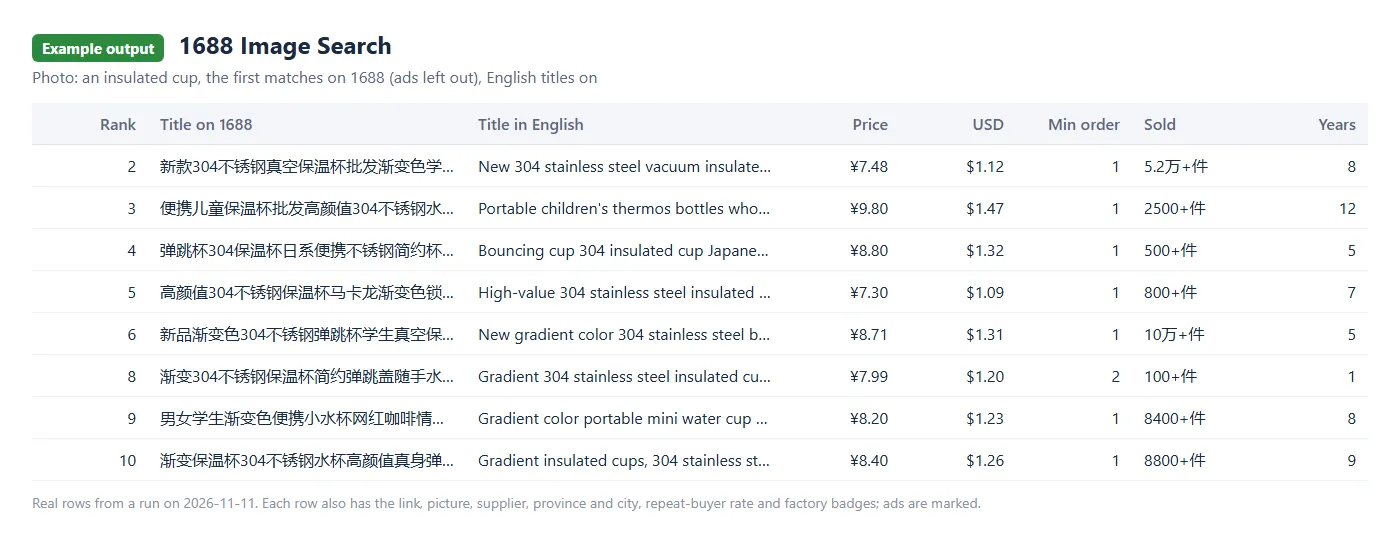
1688 Image Search finds the offers on 1688.com, the Chinese wholesale marketplace, that look like your product photo. Give it links of photos: a product picture from Amazon, AliExpress, Shopify, TikTok Shop, 1688 or your own site. For each photo it returns the offers 1688's own search by photo shows, best match first: price in CNY and US dollars, units sold, repeat-buyer rate, the supplier, its years on 1688, province and city, picture and link.
- No 1688 account, no cookies, no proxy of your own. Paste photo links and press Start.
- Up to 600 matches per photo: 60 a page, up to 10 pages. The first 60 by default.
- Prices in CNY and US dollars, at the European Central Bank's rate of the day.
- English titles for $0.10 per 1,000 rows, for buyers who do not read Chinese.
- Full offer rows if you want them: open every match to get price by quantity, every variant with stock, the supplier card, ratings and dropshipping terms.
- You pay per photo (with its first 60 matches) and per further page of 60, plus $0.005 when a run starts.
It runs on the Apify platform, so you also get scheduling, an API, webhooks, integrations, and export of the results to JSON, CSV, Excel or HTML.
What data can you get from a search by photo?
| Group | Fields |
|---|---|
| Offer | offer id, link, title, picture, ad or not |
| Price | price in CNY, price note (such as a time-limited price), price in US dollars and the rate it was worked out at, the smallest order (such as "2件起批", from 2 pieces) |
| Sales | units sold as 1688 shows them and as a number, orders booked, repeat-buyer rate |
| Supplier | company name, seller ids, shop link, years on 1688, business type (factory, trading), factory inspection, super factory |
| Place | province and city |
| Tags | 1688's own tags, such as "先采后付" (pay after you buy) |
| Your photo | the photo's link, the page of results, the place on that page and the rank among all matches of the photo |
| English title (add-on) | title_en, an English machine translation of the title |
With Open every match each match comes back as a full offer row instead, with about 100 fields: price by quantity, smallest order, every variant with its price and stock, orders in 30 days, rating, shipping, the supplier card, dropshipping terms and the description.
How to search 1688 by photo
- Open the actor and go to the Input tab.
- Paste photo links, one per line. On most sites, right-click a product picture and choose "Copy image address".
- Choose how many pages of matches you want per photo (60 each).
- Turn on English titles or Open every match if you need them.
- Press Start, then open the Output tab or export the dataset as JSON, CSV or Excel.
Ready-made tasks
Start from a task that is already set up, then replace the photo link with your own:
- Find 1688 phone case suppliers by photo
- Compare 1688 prices of a cup by its photo
- Find 1688 leggings factories by photo
- 1688 Bluetooth earphones by photo, in English
- 1688 tumbler offers by photo, with full details
What finds the best matches: one product on a plain background, as on a shop's product page. A photo with several products or with people in it finds less. A photo taken from 1688 itself often finds the very offer it came from, and the other sellers of the same product.
How much does it cost to search 1688 by photo?
You pay per photo searched and per page of matches. The price depends on your Apify plan:
| What | Free | Starter | Scale | Business |
|---|---|---|---|---|
| A photo searched, with its first page of up to 60 matches | $0.004 | $0.0036 | $0.0032 | $0.0028 |
| Each further page of up to 60 matches | $0.002 | $0.0018 | $0.0016 | $0.0014 |
| A full offer row, with "Open every match" (per 1,000) | $3.00 | $2.70 | $2.40 | $2.00 |
| English title (add-on, per 1,000 rows that get one) | $0.10 | $0.10 | $0.10 | $0.10 |
A run also costs $0.005 to start, on every plan. Apify counts the start once per GB of the run's memory, so at the default memory it is one start.
The examples below are at the Free plan price, without the start.
- One photo with 60 matches costs $0.004.
- 100 photos with 60 matches each cost $0.40.
- One photo with 600 matches (10 pages) costs $0.022.
- English titles for one photo's 60 matches add $0.006.
- With "Open every match" you pay for the full offer rows instead of the matches: one photo's 60 offers cost $0.18.
You do not pay for a photo that could not be read, for a photo nothing on 1688 looks like, or for a page the run could not get. Apify's free plan comes with $5 of usage a month, which is enough for more than 1,000 photos with 60 matches each.
Input
| Field | What it does |
|---|---|
images | Photo links, one per line: https://... links of JPEG, PNG, WebP or GIF pictures, or data:image/...;base64,... links. |
maxPagesPerImage | Pages of matches per photo, 60 each: 1 (default) to 10. |
scrapeDetails | Off: one row per match. On: the full offer row of every match. |
includeExtras | With scrapeDetails: the supplier card, ratings, dropshipping terms and description of every offer. On by default. |
translateTitles | Adds title_en to every row. |
maxItems | Stop after this many rows. A page cut short by it is charged as a page. |
maxConcurrency | How many photos are read at the same time. 10 by default. |
Three photos, the first 120 matches of each, with English titles:
Output
Every row has a type field: image_match for a match, offer for a full offer row. image_url is the photo's link as you gave it; a photo given as a data link is named by its type and a digest instead, such as data:image/jpeg;sha256=4f1c09a2b7e3d5c86a10, so the rows stay small.
Limits you should know
- The matches are 1688's own: what its search by photo on the site shows for the same photo. A photo from 1688 finds the same product well; a product shot from another shop finds similar products, and the very same one less often.
- Up to 600 matches per photo (10 pages of 60). 1688 reported about 700 for the photos we tried.
- Ads (sponsored offers) are in the results where 1688 puts them, marked
"is_ad": true; there were 3 to 8 among the first 60 in our runs. - Text is returned as 1688 gives it: in Chinese, prices in CNY (and in US dollars beside them).
- The photo is shrunk to at most 360 pixels a side before it goes to 1688, as 1688's own page does it.
- Photo size: a file of up to 15 MB; a JPEG of up to 60 megapixels, other formats up to 25. A bigger one is listed in
FAILEDand not charged. - Search by keyword, or offers by their link: that is 1688 Product Scraper.
FAQ
Do I need a 1688 account, cookies or a proxy?
No. The actor searches the way 1688's page does for a visitor who is not logged in, and brings its own connections.
Where do I get the photo links?
On most shops, right-click the product picture and choose "Copy image address". A product export of your own shop (Shopify, WooCommerce) has a column with them. A picture on your computer can be given as a data:image/jpeg;base64,... link.
What happens when a photo could not be searched?
Each photo is tried up to three times, each time from a new address. What still fails is listed in the FAILED record of the run's key-value store, with the reason: the link gave no picture, nothing on 1688 looks like it, or 1688 refused the search. Nothing is charged for it. If 1688 starts refusing visitors, the run does not press on: it waits and tries again with one visitor at a time; if that does not help within a few minutes, it stops and keeps what it stored. Start it again with Resurrect and it goes on from where it stopped. A row is never stored twice.
Can I run it on a schedule or call it from my code?
Yes. Use Apify's schedules for regular runs, and the Apify API or its clients for Python and JavaScript to start runs and read results. The maxItems field and the run's spending limit keep a run within a budget.
Is it legal to search 1688 by photo?
The actor sends your photo to 1688's public search by photo and reads what 1688 shows a visitor who is not logged in. Offers name companies and their shops, and a seller can be a private person, so handle names as the data protection rules that apply to you require. Send only photos you may use. You are responsible for how you use the data; if you are not sure, ask a lawyer.
Something is wrong or a field is missing
Open an issue on the actor's Issues tab with the photo link.
1688 is a trademark of its owner. This actor is not affiliated with or endorsed by 1688.com or Alibaba Group.


