

IFC Parser & Quantity Takeoff (IFC to JSON, CSV, Excel)
Pricing
Pay per usage
IFC Parser & Quantity Takeoff (IFC to JSON, CSV, Excel)
Turn IFC (BIM) files from Revit, ArchiCAD, Tekla or BlenderBIM into a clean table: one row per wall, slab, door or beam with storey, type, materials, property sets and quantities. IFC2X3, IFC4, IFC4X3, .ifczip.
Pricing
Pay per usage
Rating
0.0
(0)
Developer

MeltFlex AI
Maintained by CommunityActor stats
0
Bookmarked
2
Total users
1
Monthly active users
13 days ago
Last modified
Categories
Features
Share
IFC Parser & Quantity Takeoff
Give it a link to an IFC file. You get back a table with one row per building element: walls, slabs, columns, beams, doors, windows, stairs, roofs, pipes and ducts. Each row carries the element's storey, type, materials, property sets and quantities. Download it as JSON, CSV, Excel or XML, or read it through the Apify API.
It reads IFC2X3, IFC4 and IFC4X3 files from Revit, ArchiCAD, Tekla, Allplan, Vectorworks, BlenderBIM/Bonsai and anything else that writes IFC, plus zipped .ifczip files. Parsing runs on IfcOpenShell 0.9, the open-source IFC toolkit.
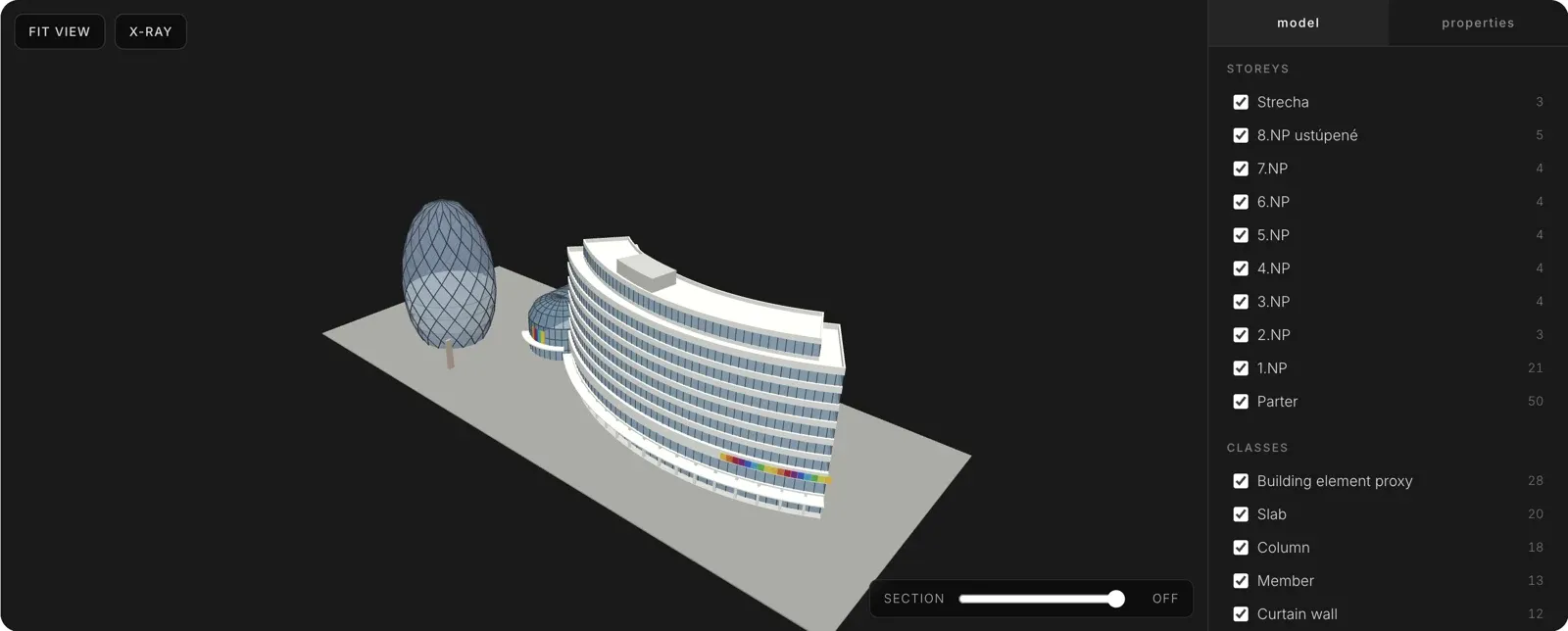
Input: the 10-storey sample office from the prefilled input, model.ifc (IFC4, 2.8 MB), shown in our free IFC viewer:
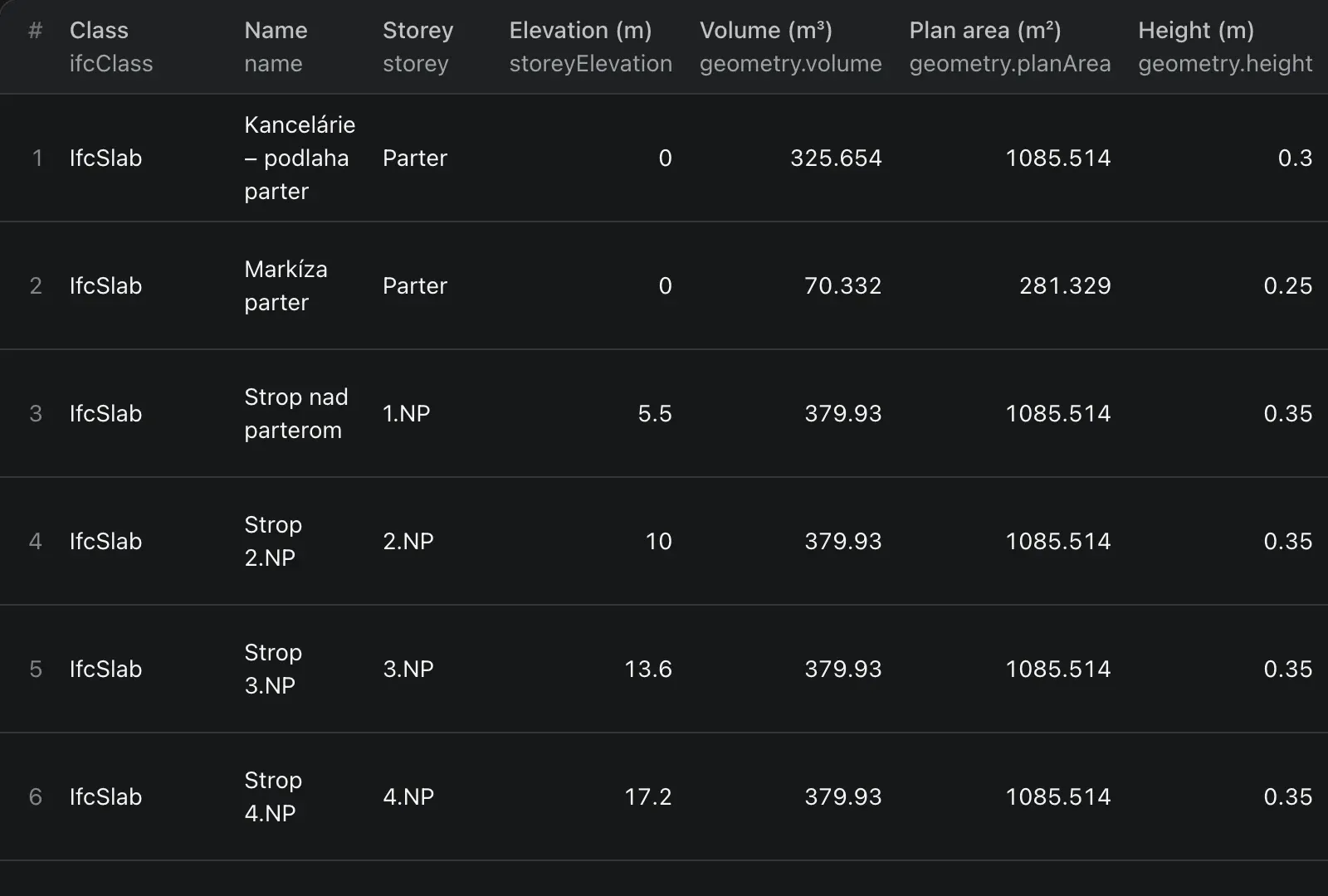
Output: the slabs of the same file, one row each, with storey, elevation and the quantities measured from the geometry. The run takes 7 seconds:
What it is for
- Quantity takeoff and cost estimating. Count doors per storey, sum wall volumes, list slab areas, then paste the result into your estimate.
- Model checking. Find elements with no storey, no material or no
FireRating. Find walls still exported asIfcBuildingElementProxy. - Feeding BIM data to other tools. Push a model into a database, Power BI, Google Sheets, a data warehouse or an LLM without writing an IFC parser yourself.
- Batch jobs. Pass 50 file URLs and every element of every model lands in one dataset, with the source file on each row.
Input
| Field | What it does |
|---|---|
| IFC files | Direct links to .ifc or .ifczip files, or upload a file in the form. Each link has to return the file itself: an S3 link, a GitHub raw link, your own server or a Dropbox ?dl=1 link. A page with a download button will not work. |
| IFC classes to export | Empty means every physical element (IfcElement). Or name classes, e.g. IfcWall, IfcDoor, IfcSpace. Subclasses come along with their parent, so IfcWall also returns IfcWallStandardCase. |
| Include property sets | Pset_WallCommon, Pset_DoorCommon and every custom property set, as nested JSON. |
| Include quantity sets | Qto_…BaseQuantities and BaseQuantities, as written by the authoring tool. |
| Compute quantities from geometry | Measures each element's 3D shape in metres: volume, plan (footprint) area, total surface area, bounding box and bottom elevation. Turn it on when the file has no quantity sets, which is the case for most Revit exports with default settings. It takes about 5 seconds per 1,000 elements. |
| Max elements per file | 0 means no limit. Set it to 20 for a quick test on a big model. |
Output
One dataset row per element:
The OUTPUT record in the key-value store has a summary for each file: schema, project name, authoring application, units, storeys with elevations, and element counts by class and by storey. For the 10-storey sample model in the prefilled input it looks like this:
Cost
The Actor itself is free. You pay only for Apify compute. The 103-element sample takes about 5 seconds with geometry turned on. Most models up to 50 MB finish within a minute at the default 2 GB of memory. Raise the memory for models over 200 MB.
Limits
- One file can be up to 1 GB. Each file loads into memory whole, so very large federated models need 8 GB or more.
- Quantity sets appear only if the authoring tool exported them. In Revit that is the "Export base quantities" box in the IFC export settings. Otherwise turn on Compute quantities from geometry.
planAreais the footprint seen from above, which is what slabs, roofs and floor finishes are priced by.surfaceAreacounts every face, both sides of a slab plus its edges, so it is roughly twice the plan area for a slab.- Geometry quantities come from the triangulated shape. Curved elements are slightly under-measured, and an element with an opening returns its net volume.
- Spaces, openings and grids are left out by default because they are not
IfcElement. NameIfcSpacein IFC classes to export to get room data.
Use it from code
AI agents can call it through the Apify MCP server, so Claude, Cursor or ChatGPT can read an IFC model when you give them a link.
Related
- For one file without an Apify account, the IFC Quantity Takeoff Space on Hugging Face does the same takeoff in your browser, with model checks and an Excel export. On the same test files its numbers match this Actor's to three decimals.
- To look at the model before parsing it, the free IFC viewer opens IFC files in the browser without uploading them. There is also a BCF viewer for issue files.
- To create an IFC model from a written brief instead of parsing one, see AIBIMTool, the team behind this Actor. Its AI architect builds IFC4 buildings with storeys, walls, slabs, openings and roofs that open in Revit and ArchiCAD.
Found a file it reads wrong? Open an issue on the Actor's Issues tab and attach the file or a link to it.


